
On-device upgrade and downgrade
Switch subscription plans on-device using Roku Pay upgrade and downgrade actions
Apps with Roku Pay integrations can implement on-device subscription upgrades and downgrades. By doing so, customers can seamlessly switch plans directly from their devices, and apps can ensure that they are billed properly. This enables apps to target different audiences with the best plan in order to maximize content monetization.
Authenticated transactional apps (SVOD, TVOD, and other subscription services) must complete upgrades and downgrades on the device using Roku Pay, without visiting an external webpage, to pass certification.
Overview
To understand how Roku's on-device upgrades and downgrades work, consider a customer who upgrades a subscription (switching to an annual plan, a premium ad-free plan, or a plan that offers ultra-high-definition [UHD] content).
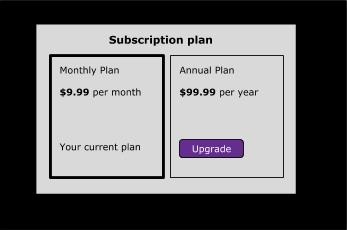
To upgrade a plan, apps cancel the previous base plan and complete the purchase of the upgraded plan (causing a prorated service credit for the remaining balance on the base plan to be applied to the purchase of the upgraded plan).
To downgrade a plan, apps similarly check the expiration date of the current plan being and then mark it for cancellation. A new transaction ID for the downgraded plan, which has a $0 price and the same expiration date as the current plan, is returned. On the expiration date, the downgrade is completed and a new transaction ID is created with the purchase price of the downgraded plan.
Apps must add a product group in the Developer Dashboard to enable and facilitate upgrades and downgrades. A product group contains a set of two or more mutually exclusive products, to which customers can upgrade or downgrade. For example, a product group may contain two products for a subscription service with different billing cycles (one that is billed monthly and another annually) or different ad support (one that is ad-based and another that is ad-free). Because they are defined as being mutually-exclusive by their membership in the same product group, Roku can automatically help ensure that the customer is only ever subscribed to one at a time.
Subscription adjustments, such as upgrade and downgrade as described here, are only made available by the Roku system, to users whose subscriptions are established and maintained via Roku Pay.
The app's on-device upgrade/downgrade flow should be blocked if the subscription was created through the publisher's system and the customer's sign-in does not match the Roku customer account linked to their device. This is because on-device upgrades/downgrades are automatically billed to the Roku customer account linked to the device, regardless of the authentication mechanism. Blocking the upgrade/downgrade flow in this case prevents the Roku Pay and the publisher services from becoming out of synch on the customer's current subscription plan.
Requirements
Apps must complete the following steps to handle on-device upgrades and downgrades via Roku Pay:
-
Create a product group in the Developer Dashboard for the products customers can upgrade or downgrade.
-
Apps using the SceneGraph ChannelStore node (SDK 2): Set the
order.actionfield toUpgradeorDowngrade, and then send a doOrder command to complete the upgrade/downgrade.Apps using the BrightScript roChannelStore node (SDK 1): Call the SetOrder() function with the action field of the orderInfo parameter set to
UpgradeorDowngrade. -
Call the Roku Pay validate transaction API with the transaction ID from the
purchaseidfield of the doOrder command. Use the data returned by the API to update the backend system with the entitlements and expiration dates of the original and upgraded/downgraded plans. Apps subscribing to push notifications will receive both cancel and sale notifications for upgrades and downgrades.
Handling upgrade/downgrade transactions
Sending the upgrade/downgrade action
SceneGraph ChannelStore node (SDK 2)
To send a doOrder command to upgrade or downgrade a plan with the SceneGraph ChannelStore node, follow these steps:
-
Set the
order.actionfield toUpgradeorDowngrade(the required values are case-sensitive; do not pass "upgrade" or "downgrade" in theactionfield).m.channelStore = CreateObject("roSGNode","ChannelStore") myOrder = CreateObject("roSGNode", "ContentNode") myItem = myOrder.createChild("ContentNode") myItem.addFields({ "code": "UPC2397", "qty": 1}) m.channelStore.order = myOrder myOrder.action = "Upgrade" -
Send a doOrder command to have the customer confirm the upgrade/downgrade.
m.channelStore.command = "doOrder"
-
The following occurs to the original base plan and the upgraded/downgraded plan based on the specified action.
-
Upgrade. The base plan is canceled and the upgraded plan is purchased (a prorated service credit for the remaining balance on the base plan is applied to the upgrade purchase).
-
Downgrade. The current plan is marked for cancellation on its expiration date. On the expiration date, the purchase of the downgrade is completed and the previous plan is canceled automatically. No service credit is issued as part of a downgrade.
-
BrightScript roChannelStore node (SDK 1)
To call the SetOrder() function to upgrade or downgrade a plan with the BrightScript roChannelStore node, follow these steps:
-
Set the
orderInfo.actionfield toUpgradeorDowngrade(the required values are case-sensitive; do not pass "upgrade" or "downgrade" in theactionfield).m.store = CreateObject("roChannelStore") ' Populate myOrderItems myOrderInfo.action = "Upgrade" -
Call the SetOrder() function to have the customer confirm the upgrade/downgrade. The myOrderItems parameter specifies the in-channel product to which the customer is upgrading/downgrading; the myOrderInfo parameter whether the transaction is an upgrade or downgrade.
m.store.setOrder(myOrderItems, myOrderInfo) -
The following occurs to the original base plan and the upgraded/downgraded plan based on the specified action.
-
Upgrade. The base plan is canceled and the upgraded plan is purchased (a prorated service credit for the remaining balance on the base plan is applied to the upgrade purchase).
-
Downgrade. The current plan is marked for cancellation on its expiration date. On the expiration date, the purchase of the downgrade is completed and the previous plan is canceled automatically. No service credit is issued as part of a downgrade.
-
Calling the Roku Pay validate transaction API
In order to support upgrade and downgrade transactions, the validate transaction API includes the following fields in the response:
-
purchaseType: The
purchaseTypeindicates whether the transaction was anUPGRADEorDOWNGRADE. -
cancelledTransactionIds: The
cancelledTransactionIdsfield contains the original transaction ID of the base/current plan, that the upgrade or downgrade replaces. -
originalTransactionId: The
OriginalTransactionIdfield contains the new transaction ID generated for the upgraded/downgraded plan purchased. -
purchaseStatus: The
purchase_statusfield corresponds with definite states of theisEntitledandcancelledfields, as shown in the following chart:
| purchase_ status | isEntitled | cancelled |
|---|---|---|
| Active | true | false |
| Inactive | false | true |
| Pending_Active | true | false |
| Pending_Inactive | true | true |
Once an upgrade or downgrade has been completed on-device, apps should call the validate transaction API with the transaction ID from the purchaseid field of the doOrder command to update their system.
The API responses for the original purchase and upgrades/downgrades are as follows:
Upgrades
After an upgrade has been completed on-device, responses to validate transaction API calls made with the transaction IDs of the original base plan and the upgrade will result in the following:
Original base plan purchase. The cancelled field is set to true (no renewal will therefore happen); the expirationDate field remains unchanged.
JSON
{
   "errorCode": null,
   "errorDetails": null,
   "errorMessage": "",
   "status": 0,
   "OriginalTransactionId": "b0f7e477e89e48d0aa13abad017d4ee9",
   "amount": 2.99,
   "cancelled": true,
   "cancelledTransactionIds": null,
   "channelId": "000000",
   "channelName": "ESPRIMU",
   "couponCode": null,
   "currency": "usd",
   "expirationDate": "\/Date(1588892898000+0000)\/",
   "isEntitled": true,
   "originalPurchaseDate": "\/Date(1588288095000+0000)\/",
   "partnerReferenceId": "1969",
   "productId": "KFevcXDIo96kmmsy9wh7_MonthlySubFreeTrial",
   "productName": "KFevcXDIo96kmmsy9wh7_MonthlySubFreeTrial",
   "purchaseDate": "\/Date(1588288095000+0000)\/",
   "purchaseStatus": "PendingInactive",
   "purchaseType": null,
   "quantity": 1,
   "rokuCustomerId": "99999999999999999999999999999999",
   "tax": 0.0000,
   "total": 0.0000,
   "transactionId": "b0f7e477e89e48d0aa13abad017d4ee9"
}
XML
<result xmlns="http://api.roku.com/transaction" xmlns:i="http://www.w3.org/2001/XMLSchema-instance">
  <errorCode/>
  <errorDetails/>
  <errorMessage></errorMessage>
  <status>0</status>
  <OriginalTransactionId>b0f7e477e89e48d0aa13abad017d4ee9</OriginalTransactionId>
  <amount>2.99</amount>
  <cancelled>true</cancelled>
  <cancelledTransactionIds/>
  <channelId>0</channelId>
  <channelName>ESPRIMU</channelName>
  <couponCode/>
  <currency>usd</currency>
  <expirationDate>/Date(1588892898000+0000)/</expirationDate>
  <isEntitled>true</isEntitled>
  <originalPurchaseDate>/Date(1588288095000+0000)/</originalPurchaseDate>
  <partnerReferenceId>1969</partnerReferenceId>
  <productId>KFevcXDIo96kmmsy9wh7_MonthlySubFreeTrial</productId>
  <productName>KFevcXDIo96kmmsy9wh7_MonthlySubFreeTrial</productName>
  <purchaseDate>/Date(1588288095000+0000)/</purchaseDate>
  <purchaseStatus>PendingInactive</purchaseStatus>
  <purchaseType/>
  <quantity>1</quantity>
  <rokuCustomerId>99999999999999999999999999999999</rokuCustomerId>
  <tax>0</tax>
  <total>0</total>
  <transactionId>b0f7e477e89e48d0aa13abad017d4ee9</transactionId>
</result>
In case of upgrades when no free trial is offered with the upgrade subscription then the original subscription is cancelled immediately and the purchase_status' is set to Inactive.
When a free trial is offered with the upgrade subscription, the purchase_status of the original subscription becomes pending_inactive. Should the user cancel the upgrade subscription, the original subscription will be reinstated (but will not renew after the entitlement period). Upon the first successful renewal of the upgraded subscription, the original subscription will be set to Inactive.
Upgrade plan purchase. The creditsApplied field is set to the prorated balance from the base plan; the expirationDate is set to the applicable expiration date (for example, if a customer switched from a monthly to an annual plan, the expiration date would be set to one year later).
JSON
{
   "errorCode": null,
   "errorDetails": null,
   "errorMessage": "",
   "status": 0,
   "OriginalTransactionId": "a800b90755be491d821aabad017d6674",
   "amount": 4.99,
   "cancelled": false,
   "cancelledTransactionIds": [
      "b0f7e477e89e48d0aa13abad017d4ee9"
   ],
   "channelId": "000000",
   "channelName": "ESPRIMU",
   "couponCode": null,
   "currency": "usd",
   "expirationDate": "\/Date(1588892919000+0000)\/",
   "isEntitled": true,
   "originalPurchaseDate": "\/Date(1588288117000+0000)\/",
   "partnerReferenceId": "1969",
   "productId": "Y6ZFym7Xl2agLakTcxMB_MonthlySubFreeTrial",
   "productName": "Y6ZFym7Xl2agLakTcxMB_MonthlySubFreeTrial",
   "purchaseDate": "\/Date(1588288117000+0000)\/",
   "purchaseStatus": "Active",
   "purchaseType": "UPGRADE",
   "quantity": 1,
   "rokuCustomerId": "99999999999999999999999999999999",
   "tax": 0.0000,
   "total": 0.0000,
   "transactionId": "a800b90755be491d821aabad017d6674"
}
XML
<result xmlns="http://api.roku.com/transaction" xmlns:i="http://www.w3.org/2001/XMLSchema-instance">
  <errorCode/>
  <errorDetails/>
  <errorMessage></errorMessage>
  <status>0</status>
  <OriginalTransactionId>a800b90755be491d821aabad017d6674</OriginalTransactionId>
  <amount>4.99</amount>
  <cancelled>false</cancelled>
  <cancelledTransactionIds>b0f7e477e89e48d0aa13abad017d4ee9</cancelledTransactionIds>
  <channelId>0</channelId>
  <channelName>ESPRIMU</channelName>
  <couponCode/>
  <currency>usd</currency>
  <expirationDate>/Date(1588892919000+0000)/</expirationDate>
  <isEntitled>true</isEntitled>
  <originalPurchaseDate>/Date(1588288117000+0000)/</originalPurchaseDate>
  <partnerReferenceId>1969</partnerReferenceId>
  <productId>Y6ZFym7Xl2agLakTcxMB_MonthlySubFreeTrial</productId>
  <productName>Y6ZFym7Xl2agLakTcxMB_MonthlySubFreeTrial</productName>
  <purchaseDate>/Date(1588288117000+0000)/</purchaseDate>
  <purchaseStatus>Active</purchaseStatus>
  <purchaseType>UPGRADE</purchaseType>
  <quantity>1</quantity>
  <rokuCustomerId>99999999999999999999999999999999</rokuCustomerId>
  <tax>0</tax>
  <total>0</total>
  <transactionId>a800b90755be491d821aabad017d6674</transactionId>
</result>
Downgrades
After a downgrade has been completed on-device, responses to validate transaction API calls made with the transaction IDs of the original plan and the downgrade will result in the following:
Original plan purchase. The cancelled field is set to true (no renewal will therefore happen); the expirationDate field remains unchanged.
JSON
{
   "errorCode": null,
   "errorDetails": null,
   "errorMessage": "",
   "status": 0,
   "OriginalTransactionId": "03c3ac6f50864601b87aabac0165abed",
   "amount": 4.99,
   "cancelled": true,
   "cancelledTransactionIds": null,
   "channelId": "000000",
   "channelName": "ESPRIMU",
   "couponCode": null,
   "currency": "usd",
   "expirationDate": "\/Date(1588801334000+0000)\/",
   "isEntitled": true,
   "originalPurchaseDate": "\/Date(1588196534000+0000)\/",
   "partnerReferenceId": "1969",
   "productId": "QynVhYtdThAg7wcfTkgi_MonthlySubFreeTrial",
   "productName": "QynVhYtdThAg7wcfTkgi_MonthlySubFreeTrial",
   "purchaseDate": "\/Date(1588196534000+0000)\/",
   "purchaseStatus": "Active",
   "purchaseType": null,
   "quantity": 1,
   "rokuCustomerId": "99999999999999999999999999999999",
   "tax": 0.0000,
   "total": 0.0000,
   "transactionId": "03c3ac6f50864601b87aabac0165abed"
}
XML
<result xmlns="http://api.roku.com/transaction" xmlns:i="http://www.w3.org/2001/XMLSchema-instance">
  <errorCode/>
  <errorDetails/>
  <errorMessage></errorMessage>
  <status>0</status>
  <OriginalTransactionId>03c3ac6f50864601b87aabac0165abed</OriginalTransactionId>
  <amount>4.99</amount>
  <cancelled>true</cancelled>
  <cancelledTransactionIds/>
  <channelId>0</channelId>
  <channelName>ESPRIMU</channelName>
  <couponCode/>
  <currency>usd</currency>
  <expirationDate>/Date(1588801334000+0000)/</expirationDate>
  <isEntitled>true</isEntitled>
  <originalPurchaseDate>/Date(1588196534000+0000)/</originalPurchaseDate>
  <partnerReferenceId>1969</partnerReferenceId>
  <productId>QynVhYtdThAg7wcfTkgi_MonthlySubFreeTrial</productId>
  <productName>QynVhYtdThAg7wcfTkgi_MonthlySubFreeTrial</productName>
  <purchaseDate>/Date(1588196534000+0000)/</purchaseDate>
  <purchaseStatus>Active</purchaseStatus>
  <purchaseType/>
  <quantity>1</quantity>
  <rokuCustomerId>99999999999999999999999999999999</rokuCustomerId>
  <tax>0</tax>
  <total>0</total>
  <transactionId>03c3ac6f50864601b87aabac0165abed</transactionId>
</result>
Downgrade plan purchase. The expirationDate is based on that of the original plan; the total field is set to 0.00 because there is no actual charge. On the expiration date, the customer will be charged for the renewal of the downgraded plan.
JSON
{
   "errorCode": null,
   "errorDetails": null,
   "errorMessage": "",
   "status": 0,
   "OriginalTransactionId": "e8515e538c2b4e9e9039abac0165b4e1",
   "amount": 2.99,
   "cancelled": false,
   "cancelledTransactionIds": [
      "03c3ac6f50864601b87aabac0165abed"
   ],
   "channelId": "000000",
   "channelName": "ESPRIMU",
   "couponCode": null,
   "currency": "usd",
   "expirationDate": "\/Date(1588801334000+0000)\/",
   "isEntitled": true,
   "originalPurchaseDate": "\/Date(1588196542000+0000)\/",
   "partnerReferenceId": "1969",
   "productId": "ZTtL0DvuGNX1sO4tJGNp_MonthlySubFreeTrial",
   "productName": "ZTtL0DvuGNX1sO4tJGNp_MonthlySubFreeTrial",
   "purchaseDate": "\/Date(1588196542000+0000)\/",
   "purchaseStatus": "PendingActive",
   "purchaseType": "DOWNGRADE",
   "quantity": 1,
   "rokuCustomerId": "99999999999999999999999999999999",
   "tax": 0.0000,
   "total": 0.0000,
   "transactionId": "e8515e538c2b4e9e9039abac0165b4e1"
}
Since the "downgrade" subscription will be activated sometime in the future (i.e., the expiration date of the original plan), purchase_status status of the downgrade is set pending_active. The status will be set to valid at the time of activation.
XML
<result xmlns="http://api.roku.com/transaction" xmlns:i="http://www.w3.org/2001/XMLSchema-instance">
  <errorCode/>
  <errorDetails/>
  <errorMessage></errorMessage>
  <status>0</status>
  <OriginalTransactionId>e8515e538c2b4e9e9039abac0165b4e1</OriginalTransactionId>
  <amount>2.99</amount>
  <cancelled>false</cancelled>
  <cancelledTransactionIds>03c3ac6f50864601b87aabac0165abed</cancelledTransactionIds>
  <channelId>0</channelId>
  <channelName>ESPRIMU</channelName>
  <couponCode/>
  <currency>usd</currency>
  <expirationDate>/Date(1588801334000+0000)/</expirationDate>
  <isEntitled>true</isEntitled>
  <originalPurchaseDate>/Date(1588196542000+0000)/</originalPurchaseDate>
  <partnerReferenceId>1969</partnerReferenceId>
  <productId>ZTtL0DvuGNX1sO4tJGNp_MonthlySubFreeTrial</productId>
  <productName>ZTtL0DvuGNX1sO4tJGNp_MonthlySubFreeTrial</productName>
  <purchaseDate>/Date(1588196542000+0000)/</purchaseDate>
  <purchaseStatus>PendingActive</purchaseStatus>
  <purchaseType>DOWNGRADE</purchaseType>
  <quantity>1</quantity>
  <rokuCustomerId>99999999999999999999999999999999</rokuCustomerId>
  <tax>0</tax>
  <total>0</total>
  <transactionId>e8515e538c2b4e9e9039abac0165b4e1</transactionId>
</result>
Receiving push notifications for upgrades and downgrades
When a customer upgrades or downgrades a subscription, a new purchase is made and the original one is cancelled. As a result, a pair of push notifications are sent: a sale for the new transaction (UpgradeSale or DowngradeSale), and a cancellation for the original transaction (UpgradeCancellation or DowngradeCancellation).
The transactionType field in the push notification indicates the upgrade/downgrade event associated with the notification. This makes it easy to identify the reason for purchases and cancellations related to upgrades/downgrades.
For example, if a customer upgrades from a monthly to an annual subscription, the following two notifications are sent: (1) an UpgradeSalenotification for the purchase of the annual subscription, and (2) an UpgradeCancellation notification for the cancellation of the monthly subscription. The following table summarizes the transaction types for the notifications sent for upgrades and downgrades.
| Transaction Type | ||
|---|---|---|
| Action | Sale | Cancellation |
| Upgrade | UpgradeSale | UpgradeCancellation |
| Downgrade | DowngradeSale | DowngradeCancellation |
The following sample demonstrates an UpgradeSale notification:
JSON
{
   "customerId": "ab080b5f1c5650d9ae0d7f595d0be886",
   "transactionType": "UpgradeSale",
   "transactionId": "187fb8f7b3a24883a245ab5d0171fadd",
   "channelId": "713788",
   "channelName": "Roku Channel",
   "productCode": "5tahs9bYB9jM5FJtz3DW_YearlySub",
   "productName": "5tahs9bYB9jM5FJtz3DW_YearlySub",
   "price": 13.99,
   "tax": 0.0,
   "total": 13.99,
   "currency": "usd",
   "isFreeTrial": false,
   "expirationDate": "2021-02-10T22:27:03.7657086Z",
   "originalTransactionId": "187fb8f7b3a24883a245ab5d0171fadd",
   "comments": "New order processed.",
   "eventDate": "2020-02-10T22:27:03.8597086Z",
   "responseKey": "ce5e3c2ae1c242c2bfd136ac36580112"
}
XML
<result xmlns="http://api.roku.com/transaction" xmlns:i="http://www.w3.org/2001/XMLSchema-instance">
  <customerId>ab080b5f1c5650d9ae0d7f595d0be886</customerId>
  <transactionType>UpgradeSale</transactionType>
  <transactionId>187fb8f7b3a24883a245ab5d0171fadd</transactionId>
  <channelId>713788</channelId>
  <channelName>Roku Channel</channelName>
  <productCode>5tahs9bYB9jM5FJtz3DW_YearlySub</productCode>
  <productName>5tahs9bYB9jM5FJtz3DW_YearlySub</productName>
  <price>13.99</price>
  <tax>0</tax>
  <total>13.99</total>
  <currency>usd</currency>
  <isFreeTrial>false</isFreeTrial>
  <expirationDate>2021-02-10T22:27:03.7657086Z</expirationDate>
  <originalTransactionId>187fb8f7b3a2-4883a245ab5d0171fadd</originalTransactionId>
  <comments>New order processed.</comments>
  <eventDate>2020-02-10T22:27:03.8597086Z</eventDate>
  <responseKey>ce5e3c2ae1c242c2bfd136ac36580112</responseKey>
</result>
Sample app
The file upgrade-downgrade-sample is a sample app that allows you to experiment with the upgrade-downgrade feature. This package file can be sideloaded directly into your Roku device. Consult the Readme.md file that is in the zipped package for operating instructions and other information.
Updated 12 days ago