
Enhanced Subscription Recovery
Recover failed subscription auto-renewals with grace and on-hold states
When payment for a subscription auto-renewal fails, Roku's Enhanced Subscription Recovery feature (formerly referred to as "Passive Subscription on Hold" or "Subscription on Hold") notifies the customer on-device and via email to update their method of payment (MOP) on file for 60 days. This helps the publisher improve the chance of recovering payments and thereby reduce passive cancellations.
All apps offering subscriptions must implement Enhanced Subscription Recovery to pass certification.
Overview
The auto-renewal of a customer's subscription may fail because of out-of-date payment information, insufficient funds, temporary account holds, fraudulent activity, or other reasons. When this occurs, the customer is given a 3-day grace period where they can continue accessing content, while Roku Pay notifies them daily via email to update their method of payment (MOP). Once the 3-day grace period expires, the subscription is placed on hold for a maximum of 57 days. When a subscription is on hold, customers may no longer access content, and they are notified on the Roku home screen, upon app launch, in-app, and via email to update their MOP.
When a subscription is in the grace period or on hold, the publisher displays an in-app renewal dialog when customers select a content item. The dialog prompts the customer to update their MOP, while either granting access to content if the subscription is in grace or blocking access if it is on hold.
If Roku receives a payment, it is processed and entitlement is automatically granted again, and the billing period either remains the same (if the account is recovered during the grace period) or adjusts to the date that the payment was collected (if the account is recovered while on hold). If no payment is received by the end of the 60-day notification cycle, the subscription is canceled.
Integration steps
To integrate Enhanced Subscription recovery in your app, you must complete the following app and backend updates:
App updates required
- Enable Enhanced Subscription Recovery for your beta app in the Developer Dashboard for testing the integration.
- Perform entitlement checks using the Roku Pay APIs to check whether a subscription is current, in recovery (in 3-day grace period), on hold, or canceled.
- Implement the ChannelStore DoRecovery API to display the Roku Pay subscription renewal dialog in your app when a customer selects content, navigates to or lands on a specific screen, or upon other specific interactions. This dialog notifies customers to update their MOP when auto-renewal fails..
- Test your Enhanced Subscription Recovery integration.
Backend updates required
- Ingest and process additional push notifications sent by Roku Pay as the subscription recovery state changes from in-grace, on-hold, and recovered.
App publishing and enabling enhanced recovery
- Once you have successfully completed and tested the Enhanced Subscription Recovery integration, you can publish the updated public version of your app, and then Enable Enhanced Subscription Recovery for it.
Enabling enhanced subscription recovery
Use the Subscription recovery page in the Developer Dashboard to enable Enhanced Subscription Recovery for your app.
-
Beta app: Before starting the integration work, enable enhanced subscription recovery for the beta version of your app . This enables you to verify that your app and backend are getting the current state of subscriptions and providing the correct user experience based on the state.
-
Public app: Once you have completed and tested the Enhanced Subscription Recovery integration, you can publish the updated production version of your app. Once your updated production app has been published, enable the enhanced recovery solution for it.
Do not enable Enhanced Subscription Recovery for your public app until you have completed, tested, and verified the integration steps. If this feature is not implemented correctly, customers will be unable to purchase a subscription for your app until the on-hold period has elapsed.
For more information on enabling Enhanced Subscription Recovery for your app, see Subscription recovery settings.
Entitlement checks
You must use the Roku Pay APIs to check whether a subscription is current, in recovery (in 3-day grace period), on hold, or canceled. The ChannelStore API is used to check the subscription status client-side upon app launch and then block access to content based on the results; the Roku Pay web service APIs are used server-side for regular nightly syncs to update the publisher's entitlement service.
When payment is recovered for a subscription that is in-grace or on-hold, check the entitlement status of the subscription upon receiving and processing the recovery event and entitle the customer.
ChannelStore API
Product Catalog 2.0 (ChannelStore generic request framework)
When customers launch an app, the app calls the ChannelStore v2 getAllPurchases API (with version=2 and includeExpired=true), as part of the required on-device authentication, to determine whether to block access to content.
The v2 getAllPurchases API returns an purchases.billingPlan.state field that reports the status of a subscription, which may be one of the following values:
| Subscription state | purchases.billingPlan.state |
|---|---|
| Current |
|
| In Recovery | "ActiveInGracePeriod" (in 3-day grace period) |
| On Hold | "InactiveOnHold" |
| Cancelled | "InactiveExpired" |
Product Catalog 1.0 (ChannelStore API)
When customers launch an app, the app calls the ChannelStore getAllPurchases API, as part of the required on-device authentication, to determine whether to block access to content. The getAllPurchases API returns an inDunning flag that is used along with the status field to get the status of a subscription:
| Subscription state | "inDunning" | "status" |
|---|---|---|
| Current | false | Valid |
| In recovery (in 3-day grace period) | true | Valid |
| On Hold | true | Invalid |
| Canceled | false | Invalid |
Roku Pay web service APIs
You should routinely synchronize your entitlement service with the Roku Pay web services to make sure your system has up-to-date entitlement data (this also provides a backup in case your backend system occasionally does not receive or process a batch of push notifications sent by Roku). Call the validate-transaction API as part of a nightly batch routine to get the updated status of your customers' subscriptions. This API returns an isEntitled flag that is used along with the expirationDate field and cancelled flag to get the status of a subscription:
| Subscription state | "isEntitled" | "expirationDate" | "cancelled" |
|---|---|---|---|
| Current | true | future date | false |
| In recovery (in 3-day grace period) | true | current or past date | false |
| On Hold | false | current or past date | false |
| Canceled | false | past date | true |
| Canceled - pending (subscription canceled during current term) | true | future date | true |
Free trials: When a free trial ends and the customer's method of payment fails, the
is_entitledflag is set to "false" and the subscription is automatically placed on hold.
DoRecovery API
You must use the ChannelStore DoRecovery API to display the Roku Pay subscription renewal dialog in your app when customers select content, navigate to or land on a specific screen, or upon other specific interactions. This API lets developers configure the last option in the in-app subscription renewal dialog to either "Continue Watching" (if the subscription is in grace) or "Close" (if the subscription is on hold; this is the default and it closes the dialog and returns the customer to the previous screen).
The ChannelStore DoRecovery API uses Roku's Channel Store generic request framework, which enables developers to pass the ChannelStore command, parameters, and context into a single request object (an associative array). The result of the request is encapsulated in a requestStatus object (also an associative array), which includes the status of the request and the data returned by it.
This API is available for both SceneGraph (SDK 2) and BrightScript (SDK 1).
This reference summarizes the request and requestStatus fields used by the DoRecovery API.
request
| Field | Type | Description | ||||||||||||||||||
|---|---|---|---|---|---|---|---|---|---|---|---|---|---|---|---|---|---|---|---|---|
| request | associative array | Includes the request's command and context.
| ||||||||||||||||||
| Field | Type | Description | ||||||||||||||||||
| command | string | Set to "DoRecovery" | ||||||||||||||||||
| context | associative array | Used to match the requestStatus with request. For example, you can set this to "id: DoRecovery_1". | ||||||||||||||||||
| params | associative array | Optional. Used to configure the in-app Roku Pay subscription renewal dialog. If this parameter is not included, the in-app Roku Pay subscription renewal dialog does not allow customers to watch content while their subscription is in recovery.
| ||||||||||||||||||
| Field | Type | Description | ||||||||||||||||||
| recoveryContext | string | This may be set to the following value: "playback": Sets the last option in the Roku Pay subscription renewal dialog to "Continue Watching". This lets customers continue watching content while their subscription is in recovery. |
requestStatus
| Field | Type | Description | ||||||||||||||||||
|---|---|---|---|---|---|---|---|---|---|---|---|---|---|---|---|---|---|---|---|---|
| requestStatus | associative array | Includes the status of the DoRecovery command and the recovery status data returned by it.
| ||||||||||||||||||
| Field | Type | Description | ||||||||||||||||||
| result | associative array | Contains the following key-value pairs for the recovery status of the subscription:
| ||||||||||||||||||
| status | enum | The command completion status, which may be one of the following values:
| ||||||||||||||||||
| statusMessage | string | A text description of the command completion status. | ||||||||||||||||||
| command | string | The command passed into the request, which is "DoRecovery". | ||||||||||||||||||
| context | associative array | The context passed into the request (for example, id: "DoRecovery_1"). |
SceneGraph (SDK 2) example
The following code demonstrates how to use the ChannelStore node (SDK 2) to display the Roku Pay subscription renewal dialog and configure it so it blocks access to content:
function DoRecovery()
    request = {}
    request.command = "DoRecovery"
    m.store = CreateObject("roSGNode", "ChannelStore")
    m.store.observeField("requestStatus", "onRequestStatus")
    m.store.request = request
end function

function onRequestStatus()
    print "onRequestStatus"
    requestStatus = m.store.requestStatus
    if requestStatus = invalid
        print "Invalid requestStatus"
        print "DoRecovery failed"
    else if requestStatus.status <> 1
        print "DoRecovery failed: status:", requestStatus.status
    else
        print "command", requestStatus.command
        print "requestStatus.statusMessage", requestStatus.statusMessage
        print "requestStatus.result.recoveryStatus", requestStatus.result.recoveryStatus
        for each product in requestStatus.result.recoveryProducts
            print "productInRecovery:", product
        end for
   end if
end function
BrightScript (SDK 1) example
The following code demonstrates how to use the roChannelStore node (SDK 1) to display the Roku Pay subscription renewal dialog and block access to content. A DoRequest() method, which takes the request object, is required for sending the DoRecovery request.
function DoRecovery() as void
    request = {}
    request.command = "DoRecovery"
    m.store = CreateObject("roChannelStore")
    m.port = CreateObject("roMessagePort")
    m.store.SetMessagePort(m.port)
    if FindMemberFunction(m.store, "DoRequest") <> invalid then
        m.store.DoRequest(request)
    else
        m.top.requestStatus = invalid
        return
    end if
    while true
        msg = wait(0, m.port)
        if type(msg) = "roChannelStoreEvent" then
            command = msg.GetCommand()
            status = msg.GetStatus()
            statusMessage = msg.GetStatusMessage()
            context = msg.GetContext()
            if context <> invalid then
                print "Received roChannelStoreEvent:"
                print "- command:", command
                print "- status:", status
                print "- statusMessage:", statusMessage
                print "- context:", context
                if msg.isRequestSucceeded()
                    result = msg.GetResponse()
                    print "- result", result
                else if msg.isRequestFailed()
                    print "***** Failure: " + msg.GetStatusMessage() + " Status Code: " + stri(msg.GetStatus()) + " *****"
                end if
            end if
            exit while
        end if
    end while
end function
Subscription recovery testing
Use the subscription-recovery test API to manually force subscriptions into different states (active, in-grace period, on-hold, passively canceled, and recovered), which helps expedite the testing of your subscription recovery integration.
For more information: Subscription recovery testing
Push notifications
You must ingest and process the following additional push notifications sent by Roku Pay as the subscription recovery state changes:
| Message | Description |
|---|---|
| GraceInitiated | Payment for a subscription auto-renewal fails. Customer may still access content while Roku attempts to charge the MOP. |
| GraceRecovered | Payment is received for a subscription that was in a grace period. Customer maintains access to content and the billing period remains the same. |
| OnHoldInitiated | Payment for a subscription auto-renewal fails after the grace period elapses. Customer should no longer have access to content while Roku continues to attempt to charge the MOP. |
| OnHoldRecovered Sale | Payment is received for a subscription that was on-hold. Customer is granted access to content automatically and the billing period is adjusted to the time that the payment was collected. |
GraceInitiated
{
    "customerId": "9aa37bd6f970578294cea4783af08560",
    "transactionType": "GraceInitiated",
    "transactionId": "024d4e1fc7b611eeafbe0a58a9feaca8",
    "channelId": "3605562",
    "productCode": "0fCsu09EGS5C6OHlEUnz_MonthlySub",
    "productName": "0fCsu09EGS5C6OHlEUnz_MonthlySub",
    "originalTransactionId": "024d4e1fc7b611eeafbe0a58a9feaca8",
    "originalPurchaseDate": "2024-01-12T01:45:36Z",
    "eventDate": "2024-02-10T01:45:39Z",
    "expirationDate": "2024-02-10T01:45:36Z",
    "comments": "Subscription is in dunning state",
    "responseKey": "163792dbc7b611eeafbe0a58a9feaca8",
    "isFreeTrial": false
}
GraceRecovered
{
    "customerId": "9d425957549250dcba71e03dacf426b5",
    "transactionType": "GraceRecovered",
    "transactionId": "f0864331c7b611eea3c40a58a9fead9c",
    "channelId": "3193830",
    "productCode": "PPfCfuZMf3TOXBBl3Ttu_MonthlySub",
    "productName": "PPfCfuZMf3TOXBBl3Ttu_MonthlySub",
    "originalTransactionId": "d4c4da85c7b611eea3c40a58a9fead9c",
    "originalPurchaseDate": "2024-01-12T01:51:39Z",
    "eventDate": "2024-02-10T01:51:46Z",
    "expirationDate": "2024-03-10T01:51:39Z",
    "comments": "Subscription recovered from dunning state.",
    "responseKey": "d915ab762a3752e7bf112e7903958f52",
    "isFreeTrial": false
}
OnHoldInitiated
{
    "customerId": "8446ceff30e952349bcd9d3b78bc94a0",
    "transactionType": "OnHoldInitiated",
    "transactionId": "ed0ca6b7348411ed84a30a58a9feaec5",
    "channelId": "1688604",
    "productCode": "VR8IqPLBJ7VeWD7bvIHH_MonthlySub",
    "productName": "VR8IqPLBJ7VeWD7bvIHH_MonthlySub",
    "originalTransactionId": "df10f029-3484-11ed-b4bf-0a58a9feacbc",
    "originalPurchaseDate": "2022-08-14T23:28:23Z",
    "eventDate": "2022-09-14T23:28:24Z",
    "expirationDate": "2022-09-13T23:28:23Z",
    "comments": "Subscription is in Passive OnHold state",
    "responseKey": "ed0ca6b7348411ed84a30a58a9feaec5",
    "isFreeTrial": false
}
OnHoldRecovered
{
    "customerId": "8446ceff30e952349bcd9d3b78bc94a0",
    "transactionType": "OnHoldRecovered",
    "transactionId": "b466213697aa59a4ac53804daa1272bc",
    "channelId": "1688604",
    "productCode": "VR8IqPLBJ7VeWD7bvIHH_MonthlySub",
    "productName": "VR8IqPLBJ7VeWD7bvIHH_MonthlySub",
    "originalTransactionId": "df10f029348411edb4bf0a58a9feacbc",
    "originalPurchaseDate": "2022-08-14T23:28:23Z",
    "eventDate": "2022-09-14T23:28:29Z",
    "expirationDate": "2022-10-14T23:28:09Z",
    "comments": "Subscription recovered from Passive OnHold state.",
    "responseKey": "b466213697aa59a4ac53804daa1272bc",
    "isFreeTrial": false
}
Appendix A: Roku-provided renewal notifications
Each of the on-device and email renewal notifications that Roku automatically sends to customers while their subscription is in recovery is as follows:
-
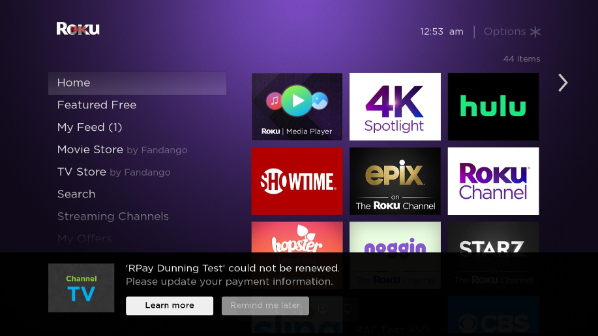
Roku home screen renewal notifications. By default, Roku automatically presents a heads-up display on the Roku home screen. It informs the customer that their subscription could not be renewed and prompts them to either update their MOP or be reminded to do so later.
-
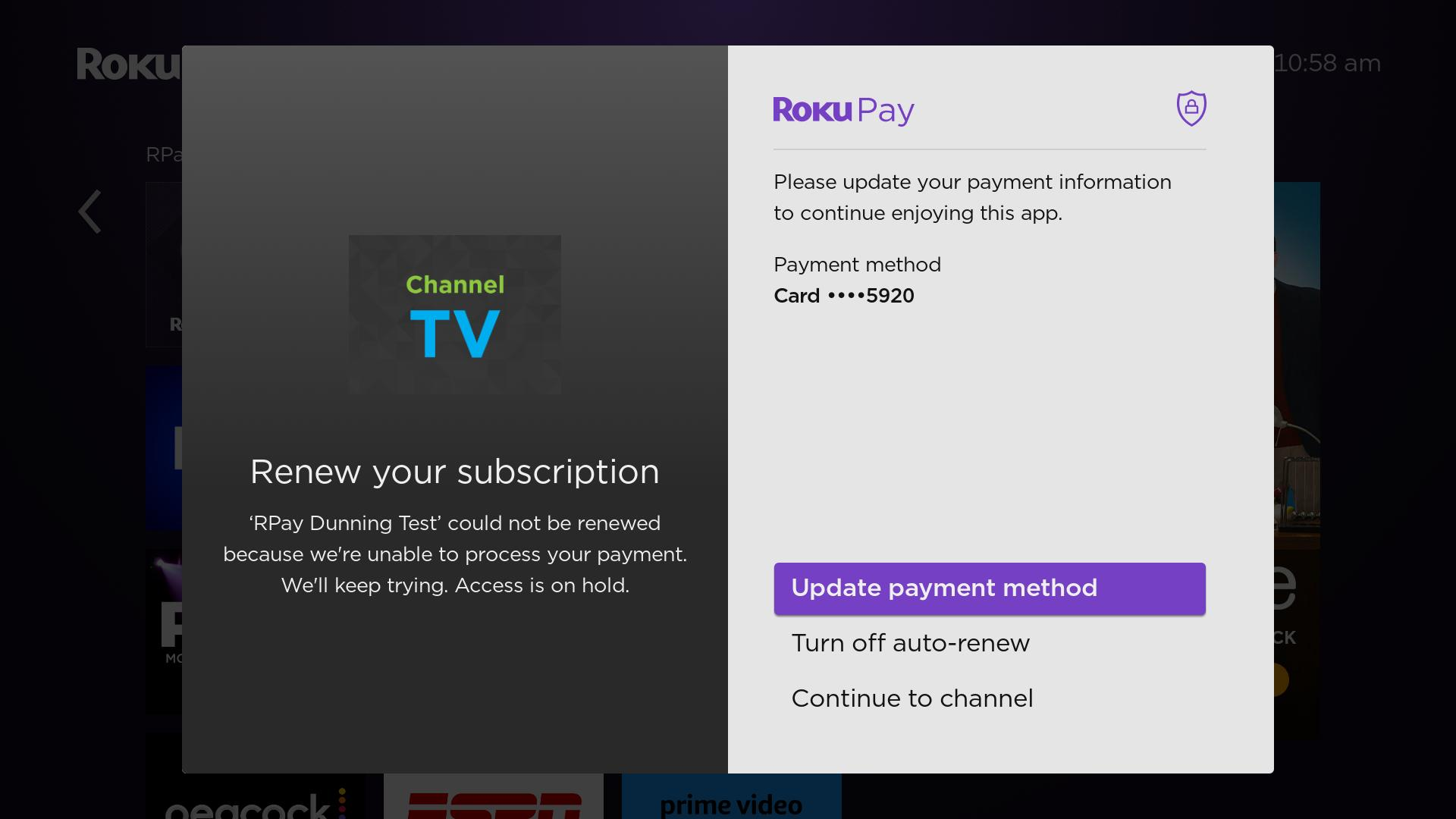
App launch renewal notifications. When the customer launches the app (via tile, Roku Search, or Roku Voice), Roku by default automatically displays a dialog once a day that gives the customer the option to update their MOP, cancel their subscription, or continue launching the app.
-
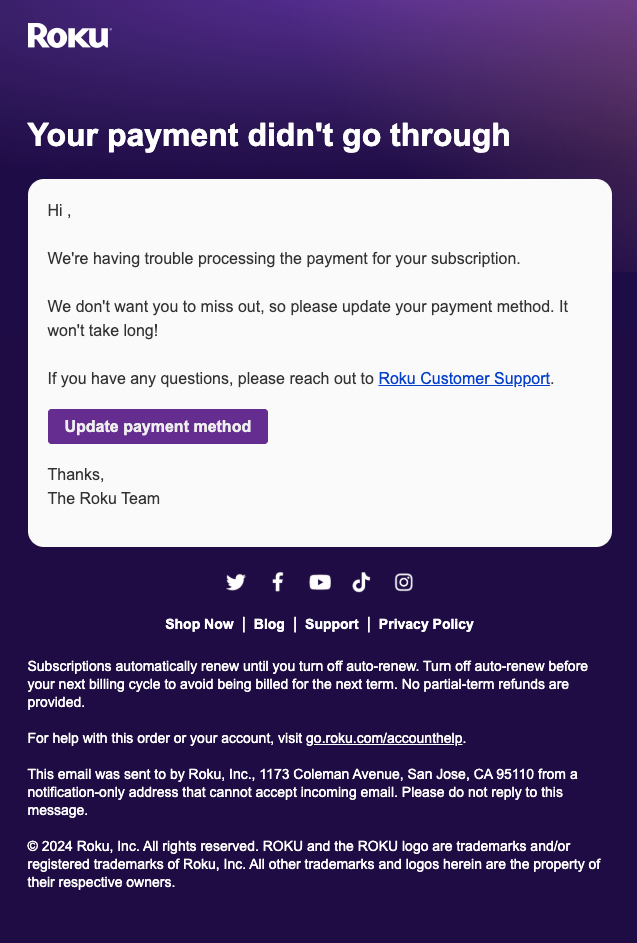
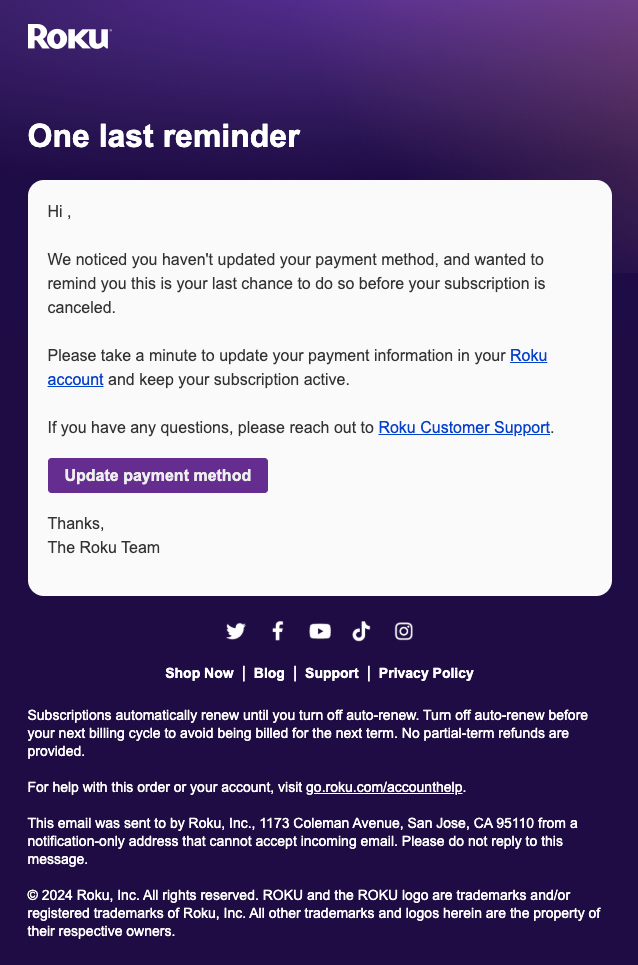
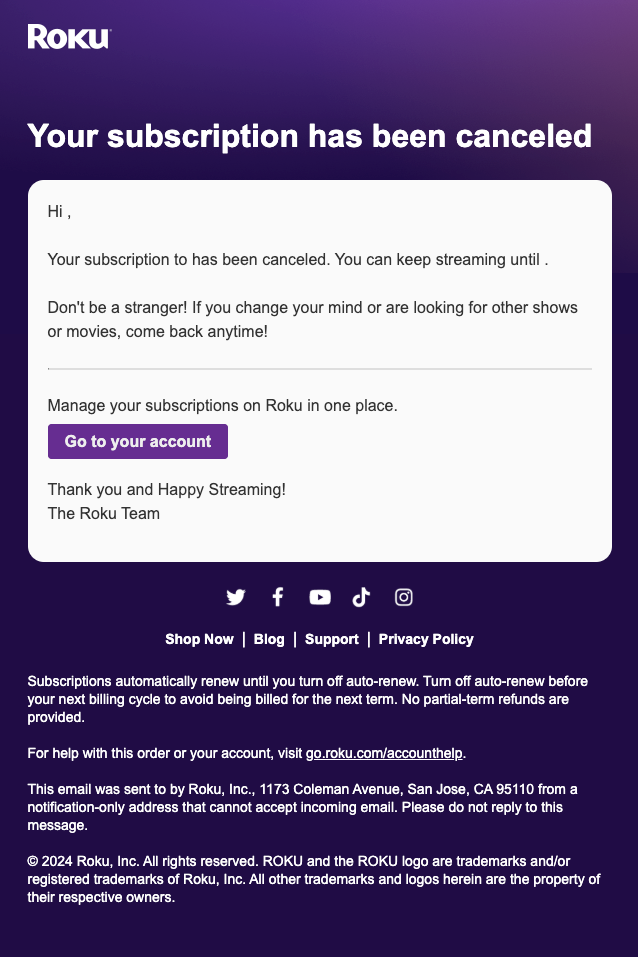
Email renewal notification. Roku sends email notifications prompting the customer to update their MOP or manage their subscription online at my.roku.com. The following images demonstrate the emails customers receive when Roku is trying to recover their subscriptions.
Updated 4 days ago