
Manifest file
Required and optional manifest attributes for every Roku app package
Root level
The root level of all Roku apps must contain a manifest file
(pkg:/manifest) containing important attributes for the application.
These attributes include but are not limited to the following:
- Name and version number of the application
- App icon
- Splash screen image
Manifest guidelines
- Each attribute is on a separate line, and has the form
name=value - Attributes are case-sensitive and must match exactly
- Each
name=valuepair must end with a newline character, or it may
not be parsed by the Roku OS - The last line must end with a newline character
- Empty lines are ignored
- Lines beginning with a '#' (number sign) are comment lines and are
ignored - All graphics files specified in the manifest file should be included
in theimagesdirectory - The URI to set the path to the files should use the
pkg:resource
prefix, such aspkg:/images/splash-screen.png
Example manifest file
# Channel Details
title=HeroGridChannel
major_version=1
minor_version=1
build_version=1

# Channel Assets
mm_icon_focus_hd=pkg:/images/channel-poster_hd.png
mm_icon_focus_sd=pkg:/images/channel-poster_sd.png

# Splash Screen + Loading Screen Artwork
splash_screen_sd=pkg:/images/splash-screen_sd.jpg
splash_screen_hd=pkg:/images/splash-screen_hd.jpg
splash_screen_fhd=pkg:/images/splash-screen_fhd.jpg
splash_color=#808080
splash_min_time=0
# Resolution
ui_resolutions=fhd

confirm_partner_button=1
Required attributes
These are the minimum attributes required for every Roku app:
| Attribute | Type | Description | Sample manifest entry | Specification |
|---|---|---|---|---|
title | string | name of the app | title=Roku Media Player | |
major_version | integer | major portion of the app version | major_version=1 | |
minor_version | integer | minor portion of the app version | minor_version=2 | |
build_version | integer | build number | build_version=00150 | |
mm_icon_focus_fhd | string | local URI for the FHD app icon. NOTE: The app will not appear on devices or be accessible after publication without this attribute pointing to a valid image. The image's file name and file type must also match. | mm_icon_focus_fhd=pkg:/images/channel-icon_FHD.png | 540x405 |
mm_icon_focus_hd | string | local URI for the HD app icon. NOTE: The app will not appear on devices or be accessible after publication without this attribute pointing to a valid image. The image's file name and file type must also match. | mm_icon_focus_hd=pkg:/images/channel-icon_HD.png | 290x218 |
splash_screen_hd | string | local URI for the HD splash screen displayed when the app is launched | splash_screen_hd=pkg:/images/splash-screen_HD.jpg | 1280x720 |
splash_screen_sd | string | local URI for the SD splash screen displayed when the app is launched | splash_screen_hd=pkg:/images/splash-screen_SD.jpg | 720x480 |
Optional attributes
The following categories of attributes are optional:
Voice control attributes
| Attribute | Type | Description | Sample manifest entry |
|---|---|---|---|
supports_etc_seek | integer | Enables handling of "seek" and "start over" voice commands. If this flag is not enabled, an error message is displayed when an app receives a "seek" or "start over" command. | supports_etc_seek=1 |
supports_etc_next | integer | Enables handling of "next" voice commands. If this flag is not enabled, an error message is displayed when an app receives a "next" command. | supports_etc_next=1 |
supports_voice_roinput | integer | Specifies that the app supports voice controls. | supports_voice_roinput=1 |
voice_action_launch_screen | integer | Specifies that the app displays a hands-free voice profile selection screen upon launch. | voice_action_launch_screen=1 |
Splash screen attributes
| Attribute | Type | Description | Sample manifest entry | Specification |
|---|---|---|---|---|
splash_color | hex value | background color to use if the splash screen image is not full screen | splash_color=#121212 | |
splash_min_time | integer | minimum amount of time (in milliseconds) to display the splash screen If no value is specified, then 1600 (1.6 seconds) is used. If 0 is specified, then there is no default time, so the splash screen disappears as soon as the application displays its first screen. (This may result in the appearance of flashing, if your application shows its first screen quickly). | splash_min_time=1500 | |
splash_screen_fhd | string | local URI for the FHD splash screen The FHD splash screen image is scaled down for HD display mode but this attribute can be used to specify a resolution-specific splash screen image. | splash_screen_fhd=pkg:/images/splash-screen_FHD.png | 1920x1080 |
splash_rsg_optimization | integer | Roku recommends that you do not use this attribute at this time as it may deplete your app's available memory resources. Set this attribute to remove the black screen flash in SceneGraph apps. This is only applicable for SceneGraph apps and only if the first screen is a SceneGraph component. | splash_rsg_optimization=1 |
Graphics scaling attributes
| Attribute | Type | Description | Sample manifest entry |
|---|---|---|---|
ui_resolutions | comma separated values | A comma-separated list of up to three strings that identify the UI resolutions the application has been designed to support. | ui_resolutions=sd,hd,fhd |
uri_resolution_autosub | comma separated values | Provides a flexible way to specify graphical image URIs that are automatically modified to replace a specified string with a string that gets a resolution-specific graphical image. The attribute value is a comma-separated list of four strings that specify the string to be replaced along with the replacement strings for SD, HD and FHD resolutions. For example, suppose the manifest includes this line: uri_resolution_autosub=$$RES$$,SD,720p,1080p And the Roku player supports full high-definition resolution. Then if the application specifies a URI of: http://www.roku.com/testChannel/assets/$$RES$$/rokuTV.jpg. At runtime that URI will be modified to: http://www.roku.com/testChannel/assets/1080p/rokuTV.jpg and the application will get the full-high definition version of the graphical image in the specified directory. | uri_resolution_autosub=$$RES$$,SD,720p,1080p |


- The default setting for
ui_resolutionsisui_resolutions=sd,hdsdApplications designed for standard definition 720x480hdApplications designed for high definition 1280x720fhdApplications designed for full high definition 1920x1080
Launch requirement attributes
| Attribute | Type | Description | Sample manifest entry |
|---|---|---|---|
supports_input_launch | integer | The roInputEvent is used to check whether a deep link has been passed into the application while your app is running. This enables your application to deep link into content without re-launching your app. This attribute must be added to the manifest for this functionality to work. | supports_input_launch=1 |
requires_gaming_remote | integer | Specifies that a gaming remote must be linked to the Roku Player to launch the application. If not, a dialog box is presented to the user. | requires_gaming_remote=1 |
requires_mkv | integer | Playing MKV files requires the use of a dynamically loaded library that is not part of the initially booted image. Therefore, an entry must be added to the manifest of any applications that require MKV support so that support is enabled when the app is launched. | requires_mkv=1 |
network_not_required | integer | Set to 1 to specify the application does not require the network (such as the USB Media Player). This lets the user launch an application even if there is no network connection. | network_not_required=1 |
bs_libs_required | string | Specifies the BrightScript libraries required for the application. | bs_libs_required=roku_ads_lib |
usb_media_handler | integer | Set to 1 to specify if the app can be auto-launched when a USB device is inserted. | usb_media_handler=1 |
DRM attributes
| Attribute | Type | Description | Sample manifest entry |
|---|---|---|---|
requires_verimatrix_drm | integer | Downloads the required library to use Verimatrix DRM. | requires_verimatrix_drm=1 |
requires_verimatrix_version | value | Specifies the version of Verimatrix DRM to use. Roku currently supports version 1.0. | requires_verimatrix_version=1.0<br />> As of Roku OS 9.3, support for Verimatrix DRM has been removed from the firmware. Make sure that content in your app is protected using one of the following Roku-supported DRMs: Microsoft PlayReady or Widevine. Click here for more information on implementing these DRMs. |
See Content Protection for implementation details.
Special purpose attributes
| Attribute | Type | Description | Sample manifest entry | |
|---|---|---|---|---|
hidden | integer | The hidden property tells the Roku OS to not display the app on the home screen. Hidden apps can still be launched over the network via the External Control API. | hidden=1 | |
playonly_aware | integer | Attribute to specify the application responds to the PlayOnly remote control button event. If not set, the application will receive the Play event instead when the user selects the button. | playonly_aware=1 | |
pause_aware | integer | Attribute to specify the application responds to the pause remote control button event. When this attribute is not set (the default), the application will not respond to the pause event and will toggle between "play" and "pause" modes when it receives the play event. When the attribute is set to 1, the play event strictly indicates play-mode (no toggling), and a pause event is necessary to invoke pause-mode. | pause_aware=1 | |
channel_token | Token string used to grant access for specific Roku platform features (for example, Continue Watching) | ewogICJpc3MiOiAidXJuOnJva3UuY29tOnRva2VubWludDpjaGFubmVsdG9rZW4iLAogICJhdWQiOiAidXJuOnJva3UuY29tOnN0Yi9jaGFubmVsIiwKICAic3ViIjogInVybjpyb2t1LmNvbTpzdGIvNzAzMDM0IiwKICAianRpIjogInVybjo4ZjNhN2FiNi1mMWJkLTQ1MTYtOTRiNS0wYTc3ZjNmMDY2OGEiLAogICJpYXQiOiAxNzA1NTI3NzE4LAogICJleHAiOiAyMDIwODg3NzE4LAogICJuYmYiOiAxNDU2NzkwNDAwLAogICJyb2t1LXRmdiI6ICIxIiwKICAicm9rdS1wZXJtIjogWwogICAgImp3dF9oZWFkZXIiCiAgXSwKICAicm9rdS1jaGFubmVsLWlkIjogWwogICAgIjEiCiAgXQp9 | ||
run_as_process | Integer | Required for integrating Instant Resume and using the chanperf debug command, Roku Resource Monitor, and Perfetto. | run_as_process=1 | |
rsg_version | value | Sets the SceneGraph observer callback model. You must set this parameter to rsg_version=1.3 by October 1, 2026, to continue passing certification testing . This version includes the APIs for transferring node data that improve app performance If using Roku OS 9.0 or above, use rsg_version=1.2. This enables a new internal mechanism for processing component <script> tags that optimizes the resulting compiled script code resulting in a reduced initial startup time and lesser memory usage while preserving compatibility.If using a Roku component library node, the rsg_version flag needs to be declared in the component library's manifest as well.Eval() is deprecated. Eval() cannot be used with rsg_version=1.2.The manifest entry defaults to 1.2 as of Roku OS 9.3 if it's not specified in the manifest. Note that support for the “rsg_version=1.0” manifest flag is deprecated as of Roku OS 8. | rsg_version=1.2 | |
automatic_audio_guide_disabled | integer | Set to 1 to disable screen reader within an app. | automatic_audio_guide_disabled=1 | |
disable_audio_guide_shortcut | integer | Disables the shortcut for activating the screen reader (pressing the options key [*] four times ). | ``disable_audio_guide_shortcut=1` | |
bs_prof_enabled | boolean | Enable BrightScript profiling | bs_prof_enabled=true | |
confirm_partner_button | integer | This new feature has been added that launches a confirmation dialogue before launching an app when the user presses one of the four app-specific buttons on the Roku remote. This minimizes the number of unintended app launches after accidentally hitting a button while fast forwarding or rewinding content in a different app. When this manifest flag is set to “1” (confirm_partner_button=1), the OS will display a confirmation HUD (Head Up Display) any time the user presses a partner app button while in that app. By default, the OS will always display this confirmation HUD when a partner button is pressed during video playback, regardless of if the manifest flag has been set. 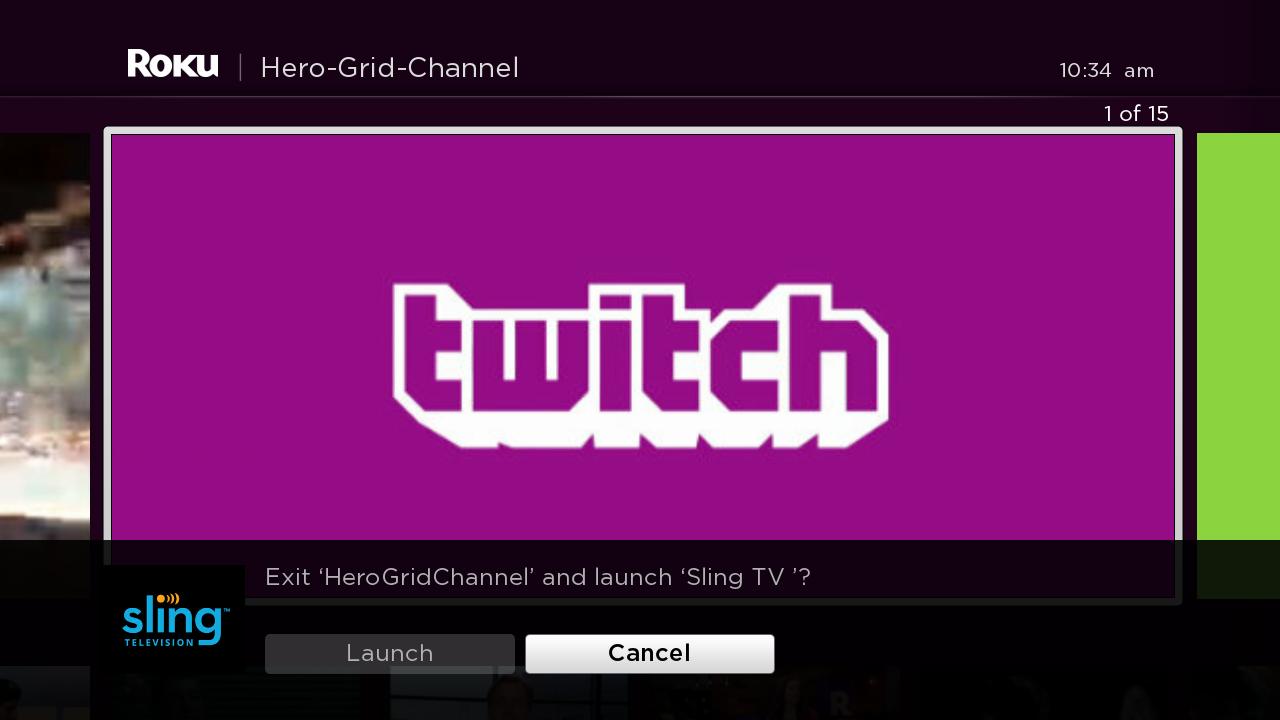 | confirm_partner_button=1 | |
suppress_unconnected_hud | integer | Manifest entry for overriding network connectivity HUD. This attribute is used to override the system level display that indicates when media playback is interrupted due to network connection failures. For more information on the connectivity HUD, please read the related support article | `suppress_unconnected_hud=[1 | 0]` (1 suppresses, 0 enables). |
dial_title | string | The name of the title used by the Roku DIAL server to identify the app. | dial_title=2Dvideo | |
game | integer | All game apps must add the game manifest entry to their manifest file. This flag prevents the app from having audio/sound effects delays in the game. | game=1 |
Screensaver attributes
For an overview and guide on screensavers, see Screensavers on Roku.
Required screensaver attributes
For stand-alone screensavers, only the following attributes are required:
| Attribute | Type | Description | Sample manifest entry |
|---|---|---|---|
screensaver_title | string | name of the screensaver | screensaver_title=Dog Screensaver |
major_version | integer | major portion of the screensaver version | major_version=1 |
minor_version | integer | minor portion of the screensaver version | minor_version=2 |
build_version | integer | build number | build_version=150 |
Legacy attributes (Deprecated)
The following attributes are no longer required or used by Roku devices:
| Attribute | Type | Description | Sample manifest entry |
|---|---|---|---|
subtitle | string | Short promotional description of your application for display beneath the title | subtitle=providing the latest in cool videos |
mm_icon_side_hd | string | Local URI for side unfocused image for HD | mm_icon_side_hd=pkg:/images/side-hd.png |
mm_icon_side_sd | string | Local URI for side unfocused image for SD | mm_icon_side_sd=pkg:/images/side-sd.png |
mm_icon_focus_sd | string | local URI for the SD app icon. NOTE: The app will not appear on devices or be accessible after publication without this attribute pointing to a valid image. The image's file name and file type must also match. | mm_icon_focus_sd=pkg:/images/channel-icon_SD.png |
requires_audiometadata | integer | The roAudioMetadata component requires the use of a dynamically loaded library that is not part of the initially booted image. Therefore, an entry must be added to the manifest of any applications that use the roAudioMetadata component so that it can be loaded when the app is launched. | requires_audiometadata=1 |
requires_bluetooth | integer | Specifies that a Bluetooth remote must be linked to the box to launch the app. If not, a dialog box is presented to the user. This attribute has been superseded by requires_gaming_remote. | requires_bluetooth=1 |
Updated about 2 months ago
Did this page help you?