
Content delivery
Ingest specifications
Below is a comprehensive list of formatting requirements for partner media assets and metadata, including file templates and delivery guidelines. Roku's ingest platform is fully automated and full compliance with this specification will ensure timely and error-free processing of content for distribution to Roku Channel. Should any changes need to be made to the workflow established during onboarding, please inform a Roku representative as early as possible to arrange for any new testing or configuration. Roku expects content and metadata to be delivered in a manner that was agreed upon during the onboarding and testing phase. Please ensure delivery knowledge is transferred to new personnel in the event that teams are updated or changed.
MovieLabs
As an alternative to this specification, Roku Channel supports content delivery via MovieLabs specification.
- MMC and MEC - Roku Channel MovieLabs service was built on MEC v2.9 and MMC v1.10 as defined on MovieLabs’ site: https://www.movielabs.com/md/
- EMA avails - Roku Channel supports the latest version of the EMA specification via the xlsx deliverable
Roku prefers MovieLabs deliverables from all Premium Subscription (SVOD) Partners. Please see additional Roku Channel-specific MovieLabs delivery details here
Roku content policies
Ad policy
Roku will serve up to 8 minutes of advertisements per viewing hour. Roku’s ad policy is subject to change.
Ad-supported content on Roku Channel
Roku Channel is looking for ad-supported content that is appropriate for our users and advertisers – for example, Roku Channel does not want ad-supported content that contains excessive nudity or extreme/graphic violence.Please use your best judgement when sharing content. If an asset is questionable, please find an alternative to share. We reserve the right to remove or reject any content that we deem inappropriate.
Ad breaks
Ad break timecodes shall be delivered according to the Roku Ad Policy in the adBreak nodes of the movie/episode/clip metadata to trigger ad breaks during playback on the platform. adBreaks should be accurately provided to the millisecond. Please convert any frame rate value to a millisecond equivalent. Providing adBreaks in the ingest metadata is highly recommended and will speed up the QC process. All adBreak data must be supplied as HH:MM:SS.sss (e.g., 01:23:45.678)
Movie ad policy
- No adBreaks should be listed during the first 10 minutes of playback
- No pre-roll adBreak should be listed – 00:00:00.000
- adBreak cue points should be provided at naturally occurring scene breaks and/or fades to black
- There should be no less than 10 minutes between each adBreak
- No adBreaks within 10 minutes of end credits
Series episode ad policy
Content length longer than 15 minutes:
- No adBreaks should be listed during the first 5 mins of playback
- No pre-roll adBreak should be listed - 00:00:00
- adBreak cue points should be provided at naturally occurring scene breaks and/or fades to black
- There should be no less than 7 mins between each adBreak
- No adBreaks within the last 5 minutes of end credits
Kids directed content policy
“Kids-Directed Content” is content that either: (i) is directed to children as defined by the applicable law of the jurisdiction in which the content is shown (e.g., The Children's Online Privacy Protection Act); or (ii) was made for viewing primarily by children within the jurisdiction in which the content is shown.
- Roku must be made aware of the intent to submit or distribute content that is directed at children
- DO NOT submit or distribute kids directed content without Roku’s express written approval
- When given approval by Roku to submit or distribute content directed at children, all content metadata must include the following:
- For Movie content:
- The
<tag>“kidsdirected” (all lowercase) must be included as one of the tags for every movie - A valid MPAA, USA_PR, or TV parental rating must be included. “UNRATED” and “Not Rated” are not acceptable ratings for kids directed content
- For Episodic Series content:
- The
<tag>“kidsdirected” (all lowercase) must be included as one of the series and episodic tags for every series and episode - A valid TV parental rating must be included. “UNRATED” and “Not Rated” are not acceptable ratings for kids directed content
Please see here for more information and guidance on content "made for kids"
External branding and calls to action (CTAs)
Roku Channel does not allow branding or external URL links/calls to action on key art or within the video and closed captioning. Calls to action are creatives and/or content segments that direct users outside of the Roku Channel ecosystem to consume content on external services. Video must be edited to remove links or directions for users to visit external sites. This includes:
- Brand logos
- Web urls
- QR codes
- Verbally or textually calling viewers to "click", "subscribe", "buy now", "go to", etc
Please contact your Roku representative for more details.
Music cue sheets
Music cue sheets may be submitted to Roku for content distributed to Roku Channel via the below link:
https://go.roku.com/music-cue-sheet-submission
Please do not submit music cue sheets with the video package deliverables via Aspera. Cue sheets delivered with the video package will be subject to deletion.
User experience on Roku Channel
Roku augments metadata and artwork that appears in Roku Channel on Roku devices, web browsers, mobile applications, and other off-platform players with data supplied from Gracenote’s database where available. The Gracenote data aids in a unified experience of a title across platforms as well as on the greater Roku ecosystem. Roku will attempt to match all content delivered by our Partners to a corresponding record in Gracenote’s database. At this time all metadata and artwork that appears on Roku Channel is sourced from Gracenote if that content is found in Gracenote’s database.
Gracenote leverages "Artwork Personalization" where they supply alternate imagery to diversify title artwork for different users based on several factors (demographics, popularity, etc.); which has led to an increase in user engagement. Gracenote does accept official key art from Partners, but not all users will see official art unless the algorithm serves it to them. Gracenote supplies ~3 unique images, and create alternative versions of artwork sourced from a variety of places (ex. original broadcaster, production studio, creative agency). Gracenote has stated to Roku that all images are under a fair use license, and they apply the same quality standards to Personalized Images as they do to partner supplied Key Art, e.g., no major spoilers, no dark/blurry/grainy images, no violent/suggestive imagery, avoidance of smoking.
Our systems use a combination of methods to match a title its correct Gracenote record. Partners can aid in the matching to a Gracenote record by providing accurate metadata including:
- Exact title of a series, movie, TV special, or short form video
- Release dates that are accurate to the year the title was originally released on any platform
- Accurate season and episode numbers according to the original release order
- Accurate TMS (Gracenote) IDs by content type
- Content classified as an episode with Gracenote must be delivered as an Episode to Roku
- Content classified as a movie with Gracenote must be delivered as a movie to Roku
- Content classified as a TV Special with Gracenote can be delivered as a movie to Roku
Partners can aid in the curation of their content on Roku Channel by providing Tags with each movie, episode, or clip. Roku Channel editorial team and recommendations engine will utilize the provided Tags and Genres to help surface content on Roku Channel Platform UI. The more tags that are included, the more ways the content can be curated/surfaced to the end user. Please see Best practices: content tags and metadata for more details.
Media asset guidelines
Video requirements
-
All video content must be full program only:
- no bars/tone or slates at program start
- no textless video after program end
- no more than 2 seconds of black at program start
- no more than 2 seconds of black after program end
-
Video files should be semi-textless (also known as "texted with no subtitles" or "textless with main, ends, and graphic text"). Video can include opening and end credit text but all subtitles for foreign dialogue must be removed.
-
Do not include advertisements within the video. All ad insertion points for ad supported content will be provided in the metadata file based on the Roku Ad Policy guidelines
-
Commercial blacks may be included within the video so long as they are no longer than 2 seconds
-
Commercial blacks are acceptable for episodic TV content but not expected for movie content
-
Video files must be delivered as a single, seamless video file
-
Do not deliver hard parted (broken into segments at the ad break points) video files
-
Calls to action (CTAs) or links to external platforms or sites are not permissible and must be removed from the video prior to delivery to Roku
-
HD video content must be delivered in a 16:9 container
-
Full-Frame presentation (1.78 aspect ratio) is preferred whenever available
-
Letterboxed 16:9 is allowed but should be minimized
-
SD 16:9 content must not be delivered in a 4:3 container with letterboxing
-
High-quality mezzanine level files are preferred with the highest bitrate and highest resolution possible.
Video frame rate
Roku supports a variety of frame rates and scan types. All video files should be delivered in their original native frame rate and scan type
Video resolution
| Type | Width | Height | Pixel Aspect Ratio |
|---|---|---|---|
| SD | 720 | 480 | 4:3 or 16:9 (anamorphic pixels) |
| SD | 640 | 480 | 1:1 (square pixels) |
| SD | 853 | 480 | 1:1 (square pixels) |
| SD | 720 | 576 | 4:3 or 16:9 (anamorphic pixels) |
| SD | 768 | 576 | 1:1 (square pixels) |
| SD | 1024 | 576 | 1:1 (square pixels) |
| HD | 1280 | 720 | 1:1 (square pixels) |
| FHD | 1920 | 1080 | 1:1 (square pixels) |
| UHD** | 3840 | 2160 | 1:1 (square pixels) |
**UHD is supported as an input resolution only. Roku does not currently encode to or display 4K UHD video on Roku Channel
Video formats
| Name | Codecs | Extension | Bitrate |
|---|---|---|---|
| Apple® ProRes | ProRes 444 (all profiles) ProRes 4444 (all profiles) ProRes 422 (all profiles) | .mov | 50 Mbps or greater |
| XDCam | .mxf | 50 Mbps or greater | |
| MPEG-2 | .ts .mpg | HD - 15 Mbps or greater SD - 3.75 Mbps or greater | |
| MPEG-4 | H.264 | .mp4 | 5 Mbps or greater |
Audio requirements
Files must have industry standard audio configurations with all channels clearly labeled for position and language (depending on file format)
- PCM 16-Bit or 24-Bit 48kHz audio at highest bitrate preferred
- Dolby AC3 Audio is supported
Roku prefers to receive 5.1 and Stereo audio whenever possible
| 5.1 Surround + 2.0 Stereo | Channel Label |
|---|---|
| Channel 1 | Left Front (L) |
| Channel 2 | Right Front (R) |
| Channel 3 | Center (C) |
| Channel 4 | LFE (Lfe) |
| Channel 5 | Left Surround (Ls) |
| Channel 6 | Right Surround (Rs) |
| Channel 7 | Stereo Left (SL) |
| Channel 8 | Stereo Right (SR) |
5.1 Surround only is acceptable if 5.1 + Stereo is not available
| 5.1 Surround Only | Channel Label |
|---|---|
| Channel 1 | Left Front (L) |
| Channel 2 | Right Front (R) |
| Channel 3 | Center (C) |
| Channel 4 | LFE (Lfe) |
| Channel 5 | Left Surround (Ls) |
| Channel 6 | Right Surround (Rs) |
Stereo only is acceptable if 5.1 + Stereo and 5.1 Surround only are not available
| 2.0 Stereo | Channel Label |
|---|---|
| Channel 1 | Stereo Left (SL) |
| Channel 2 | Stereo Right (SR) |
Secondary audio deliverables
Content delivered with an audio language that is not primary to the territory of distribution must be delivered with an audio dub and/or subtitle file translating the content into that territory’s primary language. Secondary audio tracks may be multiplexed in with the video file deliverable or delivered in a single interleaved sidecar audio file. All secondary audio tracks, whether multiplexed in the video or delivered as an interleaved sidecar file, must be delivered as a full audio mix. Roku does not support dialogue only dub tracks.
Sidecar secondary audio
- Sidecar audio must be delivered as a single interleaved file. Roku does not support discrete single-channel files
- Sidecar audio must sync to the video source file delivered to Roku
- Roku supports one sidecar audio dub file per language
Below are the supported sidecar audio formats. Deliver sidecar audio with highest bitrate and sampling rate available.
| Container | Codecs | Extension |
|---|---|---|
| WAV (preferred) | PCM | .wav |
| MPEG-1 Layer 3 | MP3 | .mp3 |
| OGA | Opus, Vorbis | .ogg |
Descriptive audio
Descriptive audio is an alternate audio track for the visually impaired. The official FCC Audio Description documentation can be found at the below link:
https://www.fcc.gov/audio-description
Roku strongly prefers to receive descriptive audio tracks wherever available. Descriptive audio deliveries will follow the deliverables outlined in the Secondary Audio Deliverables section above
Audio channel layout hints
In the event video files cannot be created to include proper audio channel labels, an audio layout hint must be provided in the metadata for the video files that are delivered. The available hints are defined below.
Audio layout hints
| Descriptor | Definition |
|---|---|
| stereoOnly | 2 channel stereo audio only. Can be delivered on a single track or on 2 discrete tracks |
| surroundOnly | 6 channel 5.1 surround audio only. Can be delivered on a single track or on 6 discrete tracks |
| stereoPlusSurround | 8 channel audio with stereo on channels 1 and 2 followed by 5.1 surround on channels 3 through 8 |
| surroundPlusStereo | 8 channel audio with 5.1 on channels 1 through 6 followed by stereo on channels 7 and 8 |
Closed captions and subtitles
Closed captions (also known as subtitles for the deaf or hard of hearing or SDH subtitles) and subtitles, while similar, serve separate distinct functions:
Closed captions/SDH subtitles/subtitles for the deaf or hard of hearing
- Transcribes the spoken dialogue and the sounds heard in an audio track
- Intended as an accessibility device for the deaf or hard of hearing
- Can be enabled/disabled (toggled on/off) by the viewer during playback
- Includes text that describes sound effects and/or music cues and lyrics
- Must include a full transcription of all spoken dialogue and narrative text that needs to be understood by the viewer, including forced narratives as the Roku player will only display a single text track at a time
- Are companions to an audio track and must be provided in the same language and locale as that audio track
- Will not be made available to the viewer if a companion audio track in the same language is not provided
- May be required per regulatory agencies in certain territories
Full subtitles
- Translates all narratively important spoken dialogue and on-screen text from one language to another
- Intended as a localization device when an audio track is in a language that the viewer does not understand
- Must include a full translation of all spoken dialogue and narrative text that needs to be understood by the viewer, including forced narratives as the Roku player will only display a single text track at a time
- Can be enabled/disabled (toggled on/off) by the viewer during playback
- Does not include text that describes sound effects or music cues, but may translate song lyrics if narratively important to the viewer or as a creative choice
- Can be made available to the viewer regardless of the audio track language(s) delivered
Forced narrative subtitles
- Translates narratively important spoken dialogue and/or on-screen text for the purpose of conveying information that may not be understood by the viewer. This information could include:
- Spoken dialogue in a language different from the audio track language selected by the viewer
- On-screen text in a language different from the audio track selected by the viewer
- Inaudible or difficult to hear audio (such as an overly noisy scene or poor-quality audio recordings)
- Intended as a localization device when a portion of a program is presented in a language different from the main audio track language selected by the viewer or is otherwise unintelligible
- Can NOT be enabled/disabled (toggled on/off) by the viewer during playback
- Forced narrative playback WILL be disabled when the viewer enables a CC/SDH/Subtitle track as the Roku player will only display a single text track at a time. For this reason, it is required that CC/SDH and full subtitles contain all forced narrative elements
- Are companions to an audio track and must be provided in the same language and locale as that audio track
- Will automatically display based on the audio language track selected by the viewer
Closed captions
Roku prefers to receive closed captioning for all content to provide the best user experience possible.
For content intended for the US, Roku adheres to FCC closed captioning rules regarding Internet Video Programming. Those rules can be found at the below link:
https://www.fcc.gov/consumers/guides/captioning-internet-video-programming
All content required by the FCC to have closed captioning must be delivered to Roku with closed captions and those captions must be conformed and synced to program. For content that is exempt from the closed caption requirement per FCC rules, a valid exemption code number must be included in the metadata. Allowable exemption code numbers and their definitions:
1 - The content has never aired on television in the United States.
2 - The content has only aired on television in the United States without captions.
3 - The content has not aired on television in the United States with captions since September 30, 2012.
4 - The content does not consist of full-length video programming.
5 - The content does not fall within a category of online programming that requires captions under FCC regulations (49 C.F.R. § 79.4(b)).
6 - The FCC and/or U.S. Congress has granted an exemption from caption requirements for this content.
For content intended for territories outside of the US, Roku will adhere to the requirements in that territory.
Captions may be provided in one of two ways:
- EIA-608/CEA-708 embedded in-stream in the video file
- Sidecar caption file
- Roku prefers a human-readable sidecar subtitle file such as .ttml, .dfxp, .vtt, or .srt
- See below for a full listing of supported sidecar caption files
- Sidecar captions must begin at timecode hour 00:00:00:00 as the Roku encoder does not honor the timecode embedded in the video file
- Do not provide an empty file (a file without text) for sidecar captions
- TTML and WebVTT positional data supported
- Positional data provided in TTML and WebVTT captions will be honored as defined in the file provided
Closed caption text styling support is limited to:
- bold <b> and italic <i> tags
- text color
- text positioning
Quicktime video files must be accompanied by a sidecar closed caption file. Roku does not support the Quicktime text track.
| Format Name | Supports Positional Data | File Extension | Encoding | Delivery Type | Languages |
|---|---|---|---|---|---|
| Timed Text Markup Language (TTML) | Y | .ttml | UTF-8 | sidecar | follows audio language of either video file or dub file |
| Web Video Text Track (WebVTT) | Y | .vtt or .webvtt | UTF-8 | sidecar | follows audio language of either video file or dub file |
| Distribution Format Exchange Profile (DFXP) | N | .dfxp | UTF-8 | sidecar | follows audio language of either video file or dub file |
| EBU Subtitle Data Exchange Format (STL) | N | .stl | UTF-8 | sidecar | follows audio language of either video file or dub file |
| SubRip Text (SRT) | N | .srt | UTF-8 | sidecar | follows audio language of either video file or dub file |
| EIA-608/CEA-708 | N | n/a | n/a | Embedded in MPEG stream | embedded in video file |
| SCC | N | .scc | ASCII | sidecar | follows audio language of either video file or dub file |
Subtitles
Content delivered with an audio language that is not primary to the territory of distribution must be delivered with an audio dub and/or subtitle file translating the content into that territory’s primary language.
- Full subtitles must NOT be burned into the video
- Roku prefers a human-readable sidecar subtitle file such as .ttml, .dfxp, .vtt, or .srt
- See below for a full listing of supported sidecar subtitle files
- Sidecar subtitles must begin at timecode hour 00:00:00:00 as the Roku encoder does not honor the timecode embedded in the video file
- Do not provide an empty file (a file without text) for sidecar subtitles
- TTML and WebVTT positional data supported
- Positional data provided in TTML and WebVTT captions will be honored as defined in the file provided
Subtitle text styling support is limited to:
- bold <b> and italic <i> tags
- text color
- text positioning
| Format Name | Supports Positional Data | File Extension | Encoding | Delivery Type | Languages |
|---|---|---|---|---|---|
| Timed Text Markup Language (TTML) | Y | .ttml | UTF-8 | sidecar | must conform to a supported language code. Please also include region code where possible |
| Web Video Text Track (WebVTT) | Y | .vtt or .webvtt | UTF-8 | sidecar | must conform to a supported language code. Please also include region code where possible |
| Distribution Format Exchange Profile (DFXP) | N | .dfxp | UTF-8 | sidecar | must conform to a supported language code. Please also include region code where possible |
| EBU Subtitle Data Exchange Format (STL) | N | .stl | UTF-8 | sidecar | must conform to a supported language code. Please also include region code where possible |
| SubRip Text (SRT) | N | .srt | UTF-8 | sidecar | must conform to a supported language code. Please also include region code where possible |
Artwork
Roku supports three image types for each piece of content. Each image type will be used in a different location within Roku Channel. Roku prefers to receive all three art sizes whenever possible. Each image must be delivered in JPEG or PNG format. Please provide images in Roku's preferred image resolution to avoid delays in publishing. Images must meet or exceed the minimum resolution and must be delivered in the exact aspect ratio defined for each image type.
Image type definitions
| Format | Extensions | Image Type | Aspect Ratio | Minimum Resolution | Preferred Resolution |
|---|---|---|---|---|---|
| JPEG or PNG RGB 72 ppi | .jpg .jpeg .png | Texted key art image with title treatment | 16:9 | 800x450 | 1920x1080 |
| JPEG or PNG RGB 72 ppi | .jpg .jpeg .png | Textless background image used in background of program page | 16:9 | 800x450 | 1920x1080 |
| JPEG or PNG RGB 72 ppi | .jpg .jpeg .png | Texted vertical poster image with title treatment | 2:3 | 534x801 | 2000x3000 |
Minimum art requirements by content type
Clip content type art requirements
| Art | Required/Preferred | Notes |
|---|---|---|
| 16:9 Key Art | Required | Only the 16:9 texted image is required for Clips |
Movie content type art requirements
| Art | Required/Preferred | Notes |
|---|---|---|
| 16:9 Key Art | Required | At a minimum, Roku requires the 16:9 Key Art for all Movie assets. All 3 images are preferred. |
| 2:3 Box Cover | Preferred | At a minimum, Roku requires the 16:9 Key Art for all Movie assets. All 3 images are preferred. |
| 16:9 Background | Preferred | At a minimum, Roku requires the 16:9 Key Art for all Movie assets. All 3 images are preferred. |
TV content type art requirements
Series content type
| Art | Required/Preferred | Notes |
|---|---|---|
| 16:9 Key Art | Required | At a minimum, Roku requires the 16:9 Key Art for all Series assets. All 3 images are preferred. |
| 2:3 Box Cover | Preferred | At a minimum, Roku requires the 16:9 Key Art for all Series assets. All 3 images are preferred. |
| 16:9 Background | Preferred | At a minimum, Roku requires the 16:9 Key Art for all Series assets. All 3 images are preferred. |
Episode content type
| Art | Required/Preferred | Notes |
|---|---|---|
| 16:9 Background | Required | Episodic image may be letterboxed or pillarboxed depending upon the source video. Windowboxed images will be rejected. Episodic images should be unique for each episode and represent the content of the episode |
Artwork content guidelines
- Key Art (graphic with the full title of the asset visible)
- No sexually explicit or graphically violent artwork
- Artwork should be post-theatrical and not include language such as In Theaters Now or Coming Soon
- Artwork designed specifically for digital delivery is preferred
- Artwork for international territories should be localized for each territory
- For content on Roku Channel, Roku will not accept branded artwork without prior approval for any individual video asset nor for season/series entities.
- Calls to action (CTAs) or links to external platforms or sites are not permissible and must be removed from the image file prior to delivery to Roku
Artwork placement on platform examples
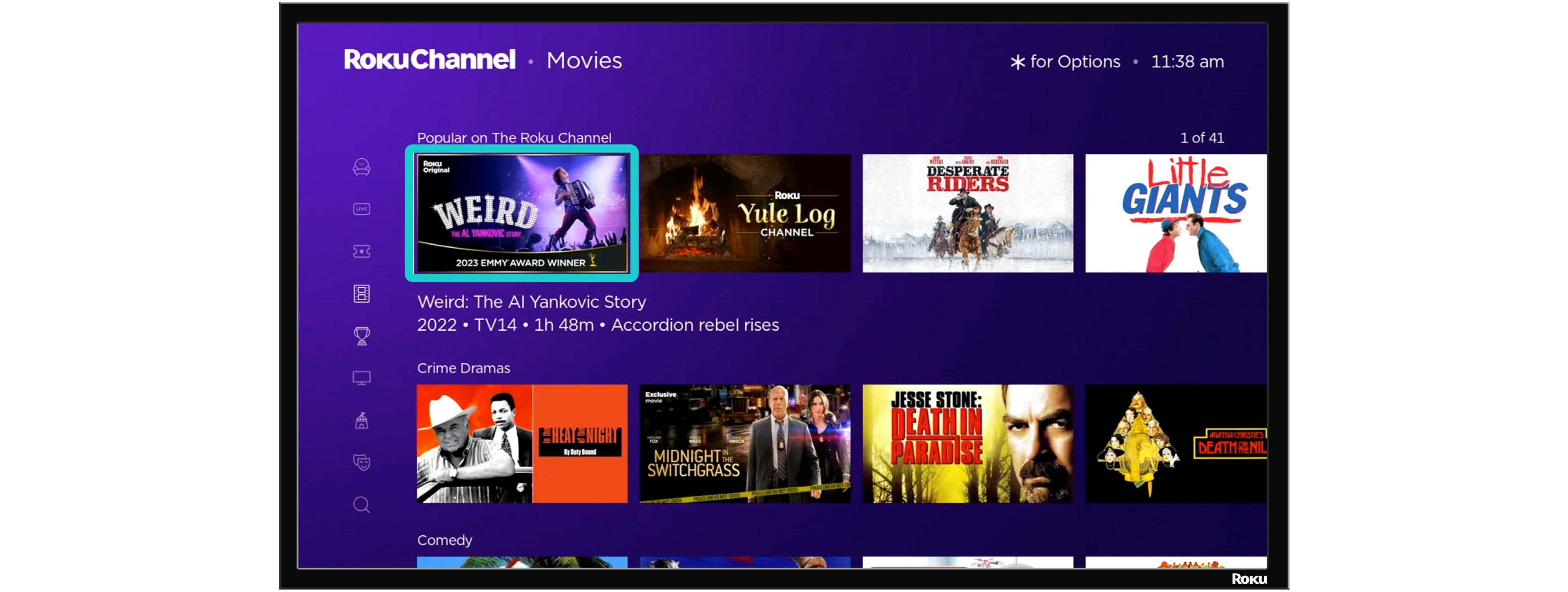
Movie artwork -browse experience
Highlighted example of the 16:9 texted image with title treatment
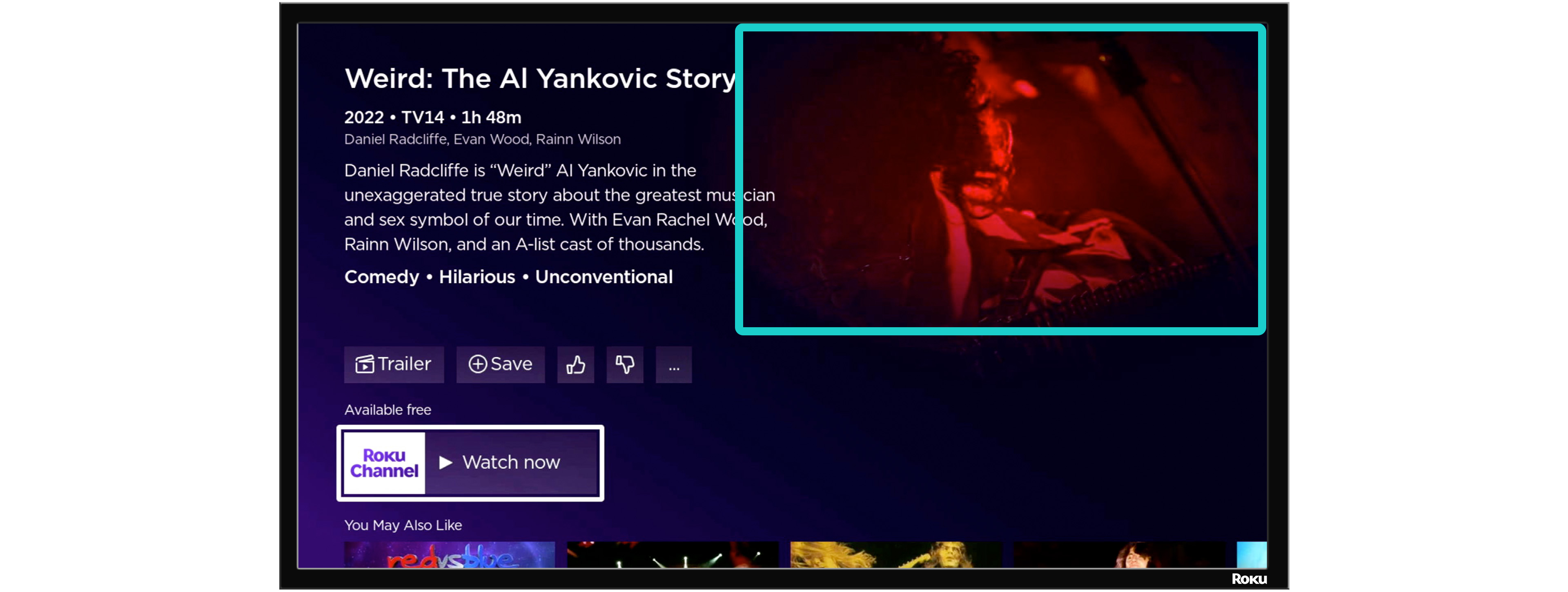
Movie artwork -details experience
Highlighted example of the 16:9 textless image
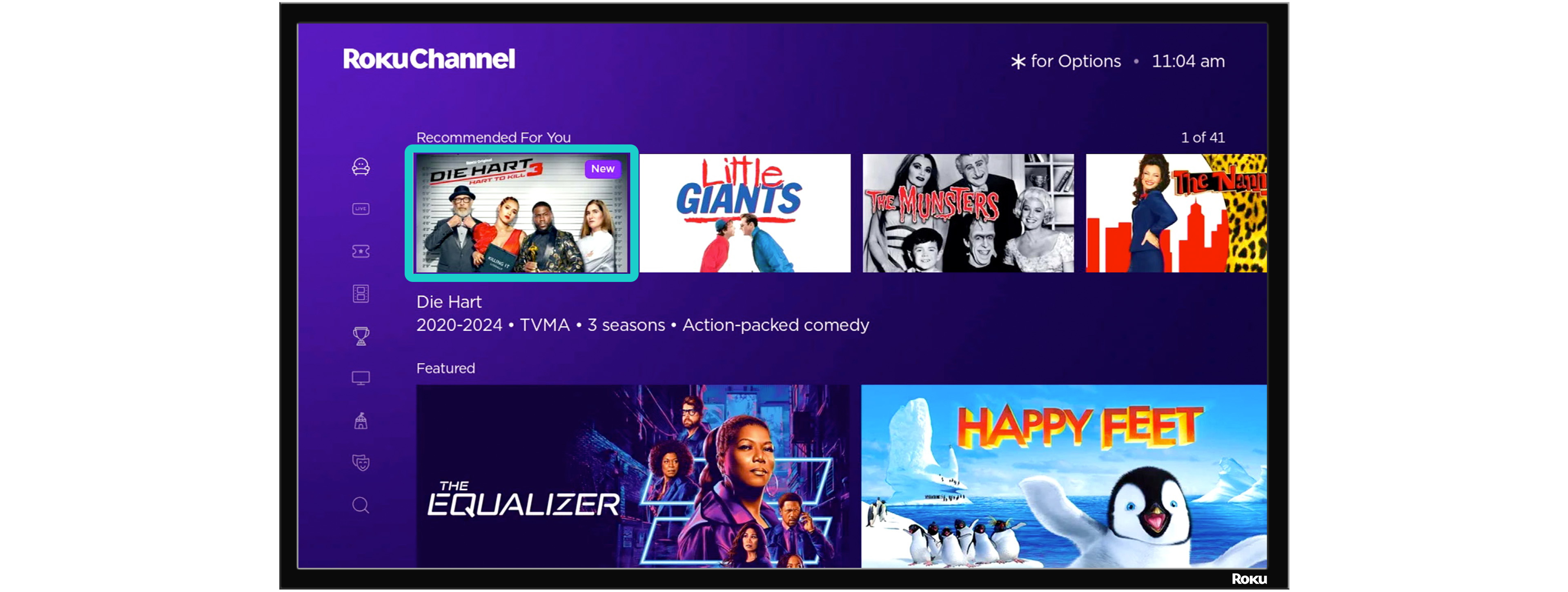
Series artwork - browse experience
Highlighted example of the 16:9 texted series image with title treatment
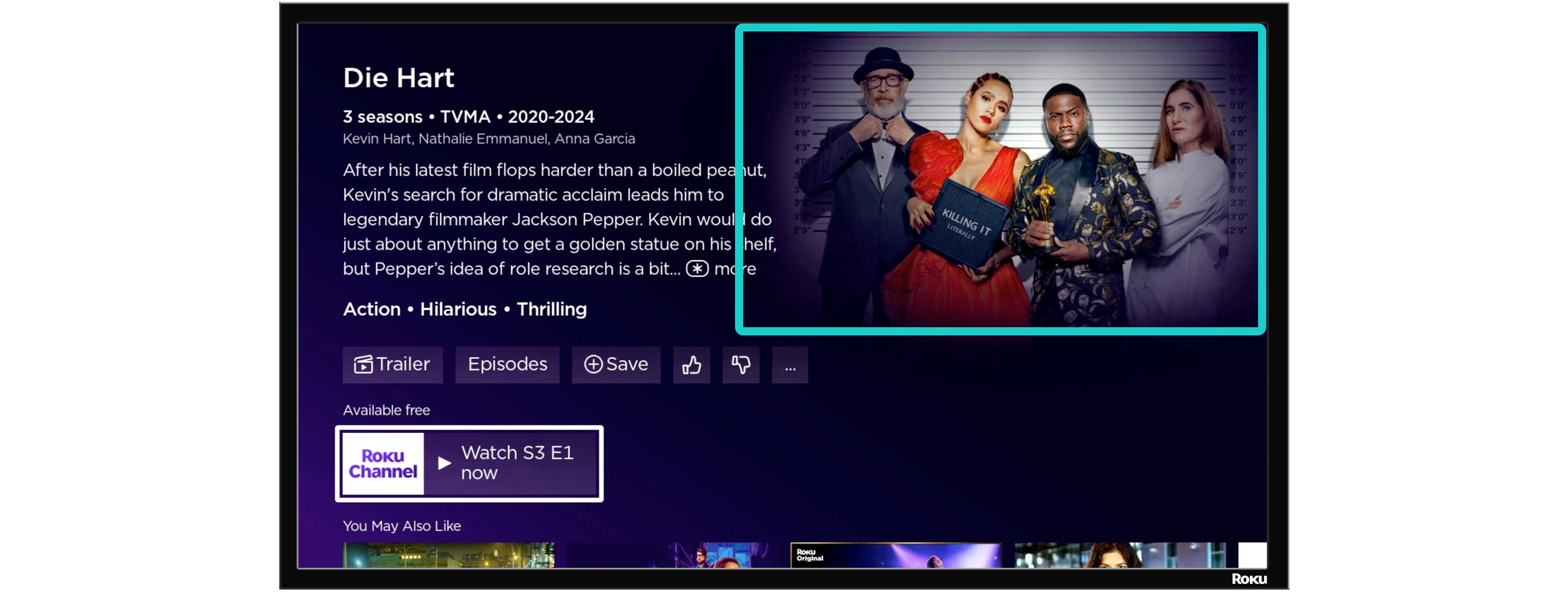
Series artwork - details experience
Highlighted example of the 16:9 textless series image
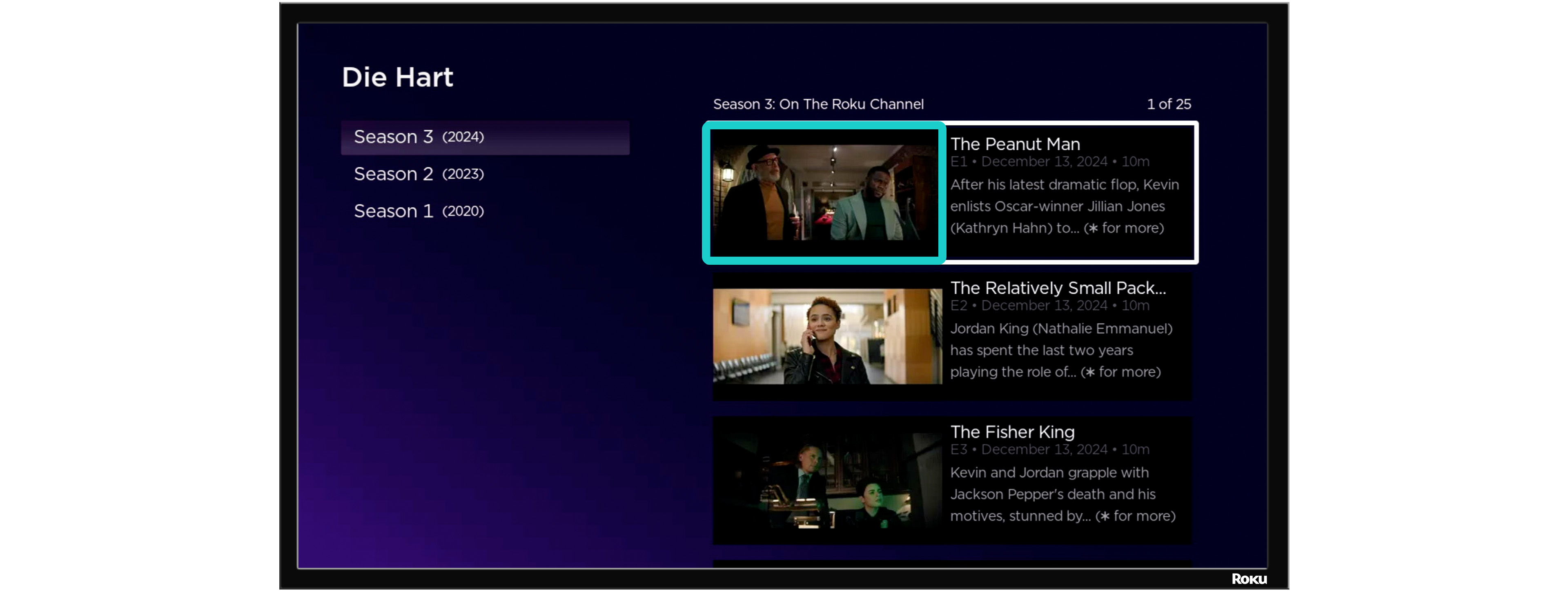
Episode artwork - episode picker experience
Highlighted example of the 16:9 textless episode images
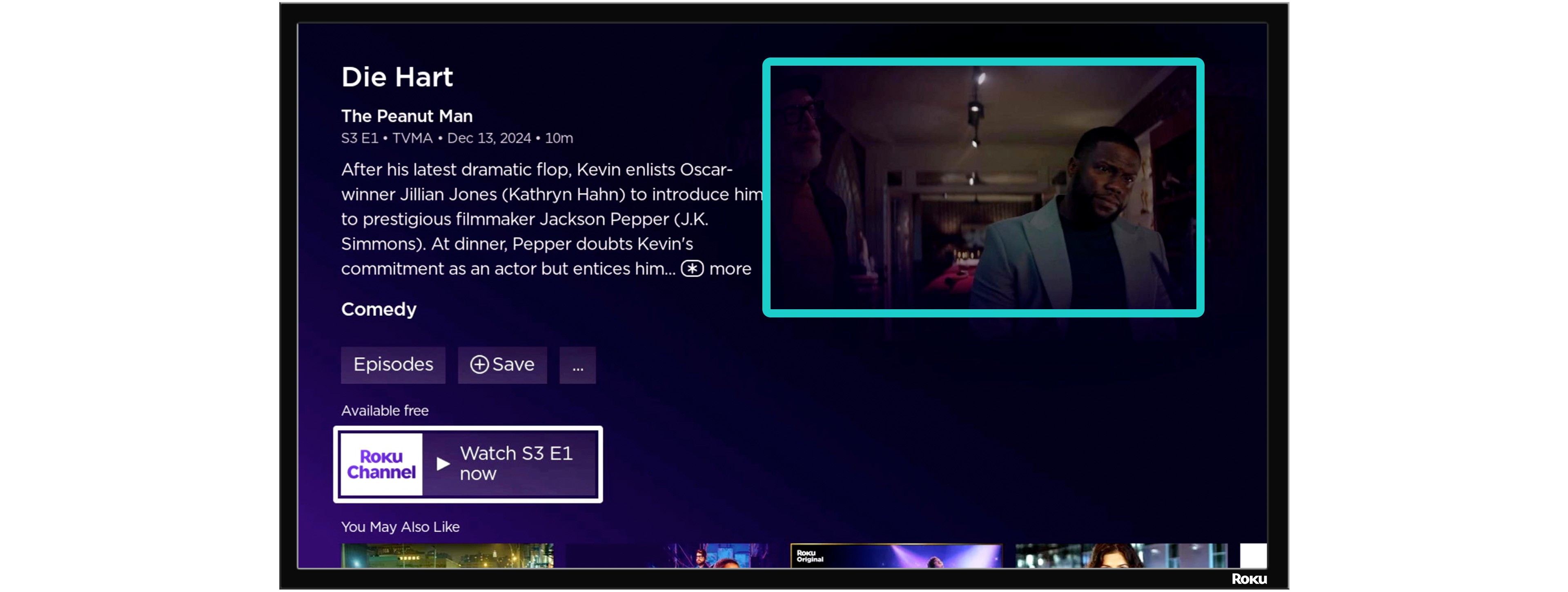
Episode artwork - episode details experience
Highlighted example of the 16:9 textless episode image
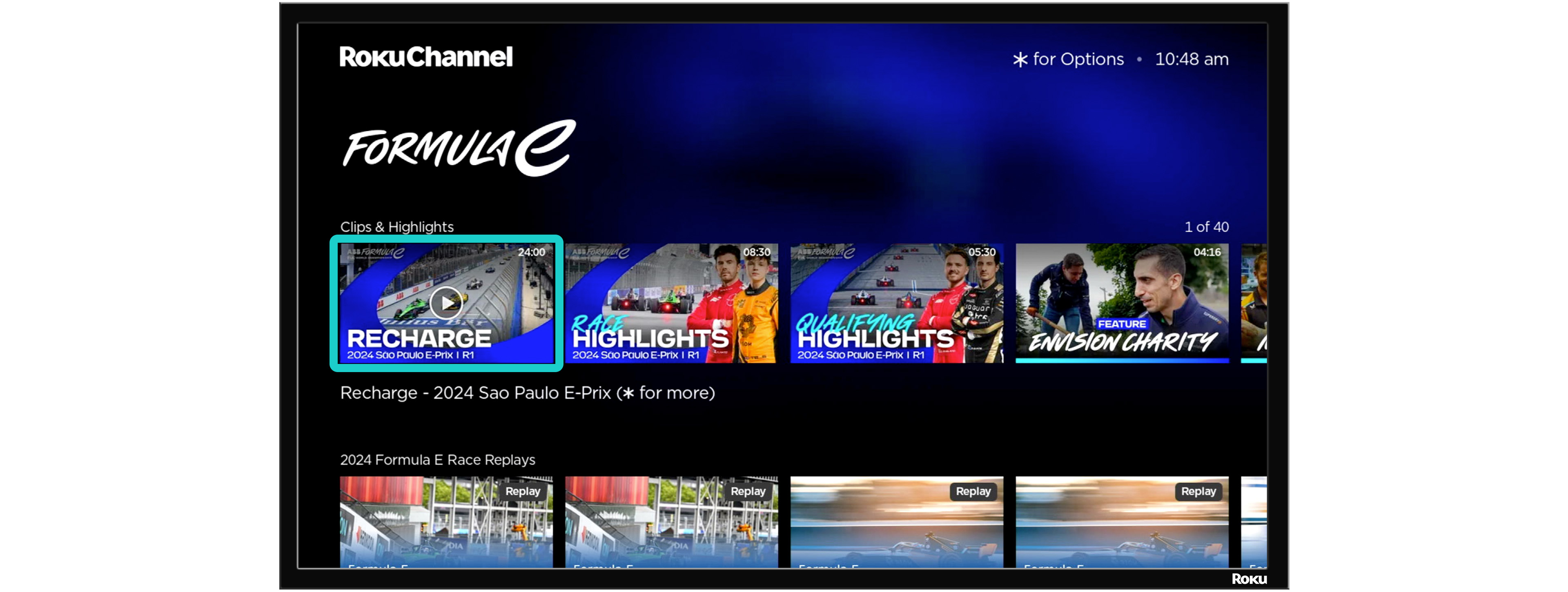
Clip artwork - browse experience
Highlighted example of the 16:9 texted image with title treatment
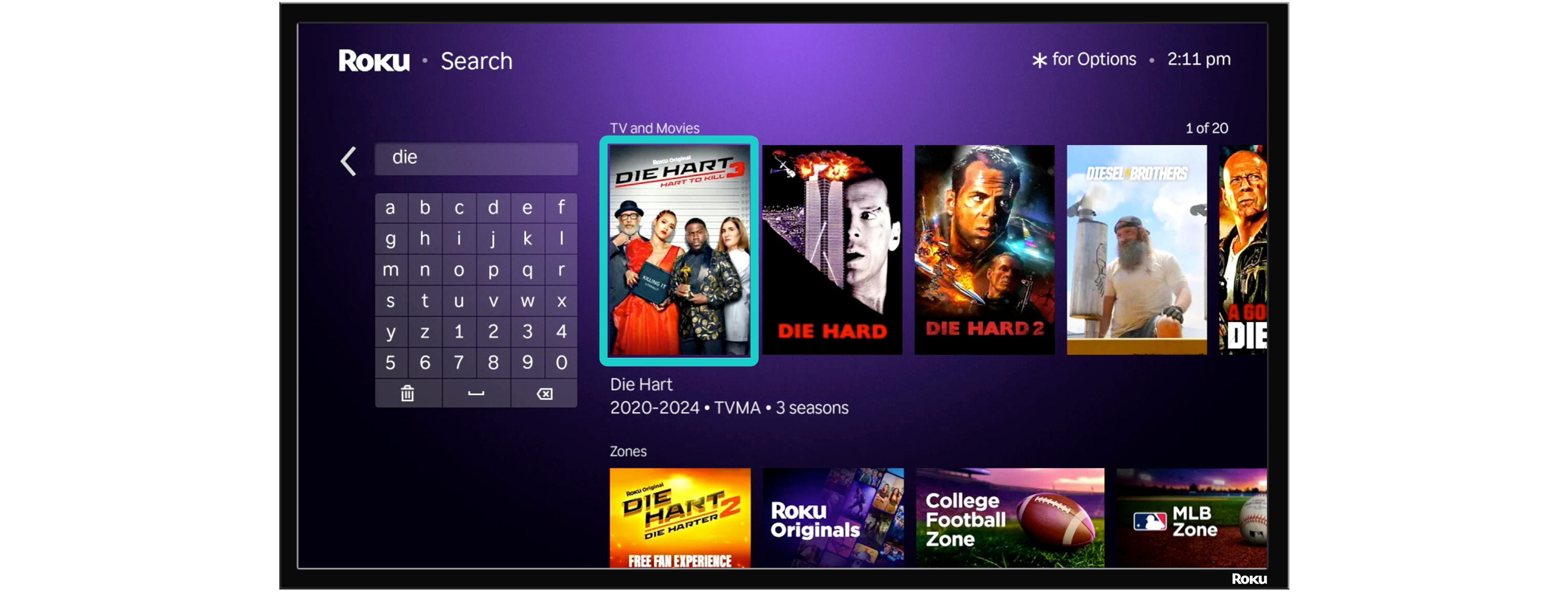
Poster artwork - search experience
Highlighted example of the 2:3 texted image with title treatment from the Search experience. 2:3 images are preferred for series and movie content types
Delivery guidelines
Roku accepts content via Aspera which can be configured as either an Aspera Shares (using the Aspera Connect Browser plugin) or as an Aspera P2P/Enterprise connection (using Aspera Client or Console).
Alternate file transfer or physical delivery methods may be evaluated on a case-by-case basis and must be approved by Roku. Any physical media/hard drives Roku may accept will not be returned.
Aspera shares delivery
Provide the name(s) and email address(es) for users that will be transmitting content to Roku for Roku Channel.
Roku’s Aspera Shares URL: https://aspera.sr.roku.com
You will need to install the Aspera Connect browser plugin to upload content via Aspera Shares.
Invitations to create an Aspera Shares account will come from Roku’s Aspera Shares server. These automated invitation emails can be flagged as spam or junk emails or can be blocked by an organization’s email filtering system or firewall. Please check the spam/junk folder for the invitation and move it from the spam/junk folder before trying to access the link provided.
Aspera enterprise/P2P/HSTS delivery
Roku authenticates through RSA Public/Private key exchange. To complete this configuration, please provide a Public RSA-SSH key.
Steps to create SSH keys can be found in Aspera’s official documentation
Roku will provide host and username information during onboarding.
Aspera Client
Transfer Bandwidth
Roku recommends verifying or updating the global and user preferences of the Aspera Client to align with your preferred upload bandwidth. Please note Roku applies a global bandwidth cap of 300Mbps.
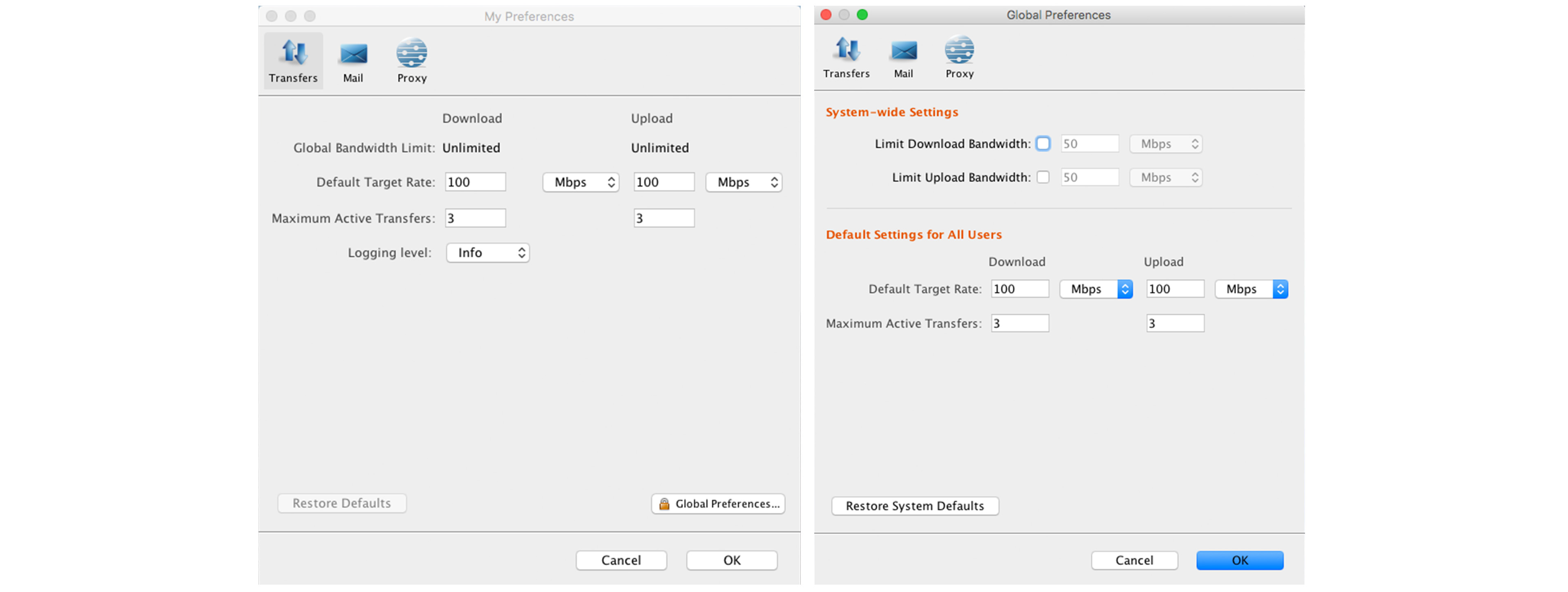
Depending on what client is being used, there are different settings that can affect transfer speeds.
- If using the Desktop Client GUI, global settings can be set https://www.ibm.com/docs/en/asdc/4.4.x?topic=gui-global-bandwidth-settings
- Transfer speeds can also be set on a per-Connection level (the "Speed" setting in step 7): https://www.ibm.com/docs/en/asdc/4.4.x?topic=gui-adding-editing-connections
- If connecting via command line, there is a specific switch:
-l 100mwould set the transfer rate at 100Mbps - If connecting via Aspera Shares, target rates can be set both system-wide or per-user in the Shares web interface https://www.ibm.com/docs/en/aspera-shares/1.10?topic=options-configuring-transfer-settings https://www.ibm.com/docs/en/aspera-shares/1.10?topic=accounts-configure-user-settings
File delivery
- Video, closed captions, and artwork files must be completely delivered prior to the delivery of metadata
- Production files MUST be delivered to the
/prodfolder. Automation is dependent on proper file delivery location. Failure to deliver files to the correct folder will result in processing delays or content not processing at all - Test files may be delivered to the
/testingfolder - It is preferred that content not be delivered to subfolders. If subfolders are necessary, follow the below guidelines:
- Subfolders must not begin with an underscore
- Do not separate files into subfolders by file type
- All media files for a single title (episode, movie, or shortForm) must be delivered to the same directory
- The ingest platform assumes media files referenced in the metadata are in the same directory as the metadata file. As such, metadata must be delivered to the same directory as the media files contained within the metadata
- Delivery notifications can be sent to [email protected]
File retention
The delivery location is a temporary location for our Partners to upload files for ingestion into Roku Channel content library. Automation will move files from the delivery location upon successful ingest to an archive location to be stored indefinitely. All files uploaded to the delivery location are expected to be ingested within a reasonable time frame not to exceed 30 days. Valid and complete metadata must be delivered shortly after files are delivered to ensure timely ingest. Files in the delivery location that have not ingested after 30 days are subject to deletion.
Exceptions to the file retention policy may be made to files in the /testing folder
File naming
Source video, closed captions, and artwork files delivered for ingest must adhere to the following guidelines:
- File names must not exceed 125 characters in length
- File names must match the reference to the file name in the metadata supplied for the title delivered
- File names are case-sensitive
- File names must end with a proper file extension. File extensions are expected to be lowercase
- Whitespace and special characters
!@#$%^&*()\{}|[];:\’\”?/>,\<must not be included in any file name - The same image can be used for every episode of a series, but it is not ideal. If the same image is used for every episode, that image must be delivered multiple times and uniquely named for each episode. For example, “episode.jpg” should be delivered as “episode_01.jpg”, “episode_02.jpg”, etc.…
Characters allowed in file names
| Character sets |
|---|
|
| Character name | Character |
|---|---|
| Hyphen | - |
| Period | . |
| Underscore | _ |
Characters forbidden in file na
| Character Name | Character |
|---|---|
| "At" symbol | @ |
| Ampersand | & |
| Asterisk | * |
| Backslash | \ |
| Caret | ^ |
| Colon | : |
| Comma | , |
| Dollar | $ |
| Equals | = |
| Forward slash | / |
| Grave accent | ` |
| Greater than | > |
| Left curly brace | { |
| Left square bracket | [ |
| Less than | < |
| Percent | % |
| Plus | + |
| Pound/hashtag | # |
| Question mark | ? |
| Quotation marks/double quote | " |
| Right curly brace | } |
| Right square bracket | ] |
| Semicolon | ; |
| Space | |
| Tilde | ~ |
| Vertical pipe | | |
MovieLabs content delivery
Order of delivery is important. The Roku MovieLabs service will require that the MMC XML file be delivered after all media files referenced within have completed delivery. Roku cannot process content without successful delivery of both the MMC and MEC XMLs. Please see examples below:
- For each MMC, all files referenced in the MMC should be delivered prior to the delivery of the MMC XML to be considered a successful delivery
- For each MEC, all files referenced in the MEC should be delivered prior to the delivery of the MEC XML to be considered a successful delivery
- Movies, Series, Seasons, and Episodes require successful delivery of both MMC and MEC to ingest
- Episodes cannot ingest without successful delivery and ingest of MMC and MEC of the Season to which the Episode belongs
- Seasons cannot ingest without successful delivery and ingest of MMC and MEC of the Series to which the Season belongs
- Episodes processed by Roku’s system before the Series and/or Season to which the Episode belongs will be held in an uningested state until the Series and/or Season has been successfully delivered
- Seasons processed by Roku’s system before the Series to which the Season belongs and/or an Episode belonging to that Season will be held in an uningested state until the Series and/or an Episode has been successfully delivered
- Series processed by Roku’s system before a Season and an Episode belonging to that Series will be held in an uningested state until a Season and Episode has been successfully delivered
Roku specific metadata and media files
Video files, audio files, closed caption files, subtitle files, image files, minimum metadata requirements, genres, and ratings and rating sources, must adhere to the supported formats and requirements defined in this specification
Tags
Tags for merchandising/curation can be delivered via the Keyword node supported in the MovieLabs MEC XML. Please see the MovieLabs MEC Schema for proper placement of the Keyword node
Example:
<md:LocalizedInfo language="en">
  <md:TitleDisplayUnlimited>Great Title of My Show</md:TitleDisplayUnlimited>
  <md:Summary190>Short summary of my show.</md:Summary190>
  <md:Summary400>Longer summary of my show.</md:Summary400>
  <md:Genre id="genre"/>
  <md:Keyword>keyword</md:Keyword>
</md:LocalizedInfo>
TMS IDs
Gracenote TMS IDs can be delivered via the MovieLabs MEC XML as an Identifier with Namespace TMSID in the AltIdentifier node. Please see the MovieLabs MEC Schema for proper structure of the AltIdentifier node
Example:
<md:AltIdentifier>
  <md:Namespace>TMSID</md:Namespace>
  <md:Identifier>EP012345678910</md:Identifier>
</md:AltIdentifier>
MMC XML ad breaks and cue points
Ad break, intro credit, and end credit cue points can be supplied in the MovieLabs MMC XML in the Markers node. Please see the MovieLabs MMC Schema for proper structure of the Markers node
Example:
<manifest:Markers>

  <!--Opening credit cuepoint start and end-->
  <manifest:Marker>
    <manifest:Timecode format="seconds">155.071</manifest:Timecode>
    <manifest:DisplayLabel>FIRST_FRAME_EPISODE_INTRO</manifest:DisplayLabel>
    <manifest:Label>FFEI</manifest:Label>
  </manifest:Marker>
  <manifest:Marker>
    <manifest:Timecode format="seconds">200.867</manifest:Timecode>
    <manifest:DisplayLabel>LAST_FRAME_EPISODE_INTRO</manifest:DisplayLabel>
    <manifest:Label>LFEI</manifest:Label>
  </manifest:Marker>

  <!--End credit cuepoint start and end-->

  <manifest:Marker>
    <manifest:Timecode format="seconds">3669.207</manifest:Timecode>
    <manifest:DisplayLabel>FIRST_FRAME_UP_NEXT</manifest:DisplayLabel>
    <manifest:Label>FFUN</manifest:Label>
  </manifest:Marker>
  <manifest:Marker>
    <manifest:Timecode format="seconds">3812.517</manifest:Timecode>
    <manifest:DisplayLabel>LAST_FRAME_UP_NEXT</manifest:DisplayLabel>
    <manifest:Label>LFUN</manifest:Label>
  </manifest:Marker>

  <!--Ad Break cuepoints (Roku only needs a start point. Our player will effectively pause video playback at this point, play the ad pod, and resume from this same point)-->

  <manifest:Marker>
    <manifest:Timecode format="seconds">737.111</manifest:Timecode>
    <manifest:DisplayLabel>FIXED_POINT_CANDIDATE_INSERTION</manifest:DisplayLabel>
    <manifest:Label>FPCI</manifest:Label>
  </manifest:Marker>
  <manifest:Marker>
    <manifest:Timecode format="seconds">1361.276</manifest:Timecode>
    <manifest:DisplayLabel>FIXED_POINT_CANDIDATE_INSERTION</manifest:DisplayLabel>
    <manifest:Label>FPCI</manifest:Label>
  </manifest:Marker>
  <manifest:Marker>
    <manifest:Timecode format="seconds">1948.821</manifest:Timecode>
    <manifest:DisplayLabel>FIXED_POINT_CANDIDATE_INSERTION</manifest:DisplayLabel>
    <manifest:Label>FPCI</manifest:Label>
  </manifest:Marker>
  <manifest:Marker>
    <manifest:Timecode format="seconds">2841.421</manifest:Timecode>
    <manifest:DisplayLabel>FIXED_POINT_CANDIDATE_INSERTION</manifest:DisplayLabel>
    <manifest:Label>FPCI</manifest:Label>
  </manifest:Marker>
  <manifest:Marker>
    <manifest:Timecode format="seconds">3270.100</manifest:Timecode>
    <manifest:DisplayLabel>FIXED_POINT_CANDIDATE_INSERTION</manifest:DisplayLabel>
    <manifest:Label>FPCI</manifest:Label>
  </manifest:Marker>
</manifest:Markers>
MovieLabs schema validation
Roku is using Apache xmlbeans for parsing & validating the MEC MMC XML files. You can use the command line tool provided in xmlbeans to validate.
- Download & extract xmlbeans to local
- From command line, cd to the xmlbeans bin directory
- Inside bin directory you will find the validate tool
- Also download the official MovieLab schema xsd files to local ( https://movielabs.com/schema/manifest/v1.10/manifest-v1.10.xsd https://movielabs.com/schema/mdmec/v2.9/mdmec-v2.9.xsd )
- Usage: validate schema.xsd instance.xml ( be sure to point schema.xsd to mdmec-v2.9.xsd for MEC, and manifest-v1.10.xsd for MMC )
- From the command line output you can tell if the given xml is valid or not
Example usage
./validate ~/dev/movielabsSpec/schema/mdmec-v2.9.xsd /path/to/file/directory/MEC_SAMPLE_123456789.xmlExample response
XMLBEANS_LIB=./../lib
ERROR StatusLogger Log4j2 could not find a logging implementation. Please add log4j-core to the classpath. Using SimpleLogger to log to the console...
/path/to/file/directory /MEC_SAMPLE_123456789.xml valid
Metadata requirements
Roku utilizes a transform engine that can “normalize” different metadata formats to fit Roku’s ingestion needs. Exact element or field names are not as important as consistent delivery of agreed upon element or field names. The data within any field must conform to Roku Channel Ingest Specification regardless of element or field name. If you use an XML format for delivery of your content to other platforms, you may be able to repurpose this for delivery to Roku. You may provide a sample of this existing metadata format during onboarding for Roku to evaluate validity for ingest into Roku Channel. Regardless of the format delivered, all required elements/fields must be provided in the metadata deliverable.
Minimum required metadata by content type
| Film/Clip Requirements | TV Requirements |
|---|---|
|
|
Content type definitions
Roku Channel supports 3 content types: tv, film, and clip. All content must be delivered as one of these 3 content types. Titles must be delivered to Roku Channel in the same content type the program was originally available in. The below definitions can help guide how to classify content that is intended for Roku Channel.
TV
Episodic content that is structured in a series --> season --> episode hierarchy should be delivered to the TV specification.
Film
Full length, long form, stand-alone titles should be delivered to the Film specification. Any program that is not intended to be nested in a series/season/episode hierarchy and exceeds roughly 15 minutes run time should be considered a film. This includes stand-alone TV Specials.
Clip
Short form, stand-alone titles that do not exceed roughly 15 minutes run time should be delivered to the Clip specification.
ID requirements and expectations
Roku does not supply IDs for content. IDs are to be generated and supplied by the Partner for content that is delivered to Roku. Every clip and movie must be delivered with an asset_id. Every episode must be delivered with 3 IDs: an asset_id, a series_id, and a season_id. IDs need to be meaningful to your team as they are how we positively identify a title in our system. The asset ID in the ingest metadata should match the Title ID provided in the avail document. This will aid in tracking the content throughout Roku’s pipeline from Avails submission through publication on Roku Channel. Any updates to the title once it has been ingested into our system MUST be accompanied by the asset ID. Guidelines and definitions of IDs are below:
| ID | Definitions |
|---|---|
| asset_id | Immutable, unique identifier for a clip, episode, or movie. Required for all content. 50 characters maximum. Alphanumeric characters, hyphens, and underscores only – SPACES OR SPECIAL CHARACTERS IN ANY ID WILL FAIL INGESTION |
| series_id | Immutable, unique identifier for a series. Cannot be the same as the season or unique episode ID. Must be delivered with all episodes of a series and must be consistent for all episodes of a series. Required for TV content. 50 characters maximum. Alphanumeric characters, hyphens, and underscores only – SPACES OR SPECIAL CHARACTERS IN ANY ID WILL FAIL INGESTION |
| season_id | Immutable, unique identifier for a season. Cannot be the same as the series or unique episode ID. Must be delivered with all episodes of a season of a series and must be consistent for all episodes within that season. Required for TV content. 50 characters maximum. Alphanumeric characters, hyphens, and underscores only – SPACES OR SPECIAL CHARACTERS IN ANY ID WILL FAIL INGESTION |
Availability sheets/planners
Roku requests an initial launch list of titles/episodes/clips in current library that are available to Roku at the time of onboarding and a schedule when the content will be refreshed. For ongoing production, Roku requests that Avails be provided 60 days prior to licensing window start and the content be delivered at least 30 days before curation onto the channel. This will allow ample time for processing and QC of the content before it goes live on Roku Channel. Delivery capacity to be coordinated after signing
Availability windows
Roku has the ability for content to display on-device and for user playback at a specific starting time. By default, content will go into window at 12:00 am (midnight) and expire at 11:59:59 pm in the users’ time zone.
If content is to go live at a time other than midnight or expire at a time other than 11:59:59 pm, the license window start or end values in the inbound metadata must include the desired times.
There are two types of specific time designations – relative and absolute.
- Relative Time – a Saturday night premiere of a movie goes into window at 9pm local time for all users. A user in the Eastern Time Zone watches at 9pm but a user in the Pacific Time Zone, at the exact same moment (6pm PT), cannot watch that content.
- Absolute Time – a new episode of a series goes into window at 9pm Eastern and becomes immediately available across all time zones. A user in the Pacific Time Zone can watch the content at 6 pm local time.
While time settings are dictated by the content owner, Roku will need the metadata as follows:
- If the content has a relative start time, that time must be indicated in the ingest metadata and formatted as “yyyy-mm-ddThh:mm:ss” (2019-11-01T21:00:00)
- If the content has an absolute start time, that time must be indicated in the ingest metadata. The time must be presented as UTC time and formatted as “yyyy-mm-ddThh:mm:ssZ” (2019-11-02T01:00:00Z).
- In this example, 9 pm Eastern Time on November 1 is 1 am UTC (https://www.thetimezoneconverter.com)
- If the ingest metadata arrives without a time, Roku will assume a relative start time of midnight and a relative end time of 11:59:59 pm
Special characters
Roku utilizes CDATA sections to allow special characters (e.g. !@#$%^&*()\{}|[];:\’\”?/>\<, as well as foreign character sets) within certain node values of the ingest XML. Roku highly recommends wrapping data in CDATA sections to ensure proper ingest of content. The below nodes are the only nodes that support CDATA sections:
- title
- long_synopsis
- short_synopsis
- display_name
Certain characters in an XML will render the document unreadable by the Roku ingest platform unless handled (escaped) properly. The below characters must be provided in their Escaped Form for all node values that do not support CDATA sections:
| Character Name | Character | Escaped Form |
|---|---|---|
| Ampersand | & | & |
| Less-than | < | < |
| Greater-than | > | > |
| Quotes | " | " |
| Apostrophe | ' | ' |
Special characters should never be used in file names or file name references within the XML or Excel metadata. See File Naming Guidelines for more on this.
Supported metadata formats
XML format preferred. One complete XML shall be delivered for each movie, clip, or TV episode video file delivered. Metadata shall be delivered via Aspera to the same folder location as the video, captions, and artwork files.
Supported metadata formats
| Format Name | Format Extension | Encoding | Package Version |
|---|---|---|---|
| XML (preferred) | .xml | UTF-8 | clip1.0 Additional schemas supported on a case-by-case basis |
| Excel | .xlsx | See below for Roku Excel Metadata Templates and Excel Metadata Guidelines |
Metadata updates (MDU) and file replacements
Updates are automated and can be sent if there is a need to change metadata or asset files for any program that has previously been delivered to Roku Channel. All metadata and/or file replacement updates must include Provider, Asset ID, and Content Type of the program as it was originally delivered to Roku for the update to succeed. Version control will be handled by Roku's system, there is no need to provide versioning information in the metadata.
Roku currently supports updating the below metadata fields via automated MDU:
- TMS ID
- EIDR ID
- Titles (primary and localized)
- Short Descriptions (primary and localized)
- Long Descriptions (primary and localized)
- Release Date
- Series Titles
- Season Number
- Episode Number
- Language (and localized languages)
- Availability Windows
- License Types
- Countries
- Genres
- Provider Tags
- Content Ratings (system & rating)
- Credits
- Ad Breaks
- Cue Points
Metadata update (MDU)
Metadata updates (MDUs) are automated and will be processed in the same manner as content that needs to be ingested into Roku Channel's content library. Please follow the procedure outlined below to update metadata only.
Metadata updates must be delivered in the same format as the ingest metadata
Metadata updates must include the exact same asset ID that was included when the content was originally ingested
Please reach out to [email protected] if you need a complete listing of asset IDs as they exist in Roku Channel's system
All file name references must be removed from a metadata only update. This includes:
- source video file name
- closed captions file name
- subtitle file name
- audio dub file name
- key, background, and/or poster art file names
Some fields need to be updated in "groups". All required fields in a group must be provided for the update to process successfully. Below are the current groups:
-
Metadata group (all of the required fields must be present in order to update one of these)
-
Language (required)
-
Title (required)
-
Short description (required)
-
Long description (optional)
-
Availability group (all of the required fields must be present in order to update one of these)
-
License Type (required)
-
Country (required)
-
Start Date (required)
-
End Date (required)
Upload the metadata update to the "prod" folder in Aspera
If you do not see the update reflected on Roku Channel within 24 hours, please reach out to [email protected]
File replacements and additions
File replacements and additions are automated and will be processed in the same manner as content that needs to be ingested into Roku Channel's content library. A file replacement will replace a file that currently exists in Roku Channel's library. A file addition will add a new file to an existing record in Roku Channel's library. A file addition would be used to add localized subtitles or dubs to an existing record. Please follow the procedure outlined below to replace one or more files.
- File replacements and additions must be delivered in the same format as the ingest metadata
- File replacements and additions must include the exact same asset ID that was included when the content was originally ingested
- Please reach out to [email protected] if you need a complete listing of asset IDs as they exist in Roku Channel's system
- Only the file name references of the files that are being replaced or added should be included in the metadata file. Any file that is not being replaced or added should not be delivered or referenced in the metadata file.
- If the source video file is being replaced and there is a change in the duration of the source, any related files (captions, subtitles, audio dubs) should also be replaced.
- File replacements require language values in order to update properly
- Upload the file replacement or addition metadata to the "prod" folder in Aspera
_As a best practice, please provide replacement files with a unique name both in the metadata and on the file itself. Simply adding a versionnumber (_v2, v3, etc.) would suffice. For example: movie_title_v2.mov
Content takedown
If rights change from when the content was originally delivered to Roku and content needs to be removed from Roku Channel either immediately or scheduled, the availability end date can be changed by providing ametadata update as defined below. Explicit updates should be provided for all territories from which thecontent should be removed. Please be aware that end dates providedwithout time values specified will expire at 11:59:59pm on that date.
Roku XML metadata requirements, samples, and schemas
| Roku XML Schema | Download Link |
|---|---|
| Film XML Schema | Download here |
| TV XML Schema | Download here |
| Clip XML Schema | Download here |
| Roku XML Samples | Download Link |
| Annotated Roku Film XML | Download here |
| Annotated Roku TV XML | Download here |
| Annotated Roku Clip XML | Download here |
| Sample Cablelabs ADI Metadata | Download Link |
| Cablelabs Film ADI XML Example | Download here |
| Cablelabs TV ADI XML Example | Download here |
| Cablelabs Clip ADI XML Example | Download here |
NOTE: Cablelabs ADI samples are intended for illustrative purposes and not necessarily as templates. The required data must be supplied in a static node in each XML.
XML - film metadata fields
package
Defines the package version type
| XML XPath | Accepted Values | Required |
|---|---|---|
/package/@version | film5.0 | Required |
Example:
<package version="film5.0">provider
Name of content owner/studio/network
| XML XPath | Example | Required |
|---|---|---|
/package/provider | Roku Originals | Required |
Example:
<provider>Roku Originals</provider>language
Primary language of the package metadata. At a minimum, the value must conform to a supported language code. As a best practice when providing language, please also include a region code to convey helpful information such as the distinction between Spanish spoken in Mexico (es-MX) and Spanish spoken in Spain (es-ES).
| XML XPath | Accepted Values | Required |
|---|---|---|
/package/language | Valid language value (en, es, etc.)May also include region codes (en-US, es-MX, etc.) | Required |
Example:
<language>en</language>type
Defines the content type of the package
| XML XPath | Accepted Values | Required |
|---|---|---|
/package/video/type | film | Required |
Example:
<type>film</type>asset_id
Immutable, unique identifier for a movie. IDs are to be generated and supplied by the Partner for content that is delivered to Roku. The ID in the ingest metadata should match the ID provided in the avail document. This will aid in tracking the content throughout Roku’s pipeline from Avails submission through publication on Roku Channel. 50 character limit
| XML XPath | Accepted Values | Required |
|---|---|---|
/package/video/asset_id | alphanumeric characters, hyphens, and underscores only. 50 characters maximum | Required |
Example:
<asset_id>movieAssetIdHere</asset_id>eidr
EIDR ID if one exists
| XML XPath | Accepted Values | Required |
|---|---|---|
/package/video/eidr | Any valid EIDR ID | Optional |
Example:
<eidr></eidr>tmsId
Gracenote ID if one exists
| XML XPath | Accepted Values | Required |
|---|---|---|
/package/video/tmsId | Any valid TMS ID | Optional |
Example:
<tmsId></tmsId>title
Title of movie. Include only the name of the content as it should appear on platform. Do not include non-title parentheticals such as indicator of original/remake, year of release, season, or video format, for example: (Classic), (1987), (Season 1), or (HD)
| XML XPath | Example | Required |
|---|---|---|
/package/video/title | Movie Title | Required |
Example:
<title><![CDATA[Movie Title. Required.]]></title>short_synopsis
A short synopsis of the content. CDATA section supported. 250-character limit.
| XML XPath | Accepted Values | Required |
|---|---|---|
/package/video/short_synopsis | 250-character synopsis | Required |
Example:
<short_synopsis><![CDATA[Short summary of movie. 250 characters maximum. Required]]></short_synopsis>long_synopsis
A long synopsis of the content. CDATA section supported. 500-character limit.
| XML XPath | Accepted Values | Required |
|---|---|---|
/package/video/long_synopsis | 500-character synopsis | Required |
Example:
<long_synopsis><![CDATA[Long summary of movie. 500 characters maximum. Required.]]></long_synopsis>original_spoken_language
Defines the original production language of the title being delivered. At a minimum, the value must conform to a supported language code. As a best practice when providing language, please also include a region code to convey helpful information such as the distinction between Spanish spoken in Mexico (es-MX) and Spanish spoken in Spain (es-ES).
| XML XPath | Accepted Values | Required |
|---|---|---|
/package/video/original_spoken_language | Valid language value (en, es, etc.) May also include region codes (en-US, es-MX, etc.) | Required |
Example:
<original_spoken_language>en</original_spoken_language>country_of_origin
Defines the primary country where the film was produced and where the main creators, crew, and producers are established. Value must conform to one of the supported country codes as defined in the ISO 3166-1 alpha 2 list of 2-character country codes.
| XML XPath | Accepted Values | Required |
|---|---|---|
/package/video/country_of_origin | Valid 2-character country code per ISO 3166-1 alpha 2 | Preferred |
Example:
<country_of_origin>en</ country_of_origin >closedCaptions
Indicates whether the title delivered contains closed captions. Accepted values are Y or N. This field is required for all content intended for Roku Channel in the US
| XML XPath | Accepted Values | Required |
|---|---|---|
/package/video/closedCaptions | Y or N | Required for content in the US |
Example:
<closedCaptions>Y</closedCaptions>closedCaptionsExemption
FCC exemption code for closed caption requirement. This node is required if the closedCaptions value = “N”
Allowable value and their definitions: 1 - The content has never aired on television in the United States. 2 - The content has only aired on television in the United States without captions. 3 - The content has not aired on television in the United States with captions since September 30, 2012. 4 - The content does not consist of full-length video programming. 5 - The content does not fall within a category of online programming that requires captions under FCC regulations (49 C.F.R. § 79.4(b)). 6 - The FCC and/or U.S. Congress has granted an exemption from caption requirements for this content.
| XML XPath | Accepted Values | Required |
|---|---|---|
/package/video/closedCaptionsExemption | 1, 2, 3, 4, 5, 6 | Required if closedCaptions = N |
Example:
<closedCaptionsExemption>1</closedCaptionsExemption>release_date
Original date content was first made available in any presentation. Must include accurate year of release at a minimum
| XML XPath | Accepted Values | Required |
|---|---|---|
/package/video/release_date | Conforms to ISO 8601 format: YYYY-MM-DD | Required |
Example:
<release_date>YYYY-MM-DD</release_date>runtime
Total run time of content in whole minutes
| XML XPath | Accepted Values | Required |
|---|---|---|
/package/video/runtime | Integers only | Required |
Example:
<runtime>120</runtime>genre
Genre classification of the content. Roku requires each movie to be delivered with at least one supported genre. Please see enumerated list of genres that Roku supports.
| XML XPath | Accepted Values | Required |
|---|---|---|
/package/video/genres/genre | See enumerated list below. No more than 10 genres may be submitted for a single title | Required |
| Example: |
<genres>
  <genre>drama</genre>

  <!-- Additional genres here-->
</genres>
rating
Parental or content advisory rating for the movie by a rating source. A valid movie or TV rating from the rating authority (ratingSystem) of the Territory the content will be available in shall be provided for each movie. If the title has not been rated by that Territory’s official rating authority, please include a valid rating from the USA_PR ratingSystem. There is no official body that assigns ratings for the USA_PR ratingSystem. Please use the guidelines listed at http://tvguidelines.org/ to assign the appropriate rating. Multiple rating value
| XML XPath | Accepted Values | Required |
|---|---|---|
/package/video/ratings/rating must include the system attribute | See below for allowable ratings by rating system. Multiple rating/rating system pairs are allowed | Required |
| Example: |
<ratings>
  <rating system="mpaa" reason="For drug content, some sensuality and war violence.">PG-13</rating>

  <rating system="bbfc">12A</rating>
  <rating system="chvrs">14A</rating>
</ratings>
tag
Tag is a freeform field that can be used to further categorize content aside from the limited number of supported Genre values. Roku Channel editorial team and recommendations engine will utilize the provided Tags to help surface content on Roku Channel Platform UI. The more tags that are included to a clip, episode, or movie, the more ways the content can be curated/surfaced to the end user. There is no limit to the number of tags that can be delivered with a title and there is no defined set of Tags. Tags are case sensitive. For example, a Tags “Rom-Com” and “rom-com” would be considered two unique tags. Please ensure Tags are all delivered consistently.
| XML XPath | Accepted Values | Required |
|---|---|---|
/package/video/tags/tag | any string under 50 characters in length | Optional, but HIGHLY recommended |
| Example: |
<tags>
  <tag>energy</tag>

  <tag>dance</tag>
  <!-- Additional tags here-->
</tags>
adBreak start_time
Used to determine Ad Breaks for Ad Supported Content. adBreak values must be accurate to the millisecond. If the video provided includes commercial blacks, please provide the timecode equal to the midpoint of the commercial black. While not required for SVOD content, frame accurate adBreak data can be ingested if available.
| XML XPath | Accepted Values | Required |
|---|---|---|
/package/video/adBreaks/adBreak/start_time | HH:MM:SS.sss | Preferred for AVOD content |
Example:
<adBreaks>
  <adBreak>
    <start_time>00:03:15.000</start_time>
  </adBreak>
  <adBreak>
    <start_time>00:07:45.425</start_time>
  </adBreak>
<!-- Additional adBreaks here-->
</adBreaks>
cuePoint start_time and end_time
Used to identify the in and out points of opening credits, content recaps, end credits, and behind the scenes footage. cuePoint tags must include the type attribute cuePoint start_time and end_time values must be accurate to the millisecond.
| XML XPath | Accepted Values | Required |
|---|---|---|
/package/video/cuePoints/cuePoint/start_time | HH:MM:SS.sss | Preferred |
/package/video/cuePoints/cuePoint/end_time | HH:MM:SS.sss | Preferred |
Example:
<cuePoints>
	<cuePoint type="ad overlay">
		<start_time>00:09:10.456</start_time>
		<end_time>00:09:12.678</end_time>
	</cuePoint>
	<cuePoint type="behind the scenes">
		<start_time>00:07:08.123</start_time>
		<end_time>00:07:59.123</end_time>
	</cuePoint>
	<cuePoint type="intro">
		<start_time>00:01:08.123</start_time>
		<end_time>00:01:59.123</end_time>
	</cuePoint>
	<cuePoint type="recap">
		<start_time>00:21:08.123</start_time>
		<end_time>00:21:59.123</end_time>
	</cuePoint>
	<cuePoint type="end">
		<start_time>00:41:08.123</start_time>
		<end_time>00:41:59.123</end_time>
	</cuePoint>
</cuePoints>
cuePoint type attribute
Defines the cuePoint type of the cuePoint provided within the cuePoints block. The cuePoint tag's attribute must be type and the value provided must be one of the below:
| Type Value | Description |
|---|---|
ad overlay | Identifies the cuePoint as the point within the video for in-program product placement advertisements. If providing, start_time and end time required |
behind the scenes | Identifies the cuePoint as behind the scenes footage typically at the tail of a video. If providing, start_time and end_time required |
intro | Identifies the cuePoint as the opening credits of the program. If providing, start_time and end_time required |
recap | Identifies the cuePoint as a recap of previous content typically for episodic television. If providing, start_time and end_time required |
end | Identifies the cuePoint as the end credits of the program. If providing, start_time and end_time is required |
| XML XPath | Accepted Values | Required |
|---|---|---|
/package/video/cuePoints/cuePoint | One of the values in the enumerated list above | Required if providing cuePoints |
Example:
<cuePoint type="intro">cast display_name
Name of cast member**.** CDATA section supported.
| XML XPath | Accepted Values | Required |
|---|---|---|
/package/video/cast/cast_member/display_name | Firstname Lastname | Optional |
| Example: |
<season>

  <cast_member>
    <display_name><![CDATA[Harrison Ford]]></display_name>
  </cast_member>
<!-- Additional cast members here-->
</cast>
crew display_name
Name of crew member. CDATA section supported.
*NOTE: Director is the only crew_member supported for Excel ingest at this time
| XML XPath | Accepted Values | Required |
|---|---|---|
/package/video/crew/crew_member/display_name | Firstname Lastname | Required if providing crew_member |
Example:
<display_name><![CDATA[George Lucas]]></display_name>role
Role of the crew member listed in the display_name. Roku requires each crew member included in the metadata to also include that crew member’s role. Please see the enumerated list of crew roles that Roku supports. Roles are case sensitive.
*NOTE: Director is the only crew_member supported for Excel ingest at this time
| XML XPath | Accepted Values | Required |
|---|---|---|
/package/video/crew/crew_member/role | See enumerated list below | Required if providing crew_member |
Example:
<role>director</role>localizations
Begins the asset block that provides localized metadata for multi-language packages. localizations define the language and provide the translated title, short_synopsis, and long_synopsis of the package.
| XML XPath | Accepted Values | Required |
|---|---|---|
/package/video/localizations | Required |
Example:
<localizations>localization name attribute
Defines the language of the localized title, short_synopsis, and long_synopsis provided within the localization block. The localization tag's attribute must be name and the value provided in the name must at a minimum conform to a supported language code. As a best practice when providing language, please also include a region code to convey helpful information such as the distinction between Spanish spoken in Mexico (es-MX) and Spanish spoken in Spain (es-ES).
| XML XPath | Accepted Values | Required |
|---|---|---|
/package/video/localizations/localization | Valid language code (en, es, etc.) May also include region codes (en-US, es-MX, etc.) | Required |
Example:
<localization name="es">localized title
Localized title of movie in the language specified in the localization tag’s name attribute. Include only the name of the content as it should appear on platform. Do not include non-title parentheticals such as indicator of original/remake, year of release, season, or video format, for example: (Classic), (1987), (Season 1), or (HD). Localized title must be accompanied by a localized short_synopsis and localized long_synopsis
| XML XPath | Accepted Values | Required |
|---|---|---|
/package/video/localizations/localization/title | Localized Movie Title | Required |
Example:
<title><![CDATA[Localized Movie Title. Required.]]></title>localized short_synopsis
A localized short synopsis of the content in the language specified in the localization tag’s name attribute. CDATA section supported. 250-character limit. Localized short_synopsis must be accompanied by a localized title and localized long_synopsis
| XML XPath | Accepted Values | Required |
|---|---|---|
/package/video/localizations/localization/short_synopsis | 250 characters | Required |
Example:
<short_synopsis><![CDATA[Localized Short summary of movie. 250 characters maximum. Required]]></short_synopsis>localized long_synopsis
A localized long synopsis of the content in the language specified in the localization tag’s name attribute. CDATA section supported. 500-character limit. Localized long_synopsis must be accompanied by a localized title and localized short_synopsis
| XML XPath | Accepted Values | Required |
|---|---|---|
/package/video/localizations/localization/long_synopsis | 500 characters | Required |
Example:
<long_synopsis><![CDATA[Localized Long summary of movie. 500 characters maximum. Required.]]></long_synopsis>playOptions
Begins the asset block that provides the availability information of the package. playOptions consist of the country/territory availability, monetization type, availability start, and availability end dates of the title in the package.
| XML XPath | Accepted Values | Required |
|---|---|---|
/package/video/playOptions | Required |
Example:
<playOptions>country
Country code of the territory in which the content is available. Multiple country nodes can be provided assuming vodType, licensePeriodStart, and licensePeriodEnd dates are identical across countries.
| XML XPath | Accepted Values | Required |
|---|---|---|
/package/video/playOptions/playOption/country | US CA GB MX | Preferred |
| Example: |
<playOption>
  <country>US</country>

  <!-- Additional country nodes here -->
</playOption>
vodType
Monetization Type of the movie. Multiple vodType nodes can be provided assuming country, licensePeriodStart, and licensePeriodEnd dates are identical across vodType.
| XML XPath | Accepted Values | Required |
|---|---|---|
/package/video/playOptions/playOption/vodType | AVOD SVOD | Preferred |
| Example: |
<playOption>
  <vodType>AVOD</vodType>

  <!-- Additional vodType nodes here -->
</playOption>
licensePeriodStart
Start date of content availability to users on Roku Channel. One licensePeriodStart date is allowed per playOption. licensePeriodStart dates must be chronologically before licensePeriodEnd dates. licensePeriodStart and licensePeriodEnd must not be identical
| XML XPath | Accepted Values | Required |
|---|---|---|
/package/video/playOptions/playOption/licensePeriodStart | Conforms to ISO 8601 format: YYYY-MM-DDTHH:MM:SS | Optional |
| Example: |
<playOption>
  <licensePeriodStart>YYYY-MM-DDTHH:MM:SS</licensePeriodStart>

</playOption>
licensePeriodEnd
End date of content availability to users on Roku Channel. One licensePeriodEnd date allowed per playOption. licensePeriodEnd dates must be chronologically after licensePeriodStart dates. licensePeriodStart and licensePeriodEnd must not be identical
| XML XPath | Accepted Values | Required |
|---|---|---|
/package/video/playOptions/playOption/licensePeriodEnd | Conforms to ISO 8601 format: YYYY-MM-DDTHH:MM:SS | Optional |
| Example: |
<playOption>
  <licensePeriodEnd>YYYY-MM-DDTHH:MM:SS</licensePeriodEnd>
</playOption>
assets
Begins the asset block that references the files delivered in the package
| XML XPath | Accepted Values | Required |
|---|---|---|
/package/video/assets | media_type="video" | Required |
Example:
<assets media_type="video">data_file
full source
The block that describes the source video file. The asset tag's attribute must be type="full" and the data_file tag's attribute must be role="source". The <locale> and <file_name> nodes are also required
| XML XPath | Accepted Values | Required |
|---|---|---|
/package/video/assets/asset/data_file | Attribute values:asset type="full" data_file role="source" | Required |
| Example: |
<asset type="artwork">
  <data_file role="series">
full captions
The block that describes the closed captions for the source video file. The asset tag's attribute must be type="full" and the data_file tag's attribute must be role="captions". The <locale> and <file_name> nodes are also required
| XML XPath | Accepted Values | Required |
|---|---|---|
/package/video/assets/asset/data_file | Attribute values:asset type="full"data_file role="captions" | Required in US |
| Example: |
<asset type="full">
  <data_file role="captions">
full audio
The block that describes sidecar audio for the source video file. The audio file will either be a full audio dub for language translation purposes or a descriptive audio track for the accessibility purposes. The asset tag's attribute must be type="full" and the data_file tag's attribute must be role="audio" for translation dubs or role=”audio.descriptive” for accessibility purposes. The <locale> and <file_name> nodes are also required
| XML XPath | Accepted Values | Required |
|---|---|---|
/package/video/assets/asset/data_file | Attribute values:asset type="full"data_file role="audio"data_file role="audio.descriptive" | Optional* audio.descriptive is strongly preferred |
*sidecar audio may be required if localized assets are needed when the original audio of the source file is not native to the territory of distribution or when complying with FCC regulations Example:
<asset type="full">
  <data_file role="audio">
full subtitles
The block that describes sidecar subtitles for the source video file. The asset tag's attribute must be type="full" and the data_file tag's attribute must be role="subtitles". The <locale> and <file_name> nodes are also required
| XML XPath | Accepted Values | Required |
|---|---|---|
/package/video/assets/asset/data_file | Attribute values:asset type="full"data_file role="subtitles" | Optional* |
*sidecar subtitles may be required if localized assets are needed when the original audio of the source file is not native to the territory of distribution. Example:
<asset type="full">
  <data_file role="subtitles">
artwork
The block that describes the artwork file(s). The asset tag's attribute must be type="artwork". The <locale> and <file_name> nodes are also required. Please see Artwork for full image delivery specifications.
| XML XPath | Accepted Values | Required |
|---|---|---|
/package/video/assets/asset/data_file | Attribute values:asset type="artwork" | Required |
Example:
<asset type="artwork">
  <data_file>

<asset type="artwork">
  <data_file type="background_image">

<asset type="artwork">
  <data_file type="thumbnail_boxcover">
locale
Identifies the language of the data_file. At a minimum, the value must conform to a supported language code. As a best practice when providing language, please also include a region code to convey helpful information such as the distinction between Spanish spoken in Mexico (es-MX) and Spanish spoken in Spain (es-ES).
Applicable to data_file roles: source, captions, audio, subtitles, and asset type: artwork.
| XML XPath | Accepted Values | Required |
|---|---|---|
/package/video/assets/asset/data_file/locale | Supported language code | Required |
Example:
<locale name="en"/>file_name
Filename of the asset indicated in the data_file role or type attribute. All file_name values are case-sensitive and must contain the proper file extension.
| XML XPath | Accepted Values | Required |
|---|---|---|
/package/video/assets/asset/data_file/file_name | See guidelines below for asset delivery specifications | Required for each asset delivered |
/package/video/assets/asset/data_file/file_name | Required | |
/package/video/assets/asset/data_file/file_name | Attribute values:type="background_image" | Preferred |
/package/video/assets/asset/data_file/file_name | Attribute values:type="thumbnail_boxcover" | Preferred |
Example:
<file_name>VideoFilename.mxf</file_name>audio
Audio Layout Descriptor for the video file delivered. See guidelines below
| XML XPath | Accepted Values | Required |
|---|---|---|
/package/video/assets/asset/data_file/audio | Allowed values: stereoOnly surroundOnly stereoPlusSurround surroundPlusStereo | Optional |
Example:
<audio>stereoOnly</audio>XML - episodic TV metadata fields
package
Defines the package version type
| XML XPath | Accepted Values | Required |
|---|---|---|
/package/@version | tv1.0 | Required |
Example:
<package version="tv1.0">provider
Name of content owner/studio/network
| XML XPath | Example | Required |
|---|---|---|
/package/provider | Roku Originals | Required |
Example:
<provider>Roku Originals</provider>language
Primary language of the package metadata. At a minimum, the value must conform to a supported language code. As a best practice when providing language, please also include a region code to convey helpful information such as the distinction between Spanish spoken in Mexico (es-MX) and Spanish spoken in Spain (es-ES).
| XML XPath | Accepted Values | Required |
|---|---|---|
/package/language | Valid language code | Required |
Example:
<language>en</language>type
Defines the content type of the package
| XML XPath | Accepted Values | Required |
|---|---|---|
/package/video/type | tv | Required |
Example:
<type>tv</type>asset_id
Immutable, unique identifier for an episode. IDs are to be generated and supplied by the Partner for content that is delivered to Roku. The ID in the ingest metadata should match the ID provided in the avail document. This will aid in tracking the content throughout Roku’s pipeline from Avails submission through publication on Roku Channel. 50 character limit
| XML XPath | Accepted Values | Required |
|---|---|---|
/package/video/asset_id | alphanumeric characters, hyphens, and underscores only. 50 characters maximum | Required |
Example:
<asset_id>episodeAssetIdHere</asset_id>eidr
EIDR ID if one exists
| XML XPath | Accepted Values | Required |
|---|---|---|
/package/video/eidr | Any valid EIDR ID | Optional |
Example:
<eidr></eidr>tmsId
Gracenote ID if one exists
| XML XPath | Accepted Values | Required |
|---|---|---|
/package/video/tmsId | Any valid TMS ID | Optional |
Example:
<tmsId></tmsId>title
Title of episode. Include only the name of the content as it should appear on platform. Do not include non-title parentheticals such as indicator of original/remake, year of release, season, or video format, for example: (Classic), (1987), (Season 1), or (HD)
| XML XPath | Example | Required |
|---|---|---|
/package/video/title | Episode Title | Required |
Example:
<title><![CDATA[Episode Title. Required.]]></title>episodeNumber
Numerical position of the episode within a season of a series. This value will determine the order in which the episodes will be viewed on platform. episodeNumber values must be delivered as they were originally broadcast or exhibited on any platform. Production numbers must not be provided. Only numerical (integer) values are allowed.
| XML XPath | Accepted Values | Required |
|---|---|---|
/package/video/episodeNumber | Integers only | Required |
Example:
<episodeNumber>2</episodeNumber>short_synopsis
A short synopsis of the episode. CDATA section supported. 250-character limit.
| XML XPath | Accepted Values | Required |
|---|---|---|
/package/video/short_synopsis | 250-character synopsis | Required |
Example:
<short_synopsis><![CDATA[Short summary of episode. 250 characters maximum. Required]]></short_synopsis>long_synopsis
A long synopsis of the episode. CDATA section supported. 500-character limit.
| XML XPath | Accepted Values | Required |
|---|---|---|
/package/video/long_synopsis | 500-character synopsis | Required |
Example:
<long_synopsis><![CDATA[Long summary of episode. 500 characters maximum. Required.]]></long_synopsis>closedCaptions
Indicates whether the episode delivered contains closed captions. Accepted values are Y or N. This field is required for all content intended for Roku Channel in the US
| XML XPath | Accepted Values | Required |
|---|---|---|
/package/video/closedCaptions | Y or N | Required for content in the US |
Example:
<closedCaptions>Y</closedCaptions>closedCaptionsExemption
FCC exemption code for closed caption requirement. This node is required if the closedCaptions value = “N”
Allowable value and their definitions:
1 - The content has never aired on television in the United States. 2 - The content has only aired on television in the United States without captions. 3 - The content has not aired on television in the United States with captions since September 30, 2012. 4 - The content does not consist of full-length video programming. 5 - The content does not fall within a category of online programming that requires captions under FCC regulations (49 C.F.R. § 79.4(b)). 6 - The FCC and/or U.S. Congress has granted an exemption from caption requirements for this content.
| XML XPath | Accepted Values | Required |
|---|---|---|
/package/video/closedCaptionsExemption | 1, 2, 3, 4, 5, 6 | Required if closedCaptions = N |
Example:
<closedCaptionsExemption>1</closedCaptionsExemption>release_date
Original date the episode was first made available in any presentation. Must include accurate year of release at a minimum
| XML XPath | Accepted Values | Required |
|---|---|---|
/package/video/release_date | Conforms to ISO 8601 format: YYYY-MM-DD | Required |
Example:
<release_date>YYYY-MM-DD</release_date>runtime
Total run time of content in whole minutes
| XML XPath | Accepted Values | Required |
|---|---|---|
/package/video/runtime | Integers only | Required |
Example:
<runtime>120</runtime>rating
Parental or content advisory rating for the episode by a rating source. A valid TV rating from the rating authority (ratingSystem) of the Territory the content will be available in shall be provided for each episode. If the title has not been rated by that Territory’s official rating authority, please include a valid rating from the USA_PR ratingSystem. There is no official body that assigns ratings for the USA_PR ratingSystem. Please use the guidelines listed at http://tvguidelines.org/ to assign the appropriate rating. Multiple rating value
| XML XPath | Accepted Values | Required |
|---|---|---|
/package/video/ratings/rating must include the system attribute | See below for allowable ratings by rating system. Multiple rating/rating system pairs are allowed | Required |
Example:
<ratings>
<rating system="mpaa" reason="For drug content, some sensuality and war violence.">PG-13</rating>
<rating system="bbfc">12A</rating>
<rating system="chvrs">14A</rating>
  </ratings>
tag
Tag is a freeform field that can be used to further categorize content aside from the limited number of supported Genre values. Roku Channel editorial team and recommendations engine will utilize the provided Tags to help surface content on Roku Channel Platform UI. The more tags that are included to a clip, episode, or movie, the more ways the content can be curated/surfaced to the end user. There is no limit to the number of tags that can be delivered with a title and there is no defined set of Tags. Tags are case sensitive. For example, a Tags “Rom-Com” and “rom-com” would be considered two unique tags. Please ensure Tags are all delivered consistently.
| XML XPath | Accepted Values | Required |
|---|---|---|
/package/video/tags/tag | any string under 50 characters in length | Optional, but HIGHLY recommended |
Example:
<tags>
  <tag>energy</tag>
  <tag>dance</tag>
  <!-- Additional tags here-->
</tags>
adBreak start_time
Used to determine Ad Breaks for Ad Supported Content. adBreak values must be accurate to the millisecond. If the video provided includes commercial blacks, please provide the timecode equal to the midpoint of the commercial black. While not required for SVOD content, frame accurate adBreak data can be ingested if available.
| XML XPath | Accepted Values | Required |
|---|---|---|
/package/video/adBreaks/adBreak | HH:MM:SS.sss | Preferred for AVOD content |
| Example: |
<adBreaks>
  <adBreak>
    <start_time>00:03:15.000</start_time>

  </adBreak>
  <adBreak>
    <start_time>00:07:45.425</start_time>
  </adBreak>
<!-- Additional adBreaks here-->
</adBreaks>
cuePoint start_time and end_time
Used to identify the in and out points of opening credits, content recaps, end credits, and behind the scenes footage. cuePoint tags must include the type attribute cuePoint start_time and end_time values must be accurate to the millisecond.
| XML XPath | Accepted Values | Required |
|---|---|---|
/package/video/cuePoints/cuePoint/start_time | HH:MM:SS.sss | Preferred |
/package/video/cuePoints/cuePoint/end_time | HH:MM:SS.sss | Preferred |
Example:
<cuePoints>
	<cuePoint type="ad overlay">
		<start_time>00:09:10.456</start_time>
		<end_time>00:09:12.678</end_time>
	</cuePoint>
	<cuePoint type="behind the scenes">
		<start_time>00:07:08.123</start_time>
		<end_time>00:07:59.123</end_time>
	</cuePoint>
	<cuePoint type="intro">
		<start_time>00:01:08.123</start_time>
		<end_time>00:01:59.123</end_time>
	</cuePoint>
	<cuePoint type="recap">
		<start_time>00:21:08.123</start_time>
		<end_time>00:21:59.123</end_time>
	</cuePoint>
	<cuePoint type="end">
		<start_time>00:41:08.123</start_time>
		<end_time>00:41:59.123</end_time>
	</cuePoint>
</cuePoints>
cuePoint type attribute
Defines the cuePoint type of the cuePoint provided within the cuePoints block. The cuePoint tag's attribute must be type and the value provided must be one of the below:
| Type Value | Description |
|---|---|
ad overlay | Identifies the cuePoint as the point within the video for in-program product placement advertisements. If providing, start_time and end time required |
behind the scenes | Identifies the cuePoint as behinds the scenes footage typically at the tail of a video. If providing, start_time and end_time required |
intro | Identifies the cuePoint as the opening credits of the program. If providing, start_time and end_time required |
recap | Identifies the cuePoint as a recap of previous content typically for episodic television. If providing, start_time and end_time required |
end | Identifies the cuePoint as the end credits of the program. If providing, start_time and end_time is required |
| XML XPath | Accepted Values | Required |
|---|---|---|
/package/video/cuePoints/cuePoint | One of the values in the enumerated list above | Required if providing cuePoints |
Example:
<cuePoint type="intro">cast display_name
Name of cast member for the episode**.** CDATA section supported.
| XML XPath | Accepted Values | Required |
|---|---|---|
/package/video/cast/cast_member/display_name | Firstname Lastname | Optional |
| Example: |
<cast>
  <cast_member>

    <display_name><![CDATA[Harrison Ford]]></display_name>
  </cast_member>
<!-- Additional cast members here-->
</cast>
crew display_name
Name of crew member for the episode. CDATA section supported.
*NOTE: Director is the only crew_member supported for Excel ingest at this time
| XML XPath | Accepted Values | Required |
|---|---|---|
/package/video/crew/crew_member/display_name | Firstname Lastname | Required if providing crew_member |
Example:
<display_name><![CDATA[George Lucas]]></display_name>role
Role of the crew member listed in the display_name. Roku requires each crew member included in the metadata to also include that crew member’s role. Please see the enumerated list of crew roles that Roku supports. Roles are case sensitive.
*NOTE: Director is the only crew_member supported for Excel ingest at this time
| XML XPath | Accepted Values | Required |
|---|---|---|
/package/video/crew/crew_member/role | See enumerated list below | Required if providing crew_member |
Example:
<role>director</role>localizations
Begins the asset block that provides localized metadata of the episode for multi-language packages. localizations define the language and provide the translated title, short_synopsis, and long_synopsis of the package.
| XML XPath | Accepted Values | Required |
|---|---|---|
/package/video/localizations | Required |
Example:
<localizations>localization name attribute
Defines the language of the localized title, short_synopsis, and long_synopsis provided within the localization block. The localization tag's attribute must be name and the value provided in the name must at a minimum conform to a supported language code. As a best practice when providing language, please also include a region code to convey helpful information such as the distinction between Spanish spoken in Mexico (es-MX) and Spanish spoken in Spain (es-ES).
| XML XPath | Accepted Values | Required |
|---|---|---|
/package/video/localizations/localization | Valid language code (en, es, etc.) May also include region codes (en-US, es-MX, etc.) | Required |
Example:
<localization name="es">localized title
Localized title of episode in the language specified in the localization tag’s name attribute. Include only the name of the episode as it should appear on platform. Do not include non-title parentheticals such as indicator of original/remake, year of release, season, or video format, for example: (Classic), (1987), (Season 1), or (HD). Localized title must be accompanied by a localized short_synopsis and localized long_synopsis
| XML XPath | Accepted Values | Required |
|---|---|---|
/package/video/localizations/localization/title | Localized Episode Title | Required |
Example:
<title><![CDATA[Localized Episode Title. Required.]]></title>localized short_synopsis
A localized short synopsis of the episode in the language specified in the localization tag’s name attribute. CDATA section supported. 250-character limit. Localized short_synopsis must be accompanied by a localized title and localized long_synopsis
| XML XPath | Accepted Values | Required |
|---|---|---|
/package/video/localizations/localization/short_synopsis | 250 characters | Required |
Example:
<short_synopsis><![CDATA[Localized Short summary of episode. 250 characters maximum. Required]]></short_synopsis>localized long_synopsis
A localized long synopsis of the episode in the language specified in the localization tag’s name attribute. CDATA section supported. 500-character limit. Localized long_synopsis must be accompanied by a localized title and localized short_synopsis
| XML XPath | Accepted Values | Required |
|---|---|---|
/package/video/localizations/localization/long_synopsis | 500 characters | Required |
Example:
<long_synopsis><![CDATA[Localized Long summary of episode. 500 characters maximum. Required.]]></long_synopsis>series
Begins the series block that references the metadata for the show to which the episode belongs. Roku follows the US definition of a series. Episodes are nested within a season of a series following the hierarchy: series -> season -> episode
| XML XPath | Example | Required |
|---|---|---|
/package/video/series | Required |
Example:
<series>series_id
Immutable, unique identifier for a series. IDs are to be generated and supplied by the Partner for content that is delivered to Roku. The ID in the ingest metadata should match the ID provided in the avail document. This will aid in tracking the content throughout Roku’s pipeline from Avails submission through publication on Roku Channel. 50 character limit
| XML XPath | Accepted Values | Required |
|---|---|---|
/package/video/series/series_id | alphanumeric characters, hyphens, and underscores only. 50 characters maximum | Required |
Example:
<series_id>seriesIdHere</series_id>title
Title of series. Include only the name of the content as it should appear on platform. Do not include non-title parentheticals such as indicator of original/remake, year of release, season, or video format, for example: (Classic), (1987), (Season 1), or (HD)
| XML XPath | Example | Required |
|---|---|---|
/package/video/series/title | Episode Title | Required |
Example:
<title><![CDATA[Episode Title. Required.]]></title>short_synopsis
A short synopsis of the series. CDATA section supported. 250-character limit.
| XML XPath | Accepted Values | Required |
|---|---|---|
/package/video/series/short_synopsis | 250-character synopsis | Required |
Example:
<short_synopsis><![CDATA[Short summary of episode. 250 characters maximum. Required]]></short_synopsis>long_synopsis
A long synopsis of the series. CDATA section supported. 500-character limit.
| XML XPath | Accepted Values | Required |
|---|---|---|
/package/video/series/long_synopsis | 500-character synopsis | Required |
Example:
<long_synopsis><![CDATA[Long summary of episode. 500 characters maximum. Required.]]></long_synopsis>original_spoken_language
Defines the original production language of the episode being delivered. At a minimum, the value must conform to a supported language code. As a best practice when providing language, please also include a region code to convey helpful information such as the distinction between Spanish spoken in Mexico (es-MX) and Spanish spoken in Spain (es-ES).
| XML XPath | Accepted Values | Required |
|---|---|---|
/package/video/series/original_spoken_language | Valid language code (en, es, etc.) May also include region codes (en-US, es-MX, etc.) | Required |
Example:
<original_spoken_language>en</original_spoken_language>country_of_origin
Defines the primary country where the film was produced and where the main creators, crew, and producers are established. Value must conform to one of the supported country codes as defined in the ISO 3166-1 alpha 2 list of 2-character country codes.
| XML XPath | Accepted Values | Required |
|---|---|---|
/package/video/series/country_of_origin | Valid 2-character country code per ISO 3166-1 alpha 2 | Preferred |
Example:
<country_of_origin>US</ country_of_origin>release_date
Original date the series was first made available in any presentation. This is typically the same date as the first episode of the series. Must include accurate year of release at a minimum
| XML XPath | Accepted Values | Required |
|---|---|---|
/package/video/series/release_date | Conforms to ISO 8601 format: YYYY-MM-DD | Required |
Example:
<release_date>YYYY-MM-DD</release_date>genre
Genre classification of the content. Roku requires each episode to be delivered with at least one supported genre. Please see enumerated list of genres that Roku supports.
| XML XPath | Accepted Values | Required |
|---|---|---|
/package/video/series/genres/genre | See enumerated list below. No more than 10 genres may be submitted for a single title | Required |
Example:
<genres>
  <genre>drama</genre>
  <!-- Additional genres here-->
</genres>
tag
Tag is a freeform field that can be used to further categorize content aside from the limited number of supported Genre values. Roku Channel editorial team and recommendations engine will utilize the provided Tags to help surface content on Roku Channel Platform UI. The more tags that are included to a clip, episode, or movie, the more ways the content can be curated/surfaced to the end user. There is no limit to the number of tags that can be delivered with a title and there is no defined set of Tags. Tags are case sensitive. For example, a Tags “Rom-Com” and “rom-com” would be considered two unique tags. Please ensure Tags are all delivered consistently.
| XML XPath | Accepted Values | Required |
|---|---|---|
/package/video/series/tags/tag | any string under 50 characters in length | Optional, but HIGHLY recommended |
Example:
<tags>
  <tag>energy</tag>
  <tag>dance</tag>
  <!-- Additional tags here-->
</tags>
cast display_name
Name of cast member of the series**.** CDATA section supported.
| XML XPath | Accepted Values | Required |
|---|---|---|
/package/video/series/cast/cast_member/display_name | Firstname Lastname | Optional |
Example:
<cast>
  <cast_member>
    <display_name><![CDATA[Harrison Ford]]></display_name>
  </cast_member>
<!-- Additional cast members here-->
</cast>
crew display_name
Name of crew member of the series. CDATA section supported.
*NOTE: Director is the only crew_member supported for Excel ingest at this time
| XML XPath | Accepted Values | Required |
|---|---|---|
/package/video/series/crew/crew_member/display_name | Firstname Lastname | Required if providing crew_member |
Example:
<display_name><![CDATA[George Lucas]]></display_name>role
Role of the crew member listed in the display_name. Roku requires each crew member included in the metadata to also include that crew member’s role. Please see the enumerated list of crew roles that Roku supports. Roles are case sensitive.
*NOTE: Director is the only crew_member supported for Excel ingest at this time
| XML XPath | Accepted Values | Required |
|---|---|---|
/package/video/series/crew/crew_member/role | See enumerated list below | Required if providing crew_member |
Example:
<role>director</role>localizations
Begins the asset block that provides localized metadata for the series in multi-language packages. localizations define the language and provide the translated title, short_synopsis, and long_synopsis of the package.
| XML XPath | Accepted Values | Required |
|---|---|---|
/package/video/series/localizations | Required |
Example:
<localizations>localization name attribute
Defines the language of the localized title, short_synopsis, and long_synopsis provided within the localization block. The localization tag's attribute must be name and the value provided in the name must at a minimum conform to a supported language code. As a best practice when providing language, please also include a region code to convey helpful information such as the distinction between Spanish spoken in Mexico (es-MX) and Spanish spoken in Spain (es-ES).
| XML XPath | Accepted Values | Required |
|---|---|---|
/package/video/series/localizations/localization | Valid language code (en, es, etc.) May also include region codes (en-US, es-MX, etc.) | Required |
Example:
<localization name="es">localized title
Localized title of the series in the language specified in the localization tag’s name attribute. Include only the name of the content as it should appear on platform. Do not include non-title parentheticals such as indicator of original/remake, year of release, season, or video format, for example: (Classic), (1987), (Season 1), or (HD). Localized title must be accompanied by a localized short_synopsis and localized long_synopsis
| XML XPath | Accepted Values | Required |
|---|---|---|
/package/video/series/localizations/localization/title | Localized Episode Title | Required |
Example:
<title><![CDATA[Localized Episode Title. Required.]]></title>localized short_synopsis
A localized short synopsis of the series in the language specified in the localization tag’s name attribute. CDATA section supported. 250-character limit. Localized short_synopsis must be accompanied by a localized title and localized long_synopsis
| XML XPath | Accepted Values | Required |
|---|---|---|
/package/video/series/localizations/localization/short_synopsis | 250 characters | Required |
Example:
<short_synopsis><![CDATA[Localized Short summary of episode. 250 characters maximum. Required]]></short_synopsis>localized long_synopsis
A localized long synopsis of the series in the language specified in the localization tag’s name attribute. CDATA section supported. 500-character limit. Localized long_synopsis must be accompanied by a localized title and localized short_synopsis
| XML XPath | Accepted Values | Required |
|---|---|---|
/package/video/series/localizations/localization/long_synopsis | 500 characters | Required |
Example:
<long_synopsis><![CDATA[Localized Long summary of episode. 500 characters maximum. Required.]]></long_synopsis>season
Begins the season block that references the metadata for the season of the series to which the episode belongs. Roku follows the US definition of a series. Episodes are nested within a season of a series following the hierarchy: series -> season -> episode
Example:
| XML XPath | Example | Required |
|---|---|---|
/package/video/season | Required |
<season>season_id
Immutable, unique identifier for a season. IDs are to be generated and supplied by the Partner for content that is delivered to Roku. The ID in the ingest metadata should match the ID provided in the avail document. This will aid in tracking the content throughout Roku’s pipeline from Avails submission through publication on Roku Channel. 50 character limit
| XML XPath | Accepted Values | Required |
|---|---|---|
/package/video/season/season_id | alphanumeric characters, hyphens, and underscores only. 50 characters maximum | Required |
Example:
<season_id>seasonIdHere</season_id>seasonNumber
Numerical position of the season within a series. This value will determine the order in which the underlying episodes will be viewed on platform. seasonNumber values must be delivered as they were originally broadcast or exhibited on any platform. Only numerical (integer) values are allowed.
| XML XPath | Accepted Values | Required |
|---|---|---|
/package/video/season/seasonNumber | Integers only | Required |
Example:
<seasonNumber>2</seasonNumber>playOptions
Begins the asset block that provides the availability information of the package. playOptions consist of the country/territory availability, monetization type, availability start, and availability end dates of the title in the package.
| XML XPath | Accepted Values | Required |
|---|---|---|
/package/video/playOptions | Required |
Example:
<playOptions>country
Country code of the territory in which the content is available. Multiple country nodes can be provided assuming vodType, licensePeriodStart, and licensePeriodEnd dates are identical across countries.
| XML XPath | Accepted Values | Required |
|---|---|---|
/package/video/playOptions/playOption/country | US CA GB MX | Preferred |
Example:
<playOption>
  <country>US</country>
  <!-- Additional country nodes here -->
</playOption>
vodType
Monetization Type of the episode. Multiple vodType nodes can be provided assuming country, licensePeriodStart, and licensePeriodEnd dates are identical across vodType.
| XML XPath | Accepted Values | Required |
|---|---|---|
/package/video/playOptions/playOption/vodType | AVOD SVOD | Preferred |
Example:
<playOption>
  <vodType>AVOD</vodType>
  <!-- Additional vodType nodes here -->
</playOption>
licensePeriodStart
Start date of content availability to users on Roku Channel. One licensePeriodStart date is allowed per playOption. licensePeriodStart dates must be chronologically before licensePeriodEnd dates. licensePeriodStart and licensePeriodEnd must not be identical
| XML XPath | Accepted Values | Required |
|---|---|---|
/package/video/playOptions/playOption/licensePeriodStart | Conforms to ISO 8601 format: YYYY-MM-DDTHH:MM:SS | Optional |
Example:
<playOption>
  <licensePeriodStart>YYYY-MM-DDTHH:MM:SS</licensePeriodStart>
</playOption>
licensePeriodEnd
End date of content availability to users on Roku Channel. One licensePeriodEnd date allowed per playOption. licensePeriodEnd dates must be chronologically after licensePeriodStart dates. licensePeriodStart and licensePeriodEnd must not be identical
| XML XPath | Accepted Values | Required |
|---|---|---|
/package/video/playOptions/playOption/licensePeriodEnd | Conforms to ISO 8601 format: YYYY-MM-DDTHH:MM:SS | Optional |
| Example: |
<playOption>
  <licensePeriodEnd>YYYY-MM-DDTHH:MM:SS</licensePeriodEnd>

</playOption>
assets
Begins the asset block that references the files delivered in the package
| XML XPath | Accepted Values | Required |
|---|---|---|
/package/video/assets | media_type="video" | Required |
Example:
<assets media_type="video">data_file
full source
The block that describes the source video file. The asset tag's attribute must be type="full" and the data_file tag's attribute must be role="source". The <locale> and <file_name> nodes are also required
| XML XPath | Accepted Values | Required |
|---|---|---|
/package/video/assets/asset/data_file | Attribute values:asset type="full"data_file role="source" | Required |
| Example: |
<asset type="full">
  <data_file role="source">
full captions
The block that describes the closed captions for the source video file. The asset tag's attribute must be type="full" and the data_file tag's attribute must be role="captions". The <locale> and <file_name> nodes are also required
| XML XPath | Accepted Values | Required |
|---|---|---|
/package/video/assets/asset/data_file | Attribute values:asset type="full"data_file role="captions" | Required in US |
Example:
<asset type="full">
  <data_file role="captions">
full audio
The block that describes sidecar audio for the source video file. The audio file will either be a full audio dub for language translation purposes or a descriptive audio track for the accessibility purposes. The asset tag's attribute must be type="full" and the data_file tag's attribute must be role="audio" for translation dubs or role=”audio.descriptive” for accessibility purposes. The <locale> and <file_name> nodes are also required
| XML XPath | Accepted Values | Required |
|---|---|---|
/package/video/assets/asset/data_file | Attribute values:asset type="full"data_file role="audio"data_file role="audio.descriptive" | Optional *audio.descriptive is strongly preferred |
*sidecar audio may be required if localized assets are needed when the original audio of the source file is not native to the territory of distribution or when complying with FCC regulations
Example:
<asset type="full">
  <data_file role="audio">
full subtitles
The block that describes sidecar subtitles for the source video file. The asset tag's attribute must be type="full" and the data_file tag's attribute must be role="subtitles". The <locale> and <file_name> nodes are also required
| XML XPath | Accepted Values | Required |
|---|---|---|
/package/video/assets/asset/data_file | Attribute values:asset type="fulldata_file role="subtitles" | Optional* |
*sidecar subtitles may be required if localized assets are needed when the original audio of the source file is not native to the territory of distribution.
Example:
<asset type="full">
  <data_file role="subtitles">
artwork
The block that describes the artwork file(s). The asset tag's attribute must be type="artwork". The data_file tag's attribute can either be type="episode" for episode level image delivery, or type="series" for series level image delivery. The <locale> and <file_name> nodes are also required. Please see Artwork for full image delivery specifications.
| XML XPath | Accepted Values | Required |
|---|---|---|
/package/video/assets/asset/data_file | Attribute values:asset type="artwork"data_file type="episode" | Preferred |
/package/video/assets/asset/data_file | Attribute values:asset type="artwork"data_file type="series" | Preferred |
| Example: |
<asset type="artwork">
  <data_file type="thumbnail_boxcover">
<asset type="artwork">
  <data_file role="series">
locale
Identifies the language of the data_file. At a minimum, the value must conform to a supported language code. As a best practice when providing language, please also include a region code to convey helpful information such as the distinction between Spanish spoken in Mexico (es-MX) and Spanish spoken in Spain (es-ES).
Applicable to data_file roles: source, captions, audio, subtitles, and asset type: artwork.
| XML XPath | Accepted Values | Required |
|---|---|---|
/package/video/assets/asset/data_file/locale | Supported language code | Required |
Example:
<locale name="en"/>file_name
Filename of the asset indicated in the data_file role or type attribute. All file_name values are case-sensitive and must contain the proper file extension.
For artwork files the file_name tag's attribute can either be omitted (to indicate key art), type="background_image", or type="thumbnail_boxcover".
| XML XPath | Accepted Values | Required |
|---|---|---|
/package/video/assets/asset/data_file/file_name | See guidelines below for asset delivery specifications | Required for each asset delivered |
/package/video/assets/asset/data_file/file_name | Required | |
/package/video/assets/asset/data_file/file_name | Attribute values:type="background_image" | Preferred |
/package/video/assets/asset/data_file/file_name | Attribute values:type="thumbnail_boxcover" | Preferred |
Example:
<file_name>VideoFilename.mxf</file_name>audio
Audio Layout Descriptor for the video file delivered. See guidelines below
| XML XPath | Accepted Values | Required |
|---|---|---|
/package/video/assets/asset/data_file/audio | Allowed values: stereoOnly surroundOnly stereoPlusSurround surroundPlusStereo | Optional |
Example:
<audio>stereoOnly</audio>XML - shortForm clip metadata fields
package
Defines the package version type
| XML XPath | Accepted Values | Required |
|---|---|---|
/package/@version | clip1.0 | Required |
Example:
<package version="clip1.0">provider
Name of content owner/studio/network
| XML XPath | Accepted Values | Required |
|---|---|---|
/package/provider | Example:Roku Originals | Required |
Example:
<provider>Roku Originals</provider>language
Primary language of the package metadata. At a minimum, the value must conform to a supported language code. As a best practice when providing language, please also include a region code to convey helpful information such as the distinction between Spanish spoken in Mexico (es-MX) and Spanish spoken in Spain (es-ES).
| XML XPath | Accepted Values | Required |
|---|---|---|
/package/language | Valid language code | Required |
Example:
<language>en</language>type
Defines the content type of the package
| XML XPath | Accepted Values | Required |
|---|---|---|
/package/video/type | clip | Required |
Example:
<type>clip</type>subType
Defines the content subType of the package. Roku does not currently support parent/child connections natively. Ancillary or related content can be delivered and identified using one of the below subTypes. There is no link between the parent and child asset
| XML XPath | Accepted Values | Required |
|---|---|---|
/package/video/subType | trailer highlight making_of behind_scenes interview related recap extra | Optional |
Example:
<subType>trailer</subType>asset_id
Immutable, unique identifier for a shortForm clip. IDs are to be generated and supplied by the Partner for content that is delivered to Roku. The ID in the ingest metadata should match the ID provided in the avail document. This will aid in tracking the content throughout Roku’s pipeline from Avails submission through publication on Roku Channel. 50 character limit
| XML XPath | Accepted Values | Required |
|---|---|---|
/package/video/asset_id | alphanumeric characters, hyphens, and underscores only. 50 characters maximum | Required |
Example:
<asset_id>clipAssetIdHere</asset_id>eidr
EIDR ID if one exists
| XML XPath | Accepted Values | Required |
|---|---|---|
/package/video/eidr | Any valid EIDR ID | Optional |
Example:
<eidr></eidr>tmsId
Gracenote ID if one exists
| XML XPath | Accepted Values | Required |
|---|---|---|
/package/video/tmsId | Any valid TMS ID | Optional |
Example:
<tmsId></tmsId>title
Title of shortForm clip. Include only the name of the content as it should appear on platform. Do not include non-title parentheticals such as indicator of original/remake, year of release, season, or video format, for example: (Classic), (1987), (Season 1), or (HD)
| XML XPath | Example | Required |
|---|---|---|
/package/video/title | Clip Title | Required |
Example:
<title><![CDATA[Clip Title. Required.]]></title>short_synopsis
A short synopsis of the content. CDATA section supported. 250-character limit.
| XML XPath | Accepted Values | Required |
|---|---|---|
/package/video/short_synopsis | 250-character synopsis | Required |
Example:
<short_synopsis><![CDATA[Short summary of clip. 250 characters maximum. Required]]></short_synopsis>long_synopsis
A long synopsis of the content. CDATA section supported. 500-character limit.
| XML XPath | Accepted Values | Required |
|---|---|---|
/package/video/long_synopsis | 500-character synopsis | Required |
Example:
<long_synopsis><![CDATA[Long summary of clip. 500 characters maximum. Required.]]></long_synopsis>original_spoken_language
Defines the original production language of the title being delivered. At a minimum, the value must conform to a supported language code. As a best practice when providing language, please also include a region code to convey helpful information such as the distinction between Spanish spoken in Mexico (es-MX) and Spanish spoken in Spain (es-ES).
| XML XPath | Accepted Values | Required |
|---|---|---|
/package/video/original_spoken_language | Valid language code (en, es, etc.) May also include region codes (en-US, es-MX, etc.) | Required |
Example:
<original_spoken_language>en</original_spoken_language>country_of_origin
Defines the primary country where the film was produced and where the main creators, crew, and producers are established. Value must conform to one of the supported country codes as defined in the ISO 3166-1 alpha 2 list of 2-character country codes.
| XML XPath | Accepted Values | Required |
|---|---|---|
/package/video/country_of_origin | Valid 2-character country code per ISO 3166-1 alpha 2 | Preferred |
Example:
<country_of_origin>en</country_of_origin >closedCaptions
Indicates whether the title delivered contains closed captions. Accepted values are Y or N. This field is required for all content intended for Roku Channel in the US
| XML XPath | Accepted Values | Required |
|---|---|---|
/package/video/closedCaptions | Y or N | Required for content in the US |
Example:
<closedCaptions>Y</closedCaptions>closedCaptionsExemption
FCC exemption code for closed caption requirement. This node is required if the closedCaptions value = “N”
Allowable value and their definitions:
1 - The content has never aired on television in the United States. 2 - The content has only aired on television in the United States without captions. 3 - The content has not aired on television in the United States with captions since September 30, 2012. 4 - The content does not consist of full-length video programming. 5 - The content does not fall within a category of online programming that requires captions under FCC regulations (49 C.F.R. § 79.4(b)). 6 - The FCC and/or U.S. Congress has granted an exemption from caption requirements for this content.
| XML XPath | Accepted Values | Required |
|---|---|---|
/package/video/closedCaptionsExemption | 1, 2, 3, 4, 5, 6 | Required if closedCaptions = N |
Example:
<closedCaptionsExemption>1</closedCaptionsExemption>release_date
Original date content was first made available in any presentation. Must include accurate year of release at a minimum
| XML XPath | Accepted Values | Required |
|---|---|---|
/package/video/release_date | Conforms to ISO 8601 format: YYYY-MM-DD | Required |
Example:
<release_date>YYYY-MM-DD</release_date>runtime
Total run time of content in whole minutes
| XML XPath | Accepted Values | Required |
|---|---|---|
/package/video/runtime | Integers only | Required |
Example:
<runtime>120</runtime>genre
Genre classification of the content. Roku requires each shortForm clip to be delivered with at least one supported genre. Please see enumerated list of genres that Roku supports.
| XML XPath | Accepted Values | Required |
|---|---|---|
/package/video/genres/genre | See enumerated list below. No more than 10 genres may be submitted for a single title | Required |
Example:
<genres>
  <genre>drama</genre>
  <!-- Additional genres here-->
</genres>
rating
Parental or content advisory rating for the shortForm clip by a rating source. A valid movie or TV rating from the rating authority (ratingSystem) of the Territory the content will be available in shall be provided for each shortForm clip. If the title has not been rated by that Territory’s official rating authority, please include a valid rating from the USA_PR ratingSystem. There is no official body that assigns ratings for the USA_PR ratingSystem. Please use the guidelines listed at http://tvguidelines.org/ to assign the appropriate rating. Multiple rating value
| XML XPath | Accepted Values | Required |
|---|---|---|
/package/video/ratings/rating must include the system attribute | See below for allowable ratings by rating system. Multiple rating/rating system pairs are allowed | Required |
Example:
<ratings>
  <rating system="mpaa" reason="For drug content, some sensuality and war violence.">PG-13</rating>
  <rating system="bbfc">12A</rating>
  <rating system="chvrs">14A</rating>
</ratings>
tag
Tag is a freeform field that can be used to further categorize content aside from the limited number of supported Genre values. Roku Channel editorial team and recommendations engine will utilize the provided Tags to help surface content on Roku Channel Platform UI. The more tags that are included to a clip, episode, or movie, the more ways the content can be curated/surfaced to the end user. There is no limit to the number of tags that can be delivered with a title and there is no defined set of Tags. Tags are case sensitive. For example, a Tags “Rom-Com” and “rom-com” would be considered two unique tags. Please ensure Tags are all delivered consistently.
| XML XPath | Accepted Values | Required |
|---|---|---|
/package/video/tags/tag | any string under 50 characters in length | Optional, but HIGHLY recommended |
Example:
<tags>
  <tag>energy</tag>
  <tag>dance</tag>
  <!-- Additional tags here-->
</tags>
cast display_name
Name of cast member**.** CDATA section supported.
| XML XPath | Accepted Values | Required |
|---|---|---|
/package/video/cast/cast_member/display_name | Firstname Lastname | Optional |
Example:
<cast>
  <cast_member>
    <display_name><![CDATA[Harrison Ford]]></display_name>
  </cast_member>
<!-- Additional cast members here-->
</cast>
crew display_name
Name of crew member. CDATA section supported.
*NOTE: Director is the only crew_member supported for Excel ingest at this time
| XML XPath | Accepted Values | Required |
|---|---|---|
/package/video/crew/crew_member/display_name | Firstname Lastname | Required if providing crew_member |
Example:
<display_name><![CDATA[George Lucas]]></display_name>role
Role of the crew member listed in the display_name. Roku requires each crew member included in the metadata to also include that crew member’s role. Please see the enumerated list of crew roles that Roku supports. Roles are case sensitive.
*NOTE: Director is the only crew_member supported for Excel ingest at this time
| XML XPath | Accepted Values | Required |
|---|---|---|
/package/video/crew/crew_member/role | See enumerated list below | Required if providing crew_member |
Example:
<role>director</role>localizations
Begins the asset block that provides localized metadata for multi-language packages. localizations define the language and provide the translated title, short_synopsis, and long_synopsis of the package.
| XML XPath | Accepted Values | Required |
|---|---|---|
/package/video/localizations | Required |
Example:
<localizations>localization name attribute
Defines the language of the localized title, short_synopsis, and long_synopsis provided within the localization block. The localization tag's attribute must be name and the value provided in the name must at a minimum conform to a supported language code. As a best practice when providing language, please also include a region code to convey helpful information such as the distinction between Spanish spoken in Mexico (es-MX) and Spanish spoken in Spain (es-ES).
| XML XPath | Accepted Values | Required |
|---|---|---|
/package/video/localizations/localization | Valid language code (en, es, etc.) May also include region codes (en-US, es-MX, etc.) | Required |
Example:
<localization name="es">localized title
Localized title of shortForm clip in the language specified in the localization tag’s name attribute. Include only the name of the content as it should appear on platform. Do not include non-title parentheticals such as indicator of original/remake, year of release, season, or video format, for example: (Classic), (1987), (Season 1), or (HD)
| XML XPath | Example | Required |
|---|---|---|
/package/video/localizations/localization/title | Localized Clip Title | Required |
Example:
<title><![CDATA[Localized Clip Title. Required.]]></title>localized short_synopsis
A localized short synopsis of the content in the language specified in the localization tag’s name attribute. CDATA section supported. 250-character limit.
| XML XPath | Accepted Values | Required |
|---|---|---|
/package/video/localizations/localization/short_synopsis | 250 characters | Required |
Example:
<short_synopsis><![CDATA[Localized Short summary of clip. 250 characters maximum. Required]]></short_synopsis>localized long_synopsis
A localized long synopsis of the content in the language specified in the localization tag’s name attribute. CDATA section supported. 500-character limit.
| XML XPath | Accepted Values | Required |
|---|---|---|
/package/video/localizations/localization/long_synopsis | 500 characters | Required |
Example:
<long_synopsis><![CDATA[Localized Long summary of clip. 500 characters maximum. Required.]]></long_synopsis>playOptions
Begins the asset block that provides the availability information of the package. playOptions consist of the country/territory availability, monetization type, availability start, and availability end dates of the title in the package.
| XML XPath | Accepted Values | Required |
|---|---|---|
/package/video/playOptions | Required |
Example:
<playOptions>country
Country code of the territory in which the content is available. Multiple country nodes can be provided assuming vodType, licensePeriodStart, and licensePeriodEnd dates are identical across countries.
| XML XPath | Accepted Values | Required |
|---|---|---|
/package/video/playOptions/playOption/country | US CA GB MX | Preferred |
Example:
<playOption>
  <country>US</country>
  <!-- Additional country nodes here -->
</playOption>
vodType
Monetization Type of the shortForm clip. Multiple vodType nodes can be provided assuming country, licensePeriodStart, and licensePeriodEnd dates are identical across vodType.
| XML XPath | Accepted Values | Required |
|---|---|---|
/package/video/playOptions/playOption/vodType | AVOD SVOD | Preferred |
Example:
<playOption>
  <vodType>AVOD</vodType>
  <!-- Additional vodType nodes here -->
</playOption>
licensePeriodStart
Start date of content availability to users on Roku Channel. One licensePeriodStart date is allowed per playOption. licensePeriodStart dates must be chronologically before licensePeriodEnd dates. licensePeriodStart and licensePeriodEnd must not be identical
| XML XPath | Accepted Values | Required |
|---|---|---|
/package/video/playOptions/playOption/licensePeriodStart | Conforms to ISO 8601 format: YYYY-MM-DDTHH:MM:SS | Optional |
Example:
<playOption>
  <licensePeriodStart>YYYY-MM-DDTHH:MM:SS</licensePeriodStart>
</playOption>
licensePeriodEnd
End date of content availability to users on Roku Channel. One licensePeriodEnd date allowed per playOption. licensePeriodEnd dates must be chronologically after licensePeriodStart dates. licensePeriodStart and licensePeriodEnd must not be identical
| XML XPath | Accepted Values | Required |
|---|---|---|
/package/video/playOptions/playOption/licensePeriodEnd | Conforms to ISO 8601 format: YYYY-MM-DDTHH:MM:SS | Optional |
Example:
<playOption>
  <licensePeriodEnd>YYYY-MM-DDTHH:MM:SS</licensePeriodEnd>
</playOption>
assets
Begins the asset block that references the files delivered in the package
| XML XPath | Accepted Values | Required |
|---|---|---|
/package/video/assets | media_type="video" | Required |
Example:
<assets media_type="video">data_file
full source
The block that describes the source video file. The asset tag's attribute must be type="full" and the data_file tag's attribute must be role="source". The <locale> and <file_name> nodes are also required
| XML XPath | Accepted Values | Required |
|---|---|---|
/package/video/assets/asset/data_file | Attribute values:asset type="full"data_file role="source" | Required |
Example:
<asset type="full">
  <data_file role="source">
full captions
The block that describes the closed captions for the source video file. The asset tag's attribute must be type="full" and the data_file tag's attribute must be role="captions". The <locale> and <file_name> nodes are also required
| XML XPath | Accepted Values | Required |
|---|---|---|
/package/video/assets/asset/data_file | Attribute values:asset type="full"data_file role="captions" | Required in US |
Example:
<asset type="full">
  <data_file role="captions">
full audio
The block that describes sidecar audio for the source video file. The audio file will either be a full audio dub for language translation purposes or a descriptive audio track for the accessibility purposes. The asset tag's attribute must be type="full" and the data_file tag's attribute must be role="audio" for translation dubs or role=”audio.descriptive” for accessibility purposes. The <locale> and <file_name> nodes are also required
| XML XPath | Accepted Values | Required |
|---|---|---|
/package/video/assets/asset/data_file | Attribute values:asset type="full"data_file role="audio"data_file role="audio.descriptive" | Optional *audio.descriptive is strongly preferred |
*sidecar audio may be required if localized assets are needed when the original audio of the source file is not native to the territory of distribution or when complying with FCC regulations
Example:
<asset type="full">
  <data_file role="audio">
full subtitles
The block that describes sidecar subtitles for the source video file. The asset tag's attribute must be type="full" and the data_file tag's attribute must be role="subtitles". The <locale> and <file_name> nodes are also required
| XML XPath | Accepted Values | Required |
|---|---|---|
/package/video/assets/asset/data_file | Attribute values:asset type="full"data_file role="subtitles" | Optional* |
*sidecar subtitles may be required if localized assets are needed when the original audio of the source file is not native to the territory of distribution.
Example:
<asset type="full">
  <data_file role="subtitles">
artwork
The block that describes the artwork file(s). The asset tag's attribute must be type="artwork". The <locale> and <file_name> nodes are also required. Please see Artwork for full image delivery specifications.
| XML XPath | Accepted Values | Required |
|---|---|---|
/package/video/assets/asset/data_file | Attribute values:asset type="artwork" | Required |
Example:
<asset type="artwork">
  <data_file>
locale
Identifies the language of the data_file. At a minimum, the value must conform to a supported language code. As a best practice when providing language, please also include a region code to convey helpful information such as the distinction between Spanish spoken in Mexico (es-MX) and Spanish spoken in Spain (es-ES).
Applicable to data_file roles: source, captions, audio, and subtitles and asset type: artwork.
| XML XPath | Accepted Values | Required |
|---|---|---|
/package/video/assets/asset/data_file/locale | Supported language code | Required |
Example:
<locale name="en"/>file_name
Filename of the asset indicated in the data_file role or type attribute. All file_name values are case-sensitive and must contain the proper file extension.
| XML XPath | Accepted Values | Required |
|---|---|---|
/package/video/assets/asset/data_file/file_name | See guidelines below for asset delivery specifications | Required for each asset delivered |
Example:
<file_name>VideoFilename.mxf</file_name>audio
Audio Layout Descriptor for the video file delivered. See guidelines below
| XML XPath | Accepted Values | Required |
|---|---|---|
/package/video/assets/asset/data_file/audio | Allowed values: stereoOnly surroundOnly stereoPlusSurround surroundPlusStereo | Optional |
Example:
<audio>stereoOnly</audio>parentInfo
Begins the asset block that provides the parent information of the package. parentInfo consists of the parent content's contentType, episode/movie title, episode/movie runtime, releaseDate, TMS ID, seriesTitle, seasonNumber, and episodeNumber. Used in combination with a valid subType
| XML XPath | Accepted Values | Required |
|---|---|---|
/package/video/parentInfo | Optional |
Example:
<parentInfo>contentType
Content Type of the parent the clip is derived from or describes
| XML XPath | Accepted Values | Required |
|---|---|---|
/package/video/parentInfo/contentType | episode movie series | Optional |
| Example: |
<parentInfo>
  <contentType>episode</contentType>

</parentInfo>
title
Title of the parent program if the parent is a movie or episode
| XML XPath | Accepted Values | Required |
|---|---|---|
/package/video/parentInfo/title | Title of Parent Movie or Series | Optional |
| Example: |
<parentInfo>
  <title>Title of Parent Movie or Series</title>

</parentInfo>
runtime
Runtime of the parent program if the parent is a movie or episode
| XML XPath | Accepted Values | Required |
|---|---|---|
/package/video/parentInfo/runtime | Integer | Optional |
| Example: |
<parentInfo>
  <runtime>45</runtime>

</parentInfo>
releaseDate
Release date of the parent movie, episode, or series
| XML XPath | Accepted Values | Required |
|---|---|---|
/package/video/parentInfo/releaseDate | Conforms to ISO 8601 format: YYYY-MM-DD | Optional |
| Example: |
<parentInfo>
  <releaseDate>YYYY-MM-DD</releaseDate>

</parentInfo>
tmsId
TMS ID of the parent movie, episode, or series
| XML XPath | Accepted Values | Required |
|---|---|---|
/package/video/parentInfo/tmsId | Valid TMS ID | Optional |
| Example: |
<parentInfo>
  <tmsId>TMSID</tmsId>

</parentInfo>
seriesTitle
Series Title of the parent program if the parent is an episode
| XML XPath | Accepted Values | Required |
|---|---|---|
/package/video/parentInfo/seriesTitle | Parent Series Title | Optional |
| Example: |
<parentInfo>
  <seriesTitle>Parent Series Title</seriesTitle>

</parentInfo>
seasonNumber
Season number of the parent program if the parent is an episode
| XML XPath | Accepted Values | Required |
|---|---|---|
/package/video/parentInfo/seasonNumber | Integer | Optional |
| Example: |
<parentInfo>
  <seasonNumber>2</seasonNumber>

</parentInfo>
episodeNumber
Episode number of the parent program if the parent is an episode
| XML XPath | Accepted Values | Required |
|---|---|---|
/package/video/parentInfo/episodeNumber | Integer | Optional |
| Example: |
<parentInfo>
  <episodeNumber>14</episodeNumber>

</parentInfo>
sportType
Name of the sport featured in the clip/highlight
| XML XPath | Accepted Values | Required |
|---|---|---|
/package/video/sportType | Name of the sport | Required for sports clips |
Example:
<sportType>Baseball</sportType>sportLeague
Name of the sport league featured in the clip/highlight
| XML XPath | Accepted Values | Required |
|---|---|---|
/package/video/sportLeague | Name of the sport league | Required for sports clips |
Example:
<sportLeague>MLB</sportLeague>teams
Teams featured in the sport clip/highlight. Home and Away teams to be defined in the Location attribute
At this time Roku only supports team-based participant metadata. Individual sports will be supported at a later date
| XML XPath | Accepted Values | Required |
|---|---|---|
/package/video/teams/team | Attribute values:team location="away"team location="home" | Required for sports clips |
Example:
<teams>
	<team location="away">Chicago Cubs</team>
	<team location="home">St. Louis Cardinals</team>
</teams>
Roku Excel metadata guidelines and templates
Excel metadata can only be accepted if delivered in the ROKU approved formats below:
| Excel Metadata | Download Link |
|---|---|
| Film Metadata Excel Template | Download here |
| TV Metadata Excel Template | Download here |
| Clip Metadata Excel Template | Download here |
The Roku Excel metadata template must be submitted with all required fields populated. Roku has provided hints on row 2 of each metadata template to highlight the required cells and any special formatting needed for each cell. Please refer to these hints when filling out the Excel metadata template. Other considerations when filling out a template include:
- Dates must be provided in YYYY-MM-DD format (change the cell formatting to “Text” if necessary)
- File names must not contain special characters or spaces
- Any formulas used must be converted to text prior to submission. Inclusion of a formula will result in rejected deliveries and will cause content processing delays/failures
- Do not link to external data or Excel workbooks. All data must be self contained within the Excel workbook delivered to Roku
- Do not add additional sheets to the workbook
- Do not add additional columns to the workbook
- Do not delete the legend/hint row (row 2)
- Do not supply a value of “N/A” or “n/a”. Required cells should contain valid data and optional cells may be left blank
- Multiple movies, clips, and multiple episodes may be supplied in a single Excel workbook
- Each row is considered a unique language experience of an episode/movie/clip
- Do not leave a blank row between entries in a worksheet. The system will terminate processing at the first empty row.
- Do not include more than 900 rows in a single sheet
- Excel metadata must be saved with .xlsx extension and be exported from Microsoft Excel. If using a different program, please export as CSV
Excel - film metadata fields
| Field | Description | Accepted Values | Required |
|---|---|---|---|
| provider | Name of content owner/studio/network | Example: Roku Originals | required |
| contentType | Defines the content type of the package | film | required |
| language | Language of the title, synopses, video, captions, subtitles, audio dubs, and/or artwork listed on the row. The value must conform to a supported language code. As a best practice when providing language, please also include a region code to convey helpful information such as the distinction between Spanish spoken in Mexico (es-MX) and Spanish spoken in Spain (es-ES). Only one language is allowed | Valid language value | required |
| original_spoken_language | Defines the original production language of the title being delivered. At a minimum, the value must conform to a supported language code. As a best practice when providing language, please also include a region code to convey helpful information such as the distinction between Spanish spoken in Mexico (es-MX) and Spanish spoken in Spain (es-ES). | Valid language value | required |
| country_of_origin | Defines the primary country where the film was produced and where the main creators, crew, and producers are established. Value must conform to one of the supported country codes as defined in the ISO 3166-1 alpha 2 list of 2-character country codes. | Valid 2-character country code per ISO 3166-1 alpha 2 | preferred |
| asset_id | Immutable, unique identifier for a movie. IDs are to be generated and supplied by the Partner for content that is delivered to Roku. The ID in the ingest metadata should match the Title ID provided in the avail document. This will aid in tracking the content throughout Roku’s pipeline from Avails submission through publication on Roku Channel. 50 character limit | alphanumeric characters, hyphens, and underscores only. 50 characters maximum | required |
| title | Title of movie in the language defined in the language column. Include only the name of the content as it should appear on platform. Do not include non-title parentheticals such as indicator of original/remake, year of release, season, or video format, for example: (Classic), (1987), (Season 1), or (HD) | Example: Movie Title | required |
| genres | Genre classification of the content. Roku requires each movie to be delivered with at least one supported genre. Please see enumerated list of genres that Roku supports. | See enumerated list below. No more than 10 genres may be submitted for a single title | required |
| tags | Tags is a freeform field that can be used to further categorize content aside from the limited number of supported Genre values. Roku Channel editorial team and recommendations engine will utilize the provided Tags to help surface content on Roku Channel Platform UI. The more tags that are included to a clip, episode, or movie, the more ways the content can be curated/surfaced to the end user. There is no limit to the number of tags that can be delivered with a title and there is no defined set of Tags. Tags are case sensitive. For example, a Tags “Rom-Com” and “rom-com” would be considered two unique tags. Please ensure Tags are all delivered consistently. | any string under 50 characters in length | HIGHLY recommended |
| runtime | Total run time of content in whole minutes | Integers only. Example: 90 | required |
| release_date | Original date content was first made available in any presentation. Must include accurate year of release at a minimum | Conforms to ISO 8601 format: YYYY-MM-DD | required |
| adBreaks | Used to determine Ad Breaks for Ad Supported Content. adBreak values must be accurate to the millisecond. If the video provided includes commercial blacks, please provide the timecode equal to the midpoint of the commercial black. While not required for SVOD content, frame accurate adBreak data can be ingested if available. | HH:MM:SS.sss | preferred |
| cuePoints | Used to identify start and end times of opening credits, content recaps, end credits, and behind the scenes footage. cuePoint start and end time values must be accurate to the millisecond. comma separated list constructed using the following format:type=startTime>endTimeExample: intro=00:05:10.253>00:07:15:123, recap=00:01:12.456>00:03:12.052 | Format: type=HH:MM:SS.sss> HH:MM:SS.sss Allowable type values: ad overlaybehind the scenesintrorecapend | optional |
| ratingSystem | The rating authority (ratingSystem) of the Territory the content will be available in shall be provided for each movie. | See below for allowable ratings by rating system. | required |
| ratings | Parental or content advisory rating for the movie by a rating source. A valid movie or TV rating from the rating authority (ratingSystem) of the Territory the content will be available in shall be provided for each movie. If the title has not been rated by that Territory’s official rating authority, please include a valid rating from the USA_PR ratingSystem. There is no official body that assigns ratings for the USA_PR ratingSystem. Please use the guidelines listed at http://tvguidelines.org/ to assign the appropriate rating. | See below for allowable ratings by rating system. | required |
| cast | Names of cast members | Comma separated list of Firstname Lastname | preferred |
| director | Name(s) of the director of the movie. Director is the only crew member role currently supported in Excel metadata ingest | Comma separated list of Firstname Lastname | preferred |
| short_synopsis | A short synopsis of the content in the language defined in the language column. 250-character limit. | 250-character synopsis | required |
| long_synopsis | A long synopsis of the content in the language defined in the language column. 500-character limit. | 500-character synopsis | optional |
| eidr | EIDR ID if one exists | Any valid EIDR ID | optional |
| tms_id | Gracenote ID if one exists | Any valid TMS ID | optional |
| closed_captions | Indicates whether the title delivered contains closed captions. Accepted values are Y or N. This field is required for all content intended for Roku Channel in the US | Y or N | required |
| closed_captions_exemption | FCC exemption code for closed caption requirement. This node is required if the closedCaptions value = “N”1 - The content has never aired on television in the United States. 2 - The content has only aired on television in the United States without captions. 3 - The content has not aired on television in the United States with captions since September 30, 2012. 4 - The content does not consist of full-length video programming. 5 - The content does not fall within a category of online programming that requires captions under FCC regulations (49 C.F.R. § 79.4(b)). 6 - The FCC and/or U.S. Congress has granted an exemption from caption requirements for this content. | required in US if closed_captions = N | |
| video_file_name | The file name of the video in the language defined in the language column that was delivered via Aspera. Only 1 video is allowed per asset_id. The video_file_name must exactly match the file delivered. File names are case sensitive and must not contain whitespace or special characters | Example: movieVideoFile.mov | required |
| audio_layout | Audio Layout Descriptor for the video file delivered. | Allowed values: stereoOnly surroundOnly stereoPlusSurround surroundPlusStereo | optional |
| sidecar_audio_file_name | The file name of the sidecar audio file in the language defined in the language column that was delivered via Aspera. The sidecar_audio_file_name must exactly match the file delivered. File names are case sensitive and must not contain whitespace or special characters | Example: movieDubFile.wav | optional For delivery of sidecar audio file for translation or accessibility purposes |
| sidecar_audio_label | For use only with audio description files. Leave this column blank for audio dubs. | Allowed value: audio description | required for descriptive audio files |
| caption_file_name | The file name of the closed caption in the language defined in the language column that was delivered via Aspera. The caption_file_name must exactly match the file delivered. File names are case sensitive and must not contain whitespace or special characters | Example: movieCaptions.srt | required |
| subtitle_file_name | The file name of the full subtitle in the language defined in the language column that was delivered via Aspera. The localized_subtitle_file_name must exactly match the file delivered. File names are case sensitive and must not contain whitespace or special characters | Example: movieSubtitle.srt | required when providing localized metadata and/or localized assets |
| keyart_file_name | The file name of the texted key art image in the language defined in the language column that was delivered via Aspera. The keyart_file_name must exactly match the file delivered. File names are case sensitive and must not contain whitespace or special characters | Example: movieKeyArt.jpg | required |
| background_file_name | The file name of the textless background image that was delivered via Aspera. The background_file_name must exactly match the file delivered. File names are case sensitive and must not contain whitespace or special characters | Example: movieBGimage.jpg | preferred |
| boxcover_file_name | The file name of the texted boxcover image in the language defined in the language column that was delivered via Aspera. The boxcover_file_name must exactly match the file delivered. File names are case sensitive and must not contain whitespace or special characters | Example: movieBoxArt.jpg | preferred |
| territory | Country code(s) of the territory in which the content is available. Multiple comma separated country nodes can be provided assuming vodType, licensePeriodStart, and licensePeriodEnd dates are identical across countries. | Allowed values: US CA GB MX | preferred |
| vodType | Monetization Type of the movie. Multiple comma separated vodType nodes can be provided assuming country, licensePeriodStart, and licensePeriodEnd dates are identical across vodType. | Example: avod svod avod,svod | preferred |
| license_start_date | Start date of content availability to users on Roku Channel. license_start_date must be chronologically before license_end_date. license_start_date and license_end_date must not be identical | Conforms to ISO 8601 format: YYYY-MM-DDTHH:MM:SS | preferred |
| license_end_date | End date of content availability to users on Roku Channel. license_end_date must be chronologically after license_start_date. license_start_date and license_end_date must not be identical | Conforms to ISO 8601 format: YYYY-MM-DDTHH:MM:SS | preferred |
Excel - episodic TV metadata fields
| Field | Description | Accepted Values | Required |
|---|---|---|---|
| provider | Name of content owner/studio/network | Example: Roku Originals | required |
| contentType | Defines the content type of the package | episode | required |
| Language | Language of the title, synopses, video, captions, subtitles, audio dubs, and/or artwork listed on the row. The value must conform to a supported language code. As a best practice when providing language, please also include a region code to convey helpful information such as the distinction between Spanish spoken in Mexico (es-MX) and Spanish spoken in Spain (es-ES). Only one language is allowed | One valid language value | required |
| original_spoken_language | Defines the original production language of the title being delivered. At a minimum, the value must conform to a supported language code. As a best practice when providing language, please also include a region code to convey helpful information such as the distinction between Spanish spoken in Mexico (es-MX) and Spanish spoken in Spain (es-ES). | One valid language value | required |
| country_of_origin | Defines the primary country where the film was produced and where the main creators, crew, and producers are established. Value must conform to one of the supported country codes as defined in the ISO 3166-1 alpha 2 list of 2-character country codes. | One valid 2-character country code per ISO 3166-1 alpha 2 | preferred |
| series_id | Immutable, unique identifier for a series. IDs are to be generated and supplied by the Partner for content that is delivered to Roku. The ID in the ingest metadata should match the Series ID provided in the avail document. This will aid in tracking the content throughout Roku’s pipeline from Avails submission through publication on Roku Channel. 50 character limit | alphanumeric characters, hyphens, and underscores only. 50 character maximum | required |
| series_title | Title of the series in the language defined in the language column. Include only the name of the content as it should appear on platform. Do not include non-title parentheticals such as indicator of original/remake, year of release, season, or video format, for example: (Classic), (1987), (Season 1), or (HD) | Example: Series Title | required |
| series_tmsId | Gracenote ID if one exists | Any valid Show TMS ID | optional |
| series_release_date | Original date series was first made available in any presentation. Must include accurate year of release at a minimum | Conforms to ISO 8601 format: YYYY-MM-DD | required |
| series_genres | Genre classification of the content. Roku requires each movie to be delivered with at least one supported genre. Please see enumerated list of genres that Roku supports. | See enumerated list below. No more than 10 genres may be submitted for a single title | required |
| series_tags | Tags is a freeform field that can be used to further categorize content aside from the limited number of supported Genre values. Roku Channel editorial team and recommendations engine will utilize the provided Tags to help surface content on Roku Channel Platform UI. The more tags that are included to a clip, episode, or movie, the more ways the content can be curated/surfaced to the end user. There is no limit to the number of tags that can be delivered with a title and there is no defined set of Tags. Tags are case sensitive. For example, a Tags “Rom-Com” and “rom-com” would be considered two unique tags. Please ensure Tags are all delivered consistently. | any string under 50 characters in length | HIGHLY recommended |
| series_cast | Names of series cast members | Comma separated list of Firstname Lastname | preferred |
| series_directors | Name(s) of the director of the series. Director is the only crew member role currently supported in Excel metadata ingest | Comma separated list of Firstname Lastname | preferred |
| series_short_synopsis | A short synopsis of the series in the language defined in the language column. 250-character limit. | 250-character synopsis | required |
| series_long_synopsis | A long synopsis of the series in the language defined in the language column. 500-character limit. | 500-character synopsis | Optional |
| season_id | Immutable, unique identifier for a season. IDs are to be generated and supplied by the Partner for content that is delivered to Roku. 50 character limit | alphanumeric characters, hyphens, and underscores only. 50 characters maximum | required |
| season_number | Numerical position of the season within a series. This value will determine the order in which the underlying episodes will be viewed on platform. seasonNumber values must be delivered as they were originally broadcast or exhibited on any platform. Only numerical (integer) values are allowed. | Integers only | required |
| season_tmsId | Gracenote ID if one exists | Any valid season TMS ID | optiona |
| asset_id | Immutable, unique identifier for an episode. IDs are to be generated and supplied by the Partner for content that is delivered to Roku. The ID in the ingest metadata should match the Title ID provided in the avail document. This will aid in tracking the content throughout Roku’s pipeline from Avails submission through publication on Roku Channel. 50 character limit | alphanumeric characters, hyphens, and underscores only. 50 characters maximum | required |
| episode_title | Title of episode in the language defined in the language column. Include only the name of the content as it should appear on platform. Do not include non-title parentheticals such as indicator of original/remake, year of release, season, or video format, for example: (Classic), (1987), (Season 1), or (HD) | Example: Movie Title | required |
| episode_number | Numerical position of the episode within a season of a series. This value will determine the order in which the episodes will be viewed on platform. episodeNumber values must be delivered as they were originally broadcast or exhibited on any platform. Production numbers must not be provided. Only numerical (integer) values are allowed. | Integers only | required |
| episode_release_date | Original date content was first made available in any presentation. Must include accurate year of release at a minimum | Conforms to ISO 8601 format: YYYY-MM-DD | required |
| episode_runtime | Total run time of content in whole minutes | Integers only. Example: 22 | required |
| episode_adBreaks | Used to determine Ad Breaks for Ad Supported Content. adBreak values must be accurate to the millisecond. If the video provided includes commercial blacks, please provide the timecode equal to the midpoint of the commercial black. While not required for SVOD content, frame accurate adBreak data can be ingested if available. | HH:MM:SS.sss | preferred |
| episode_cuePoints | Used to identify start and end times of opening credits, content recaps, end credits, and behind the scenes footage. cuePoint start and end time values must be accurate to the millisecond. comma separated list constructed using the following format:type=startTime>endTimeExample: intro=00:05:10.253>00:07:15:123, recap=00:01:12.456>00:03:12.052 | Format: type=HH:MM:SS.sss> HH:MM:SS.sss Allowable type values: ad overlaybehind the scenesintrorecapend | optional |
| ratingSystem | The rating authority (ratingSystem) of the Territory the content will be available in shall be provided for each movie. | See below for allowable ratings by rating system. | Required |
| episode_ratings | Parental or content advisory rating for the content by a rating source. A valid movie or TV rating from the rating authority (ratingSystem) of the Territory the content will be available in shall be provided for each movie. If the title has not been rated by that Territory’s official rating authority, please include a valid rating from the USA_PR ratingSystem. There is no official body that assigns ratings for the USA_PR ratingSystem. Please use the guidelines listed at http://tvguidelines.org/ to assign the appropriate rating. | See below for allowable ratings by rating system. | required |
| episode_tags | Tags is a freeform field that can be used to further categorize content aside from the limited number of supported Genre values. Roku Channel editorial team and recommendations engine will utilize the provided Tags to help surface content on Roku Channel Platform UI. The more tags that are included to a clip, episode, or movie, the more ways the content can be curated/surfaced to the end user. There is no limit to the number of tags that can be delivered with a title and there is no defined set of Tags. Tags are case sensitive. For example, a Tags “Rom-Com” and “rom-com” would be considered two unique tags. Please ensure Tags are all delivered consistently. | any string under 50 characters in length | HIGHLY recommended |
| episode_cast | Names of cast members | Comma separated list of Firstname Lastname | preferred |
| episode_director | Name(s) of the director of the episode. Director is the only crew member role currently supported in Excel metadata ingest | Comma separated list of Firstname Lastname | preferred |
| episode_short_synopsis | A short synopsis of the episode in the language defined in the language column. 250-character limit. | 250-character synopsis | required |
| episode_long_synopsis | A long synopsis of the episode in the language defined in the language column. 500-character limit. | 500-character synopsis | optional |
| episode_eidr | EIDR ID if one exists | Any valid episodic EIDR ID | optional |
| episode_tmsId | Gracenote ID if one exists | Any valid episodic TMS ID | optiona |
| closed_captions | ndicates whether the title delivered contains closed captions. Accepted values are Y or N. This field is required for all content intended for Roku Channel in the US | Y or N | required |
| closed_captions_exemption | FCC exemption code for closed caption requirement. This node is required if the closedCaptions value = “N”1 - The content has never aired on television in the United States. 2 - The content has only aired on television in the United States without captions. 3 - The content has not aired on television in the United States with captions since September 30, 2012. 4 - The content does not consist of full-length video programming. 5 - The content does not fall within a category of online programming that requires captions under FCC regulations (49 C.F.R. § 79.4(b)). 6 - The FCC and/or U.S. Congress has granted an exemption from caption requirements for this content. | required in US if closed_captions = N | |
| video_file_name | The file name of the video in the language defined in the language column that was delivered via Aspera. Only 1 video is allowed per asset_id. The video_file_name must exactly match the file delivered. File names are case sensitive and must not contain whitespace or special characters | Example: episodeVideoFile.mov | required |
| audio_layout | Audio Layout Descriptor for the video file delivered. | Allowed values: stereoOnly surroundOnly stereoPlusSurround surroundPlusStereo | optional |
| sidecar_audio_file_name | The file name of the sidecar audio file in the language defined in the language column that was delivered via Aspera. The sidecar_audio_file_name must exactly match the file delivered. File names are case sensitive and must not contain whitespace or special characters | Example: movieDubFile.wav | optional For delivery of sidecar audio file for translation or accessibility purposes |
| sidecar_audio_label | For use only with audio description files. Leave this column blank for audio dubs. | Allowed value: audio description | required for descriptive audio files |
| closed_caption_file_name | The file name of the closed caption in the language defined in the language column that was delivered via Aspera. The caption_file_name must exactly match the file delivered. File names are case sensitive and must not contain whitespace or special characters | Example: episodeCaptions.srt | required |
| series_keyart_file_name | The file name of the texted key art image in the language defined in the language column that was delivered via Aspera. The keyart_file_name must exactly match the file delivered. File names are case sensitive and must not contain whitespace or special characters | Example: episodeKeyArt.jpg | required |
| series_boxcover_file_name | The file name of the texted boxcover image in the language defined in the language column that was delivered via Aspera. The boxcover_file_name must exactly match the file delivered. File names are case sensitive and must not contain whitespace or special characters | Example: episodeBoxArt.jpg | preferred |
| series_background_file_name | The file name of the textless background image that was delivered via Aspera. The background_file_name must exactly match the file delivered. File names are case sensitive and must not contain whitespace or special characters | Example: episodeBGimage.jpg | preferred |
| episode_background_file_name | The file name of the textless background image that was delivered via Aspera. The background_file_name must exactly match the file delivered. File names are case sensitive and must not contain whitespace or special characters | Example: episodeBGimage.jpg | preferred |
| vodType | Monetization Type of the movie. Multiple comma separated vodType nodes can be provided assuming country, licensePeriodStart, and licensePeriodEnd dates are identical across vodType. | Example: avod svod avod,svod | preferred |
| territory | Country code(s) of the territory in which the content is available. Multiple comma separated country nodes can be provided assuming vodType, licensePeriodStart, and licensePeriodEnd dates are identical across countries. | Allowed values: US CA GB MX | preferred |
| episode_startDate | Start date of content availability to users on Roku Channel. episode_startDate must be chronologically before episode_endDate. episode_startDate and episode_endDate must not be identical | Conforms to ISO 8601 format: YYYY-MM-DDTHH:MM:SS | preferred |
| episode_endDate | End date of content availability to users on Roku Channel. episode_endDate must be chronologically after episode_startDate. episode_startDate and episode_endDate must not be identical | Conforms to ISO 8601 format: YYYY-MM-DDTHH:MM:SS | preferred |
Excel - shortForm clip metadata fields
| Field | Description | Accepted Values | Required |
|---|---|---|---|
| provider | Name of content owner/studio/network | Example: Roku Originals | required |
| contentType | Defines the content type of the package | clip | required |
| subType | Defines the content subType of the package. Roku does not currently support parent/child connections natively. Ancillary or related content can be delivered and identified using one of the below subTypes. There is no link between the parent and child asset Supported subTypes: trailer highlight making_of behind_scenes interview related recap extra | Allowed values: trailer highlight making_of behind_scenes interview related recap extra | optional |
| language | Language of the title, synopses, video, captions, subtitles, audio dubs, and/or artwork listed on the row. The value must conform to a supported language code. As a best practice when providing language, please also include a region code to convey helpful information such as the distinction between Spanish spoken in Mexico (es-MX) and Spanish spoken in Spain (es-ES). Only one language is allowed | Valid language value | required |
| original_spoken_language | Defines the original production language of the title being delivered. At a minimum, the value must conform to a supported language code. As a best practice when providing language, please also include a region code to convey helpful information such as the distinction between Spanish spoken in Mexico (es-MX) and Spanish spoken in Spain (es-ES). | Valid language value | required |
| country_of_origin | Defines the primary country where the film was produced and where the main creators, crew, and producers are established. Value must conform to one of the supported country codes as defined in the ISO 3166-1 alpha 2 list of 2-character country codes. | Valid 2-character country code per ISO 3166-1 alpha 2 | preferred |
| asset_id | Immutable, unique identifier for a movie. IDs are to be generated and supplied by the Partner for content that is delivered to Roku. The ID in the ingest metadata should match the Title ID provided in the avail document. This will aid in tracking the content throughout Roku’s pipeline from Avails submission through publication on Roku Channel. 50 character limit | alphanumeric characters, hyphens, and underscores only. 50 characters maximum | required |
| title | Title of clip in the language defined in the language column. Include only the name of the content as it should appear on platform. Do not include non-title parentheticals such as indicator of original/remake, year of release, season, or video format, for example: (Classic), (1987), (Season 1), or (HD) | Example: Movie Title | required |
| genres | Genre classification of the content. Roku requires each movie to be delivered with at least one supported genre. Please see enumerated list of genres that Roku supports. | See enumerated list below. No more than 10 genres may be submitted for a single title | required |
| tags | Tags is a freeform field that can be used to further categorize content aside from the limited number of supported Genre values. Roku Channel editorial team and recommendations engine will utilize the provided Tags to help surface content on Roku Channel Platform UI. The more tags that are included to a clip, episode, or movie, the more ways the content can be curated/surfaced to the end user. There is no limit to the number of tags that can be delivered with a title and there is no defined set of Tags. Tags are case sensitive. For example, a Tags “Rom-Com” and “rom-com” would be considered two unique tags. Please ensure Tags are all delivered consistently. | any string under 50 characters in length | HIGHLY recommended |
| runtime | Total run time of content in whole minutes | Integers only. Example: 90 | required |
| release_date | Original date content was first made available in any presentation. Must include accurate year of release at a minimum | Conforms to ISO 8601 format: YYYY-MM-DD | required |
| adBreaks | Used to determine Ad Breaks for Ad Supported Content. adBreak values must be accurate to the millisecond. While not required for SVOD content, frame accurate adBreak data can be ingested if available. | HH:MM:SS.sss | preferred |
| cuePoints | optional | ||
| ratingSystem | The rating authority (ratingSystem) of the Territory the content will be available in shall be provided for each movie. | See below for allowable ratings by rating system. | required |
| ratings | Parental or content advisory rating for the movie by a rating source. A valid movie or TV rating from the rating authority (ratingSystem) of the Territory the content will be available in shall be provided for each movie. If the title has not been rated by that Territory’s official rating authority, please include a valid rating from the USA_PR ratingSystem. There is no official body that assigns ratings for the USA_PR ratingSystem. Please use the guidelines listed at http://tvguidelines.org/ to assign the appropriate rating. | See below for allowable ratings by rating system. | required |
| cast | Names of cast members | Comma separated list of Firstname Lastname | preferred |
| director | Name(s) of the director of the movie. Director is the only crew member role currently supported in Excel metadata ingest | Comma separated list of Firstname Lastname | preferred |
| short_synopsis | A short synopsis of the content in the language defined in the language column. 250-character limit. | 250-character synopsis | required |
| long_synopsis | A long synopsis of the content in the language defined in the language column. 500-character limit. | 500-character synopsis | required |
| eidr | EIDR ID if one exists | Any valid EIDR ID | optional |
| tms_id | Gracenote ID if one exists | Any valid TMS ID | optional |
| closed_captions | Indicates whether the title delivered contains closed captions. Accepted values are Y or N. This field is required for all content intended for Roku Channel in the US | Y or N | required |
| closed_captions_exemption | FCC exemption code for closed caption requirement. This node is required if the closedCaptions value = “N”1 - The content has never aired on television in the United States. 2 - The content has only aired on television in the United States without captions. 3 - The content has not aired on television in the United States with captions since September 30, 2012. 4 - The content does not consist of full-length video programming. 5 - The content does not fall within a category of online programming that requires captions under FCC regulations (49 C.F.R. § 79.4(b)). 6 - The FCC and/or U.S. Congress has granted an exemption from caption requirements for this content. | required in US if closed_captions = N | |
| video_file_name | The file name of the video in the language defined in the language column that was delivered via Aspera. Only 1 video is allowed per asset_id. The video_file_name must exactly match the file delivered. File names are case sensitive and must not contain whitespace or special characters | Example: movieVideoFile.mov | required |
| audio_layout | Audio Layout Descriptor for the video file delivered. | Allowed values: stereoOnly surroundOnly stereoPlusSurround surroundPlusStereo | optional |
| sidecar_audio_file_name | The file name of the sidecar audio file in the language defined in the language column that was delivered via Aspera. The sidecar_audio_file_name must exactly match the file delivered. File names are case sensitive and must not contain whitespace or special characters | Example: movieDubFile.wav | optional For delivery of sidecar audio file for translation or accessibility purposes |
| sidecar_audio_label | For use only with audio description files. Leave this column blank for audio dubs. | Allowed value: audio description | required for descriptive audio files |
| caption_file_name | The file name of the closed caption in the language defined in the language column that was delivered via Aspera. The caption_file_name must exactly match the file delivered. File names are case sensitive and must not contain whitespace or special characters | Example: movieCaptions.srt | required |
| keyart_file_name | The file name of the texted key art image in the language defined in the language column that was delivered via Aspera. The keyart_file_name must exactly match the file delivered. File names are case sensitive and must not contain whitespace or special characters | Example: movieKeyArt.jpg | required |
| background_file_name | The file name of the textless background image that was delivered via Aspera. The background_file_name must exactly match the file delivered. File names are case sensitive and must not contain whitespace or special characters | Example: movieBGimage.jpg | preferred |
| boxcover_file_name | The file name of the texted boxcover image in the language defined in the language column that was delivered via Aspera. The boxcover_file_name must exactly match the file delivered. File names are case sensitive and must not contain whitespace or special characters | Example: movieBoxArt.jpg | preferred |
| territory | Country code(s) of the territory in which the content is available. Multiple comma separated country nodes can be provided assuming vodType, licensePeriodStart, and licensePeriodEnd dates are identical across countries. | Allowed values: US CA GB MX | preferred |
| vodType | Monetization Type of the movie. Multiple comma separated vodType nodes can be provided assuming country, licensePeriodStart, and licensePeriodEnd dates are identical across vodType. | Example: avod svod avod,svod | preferred |
| license_start_date | Start date of content availability to users on Roku Channel. license_start_date must be chronologically before license_end_date. license_start_date and license_end_date must not be identical | Conforms to ISO 8601 format: YYYY-MM-DDTHH:MM:SS | preferred |
| license_end_date | End date of content availability to users on Roku Channel. license_end_date must be chronologically after license_start_date. license_start_date and license_end_date must not be identical | Conforms to ISO 8601 format: YYYY-MM-DDTHH:MM:SS | preferred |
| parent_type | Content Type of the parent the clip is derived from or describes | Allowed values: episode movie series | optional |
| parent_title | Title of the parent program if the parent content | Example: Title of Parent Movie or Series | optional |
| parent_runtime | Runtime of the parent program if the parent is a movie or episode | Integer | optional |
| parent_release_date | Release date of the parent movie, episode, or series | Conforms to ISO 8601 format: YYYY-MM-DD | optional |
| parent_tms_id | TMS ID of the parent movie, episode, or series | Any valid TMS ID | optional |
| parent_series | Series Title of the parent program if the parent is an episode | Example: Parent Series Title | optional |
| parent_season | Season number of the parent program if the parent is an episode | Integer | optional |
| parent_episode | Episode number of the parent program if the parent is an episode | Integer | optional |
| sport_type | Name of the sport featured in the clip/highlight | Sport name | required for sports clips |
| sport_league | Name of the sport league featured in the clip/highlight | Sport league name | required for sports clips |
| sport_teams | Teams featured in the sport clip/highlight. Multiple comma separated teams may be provided. At this time Roku only supports team-based participant metadata. Individual sports will be supported at a later date | Comma separated list. Example: Chicago Cubs,St. Louis Cardinals | required for sports clip= |
Roku supported values
Crew roles
- Actor
- Anchor
- Host
- Narrator
- Voice
- Director
- Producer
- Screenwriter
Genres
| 3x3 basketball action action sports adventure aerobics agriculture animals animated anime anthology archery arm wrestling art artistic gymnastics artistic swimming arts/crafts athletics auction auto auto racing aviation awards badminton ballet baseball basketball beach soccer beach volleyball biathlon bicycle bicycle racing billiards biography blackjack bmx racing boat boat racing bobsled bodybuilding bowling boxing bullfighting bus./financial canoe canoe/kayak card games ceremony cheerleading children children-music children-special children-talk collectibles comedy comedy drama community computers consumer cooking cricket crime crime drama curling cycling dance dark comedy darts debate diving docudrama documentary dog racing dog show dog sled drag racing drama | educational entertainment environment equestrian erotic event exercise faith fantasy fashion fencing field hockey figure skating fishing food football fundraiser gaelic football game show gaming gay/lesbian golf gymnastics handball health historical drama history hockey holiday holiday music holiday music special holiday special holiday-children holiday-children special home improvement horror horse house/garden how-to hunting hurling hydroplane racing indoor soccer interview intl soccer judo karate kayaking lacrosse law live luge martial arts medical military miniseries mixed martial arts modern pentathlon motorcycle motorcycle racing motorsports mountain biking music music special music talk musical musical comedy mystery nature news newsmagazine olympics opera outdoors parade paranormal | parenting performing arts playoff sports poker politics polo pool pro wrestling public affairs racquet reality religious rhythmic gymnastics ringuette road cycling rodeo roller derby romance romantic comedy rowing rugby running sailing science science fiction self improvement shooting shopping sitcom skateboarding skating skeleton skiing snooker snowboarding snowmobile soap soap special soap talk soccer softball special speed skating sport climbing sports sports talk squash standup sumo wrestling surfing suspense swimming table tennis taekwondo talk technology tennis theater thriller track cycling track/field trampoline travel triathlon variety volleyball war water polo water skiing watersports weather weightlifting western wrestling yacht racing |
Rating values by rating system and country
A valid film or TV rating from the rating authority (Rating Source) of the Territory the title will be available in shall be provided for each movie, episode, or shortForm video. If the title has not been rated by that Territory’s official rating authority, a rating of NR (Not Rated) may be provided, however please note that Roku strongly prefers an actual rating on all content. Titles with a rating of NR (Not Rated) will be subject to manual verification which can delay the selection process and publishing to Roku Channel. Discoverability on Roku Channel may also be impacted for titles with the NR (Not Rated) rating and placement within the Kids & Family experience will be prohibited. In lieu of the NR (Not Rated) rating, the title should be self rated using the USA_PR rating system. Guidelines pertaining to the USA_PR ratings can be found here
| Ratings Authority and Territory | Country | ratingSystem | Rating Value |
|---|---|---|---|
| British Board of Film Classification United Kingdom | GB | BBFC | U PG 12A 12-A 12 15 18 NR R18 R-1 |
| Canadian Home Video Rating System Canada | CA | CHVRS | G PG 14A 14-A 18A 18-A NR R E |
| Motion Picture Associate of America United States | US | MPAA | G PG PG13 PG-13 R NC-17 NC17 NR |
| Canadian Parental Rating Canada | CA | CPR | 14+ 18+ C C8 C-8 G NR PG E |
| Dirección General de Radio, Televisión y Cinematografía Mexico | MX | RTC | AA A B B-15 B15 C DD D NR |
| USA Parental Rating (V-Chip) United States | US | USA_PR | TV-Y TVY TV-Y7 TVY7 TV-G TVG TV-PG TVPG TV-14 TV14 TV-MA TVMA NR |
Language codes
The below list is the full set of language codes Roku currently supports for content ingest. This list is a simplified version of the RFC 5646 specification.
| Language Code | Language | Language Code | Language |
|---|---|---|---|
| af | Afrikaans | km | Khmer |
| sq | Albanian | rw | Kinyarwanda |
| am | Amharic | ko | Korean |
| ar | Arabic | ko-kr | Korean (Korea) |
| ar-dz | Arabic (Algeria) | ku | Kurdish |
| ar-bh | Arabic (Bahrain) | ky | Kyrgyz |
| ar-eg | Arabic (Egypt) | lo | Lao |
| ar-iq | Arabic (Iraq) | la | Latin |
| ar-jo | Arabic (Jordan) | lv | Latvian |
| ar-kw | Arabic (Kuwait) | lt | Lithuanian |
| ar-lb | Arabic (Lebanon) | mk | Macedonian |
| ar-ly | Arabic (Libya) | mg | Malagasy |
| ar-ma | Arabic (Morocco) | ms | Malay |
| ar-om | Arabic (Oman) | ms-my | Malay (Malaysia) |
| ar-qa | Arabic (Qatar) | ml | Malayalam |
| ar-sa | Arabic (Saudi Arabia) | mt | Maltese |
| ar-sy | Arabic (Syria) | mr | Marathi |
| ar-tn | Arabic (Tunisia) | mn | Mongolian |
| ar-ae | Arabic (U.A.E.) | nd | Ndebele |
| ar-ye | Arabic (Yemen) | ne | Nepali |
| hy | Armenian | no | Norwegian |
| as | Assamese | no-no | Norwegian (Norway) |
| az | Azerbaijani | or | Oriya |
| eu | Basque | om | Oromo |
| be | Belarusian | ps | Pashto |
| bn | Bengali | fa | Persian (Farsi) |
| bh | Bihari | pl | Polish |
| bs | Bosnian | pl-pl | Polish (Poland) |
| bg | Bulgarian | pt | Portuguese |
| bg-bg | Bulgarian (Bulgary) | pt-br | Portuguese (Brazil) |
| my | Burmese | pt-pt | Portuguese (Portugal) |
| ca | Catalan | pa | Punjabi |
| zh | Chinese | qu | Quechua |
| zh-hk | Chinese (Hong Kong) | rm | Rhaeto-Romanic |
| zh-cn | Chinese (PRC) | ro | Romanian |
| zh-sg | Chinese (Singapore) | ro-md | Romanian (Republic of Moldova) |
| zh-tw | Chinese (Taiwan) | ro-ro | Romanian (Romania) |
| zh-hans | Chinese (Simplified) | rn | Rundi |
| zh-hant | Chinese (Traditional) | ru | Russian |
| hr | Croatian | ru-md | Russian (Republic of Moldova) |
| hr-hr | Croatian (Croatia) | ru-ru | Russian (Russia) |
| cs | Czech | se | Sami |
| cs-cz | Czech (Czech Republic) | sa | Sanskrit |
| da | Danish | gd | Scottish (Gaelic) |
| da-dk | Danish (Denmark) | sr | Serbian |
| dv | Divehi | sn | Shona |
| nl | Dutch | ii | Sichuan Yi |
| nl-be | Dutch (Belgium) | sd | Sindhi |
| nl-nl | Dutch (Netherlands) | si | Sinhalese |
| dz | Dzongkha | sk | Slovak |
| en | English | sl | Slovenian |
| en-au | English (Australia) | sl-si | Slovenian (Slovenia) |
| en-bz | English (Belize) | so | Somali |
| en-ca | English (Canada) | st | Sotho |
| en-ie | English (Ireland) | es | Spanish |
| en-jm | English (Jamaica) | es-ar | Spanish (Argentina) |
| en-nz | English (New Zealand) | es-bo | Spanish (Bolivia) |
| en-za | English (South Africa) | es-cl | Spanish (Chile) |
| en-tt | English (Trinidad) | es-co | Spanish (Colombia) |
| en-gb | English (United Kingdom) | es-cr | Spanish (Costa Rica) |
| en-us | English (United States) | es-do | Spanish (Dominican Republic) |
| et | Estonian | es-ec | Spanish (Ecuador) |
| fo | Faeroese | es-sv | Spanish (El Salvador) |
| fi | Finnish | es-gt | Spanish (Guatemala) |
| fr | French | es-hn | Spanish (Honduras) |
| fr-be | French (Belgium) | es-mx | Spanish (Mexico) |
| fr-ca | French (Canada) | es-ni | Spanish (Nicaragua) |
| fr-lu | French (Luxembourg) | es-pa | Spanish (Panama) |
| fr-ch | French (Switzerland) | es-py | Spanish (Paraguay) |
| fy | Frisian | es-pe | Spanish (Peru) |
| ff | Fulfulde (Fulah) | es-pr | Spanish (Puerto Rico) |
| gl | Galician | es-es | Spanish (Spain) |
| ka | Georgian | es-uy | Spanish (Uruguay) |
| de | German | es-ve | Spanish (Venezuela) |
| de-at | German (Austria) | sw | Swahili |
| de-de | German (Germany) | sv | Swedish |
| de-li | German (Liechtenstein) | sv-fi | Swedish (Finland) |
| de-lu | German (Luxembourg) | sv-se | Swedish (Sweden) |
| de-ch | German (Switzerland) | tl | Tagalog |
| el | Greek | ty | Tahitian |
| el-gr | Greek (Greece) | tg | Tajik |
| gn | Guarani | ta | Tamil |
| gu | Gujarati | tt | Tatar |
| ht | Haitian (Creole) | te | Telugu |
| ha | Hausa | th | Thai |
| he | Hebrew | th-th | Thai (Thailand) |
| hi | Hindi | bo | Tibetan |
| hu | Hungarian | ti | Tigrigna |
| hu-hu | Hungarian (Hungary) | ts | Tsonga |
| is | Icelandic | tn | Tswana |
| ig | Igbo | tr | Turkish |
| id | Indonesian | tr-tr | Turkish (Turkey) |
| iu | Inuktitut | tk | Turkmen |
| ik | Inupiaq | uk | Ukrainian |
| ga | Irish | ur | Urdu |
| it | Italian | uz | Uzbek |
| it-it | Italian (Italy) | ve | Venda |
| it-ch | Italian (Switzerland) | vi | Vietnamese |
| ja | Japanese | vi-vn | Vietnamese (Vietnam) |
| ja-jp | Japanese (Japan) | cy | Welsh |
| kn | Kannada | xh | Xhosa |
| kr | Kanuri | yi | Yiddish |
| ks | Kashmiri | yo | Yoruba |
| kk | Kazakh | zu | Zulu |
Glossary
| Term | Definition |
|---|---|
| Package/ Full Package/ Asset Package/ Full Asset Package | Complete delivery of a movie, episode, or shortForm video. A package consists of: video, closed caption (where available), artwork, and metadata. When delivering multi-language titles, a package can also consist of the above as well as: audio dub, subtitle, localized artwork, and localized metadata |
| MDU | Metadata update |
Resources
Change Log
v2.3 - 2025-02-18
- Updated all references to The Roku Channel to Roku Channel
- Added MovieLabs and EMA support
- Added description of Gracenote's Artwork Personalization employed by Roku Channel
- Added expectations post-onboarding
- Added ad-supported content policy
- Added definition and examples of calls to action
- Added submission link for music cue sheets
- Updated video requirements to require semi-textless video
- Updated Roku's preferred sidecar caption/subtitle files
- Identified which sidecar captions/subtitles support positional data
- Updated ratings requirements and preferences discouraging NR and removing support for UR
- Updated minimum 2:3 image resolution to align dimensions to exactly 2:3
- Updated image examples on platform
- Added some guidance on providing images
- Noted that episodic images should be unique for each episode
- Noted that sidecar subtitles and captions must not be empty files
- Added a link to Roku's "made for kids" page
- Fixed typo in Xpath sample for content type from "episode" to "tv"
- Noted that Excel documents should not link to external data
- Clarified that start dates need to be chronologically before end dates
- Clarified that start dates and end dates cannot be identical
- Updated ingest templates to add additional hints
- Added sports metadata nodes to the clip specifications and templates
- Removed link to file update template
- Updated XSD documents to account for above changes
v2.2 - 2023-05-18
- Removed support for legacy MDU
- Removed requirement for long_synopsis
- Refreshed the language for automated MDU and file replacements
- Added a 30 day retention policy for files in delivery location
- Added list of allowable and forbidden characters for file names
- Added link to Best practices: content tags and metadata page
- Added end_time as a requirement for credit cuePoint
- Added support for ad overlay cuePoints
- Added language prohibiting delivery of hard parted video segments
- Added language allowing letterboxed/pillarboxed episodic thumbnails
- Added link for a .zip file of all sample docs
- Addressed typographical errors
v2.1 - 2022-10-28
- Updated MDU documentation adding support for automated MDUs and renaming legacy method
- Separated Excel metadata fields descriptions from XML metadata fields descriptions
- Reformatted XML metadata fields descriptions for increased legibility
- Clarified audio channel labelling
- Clarified sidecar audio requirements
- Clarified sidecar subtitle requirements
- Updated the list of supported language codes
- Added support for ingest of credit cuePoints
- Added Mexico content ratings and rating system (RTC)
v2.0 - 2022-04-25
- Identified .srt as preferred side car caption input
- Clarified episode number requirements
- Reorganized document to end with metadata
- Reformat metadata node definitions to show xpath and Excel column names
- Hardened and clarified video requirements
- Added acceptable amount of black video at head/tail
- Updated Film requirements to allow release_date rather than theatrical_release_date
- Added support for differing availability information between licenseTypes and/or territories
- Added support for multiple language deliverables including
- Language
- Original Spoken Language
- Country of Origin
- Localized metadata
- Sidecar audio
- Sidecar subtitles
- Localized artwork
- Added listing of supported subtitle files
- Added listing of supported sidecar audio files
- Added listing of supported language codes
- Added support for delivery of descriptive audio
- Clarified language code requirements for localized metadata/assets
- Updated XML samples to include multi-language support
- Updated XSD to validate multi-language XMLs
- Updated Excel samples to include multi-language support
- Added glossary of terminology
- Added external link to FTC page describing COPPA compliance
- Updated the name of the audio layout descriptors to audio layout hints to avoid confusion with descriptive audio
- Updated adBreak policy per latest Roku Ad Policy
Updated 16 days ago