
Instant Signup
Let customers subscribe to your app during Roku device activation with no extra steps
Apps using Roku Pay can participate in Roku's Instant Signup program to offer subscription services to customers when they activate their Roku devices. With Instant Signup, customers can subscribe to apps off-device with just a few clicks and then directly access content on the app without any additional steps.
Offers may include free trials, promotional pricing, and standard pricing (the user experience is tailored for each offer type; see Appendix A for examples):
- Free trials and promotions are automatically converted to full paid subscriptions by Roku Pay.
- Standard pricing may only be offered if the app does not offer free trials or promotional pricing on-device or across other comparable platforms.
SVOD apps that have streamed more than an average of 10 million hours per month over the last three months (and new SVOD apps expected to meet the threshold shortly after launch) must participate in Roku’s Instant Signup program to pass certification.
Apps' ISU integration must include offers for lapsed and canceled subscribers. This requirement is applicable to apps with existing ISU integrations.
Apps must return a product offer to Roku for all current non-subscribers. This ensures that all non-subscribed customers receive a product offer on all touchpoints. This helps drive subscription sign-ups, particularly for lapsed and cancelled customers.
Overview
When a customer activates their Roku device on my.roku.com, they add their method of payment and then answer survey questions. These questions include which subscriptions they already have and which types of content they are interested in watching.
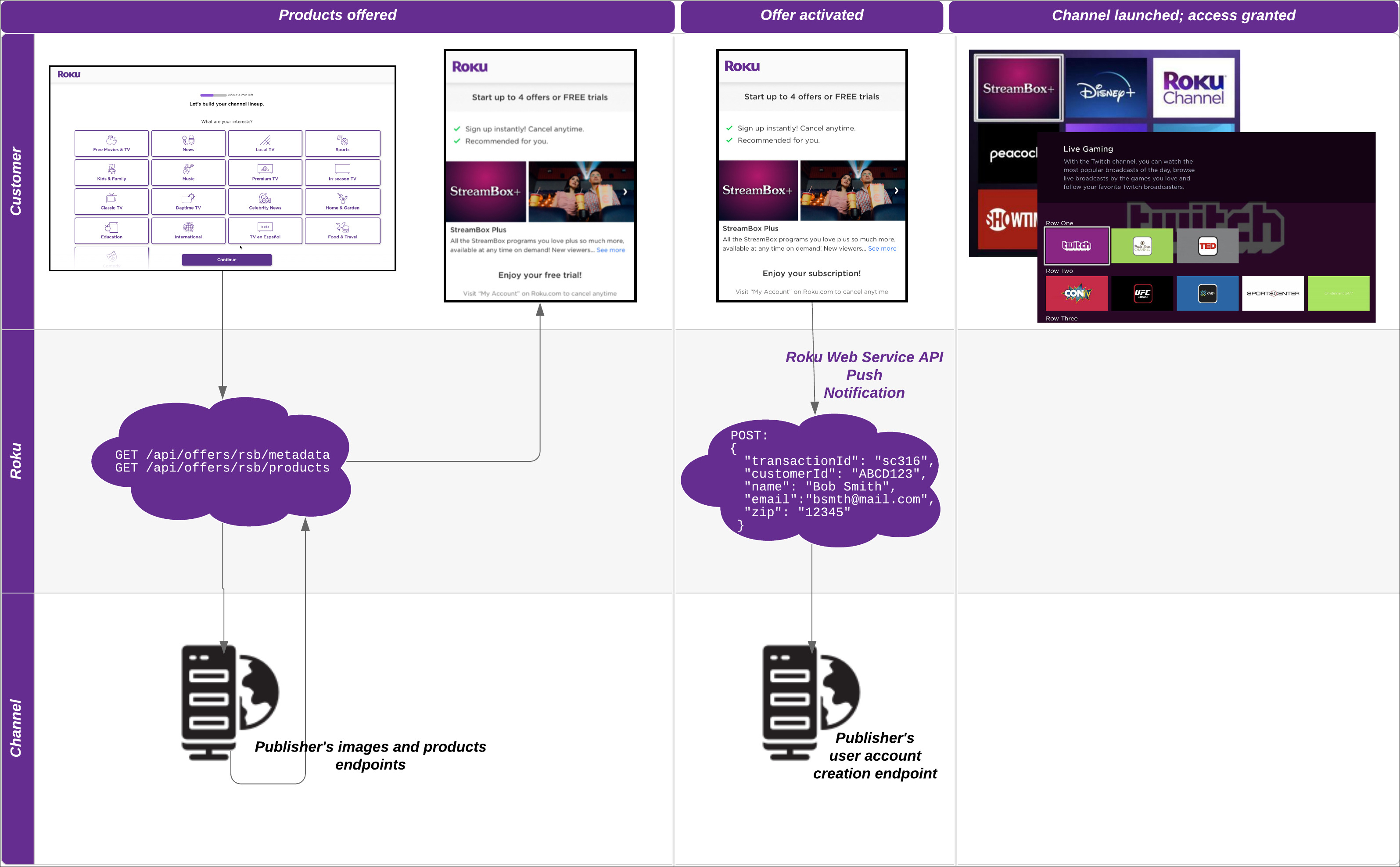
Roku checks for which offers the customer is eligible (customers that already have a subscription for a specific service are ineligible for free trial offers for that service). Apps leverage a SHA-512 hashed email address included in Product API calls to the app's product endpoint to determine whether customers are eligible for their offers. Roku then retrieves the app's content images and trial products from the publishers' app images and products endpoints, respectively.
Based on the answers to the survey questions, the customer's eligibility, and other signals, a list of offers from different apps is displayed to customers. For example, if a customer selects music as one of their interests, their offers will likely include a music streaming service (the inclusion of an app in the list, however, cannot be guaranteed; the recommended apps are derived solely from the survey responses). The customer can then select which apps they subscribe to and then select specific offers.
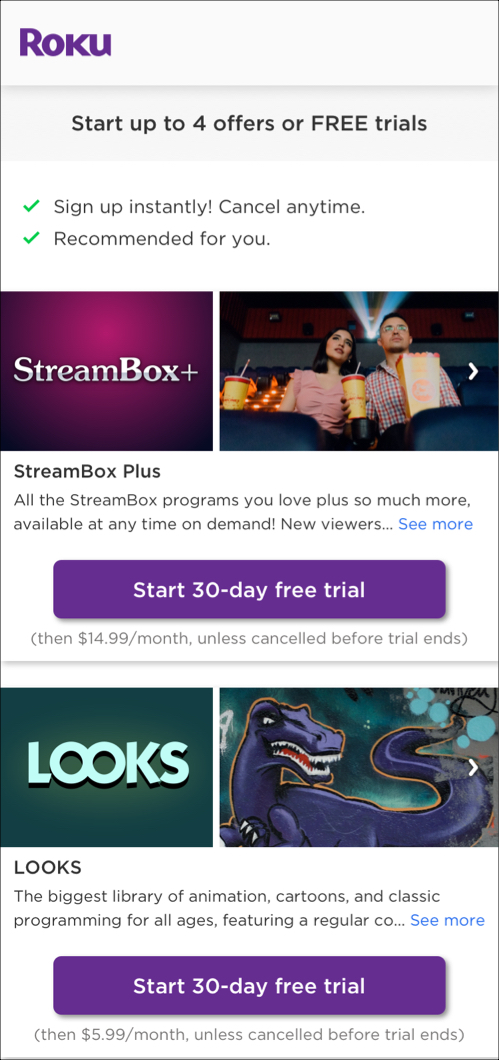
Once an offer is presented to a customer and they select it and confirm the transaction, apps must honor the terms of the offer, regardless if the customer is actually eligible for the offer. To determine customers' offer eligibility, you must use the SHA-512 email hash passed in the products API calls.
Once the customer confirms the transaction, the publisher's account endpoint receives the customer's information via a push notification from the Roku Pay web services. This enables the publisher to create a user account in their backend system for the customer automatically.
After the transaction is completed, the app is automatically added to the home screen of the customer's Roku devices. When the customer launches the app, they can directly access content without any additional steps—if the publisher has created a user account for them. If the publisher has not created a user account for the customer upon app launch, the app must use the alternative account creation method of calling the ChannelStore APIs to validate the customer's subscription, get their information, and store access tokens in the device registry and in the Roku cloud.
Prerequisites
Apps must have completed the following integrations to participate in Roku Instant Signup:
-
Roku Pay. Enable Roku to create trial subscriptions and handle billing for auto-renewals on app.
-
Roku Pay Web Service API push notifications. Receive personal information granted by customers to create user accounts on their behalf automatically.
-
On-device authentication. Validate subscriptions activated through Roku Pay before granting customers access to content.
-
Automatic Account Link. Automatically sign customers in when they activate additional Roku devices linked to their same Roku account.
Getting started
To get started with the Instant Signup integration, follow these steps:
-
Verify that your app meets the listed prerequisites.
-
Contact the Roku Partner Success team. They will determine whether your app is eligible for Instant Signup.
-
Build the required metadata and products APIs. See Integrating Instant Signup for more information on the requirements for these APIs.
-
If you plan on using the SHA-512 email hashes included in the products API calls to determine customers' offer eligibility, verify that your user account lookup tables include the SHA-512 email hashes and implement logic to return offers based on the products (if any) already associated with the hash. See Using email hashes to determine offer eligibility for more information.
-
Provide Roku with the following:
- The production image and product API endpoints (these production URLs are final and may not be changed once provided).
- The app ID for the beta version of the app.
- The app's Roku Pay API Key, which is used to sign and verify API calls.
- The title, company name, privacy URL, and terms URL to be included in the legal disclaimer text that is displayed directly before the customer signs up for an offer.
Integrating Instant Signup
Apps must complete the following steps (in addition to completing the prerequisites) to integrate into Roku Instant Signup:
-
Implement images and metadata API: Apps must provide an images endpoint that Roku can call to get the app image and any other metadata related to the content on the app.
-
Implement personalized product display API: Apps must provide a products endpoint that Roku can call to get the offer to be displayed to the customer.
-
Create user accounts: User accounts must be created before customers can access content; therefore, apps must implement additional account creation logic. User accounts can be created automatically after the customer activates a subscription and upon the user launching the app.
It is recommended that both the images and products APIs use the same domain (for example, https://mychannel.com/api/offers/rsb/images and https://mychannel.com/api/offers/rsb/products).
Implementing images API
Apps must implement an API that retrieves the images and description of the app to be displayed to customers. The following table lists the requirements for implementing the Images API:
| Item | Description | |||||||||
|---|---|---|---|---|---|---|---|---|---|---|
| Endpoint | /api/offers/rsb/images | |||||||||
| Method | GET | |||||||||
| Header | The HTTP header of the GET requests includes a JSON Web Token (JWT) for verifying that the API call is from Roku and the customer's locale for determining which offer image to display to the customer.
|
|||||||||
| Response | The API returns the following: - An images array. This array contains between 5 to 15 image URLs specifying the app content posters to be displayed. The first image returned must be the app logo (a 160X120 JPG with 72ppi minimum resolution). Other images must be 213X120 JPG with 72ppi minimum resolution, per the Image specifications. - A description string. This is a maximum 200-character string summarizing the app. The description may not include any pricing information. Syntax: Example: |
|||||||||
| Error |
|
Image specifications
The images used for the app must meet the requirements for width, height, minimum resolution, and format.
| Specification | Requirement |
|---|---|
| Width | 213px |
| Height | 120px |
| Minimum resolution | 72ppi |
| File format | JPG |
Poster/artwork specifications
The posters/artwork with the content or networks featured in the app are used to highlight the app's offerings. The posters/artwork must meet the following requirements:
| Specification | Requirements |
|---|---|
| File format | JPG |
| Aspect ratio | 4:3
|
| Licensing | Posters/artwork must be licensed for usage. Dates that posters may be used must be specified |
Implementing products API
Apps must implement an API that retrieves the product offers to be displayed to the customer when they click an app image. Apps may return offers for up to three unique products (for example, for example, an ad-supported plan, monthly limited-ads plan, and monthly premium ad-free plan). Apps may not return different offers for the same product (for example, returning 7-day and 30-day free trials for the same product is not allowed).
Each product will include its associated name and description, which were entered in the Product Name field on the Manage In-app Products page within the Developer Dashboard.
To change the product offers that are displayed to customers, apps must contact the Roku Partner Success team before making any updates.
Apps can use the ChannelStore.GetCatalog command to get a list of products associated with the app, including whether a free trial period or introductory pricing is offered.
The following table lists the requirements for implementing the personalized product display API:
| Item | Description | ||||||||||||||||||
|---|---|---|---|---|---|---|---|---|---|---|---|---|---|---|---|---|---|---|---|
| Endpoint | /api/offers/rsb/products | ||||||||||||||||||
| Method | GET | ||||||||||||||||||
| Headers | The HTTP header of the GET requests includes a JWT token for verifying that the API call is from Roku, and the customer's email hash, locale, and activation date for determining which offers the customer is eligible for:
|
||||||||||||||||||
| Response | The API returns a Products array, which contains a list of product objects. The following information is included for each product in the array:
Syntax: Example: If the customer is not eligible for any offers, return an empty array. |
||||||||||||||||||
| Error |
|
Using email hashes to determine offer eligibility
Apps should leverage the email hash included in the Products API GET requests to verify whether a customer is eligible for a specific offer during activation before returning an offer to Roku (the email hash is based on the email address provided and verified by the customer prior to entering the offers flow).
- If the user is not in your system or they already are in your system but not a current subscriber, they are eligible for a free trial, discount offer, or, direct-to-paid product. In this case, send the eligible products to Roku in the Products API response.
- If the user is already in your system and a current subscriber, they are not eligible for an offer. In this case, send
<null>in the Products API response.
The customer's SHA-512 hashed email address (unsalted) is included in a roku-reserved-email-hash field within the HTTP request header (the email address is lowercased before being hashed).
The SHA-512 hashing algorithm is an industry-standard one-way function for hashing customers' contact information so that it can be passed anonymously between platforms. Because the hash functions as an anonymous ID, no consent is required order for it to be passed.
Roku does not send any personally identifiable information (PII) in the calls to your products endpoint (for example, raw email addresses may not be sent). Only SHA-512 email hashes are included.
The length of the input used in this algorithm may vary, but the output is always a fixed length. This means that an infinite number of input strings can be used to generate a hash, which makes it impossible to reverse the hash and get the PII from which it was created. Consider the modulo operation as an example. The result of 5%4 is 1; however, another party would have no way to determine the numbers used to get the result of 1.
The following diagram illustrates how the SHA-512 email hash is used to determine offer eligibility:

Creating user accounts
Apps must use Roku Pay Web Service API push notifications to automatically create new user accounts in their backend system when customers sign up for a subscription. To integrate push notifications, go to the Developer Dashboard and then click Roku Pay Web Services. Under Push Notification URL, enter a secure URL for receiving push notifications and keep the Stop sending billing notifications check box cleared.
Additionally, apps can use the ChannelStore APIs to create new customer accounts when customers launch their app but do not have a user account.
It is recommended that apps requiring user accounts support both account creation scenarios. Automatically creating user account upon activation of the trial subscription enables the customer to directly and seamlessly access content upon launching the app without any additional input. In the event that the app's web server listener is not responding to the push notifications or there is some other push notification failure, account creation can still be completed upon app launch as a backup.
Creating user accounts upon activation
Apps can provide an account endpoint that accepts POST requests. This enables apps to receive the customer's information that is collected during device activation and use it to create new user accounts in their backend system automatically.
When a customer selects a subscription, they are prompted to grant Roku permission to share their information with the app. If the customer consents, the sale notification will additionally include the customer's name, email address, billing zip code, and app-specific unique id. The following sample purchase notification demonstrates this:
{
	"customerId": "168c2bda168854bb805f24ab296390a3",
	"transactionType": "Sale",
	"transactionId": "bf9af441015311ed810f0a58a9feac11",
	"channelId": "1143791",
	"channelName": "1p6d9g0o7k7w9a1m",
	"productCode": "UQcEYh2fVuKqS6cTuR3X_MonthlySub",
	"productName": "UQcEYh2fVuKqS6cTuR3X_MonthlySub_name",
	"price": 0.99,
	"total": 0.99,
	"tax": 0.0,
	"currency": "usd",
	"originalTransactionId": "bf9af441015311ed810f0a58a9feac11",
	"eventDate": "2022-07-11T19:58:00Z",
	"expirationDate": "2022-08-11T19:57:58Z",
	"comments": "New order processed.",
	"responseKey": "bf9af441015311ed810f0a58a9feac11",
	"email": "[[email protected]](mailto:[email protected])",
	"zip": "95032",
	"gender": "F",
	"firstName": "channelstore",
	"lastName": "qa",
	"birthMonth": 3,
	"birthYear": 1990,
	"purchaseChannel": "WEB",
	"purchaseContext": "ISU",
	"federationToken": "763edc77-4b19-547b-8c48-23a7a0234327",
	"pucId": "763edc77-4b19-547b-8c48-23a7a0234327",
	"isFreeTrial": false
}
If the user subscribes to your app via an Instant Signup on-device offer, the purchaseChannel and purchaseContext fields are set to "DEVICE" and "ISU", respectively.
"purchaseChannel": "DEVICE",
"purchaseContext": "ISU",
Use the information in the push notification to create a new account for the customer. Store the transaction ID, and the customer's email address, name, and user ID in your system. As part of the on-device authentication flow, the transaction ID is used to validate access to content upon subsequent app launches.
In addition, you should generate a secure temporary password and store it in the customer's account, and then send the customer a "Welcome" email with information on how to reset the temporary password.
Alternatively, you can ask the user to create a password upon launching the app and then complete the creation of the user account—in as few steps as possible. However, this approach is not recommended as the additional password step increases friction and therefore may increase churn.
Upon launch, apps may only display a single dialog for entering a password. The dialog may not serve any purpose other than password creation, and multiple dialogs are not allowed.
Creating user accounts upon app launch
Apps can leverage the ChannelStore APIs and Roku Pay web services to create user accounts when customers launch their app. This ensures that user accounts have been created before customers can access content. Creating user accounts with these APIs entails getting the purchase data, validating the subscription, and storing access tokens in the device registry and in the Roku cloud. The following steps describe how to do this:
-
Call the ChannelStore.getPurchases command. This causes the purchases field to be set to a ContentNode containing the results of the command. The purchases contentNode contains a child content node for each purchase.
myChannelStore.command = "getPurchases" -
Get the transaction ID from the purchaseId field of the child content node. Find the subscription to be validated using the code or productType fields of the child content node.
if (myChannelStore.purchases <> invalid) count = myChannelStore.purchases.GetChildCount() for x = 0 to count - 1 if (myChannelStore.purchases.getChild(x).code = "monthlySubscription") transactionId = myChannelStore.purchases.getChild(x).purchaseId end if end for end if -
Pass the transaction ID into a validate-transaction Roku Pay Web Service API call.
transactionId = myChannelStore.purchases.getChild(x).purchaseId -
Check the isEntitled field in the response to verify that the user is entitled to the content.
<result> <transactionId>aa3f3a2479ea4e0c88d9a2d500f33e74<transactionId> ... <isEntitled>true<isEntitled> ... <rokuCustomerId>ac4d2fd61f624451a61aa2cf00a766a1<rokuCustomerId> <expirationDate>2020-08-22T14:59:50<expirationDate> <result> -
Check the access token in your entitlement server to verify whether it is still valid. If the access token is valid, generate a refresh token in your system and store it in the device registry and in the Roku cloud, and then grant the customer access to the content. In this case, no additional steps are required and authentication is complete.
-
Call the roRegistrySection.write() and roRegistrySection.flush() methods to permanently store the refresh token on the device:
reg_sec.write("access_token_key_name", "access_token_value") reg_sec.flush() -
Call the ChannelStore.storeChannelCredData command to store the access token in the Roku cloud. You can use the status and response fields of the storeChannelCredDataStatus content node to verify that the command was successful and that the access token stored in the Roku cloud has the specified value.
myChannelStore.channelCredData = "your access token"
myChannelStore.command = "storeChannelCredData "

'check if command was successful
status = myChannelStore.storeChannelCredDataStatus.status
if status = 0
     ...
end if

'check if access token stored in Roku cloud has specified value
 response = myChannelStore.storeChannelCredDataStatus.response
 if response.json.channel_data = myChannelStore.channelCredData
     ...
 end if
-
Offer card construction
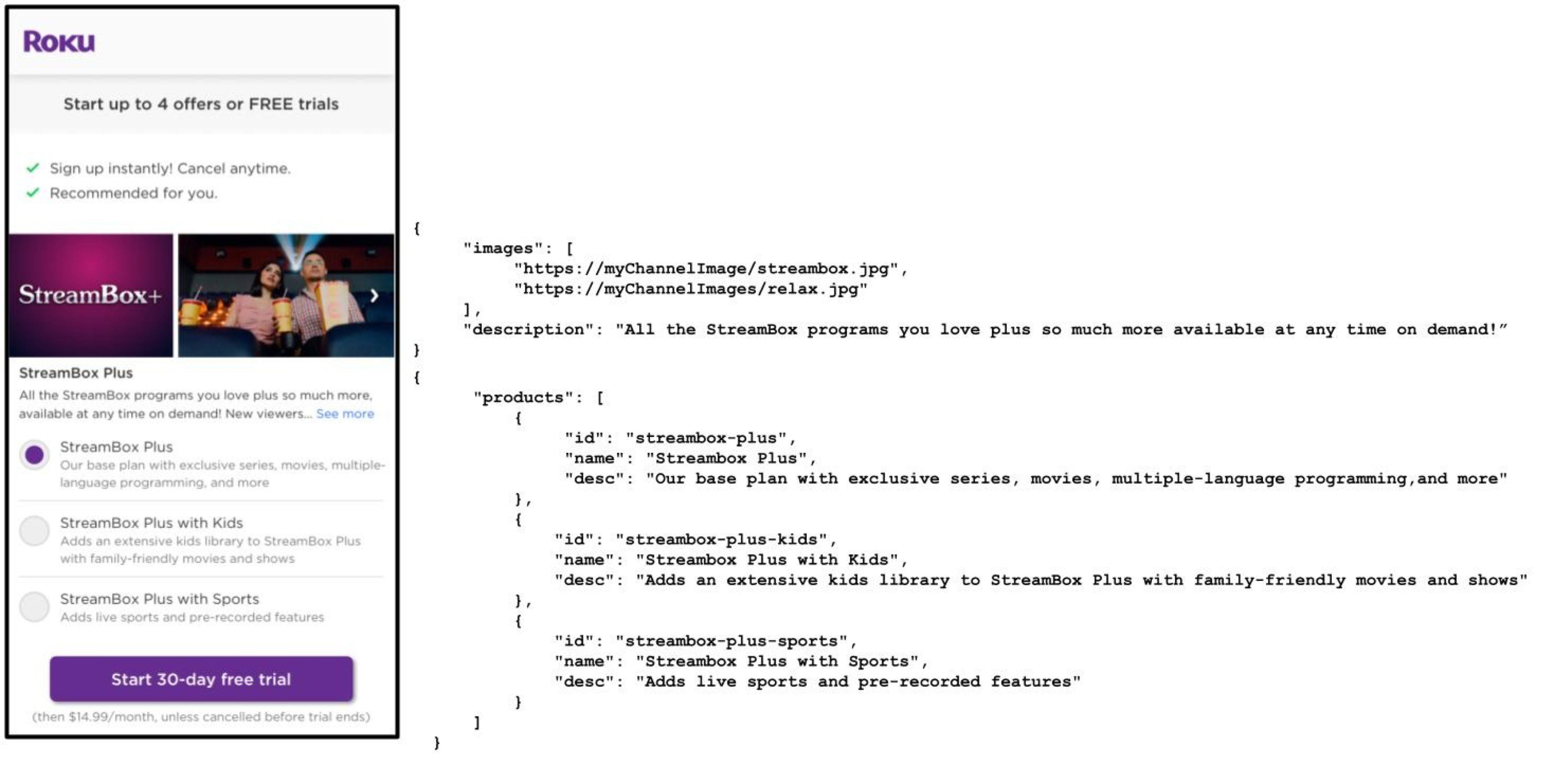
The following graphic demonstrates how an app's offer card is constructed from the data returned by its images and products APIs. Apps provide Roku with the name to be used for the title card (for example, "Streambox Plus"). Roku obtains the price and duration of the offer via calls to the ChannelStore API (based on the id included in the products API response).
The headers and subscription terms displayed in the offer card are fixed and cannot be modified.
Testing
The following process is used to test and verify the app's Instant Signup integration before making offers available to customers in Roku's production environment:
- Roku tests the publisher's final production images and products endpoints in a beta environment to ensure responses are received and adhere to the specifications listed in this document.
- Roku verifies that the app's offer card is displayed correctly.
- Roku tests and deploys the latest build in a beta environment.
- App uses the beta environment to verify and approve their offer card.
- Roku tests and verifies that customers can claim the offer.
Measuring Instant Signup
Apps can identify whether Roku Pay subscription purchase originated from Instant Signup (a customer signing up for a free trial offer is considered a purchase). This may be useful, for example, for publishers to compare the number of subscription purchases made via Instant Signup versus on-device.
The ChannelStore node getPurchases and getAllPurchases commands, roChannelStore.getPurchases function, Roku Pay validate-transaction web service, and Roku Pay Sale push notification include purchaseChannel and purchaseContext fields that indicate the source of the purchase.
| Source | purchaseChannel | purchaseContext |
|---|---|---|
| Instant Signup Web (my.roku.com) | "ISU" | "WEB" |
| Instant Signup (on-device) | "ISU" | "DEVICE" |
| In-app purchase | "IAP" | "DEVICE" |
In addition, the Roku Pay Transaction Report includes a purchase_context column indicating the origin of the sign-up ('isu" or "iap").
Appendix A: Instant Signup user experience
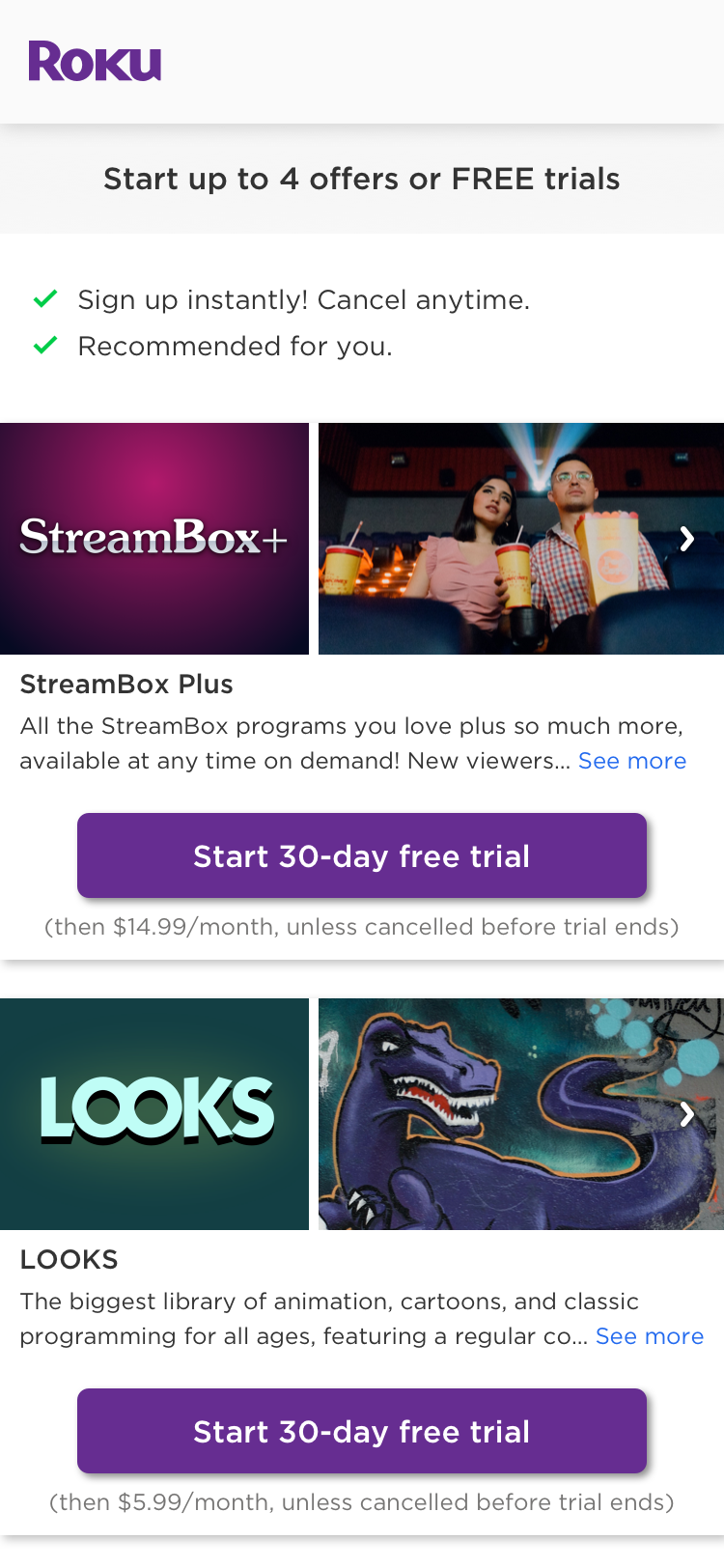
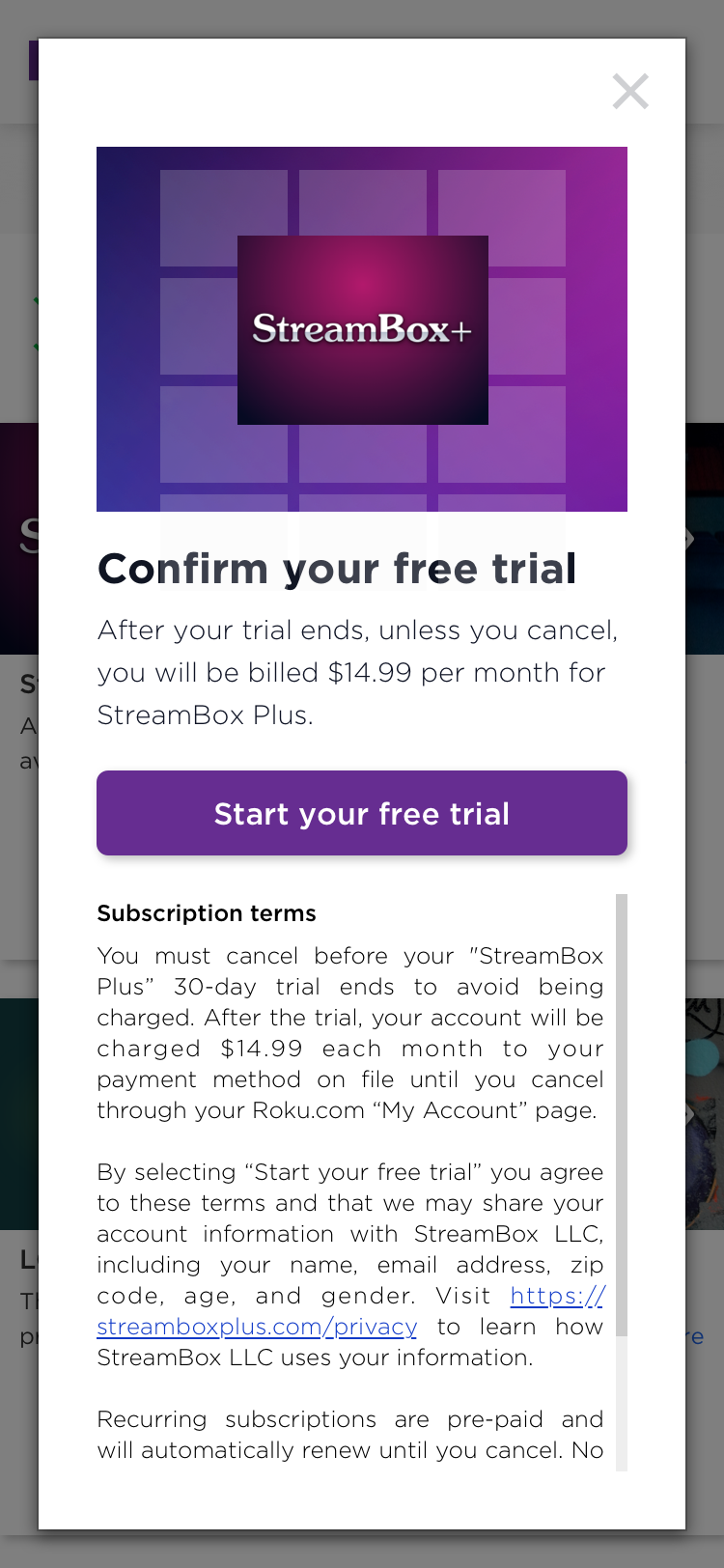
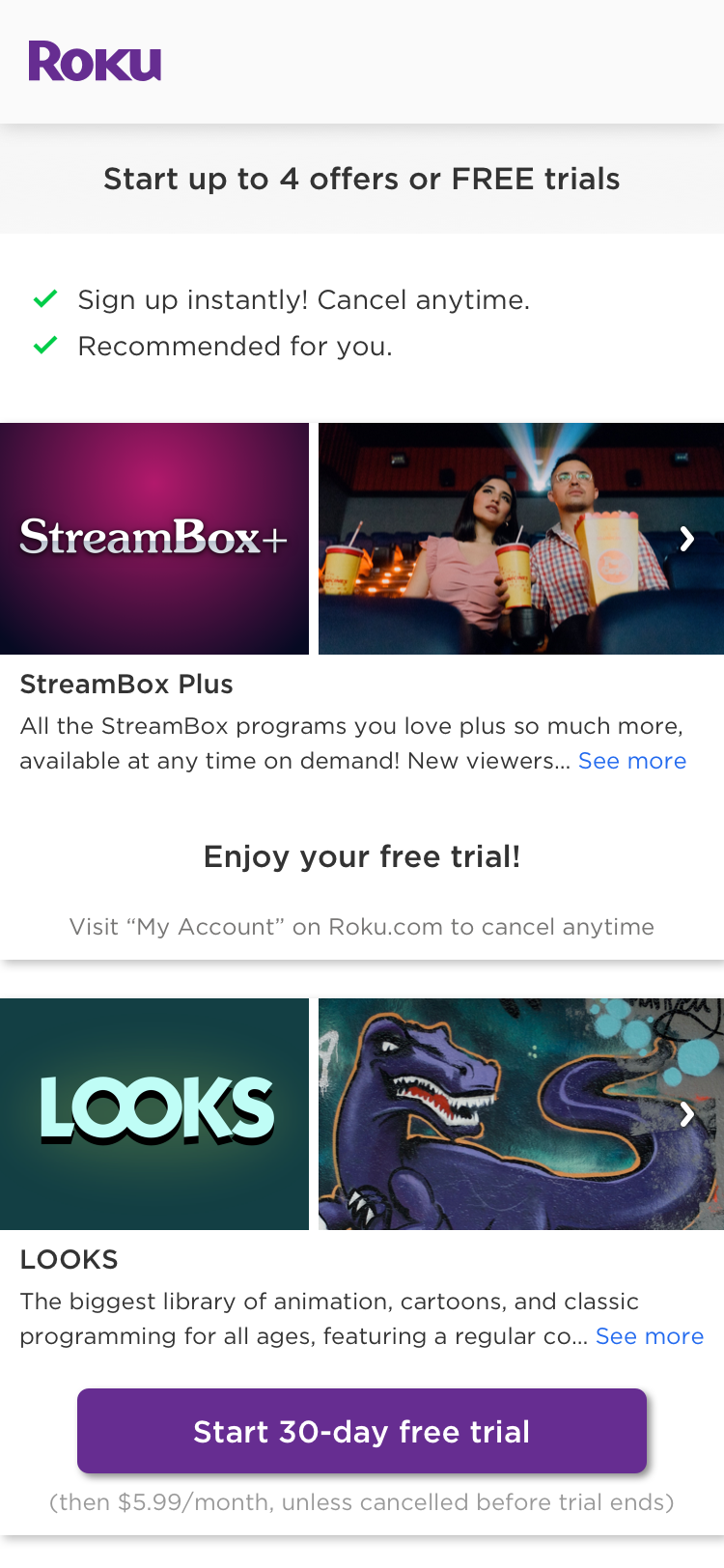
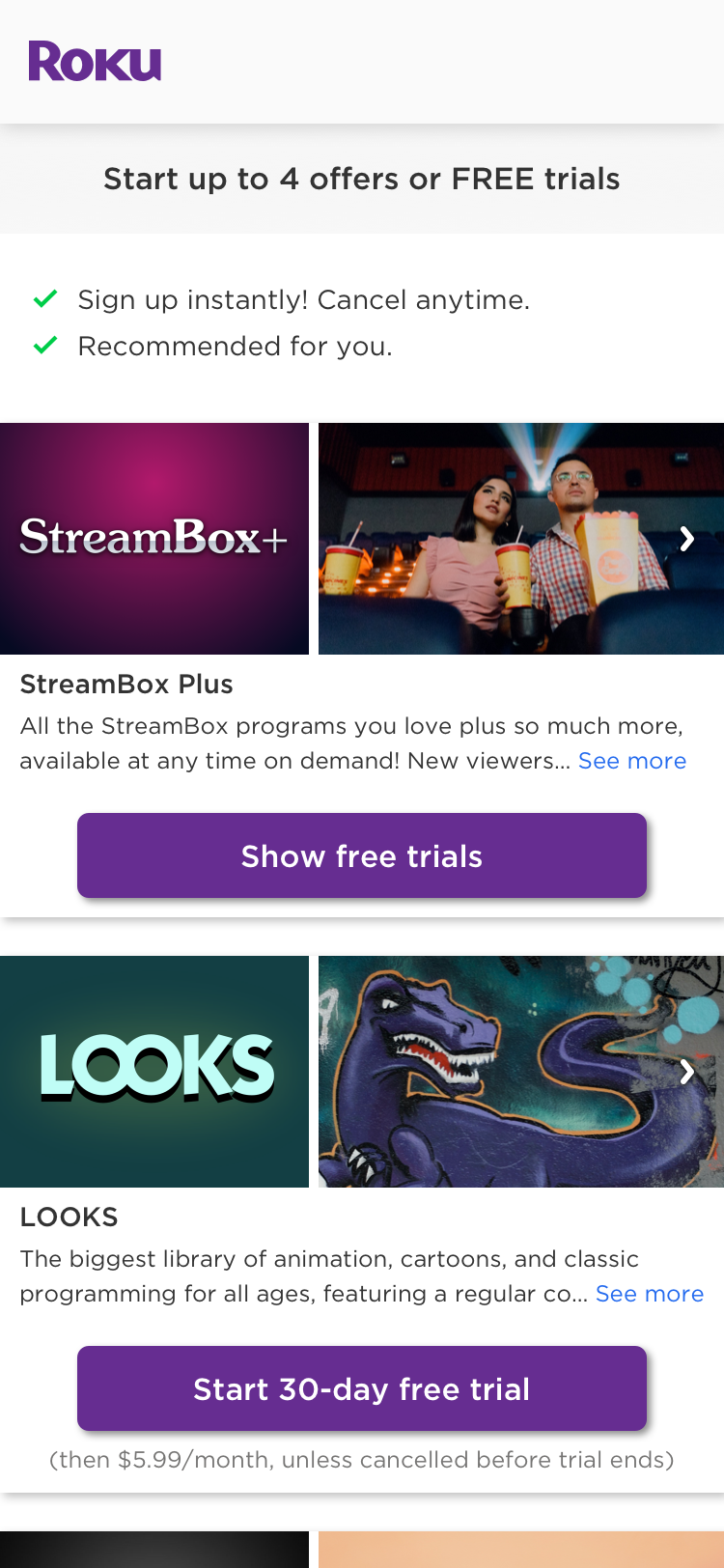
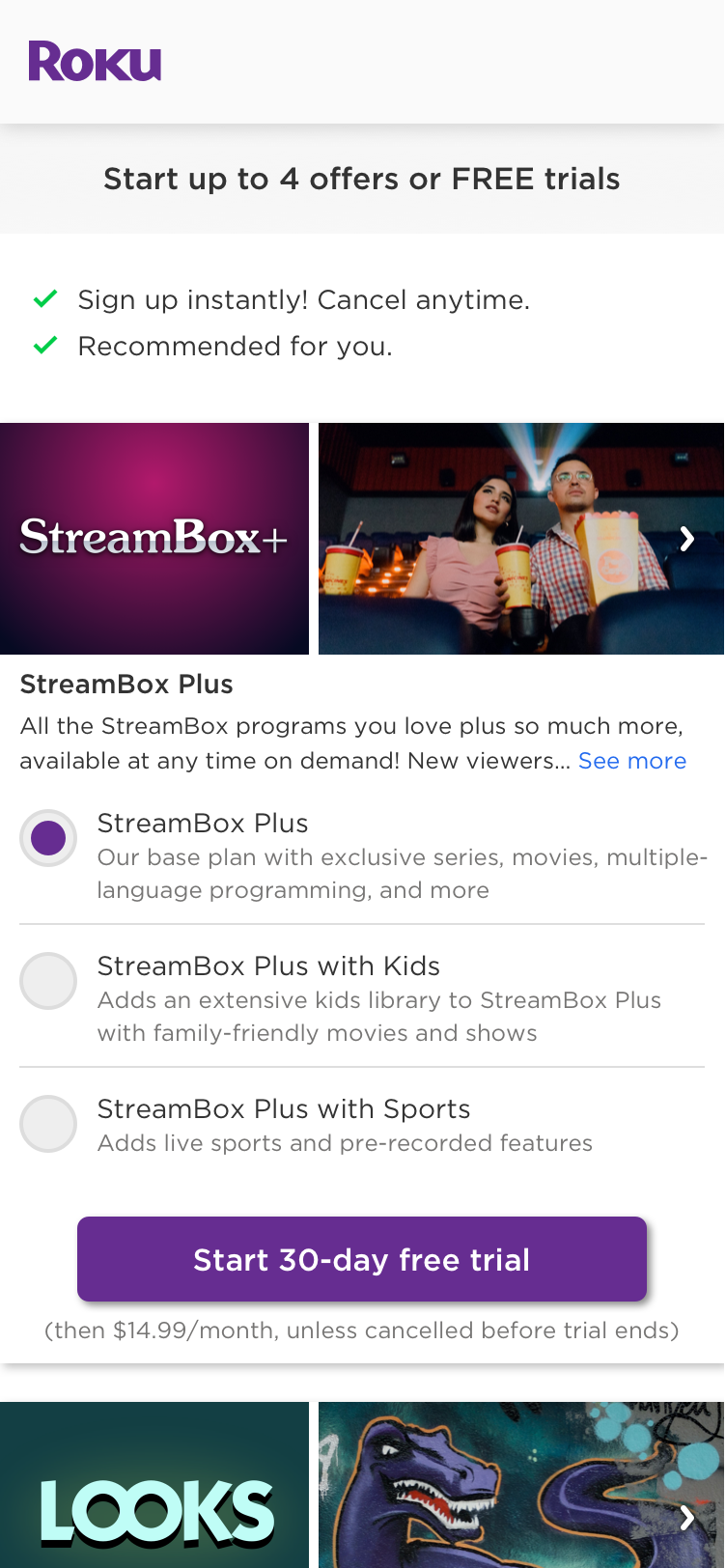
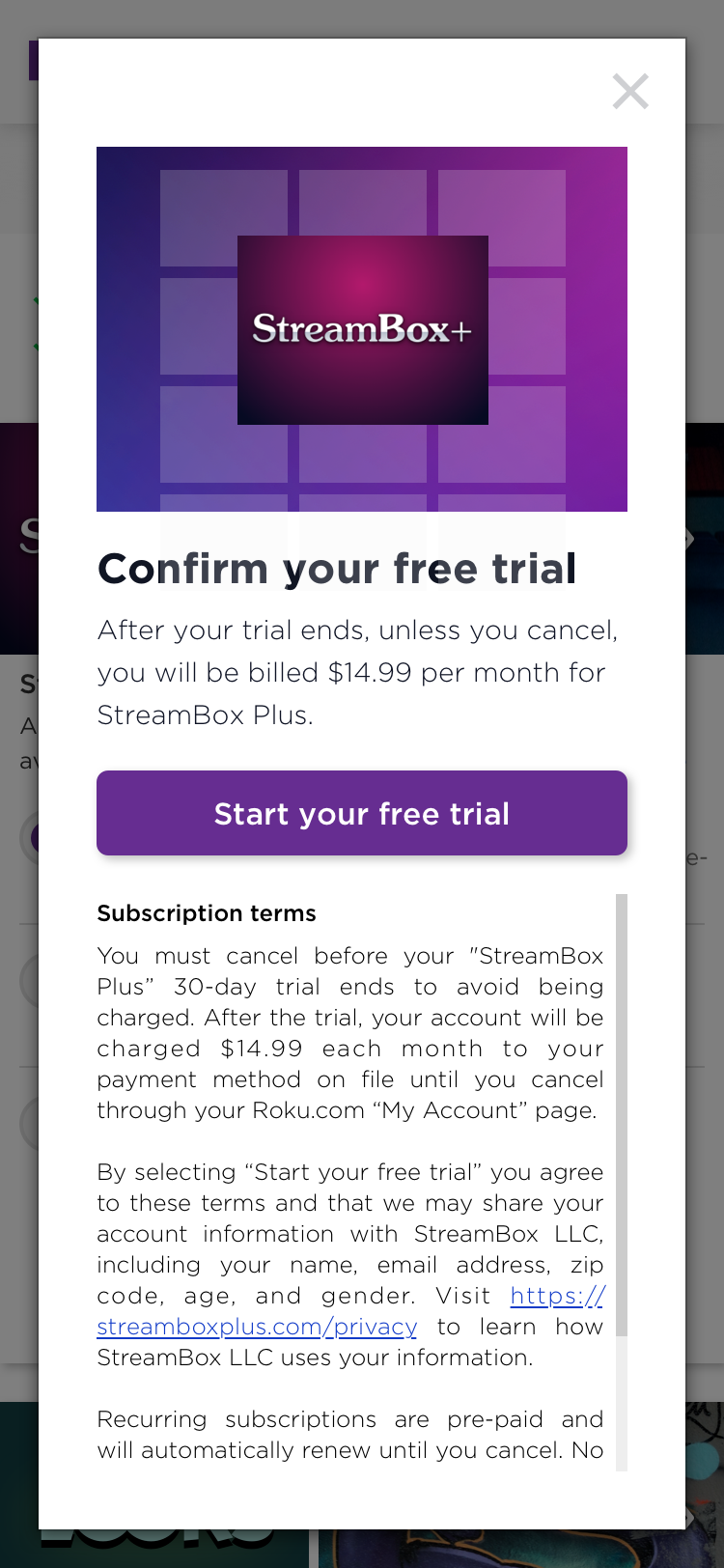
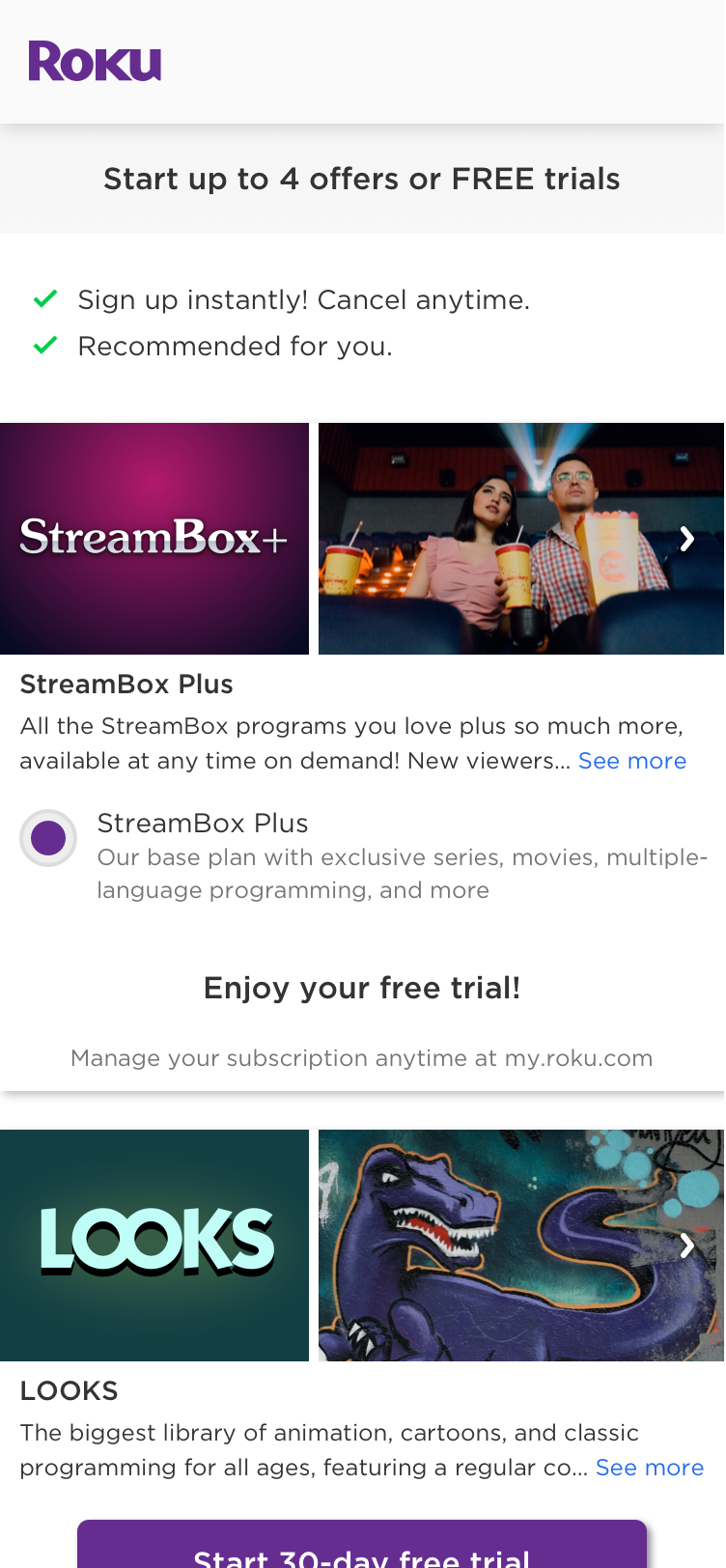
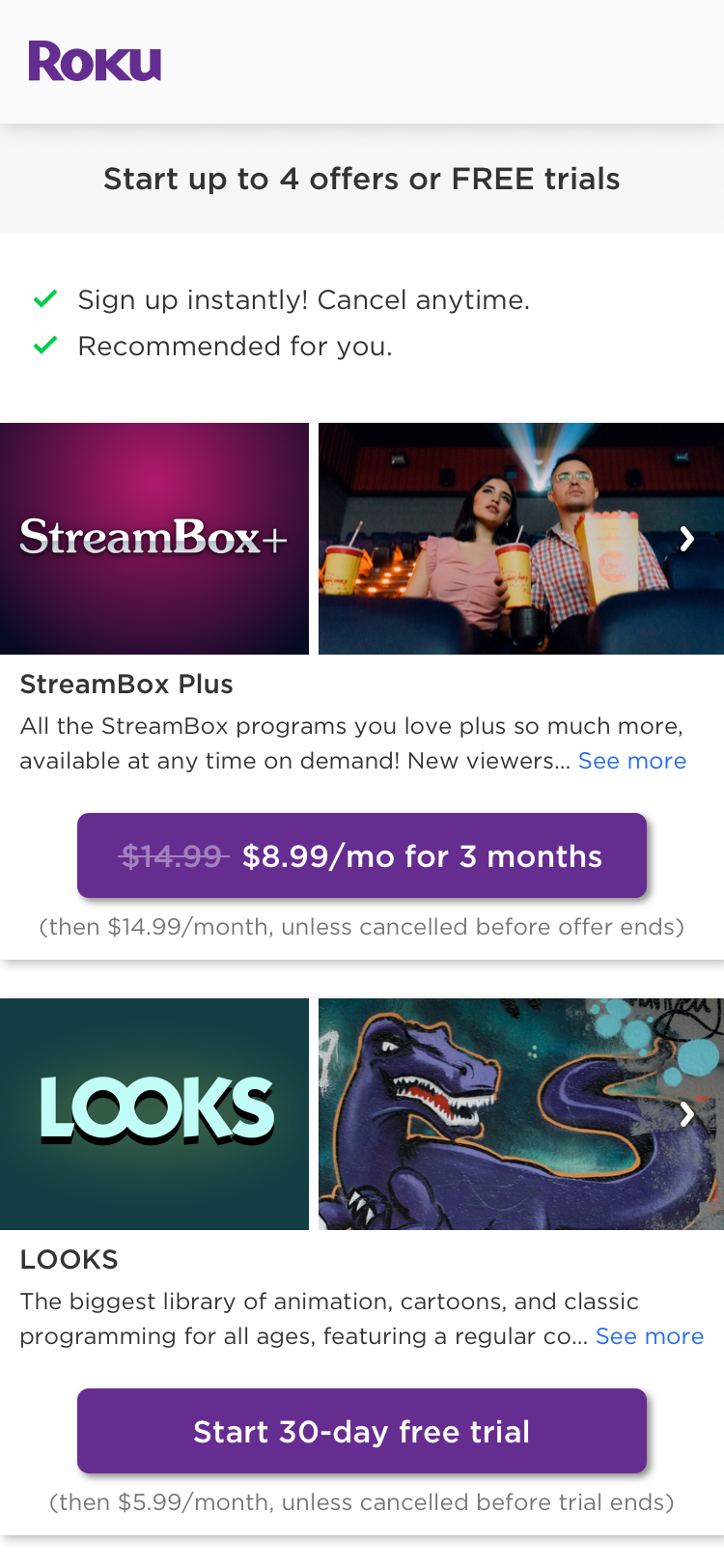
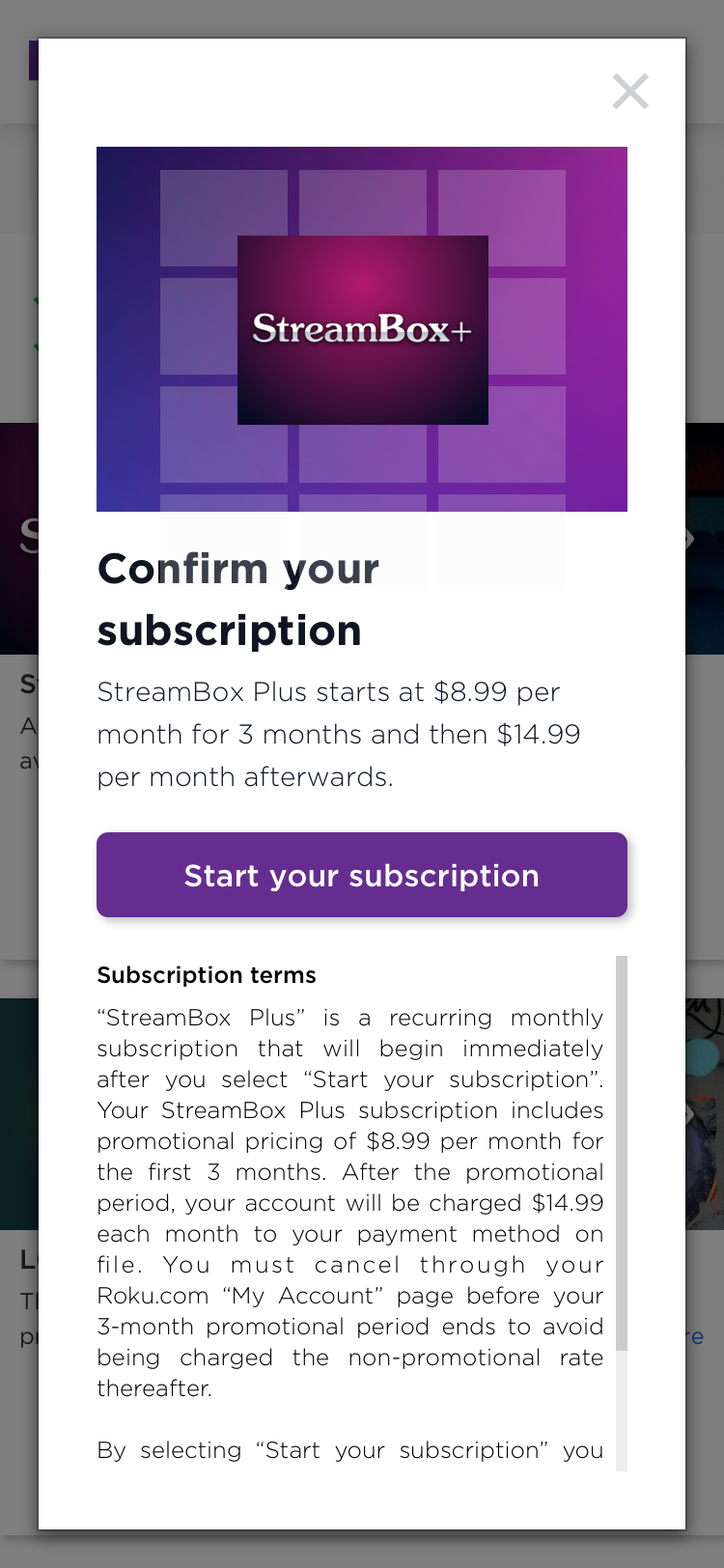
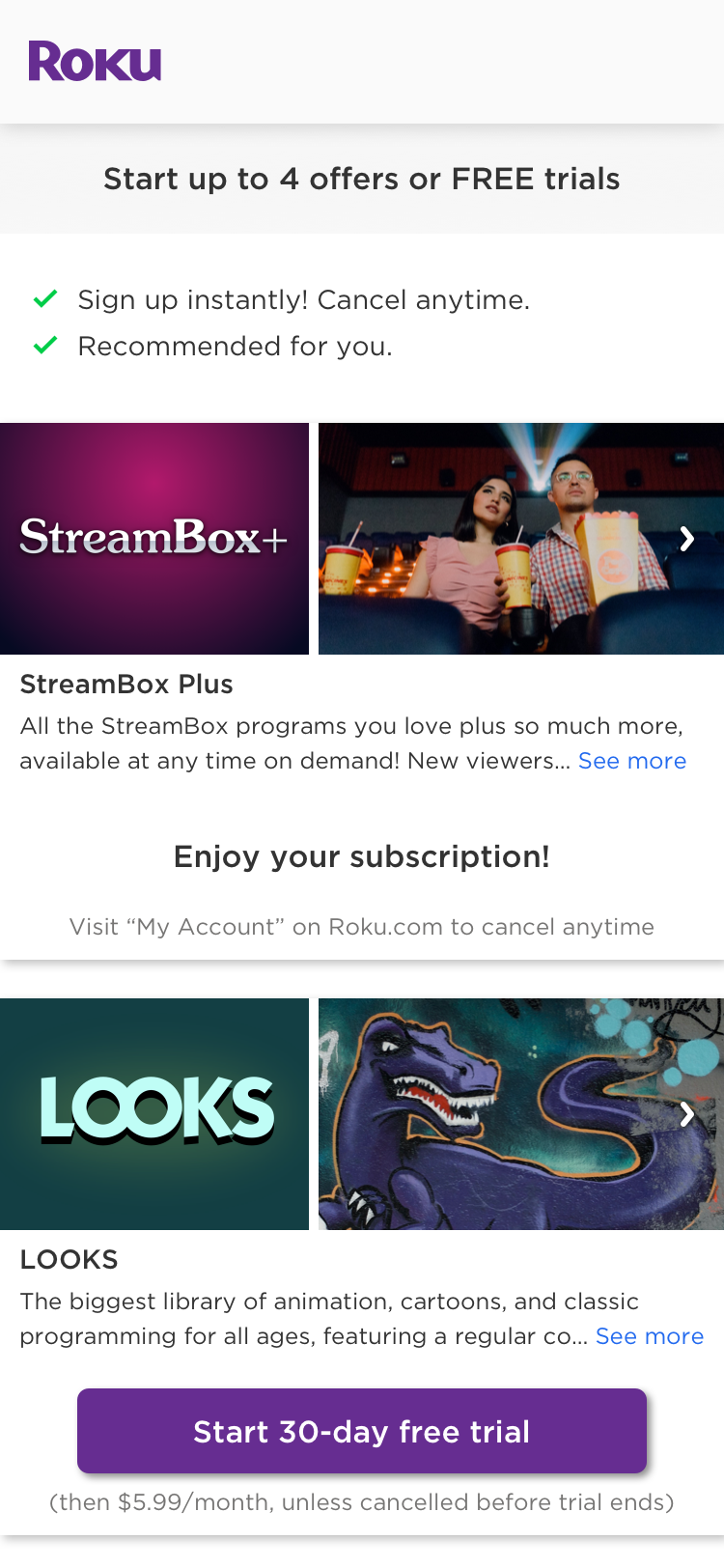
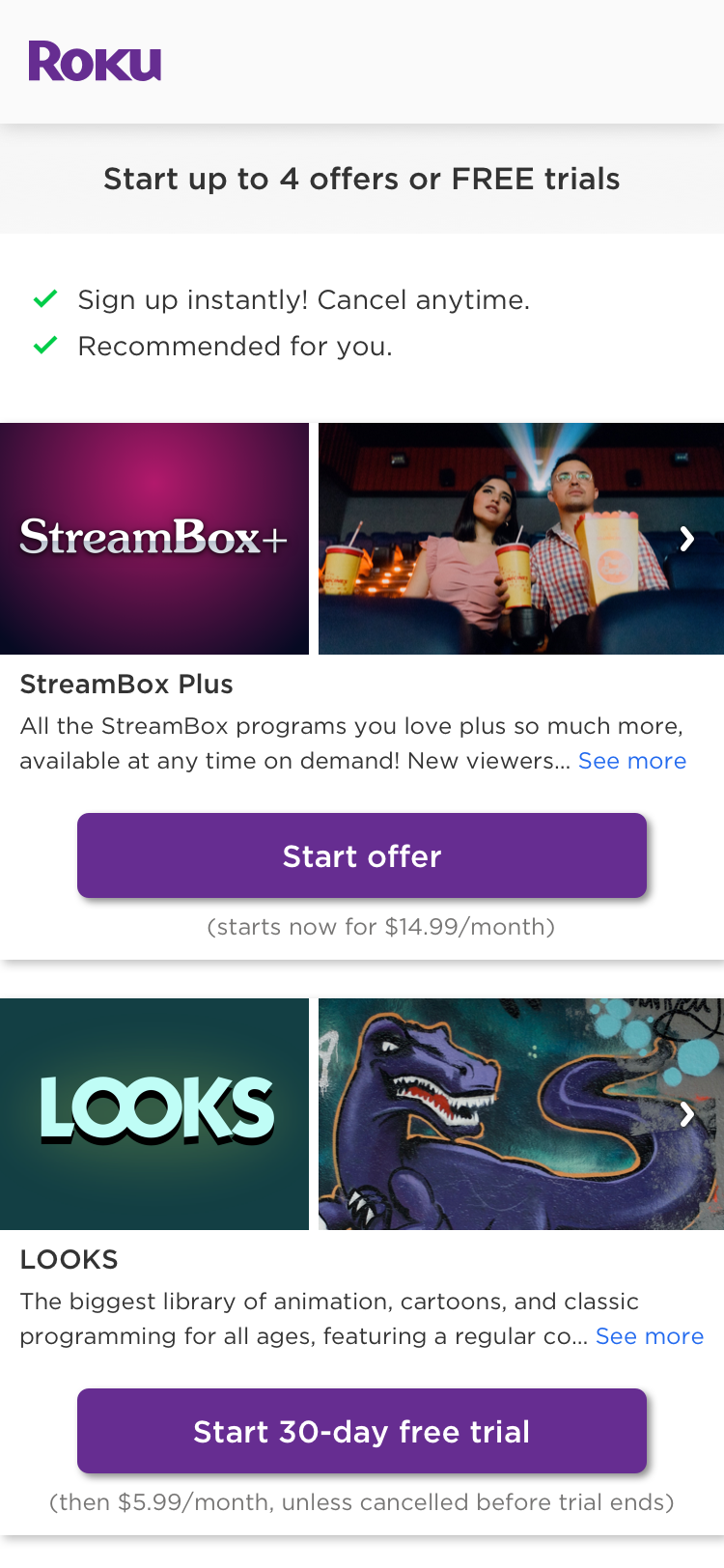
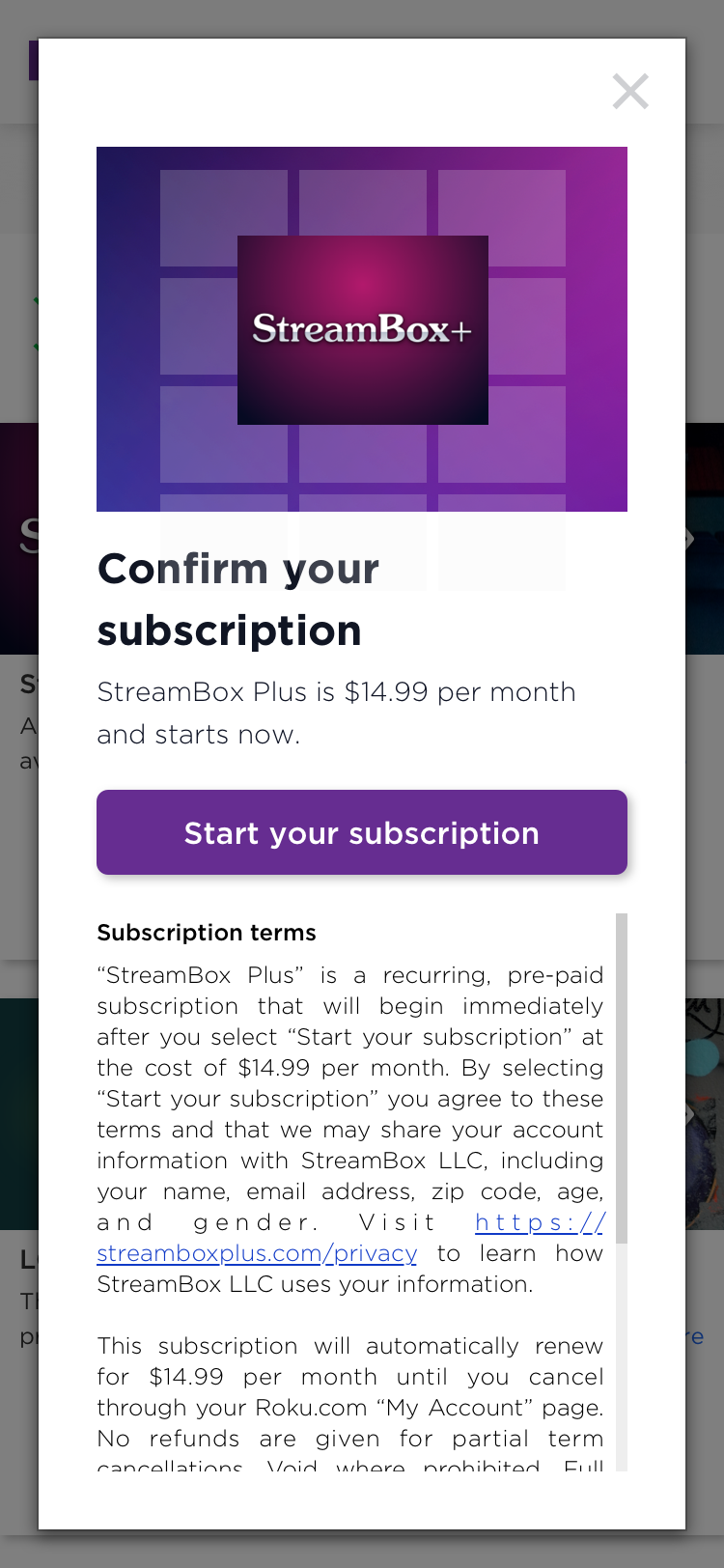
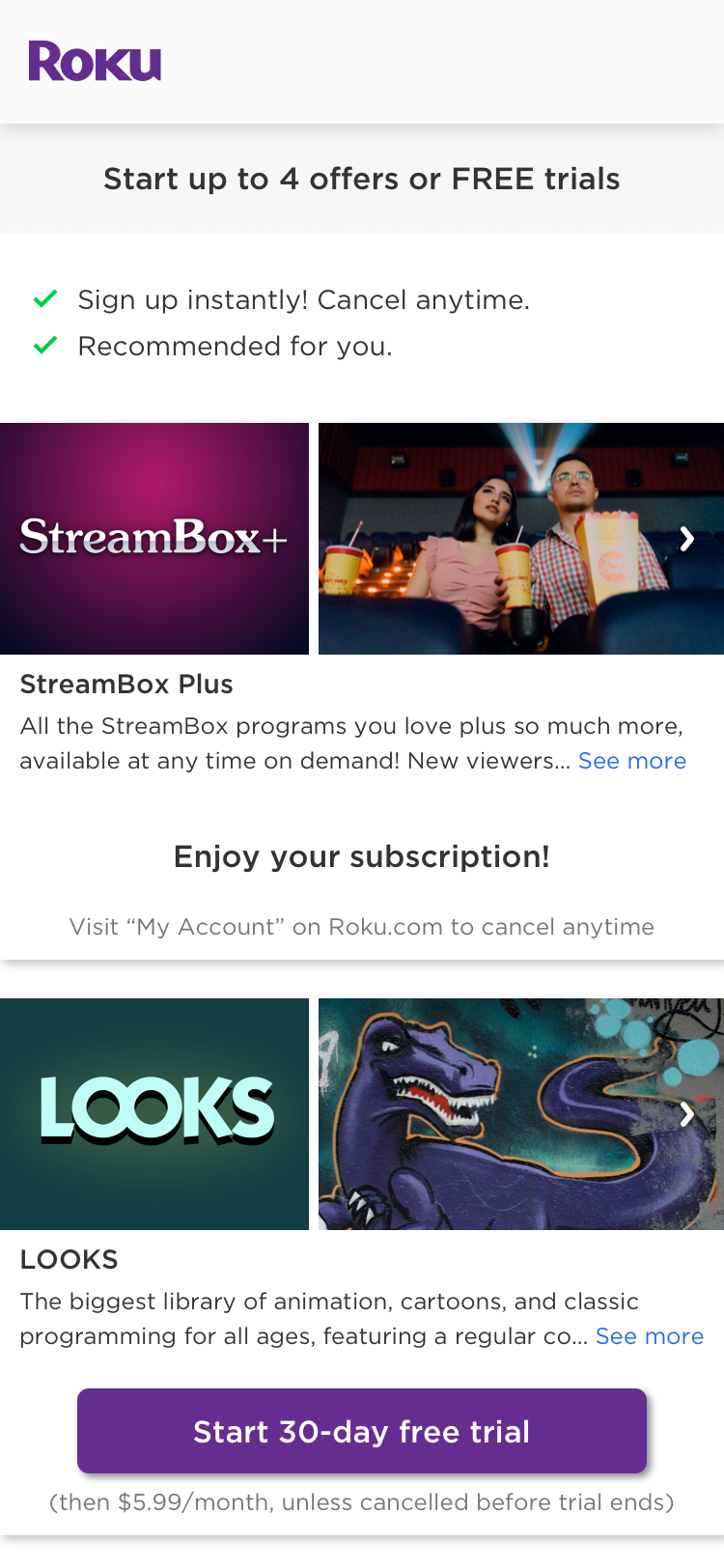
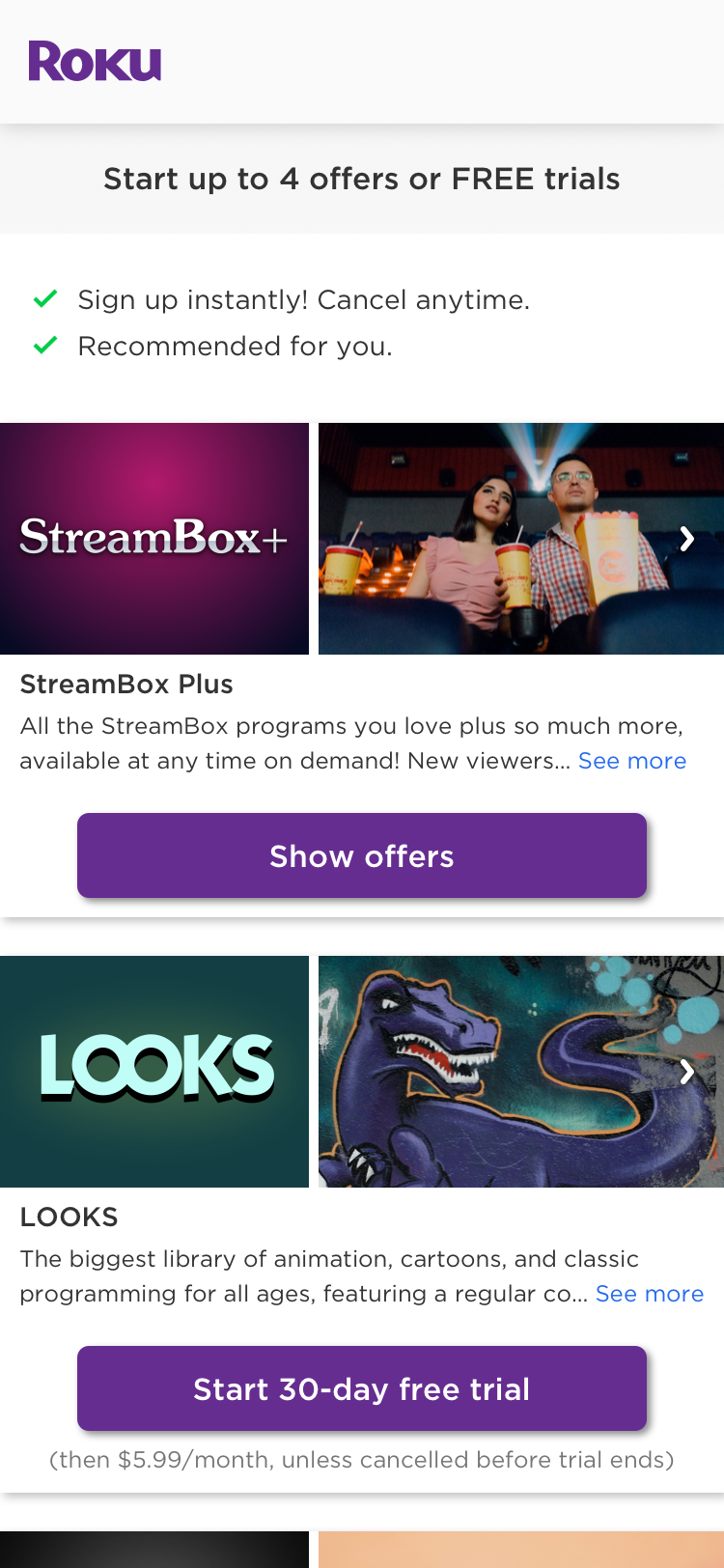
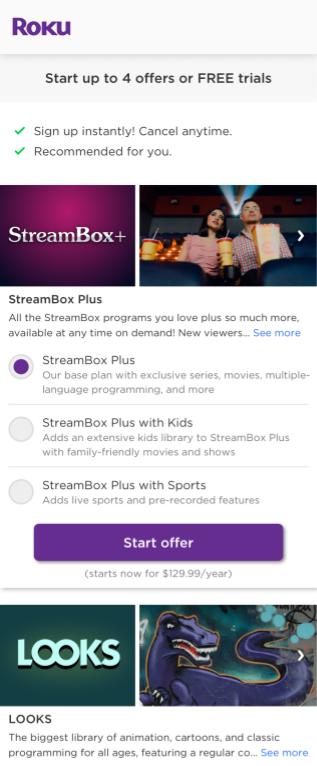
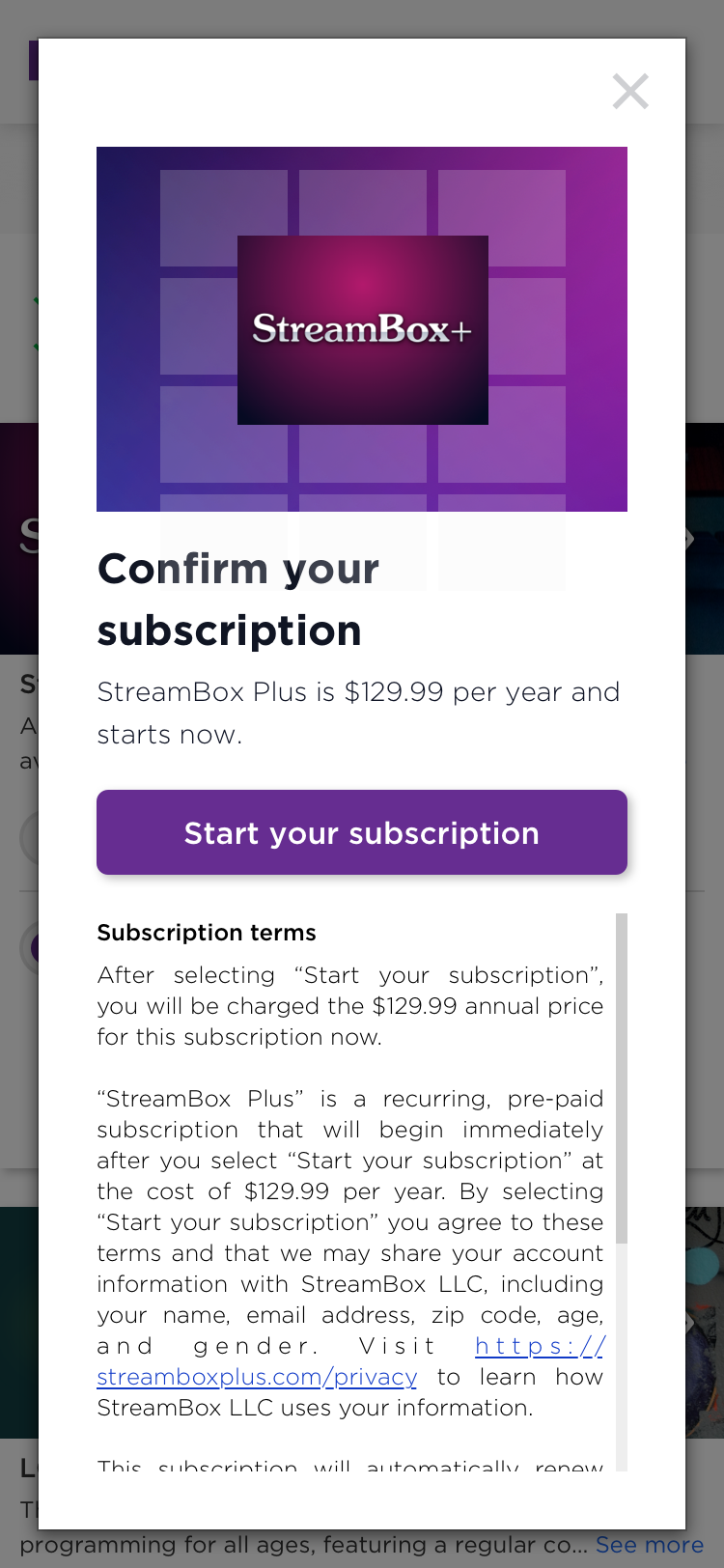
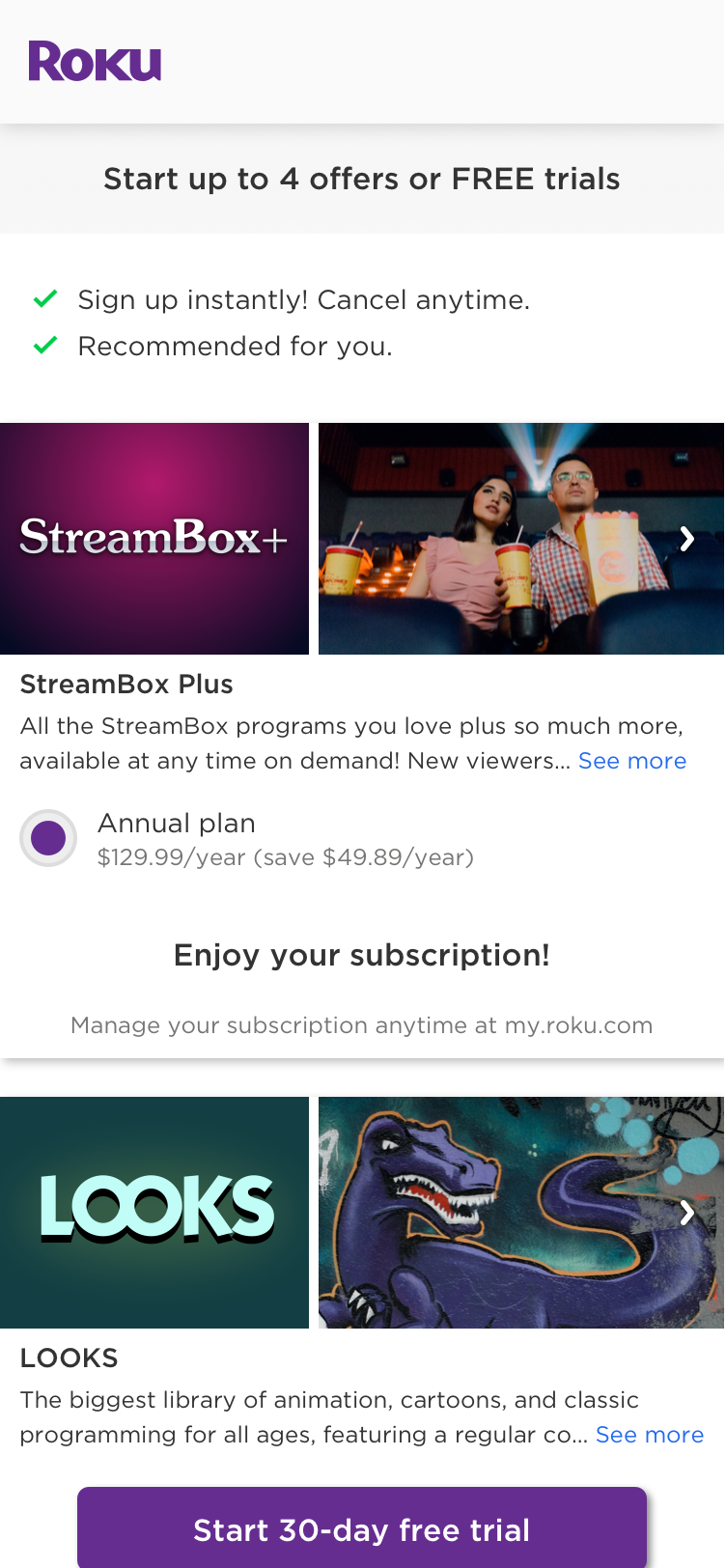
The Instant Signup user experience slightly varies based on whether a free trial, promotional pricing, or standard pricing is offered and whether the offer includes a single plan or multiple plans. The following images illustrate the workflows for each of these scenarios:
Free trial offer - single plan
| Offer | Confirm selection | Success |
|---|---|---|
 |  |  |
Free trial offer - multiple plans
| Offer | Plan selection | Confirm selection | Success |
|---|---|---|---|
 |  |  |  |
Promotional pricing
| Offer | Confirm selection | Success |
|---|---|---|
 |  |  |
Standard pricing - single plan
| Offer | Confirm selection | Success |
|---|---|---|
 |  |  |
Standard pricing - multiple plans
| Offer | Plan selection | Confirm selection | Success |
|---|---|---|---|
 |  |  |  |
Appendix B: Subscription terms
The subscription terms presented in the subscription confirmation dialog, which are fixed and cannot be modified, differ based on whether the offer is a free trial, promotional price, or standard price. This appendix provides the text displayed for each of these scenarios.
Free trial subscription terms
You must cancel before your “<product-name>“<trial duration in days>-day trial ends to avoid being charged. After the trial, your account will be charged <product-price> each month to your payment method on file until you cancel.
By selecting “Start your free trial” you agree that we may share your Roku account information with <publisher name>, which may include your name, email address, zip code, age and gender, to create your account with “<publisher name>.” Visit “<product privacy policy URL>” to learn how <publisher name> uses your information. Access and use of “<product-name>“ is subject to the <publisher terms of service URL>, which may require you to create an account.
Recurring subscriptions are pre-paid and will automatically renew until you cancel. No refunds are given for partial term cancellations. You must cancel before your free trial ends to avoid being billed. You can manage your subscription at my.roku.com. Valid payment method required. A temporary authorization hold may appear on your payment method. Certain promotional offers are available for new subscribers only. Certain promotional offers are subject to change or may be canceled at any time without notice. Void where prohibited.
Promotional pricing subscription terms
“<product-name>“ is a recurring, pre-paid subscription that will begin immediately after you select “Start your subscription”. Your “<product-name>“ subscription includes promotional pricing of <product-price> per month for the first <x> months. After the promotional period, your account will be charged <product-price> each month to your payment method on file until you cancel. You must cancel before your <x>-month promotional period ends to avoid being charged the non-promotional rate thereafter.
By selecting “Start your subscription” you agree that we may share your Roku account information with <publisher name>, which may include your name, email address, zip code, age and gender, to create your account with “<publisher name>.” Visit “<product privacy policy URL>” to learn how <publisher name> uses your information. Access and use of “<product-name>“ is subject to the publisher terms of service URL>, which may require you to create an account.
Recurring subscriptions are pre-paid and will automatically renew until you cancel. You must cancel before your subscription renews to avoid being billed for the next term. You can manage your subscription at my.roku.com. No refunds are given for partial term cancellations. Valid payment method required. Certain promotional offers are available for new subscribers only. Promotional offers are subject to change or may be canceled at any time without notice. Void where prohibited.
Standard pricing subscription terms - single plan
“<product-name>“ is a recurring, pre-paid subscription that will begin immediately after you select “Start your subscription” at the cost of <product-price> per <month|year>. By selecting “Start your subscription” you agree that we may share your Roku account information with <publisher name>, which may include your name, email address, zip code, age and gender, to create your account with “<publisher name>”. Visit “<product privacy policy URL>” to learn how <publisher name> uses your information. Access and use of “<product-name>“is subject to the publisher terms of service URL>, which may require you to create an account.
The subscription will automatically renew for <product-price> per <month|year> until you cancel. You must cancel before your subscription renews to avoid being billed for the next term. You can manage your subscription at my.roku.com. No refunds are given for partial term cancellations. Void where prohibited.
Standard pricing subscription terms - multiple plans
After selecting “Start your subscription” you will be charged the <product-price> <monthly|annual> price for this subscription now.
“<product-name>“ is a recurring, pre-paid subscription that will begin immediately after you select “Start your subscription” at the cost of <product-price> per <month|year>. By selecting “Start your subscription” you agree that we may share your Roku account information with <publisher name>, which may include your name, email address, zip code, age and gender. Visit “<product privacy policy URL>” to learn how <publisher name> uses your information. Access and use of “<product-name>“ is subject to the publisher terms of service URL>, which may require you to create an account.
Updated 9 days ago