
LabelBase
The abstract base class for the Label and MultiStyleLabel nodes, providing text alignment, wrapping, auto-truncating, and other shared text-display behavior
Extends Group
The LabelBase node is an abstract base class for the Label and MultiStyleLabel nodes. The Label node is used to display a string of text with a single style; the MultiStyleLabel node is used display a string of text with mixed styles (for example, plain and bold text, different fonts, and/or multiple colors). The LabelBase node provides the dimensions, text alignment, wrapping, auto-truncating, and other common functionality for its child nodes.
The LabelBase node was introduced in Roku OS 10.5 to provide a single base class for the Label node and the new MultiStyleLabel node, which was added as part of the Roku OS 10.5 release. The Label node now inherits most of its functionality from LabelBase node class. Developers, however, do not need to update their app code to account for this refactoring.
Text Alignment
The LabelBase node uses the horizAlign and vertAlign fields to allow you to position the rendered text relative to a specified bounding rectangle.
Horizontal Alignment
The horizAlign field allows you to position text horizontally relative to the computed width of the label. The computed width is determined in one of two ways:
- If the width field is greater than zero, the computed width is the value of the width field.
- If the width field is equal to zero, the computed width is the rendered width of the text.
There are three possible values for the horizAlign field:
-
left
The left edge of the text is drawn at the 0 x-coordinate position of the LabelBase node local coordinate system. -
center
The horizontal center of each line of text is positioned at the x-coordinate corresponding to half the computed width of the LabelBase node local coordinate system. -
right
The right edge of each line of text is positioned at x-coordinate position corresponding to the computed width of the LabelBase node local coordinate system.
If the width field is equal to zero, a single line of text will be rendered (see Wrapping for more details). In that case, all three values of the horizAlign field have the same result, since the computed width equals the rendered width of the text.
Vertical Alignment
The vertAlign field allows you to position text vertically relative to the computed height of the label. The computed height is determined in one of four ways, which in some cases depend on the values set in the numLines and maxLines fields:
-
If the height field is greater than zero, the computed height is the value of the height field. In this case, the numLines and maxLines field values are ignored.
-
If the height field is zero and the numLines field is greater than zero, the computed height is the height required to render the number of lines specified by the numLines field value. Note that the computed height is set to the height required to render the number of lines even if the rendered text contains fewer lines. For example, if the numLines field value is 4, and the rendered text only occupies two lines, the computed height is still equal to the height required to render four lines. In this case, the value of the maxLines field is ignored.
-
If both the height and numLines field values are set to zero, and the maxLines field value is greater than zero, the rendered text will be limited to the number of lines set in the maxLines field value. In this case, the computed height is the height of the rendered text, but that text will be limited to no more than the number of lines set in the maxLines field value. For example, if the maxLines field value is 3, and the rendered text only occupies two lines, the computed height is the height required to render two lines of text. If the maxLines field value is 3, and the rendered text would occupy five lines, only three lines are drawn, and the computed height is the height required to render those three lines.
-
If the height, numLines and maxLines field values are all zero, the computed height is the height of the rendered text.
There are three possible values for the vertAlign field:
-
top
The top edge of the text is drawn at 0 y-coordinate position of the LabelBase node local coordinate system. -
center
The vertical center of the rendered text is positioned at y-coordinate position corresponding to half the computed height of the LabelBase node local coordinate system. -
bottom
The text is drawn so that bottom edge of the rendered text is positioned at the y-coordinate position corresponding to the computed height of the LabelBase node local coordinate system.
Note that if the computed height equals the actual height of the rendered text (such as when the height and numLines field values are both zero), all three values of the vertAlign field have the same result, since the computed height equals the rendered height of the text.
Text Alignment Example
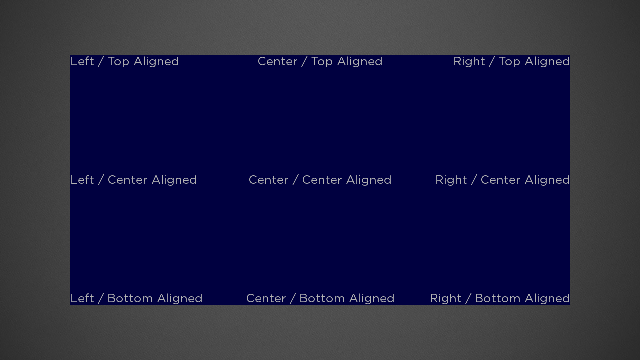
The following image shows a Rectangle node with a width of 1000 pixels and a height of 500 pixels. The Rectangle node has nine Label child nodes. Each Label child node has its width field value set to 1000 and its height field value set to 500. All nine combinations of the horizAlign and vertAlign fields are used to position the labels relative to the 1000x500 bounding rectangle.
Wrapping Text
The wrap field is used to control how the text is broken into multiple lines. The two possible field values are true and false.
wrap = false
In this case, a single line of text will be displayed.
If the width field value is zero, and the text does not contain any newline characters, the entire text string is rendered. If the text contains newline characters, the part of the text up to the first newline character is rendered.
If the width field value is greater than zero, the text is truncated or ellipsized so only the portion of text is rendered that fits within the specified width.
wrap = true
In this case, if the width field value is greater than zero, the text is broken into several lines, each of which has width no larger than the computed width. Each newline character in the text results in a new line of text. Also, the text is broken into lines at any space or hyphen character. If any word in the text exceeds the computed width, it is broken into lines arbitrarily.
If the width field value is zero and the wrap field value is true, no text is rendered.
The actual numbers of lines displayed is dependent upon the values set in the height, numLines and maxLines fields.
If the height field value is greater than zero, the text is broken into lines based on the value of the width field, but only the number of lines that fit into the specified height are rendered. If the displayPartialLines field value is set to false (the default), only full lines of text are rendered. If the displayPartialLines field value is true, the top or bottom line of text may be clipped vertically.
If the height field value is zero, and the numLines field value is greater than zero, the text is broken into lines based on the value of the width field, and up to the number of lines of text set in the numLines field value are rendered.
If both the height and numLines field values are zero, and the maxLines field value is greater than zero, the text is broken into lines based on the value of the width field, and no more than the number of lines of text set in the maxLines field value are rendered.
Rotation of Labels
Rotation of LabelBase nodes is supported. On platforms that do not support OpenGL, only rotations of 0, 90, 180, and 270 degrees are supported.
Fields
Fields derived from the Group base class can also be used.
| Field | Type | Default | Access Permission | Description |
|---|---|---|---|---|
| text | string | READ_WRITE | Specifies the text to be displayed | |
| color | color | 0xddddddff | READ_WRITE | Specifies the text color |
| monospacedDigits Available since Roku OS 14.0 | Boolean | false | READ_WRITE | Renders numeric values using tabular (fixed-width) fonts. |
| horizAlign | string | left | READ_WRITE | See Horizontal Alignment |
| vertAlign | string | top | READ_WRITE | See Vertical Alignment |
| width | float | 0 | READ_WRITE | Specifies the width of the label. If set to zero, the text is always displayed as a single line |
| height | float | 0 | READ_WRITE | Specifies the height of the label. If set to zero, the actual height is determined by the value of the numLines field if it is greater than zero. See Vertical Alignment and Wrapping for more details. |
| numLines | integer | 0 | READ_WRITE | If the height field value is zero, provides an alternate way to specify the height of the bounding rectangle of the label. See Vertical Alignment and Wrapping for more details. |
| maxLines | integer | 0 | READ_WRITE | If the height and numLines field values are both zero, specifies the maximum number of lines of text to be displayed. See Vertical Alignment and Wrapping for more details. |
| wrap | boolean | false | READ_WRITE | See Wrapping Text |
| displayPartialLines | Boolean | false | READ_WRITE | If the height field value is greater than zero, used to determine whether or not the last line of visible text is displayed if it would be clipped vertically. |
| ellipsizeOnBoundary | Boolean | false | READ_WRITE | If the width field value is greater than zero, controls whether or not the last line of text displayed should be ellipsized if it extends beyond the specified width. It is ignored if the truncateOnDelimiter field value is set to a non-empty string.
|
| wordBreakChars | string | READ_WRITE | By default, space and hyphen characters are used to determine where lines can be divided. In addition, this field can specify additional characters to be used to determine where the text can be broken into lines | |
| ellipsisText | string | READ_WRITE | By default, three dots (...) are used to ellipsize the last line of text that extends beyond the bounding rectangle. This field specifies alternate characters to be displayed when the last line of text is ellipsized | |
| isTextEllipsized | Boolean | false | READ_ONLY | Indicates whether the last line of text has been ellipsized |
Updated 11 days ago