
App Engagement Report
Analyze streaming activity, installs, and viewer engagement data for your app
You can use the App Engagement Report to grow your audience by analyzing data about streaming activity and the size of your install base.
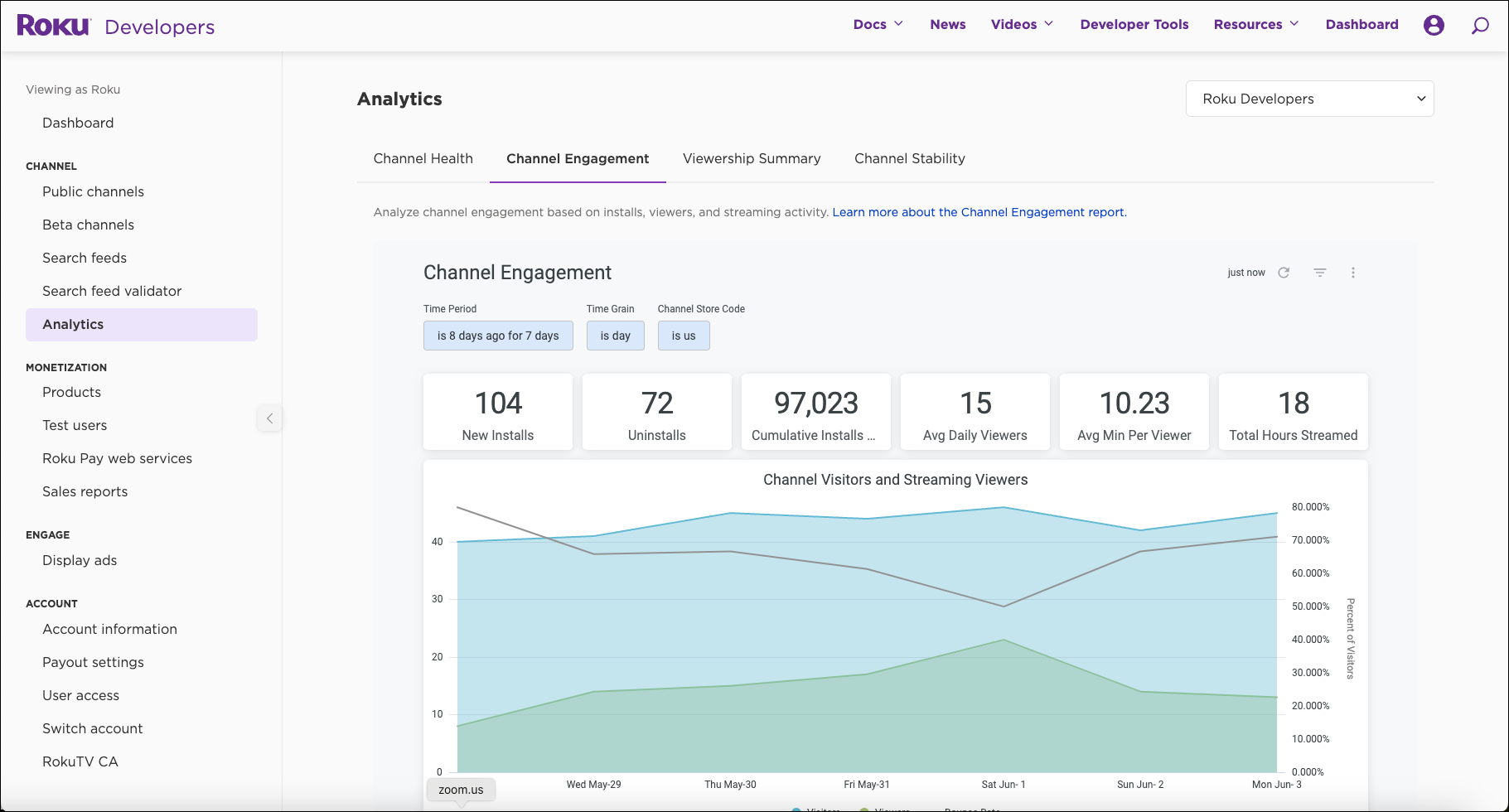
Filters
The filters applied to this report are:
- Time Period - sets the data sample period for the entire report. The default is set to "8 days ago for 7 days" because data from the most recent day will be incomplete.
- Time Grain - sets the granularity of measurements to day, week or month. Be careful not to conflict with Time Period by choosing a granularity that is larger than the Time Period selected, e.g. a month Time Grain with a week long Time Period. Time Grain is set to "day" by default.
- Streaming Store Code -
identifies the market where your app can legally be distributed. More than one code is allowed. The default is set to include all data from all available markets.
Summary statistics
The band of metrics below FILTERS shows the summary statistics based on the time period you select in FILTERS:
- New Installs - total count of new unique accounts during the selected Time Period.
- Uninstalls - total count of accounts uninstalled during the selected Time Period.
- Cumulative Installs To-Date - count of unique accounts that that have installed your app to-date; roughly equivalent to the size of your install base. When users uninstall and re-install an app, this is credited as one net new installation and will increase the Cumulative Installs To-Date.
- Average Daily Viewers - average number of daily views similar to DAU "daily active users." Changing Time Grain will not effect this measurement.
- Average Minutes Per Viewer - total streaming minutes on the app per number of unique accounts that visited the app.
- Total Hours Streamed - total hours streamed during the selected Time Period.
Visualizations
Below the band of summary statistics are three visualizations. These are time-series visualizations, so at least two observation dates are required to display properly. The filters Time Grain and Time Period control how the data is displayed in the visualizations. Any conflicts between Time Grain and Time Period will prevent a visualization of the data.
Click on the legend at the bottom of each visualization to view only one or multiple metrics. For instance, on Channel Visitors and Streaming Viewers you can choose to see only Bounce Rate or you can choose to see all three metrics displayed simultaneously.
Channel Visitors and Streaming Viewers visualization
This visualization shows whether people are engaging with your content after accessing your app. After getting a visitor to install and open your app, you want them to stream content so they become viewers. Also, you want them to keep coming back so the relationship grows and becomes stickier over time.
Bounce rate measures how often visitors open the app but do not stream any content. Bounce rate is calculated as 1-(viewers/visitors). As the number of viewers increases relative to visitors, bounce rates go down. A high bounce rate indicates a need to focus more on the immediate experience when visitors open your app, including what kind of content visitors see and how that content is presented.
Minutes Streamed visualization
This visualization shows how much content is being consumed by your viewers. The more minutes streamed, the more time viewers are spending in your app engaging with your content. Minutes Streamed includes both an aggregate total across all accounts, as well as an average number of minutes for those accounts that streamed during the period selected in FILTERS.
The relationship between the aggregate total and the average indicates whether the intensity of content consumption is concentrated or dispersed. It shows if all viewers are consuming about the same amount of content or if groups of “power users” (fans) are consuming far more than others. Understanding what motivates fans to consume more content than the average viewer could help you improve your content strategy.
Additionally, this visualization shows the percent of accounts with your app installed that have streamed content in the selected time period. This metric connects the report on Visitors and Viewers to the report on Install Base Growth because the rate at which viewers stream content is a leading indicator of retention. Expressed differently, viewers that are not engaging with content in your app are more likely, on average, to uninstall your app. The more your viewers stream, the less likely it is that they will churn and the better your prospect for growing your install base.
Install Base Growth visualization
This visualization shows how your install base is changing over time. Some uninstalls are normal and expected, but overall you want installs to outpace uninstalls. A growing install base is represented by a positive net install value, and accelerating growth is represented by an upward sloping net install line. The difference between new installs and uninstalls is shown in Net Installs.
When viewed daily, fluctuations in net installs tend to be more suggestive of individual behavior patterns. For example, because people tend to watch more TV on the weekends, you might see higher install rates on Saturday or Sunday. At higher levels of aggregation, such as a weekly or monthly time grain, net install trends are more indicative of the performance of your audience development efforts. Increased audience-development marketing is a very effective way to influence your install base growth rates.
Updated 2 days ago