
Roku Analytics Component Library (RACL)
Integrate third-party analytics vendors into your Roku app using RACL
The Roku Analytics Component Library (RACL) implements Google Analytics, Omniture, and Ooyala Analytics, amongst other third-party analytics solutions. The library creates a simple method for using SceneGraph apps with one or more of these analytics solutions.
Support Models
The analytics platforms supported by RACL are
classified into three different models:
Model #1
The app passes video-related events to the analytics module as they
are received, and the analytics module is responsible for building and
firing any analytics beacons needed for that event. This approach is
most common for services focused only on video metrics. Platforms that
use this model include Brightcove and Ooyala.
Model #2
The app is responsible for deciding when an analytics beacon needs
to be fired and collecting the data that needs to be sent with the beacon.
The analytics module uses that data to build and fire the beacon. This
approach is most common for services that track UX interactions as well
as video metrics. Platforms that use this model
include Omniture and Google Analytics 4 (GA4).
Model #3
This model utilizes Roku's Event Dispatcher library that allows apps to share in-app user behaviors and events with Roku by inserting custom tracking pixels into the app. The Event Dispatcher enables Roku to customize the Universal Search results based on a user's ability to view a particular piece of content without making a transaction. In other words, content in an app that the user already subscribes to will appear higher in the search results than content behind an additional paywall or content with ads. The Roku Event Dispatcher is the vehicle used to allow Roku to determine a user's authenticated status.
Supported vendors
The Roku Analytics Component Library officially supports the following vendors.
Other vendors may be partially supported but may need to be updated to
be compatible with RACL.
Ooyala
Model #1
Initialization attributes
| Attribute | Type | Required | Description |
|---|---|---|---|
| pcode | String | Required | Ooyala publisher code |
| userinfo | roAssociativeArray of Strings | Optional | User information |
| geoinfo | roAssociativeArray of Strings | Optional | Geographic information |
Vendor-specific attributes for setContentMetadata
setContentMetadata| Attribute | Type | Required | Description |
|---|---|---|---|
| assetType | String | Required | Possible values include "ooyala" or "external" |
| assetID | Integer | Optional | The video's embed code - If omitted, the ID attribute from the standard metadata is used |
| duration | Integer | Optional | The duration of the video - If omitted, the length attribute from the standard metadata is used |
Brightcove
Model #1
Initialization attributes
| Attribute | Type | Required | Description |
|---|---|---|---|
| account | String | Required | Brightcove account ID |
| user | String | Optional | Unique ID for this user |
Vendor-specific attributes for setContentMetadata
setContentMetadata| Attribute | Type | Required | Description |
|---|---|---|---|
| source | String | Optional | If omitted, the url attribute from the standard content metadata is used |
| destination | String | Optional | If omitted, the url attribute from the standard content metadata is used |
| video | Integer | Optional | If omitted, the id attribute from the standard content metadata is used |
| video_name | String | Optional | If omitted, the title attribute from the standard content metadata is used |
| video_duration | Integer | Optional | If omitted, the length attribute from the standard content metadata is used. If length is also absent, the duration field from the Video Node is used |
Omniture
Model #2
| Attribute | Type | Required | Description |
|---|---|---|---|
| baseURL | String | Required | The URL of the Omniture suite that data should be sent to |
| persitentParams | roAssociativeArray | Optional | A set of static parameters and values that should be sent with every request |
Analytics vendors using Model #2 use trackEvent rather than setContentMetadata.
Google analytics
Model #2
This section has been updated based on Google Analytics 4 (GA4).
Initialization attributes
| Parameter | Type | Required | Default value | Description | RACL implementation |
|---|---|---|---|---|---|
| api_secret | string | Required | - | An API Secret that is generated through the Google Analytics UI. | This parameter is added to each request. If the parameter is not specified or the type is incorrect, RAC prints a warning to the debug console, and the payload is not sent. If data needs to be sent to multiple data streams, create one RAC instance per stream. |
| measurement_id | string | Required | - | The identifier for a Data Stream. In the Google Analytics UI, this parameter is listed under Admin > Data Streams > choose your stream > Measurement ID. Google Analytics (GA4) supports tracking multiple data streams for a single property. | This parameter is added to each request. If the parameter is not specified or the type is incorrect, RAC prints a warning to the debug console, and the payload is not sent. |
| defaultParams | roAssociativeArray | Optional | - | A set of static parameters and values that should be included in each request (see the Google Analytics (GA4) JSON body documentation for more information). | RAC applies these parameters and values to the root level of each payload constructed by the trackEvent() method. |
| defaultEventParams | roAssociativeArray | Optional | - | A set of static parameters and values that should be sent with every event. | RAC applies these parameters and values to each event within every payload constructed by the trackEvent() method. |
Example:
m.global.RSG_analytics.init = {
    ga4: {
        api_secret: "apisecret_value",
        measurement_id: "measurementid_value",
        defaultParams: {
            ' Applied to the root level of every payload constructed by trackEvent
            client_id: "client_id"

        },
        defaultEventParams: {
            ' Applied to all events contained within payloads constructed by trackEvent
            currency: "USD"
        }
    }
}
Guidelines
Manifest entry to use RACL:
sg_component_libs_required=Roku_AnalyticsVideo Node - notificationInterval: For vendors using model #1,
the notificationInterval field of the Video node must be set to 1.
The component will check this when setting initVideoPlayer and change
the value if necessary.
Mid-roll ads: When using multiple Video nodes for client-side inserted
mid-roll ads, initVideoPlayer must be set for each Video node that is
created. However, finishedVideoPlayback should only be set once at
the end of the content session. finishedVideoPlayback should not be
set at the end of mid-roll ads.
Implementation
To use RACL, add a field, "RSG_analytics,"
to m.global and then create an roSGNode object like so:
m.global.addField("RSG_analytics", "node", false)
m.global.RSG_analytics = CreateObject("roSGNode", "Roku_Analytics:AnalyticsNode")
addField takes three parameters:
- The
fieldName- the name of the field to add - The
typeof the field to add - And a
alwaysNotifyvalue which determines if observers are
triggered when the field changes or when the value of the field is set
Initialization
This method takes a roAssociativeArray of roAssociativeArrays containing
configuration data for each analytics service such as endpoint URLs, API
keys, etc. See Supported Vendors for
vendor-specific configuration data.
Example:
m.global.RSG_analytics.init = {
    IQ : {
        PCODE : "pcode_value"
    },
    omniture : {
        baseURL : "https://omniture.suite.url/",
        ' For convenience, this allows developers to define a set of parameters and values that will be sent with every omniture call
        defaultParams : {}
    }
}
Methods
Model #1
initVideoPlayer
This method can only be used for vendors using model #1 such as
Ooyala or Brightcove.
This method takes a single roAssociativeArray with exactly one attribute
named video containing a SceneGraph Video node. If your app
uses multiple Video nodes (as might be done for mid-roll ads), this
method needs to be set each time a new Video node is created.
Example:
m.global.RSG_analytics.initVideoPlayer = {
    video: m.video
}
setContentMetadata
This method can only be used for vendors using model #1 such as
Ooyala or Brightcove.
This method takes a roAssociativeArray of roAssociativeArrays. At least
one sub-AA is required and must contain the content metadata for
playback. Any other sub-AAs may contain additional information required
for analytics providers and are optional.
Example with only Roku content meta-data:
myContent = {
    streamFormat: "mp4",
    streamUrl: "www.mycontent.com/video.mp4"
}

m.global.RSG_analytics.setContentMetadata = {
    content: myContent
}
Example with Roku content meta-data and additional analytics provider information:
myContent = {
    streamFormat: "mp4",
    streamUrl: "www.mycontent.com/video.mp4"
}

metadata = {
    duration : item.length,
    assetId : item.id,
    assetType : "external"
}

m.global.RSG_analytics.setContentMetadata = {
    content: myContent,
    IQ : metadata
}
finishedVideoPlayback
This method can only be used for vendors using model #1 such as Ooyala or Brightcove.
This method is similar to initVideoPlayer and takes a single
roAssociativeArray with exactly one attribute named video containing a
Scenegraph Video Node.
This should be set once video playback has finished which will allow the
component to finish analytics tasks and stop observing Video node
events.
Unlike initVideoPlayer, this method should only be set once the last
Video node is closed (i.e., do not set this when closing a Video node
after a mid-roll ad).
Example:
sub onVideoState()
    closeStates = {
        finished : "",
        error : ""
    }
    if closeStates[m.video.state] <> invalid then
        'Send video player so analytics node could unobserve all fields and close session properly
        m.global.RSG_analytics.finishedVideoPlayback = {
            video: m.video
        }
        hideVideo() 'implement this to restore prev screen
    end if
end sub
Model #2
trackEvent
This method can only be used for vendors using model #2 such as Google Analytics (GA4) or Omniture.
This method takes a roAssociativeArray of roAssociativeArrays containing
the parameters and values that are sent with a beacon. This method can
be set anytime an event needs to be fired.
Google Analytics (GA4) events tracking
Developers can track events from the standard GA4 events list, and they can track their custom events and their parameters. To do this, pass the following data for events tracking and any other optional parameters, per GA4 documentation, as needed.
Parameters may also be placed in the
defaultParamsordefaultEventParamsfields during initialization and RAC will automatically apply them to every event.
| Parameter | Type | Required | Default value | Description | RAC implementation |
|---|---|---|---|---|---|
| client_id | string | Required | GetChannelClientID() | Uniquely identifies a user instance of a web client. This is the equivalent of the "cid" parameter in Universal Analytics (UA). | This field is populated with value returned by the GetChannelClientID() method, if it is not provided by the developer. |
| events | roArray | Required | - | An array of event items that to be provided by developer. Up to 25 events can be sent per request. See the Google Analytics (GA4) events reference for all valid events. | RAC will print a debug console warning if this value is empty or is not an array. The payload is still sent if this parameter is not specified. |
| events[].name | string | Required | - | The name for the event. See the Google Analytics (GA4) events reference for all options. This is an equivalent of the "t" parameter in Universal Analytics (UA). | RAC only checks the "name" for each event in array. If the event "name" is not provided, RAC prints a debug console warning, but still sends the events to the Google server. If this parameter is not specified, the payload is still sent. |
Example:
m.global.RSG_analytics.trackEvent = {
    GA4: {
        events: [
            {
                name: "test_event",
                params: {
                    "param1": "value1",
                    "param2": 222
                    ' here RAC will append defaultEventParams. For instance, currency from the init example above
                }
            }
        ]
        ' here RAC will append defaultParams, For instance, client_id, api_secret, and measurement_id from the init example above
     }
    omniture: {
        events: "event15,event17",
        page_name: "splash_screen",
        c17: "channel_launch"
    }
}
Debug
This method takes a boolean to determine if debug data will be shown in
the console. The default value is false (No debug data will be
displayed in the console).
Example:
m.global.RSG_analytics.debug = trueThe library does send beacons even in debug mode.
Example
Following is a simple example of using RACL with a
service that supports Model #1.
sub VerySimpleShowVideo(item)
    m.global.addField("RSG_analytics","node",false)
    m.global.RSG_analytics = CreateObject("roSGNode","Roku_Analytics:AnalyticsNode")

    ' Analytics Initialization
    m.global.RSG_analytics.init = {
        IQ : {
            PCODE : "pcode_value"
        }
    }

    m.video = m.top.createchild("roSGNode","Video")
    m.video.notificationInterval = 1
    m.video.content = item

    'Setup analytics for this video player
    'We will pass IDs of analytics that should take part in this video playback
    m.global.RSG_analytics.initVideoPlayer = {
        video: m.video
    }
    'set IQ specific metadata
    'This metadata is IQ specific and cannot be stored in ContentNode
    metadata = {
        duration : item.length,
        assetId : item.id,
        assetType : "external"
    }
    m.global.RSG_analytics.setContentMetadata = {
        IQ : metadata
    }

    m.video.observeField("state","onVideoState")
    m.video.control = "start"
end sub

sub onVideoState()
    closeStates = {
        finished : "",
        error : ""
    }
    if closeStates[m.video.state] <> invalid then
        'Send video player so analytics node could unobserve all fields and close session properly
        m.global.RSG_analytics.finishedVideoPlayback = {
            video: m.video
        }
        hideVideo() 'implement this to restore prev screen
    end if
end sub
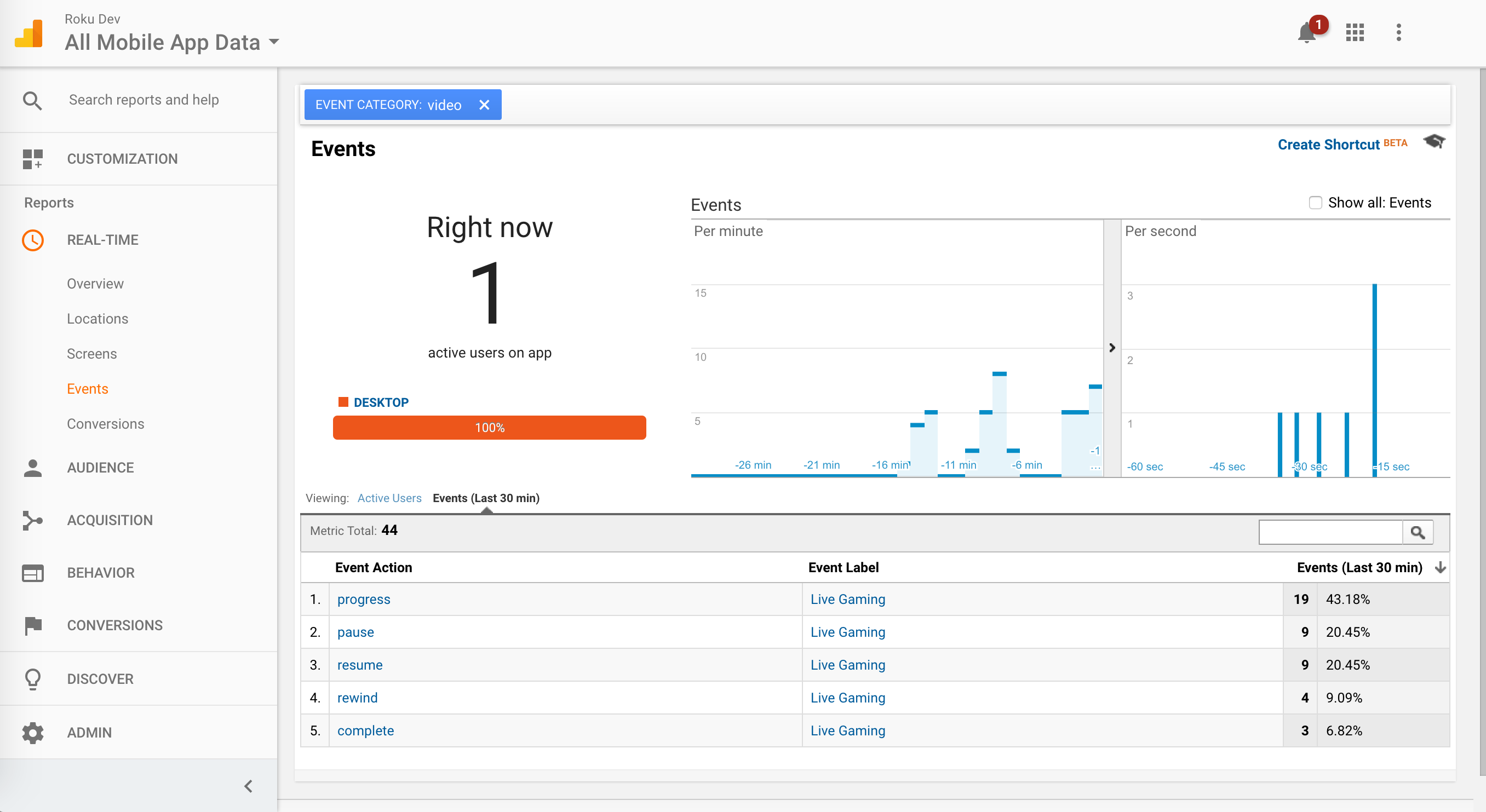
Expected Output
Once you run the Roku analytics
component, you should see the beacons it fires on the BrightScript
console. The analytics are displayed on your analytics
dashboard.
Example:
Google Analytics Dashboard after running RACL:
Sample Apps
To test the library, sideload the
sample apps below with respect to the analytics platform you are
using. You can test either Ooyala (Model #1) or Google Analytics (Model
2).
Use the Sample app #1 to test
Ooyala analytics. Change the publisher code (PCODE) in the baseScene.brs
to your Ooyala account PCODE to see the analytics.
When using the sample app for
Google analytics (Model #2), make sure to change the tracking ID to
your Google analytics tracking ID in baseScene.brs under the folder
components.
| Model | Download |
|---|---|
| Simple model #1 | RokuAnalyticsComponent_Model1 |
| Simple model #2 | RokuAnalyticsComponent_Model2 |
Updated 16 days ago