
TimeGrid
Electronic Program Guide node with channel rows and program cells
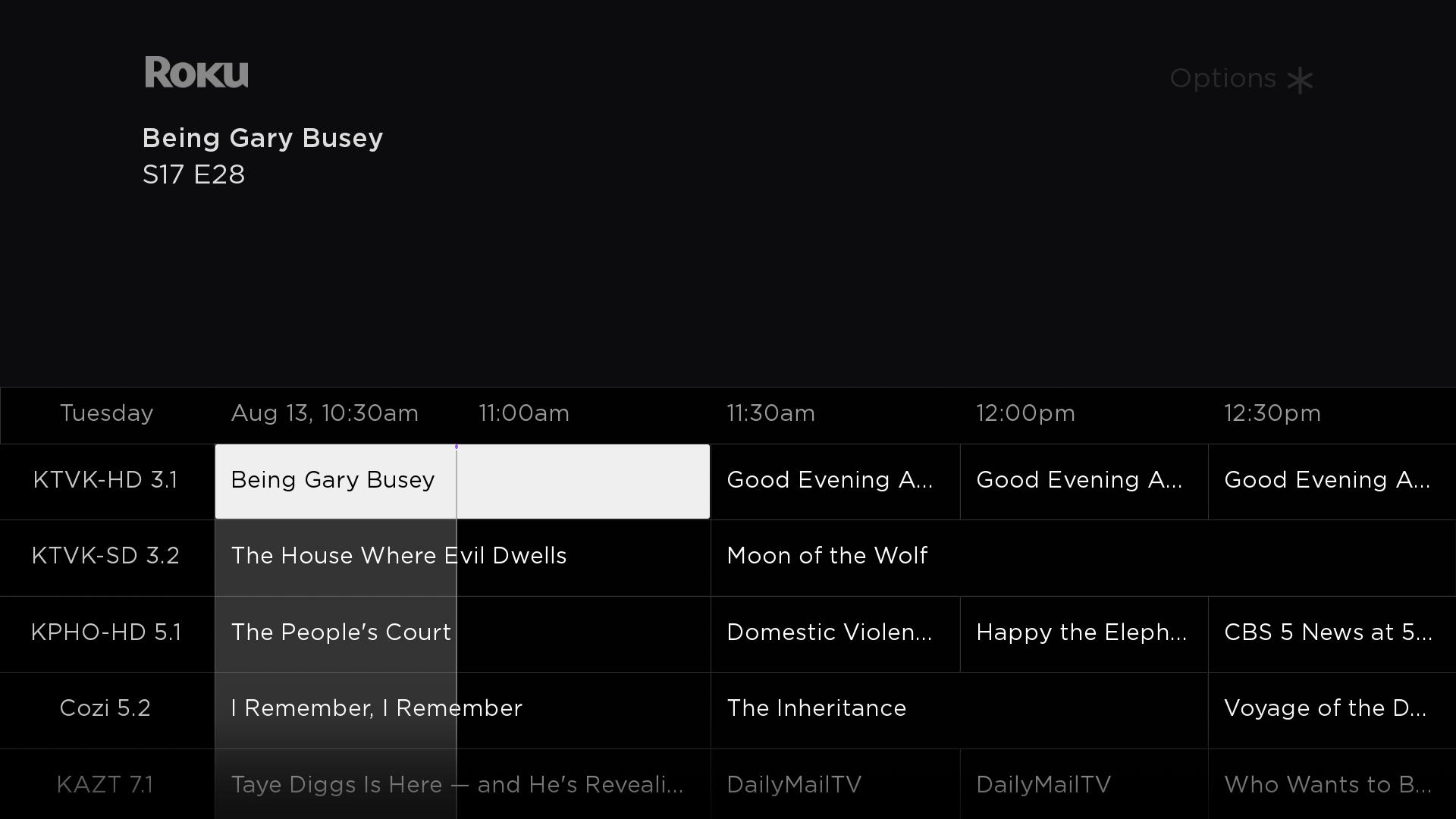
OTT providers can use the TimeGrid node to implement an Electronic Program Guide (EPG) in their apps. In an EPG, channels are represented as horizontal rows, one for each channel. Each row has an channel name on the left, and a set of programs airing on that app to the right. The size of each program depends on its duration. One of these programs has a remote control focus highlight indicator on it, and this highlight can be moved around using the remote control (as long as the TimeGrid node has remote control focus).
The TimeGrid node also features an alternative Now/Next view that lists only the programs currently airing and airing next, with their respective start times. See Now/Next mode for more information.
Fields
Content
The TimeGrid node has a content field that can be used to store the information for and programs displayed in the grid. This content field should have a single ContentNode that has one child ContentNode per app, and each app ContentNode should have one child ContentNode for each program, sorted by start time in ascending order (earliest programs first).
For any program in any channel, the start time plus the duration of any program must be less than or equal to the start time of the next program.
App attributes
| Attribute | Type | Description |
|---|---|---|
| TITLE | string | The name of this channel, to be visible only if HDSMALLICONURL is not set or if the icon failed to load. |
| HDSMALLICONURL | uri | The image file for the channel logo. |
Program attributes
| Attribute | Type | Description |
|---|---|---|
| TITLE | string | Program title. |
| PLAYSTART | roDateTime | Start time for this program. |
| PLAYDURATION | roDateTime | Duration of this program. |
| HDSMALLICONURL | uri | The image file for an icon that appears beside the program title (optional). |
General TimeGrid settings
The following fields are used to configure general time grid settings.
| Field | Type | Default | Description |
|---|---|---|---|
| maxDays | int | 7 | Specifies the total width of the time grid in days. |
| contentStartTime | roDateTime | 0 | The earliest time to which the time grid can be scrolled. The scrollable range of times is defined by the sum of the contentStartTime and maxDays fields. |
| duration | double | 9000 | Width (in seconds) of the visible section of the time grid. For example, setting this to 10800 will cause the time grid to display 3 hours of programs horizontally (10,800 = 3 hours * 3,600 seconds per hour). |
| autoDismissTime | roDateTime | 0 | Specifies the time (in seconds) that the time grid will be displayed before automatically being hidden. Setting this field to 0 will cause the time grid to never be hidden. |
| ignoreTrickPlayKeys | boolean | FALSE | If set to true, ignores fast forward, rewind, and instant replay key events. Fast forward and rewind key presses normally page the time grid up and down. Instant replay key presses jump the grid to the current time. |
| overlayBitmapUri | uri | "" | Specifies an overlay that is drawn on top of the entire time grid. This is used by default to make the bottom visible rows of the time grid appear to fade out, but could be used to add any overlay be drawn on top of the time grid. In most cases, this should be a 9-patch image that specifies expandable regions. Only set this field to specify a custom bitmap that differs in appearance from the default bitmap. The overlay bitmap is drawn over the full width of the time grid with its bottom aligned to the bottom of the time grid. If the overlayHeight field value is greater than 0 the image will be stretched to the specified height (that is from the bottom of the time grid to the specified height). If overlayHeight field value is set to 0 the bitmap will be drawn at its default height. |
| overlayHeight | float | 0 | Specifies the height of the overlay image (see the overlayBitmapUri field). If set to 0 the overlay image is drawn at its default height. |
App settings
The following fields are used to configure and control app selection and focus.
| Field | Type | Default | Description |
|---|---|---|---|
| focusBitmapUri | uri | "" | Specifies the bitmap file used for the focus indicator when the list has focus. In most cases, this should be a 9-patch image that specifies expandable regions. Only set this field to specify a custom bitmap that differs in appearance from the default bitmap. |
| animateToChannel | int | 0 | Write-only. Scrolls the grid so the row corresponding to the specified app index is on screen. When the scrolling ends, the program in that row at the current focus time will have focus. |
| jumpToChannel | int | 0 | Write-only. Jumps the grid so the row corresponding to the specified app index is on screen. After the jump, the program in that row at the current focus time will have focus. |
| jumpToTime | string | "" | Write-only. Jumps the grid to the program at the specified time (in UTC format). After the jump, the time will be visible, and the program on the currently focused app will have focus. |
| leftEdgeTargetTime | roDateTime | none | When explicitly set, this triggers a horizontally scrolling animation so that the specified time is displayed at the left edge of the program grid. This field is also set by the firmware in response to remote control key presses that cause horizontal scrolling to provide feedback on the currently visible time range. |
| channelSelected | int | 0 | Read-only. Indicates the index of the selected app when the user makes a selection. |
| channelFocused | int | 0 | Read-only. Indicates the index of the focused app when a program in the app's row gains focus. |
| channelUnfocused | int | FALSE | Read-only. Indicates the index of the focused app when a program in the app's row loses focus. |
Channel information column
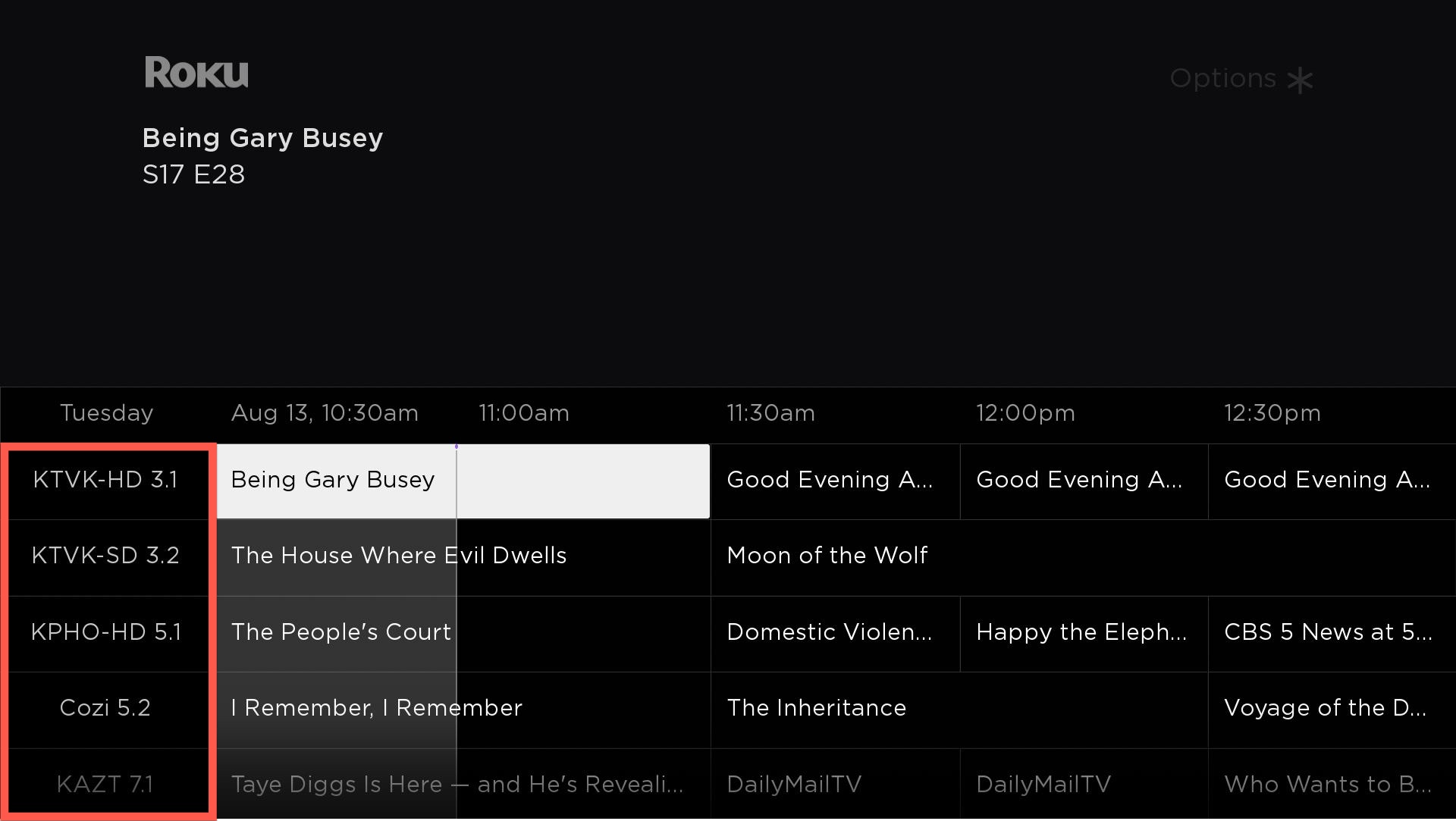
The following fields are used to configure and control the channel information column on the left side of the EPG that lists the app names:
| Field | Type | Default | Description |
|---|---|---|---|
| channelInfoComponentName | roSGNode | Object | Uses the specified RSG component to display the data for each channel in the Channel Information column. An instance of this component is created on demand for each channel. The component must define a specific interface. Specifically, the content field of this component can be used to configure the data for the app information column (see Specifying list and grid content for more information). Additionally, observer functions of the optional width, height, and hasFocus fields of the custom component can be used to customize the appearance (see Custom item definitions and focus indicators for more information). If this field is not specified, the default channel info will be displayed, which is an optional channel icon followed by a label containing the name of the app. The icon and label come from the app ContentNodes as described in the Channel Attributes section. |
| channelInfoSelected | int | 0 | Read-only. Indicates the index of the selected app when the user selects an item in the Channel Information column. |
| channelInfoFocused | int | 0 | Read-only. Indicates the index of the app when an app in the Channel Information column gains focus. |
| channelInfoUnfocused | int | 0 | Read-only. Indicates the index of the app when an app in the Channel Information column loses focus. |
| channelInfoFocusable | boolean | false | Indicates whether the user can move focus into the Channel Information column. If this field is false, the Channel Info column in non-interactive. |
| jumpToChannelInfo | int | 0 | Write-only. Jumps the grid immediately to the app info column box of the specified channel index. The app row will be visible, and the app info box for the specified channel will have focus. If the channelInfoFocusable field is false, this field is ignored. |
| channelInfoWidth | float | system default | Width of the column showing the app names. |
| infoGridGap | float | 0 | Spacing between the Channel Information column and the main grid. |
| channelInfoColumnLabel | string | "" | Specifies text used as a label for the header of the Channel Information column (the text displayed above the Channel Information column). If this is not specified, the label will show the day of the week that the left-hand edge of the time grid represents. |
| channelInfoTextColor | color | system default | Specifies the text color for the app names in the Channel Information column if the channelInfoComponentName field is not specified. |
| channelInfoFont | roFont | system default | Specifies the font for the app names if the channelInfoComponentName field is not specified. |
| channelInfoBackgroundBitmapUri | uri | "" | Specifies the bitmap file to use as the background for the app names in the grid if the channelInfoComponentName field is not specified. In most cases, this should be a 9-patch image that specifies expandable regions. Only set this field to specify a custom bitmap that differs in appearance from the default bitmap. |
| channelInfoAlignment | "left" the channelInfo column is displayed on the left (default) "right" the channelInfo column on displayed on the right |
Program grid
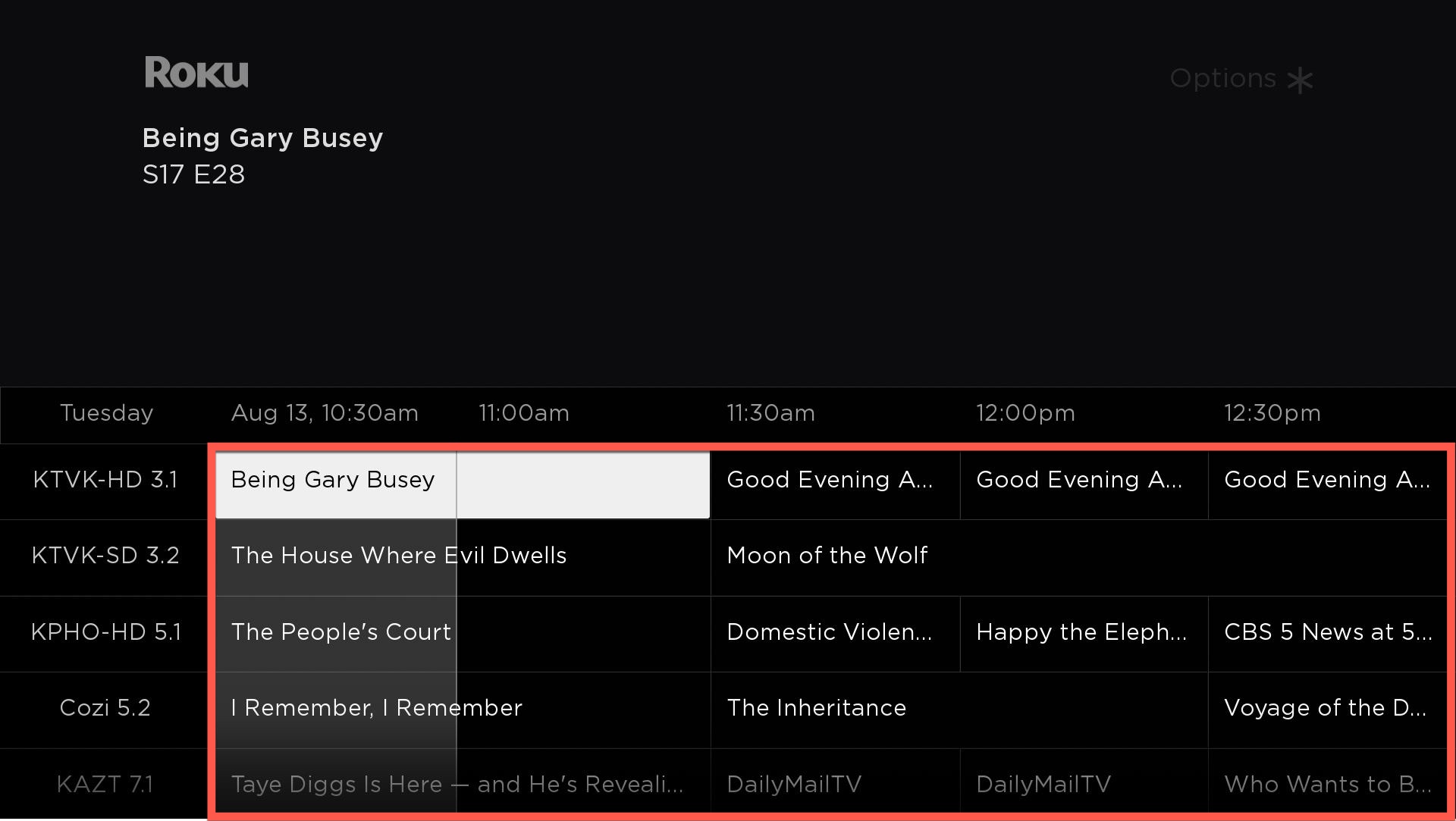
The following fields are used to configure and control the program titles and cells in the EPG:
| Field | Type | Default | Description |
|---|---|---|---|
| programTitleFocusedColor | color | system default | Specifies the text color for the program title that is focused. |
| programTitleColor | color | system default | Specifies the text color for program titles that are unfocused. |
| programTitleFont | roFont | system default | Specifies the font for the program titles |
| programSelected | int | 0 | Read-only. Indicates the index of the program in the currently focused channel row when the user selects a program. |
| programFocused | int | 0 | Read-only. Indicates the index of the program in the currently focused channel row when the program gains focus. |
| programUnfocused | int | 0 | Read-only. Indicates the index of the program in the currently focused channel row when the program loses focus. |
| programFocusedDetails | AssociativeArray | Read-only. Includes focusChannelIndex and focusIndex elements that indicate the app index and program index, respectively, when a program gains focus. This provides a single object that combines the values of the channelFocused and programFocused fields. | |
| jumpToProgram | int | 0 | Write-only. Jumps the grid immediately to the program corresponding to the specified program index for the currently focused row. After jumping, the program will be visible and have focus. |
| programHorizMargin | float | 14 | Specifies the width of the left and right margins of program cell text. |
| programBackgroundBitmapUri | Uri | "" | Specifies the bitmap file to use as the background for the program names in the grid. In most cases, this should be a 9-patch image that specifies expandable regions. Only set this field to specify a custom bitmap that differs in appearance from the default bitmap. |
| fillProgramGaps | boolean | false | Inserts a program with the "No Data Available" label if there is a gap between the program's start time and the previous program's end time |
| automaticLoadingDataFeedback | boolean | true | Enables the program data region of the grid to be automatically replaced with the loading message specified in the loadingDataText field whenever the content field has not been set or the user scrolls to a time where the content has not yet been loaded. |
| showLoadingDataFeedback | boolean | false | Replaces the program data region of the grid with the loading message specified in the loadingDataText field. This field enables you to explicitly control when the loading message is displayed instead of it being automatically shown when automaticLoadingDataFeedbackis enabled. This field is ignored if automaticLoadingDataFeedbackis true. |
| loadingDataText | string | " Loading Data…" " | The text to be displayed over the program grid whenever the loading message is to be shown. |
| channelNoDataText | string | "No Data Available" | Displays the specified text on each channel row if no data exists for a specific time (or if there is a gap in the program data). |
Past Time Screen
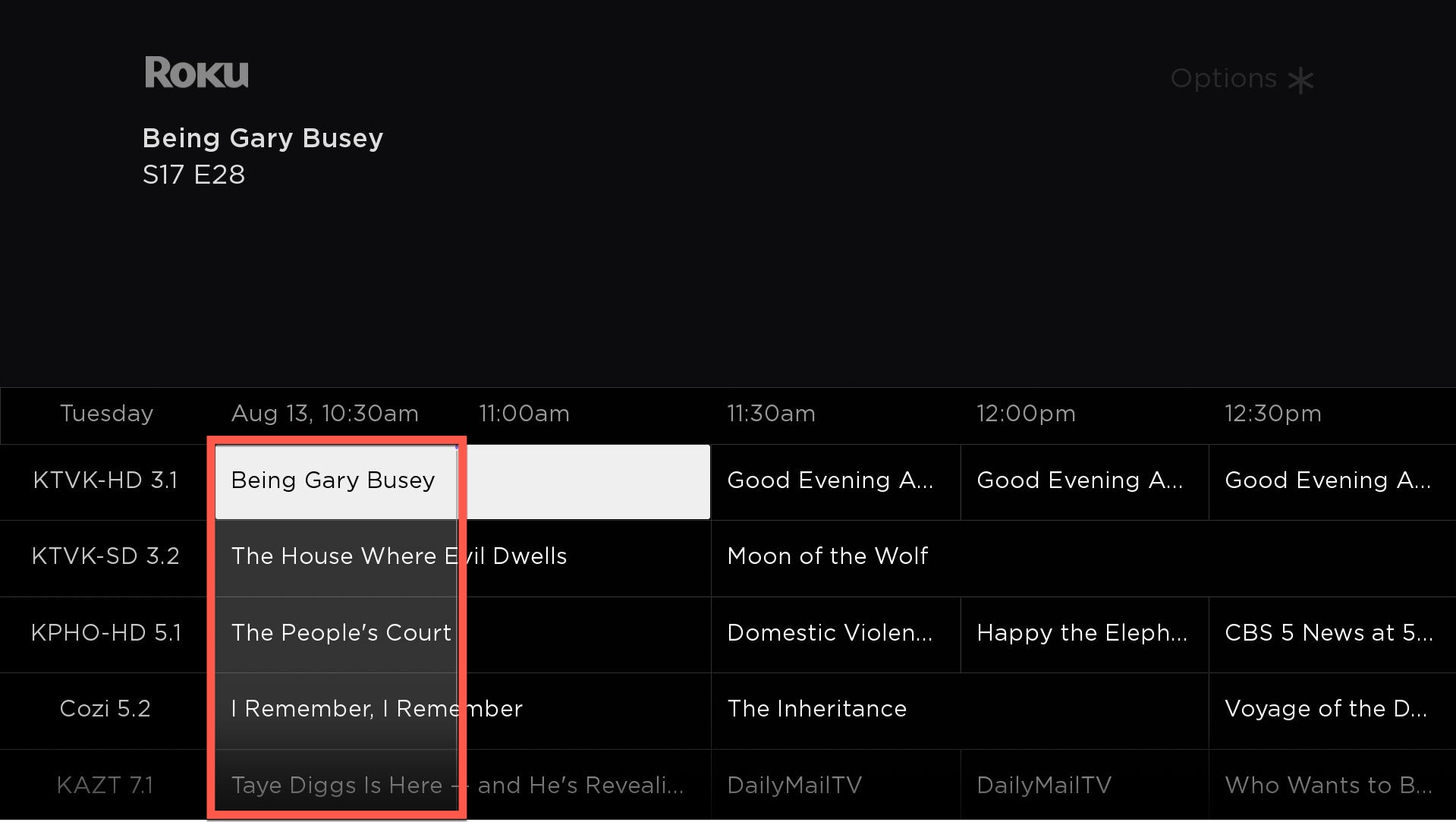
The following fields are used to configure the appearance of the rectangle that is displayed as part of the background of all programs prior to the current time.
| Field | Type | Default | Description |
|---|---|---|---|
| showPastTimeScreen | boolean | True | If true, enables drawing a solid color background behind all the programs in the grid airing before the current time. |
| pastTimeScreenBlendColor | color | 0xFFFFFFFF | Tints the past time screen by multiplying the color of each pixel by the specified value. If this value is not set to a value other than the default value, no color blending will be performed |
| pastTimeScreenBitmapUri | uri | "" | Displays the specified bitmap file in the background of the past time screen. |
Time Bar
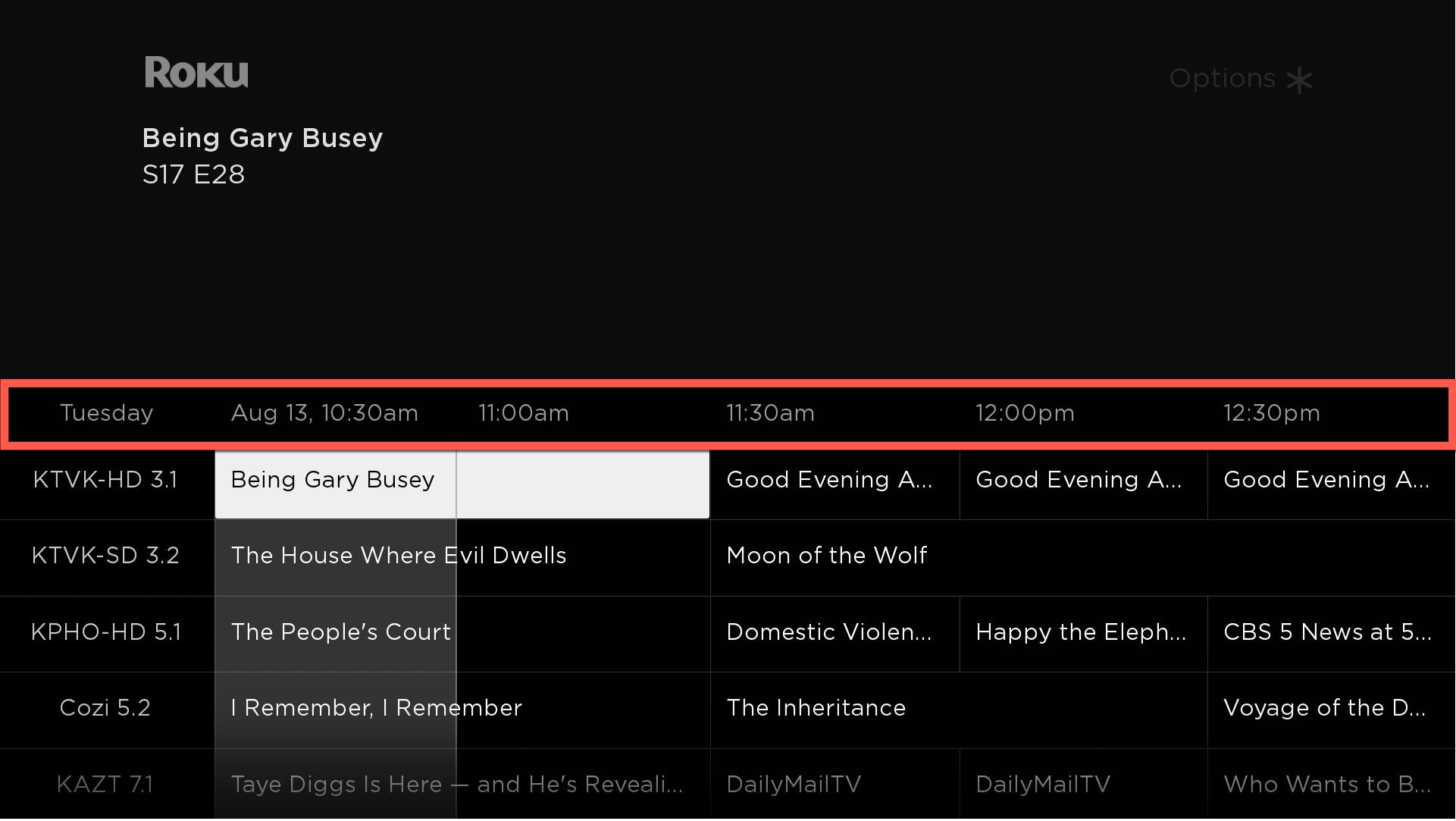
The following fields are used to control and configure the time bar that is displayed horizontally above the program cells:
| Field | Type | Default | Description |
|---|---|---|---|
| timeBarHeight | float | 50 | Specifies the height of the region above the app grid where the time labels are displayed. |
| timeBarBitmapUri | uri | "" | Specifies the bitmap file to use as the background of the time bar that appears above the time grid channel grid. In most cases, this should be a 9-patch image that specifies expandable regions. Only set this field to specify a custom bitmap that differs in appearance from the default bitmap. |
| timeLabelColor | color | 0xffffff99 | Specifies the text color for the time labels that are displayed in the time bar at the top of the TimeGrid. |
| timeLabelFont | font | system default | Specifies the font for the time labels that are displayed in the time bar at the top of the TimeGrid. |
| timeLabelOffset | float | 14 | Specifies the offset from the edge of the grid of the leftmost time label. |
Now Bar
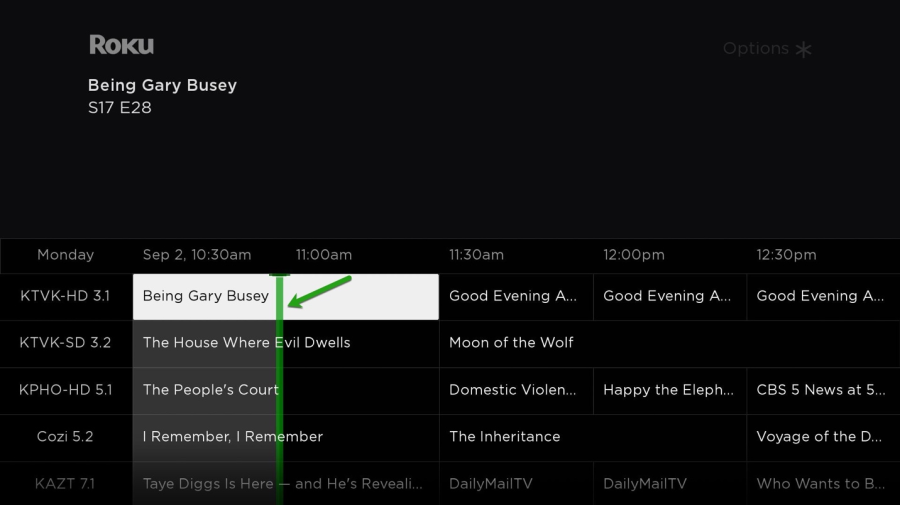
The following fields are used to enable the Now Bar, which is the thin vertical bar displayed at the current time.
| Field | Type | Default | Description |
|---|---|---|---|
| nowBarWidth | float | system default | Specifies the width of the Now Bar |
| nowBarHeight | float | system default | Specifies the height of the Now Bar |
| nowBarBitmapUri | uri | "" | Specifies the bitmap file used for the Now Bar. In most cases, this should be a 9-patch image that specifies expandable regions. Only set this field to specify a custom bitmap that differs in appearance from the default bitmap. |
| nowBarBlendColor | color | system default | Tints the Now Bar by multiplying the color of each pixel by the specified value. If this value is not set to a value other than the default value, no color blending will be performed. |
| nowBarOffset | int | 0 | Specifies the number of pixels the left edge of the Now Bar is offset from the current time. |
| minimumNowBarOffset | roDateTime | 300 | Specifies (in seconds) the nearest that the Now Bar can be to the left-hand edge of the time grid. If the Now Bar advances to the minimumNowBarOffset field value plus 30 minutes the time grid will automatically scroll right 30 minutes. |
Now/Next mode
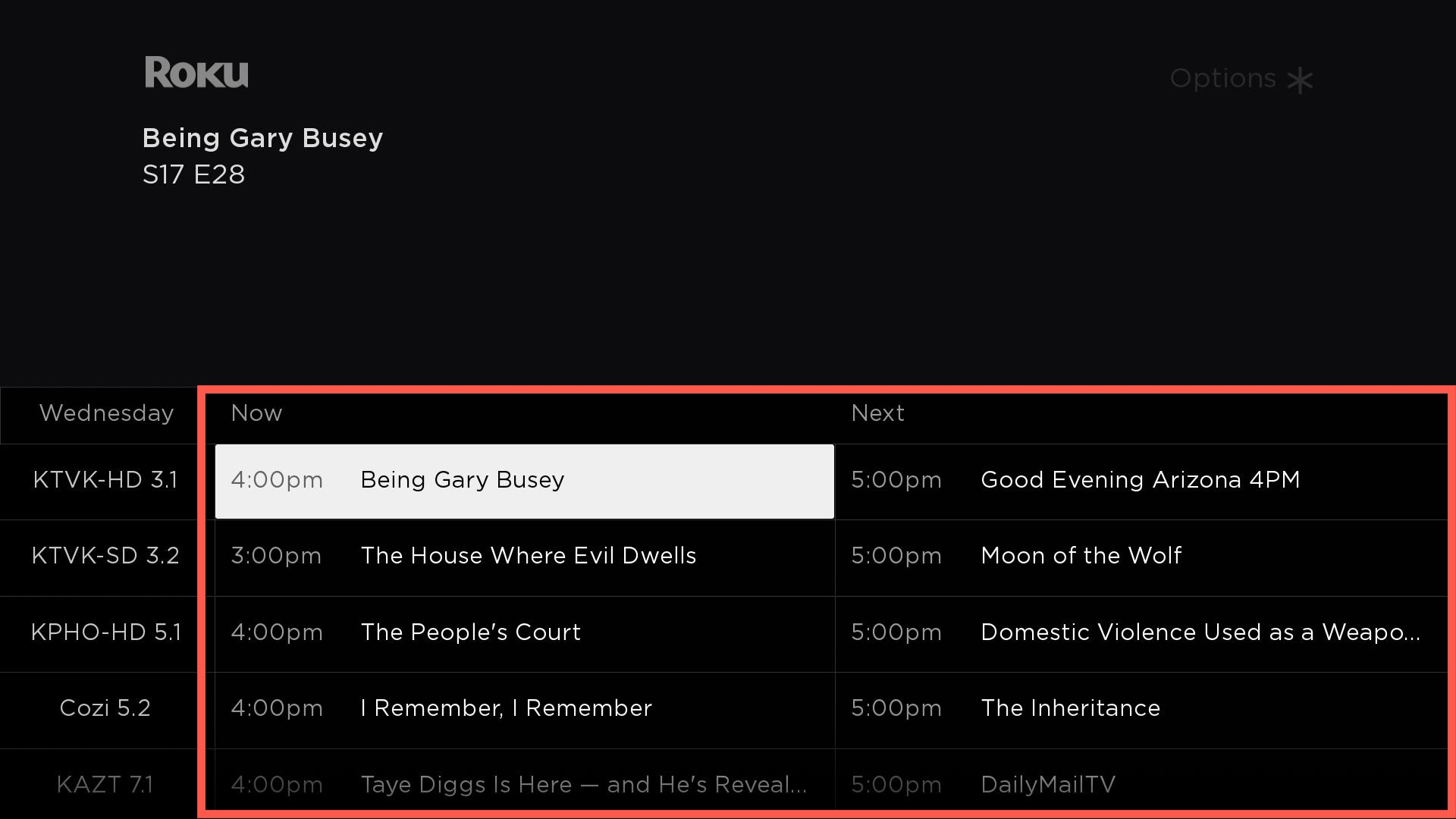
When the TimeGrid is in Now/Next mode, the program grid only contains Now and Next columns listing the programs currently and subsequently airing on each channel, with their respective start times.
The following fields are used to enable Now/Next mode, configure the Now and Next labels displayed above the program cells, and configure the program labels and cells while in this mode.
| Field | Type | Default | Description |
|---|---|---|---|
| nowNextMode | boolean | False | When set to true, the time grid displays two vertical columns of programs showing Now and Next for each channel |
| nowBackgroundBitmapUri | Poster.uri | "" | Displays the specified bitmap file in the background of the Now grid within the Now Bar |
| nextBackgroundBitmapUri | Poster.url | "" | Displays the specified bitmap file in the background of the Next grid within the Now Bar |
| nowNextHideAmPm | boolean | False | Hides the AM/PM abbreviation next to the times in the Now Bar. |
| programNowNextTimeColor | color | 0xffffff99 | If Now/Next mode is true, specifies the text color for the time that appears in the now/next program cells when the program is unfocused |
| programNowNextTimeFocusedColor | color | 0x99 | If Now/Next mode is true, specifies the text color for the time that appears in the Now/Next program cells when the program is focused |
| programNowNextHorizMargin | float | 14 | Specifies the width of the left and right margins of program cell text in Now/Next mode. |
| programNowNextTimeTitleGap | float | 15 | Specifies the gap between the Now and Next entries |
Measuring EPG launch times
Apps with an EPG must fire signal beacons to measure the EPG launch time. Beacons must be fired when the user initiates a keypress to display the EPG (EPGLaunchInitiate) and when the EPG is fully rendered and navigable (EPGLaunchComplete). See Measuring Channel Performance for more information.
Sample app
You can download and install a sample app that demonstrates how to use the TimeGridView in the SceneGraph Developer Extensions (SGDEX) to create an EPG. This sample app uses a row-by-row loading model. In this model, a handler config running on the root node of a content tree creates a child node for each row in the EPG. Each of the row child nodes has a handler that creates a child node for each program that should be displayed on that row.
Updated 7 days ago