
Receiving secured Roku Pay push notifications
Publishers can use signed JSON web tokens (JWT/JWS) to securely receive Roku Pay push notification messages. This enables publishers to verify that the messages received by their push notification endpoint originated from Roku.
When JWT signature authentication is enabled on a push notification endpoint, the HTTP body of the notification messages includes a set of base64url-encoded strings and a JSON Web Signature (JWS). Upon receiving a message, developers can get the contents of the Roku Pay transaction by separating and decoding each string, verifying the JWS signature with the Roku-provided public keys, and then decoding the transaction.
This document details how to receive, decode, and respond to secured Roku Pay push notifications.
See Setting up Roku Pay web services for how to add production and test push notification endpoints and enable them to receive secured Roku Pay push notifications.
See the Roku Pay push notifications reference for more information on the contents of the Roku Pay push notification messages.
Request (sent by Roku)
Roku Pay push notification HTTP requests have the following format:
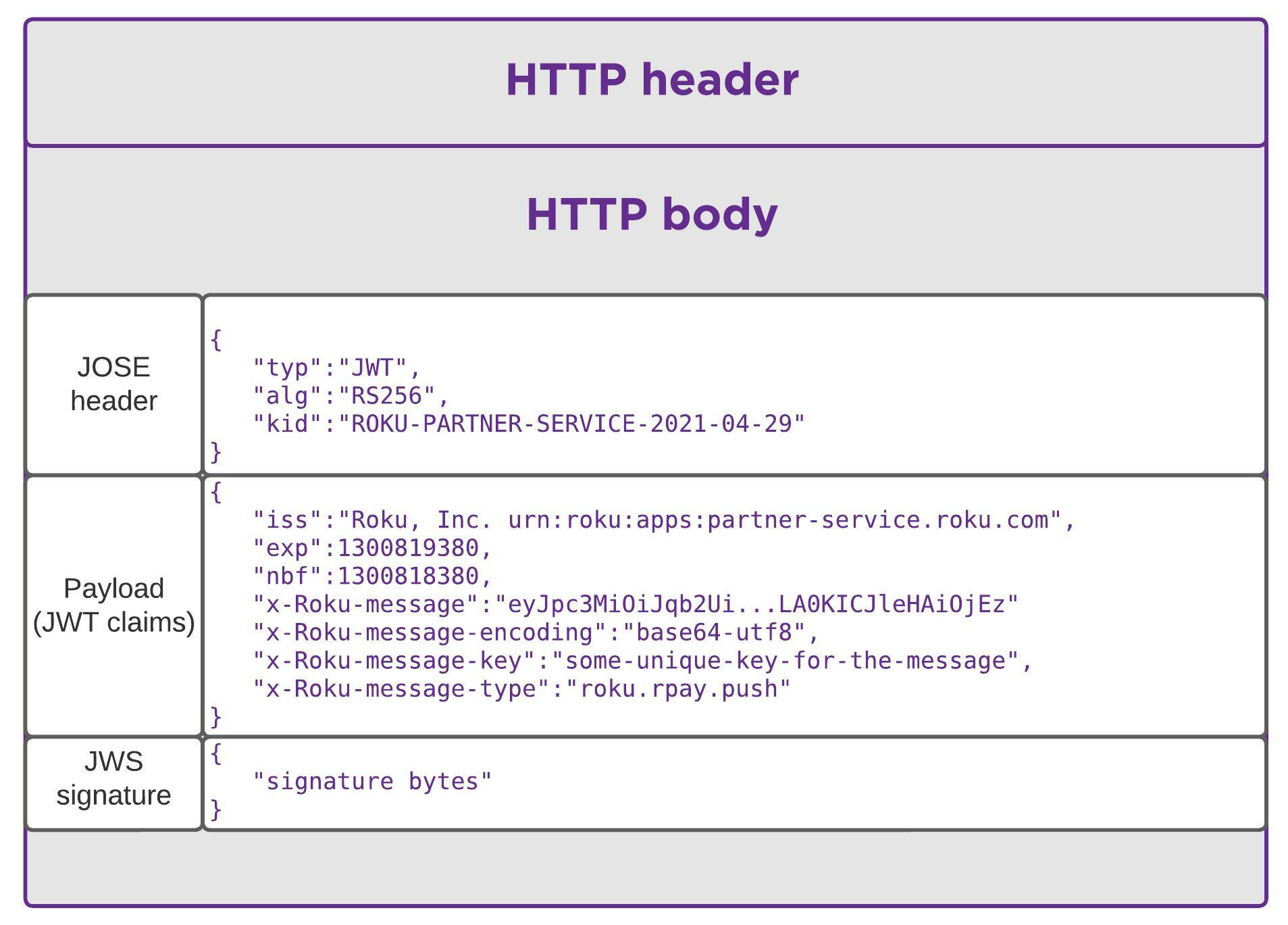
HTTP header
The HTTP body is considered to be plain text; therefore, the header specifies the plain text format. Plain text is used because Roku Pay push notification messages are sent over a TLS-secured link and the critical content elements are already base64url-encoded.
Content-Type: text/plainHTTP body
Roku Pay push notifications use the JavaScript Object Signing and Encryption (JOSE) framework, which relies on a JSON Web Token (JWT) to deliver messages securely. The HTTP body of a Roku Pay push notification, which adheres to the JWS compact serialization specification, includes the following JSON structures:
- JOSE header. Specifies the key ID, which indicates the public key to be used to verify the signature and the signing algorithm required to decode the public key.
- payload. A set of JWT claims.
- signature. A JWS generated from the concatenation of the header and the set of JWT claims.
The JOSE header and the set of JWT claims are each base64url-encoded. The two are then concatenated with a period (".") separator and a JWS (also a base64url-encoded string) is then calculated across the resulting string. The JWS is attached to the end of the header/payload string, again separated by a period. The following demonstrates the format of the un-encoded HTTP body:
' JOSE header
{
    "typ": "JWT",  // the signing algorithm to use (RSA 2048 with SHA 256)
    "alg": "RS256",
    "kid": "ROKU-PARTNER-SERVICE-2021-04-29" // the key ID corresponding to the private key used to sign the message (refer to the Public Keys section below)
}

"."

' payload (JWT claims)
{
    "iss": "Roku, Inc. urn:roku:apps:partner-service.roku.com",
    "exp": 1300819380, // This is set to 24 hours after the token generation
    "nbf": 1300818380, // This is set to one hour before the token was generated
    "x-Roku-message": "eyJpc3MiOiJqb2Ui...LA0KICJleHAiOjEz", // base64url(utf8(message))
    "x-Roku-message-encoding": "base64-utf8",
    "x-Roku-message-key": "some-unique-key-for-the-message", // used to de-duplicate messages
    "x-Roku-message-type": "roku.rpay.push" //identifies that message is a Roku Pay push notification.
}

"."

'JWS signature
{
    "signature bytes"
}
The URL for the public keys is a fixed value and does not change. Publishers should reject messages if the URL is not https://assets.cs.roku.com/keys/partner-jwks.json.
The URL for the test public key to be used for test push notifications is https://assets.cs.roku.com/keys/partner-jwks-test.json.
The JSON format of the JWS signature conforms to the JWS RFC 7515 standard.
Encoded HTTP message body
The encoded, period-concatenated JOSE header, payload, and JWS signature form the full HTTP message body:
eyJ0eXAiOiJKV1QiLA0KICJhbGciOiJIUzI1NiJ9.
eyJpc3MiOiJqb2UiLA0KICJleHAiOjEzMDA4MTkzODAsDQogImh0dHA6Ly9leGFtcGxlLmNvbS9pc19yb290Ijp0cnVlfQ.
dBjftJeZ4CVP-mB92K27uhbUJU1p1r_wW1gFWFOEjXk
Receiving push notifications
To receive the contents of Roku Pay push notifications, publishers must do the following:
- Separate the push notification into its three individual strings.
- Decode each string.
- Use the public key to verify the signature string against the contents of the period-concatenated header and payload strings.
- Decode the x-Roku-message JWT claim within the payload to get the contents of the notification.
Publishers can visit https://jwt.io, go to the Debugger section, and try to decode the push notifications.
Decoding the x-Roku-message JWT claim to get the push notification message
The x-Roku-message field within the JWT claim payload is a base64url-encoded string that contains the contents of the push notification message. The following example demonstrates the decoded x-Roku-message field for a Sale notification message:
{
    "customerId": "4e5812f5b00b4f5b90f768d22a7de170",
    "transactionType": "Sale",
    "transactionId": "d9dbdfecc5cc41cbb881ab750135029b",
    "channelId": "581251",
    "channelName": "Roku Developers",
    "productCode": "yN4JEfTmjhRP3IpbuWiJ_MonthlySub",
    "productName": "Monthly Subscription",
    "price": 9.99,
    "tax": 0.0,
    "total": 9.99,
    "currency": "usd",
    "isFreeTrial": false,
    "expirationDate": "2020-04-05T18:45:04.3142198Z",
    "originalTransactionId": "d9dbdfecc5cc41cbb881ab750135029b",
    "comments": "New order processed.",
    "eventDate": "2020-03-05T18:45:04.8762198Z",
    "creditsApplied": 0.00,
    "responseKey": "d4dd12df0c8445afa8860895061e72f9"
}
See the Roku Pay push notifications reference for more information on the contents of the different Roku Pay push notification messages.
Response (required from the publisher)
To acknowledge the receipt of a Roku Pay push notification message, send a 200 OK response.
Header
HTTP/1.1 200 OKPublic keys
Publishers must use Roku-provided public keys, which are located here, to verify message signatures. The public keys are provided in JSON Web Key (JWK) format and are similar to the example shown below. Select the key that corresponds to the kid specified in the JOSE header.
Public keys in JWK format
{
  "keys": [
     {
       "kty": "RSA",
       "n": "0vx7agoebGcQSuuPiLJXZpt...N9nndrQmbXEps2aiAFbWhM78LhWxga",
       "e": "AQAA",
       "alg": "RS256",
       "kid": "ROKU-PARTNER-SERVICE-2021-04-29"
     },
     {
       "kty": "RSA",
       "n": "0vx7agoebGcQSuuPiLJXZpt...N9nndrQmbXEps2aiAFbWhM78LhWxgb",
       "e": "AQAB",
       "alg": "RS256",
       "kid": "ROKU-PARTNER-SERVICE-2021-05-29"
     }
  ]
}
Publishers must get the public keys from the specified URL. Notifications with a different URL in the JOSE header must be rejected.
The JSON format above conforms to JWK RFC 7517 (https://datatracker.ietf.org/doc/html/rfc7517) and JWA RFC 7518 (https://datatracker.ietf.org/doc/html/rfc7518).
Testing
Prior to enabling JWT signature authentication on a production endpoint, publishers can configure a test endpoint in the Developer Dashboard and verify whether it can receive and process the JWT/JWS-secured messages. See Setting up Roku Pay web services for more information.
In addition, publishers can manually send a test JWT/JWS-secured message with a generic payload to the configured test push notification endpoint. This enables publishers to verify that their test endpoint can receive a JWT/JWS-secured message without generating Roku Pay transactions. See Setting up Roku Pay web services for more information.
Sample
You can download Roku's sample application, use it as a template for your implementation, and update it with your custom business logic for processing Roku Pay push notifications. Your backend system application must communicate via HTTPS or leverage an HTTPS reverse proxy.
Updated 4 months ago