
RowList
Vertically-scrollable list of rows containing horizontally-scrollable items
Extends ArrayGrid
The RowList node class provides a vertically-scrollable list, containing rows of independent horizontally-scrollable individual items. Each item in a row can include a poster, but can also include much more complex sub-elements defined in an item component file, in the same way that items are defined in the MarkupList and MarkupGrid node classes. The RowList node class includes interface fields for customizing the appearance as the user scrolls up and down through the rows.
Like those node classes, the RowList node class provides special interface fields to the item components to allow custom appearance and animations as the user scrolls left and right through the items in a row.
You can use the ZoomRowList node class to enlarge the row in the RowList that currently has focus. In addition to providing a zoomed focus row, the ZoomRowList features custom row item and row decoration components, unique zooming amounts for individual rows, and separate heights for zoomed/unzoomed row items.
Guidelines
The following are guidelines for use of rows and images.
- The items in any single row must be the same size, however different rows in the list can have different item sizes (see sample image below).
- Each row may include a left-justified title label at the top of the row, and a right-justified label at the top that displays a message of the format "item_number of total_number_of_items", indicating which item in the row currently has focus.
Horizontal Row Scrolling
There are three horizontal item scrolling options for the RowList node class controlled by the rowFocusAnimationStyle field.
- Setting the
rowFocusAnimationStylefield tofloatingFocuscauses the focus indicator to float left or right until it reaches the end of the row, at which point the focus will stay fixed on the first or last item in the row, and the items will scroll left or right. - Setting the
rowFocusAnimationStylefield tofixedFocusWrapcauses each row to wrap around when navigation reaches the first or last item in the row, as long as the row contains enough items to fill the row. If the row does not contain enough items to fill the row, the focus will float left and right. - Setting the
rowFocusAnimationStylefield tofixedFocuscauses the focus to stay fixed on the first item in each row. As the user scrolls, the previous selected item goes off the screen. Scrolling continues until the last item is reached with no wrapping.
Vertical Row Scrolling
The vertical row scrolling options are controlled by the vertFocusAnimationStyle field, and behave in the same way for rows as they do for list items as described in ArrayGrid.
The RowList node class supports two types of item definitions.
- The first type provides a simple option for the common case where each item in each row is displayed as a single poster.
- The second variation allows the contents of each item in each row to be an instance of a SceneGraph component that defines a set of interface fields that provide for communication between the RowList node and the items it displays (similar to that used by the MarkupList and MarkupGrid node classes).
Example
The following is a sample screenshot of RowList based on SimpleRowlist sample code:
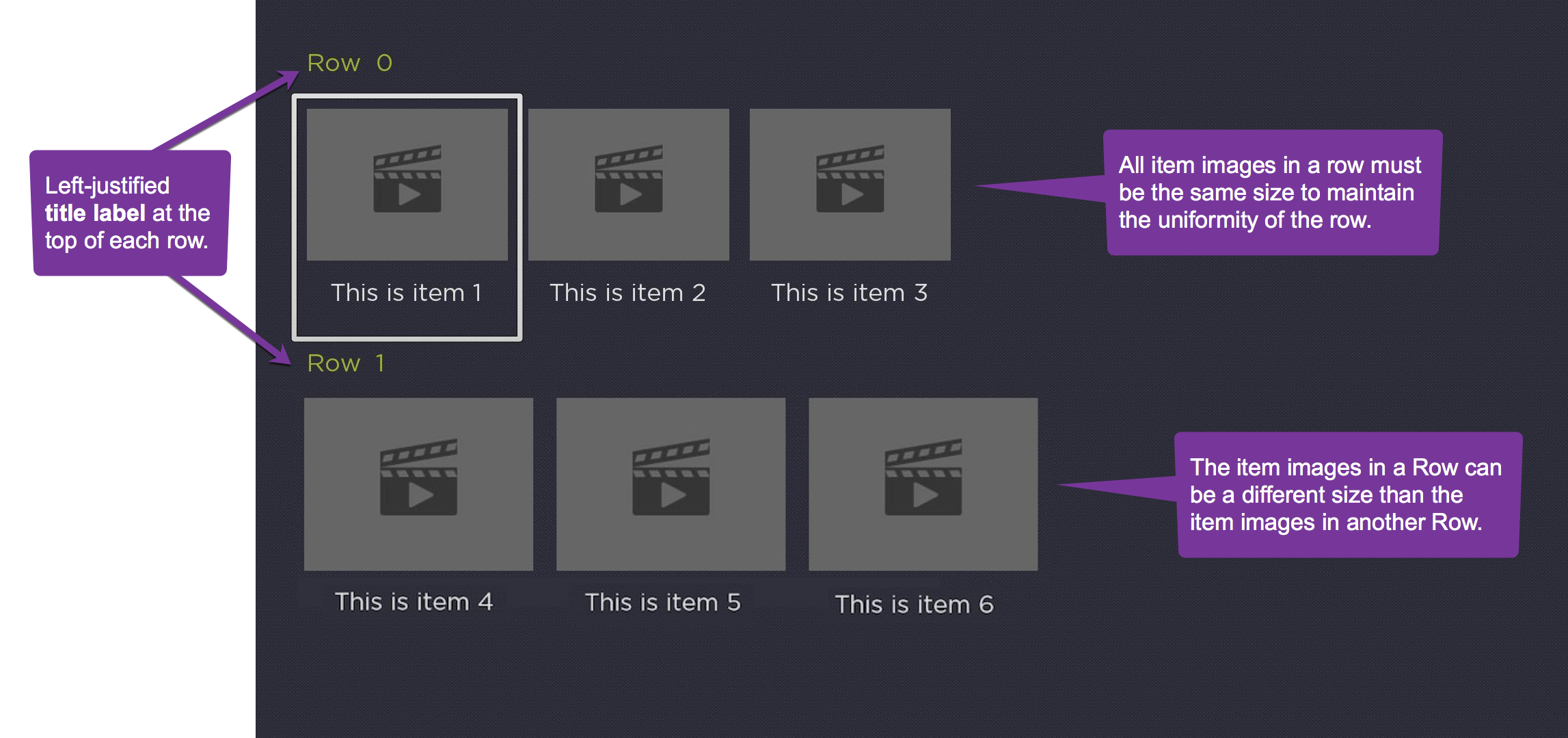
In the field descriptions below, the first type is referred to as simple, and the second type is referred to as component. Most of the field descriptions below apply to both simple and component types.
Behavior
Whenever all the items in a RowList row are visible, the focus will step one-by-one across the items, rather than step once, then smooth scroll.
Each time the RowList focus animation completes a step, the RowList's rowItemFocused field will be set. This allows the Bob to be immediately updated. This will happen when long press scrolling after the initial step ends prior to the smooth scrolling. It will also happen when long press scrolling across a short RowList row as the focus now steps one-by-one across the items in a short row. Previously, the rowItemFocused field was only set once after a long press scrolling key release event.
Fields
| Field | Type | Default | Access Permission | Description | ||||||||
|---|---|---|---|---|---|---|---|---|---|---|---|---|
| itemComponentName | string | READ_WRITE | Specifies the name of an XML component for the items in each row. An instance of this component is created on demand for each visible item of each row. The XML component must define a specific interface as detailed in RowList XML Component below. | |||||||||
| rowTitleComponentName | string | READ_WRITE | Specifies the name of an XML component to render titles in place of the row label. This component must extend from Group. If this component defines a "content" field, it will be set to the row's content. If this component defines a "rowCounterVertAlign" field (possible values are "top", "center", and "bottom"), the row counter's vertical alignment is respective of the row title component. | |||||||||
| content | ContentNode | none | READ_WRITE | Specifies the content for the list. The content should be a single ContentNode that has one child ContentNode for each row. These child ContentNodes for each row should themselves contains child ContentNodes for each item in the row. See Data Bindings below for more details. | ||||||||
| itemSize | vector2d | [0,0] | READ_WRITE | Specifies the width and height of rows in the list. Note that this the width of the entire row, not the width of the posters in the row. | ||||||||
| itemSpacing | vector2d | [0,0] | READ_WRITE | Specifies the spacing between rows in the list. The y-dimension of the vector specifies the vertical spacing between rows, and the x-dimension is ignored. | ||||||||
| numRows | integer | 0 | READ_WRITE | Specifies the number of visible rows in the list. Note that the actual number of rows may be more or less than the number of visible rows depending on the number of items in the list content. | ||||||||
| rowHeights | array of floats | [ ] | READ_WRITE | Specifies the heights of each row of the list. This allows the height of each row of the list to vary from row to row. The values override the height specified in the y-dimension value of the itemSize field. If the array contains fewer elements than the number of rows in the data model, the y-dimension value of the itemSize field is used as the height of the extra rows. | ||||||||
| rowSpacings | array of floats | [ ] | READ_WRITE | Specifies the spacing after each row of the list. This allows the spacing between rows to vary from row to row. The values override the vertical spacing specified in y-dimension value of the itemSpacing field. If the array contains fewer elements than the number of rows in the data model, the y-dimension value of the itemSpacing field is used as the spacing after the extra rows. | ||||||||
| rowItemSize | array of vector2d | [ ] | READ_WRITE | Specifies the width and height of the items in each row. The array of values must include at least one element. If the array contains fewer elements than the number of rows in the data model, the last value in the array is used as the size for the extra rows. | ||||||||
| rowItemSpacing | array of vector2d | [ ] | READ_WRITE | Specifies the spacing between items in each row. The x-dimension of each array value specifies the horizontal spacing between list items in the corresponding row. If the array contains fewer elements than the number of rows in the data model, the last value in the array is used as the spacing for the extra rows. If the array contains no values, no space will be included between list items in all rows. | ||||||||
| focusXOffset | array of floats | [ ] | READ_WRITE | Specifies the x-dimension offset of the first fully visible item in each row relative to the left edge of the list. In most cases, the first fully visible item in each row will be positioned at the left edge of the list, so this field does not need to be specified. If the array contains fewer elements than the number of rows in the data model, the last value in the array is used as the x-dimension offset for the extra rows. If the array contains no values, the default x-dimension offset of 0.0 is used. | ||||||||
| rowLabelOffset | array of vector2d | [0,0] | READ_WRITE | Specifies the offset of the row label for each row. The x-dimension specifies the horizontal offset of the label from the left edge of the row. The y-dimension component specifies the vertical spacing between the label and the list items in the row. If the array contains fewer elements than the number of rows in the data model, the last value in the array is used as the offset for the labels of the extra rows. If the array specified contains no values, a default offset value of [0,0] is used. | ||||||||
| showRowLabel | array of Boolean | [ ] | READ_WRITE | Specifies whether the row label on the left edge of each row is displayed. If the array contains fewer elements than the number of rows in the data model, the last value in array is used to control the display of the row label for the extra rows. If the array contains no values, no row labels are displayed. | ||||||||
| showRowCounter | array of Boolean | [ ] | READ_WRITE | Specifies whether the "item_number of total_number_of_items" label on the right edge of each row is displayed. Note that the "item_number of total_number_of_items" label is only displayed for the focused row even if the showRowCounter field value for that row is set to true. If the array contains fewer elements than the number of rows in the data model, the last value in array is used to control the display of the "item_number of total_number_of_items" label for the extra rows. If the array contains no values, no "item_number of total_number_of_items" labels are displayed. | ||||||||
| indefiniteRowItemCount | array of Boolean | [ ] | READ_WRITE | For each row, a value of true indicates that a "+" character should be appended to the "total_number_of_items" label in the UI (which should be the case when there are unfetched pages beyond what is currently accessible/visible, e.g., "Item 4 of 30+"). | ||||||||
| variableWidthItems | array of Boolean | [ ] | READ_WRITE | This field is only supported when rowFocusAnimationStyle = "fixedFocusWrap"By default, all items in a row of the RowList node have the same width and height. By setting variableWidthItems to true for a row, the items in the row will continue to have the same height, but the width will be taken from the [SD/HD/FHD]ItemWidth field of the ContentNode associated with each item. See Data Bindings below for more details. variableWidthItems is an array with one element per row in the RowList. If there are fewer elements than rows in the RowList, the last value in the array is repeated. If all rows of the RowList have variable widths, you can set variableWidthItems="[true]" or variableWidthItems="true".The [SD/HD/FHD]ItemWidth values specified should match the ui_resolutions attribute in the manifest.Example: If you only specify ui_resolutions=fhd, you should only set FHDItemWidth and allow the device to autoscale when rendering for HD and SD display modes. If you specify ui_resolutions=hd,fhd, you can set HDItemWidth and FHDItemWidth.If any item does not specify the [SD/HD/FHD]ItemWidth in its ContentNode for a variable width row, the x value of the RowList's rowItemSize field for that row is used as the width for that item. | ||||||||
| rowFocusAnimationStyle | option string | floatingFocus | READ_WRITE | Specifies the how the focus indicator moves in a row of items in response to the remote direction pad Left and Right key presses. The possible values are:
| ||||||||
| Option | Effect | |||||||||||
| floatingFocus | Causes the focus indicator to float left or right until it reaches the end of the row, at which point the focus indicator will stay fixed on the first or last item in the row, and the items will scroll left or right if there were items that were not visible. | |||||||||||
| fixedFocusWrap | Causes the row to wrap around when the focus indicator reaches the first or last item in the row, as long as the row contains enough items to fill the row. If the row does not contain enough items to fill the row, the focus indicator will float left and right. | |||||||||||
| fixedFocus | Causes the focus to stay fixed on the first item in each row. As the user scrolls, the previous selected item goes off the screen. Scrolling continues until the last item is reached with no wrapping. | |||||||||||
| vertFocusAnimationStyle | option string | fixedFocus | READ_WRITE | Specifies the how the focus indicator moves in a list or a column of grid items in response to the remote direction pad Up and Down key presses. The possible values are:
| ||||||||
| Option | Effect | |||||||||||
| floatingFocus | Causes the focus indicator to float up or down until it reaches the end of the list, at which point the focus indicator will stay fixed on the first or last row in the list, and the rows will scroll up or down if there are rows that were not visible. | |||||||||||
| fixedFocusWrap | Causes the column to wrap around when the focus indicator reaches the first or last row in the list, as long as the list contains enough rows to fill the list. If the list does not contain enough rows to fill the list, the focus indicator will float up and down. | |||||||||||
| fixedFocus | Causes the focus to stay fixed on the upper row. As the user scrolls down, the row containing the previously selected item scrolls up off screen. Scrolling continues until the last row is reached. | |||||||||||
| rowLabelColor | color | 0xffffffff | READ_WRITE | Specifies the color of the row and "item_number of total_number_of_items" labels. | ||||||||
| rowLabelFont | font | system default | READ_WRITE | Specifies the font for the row and "item_number of total_number_of_items" labels. | ||||||||
| rowCounterRightOffset | float | READ_WRITE | Field provides greater control over the UX. When set, this value specifies the location of the right edge of the row counter relative to right edge of the RowList's clipping rectangle. If not set, the right edge of the row counter is positioned to equal the left offset of the row title. | |||||||||
| showRowCounterForShortRows | Boolean | true | READ_WRITE | Field provides greater control over the UX. When set to true, the row counter is shown for all rows. When set to false, the row counter is not shown for rows where all items fit onscreen. | ||||||||
| fadeFocusFeedbackWhenAutoScrolling | Boolean | false | READ_WRITE | When set to true, the focus feedback indicator will quickly fade out when scrolling multiple items and fade back in when the scrolling ends. The focus feedback indicator will also after in and out when using the FFW/Rewind keys to scroll a page at a time. Note: This field is defined on ArrayGrid and thus is inherited by all of the following components: LabelList, MarkupList, PosterGrid, MarkupGrid, RowList, CheckList, and RadioButtonList. | ||||||||
| currFocusFeedbackOpacity | float | READ_ONLY | This field provides access to the current opacity of the focus feedback indicator. It can be used to have other items on the screen fade in/out when the focus feedback indicator fades in/out. Note: This field is defined on ArrayGrid and thus is inherited by all of the following components: LabelList, MarkupList, PosterGrid, MarkupGrid, RowList, CheckList, and RadioButtonList. | |||||||||
| drawFocusFeedbackOnTop | Boolean | false | READ_WRITE | Specifies whether the focus indicator bitmap is drawn below or on top of the list items. | ||||||||
| drawFocusFeedback | Boolean | true | READ_WRITE | Specifies whether or not the focus indicator bitmap is displayed. | ||||||||
| imageWellBitmapUri | uri | READ_WRITE | Specifies the bitmap file to use to suggest where images would appear for empty lists. | |||||||||
| focusBitmapUri | uri | READ_WRITE | Specifies the bitmap file used for the focus indicator when the list has focus. In most cases, this should be a 9-patch image that specifies both expandable regions as well as margins. Only set this field to specify a custom bitmap that differs in appearance from the default bitmap. | |||||||||
| focusFootprintBitmapUri | uri | READ_WRITE | Specifies the bitmap file used for the focus indicator when the list does not have focus. In most cases, this should be a 9-patch image that specifies both expandable regions as well as margins. Only set this field to specify a custom bitmap that differs in appearance from the default bitmap. | |||||||||
| focusBitmapBlendColor | color | 0xFFFFFFFF | READ_WRITE | Blend the graphic image specified by focusBitmapUri with the specified color. If set to the default, 0xFFFFFFFF, no color blending will occur. Set this field to show a focus indicator graphic image with a different color than the image specified by focusBitmapUri. | ||||||||
| focusFootprintBlendColor | color | 0xFFFFFFFF | READ_WRITE | Blend the graphic image specified by focusFootprintBitmapUri with the specified color. If set to the default, 0xFFFFFFFF, no color blending will occur. Set this field to show a focus footprint indicator graphic image with a different color than the image specified by focusFootprintBitmapUri. | ||||||||
| loadingBitmapUri | uri | READ_WRITE | Specifies a bitmap file to display while a list item poster is loading. To execute a seamless cross-fade transition between posters, set the loadingBitmapUri of the next poster to be shown to the uri of the currently displayed poster. | |||||||||
| loadingBitmapOpacity | float | 1.0 | READ_WRITE | Specifies an opacity value used to render the loading bitmap. | ||||||||
| failedBitmapUri | uri | READ_WRITE | Specifies a bitmap file to display when a list item poster fails to load. | |||||||||
| failedBitmapOpacity | float | 1.0 | READ_WRITE | Specifies an opacity value used to render the failed bitmap. | ||||||||
| wrapDividerBitmapUri | uri | READ_WRITE | Specifies the bitmap file to use as a visual separator between the last and first list items when the list wraps. In most case, this should be a 9-patch image that specifies both expandable regions. Only set this field to specify a custom bitmap that differs in appearance from the default bitmap. | |||||||||
| wrapDividerHeight | float | 0 | READ_WRITE | Specifies the height of the divider. The wrap divider bitmap will be scaled to this height. The width of the wrap divider is set to the width of the list items (that is, the x-dimension value of the itemSize field). | ||||||||
| rowItemSelected | array of integer | [ ] | READ_ONLY | When an item is selected, set to a 2-element array, where element 0 contains the index of the row containing the selected item, and element 1 contains the index of the selected item in that row. | ||||||||
| rowItemFocused | array of integer | [ ] | READ_ONLY | When an item gains the key focus, set to a 2-element array, where element 0 contains the index of the focused row, and element 1 contains the index of the focused item in that row. | ||||||||
| currFocusColumn | float | 0.0 | READ_WRITE | Indicates which column of the currently focused row in a RowList component currently has focus. This field is typically used to implement a horizontal pagination mechanism for the currently focused row. If this value is set to 3.7, it means that item 3 occupies 30% of the currently focused row while item 4 occupies 70% of it. To maximize performance, the field should be kept to a minimum, as these scripts will run once during each render. | ||||||||
| itemSelected | integer | 0 | READ_ONLY | When an item is selected, set to the index of the selected row. | ||||||||
| itemFocused | integer | 0 | READ_ONLY | When a row gains the key focus, set to the index of the focused row. | ||||||||
| itemUnfocused | integer | 0 | READ_ONLY | When a row loses the key focus, set to the index of the unfocused row. | ||||||||
| jumpToItem | integer | 0 | WRITE_ONLY | When set to a valid item index, causes the list to immediately update so that the specified row moves into the focus position. | ||||||||
| jumpToRowItem | array of integer | [ ] | WRITE_ONLY | When set to a valid [ row, col ] index pair, causes the list to immediately update so that the specified row, col item moves into the focus position. | ||||||||
| animateToItem | integer | 0 | WRITE_ONLY | When set to a valid item index, causes the list to quickly scroll so that the specified row moves into the focus position. |

RowList XML component
If the RowList node is to use an XML component, the itemComponentName field value should be set to the name of an XML component used to display each item in the row list. An instance of this component is created for each visible item in each row of the list.
If the XML component contains interface fields that match the names shown in the table below, those fields will be updated by the RowList node. This allows the XML component to alter the item appearance based on changes to these interface fields.
Note that the fields are updated in the order presented in the table below. Any layout scripting you write based on these fields should be done in that order to avoid updating your layout based on a field that has not been updated yet.
| Field Name | Field Type | Access Permission | Description |
|---|---|---|---|
| width | float | READ_ONLY | Set to the width of the item. |
| height | float | READ_ONLY | Set to the height of the item |
| index | integer | READ_ONLY | Set to the data model index within the data for the row that contains this item. For example, if this appeared in row 2, then the field is set to 0 for the first item in row 2, 1 for the second item in row 2, and so on. |
| rowIndex | integer | READ_ONLY | Set to the data model index of the row that contains this item |
| rowHasFocus | Boolean | READ_ONLY | Set to true if the row that contains this item has focus, false otherwise. |
| rowListHasFocus | Boolean | READ_ONLY | Set to true if the row list that contains this item has focus, false otherwise. |
| itemContent | ContentNode | READ_WRITE | Contains the data to be displayed by the row list item. The relationship between data in the ContentNode and the visual elements of the row list item is determined by the scripts in the item XML component. Typically, an observer callback function of the itemContent field is used to update the row list item when the content changes. |
| focusPercent | Float | READ_ONLY | The fractional value, from 0.0 to 1.0, of a time delay after focus has moved from one item in a row to the next. The fractional value increases incrementally from 0.0 to 1.0 for the newly-focused item, while simultaneously decreasing from 1.0 to 0.0 for the previously-focused item. This value can be used as a timing key to smoothly animate the appearance of the focused item as well as the previously-focused item, to indicate the movement of focus to the user. |
| rowFocusPercent | float | READ_ONLY | The fractional value, from 0.0 to 1.0, of a time delay after focus has moved from an item in one row to an item in an adjacent row, either above or below the previously-focused row. The fractional value increases incrementally from 0.0 to 1.0 for the newly-focused row, while simultaneously decreasing from 1.0 to 0.0 for the previously-focused row. This value can be used as a timing key to smoothly animate the appearance of the focused row as well as the previously-focused row, to indicate the movement of focus to the user. |
| itemHasFocus | Boolean | READ_ONLY | Indicates whether the item component currently is the RowList's focused item. When scrolling starts, the itemHasFocus field for the currently focused item is set to false. When scrolling ends, the itemHasFocus field for the newly focused item is set to true. During the scrolling animation, all itemHasFocus fields are set to false. Only one item component of any RowList should have itemHasFocus set to true. If the RowList does not focus, all itemHasFocus fields of their item components should be set to false. |
Data bindings
A RowList node should have a single ContentNode as the root node in its content field. One child ContentNode should be added to the root node for each row in the list (these nodes can be thought of as row nodes). Each row node should contain one child ContentNode for each item in the row (these nodes can be thought of as item nodes).
Row node data bindings
| Attribute | Type | Description |
|---|---|---|
| TITLE | string | The label for the row |
Item node data bindings
| Attribute | Type | Description |
|---|---|---|
| FHDGRIDPOSTERURL / FHDPOSTERURL | uri | The image file for the item poster when the screen resolution is set to FHD. FHDGRIDPOSTERURL is used if non-empty. FHDPOSTERURL is used otherwise. |
| HDGRIDPOSTERURL / HDPOSTERURL | uri | The image file for the item poster when the screen resolution is set to HD. HDGRIDPOSTERURL is used if non-empty. HDPOSTERURL is used otherwise. |
| SDGRIDPOSTERURL / SDPOSTERURL | uri | The image file for the item poster when the screen resolution is set to SD. SDGRIDPOSTERURL is used if non-empty. SDPOSTERURL is used otherwise. |
| FHDItemWidth | float | The width for the FHD item. This value is used in conjunction with variableWidthItems and should only be set if the associated ui_resolutions attribute is also specified.This field must be added to the ContentNode via addField() prior to setting a value. Ex. ContentNode.addField("FHDItemWidth", "float", false) |
| HDItemWidth | float | The width for the HD item. This value is used in conjunction with variableWidthItems and should only be set if the associated ui_resolutions attribute is also specified.This field must be added to the ContentNode via addField() prior to setting a value. Ex. ContentNode.addField("HDItemWidth", "float", false) |
| SDItemWidth | float | The width for the SD item. This value is used in conjunction with variableWidthItems and should only be set if the associated ui_resolutions attribute is also specified.This field must be added to the ContentNode via addField() prior to setting a value. Ex. ContentNode.addField("SDItemWidth", "float", false) |
RowList sample apps
The follow sample apps can be installed on your local device for testing and reviewing the code.
| Sample download | Description |
|---|---|
| SimpleRowList | Simple example app using the RowList node class. This sample creates a two row RowList node using an item component definition, that is, it specifies custom markup for the individual items in the row. |
| RowListFocusStyleTest | A more complex example app that demonstrates a number of different focus styles, as well as ways to mix different sized images in different RowList rows. |
| AdvancedRowList | Example demonstrating use of RowList in a PanelSet. This example includes RowList loading real data from a JSON file, mixed aspect ratio posters, and the use of focusPercent to overlay annotations. |
| variableWidthRowList | A simple example demonstrating variable width items. The first row in the RowList contains large hero artwork and each subsequent row contains a mix of different aspect ratio posters for TV and Movie artwork. |
Sample app
RowListExample is a sample app demonstrating RowList in action.
Updated 9 days ago