
DynamicCustomKeyboard
Voice-enabled keyboard node with a custom layout driven by a Key Definition File
Extends DynamicKeyboardBase
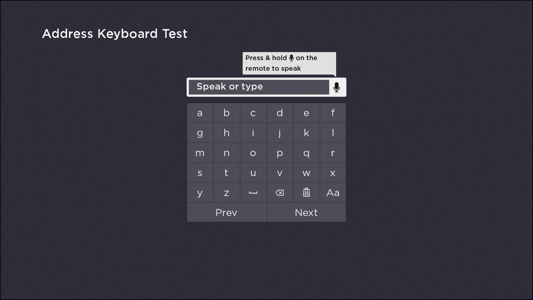
The DynamicCustomKeyboard node enables developers to create a voice-enabled keyboard that has a custom layout. As specified in its parent DynamicKeyboardBase class, the DynamicCustomKeyboard node has a built-in VoiceTextEditBox node for displaying the string of characters provided via text or voice entry, and it has a DynamicKeyGrid node that provides keyboard functionality.
The layout of the keyboard is customized based on a JSON-formatted Key Definition File. In the Key Definition File, the developer labels the individual keys and groups them into sections and rows. The key labels support the characters in the Basic Latin, Latin 1 Supplement, Latin Extended-A, and Latin Extended-B blocks. This provides support for most Western European languages, including English, French, German, Italian, Portuguese, and Spanish.
Accessing the Key Definition File
The instance of the DynamicKeyGrid node is accessed via the keyGrid field of the DynamicCustomKeyboard node. The keyGrid field includes a keyDefinitionUri field, which must be set to a valid Key Definition File. Typically, this is done by creating an RSG component that extends the DynamicCustomKeyboard and then defining an init() function for that component as demonstrated in the following example:
sub init()
        m.top.keyGrid.keyDefinitionUri = "pkg:/data/coolKeyboardLayoutKDF.json"
end sub
In this example, the keyGrid is set to the coolKeyboardLayoutKDF.json file, which is located in the data directory of the package file. The Key Definition File may be stored anywhere within the package file.
Default key selection handlers
It is recommended that developers create a component that extends the DynamicCustomKeyboard node class. This provides default key selection handling for the following use cases:
| Key | Default Handler |
|---|---|
| "label" specified, but not "strOut" | The "label" string is inserted in the text field's string at the current cursor position. |
| "strOut" set to "clear" ("clear" is case insensitive) | The text field is set to the empty string. |
| "strOut" set to "backspace" ("backspace" is case insensitive) | The character to the left of the cursor position is deleted from the text field's string. |
| "strOut" set to "space" ("space" is case insensitive") | A space is inserted in the text field's string at the current cursor position. |
| "strOut" set to some other string | By default, the "strOut" string is inserted in the text field's string at the current cursor position. In this case, the component typically provides a custom key selection handler (see |
Custom key selection handlers
For most keys defined in the Key Definition File, the default key selection handlers will provide the desired behavior. If custom handling is needed, the component that extends the DynamicCustomKeyboard node class can implement an interface function. To do this, include a function within the component's <interface> element that has the following signature:
function keySelected(key as string) as booleanThe key parameter is set to the key's "strOut" field, if specified; otherwise, it is set to the key's "label" string.
The function should return true if it handles the key selection. Returning false causes the default key selection handler behavior to be used.
Example custom key select handler
The following example demonstrates a custom key handler:
-
The Key Definition File for the component that extends DynamicCustomKeyboard node has a row that defines the following keys:
"keys": [ { "label": "Aa", "strOut": "ChangeCase" }, <OTHER KEYS> ] -
When this key is selected, the keyboard's mode is changed from "UpperCase" to "LowerCase" (the Key Definition File would need to include grids for both modes). In this case, the child DynamicCustomKeyboard component includes a keySelected() function in its interface:
<component name="MyCustomKeyboard" extends="DynamicCustomKeyboard"> <interface> <function name="keySelected" /> </interface> <OTHER COMPONENT ELEMENTS> </component> -
In the corresponding BrightScript file for the child DynamicCustomKeyboard component, the keySelected() function includes the following business logic:
function keySelected(key as string) as boolean
    if key = "ChangeCase"
        if m.top.keyGrid.mode = "UpperCase"   ' m.top.keyGrid.mode would likely be initialized in the component's init()
            m.top.keyGrid.mode = "LowerCase"  ' function just after m.top.keyGrid.keyDefinitionUri is set to the Key Definition File to use
        else
            m.top.keyGrid.mode = "UpperCase"
        end if
        return true    ' key selection is handled, return true
    end if
    ' if not handled, return false to use default DynamicCustomKeyboard keySelected handlers
    return false
end function
Custom key handlers that modify the entered text string
In most cases, the default key selection handlers can be used for modifying the entered text string. However, if a custom key handler is used to do this, it must update the cursorPosition of the DynamicCustomKeyboard. The following example demonstrates a custom key handler that changes the text string:
- The Key Definition File includes a key definition with an action intended to duplicate the character to the left of the cursor position, positioning the cursor after the duplicated character:
"keys": [ { "icon": "pkg:/images/Duplicate.png", "strOut": "DuplicateCharacter" }, <OTHER KEYS> ] - The keySelected() function includes the following business logic:
function keySelected(key as string) as boolean
    if key = "DuplicateCharacter"
        currString = m.top.text
        currStringLen = currString.Len()
        cursorPosition = m.top.textEditBox.cursorPosition
        charToDuplicate = currString.Mid(cursorPosition, 1)
     ' set the keyboard's text field to the edited string
        if cursorPosition > 0
            m.top.text = currString.Left(cursorPosition) + charToDuplicate + currString.Right(currStringLen - cursorPosition)
        end if
        ' update the VoiceTextEditBox's cursorPosition
        m.top.TextEditBox.cursorPosition = cursorPosition + 1
        return true   ' DuplicateCharacter key selection is handled
    end if
    ' if not handled, return false to use default DynamicCustomKeyboard keySelected handlers
    return false
end function
Fields
See the DynamicKeyboardBase node and its base classes (Group and Node) for configuring the fields inherited by the DynamicCustomKeyboard node.
| Field | Type | Default | Access Permission | Description |
|---|---|---|---|---|
| keyGrid | DynamicKeyGrid node | The DynamicKeyGrid node associated with the keyboard | READ | Provides access to the internal DynamicKeyGrid node of this DynamicKeyboardBase component. Do not set this field to null or to a different DynamicKeyGrid node; this field should be used only to access the fields of this component's internal DynamicKeyGrid node.
|
Default VoiceTextEditBox settings
| Field | Type | Default | Description |
|---|---|---|---|
| voiceEntryType | string | "generic" | The type of characters accepted via voice entry. |
| voiceEnabled | boolean | true | Specifies whether voice entry is enabled for the text edit box of the dynamic keyboard. |
| maxTextLength | integer | 75 | The maximum number of characters that may be entered into the text edit box of the dynamic keyboard. |
Sample Key Definition File
The following sample demonstrates a Key Definition File that defines five grids for DynamicCustomKeyboard node. See the Key Definition File specification for more information.
{
"keyboardWidthFHD": 576,
"keyboardHeightFHD": 432,
"keyboardWidthHD": 384,
"keyboardHeightHD": 288,
"sections": [
{
"grids": [
{
"modes": "NameUpper",
"rows": [
{
"keys": [
{ "label": "A" },
{ "label": "B" },
{ "label": "C" },
{ "label": "D" },
{ "label": "E" },
{ "label": "F" }
]
},
{
"keys": [
{ "label": "G" },
{ "label": "H" },
{ "label": "I" },
{ "label": "J" },
{ "label": "K" },
{ "label": "L" }
]
},
{
"keys": [
{ "label": "M" },
{ "label": "N" },
{ "label": "O" },
{ "label": "P" },
{ "label": "Q" },
{ "label": "R" }
]
},
{
"keys": [
{ "label": "S" },
{ "label": "T" },
{ "label": "U" },
{ "label": "V" },
{ "label": "W" },
{ "label": "X" }
]
},
{
"keys": [
{ "label": "Y" },
{ "label": "Z" },
{
"icon": "theme:DKB_SpaceKeyBitmap",
"focusIcon": "theme:DKB_SpaceKeyFocusBitmap",
"strOut": "Space"
},
{
"icon": "theme:DKB_DeleteKeyBitmap",
"focusIcon": "theme:DKB_DeleteKeyFocusBitmap",
"strOut": "Delete"
},
{
"icon": "theme:DKB_ClearKeyBitmap",
"focusIcon": "theme:DKB_ClearKeyFocusBitmap",
"strOut": "Clear"
},
{
"label": "Aa",
"strOut": "UpperLower"
}
]
},
{
"keys": [
{ "label": "Prev", "disabled": 1 },
{ "label": "Next" }
]
}
]
},
{
"modes": "NameLower",
"rows": [
{
"keys": [
{ "label": "a" },
{ "label": "b" },
{ "label": "c" },
{ "label": "d" },
{ "label": "e" },
{ "label": "f" }
]
},
{
"keys": [
{ "label": "g" },
{ "label": "h" },
{ "label": "i" },
{ "label": "j" },
{ "label": "k" },
{ "label": "l" }
]
},
{
"keys": [
{ "label": "m" },
{ "label": "n" },
{ "label": "o" },
{ "label": "p" },
{ "label": "q" },
{ "label": "r" }
]
},
{
"keys": [
{ "label": "s" },
{ "label": "t" },
{ "label": "u" },
{ "label": "v" },
{ "label": "w" },
{ "label": "x" }
]
},
{
"keys": [
{ "label": "y" },
{ "label": "z" },
{
"icon": "theme:KeyboardSpaceOnBitmap",
"focusIcon": "theme:KeyboardSpaceOffBitmap",
"strOut": "Space"
},
{
"icon": "theme:KeyboardDeleteOnBitmap",
"focusIcon": "theme:KeyboardDeleteOffBitmap",
"strOut": "Delete"
},
{
"icon": "theme:KeyboardClearOnBitmap",
"focusIcon": "theme:KeyboardClearOffBitmap",
"strOut": "Clear"
},
{
"label": "Aa",
"strOut": "UpperLower"
}
]
},
{
"keys": [
{ "label": "Prev", "disabled": 1 },
{ "label": "Next" }
]
}
]
},
{
"modes": "Zip",
"gridHeightFHD": 360,
"gridHeightHD": 240,
"rows": [
{
"keys": [
{ "label": "1" },
{ "label": "2" },
{ "label": "3" }
]
},
{
"keys": [
{ "label": "4" },
{ "label": "5" },
{ "label": "6" }
]
},
{
"keys": [
{ "label": "7" },
{ "label": "8" },
{ "label": "9" }
]
},
{
"keys": [
{
"icon": "theme:KeyboardDeleteOnBitmap",
"focusIcon": "theme:KeyboardDeleteOffBitmap",
"strOut": "Delete"
},
{
"label": "0"
},
{
"icon": "theme:KeyboardClearOnBitmap",
"focusIcon": "theme:KeyboardClearOffBitmap",
"strOut": "Clear"
}
]
},
{
"keys": [
{ "label": "Prev" },
{ "label": "Next" }
]
}
]
},
{
"modes": "FullUpper",
"rows": [
{
"keys": [
{ "label": "0" },
{ "label": "1" },
{ "label": "2" },
{ "label": "3" },
{ "label": "4" },
{ "label": "5" },
{ "label": "6" },
{ "label": "7" }
]
},
{
"keys": [
{ "label": "8" },
{ "label": "9" },
{ "label": "A" },
{ "label": "B" },
{ "label": "C" },
{ "label": "D" },
{ "label": "E" },
{ "label": "F" }
]
},
{
"keys": [
{ "label": "G" },
{ "label": "H" },
{ "label": "I" },
{ "label": "J" },
{ "label": "K" },
{ "label": "L" },
{ "label": "M" },
{ "label": "N" }
]
},
{
"keys": [
{ "label": "O" },
{ "label": "P" },
{ "label": "Q" },
{ "label": "R" },
{ "label": "S" },
{ "label": "T" },
{ "label": "U" },
{ "label": "V" }
]
},
{
"keys": [
{ "label": "W" },
{ "label": "X" },
{ "label": "Y" },
{ "label": "Z" },
{
"icon": "theme:KeyboardSpaceOnBitmap",
"focusIcon": "theme:KeyboardSpaceOffBitmap",
"strOut": "Space"
},
{
"icon": "theme:KeyboardDeleteOnBitmap",
"focusIcon": "theme:KeyboardDeleteOffBitmap",
"strOut": "Delete"
},
{
"icon": "theme:KeyboardClearOnBitmap",
"focusIcon": "theme:KeyboardClearOffBitmap",
"strOut": "Clear"
},
{
"label": "Aa",
"strOut": "UpperLower"
}
]
},
{
"keys": [
{ "label": "Prev" },
{ "label": "Next", "disabled": 1 }
]
}
]
},
{
"modes": "FullLower",
"rows": [
{
"keys": [
{ "label": "0" },
{ "label": "1" },
{ "label": "2" },
{ "label": "3" },
{ "label": "4" },
{ "label": "5" },
{ "label": "6" },
{ "label": "7" }
]
},
{
"keys": [
{ "label": "8" },
{ "label": "9" },
{ "label": "a" },
{ "label": "b" },
{ "label": "c" },
{ "label": "d" },
{ "label": "e" },
{ "label": "f" }
]
},
{
"keys": [
{ "label": "g" },
{ "label": "h" },
{ "label": "i" },
{ "label": "j" },
{ "label": "k" },
{ "label": "l" },
{ "label": "m" },
{ "label": "n" }
]
},
{
"keys": [
{ "label": "o" },
{ "label": "p" },
{ "label": "q" },
{ "label": "r" },
{ "label": "s" },
{ "label": "t" },
{ "label": "u" },
{ "label": "v" }
]
},
{
"keys": [
{ "label": "w" },
{ "label": "x" },
{ "label": "y" },
{ "label": "z" },
{
"icon": "theme:KeyboardSpaceOnBitmap",
"focusIcon": "theme:KeyboardSpaceOffBitmap",
"strOut": "Space"
},
{
"icon": "theme:KeyboardDeleteOnBitmap",
"focusIcon": "theme:KeyboardDeleteOffBitmap",
"strOut": "Delete"
},
{
"icon": "theme:KeyboardClearOnBitmap",
"focusIcon": "theme:KeyboardClearOffBitmap",
"strOut": "Clear"
},
{
"label": "Aa",
"strOut": "UpperLower"
}
]
},
{
"keys": [
{ "label": "Prev" },
{ "label": "Next", "disabled": 1 }
]
}
]
}
]
}
]
}Sample app
You can download and install a sample app that demonstrates how to create and configure a dynamic voice-enabled custom keyboard (an address keyboard form). This sample include an example KDF file that specifies the layout of this custom keyboard.
Updated 7 days ago