
Static Analysis Tool
Analyze your app's source code and detect issues before certification
Apps must pass Static Analysis with no Errors before they can be published to the Streaming Store.
Overview
The app publishing flow includes a Static Analysis Tool used to analyze the app's BrightScript source code and detect common issues without having to submit for certification. This arms developers with the information they need to optimize their apps and ensure the app passes certification quickly. These common issues include, but are not limited to, simple app runtime issues, such as crashes on launch, and media playback errors (automated testing).
Developer Dashboard
The Static Analysis Tool is available from the Developer Dashboard.
-
From the Developer Dashboard > Manage My Apps tool, upload a package file.
-
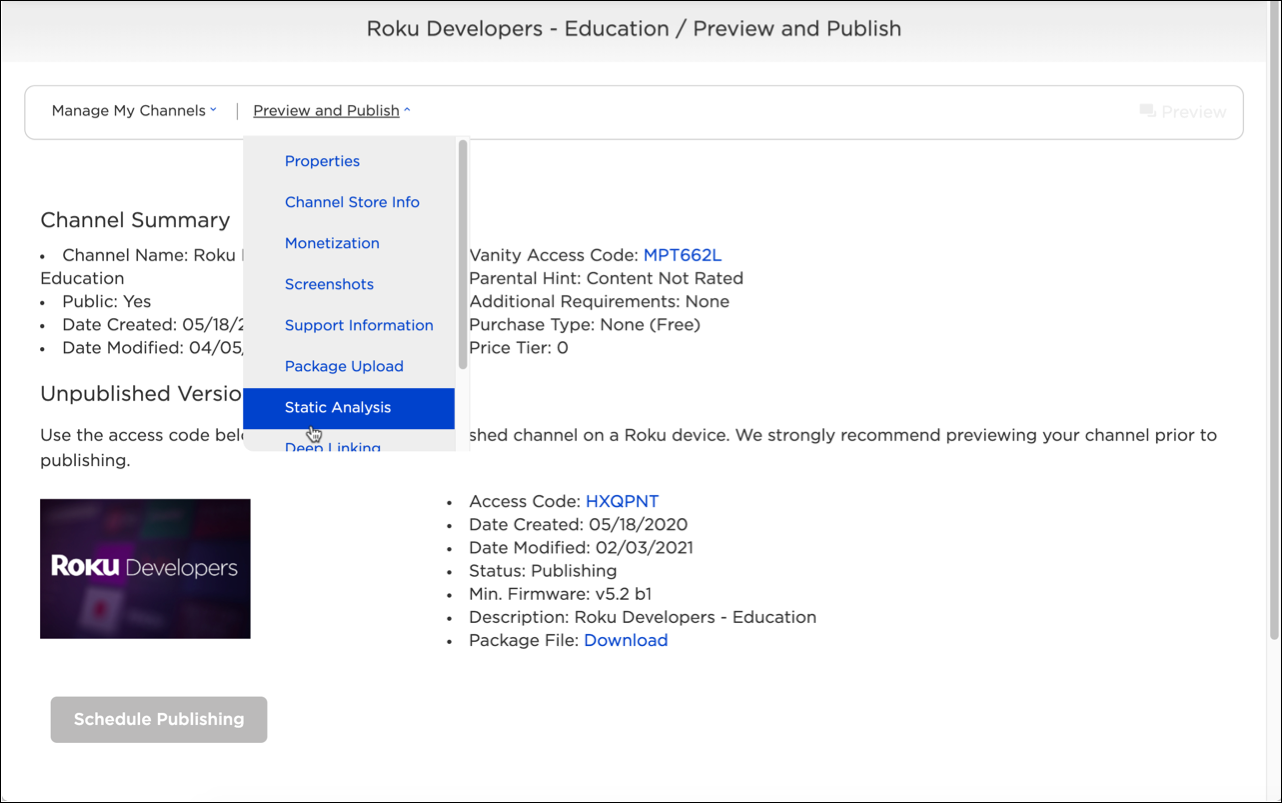
Select Static Analysis from the drop-down menu. This option is only available after a package file has been uploaded.
-
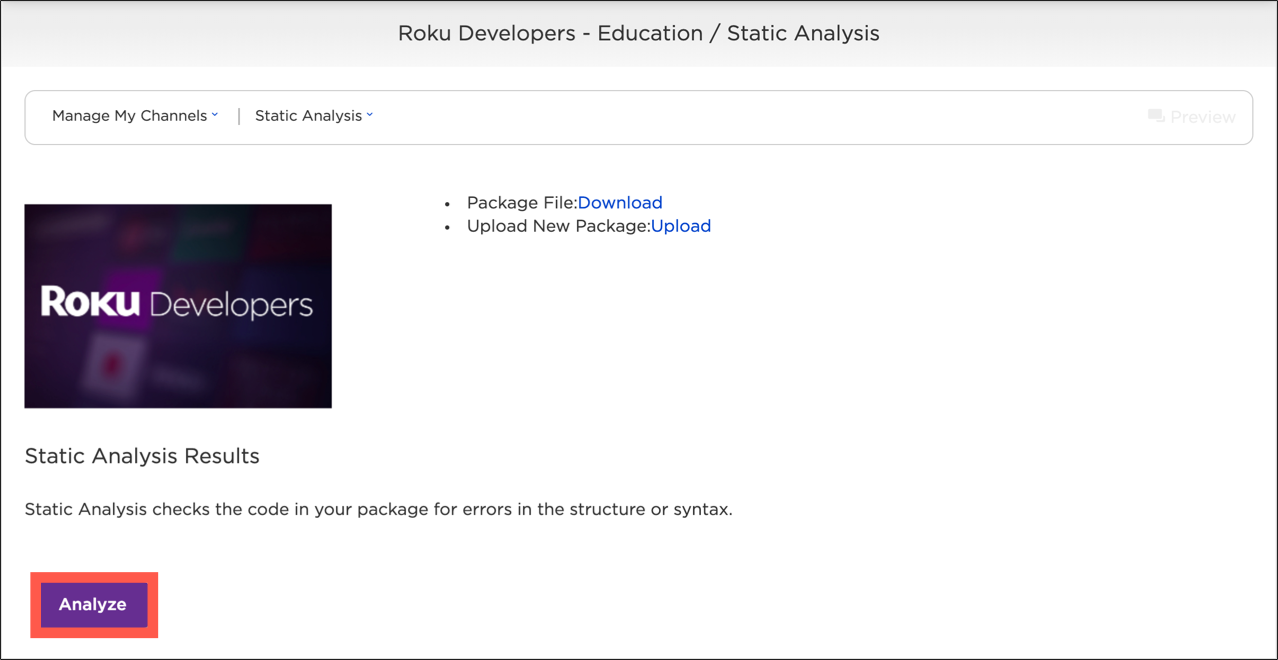
Click Analyze to begin the Static Analysis testing of your app. Click Refresh to check whether the Static Analysis test results are ready and display them.
-
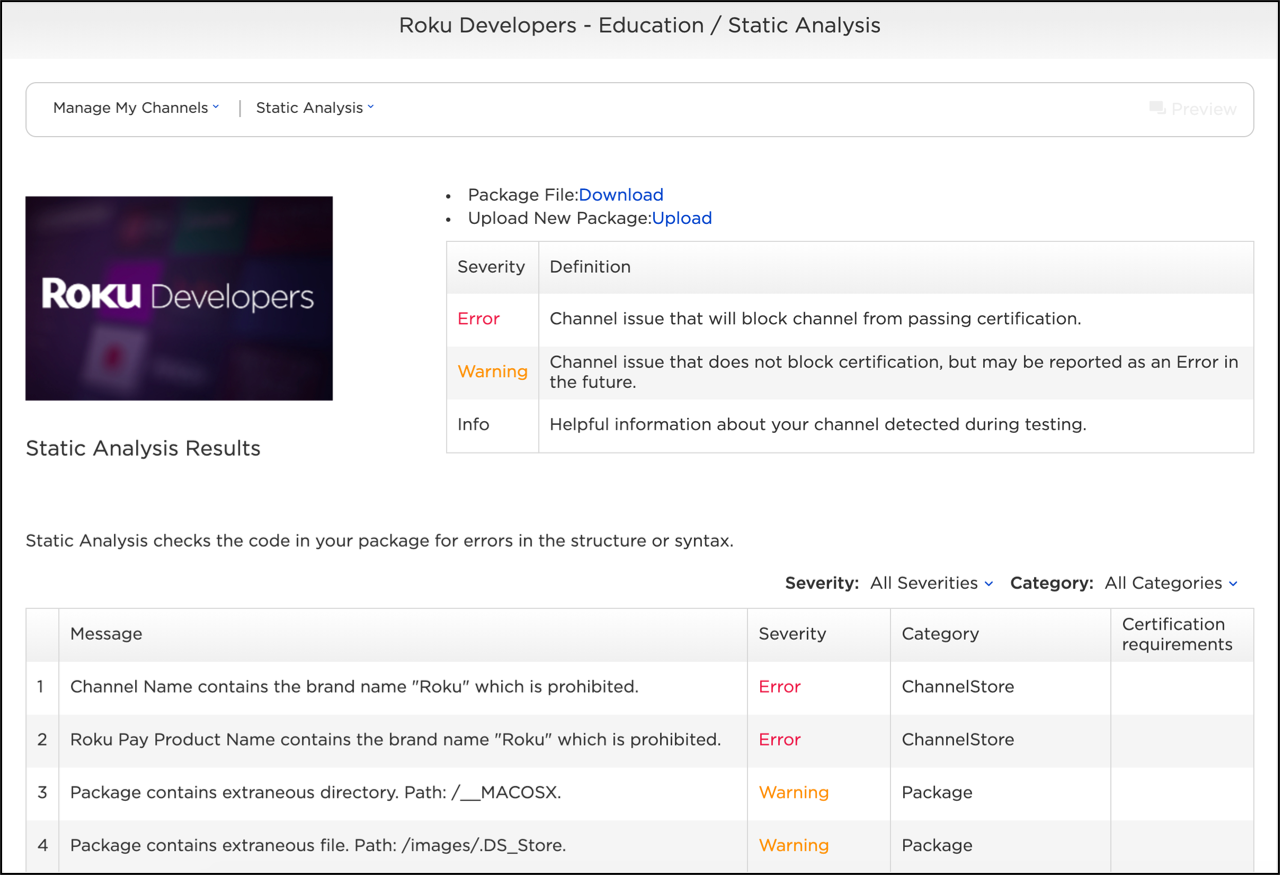
The Static Analysis Results table lists error, warning, and info messages returned by the test. For each message, the following information is provided:
| Column | Description |
|---|---|
| Message | A description of the issue related to the app. |
| Severity | The type of message: error, warning, or info.
|
| Category | The type of issue (for example, package, performance, billing, manifest, and so on). |
| Certification Requirement | Provides a link to any related certification requirements in the Certification Criteria document. |
You can filter the test results based on the Severity or Category.
- Alternatively, you can wait to receive the test results via an email notification. The test results are sent to the email address associated with the developer account. This email contains a link to the Static Analysis test results for the app (you can also download the test results as a plain text JSON file).
Static Analysis test details
Following are the tests that Static Analysis performs on the package file. More tests will be added on a monthly basis.
Tests are grouped by category. Each test reports its severity, a message, the related certification requirement, and the date the message in its current form was added to the Static Analysis tool.
Analytics
| Severity | Message | Certification requirement | Date added |
|---|---|---|---|
| Error | RED constructor call is present but manifest entry is missing. | 4.3, RP 4.4 | Jan 24, 2022 |
| Error | RED constructor call is present but library import is missing. | 4.3, RP 4.4 | Jan 24, 2022 |
| Error | Roku Analytics Library usage found in BrightScript code but manifest entry 'sg_component_libs_required=Roku_Analytics' not found. | 4.3, RP 4.4 | Feb 27, 2020 |
| Warning | Library "roku_analytics" is present in "sg_component_libs_required" manifest attribute but not used | 2.1, 4.3 | Nov 27, 2018 |
| Warning | "Roku_Authenticated" event must be dispatched using "trackEvent" field of roku analytics node. Use https://sdkdocs.roku.com/display/sdkdoc/Prioritizing+authenticated+channels+in+Roku+Search for reference. | 4.3, RP 4.4 | Nov 21, 2018 |
| Warning | RED must be activated as a provider using "init" field of roku analytics node. Use https://sdkdocs.roku.com/display/sdkdoc/Prioritizing+authenticated+channels+in+Roku+Search for reference. | 4.3, RP 4.4 | Nov 21, 2018 |
| Warning | "Roku_Authenticated" event must be dispatched using DispatchEvent() method of roku event dispatcher interface which is returned by Roku_Event_Dispatcher() function. Use https://sdkdocs.roku.com/display/sdkdoc/Prioritizing+authenticated+channels+in+Roku+Search for reference. | 4.3, RP 4.4 | Nov 21, 2018 |
| Warning | RED library import is present but constructor call is missing | 4.3, RP 4.4 | Nov 27, 2018 |
| Warning | RED library import is present but manifest entry is missing | 4.3, RP 4.4 | Nov 27, 2018 |
| Warning | The channel could implement RED or RAF "fireRokuMarketingPixel()" for "Roku_Authenticated" | 4.3 | Jul 10, 2024 |
| Info | RED is integrated properly | 4.3, RP 4.4 | Nov 21, 2018 |
Authentication
| Severity | Message | Certification requirement | Date added |
|---|---|---|---|
| Error | Proper Automatic Account Link implementation requires verifying user sign-in status using "json.channel_data" from ChannelStore "getChannelCred". This step is missing. Please use "channelCred" field of "ChannelStore" node or in case of using "roChannelStore" component, handle "roChannelStoreEvent". | 4.2 | Nov 13, 2024 |
| Error | ChannelStore "getChannelCred" required for Automatic Account Link is missing | 4.2 | Nov 4, 2024 |
| Error | ChannelStore "storeChannelCredData" required for Automatic Account Link is missing. For "ChannelStore" node, "channelCredData" field must be set with user account access token. | 4.2 | Nov 4, 2024 |
| Error | To enable Automatic Account Link, On-Device Authentication needs to be correctly implemented. Please review the On-Device Authentication Warnings in the Static Analysis report for more details. | 4.2 | Nov 13, 2024 |
| Error | We have found a proper integration of an On-Device Authentication in your channel code, but you have not selected Customer Account Requirement in channel submission properties via Developer Portal. | 2.2 | Oct 13, 2023 |
| Error | Voice keyboards are required for entering email addresses, PIN codes and passwords. | 4.12 | Sep 9, 2022 |
| Error | All authenticated channels must use the Request for Information (getUserData) API call to obtain a user's email address during the sign-up or sign-in flow. | RP 2.1, RP 4.1 | Jan 24, 2022 |
| Warning | We have found that you have selected Customer Account Requirement in channel submission properties via Developer Portal but have not enrolled in Roku Partner Payouts Program via Developer Portal. | 2.2 | May 30, 2023 |
| Warning | We have found a proper integration of an On-Device Authentication in your channel code, but you have not enrolled in Roku Partner Payouts Program via Developer Portal. | 2.2 | Oct 13, 2023 |
| Warning | User account access token is not saved using "roRegistrySection" which is required for On-Device Authentication | 2.2 | Nov 4, 2024 |
| Warning | ChannelStore "getUserData" required for On-Device Authentication is missing | 2.2 | Nov 4, 2024 |
| Warning | We have found a proper integration of an Automatic Account Link in your channel code, but you have not selected Customer Account Requirement in channel submission properties via Developer Portal. | 4.2 | May 6, 2023 |
| Info | Automatic Account Link usage is found | 4.2 | Apr 16, 2019 |
Billing
| Severity | Message | Certification requirement | Date added |
|---|---|---|---|
| Error | Channels with subscriptions must implement Roku's Enhanced Subscription Recovery feature to pass certification. ChannelStore "doRecovery" is missing. | RP 4.5 | Nov 13, 2024 |
| Error | Channels with subscriptions must implement Roku's Enhanced Subscription Recovery feature to pass certification. Enhanced Subscription Recovery was not specified on the Subscription Recovery page. | RP 4.5 | Nov 13, 2024 |
| Error | According to the Monetization channel properties page, your channel is offering in-channel purchases, but no Roku Pay API usage was found in your channel. | 2.1 | Jan 24, 2022 |
| Error | Channels with subscriptions must implement Roku's Enhanced Subscription Recovery feature to pass certification. ChannelStore "getAllPurchases" is missing. | RP 4.5 | Nov 13, 2024 |
| Warning | Enhanced Subscription Recovery setting is enabled in your Subscription Recovery page, but ChannelStore "getAllPurchases" is missing in your channel code | RP 4.5 | Feb 25, 2025 |
| Warning | Channels with subscriptions must implement Roku's Enhanced Subscription Recovery feature to pass certification. ChannelStore "getAllPurchases" is missing. | RP 4.5 | Nov 13, 2024 |
| Warning | Enhanced Subscription Recovery was found in BrightScript code but was not specified on the Subscription Recovery page | RP 4.5 | Oct 25, 2024 |
| Warning | Enhanced Subscription Recovery setting is enabled in your Subscription Recovery page, but ChannelStore "doRecovery" is missing in your channel code | RP 4.5 | Feb 25, 2025 |
| Warning | ChannelStore "doRecovery" is found but "getAllPurchases" is missing | RP 4.5 | Oct 25, 2024 |
| Warning | Channels with multiple subscription products must organize the products appropriately in groups to support upgrade / downgrade functionality. | RP 4.2, RP 4.4 | Jan 18, 2021 |
| Warning | Starting after September 30, 2020, authenticated transactional channels (SVOD, TVOD, and other subscription services) must support on-device upgrades and downgrades to pass certification. | RP 4.2, RP 4.4 | May 6, 2020 |
| Warning | Billing usage was found in BrightScript code but was not specified on the Monetization channel properties page. | 2.1 | Feb 27, 2020 |
| Warning | The channel is using both Roku Pay Catalog 1.0 and 2.0 | 2.1 | Oct 11, 2024 |
| Warning | ChannelStore "getPurchases" or "getAllPurchases" is found but purchases are not handled. Please use "purchases" field of "ChannelStore" node or in case of using "roChannelStore" component, handle "roChannelStoreEvent". | 2.2, RP 4.1, RP 4.3 | Oct 23, 2023 |
| Warning | ChannelStore "getPurchases" or "getAllPurchases" is found but "doOrder" is missing | 2.2, RP 4.1, RP 4.3 | Oct 23, 2023 |
| Warning | ChannelStore "doOrder" is found but "getPurchases" or "getAllPurchases" is missing | 2.2, RP 4.1, RP 4.3 | Oct 23, 2023 |
| Warning | Channels with subscriptions must implement Roku's Enhanced Subscription Recovery feature to pass certification. ChannelStore "doRecovery" is missing. | RP 4.5 | Nov 13, 2024 |
| Warning | Channels with subscriptions must implement Roku's Enhanced Subscription Recovery feature to pass certification. Enhanced Subscription Recovery was not specified on the Subscription Recovery page. | RP 4.5 | Nov 13, 2024 |
| Info | Roku Pay Catalog 2.0 usage is found | 2.1 | Oct 11, 2024 |
| Info | Billing is integrated properly | 2.1 | Mar 21, 2019 |
| Info | Channel implements Roku's Enhanced Subscription Recovery feature | RP 4.5 | Oct 25, 2024 |
| Info | Channels with subscriptions must implement Roku's Enhanced Subscription Recovery feature to pass certification. ChannelStore "getAllPurchases" is not handled. "inDunning" flag from entries of "purchases" response field should be checked. | RP 4.5 | Nov 13, 2024 |
| Info | Enhanced Subscription Recovery setting is enabled in your Subscription Recovery page, but ChannelStore "getAllPurchases" is not handled. "inDunning" flag from entries of "purchases" response field should be checked. | RP 4.5 | Feb 25, 2025 |
| Info | Channel supports on-device upgrades and downgrades. | RP 4.2, RP 4.4 | May 6, 2020 |
| Info | ChannelStore "doRecovery" is found but "getAllPurchases" is not handled. "inDunning" flag from entries of "purchases" response field should be checked. | RP 4.5 | Feb 24, 2025 |
Channel Store
| Severity | Message | Certification requirement | Date added |
|---|---|---|---|
| Error | Developer ID of submitted package does not match the developer ID of the previously published version. | 4.1 | Jan 24, 2022 |
| Error | Subscription services must create product groups in the Developer Dashboard for any set of subscription products that the consumer should not be able to be subscribed to simultaneously. | RP 3.1, RP 3.2 | Oct 16, 2023 |
| Warning | Developer ID of submitted package does not match the developer ID of the previously published version. | 4.1 | Jan 24, 2022 |
Deep linking
| Severity | Message | Certification requirement | Date added |
|---|---|---|---|
| Error | Channels are required to support roInput events. Please ensure your manifest includes the supports_input_launch=1 entry and your channel properly handles roInput events. | 5.2 | Jan 24, 2022 |
| Info | Deep linking support appears to be implemented | 5.1 | Apr 4, 2019 |
Deprecated APIs
| Severity | Message | Certification requirement | Date added |
|---|---|---|---|
| Error | Usage of the roAppManager.LaunchApp() API is prohibited. | 2.4, 4.6, 5.3 | Jan 24, 2022 |
| Error | Usage of the roAppManager.ShowChannelStoreSpringboard() API is deprecated. | 2.4 | Mar 26, 2025 |
Manifest
| Severity | Message | Certification requirement | Date added |
|---|---|---|---|
| Error | All version-related attributes in manifest have values "0". Version cannot be "0.0.0". | 6.1 | Jan 24, 2022 |
| Error | "{0}" attribute in manifest has invalid value: "{1}". | 6.4 | May 2, 2018 |
| Error | "{0}" attribute in manifest has an empty value. | 6.4 | Jan 24, 2022 |
| Error | "{1}" file used for "{0}" attribute is missing. | 6.4 | Jan 24, 2022 |
| Error | Manifest is missing a required attribute: "mm_icon_focus_hd". | 6.4 | Jan 24, 2022 |
| Warning | Channel version wasn't updated | 6.1 | May 3, 2019 |
| Warning | "{1}" image used for "{0}" attribute has invalid resolution: "{2}". Valid resolution is "{3}". | 6.4 | Oct 29, 2018 |
| Warning | Manifest is missing a required attribute: "splash_screen_hd". | 6.4 | Jan 24, 2022 |
| Info | "{0}" image used for "mm_icon_focus_sd" attribute has invalid resolution: "{1}". Valid resolution is "{2}". | 6.4 | Jan 26, 2026 |
Package
| Severity | Message | Certification requirement | Date added |
|---|---|---|---|
| Error | Package size exceeds {0} megabytes. See Memory management for tips on how to optimize channel memory. | 3.7 | Jan 24, 2022 |
Performance
| Severity | Message | Certification requirement | Date added |
|---|---|---|---|
| Error | "AppLaunchComplete" beacon is missing. | 3.2 | Jan 24, 2022 |
| Warning | For your channel to pass certification, your application must fire the "AppDialogInitiate" and "AppDialogComplete" beacons if the channel UI displays a login, user selection, EULA, or any other dialog before the home page. | 3.2 | Aug 21, 2020 |
Roku Advertising Framework (RAF)
| Severity | Message | Certification requirement | Date added |
|---|---|---|---|
| Error | RAF constructor call is present but library import is missing. | 1.1 | Jan 24, 2022 |
| Error | General Audience Measurements must be enabled for a non-child-directed channel in U.S. Channel Store. | RAF 1.3 | Jan 24, 2022 |
| Error | Method StitchedAdsInit() was found but related method StitchedAdHandledEvent() is missing. | 1.1 | Jun 1, 2023 |
| Error | RAF constructor call is present but manifest entry is missing. | 1.1 | Jan 24, 2022 |
| Warning | Method StitchedAdHandledEvent() was found but related method required for server side ad insertion StitchedAdsInit() is missing | 1.1, RAF 1.2 | Jun 1, 2023 |
| Warning | It appears that your channel may support child directed content with ads. Please ensure that you are calling SetContentGenre() with the kidsContent flag and are using the ROKU_ADS_KIDS_CONTENT macro in your ad requests. | ADS 2.2 | Sep 1, 2020 |
| Warning | Ads revenue usage was specified during channel publishing, but RAF integration in BrightScript code is missing or incomplete | 1.1 | Mar 3, 2026 |
| Warning | RAF manifest entry is present but library import is missing. | 1.1 | Jan 24, 2022 |
| Warning | RAF manifest entry is present but constructor call is missing. | 1.1 | Jan 24, 2022 |
| Warning | RAF library import is present but constructor call is missing. | 1.1 | Jan 24, 2022 |
| Warning | Method RenderStitchedStream() was found but related method ConstructStitchedStream() is missing | 1.1 | Jun 1, 2023 |
| Warning | RAF usage was found in BrightScript code, but Ads revenue was not specified during channel publishing | 1.1 | Mar 3, 2026 |
| Warning | Channel not firing RAF beacons. One of StitchedAdsInit(), FireTrackingEvents(), RenderStitchedStream(), ShowAds() methods should be used to fire beacons depending on the way of RAF implementation. Use https://developer.roku.com/docs/developer-program/advertising/ad-watermark.md for reference. | RAF 1.2 | Jun 1, 2023 |
| Warning | Method ConstructStitchedStream() was found but related method RenderStitchedStream() is missing | 1.1, RAF 1.2 | Jun 1, 2023 |
| Warning | RAF library import is present but manifest entry is missing. | 1.1 | Jan 24, 2022 |
| Warning | Channel not passing LAT. For client side RAF integrations, channel must pass Roku's ID for Advertisers (RIDA) and "limit ad tracking" (LAT) value on ad server requests. For more details take a look at roDeviceInfo.GetRIDA() and roDeviceInfo.IsRIDADisabled(). These values must be passed using SetAdUrl() method of Roku ad interface which is returned by Roku_Ads() function. Use https://developer.roku.com/develop/channel-store/certification-testing for reference. | ADS 2.1 | Dec 12, 2019 |
| Warning | Channel not passing SetAdUrl() method. Channel must pass Roku's ID for Advertisers (RIDA) and "limit ad tracking" (LAT) value on ad server requests. For more details take a look at roDeviceInfo.GetRIDA() and roDeviceInfo.IsRIDADisabled(). These values must be passed using SetAdUrl() method of Roku ad interface which is returned by Roku_Ads() function. Use https://developer.roku.com/develop/channel-store/certification-testing for reference. | ADS 2.1 | May 14, 2019 |
| Warning | SetAdUrl() method without URL parameter was found. This allows you to check that ads are served correctly to users of the channel, but no revenue will actually be generated. | ADS 2.1 | Jun 1, 2023 |
| Warning | RAF method SetDebugOutput() is enabled | 1.1 | Nov 16, 2021 |
| Warning | Channel not passing RIDA. For client side RAF integrations, channel must pass Roku's ID for Advertisers (RIDA) and "limit ad tracking" (LAT) value on ad server requests. For more details take a look at roDeviceInfo.GetRIDA() and roDeviceInfo.IsRIDADisabled(). These values must be passed using SetAdUrl() method of Roku ad interface which is returned by Roku_Ads() function. Use https://developer.roku.com/develop/channel-store/certification-testing for reference. | ADS 2.1 | Dec 12, 2019 |
| Info | RAF method SetDebugOutput() is disabled | 1.1 | Nov 16, 2021 |
| Info | RAF is integrated properly | 1.1 | May 2, 2018 |
| Info | Server Stitched Insertion within a channel is implemented properly | 1.1 | May 24, 2019 |
| Info | Client-side ad stitching within a channel is implemented properly | 1.1 | Dec 24, 2019 |
| Info | Client-side ad insertion within a channel is implemented properly | 1.1 | Oct 12, 2022 |
| Info | RAF constructor is found | 1.1 | Nov 15, 2021 |
Uncategorized
| Severity | Message | Certification requirement | Date added |
|---|---|---|---|
| Error | Your channel appears to be using a prohibited authentication method from Amazon. | ADS 1.1 | Jan 24, 2022 |
| Error | The use of ECP from within a channel is now prohibited. | 2.4, 4.6, 5.3 | Jan 24, 2022 |
| Error | Channels that have streamed more than an average of 5 million hours per month over the last three months or you have a new channel projected to reach the specified streaming hour threshold shortly after launch, you must participate in Roku's Continue Watching program. See Continue Watching for more detail. TVOD, live linear, and made-for-kids channels are excluded from this requirement. | 4.13 | Nov 22, 2023 |
| Error | Your channel appears to be using a prohibited authentication method from Facebook. | ADS 1.1 | Jan 19, 2021 |
| Error | Your channel appears to be using a prohibited ad library from Amazon. | ADS 1.1 | Aug 21, 2019 |
| Error | Your channel appears to be using a prohibited ad library from TruOptik. | ADS 1.1 | Aug 19, 2019 |
| Error | Your channel appears to be using a prohibited ad library from Facebook. | ADS 1.1 | Aug 14, 2019 |
| Error | Usage of the UpdateLastKeypressTime() API is no longer permitted. | 2.4, 4.6, 5.3 | Dec 8, 2020 |
| Error | Your channel appears to be using a prohibited authentication method from Google. | ADS 1.1 | Jan 24, 2022 |
| Error | Channels are prohibited from offering in-channel screensavers or any feature that overrides the Roku system screensaver. | 4.5 | Oct 7, 2022 |
| Warning | "KeyboardDialog" is not valid for Voice Keyboard entry of email address and PIN codes. Use "StandardKeyboardDialog" instead. | 4.12 | Aug 8, 2022 |
Upcoming enforcement
Static Analysis reports the following checks as warnings and will report them as errors, which block publishing, on the dates shown.
| Check | Current severity | Date added | Becomes an error |
|---|---|---|---|
The manifest must include the rsg_version=1.3 attribute, and the minimum firmware version must be set to 15.1.0 or greater. | Warning | Feb 27, 2026 | October 1, 2026 |
| The app must register for the BrightScript Memory Monitor APIs. See Memory Monitor APIs. | Warning | — | October 1, 2026 |
| The app must implement Instant Resume (certification requirement 4.14). This applies to apps in the U.S. Streaming Store that average more than 5 million streaming hours per month over the last three months. | Warning | Aug 5, 2026 | October 1, 2026 |
The app must not use the roHttpAgent.InitClientCertificates() function, which is deprecated. | Warning | — | April 1, 2027 |
Updated 3 days ago