
Kid & Teen Mode
Detect when your app is launched from Kid & Teen Mode and determine appropriate in-app experience and data handling
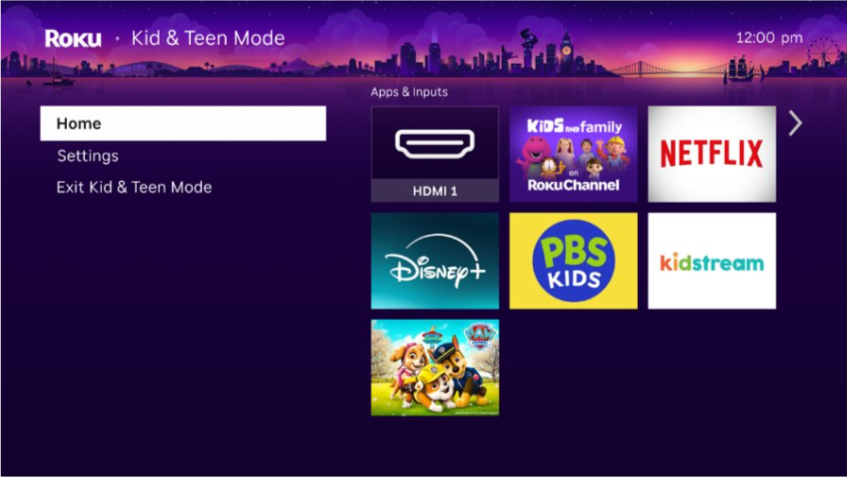
The Roku platform UX now includes a Kid & Teen Mode setting for customers in the U.S. and Brazil Streaming Stores. This setting enables Roku account owners to select which apps the child can access, choose whether the child can switch external inputs, and PIN-protect the child's ability to exit Kid & Teen Mode. Customers can add one or more installed apps that are participating in Kid & Teen Mode to this setting (to participate in Kid & Teen Mode, contact your Roku partner manager).
Once Kid & Teen Mode has been entered on a Roku device, the child can then only launch the selected apps, configure a limited number of settings (Network, Accessibility, System [About]), and exit Kid & Teen Mode (if the account owner enters the PIN or disables the PIN-protected exit).
To support apps participating in Kid & Teen Mode, you can integrate the profileType launch parameter in your app. You can use this parameter to identify when your app has been launched from Kid & Teen Mode and help determine how to comply with content, ads, and data usage restrictions.
Integrating Kid & Teen Mode in apps
Upon launch, your app receives a new profileType parameter with a value of "kids", "teen", "adult", or "none". When your app receives a "kids" or "teen" value, use the signal to determine the appropriate in-app experience and data handling for children.
- You must read the profileType parameter upon each launch because the value may change.
- Apps currently do not receive a "teen" value from Kid & Teen Mode; it is listed in this document for compatibility with future settings and features. When your app is launched from Kid & Teen Mode, it receives the "kids" profileType.
The following example demonstrates the updated list of launch parameters your app will receive when it is launched from Roku's Kid & Teen Mode:
<Component: roAssociativeArray> =
  {
      action: "display"
      instant_on_run_mode: "foreground"
      isexternal: true
      lastExitOrTerminationReason: "EXIT_UNKNOWN"
      profileType: "kids"
      source: "homescreen"
      splashTime: "0"
  }
When an app receives the "kids" profileType, the publisher is solely responsible for ensuring its in-app experience and data handling are child-appropriate.
App launch behavior
If your app includes a dedicated kids experience, it is recommended that you do the following upon launching your app:
| Profile | Recommendation |
|---|---|
| Single Kids Profile already exists | Take user directly into existing Kids Profile in app |
| Multiple Kids Profiles already exist | Take user directly into last used Kids Profile, OR show profile picker with only Kids Profiles as options |
| App supports a Kids Profile but no profile created | Show profile picker |
| App supports profiles but no Kids Profile option | Take user directly into last used profile |
| Profiles not supported in App | Launch directly into app as standard launch flow |
Kids-Directed Apps: If your app is already designated as "Kids Directed" in the Roku Developer Portal, no changes to your app are currently anticipated. It is therefore recommended that you maintain your app's current launch flow.
Additional APIs
To provide additional support for Roku's Kid & Teen Mode, the Roku OS includes the following new/updated APIs:
- BrightScript profile functions
- QueryDeviceInfo ECP command
BrightScript profile functions
The roUserInfo.GetCurrentProfile() and roProfile.GetProfileType() functions enable you to get the current active profile and then get the profile type that launched the app (kids, teen, adult, or none). The roProfile.GetAgeBandInfo() and roProfile.GetAgeVerificationStatus() functions enable you to get the age band and age verification status of the profile. These functions are available since Roku OS 16.0; on earlier versions, CreateObject("roUserInfo") returns invalid.
roUserInfo
The roUserInfo component provides access to the current active profile snapshot. Its interface includes a GetCurrentProfile() function.
GetCurrentProfile() As Object
Description
Returns an roProfile object representing the currently active profile.
Return value
This function returns a roProfile object (it never returns invalid).
Example
userInfo = CreateObject("roUserInfo")
if userInfo <> invalid
   profile = userInfo.GetCurrentProfile()
end if
roProfile
The roProfile component represents the user profile object returned by the roUserInfo.GetCurrentProfile() function. Its interface provides methods for retrieving the profile type, age band, and age verification status.
GetProfileType() As String
Description
Returns the type of the current user profile, which may be one of the following values:
"kids": Current profile is a kid profile."teen": Current profile is a teen profile (apps will not receive a "teen" value from Kid & Teen Mode; it is listed in this document for compatibility with future settings and features)."adult": Current profile is an adult profile."none": Kid & Teen Mode is not enabled or not supported on the device.
Example
profile = userInfo.GetCurrentProfile()
profileType = profile.GetProfileType()
if profileType = "kids" then
   ' app was launched by kid profile; determine appropriate in-app experience and data handling
end if
GetAgeBandInfo() As Object
Available since Roku OS 16.0
Description
Returns the age band information for the current profile. Using this API is optional.
For Kid & Teen Mode, the only age bands that your app receives are the kid or adult profile age bands (the young teen and older teen age bands are listed for compatibility with future settings and features):
- When your app is launched from within Kid & Teen Mode, this function returns only the kid profile age band (for example, 0-12).
- When your app is launched from outside Kid & Teen Mode, this function returns the adult profile age band (for example, 18+).
Return value
This function returns an associative array containing the age band associated with the user profile. Age bands are sequential.
| Field | Type | Description |
|---|---|---|
minAge | Integer | The minimum age of the age band (inclusive). |
maxAge | Integer or invalid | The maximum age of the age band (inclusive). This value is invalid for adult profiles. |
If
GetProfileType()returns "none", this function returns the adult age band (minAgeis the adulthood age andmaxAgeisinvalid), which means that a profile is not enabled for the user.
The age bands follow these rules (the examples are for the U.S.):
- Kid profiles:
minAgestarts at 0, andmaxAgeis the young teen age band minus 1 (for example, 12). - Young teen profiles:
minAgeis the young teen age band (for example, 13), andmaxAgeis the older teen age band minus 1 (for example, 15). - Older teen profiles:
minAgeis the older teen age band (for example, 16), andmaxAgeis the adulthood age band minus 1 (for example, 17). - Adult profiles:
minAgeis the adulthood age (for example, 18), andmaxAgeisinvalid.
Example
ageBandInfo = profile.GetAgeBandInfo()
if ageBandInfo <> invalid
   minAge = ageBandInfo.minAge
   maxAge = ageBandInfo.maxAge
   if maxAge <> invalid then
      print "Profile age range: " + minAge.ToStr() + " to " + maxAge.ToStr()
   else
      print "Adult profile, minimum age: " + minAge.ToStr()
   end if
end if
GetAgeVerificationStatus() As String
Description
Indicates whether the age of the current profile has been verified.
Return value
This function returns a string, either "verified" or "unverified".
Example
ageVerificationStatus = profile.GetAgeVerificationStatus()
if ageVerificationStatus = "unverified" then
   ' Handle unverified age case
end if
Do not cache the profile type, age band, or verification status. These values can change, so query the APIs upon each launch.
QueryDeviceInfo ECP command
The ECP QueryDeviceInfo command response now includes a "user-profile-type" field that indicates the profile type for the current user: "kids", "teen", "adult", or "none" (Kid & Teen Mode is not enabled or not supported on the device).
Apps currently do not receive a "teen" value from Kid & Teen Mode; it is listed in this document for compatibility with future settings and features.
Updated 4 days ago