
FlexGrid
The @roku-sdk/flex-grid package provides a virtualized 2D grid engine for Roku SceneGraph apps written in TypeScript. It targets the grid screen pattern of many rows of horizontally scrollable content with D-pad navigation and smooth scrolling.
To use the grid, you call the createFlexGrid factory function with a configuration object, render the element that the function returns in your scene, and load your data with updateRows.
The engine recycles SceneGraph nodes instead of creating them for every scroll frame. It also provides interchangeable focus strategies, variable row heights and column widths, and rows that load progressively.
This document describes the 3.x line of the package, which the
latestnpm dist-tag points to. The 2.x line stays available onmaintenance-2xand receives fixes until approximately October 2026, but it does not receive new features. See Installing packages for more information about pinning a version. The upgrade table is in the 2.x package's ownBREAKING_CHANGES.mdfile. The largest change is that zoom-on-focus moved from aplugins[]entry to thewithZoomFocustemplate wrapper.You should use
Tweenfor scalar and vector animation. Therk buildandrk devcommands inject@roku-sdk/compatautomatically; therefore, you do not need to copy any tween assets.
See the Tween value-shape contract for more information about targets, settle candidates, and wrong-shaped inputs.
This document is task- and concept-oriented: it explains how to install, render, navigate, and extend a grid. See the generated API reference for more information about exact signatures, config fields, defaults, and types.
Introduction
This section explains what the grid engine solves, how you create a grid, when to use it, what parts it contains, how it handles coordinates, and how your app keeps unused features out of production bundles with tree shaking (the build removes the code and assets that your app does not use).
What flex-grid solves
The flex-grid targets the grid screen pattern of many rows of horizontally scrollable content (posters, landscape tiles, hero banners) with D-pad navigation, smooth scrolling, and optional metadata (row titles, scale-on-focus, and detail blocks, called bobs, that the bob-in-the-middle plugin opens under the focused row).
The engine provides the following four capabilities:
- Node pooling: The engine recycles SceneGraph nodes instead of creating them for every scroll frame.
- Focus strategies: Interchangeable calculations decide how the container scrolls and how the focus highlight moves (a fixed pin, floating drift, infinite wrap, and composed row overrides).
- Variable geometry: The grid supports per-row heights, per-column widths, and per-item
cellWidthandcellHeightvalues on data objects. - Progressive loading: Rows can be
undefined(loading skeleton space), populated arrays, or[](collapsed).
Factory pattern
The public API is a factory function, not a JSX component. The following example creates a grid and renders it:
import { createFlexGrid, fixedFocusStrategy, floatingFocusYStrategy } from "@roku-sdk/flex-grid";

const grid = createFlexGrid<MyItem>({
    numRows: 30,
    numCols: 7,
    cellSize: [250, 350],
    focus: {
        horizontal: { strategy: fixedFocusStrategy },
        vertical: { strategy: floatingFocusYStrategy }
    },
    getCellComponent: templateId => TEMPLATES[templateId]
});

// Render the grid in your scene:
return grid.element;

// Imperative reads:
grid.focusedRow();
grid.focusedItem();
grid.updateRows(0, rowData);
The createFlexGrid function creates and manages the reactive store, engine, navigation controller, tweens (animated transitions), and pool (unless you supply an external pool). The returned FlexGridHandle object provides reactive accessors and methods that change the grid. The grid's lifecycle follows the SolidJS scope that created the grid, and the handle does not have a dispose() method.
A
<Grid />JSX wrapper (defineFlexGrid) is also available. SeedefineFlexGridand the package README for more information.
When to use flex-grid
The following table compares the cases where flex-grid fits with the cases where you should consider an alternative.
| Use cases | Scenarios for alternative |
|---|---|
| You need a multi-row, multi-column virtualized grid. | You have a single horizontal row (RowList, MarkupGrid). |
| Rows have mixed templates or variable geometry. | Every cell is identical and fits on one screen without scrolling. |
| You need focus strategy control (TRC-style pin, floating, wrap). | A RowList with built-in focus is sufficient. |
| You want tree-shakeable plugins (bob, titles, zoom, perf). | You do not need scrolling or pooling. |
Architecture overview
The following diagram shows the parts that createFlexGrid creates from your configuration and the handle that it returns.
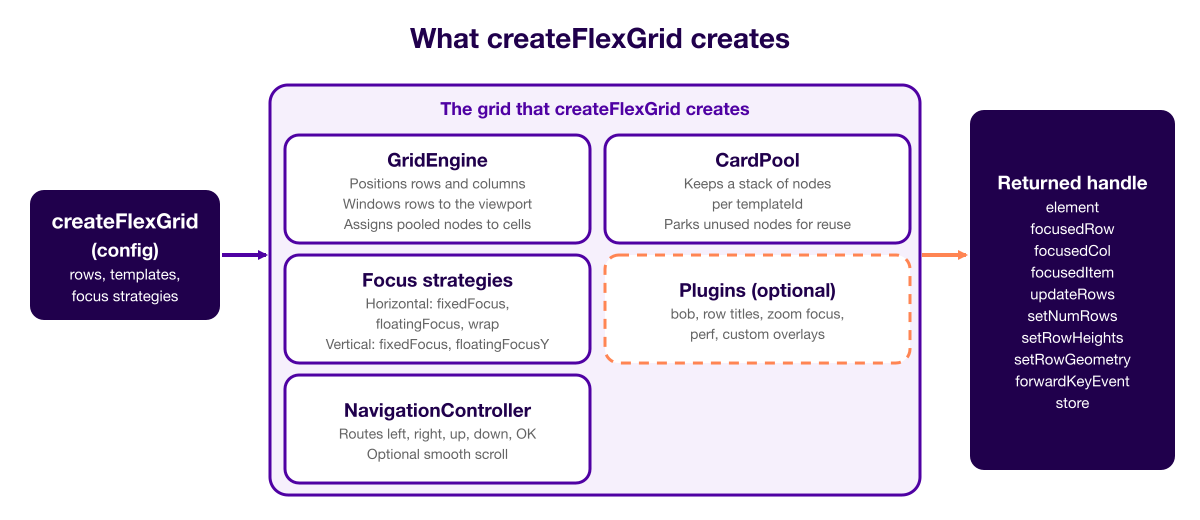
See Architecture overview for more information about the SceneGraph layer structure and per-subsystem internals.
FHD coordinate system
When your app manifest sets ui_resolutions=fhd (the default for new RSG apps), all grid coordinates are in 1920×1080 space (full HD, or FHD) regardless of the physical device resolution. HD (720p) devices scale at render time.
This coordinate system has the following effects on flex-grid:
- The
translation,cellSize,width,height, andfocusOffsetvalues, and plugin offsets, are all in FHD pixels. - Device screenshots use the native resolution. To convert 720p measurements to FHD coordinates, you can multiply them by 1.5.
- Default layout math uses
width ?? 1920andheight ?? 1080when clipping is disabled.
Tree-shaking
The following table lists how to keep each kind of feature out of production bundles when you use tree shaking:
| Mechanism | How to tree-shake |
|---|---|
| Focus strategies | Import only the strategy objects you pass to focus.horizontal.strategy and focus.vertical.strategy. |
| Plugins | Import factories from sub-paths (createBobPlugin, createFocusHighlightPlugin, withZoomFocus, createPerfPlugin, and so on); omit unused paths entirely. |
perf / zoom-focus | Import from the /perf or /zoom-focus sub-path. Use perf through plugins[] and withZoomFocus on cell templates. You should omit perf entirely in production. |
| Composed strategies | Import from @roku-sdk/flex-grid/compose-h-strategy only when needed. |
The flex-grid TypeScript modules support tree shaking as usual. The build injects tween support from @roku-sdk/compat.
Getting started
This section lists what a flex-grid app needs, explains how to install the packages, shows a minimal grid, describes how to rebuild a grid when settings change, and explains how to run the example apps and import the sub-paths.
Prerequisites
The following table lists the packages and tools that a flex-grid app needs:
| Requirement | Notes |
|---|---|
| Node 24 or later, pnpm 11 or later | Monorepo uses workspace:* for SDK packages. |
@roku-sdk/solid | You must not import from solid-js. |
@roku-sdk/components | Container, tweens |
@roku-sdk/navigation | FocusBoundary (grid key routing / region hand-off) |
@roku-sdk/rsg-ts | App tsconfig extends @roku-sdk/rsg-ts/tsconfig.json. |
| Roku device or simulator | Deploy through npx rk dev or MCP tools. |
| Tween nodes (smooth scroll) | You do not need to copy any files. The rk build and rk dev commands inject @roku-sdk/compat automatically. |
You must declare every imported package explicitly in your app's package.json (pnpm does not make transitive dependencies, which are the dependencies of your dependencies, available to your app).
Installing dependencies
This section explains how to install the packages that a flex-grid app needs and where to import the grid from. See Installing packages for more information about installing the packages.
You must import the grid from @roku-sdk/flex-grid and its sub-paths.
Minimal grid
The following example creates a minimal grid that renders 10 rows of seven cells and loads its data:
import {
  createFlexGrid,
  fixedFocusStrategy,
  floatingFocusYStrategy,
  type CellRenderProps,
} from "@roku-sdk/flex-grid";
import type { Component } from "@roku-sdk/solid";

interface Item {
  id: string;
  title: string;
  templateId?: string;
}

const PosterCell: Component<CellRenderProps<Item>> = (props) => (
  <group>
    <rectangle width={props.width} height={props.height} color="0x333355FF" />
    <label text={props.item?.title ?? "Loading…"} width={props.width} />
  </group>
);

const grid = createFlexGrid<Item>({
  numRows: 10,
  numCols: 7,
  cellSize: [250, 350],
  cellSpacing: [20, 20],
  translation: [50, 80],
  width: 1820,
  height: 980,
  focus: {
    horizontal: { strategy: fixedFocusStrategy, options: { focusOffset: 10 } },
    vertical: { strategy: floatingFocusYStrategy, options: { focusOffset: 10 } },
  },
  getCellComponent: () => PosterCell,
  getCellTemplateId: (cellData) => cellData?.templateId ?? "default",
  initialFocus: [0, 0],
});

// Load data after creation:
const rows = Array.from({ length: 10 }, (_, r) =>
  Array.from({ length: 7 }, (_, c) => ({ id: `${r}-${c}`, title: `Item ${r},${c}` }))
);
grid.updateRows(0, rows);
See createFlexGrid configuration for more information about every config field.
Lifecycle and rebuild patterns
You create the grid inside a SolidJS reactive scope (for example, createEffect or the body of an Anchor Node component). When Solid disposes the scope, the engine, navigation controller, internal pool, and plugin overlays clean up automatically through onCleanup.
Pattern: settings-driven rebuild
The grid reads some config values only once, when it creates the grid (the debugViewport value and the external pool). When these values change, you must recreate the grid inside a createEffect. The following example recreates the grid when the debugViewport value changes:
const [debugViewport, setDebugViewport] = createSignal(false);
const [grid, setGrid] = createSignal<FlexGridHandle<Item> | null>(null);

createEffect(() => {
    const showViewport = debugViewport();

    const handle = createFlexGrid<Item>({
        // ... stable config ...
        debugViewport: showViewport
    });

    setGrid(handle);
    handle.updateRows(0, loadAllRows());
});

// JSX:
return grid()?.element;
See cowboy-tv/src/components/cowboy-tv-app.tsx for an example that rebuilds the grid when the user switches tabs or changes settings in a modal.
Pattern: shared pool survives rebuilds
You can create the pool once and pass it to each grid instance with poolBuffer. The SDK calls pool.bindHost(ref) on mount and runs warmup automatically. The following example creates the pool and passes it to each grid:
import { onCleanup } from "@roku-sdk/solid";

const pool = createPool<Item>(() => ({ getCellComponent: getCellComponent, cellWidth: 250, cellHeight: 350 }), false);
onCleanup(() => pool.dispose());

createEffect(() => {
    const handle = createFlexGrid<Item>({
        pool,
        poolBuffer: { portrait: 80, hero: 2 }
        // ...
    });
    setGrid(handle);
});
You do not need an onReady callback or a hidden-group ref. For manual pool use outside createFlexGrid, you must call pool.bindHost(ref) before warmup or acquire.
Warmup is additive: calling warmUp(templateType, count) allocates only the nodes that the pool still needs to reach count for that template. As a result, when two grids that share a pool request the same template type, the pool allocates new nodes only when the combined count exceeds the current stack size, and mounting a second grid does not allocate the same nodes twice.
Shared pools also support composite cells that call setFocusBoundary. When a grid focuses a recycled node, the grid moves the cell's focus registration to itself. All grids that share the pool must be under the same root FocusBoundary.
Pattern: runtime strategy switching
The grid fixes its strategies when you create it. To switch strategies at runtime, you must import all strategies that the user can pick (a strategy map that references every strategy prevents tree shaking from removing any of them individually), and you must recreate the grid when the user picks a new strategy. The following example maps three strategies and recreates the grid when the user picks a different one:
const H_MAP = {
    fixedFocus: fixedFocusStrategy,
    floatingFocus: floatingFocusStrategy,
    fixedFocusWrap: fixedFocusWrapStrategy
} as const;

createEffect(() => {
    const h = hStrategyName(); // signal: "fixedFocus" | ...
    const handle = createFlexGrid({
        focus: {
            horizontal: { strategy: H_MAP[h], options: { focusOffset: 10 } },
            vertical: { strategy: floatingFocusYStrategy, options: { focusOffset: 10 } }
        }
        // ...
    });
    setGrid(handle);
});
See showcase/src/components/grid-example-app.tsx.
Running example apps
This section explains how to run the flex-grid example apps.
To start the showcase app, run the following commands from the flex-grid examples directory:
cd rsg-sdk/external/examples/flex-grid

npm run start-dev              # showcase ; interactive strategy sandbox
You can run a single app with npx rk dev in the showcase/, cowboy-tv/, fantasy-tv/, or plain-grid/ directory.
The following table lists the example apps.
| App | Path | Highlights |
|---|---|---|
showcase | rsg-sdk/external/examples/flex-grid/showcase/ | Runtime horizontal and vertical strategy toggle, smooth scroll, performance heads-up display (HUD), mixed templates |
cowboy-tv | rsg-sdk/external/examples/flex-grid/cowboy-tv/ | createRowTitlePlugin, createBobPlugin, createFocusHighlightPlugin, shared pool, multi-tab, progressive S3 row fetch, nested mini-grid, onItemSelected (shelf + nested) |
fantasy-tv | rsg-sdk/external/examples/flex-grid/fantasy-tv/ | composeHorizontalStrategy, withZoomFocus, custom GridPlugins, progressive S3 row fetch |
plain-grid | rsg-sdk/external/examples/flex-grid/plain-grid/ | Fixed-column N×M collection grid with a fixed row count. The app fetches and syncs one row at a time from an S3 manifest. The app builds against the 2.x maintenance line; therefore, it keeps build coverage in continuous integration (CI). The APIs that it uses are common to both major versions, but you should read the app as a 2.x reference. |
To run the unit tests, run the following commands:
cd rsg-sdk/external/packages/flex-grid && pnpm testSub-path imports
This section lists the sub-path imports that the package provides.
The following table lists each import path, its exports, and how you wire it into the config.
| Import path | Exports | Config wiring |
|---|---|---|
@roku-sdk/flex-grid | createFlexGrid, strategies, pool, types, math helpers | Main entry |
@roku-sdk/flex-grid/bob-in-the-middle | createBobPlugin | plugins: [createBobPlugin({...})] |
@roku-sdk/flex-grid/row-titles | createRowTitlePlugin, RowTitleContext | plugins: [createRowTitlePlugin({...})] |
@roku-sdk/flex-grid/focus-highlight | createFocusHighlightPlugin, FocusHighlightConfig | plugins: [createFocusHighlightPlugin({...})] |
@roku-sdk/flex-grid/row-clip | createRowCardsClipPlugin, RowCardsClipConfig, RowClipRect | plugins: [createRowCardsClipPlugin({...})] |
@roku-sdk/flex-grid/row-backdrop | createRowBackdropPlugin, RowBackdropRegion, RowBackdropSize, RowBackdropConfig | plugins: [createRowBackdropPlugin({...})] |
@roku-sdk/flex-grid/zoom-focus | withZoomFocus | Wrap cell templates for scale-on-focus. |
@roku-sdk/flex-grid/perf | createPerfPlugin | plugins: [createPerfPlugin({...})] |
@roku-sdk/flex-grid/compose-h-strategy | composeHorizontalStrategy, createPinnedFocusXExtension, matchRow, matchRowWhen, and so on | Build custom focus.horizontal.strategy. |
The following example imports each sub-path:
import { createFlexGrid, fixedFocusStrategy } from "@roku-sdk/flex-grid";
import { createBobPlugin } from "@roku-sdk/flex-grid/bob-in-the-middle";
import { createRowTitlePlugin } from "@roku-sdk/flex-grid/row-titles";
import { createFocusHighlightPlugin } from "@roku-sdk/flex-grid/focus-highlight";
import { createRowCardsClipPlugin } from "@roku-sdk/flex-grid/row-clip";
import { createRowBackdropPlugin } from "@roku-sdk/flex-grid/row-backdrop";
import { withZoomFocus } from "@roku-sdk/flex-grid/zoom-focus";
import { createPerfPlugin } from "@roku-sdk/flex-grid/perf";
import {
    composeHorizontalStrategy,
    createPinnedFocusXExtension,
    matchRowWhen
} from "@roku-sdk/flex-grid/compose-h-strategy";
Rendering cells
Every visible pool node renders a SolidJS component that you register through getCellComponent. The engine passes the component a CellRenderProps<T> object. See CellRenderProps for more information about the full prop list.
The following example shows a cell template:
import type { CellRenderProps, KeyDelegate } from "@roku-sdk/flex-grid";
import type { Component } from "@roku-sdk/solid";

export const PortraitCard: Component<CellRenderProps<MyItem>> = (props) => (
  <group>
    <rectangle
      width={props.width}
      height={props.height}
      color={props.item ? "0x444466FF" : "0x333333FF"}
    />
    <label text={props.item?.title ?? "Loading…"} width={props.width - 16} />
    {/* Read focused inside JSX ; never destructure props.focused at top level */}
    <rectangle
      visible={props.focused()}
      width={props.width}
      height={props.height}
      color="0x0066FFFF"
      blendingEnabled
    />
  </group>
);
SolidJS reactivity rules
The props object is a reactive Proxy. You must not destructure or alias props at the top level because that copies the values once and breaks reactivity. The following example shows incorrect and correct reads:
// ❌ WRONG
const { item, row } = props;
const focused = props.focused;
if (props.item) { /* top-level read */ }

// ✅ CORRECT ; read inside JSX, createEffect, createMemo, or callbacks
<label text={props.item?.title ?? ""} />
<group visible={props.focused()}>...</group> // toggle focus chrome; a <Show> rebuilds it on every move

// ✅ Mount-time-only stability (document the requirement):
const stableRow = untrack(() => props.row);
The same rule applies to the render callbacks of plugins, such as createBobPlugin and createFocusHighlightPlugin.
getCellComponent
The getCellComponent field is required. It maps a template ID string to a SolidJS component. The following example registers three templates:
import type { Component } from "@roku-sdk/solid";
import type { CellRenderProps } from "@roku-sdk/flex-grid";

function getCellComponent(templateId: string): Component<CellRenderProps<GridItem>> {
    if (templateId === "hero") return HeroBanner;
    if (templateId === "landscape") return LandscapeCard;
    return PortraitCard;
}

createFlexGrid({
    getCellComponent,
    getCellTemplateId: (cellData, row) => cellData?.templateId ?? "portrait"
});
getCellTemplateId
The getCellTemplateId function resolves which stack of the pool (one stack for each template) the engine acquires a node from. The function has the following signature:
getCellTemplateId?: (cellData: T | undefined, row: number) => string;When you omit getCellTemplateId, all cells use the "default" template.
If you set poolBuffer: { portrait: 80, hero: 2 }, you must provide getCellTemplateId (or use the "default" template for all cells). Otherwise, the engine always acquires from "default", and pool misses occur. The following example sets matching poolBuffer keys and template IDs:
poolBuffer: { hero: 2, portrait: 80, landscape: 50 },
getCellTemplateId: (cellData) => cellData?.templateId ?? "portrait",
getCellComponent: (id) => TEMPLATES[id],
Examples from showcase apps
The following examples come from the showcase apps in the flex-grid examples directory.
The showcase app uses mixed templates:
// Row 0: hero banner (1 col). Rows 1 to 3: portrait. Row 4: hero. Rows 5 to 7: landscape.
rowNumCols: buildRowNumCols(NUM_ROWS),
rowHeights: ROW_CELL_SIZES.map(([, h]) => h),
rowCellWidths: ROW_CELL_SIZES.map(([w]) => w),
getCellComponent: getCellComponent,
getCellTemplateId,
The cowboy-tv app configures TRC-style cells:
getCellComponent: getCellComponent,
getCellTemplateId: (cellData) => cellData?.templateId ?? "portrait",
rowNumCols: tabLayout.rowNumCols,
rowHeights: tabLayout.rowHeights,
rowCellWidths: tabLayout.rowCellWidths,
cellVAlign: "top",
The plain-grid app shows a fixed-column N×M grid. You can use this pattern for a uniform collection grid where every row has the same number of columns (an m rows × n columns layout). You must keep numCols fixed for the whole grid, and you must not use rowNumCols (which sets per-row, variable geometry). You can set numRows up front from the catalog size. The following example defines the dimensions:
const NUM_COLS = 4; // n ; fixed columns
const PAGE_SIZE = NUM_COLS; // one grid row per fetch page
const NUM_ROWS = 338; // m ; derived from catalog size
A remote API can return a flat list of items instead of rows. In plain-grid, each fetch page is one grid row (PAGE_SIZE = NUM_COLS). The syncPageToGrid function writes the cached page directly into the grid store:
export function syncPageToGrid(pageIndex, pageSize, grid) {
    const cells = getPageData(pageIndex, pageSize);
    if (!cells || grid.store.rows[pageIndex] === cells) return;
    grid.updateRows(pageIndex, [cells]);
}
The last row of the catalog may hold fewer than numCols items; the engine treats it as a short row and limits horizontal navigation to the last item.
You can prefetch the focused row (and a few rows ahead) in onFocusChanged and sync cached pages into the grid in a createEffect that depends on dataVersion. You must not paginate from onEdgeReached. See Selection and focus callbacks for more information. The following example shows the setup:
const handle = createFlexGrid<Item>({
    numCols: NUM_COLS,
    numRows: NUM_ROWS,
    cellSize: [CELL_WIDTH, CELL_HEIGHT],
    focus: {
        horizontal: { strategy: floatingFocusStrategy, options: { focusOffset: 50 } },
        vertical: { strategy: floatingFocusYStrategy, options: { focusOffset: 0 } }
    },
    onFocusChanged: row => {
        prefetchWindow(row, PAGE_SIZE);
        syncPageToGrid(row, PAGE_SIZE, handle);
    }
});
See plain-grid/src/components/grid-internal.tsx (grid setup) and plain-grid/src/components/fetch-images.ts (slicePage, syncPageToGrid).
Per-item and per-row dimensions
This section describes how the engine resolves the width and height of each cell.
To resolve the effective cell width, the engine uses the first value that it finds in the following order:
- The
item.cellWidthvalue on the data object - The
rowCellWidths[row]config value - The
colWidths[col]config value - The
cellSize[0]config value (the default)
To resolve the effective cell height, the engine uses the first value that it finds in the following order:
- The
item.cellHeightvalue on the data object - The
rowHeights[row]config value - The
cellSize[1]config value (the default)
The rowCellWidths and rowHeights entries above use the grid's current value for that row, which is the config value until a setRowGeometry patch replaces it. Per-item cellWidth and cellHeight values on the data object still take priority over both.
The following example sets per-item dimensions on a variable-width row:
interface GridItem {
    id: string;
    title: string;
    cellWidth?: number;
    cellHeight?: number;
}

// Variable-width row ; engine builds per-row cumX from item widths
grid.updateRows(13, [
    [
        { id: "a", title: "A", cellWidth: 210, cellHeight: 117 },
        { id: "b", title: "B", cellWidth: 231, cellHeight: 150 }
    ]
]);
The cellVAlign option sets the vertical alignment within a row. The following table lists the values:
| Value | Behavior when item height is less than row height |
|---|---|
"top" | Top-aligned within the row |
"center" | Centered |
"bottom" | Bottom-aligned (default; shorter cells float up) |
Focus overlay pattern
When you use withZoomFocus on cell templates or in-cell focus outlines, you can add the createFocusHighlightPlugin plugin to tell the engine whether the highlight is visible. You can set renderNode: false when the templates draw the highlight themselves. The following example uses both plugins:
import { createFocusHighlightPlugin } from "@roku-sdk/flex-grid/focus-highlight";
import { withZoomFocus } from "@roku-sdk/flex-grid/zoom-focus";

const PortraitCell = withZoomFocus(PortraitSimpleCell, {
    focusedScale: 1.0,
    unfocusedScale: 0.85
});

createFlexGrid({
    getCellComponent: () => PortraitCell,
    plugins: [
        createFocusHighlightPlugin({
            visible: () => focusedRegion() === gridRef,
            renderNode: false
        })
    ]
});
Cells receive focused() only when the plugin's visible() is true. As a result, in-cell outlines clear when UI outside the grid has focus, and the grid preserves its internal row and column state.
Clipping one row's cards (@roku-sdk/flex-grid/row-clip)
This section shows how to use the createRowCardsClipPlugin plugin (@roku-sdk/flex-grid/row-clip) to cut a row's cards at a fixed rectangle.
A row that grows its focused item and moves the other cards aside leaves two places where a card shows through while it slides: the margin before the grown item, and the gap between that item and the first card after it. The row does not draw anything over those places; therefore, a card crossing either one appears as a sliver.
Hiding the card instead removes it mid-slide; therefore, the slot that the card was heading for fills by appearing rather than by gliding in. Filling the two places with opaque rectangles works only over a flat background. The plugin instead cuts the card over a transparent backdrop, and the card's motion does not change. The following example creates the plugin:
import { createRowCardsClipPlugin } from "@roku-sdk/flex-grid/row-clip";

const RAIL_START_X = FOCUS_X + GROWN_WIDTH + CARD_GAP;
const RAIL_RECT: [number, number, number, number] = [RAIL_START_X, 0, SCREEN_W - RAIL_START_X, CARD_H];

createFlexGrid({
    plugins: [
        // Everything left of the rect is cut ; the grown item covers that region itself.
        createRowCardsClipPlugin({ clip: row => (grownItemCoversRow(row) ? RAIL_RECT : undefined) })
    ]
});
The build includes the plugin's code only when you import the plugin.
The rectangle uses the row's own coordinates: y = 0 is the top of the row's card strip, and a row decoration (a node that a plugin attaches to a row, such as a title) sits outside the rectangle and keeps drawing. The grid reads clip inside its render; therefore, a recycled slot takes the rectangle of the row that it now shows, and changing the condition that gates clip updates the node without a relayout.
You must gate the clip on whatever draws the covering element. The grownItemCoversRow condition above is required: the cut is invisible only because an opaque element covers it. When the app does not draw that element (for example, the row is no longer focused, a panel closed, or a scroll session hid an overlay), the same rectangle cuts the row's cards away with nothing over them, and the row renders blank. Every other state must return undefined. A row that you clip unconditionally looks correct only while it is the focused row.
The spotLight row in examples/flex-grid/fantasy-tv is a worked example. Its plugin owns both the grown overlay and the condition that follows it (isRailClipped in spotlight-plugin.tsx, rectangle in spotlight-layout.ts).
Adding a backdrop behind several rows (@roku-sdk/flex-grid/row-backdrop)
The createRowBackdropPlugin plugin draws one image, color, or piece of live content behind a run of rows (for example, a brand band under a row of brand pills and a shelf, or a tinted section). The plugin puts one node per region in the grid's back scroll layer, under every card, and keeps the node on its rows while the grid recycles slots, scrolls, and opens gaps between rows. The worked example is the "Featured brand" section in examples/flex-grid/fantasy-tv (featured-brand-plugins.tsx). The following example creates a backdrop for rows 7 and 8:
import { createRowBackdropPlugin } from "@roku-sdk/flex-grid/row-backdrop";
import { createFocusHighlightPlugin } from "@roku-sdk/flex-grid/focus-highlight";

createFlexGrid({
    plugins: [
        // Listed first: a back-layer highlight registered later draws over the backdrop.
        createRowBackdropPlugin({
            regions: () => [{ rows: [7, 8] as const, left: 0, width: 1920, brand: selectedBrand() }],
            render: (region, size) => (
                <group>
                    <poster
                        ref={size.fill}
                        loadWidth={1920}
                        loadHeight={BAND_HEIGHT}
                        loadDisplayMode="scaleToZoom"
                        uri={region().brand.artUri}
                    />
                    <rectangle ref={size.fill} color="0x0A0A12FF" opacity={0.45} />
                    <label text={region().brand.name} translation={[108, 284]} font="font:LargeBoldSystemFont" />
                </group>
            )
        }),
        createFocusHighlightPlugin({ layer: "back" })
    ]
});
Row decorations do not work for a band across rows. The registerRowChrome(…, "back") function belongs to one row slot, and the grid recycles slots; therefore, which of two neighboring rows draws later changes as the grid scrolls. As a result, a decoration that reaches into another row does not have a defined order against that row's cards (sometimes it draws under them, and sometimes over them), and the grid does not support it. This plugin is the supported way to draw a band across rows.
The rows: [first, last] value (an inclusive pair of row indexes) is the region's identity. When regions() runs again and returns the same pair, the plugin keeps the node, and every other field reaches render through region(); therefore, a new brand updates a prop on the same node instead of creating the node again (a remount). A new pair creates a new node. Regions must not overlap; the plugin drops an invalid or overlapping region with a __DEV__ warning.
The render callback runs once per mount, with y = 0 at the region's top. It may return a Poster, a Rectangle, labels, or live content. You can pass size.fill as the ref of each node that spans the whole region; the plugin then controls that node's id, width, and height, and glides its height with the rows. A fill node must exist for as long as the region exists; therefore, you must not render one under <Show>. You should place content that must not stretch (a logo or a label) against size.height(), the height that the rows are moving to, which the plugin does not tween.
The region extends above pixels over its first row's cards (by default, the grid's title reserve; therefore, the band covers the first row's title) and below pixels under its last row's cards (by default, 0). The plugin logs a __DEV__ warning when either value reaches into the neighboring row. For uneven spacing inside the band (a large inset at the top, or a small gap between two rows), you should change those rows' heights rather than above or below. The fantasy-tv app includes the pill's top inset in the pill row's height.
By default, the region spans the grid's viewport. The left and width values use the same coordinates as the grid's translation; therefore, left: 0, width: 1920 is full bleed (edge to edge) on a grid that you translate in from the screen edge. With enableClipping, the grid still cuts the region to the viewport, and the plugin logs a __DEV__ warning. The backdrop does not scroll horizontally; cards scroll over it.
The backdrop moves with the rows as follows:
- Vertical scroll: the backdrop scrolls with the rows because it is inside the grid's scroll group.
- A row Y offset that opens above the region (for example, the bob) moves the region with the rows' own glide, using the same duration and ease.
- An offset that opens inside the region stretches it: the top stays on the first row, the bottom glides to the last row's new bottom, and the lower rows slide over it. The region does not split at the gap. As a result, a Poster fill needs
loadDisplayMode="scaleToZoom"because a stretchedscaleToFitimage distorts. - During a held scroll that crosses the region, the region's bottom edge can trail the last row by a few pixels until the glide settles.
- When the grid snaps its rows (a non-animated
jumpTo, or a row collapsing and reflowing the rows below), the backdrop snaps with them.
A collapsed first or last row moves that edge of the region to the nearest row that is not collapsed, and a region whose rows are all collapsed does not draw anything.
The backdrop draws behind every row, including zoomed cards, row titles, and row decorations behind the cards. A region row with an opaque decoration of its own behind the cards hides the backdrop at that row. A focus highlight with layer: "back" draws over the backdrop only when createRowBackdropPlugin comes earlier in plugins[]. The grid cannot reorder the app's nodes: a sibling node that the app draws after the grid (for example, a side navigation) is over the backdrop, and a sibling that the app draws before the grid is under it.
The plugin mounts a region while the region is within about 1.5 viewport heights of the focused row and unmounts it when the region is more than 2 viewport heights away; the two different distances prevent the region from repeatedly mounting and unmounting at the boundary. A remount runs render again, which reloads the region's images. You can give a Poster loadWidth and loadHeight at the band size to limit texture memory, and you must set uri last so that a cached image does not render before its load fields apply. Each mount creates nodes after pool warmup; therefore, createPerfPlugin prints its "createElement called after warmup" warning once per node. This warning is expected here and does not indicate a leak.
The fantasy-tv app shows a panel over one end of a row. The brand panel (the name, the tagline, and a "Browse all" button) is part of the backdrop; therefore, it stays in place while the shelf scrolls. The shelf pins the focused poster at the panel's edge, and createRowCardsClipPlugin always cuts the posters immediately left of that edge; as a result, posters vanish there instead of passing over the panel. The cut can be unconditional because nothing that the shelf shows unscrolled lies left of the edge, and the app draws the panel whenever it draws the shelf. The app focuses "Browse all" through an empty first cell: a stop that keeps the first poster's scroll and is wide enough to sit off screen; therefore, a move from the row above or below lands on a poster rather than on the empty cell. The init function of a plugin reads focus.row() and focus.col() to highlight the button. Moving between the two rows does not scroll: the app's vertical strategy gives the shelf the pill row's scroll. See featured-brand-plugins.tsx and fantasy-vertical-strategy.ts for more information.
createFocusHighlightPlugin
The createFocusHighlightPlugin plugin provides the focus highlight (the node, its position and size tweens, layer, and visibility). The plugin supports tree shaking: you import it from @roku-sdk/flex-grid/focus-highlight and pass it through plugins. It accepts render, layer ("front" | "back"), visible, hideOnSmoothScroll, and color. You can pass a render factory to replace the default red geFocusRect rectangle with custom chrome. The factory receives reactive accessors for the focused cell's width, height, and focusedRow (the 0-based data row, the same value as FlexGridHandle.focusedRow). The following example replaces the default rectangle with a poster border:
createFocusHighlightPlugin({
  render: ({ width, height, focusedRow }) => {
    const [posterRef, setPosterRef] = createSignal<unknown>();
    return (
      <>
        <poster
          uri={focusBorderUri}
          width={untrack(() => width() + BORDER * 2)}
          height={untrack(() => height() + BORDER * 2)}
          translation={[-BORDER, -BORDER]}
          ref={setPosterRef}
        />
        <Show when={posterRef()}>
          <Tween
            targetRef={posterRef()}
            field="width"
            targetValue={width() + BORDER * 2}
            duration={0.333}
            easeFunction="outCubic"
          />
        </Show>
      </>
    );
  },
});
When render is set:
- The engine skips the built-in
Tweenwidth and height animation on the default rectangle. - You can size your content using the provided
width()/height()accessors inside JSX or effects. - You can use
focusedRow()for row-driven decorations (for example, opacity). The grid invokes the factory underuntrack; therefore, Solid context from parent components is not available inside this callback, and you must pass data through these accessors instead. - The plugin's
visiblecontrols node visibility and per-cellfocusedsignals. - You can set
hideOnSmoothScroll: trueto fade the highlight out while a held smooth scroll glides and back in once it settles. - The highlight's position tween belongs to this plugin; therefore, the plugin also runs the settle glide after a smooth scroll (the non-linear
smoothScrollConfig.focusSettleEase). You must include the plugin on grids that need that glide. (ThecreateBobPluginplugin recovers independently through the scroll-end hook; therefore, the highlight plugin does not affect it.)
See cowboy-tv/src/components/cowboy-tv-app.tsx for an example.
You should use
Tweenfor scalar width and height animation.Tweendetects the value type from the target field.
Template registry patterns
You can centralize template lookup in one module. The following example registers three templates and exports the pool buffer:
// template-registry.ts
import type { CellRenderProps } from "@roku-sdk/flex-grid";
import type { Component } from "@roku-sdk/solid";

const REGISTRY: Record<string, Component<CellRenderProps<MyCell>>> = {
    portrait: PortraitCell,
    landscape: LandscapeCell,
    hero: HeroCell
};

export function getCellComponent(templateId: string) {
    return REGISTRY[templateId] ?? REGISTRY.portrait;
}

export const POOL_BUFFER = { portrait: 80, landscape: 30, hero: 2 };
You must pass the same getCellComponent function to createFlexGrid and to createPool's TemplateConfig, with matching poolBuffer keys.
Playing video in a cell (VIBE)
A cell can host a SceneGraph Video node, and the row does not have to opt out of pooling to do it. Three device behaviors all work against the implementation you would write first.
The "Now Playing" row in vibe-cell-template.tsx is working code for this pattern. The measurements below come from a separate harness that runs each arrangement as a row of its own, with toggles that reproduce each finding.
Understanding the device constraints on video playback
The following three device behaviors affect how you play video in a cell:
-
There is one hardware decoder, and the limit is on playback rather than on mounting. Several mounted Video nodes coexist without reporting an error as long as only one of them plays. If a second cell tries to play, the request does not queue and does not degrade: the firmware rejects the second cell's
playoutright, the node reportsstate:error, and the node does not emit aVODStartInitiatebeacon at all. The app must arbitrate between cells because the firmware does not arbitrate between them. -
Removing a
<video>node from the tree does not release the decoder. A detached node keeps decoding and keeps reporting throughonState; therefore, wrapping a<video>in<Show when={focused()}>is not enough on its own. If you gate the mount on focus and also writecontrol="stop"in the same reactive update, the two compete (a race condition): when the unmount happens first, the stop never reaches the node, and the node holds the decoder until something else removes it. In the meantime, every later cell reportserror. -
A stop with default semantics is synchronous and blocks. It blocks long enough that the grid reads a single key press as a key hold and smooth-scrolls several columns from it (three columns per press at the default
holdDelay: 400andmsPerStep: 333). This problem appears as a navigation bug rather than a video bug; therefore, you must setasyncStopSemanticsand let the node reportstoppingand thenstopped.
A phase the node confirms
You can track playback in an explicit phase rather than deriving the mount from focus. This approach is safe because the cell leaves a stop only when the node confirms it.
The following table lists the phases:
| Phase | Meaning | Leaves on |
|---|---|---|
idle | No <video> mounted, decoder not claimed | A granted claim → active |
active | Node mounted, play requested | Focus loss → stopping; error / finished → idle |
stopping | stop requested, node still mounted | An idle report from the node → idle |
The following code defines the phase type and the states in which the node no longer holds the decoder:
type PlaybackPhase = "idle" | "active" | "stopping";

/** MediaState values in which the node no longer holds the decoder. */
const isIdleState = (state: string): boolean =>
    state === "none" || state === "stopped" || state === "finished" || state === "error";
The following four details each cause a defect that appears only after a while:
- An idle report counts only while the phase is
stopping. Thenonestate before playback starts is indistinguishable from thenonestate after a stop; therefore, accepting it inactiveunmounts a node that is about to decode. - The
stoppingphase never goes straight back toactive. If focus returns in the middle of a stop, you must record the intent and replay it when the node confirms the stop. Aplaywritten while a stop is still in progress leaves the node idle while the phase claims otherwise. The next stop then waits forever for a report that the node does not have any reason to send, which leaves the decoder held for every later cell. - The
errorandfinishedstates are terminal and do not hold the decoder; therefore, they return the phase toidleand unmount the node. If you leave the phase atactive, a dead video plane stays over the poster, and the phase can get stuck instoppingin the same way. - You can keep a poster behind the video. It is what the viewer sees whenever the phase is
idle, including after a failure.
Arbitrating the one decoder
Because the stop is asynchronous, the cell that lost focus still holds the decoder. As a result, a cell must not play on a timer. Instead, the cell asks for the decoder and starts only when the app grants it:
let holder: object | null = null;
let waiter: { token: object; start: () => void } | null = null;

const claimDecoder = (token: object, start: () => void): void => {
    if (holder === null || holder === token) {
        holder = token;
        start();
        return;
    }
    waiter = { token, start }; // only the newest claim is kept
};

const releaseDecoder = (token: object): void => {
    if (waiter?.token === token) waiter = null;
    if (holder !== token) return;
    holder = null;
    const next = waiter;
    waiter = null;
    if (next) {
        holder = next.token;
        next.start();
    }
};
Keeping only the newest claim is deliberate: by the time a decoder frees up, the viewer no longer wants a cell that they passed over during navigation.
Teardown must abandon a claim, not release it. On dispose, the node has not confirmed a stop; therefore, granting the decoder to a waiter there recreates the leak described earlier. You must clear the holder slot without starting any waiter. The following function abandons a claim:
const abandonDecoder = (token: object): void => {
    if (waiter?.token === token) waiter = null;
    if (holder === token) holder = null;
};
Do not claim during a held scroll
A held scroll moves through cells every msPerStep, and claiming the decoder on each step repeatedly claims and stops it. You must not guess a delay that is long enough to outlast a step, because the grid already provides this information through GridScrollInternals.smoothScrolling() (the same signal that createFocusHighlightPlugin uses for hideOnSmoothScroll).
The built-in bridge plugin makes this state available through CellRenderProps.gridKey. You must add the plugin to the same grid whose cell templates read the helpers:
import {
    createSmoothScrollBridgePlugin,
    isGridSmoothScrolling,
    gridScrollMs
} from "@roku-sdk/flex-grid/smooth-scroll-bridge";

const scrollBridge = createSmoothScrollBridgePlugin<Movie>();
// Include scrollBridge in the grid's plugins array.
You can read the accessor inside the cell's focus effect, which then runs again automatically when the hold settles. Single key presses also need a delay: a claim or a stop written inside the scroll glide interrupts the glide, and a burst of presses should not open and stop a stream for each press. As a result, you should claim the decoder only after focus has rested on the cell for a whole glide, and you should stop only after the glide that took focus away has ended. You can do this through the same gate that the shared node below uses (landing-gate.ts):
const landing = createLandingGate<true>({
    settleMs: () => gridScrollMs(untrack(() => props.gridKey)) + LANDING_MARGIN_MS,
    onLand: () => claimDecoder(decoderToken, startPlayback),
    onExit: requestStop
});

createEffect(() => {
    const holding = isGridSmoothScrolling(props.gridKey); // tracked: re-runs on settle
    if (props.focused()) landing.focus(true, holding);
    else landing.leave(holding);
});
The gridScrollMs function returns the grid's scroll.tweenDuration() in milliseconds. You can pass it to the cells through the same bridge plugin as isGridSmoothScrolling. A cell that the pool parks does not wait for the glide: it stops at once. See Pooling details specific to this pattern for more information.
Pooling details specific to this pattern
This section describes how pooling affects a cell that plays video.
You must stop a parked cell when props.isActive() becomes false, not from KeyDelegate.onDeactivate. The pool.release() method parks a node without unmounting it; therefore, a cell that the pool parks during a preview keeps playing unseen, holds the decoder, and can receive another column's item while it plays. The onDeactivate callback is not equivalent: it fires on every focus loss as well as on release; therefore, a stop attached to it lands inside the glide that the move started. In addition, parking sets the delegate to null, as CellRenderProps.setKeyDelegate documents; therefore, a registration made once stops firing after the first recycle.
You should avoid <Show> in a pooled cell because of the render cost that it adds. See Perfetto profiling for more information. The video mount is a deliberate exception: the node must not exist while the cell is idle. You can keep the rest of the template free of <Show>.
Cells reused from another row must carry the video cell's size. The engine resolves geometry as item.cellWidth → rowCellWidths[r] → colWidths[c] → cellSize[0]; therefore, catalog data that carries poster dimensions shrinks the row even when the row template says otherwise. See Per-item and per-row dimensions for more information.
What the hand-off costs, and how to get under it
A decoder hand-off cannot start a preview quickly, and the reason is in the phase table rather than in the network. The following measurements step one column at a time through the harness on a Roku Ultra (4802X), against an HTTP Live Streaming (HLS) stream:
| Stage | Cost |
|---|---|
| Focus → claim granted | ~140 ms (the debounce that this measurement used); waiting for the glide instead makes it ~0.43 s |
Claim → outgoing node confirms stopped | ~740 ms |
play → node reports playing | ~1.3 s, of which the manifest is ~90 ms and prebuffering ~450 ms |
| Focus → first frame | ~2.2 s |
Only the first stage is under the app's control. The second stage is a constraint rather than a setting that you can tune: granting the decoder at stopping instead of stopped does not recover those 740 ms. The incoming node answers error about 150 ms later, and the retry pushes the first frame past 2.6 s. The third stage is the minimum time that the firmware needs, and a packaged pkg:/ clip starts no faster than a remote one; therefore, the cost comes from decoder startup rather than input/output.
To avoid the hand-off entirely, you can use one Video node for the whole row, positioned over whichever cell has focus, with the cells as its playlist items. The cell's focus outline must stay where the node does not cover it (for example, an outline behind the poster that extends past the cell, or a border with the node inset inside it). Each cell keeps its poster, which is what the viewer sees before the node arrives over it.
You can remove two costs from that path (the decoder hand-off and the manifest round trips that HLS makes before its first segment), and they are close to independent; therefore, the arrangements form a two-way comparison of architecture and container rather than a ranking. The following measurements step one column at a time through the harness and average six switches per row in one session. Repeating the session changes the absolute values by from 10 to 15%; therefore, only the differences between rows are worth quoting:
| Row architecture | HLS | Progressive MP4 |
|---|---|---|
| A node per cell, decoder handed over | 2392 ms | 1920 ms |
The same, neighbor on control="prebuffer" | 2795 ms | 2546 ms |
One node, skipcontent between distinct assets | 1856 ms | 1425 ms |
One node, seekTo within a single asset | 788 ms | 1163 ms |
Comparing the first and third rows shows that removing the hand-off saves ~515 ms in either container. Comparing the HLS column with the Progressive MP4 column shows that removing the two manifest round trips that HLS makes before its first segment saves ~450 ms under every architecture. The MP4 container also shortens the hand-off itself, because the outgoing node confirms its stop sooner on MP4 than on HLS. On the paths that start a session, the two savings add together: they take ~970 ms off the same move.
Two rows of that table need separate explanation.
Prebuffering the neighbor makes the move slower in both containers, by ~405 ms on HLS and ~625 ms on MP4. A second session measured ~435 ms and ~460 ms; therefore, the container that pays more is not stable. The container was a plausible explanation: a progressive file does not have a manifest to fetch; therefore, a node told to prebuffer one could hold buffered data before the decoder is asked for it. The container is not the explanation, however. The node that you put on control="prebuffer" reports stopped rather than holding a buffer; therefore, the row pays for mounting a second node, and the prebuffering does not shorten the move. You should not use prebuffering for this.
Seeking is the one place where MP4 is worse, and by more than the container saves elsewhere. An HLS seek lands on a segment boundary that the playlist already indexes; a progressive seek is a byte offset that the player has to refill the buffer from.
That explanation has an alternative: the two reels are not on the same host, and the MP4 host takes from 580 to 1040 ms to answer a mid-file range request where the HLS reel's content delivery network (CDN) takes from 30 to 45 ms, which accounts for most of the gap on its own. To test this, the harness replaced the reel with others and measured the row again, with the HLS row as the in-session control, which measures from 700 to 790 ms throughout:
| Stitched reel | Origin, mid-file range | Encode | seekTo |
|---|---|---|---|
| Apple bipbop (HLS, the control) | From 30 to 45 ms | ~0.8 Mbps | From 700 to 790 ms |
| Big Buck Bunny 720p, archive.org | From 580 to 1040 ms | 0.83 Mbps | 1163 ms |
| Sintel 480p, Google Cloud Storage | From 115 to 460 ms | 1.04 Mbps, fragmented | 1423 ms |
| Oceans, Fastly | From 35 to 55 ms | 3.95 Mbps | 1694 ms |
The host does not explain the seek time. Across a 20× spread of origin latency, MP4 never comes near the HLS row, and the seek time runs opposite to origin latency: the reel behind the slowest host is the fastest of the three, because it is also the smallest encode. The seek time follows the encode: the same code against a 1080p ~3.5 Mbps reel seeks in ~3.0 s. The host does account for the variance, though: the shipped MP4 reel lands anywhere from ~1.15 s to ~1.55 s between sessions, which is the widest spread of the eight. If you use one stitched reel for previews, you should serve it as HLS, or encode it at a low bitrate with a short group of pictures (GOP) and measure the result before you rely on it.
The same test produced one more result. A fragmented MP4 that is prepared for Dynamic Adaptive Streaming over HTTP (DASH) does play as streamFormat="mp4" (it has a sidx index and moof and mdat fragments rather than a sample table), but it does not seek as quickly as HLS. It was the slowest per megabit of the three and by far the least predictable, with individual seeks reaching 3.6 s. You should use progressive faststart MP4, not fragmented MP4.
The encode changes the seek time but does not change the start time. The seek time's sensitivity to bitrate makes a smaller preview look like a way to improve every row, but it is not. The following measurements hold the origin, the content, and the code fixed and change only the encode for the two rows that start a session for each move:
| Preview encode | A node per cell | One node, skipcontent |
|---|---|---|
| 720p, 0.84 Mbps (shipped) | 1899 ms | 1394 ms |
| 360p, 0.84 Mbps (a quarter the pixels) | 1916 ms | 1446 ms |
| 720p, 8.4 Mbps (10 times the bytes) | 1934 ms | 1373 ms |
A 10× bitrate increase and a 4× pixel reduction both change the result by less than the ±2% that the same build varies between runs. A session start is the firmware bringing a decoder up, and its cost does not depend on how few bytes the first group of pictures holds. This is also the reason that a clip packaged into the app starts no faster than one over HTTPS. A seek is a buffer refill, and the refill depends on the number of bytes. As a result, if you have a seek row, you should encode for it, and you should not expect any improvement from the encode in any other row.
Every row of that table is a move inside one row, and the move between two rows costs the same on all of them. The harness measures arriving at a row apart from switching within one, and the eight architectures collapse into one number: 2645 ms and 2106 ms for the per-cell rows, 2755 ms and 2748 ms for the skip rows, 2692 ms and 3237 ms for the seek rows. The row that switches in 788 ms takes 2692 ms to arrive at; its whole advantage is lost the moment focus leaves it, because a row change is a hand-off between two nodes and a session start, however each row plays inside itself.
As a result, the boundary between rows, where each row has its own node, is the part that you can still improve; the architecture inside a row is not. Giving one node two rows and laying their cells end to end as a single playlist turns a row change into the skipcontent operation that a move inside a row already is: the same session, the same decoder, and no hand-off to wait on. The following table shows the cost of alternating between two adjacent rows, compared with the identical press pattern on a pair of rows that still have a node each:
| Row change | One node serving both rows | A node per row |
|---|---|---|
| Between the two skip rows | 1803 ms | 2748 ms |
| Between the two seek rows | N/A | 3056 ms |
Merging saves roughly a second, which is more than the container and the hand-off are worth together. Merging does not change what the rows measure inside themselves: on the merged pair, a switch still costs 1926 ms and 1451 ms, against 1856 ms and 1425 ms unmerged. The unmerged pair serves as the control, because alternating between two rows could plausibly be cheap on its own. It is not: the unmerged pair pays the full cost under the same presses.
Merging has two costs. The node has to move between the rows that it serves; therefore, it jumps rather than glides unless you tween its Y position alongside the scroll. The playlist also grows with every row that you merge in, which means the same nextContentIndex tracking over a longer list rather than a new problem. The decoder is still a single decoder; therefore, merging does not help two rows that must decode at the same time. It removes only the hand-off between rows that did not need to decode at the same time.
None of these changes removes the session start. The session start accounts for the ~640 ms that still separates the fastest row with an asset per cell from the seek row. As a result, choosing the container helps but does not replace the architecture: MP4 makes every session start cheaper without bringing any of them under a second. Only keeping one session alive does that, which is what the seek row does: the previews come from one reel, and the app carries each cell's offset as playStart on its playlist item; therefore, adjacent cells differ only in where they start. The first cell focused still pays a full startup; every move after it is a seek.
Serving previews as MP4 has conditions, and missing one costs more than the container saves:
- The file must use faststart: the
moovatom must be at the front of the file. When it is at the end of the file, the player reads the tail first, which adds a round trip, the cost that you choose MP4 to avoid. - The origin must support range requests. The
playStartandseekTovalues are byte ranges in a progressive file; therefore, the origin must answer with HTTP status206. Without range support, the stitched-reel row does not work at all. - A progressive MP4 does not support adaptive bitrate. A single rendition either stalls or looks wrong when the network drops, whereas HLS switches to a lower rendition. For a short muted preview, a single small rendition can be the right trade, but it is a trade.
- When you measure, you should cycle enough distinct assets that no two neighboring cells share one, because a clip that has played once starts faster the next time. Three assets are enough, and three assets also keep a "skip" row from measuring a seek by accident.
The sequencing is short but has ordering traps that appear only under fast navigation. A seek that you issue against a session that is still buffering does not take effect. The app must defer a move that the viewer requests in the middle of a transition and combine the deferred requests into one move to the column that focus settled on. Nothing may play against a stop that is still in progress. A failed start needs a retry budget held against the cell rather than the node: a failure clears what the node is playing; therefore, budgeting on the node gives every retry a fresh budget and retries a broken asset indefinitely. The fantasy-tv app keeps all of this logic in playlist-sequencer.ts, which does not need a device and has unit tests.
The harness runs every architecture at once instead of switching between them: it declares one variant per row (the eight cells of the table above), each with its own pool template; therefore, a recycled node can land only in a row that plays the way the node does. A variant is a row of that table rather than a name: where its node lives, whether the app cuts its cells from one reel, and which container serves them are fields that the rows, the pools, the playlist sequencing, and the data all read; therefore, adding a variant cannot leave a call site partly connected. Every row measures its own focus-to-first-frame time and prints the average in its title, counting only moves between two cells of that row: arriving from another row costs the decoder hand-off, which is not what the row's name claims. Rows of both kinds then queue for the one decoder through the same arbiter. Without the arbiter, a row change writes a play against a node that is still confirming its stop, and the firmware answers error.
You must keep the nextContentIndex field on the node up to date instead of setting it once. A playlist item that reaches its end continues at nextContentIndex, which still points wherever the last move left it; therefore, a preview held in focus long enough slides into a neighboring cell's clip, and loop does not help because on a playlist it repeats the playlist rather than the item. You must set nextContentIndex to the item that is playing each time the node reports playing, and the preview then repeats in place instead. The sequencer then has to restart a preview only for the firmware paths that report finished anyway.
Parking the node at the focus offset assumes that the focused cell never leaves that offset, and fixedFocusStrategy does not guarantee this: once the last column is on screen, the row stops scrolling and focus moves across the remaining cells, which leaves the node playing over a cell that does not have focus. You can narrow screenRight to one cell width (the viewport edge that bounds the scroll calculation), and the row then scrolls until the last cell reaches the offset, which trades a trailing gap for a slot that holds for every column. You can instead follow the focused cell by handing the node to the render function of createFocusHighlightPlugin so that it moves with the highlight's tween; the position problem then disappears, at the cost of the fixed slot that the design is built on. Measured latency does not differ between the two options; the content sets the spread between switches.
The node's parent decides how the node moves vertically, because the grid animates its two axes in different places: the X tween moves the focused row's slot, and the Y tween moves geScrollGroup. A node that the app renders beside the grid holds still on both axes, which is correct horizontally and wrong vertically: the row glides away when focus moves to another row, and the video disappears in place while the posters around it slide. You can mount the node through layers.mountScrollLayerContent("front", …) instead; the node then inherits only the Y tween. It stays fixed in the row and leaves with the row the way its posters do, clipped by the same viewport on the way out. The node then has to outlive focus by the length of that glide (scroll.tweenDuration(), plus a frame's margin so that the stop lands after the glide rather than on its last frame); otherwise, it disappears before the row has finished carrying it off.
A grid whose cells zoom on focus requires one more change to a shared node. Parking the node in a scroll layer puts it outside the withZoomFocus group that scales the cell; therefore, if the node does not scale, it stays at its resting size over a cell that has grown by 5%, and the cell's focus border shows through on the sides that the node no longer covers. You can reproduce the zoom on the node with Tween on the scale field, the same duration, and a scaleRotateCenter at the node's own center. The node is then concentric with the cell; therefore, both scale about one point on screen, and an inset border stays even. You can base the target scale on whether the row holds focus rather than on a column: the node covers whichever cell is focused; therefore, it grows and shrinks with the row's arrival and departure, and a move along the row keeps the node at the focused scale instead of pulsing once per column.
The pool disposes and re-creates a node for the same column; as a result, a cell that clears the focus signal based on its column number erases what the incoming instance published. The node then stops the moment a recycled column is focused, and you can reach this state only by traveling far enough for the pool to recycle and return. You must key the ownership of the signal on the cell instance.
A shared node has limits. It does not support per-cell Video props or two cells decoding at once, and it reaches 0.6 s only when the previews share an asset; a row of unrelated streams lands at the skipcontent figure instead.
The fantasy-tv app runs the seek arrangement as one row of an ordinary app rather than as a harness row. You can copy this version. The vibe-shared-video.tsx file parks the node, the cells draw posters and publish which of them holds focus, and the row gets its fixed slot from the createPinnedFocusXExtension extension that the app already uses for its hero and spotlight rows. This approach does not require narrowing screenRight. On the same device, the node moves along the row in a time from 645 to 828 ms and pays from 1.5 to 1.8 s once per visit, on the first focus that has to start a session. Both figures start from the moment focus lands, for the reason described in the next paragraph.
The app does not send the node any command while the grid is still moving. Every player command uses render-thread time (a session start from 60 to 90 ms, a stop from 20 to 40 ms, and a seek a frame or two), and a command written inside a glide interrupts the glide; therefore, a row that sends commands on focus scrolls visibly worse than the same row of posters. As a result, both examples hide the node the moment focus moves and hold the start, seek, or stop until scroll.tweenDuration() plus a frame's margin has passed without another move. A burst of presses lands once, on the cell that the burst ended at, and a held scroll lands when it settles. The same rule applies on the way out: a hold that carries focus off the row stops the node only once the hold settles, not a glide after focus left. The cost is that wait, ~0.43 s at the default tween, which adds to what the viewer sees before the preview. The benefit is a glide that is indistinguishable from the posters-only row on the same device. The timing is implemented in landing-gate.ts, which does not need a device and has unit tests; therefore, the component only says where focus is and what to do once focus has landed.
You can size the cell to the reel, not the reel to the cell. A Video node adds black bars around a frame whose aspect ratio differs from its own; therefore, a 4:3 preview in a 16:9 cell sits between two black bars. The fantasy-tv app gives its VIBE cells the reel's 4:3 aspect, draws their focus outline outside the cell like its other rows, and crops the wide artwork into them with loadDisplayMode="scaleToZoom"; therefore, the node fills the cell edge to edge.
Verifying it on a device
The SceneGraph Video node draws to a hardware plane that screenshots do not capture; therefore, a black rectangle where the video should be does not show whether the video is playing. You can render the reported state into the cell (the state: value and the phase) and read that instead through rk ecp query/app-ui or the MCP UI-tree tool. The following three checks separate a working implementation from a leaking one:
| Check | Healthy |
|---|---|
<Video nodes in the tree after walking the row and back | exactly one |
Cells reporting playing while not focused | none |
Unfocused cells left in active or stopping | none |
Choosing a focus strategy
This section helps you choose focus strategies and adjust how the grid scrolls and moves focus. See Focus strategies for more information about each strategy's exact options and defaults.
Selection matrix
This section maps UX goals to focus strategies.
The following table lists the horizontal (H) and vertical (V) strategy for each UX goal.
| UX goal | H strategy | V strategy | Notes |
|---|---|---|---|
| TRC browse: pinned focus | fixedFocusStrategy | fixedFocusStrategy | cowboy-tv |
| Minimal horizontal scroll | floatingFocusStrategy | floatingFocusYStrategy | fantasy-tv base |
| Infinite carousel | fixedFocusWrapStrategy | fixedFocusStrategy | showcase toggle |
| Hero row pinned center | composeHorizontalStrategy(floatingFocus, [pinned extension]) | fixedFocusStrategy | fantasy-tv |
| Scale on focus (no displacement) | any H strategy + withZoomFocus on scrollable cell templates | any | fantasy-tv scrollable rows |
Scroll vs highlight
This section describes how each strategy moves the container and the focus highlight.
The following table lists, for each strategy, when the container scrolls and how the highlight moves.
| Strategy | Container scrolls | Highlight moves |
|---|---|---|
fixedFocus (normal zone) | Yes; pins the row or column under focusOffset | Stays at focusOffset |
fixedFocus (end-zone) | Pinned at end-zone start | Floats across remaining items |
fixedFocus (content fits) | No | Floats to item position |
floatingFocus | Only when cell exits viewport | Always follows cell |
fixedFocusWrap (full row) | Continuous virtual scroll | Fixed at focusOffset |
floatingFocusY | Only when row exits viewport | Follows row Y |
Cheat sheet
The following example shows the focus configuration for each strategy:
// TRC pinned (H + V)
focus: {
  horizontal: { strategy: fixedFocusStrategy, options: { focusOffset: 0 } },
  vertical:   { strategy: fixedFocusStrategy, options: { focusOffset: 0 } },
},

// Light scroll (H + V)
focus: {
  horizontal: { strategy: floatingFocusStrategy, options: { focusOffset: 10 } },
  vertical:   { strategy: floatingFocusYStrategy, options: { focusOffset: 10 } },
},

// Infinite wrap (H)
focus: {
  horizontal: { strategy: fixedFocusWrapStrategy, options: { focusOffset: 10 } },
  vertical:   { strategy: floatingFocusYStrategy },
},

// Hero pin on row 0 (composed)
focus: {
  horizontal: {
    strategy: composeHorizontalStrategy(floatingFocusStrategy, [
      createPinnedFocusXExtension(matchRow(0), 960),
    ]),
  },
  vertical: { strategy: floatingFocusYStrategy },
},
Empty rows collapse themselves
The store.rows array has three row states, and layout treats each one differently. The following table lists the states:
store.rows[r] | Meaning | Height |
|---|---|---|
T[] with items | Loaded | Configured height, cells render |
undefined | Still loading | Configured height, placeholder cells render |
[] | Loaded, without items | Collapses to 0 |
You collapse a row by writing an empty array with updateRows; the grid does the rest. The following example collapses a row:
// The row turned out to have no content. Nothing else to do.
grid.updateRows(rowIndex, [[]]);
The row's height becomes 0. The buildCumY function drops both the height and the row gap; therefore, everything below moves up by the row height plus the row gap, and the row leaves the layout entirely (the grid does not create a row slot, cards, or row decorations for it). Navigation skips the row on up and down, jumpTo does not land on it, and if it was the focused row when the data arrived, focus moves to the nearest row that is not collapsed (downward first, then upward). This works whether or not you created the grid with rowHeights; a uniform grid derives heights from cellSize[1] as soon as a row goes empty.
If every row is collapsed, focus does not have anywhere to go; therefore, focus stays where it is and the grid does not render any cells. The grid keeps one row slot (so that the focus highlight never points at a recycled slot); therefore, any row decoration that you register (for example, a row title) still renders for that one row. You can show your own empty state in that case rather than relying on the grid to display one.
Only [] collapses a row. A row left as undefined reads as "still loading" and keeps its full height indefinitely. As a result, a fetch layer must handle three outcomes, not two, and must not let a failure masquerade as an empty row; otherwise, a dropped request collapses the content without a retry. The following example shows two incorrect patterns and the correct pattern:
// ❌ Dropping empty results: the row stays `undefined` ; full height, placeholders, forever.
if (cells.length === 0) return;
cache.set(key, cells);
bumpDataVersion(v => v + 1);

// ❌ Caching failures as empty: one flaky request collapses the row permanently.
cache.set(key, await fetchRow(r).catch(() => []));

// ✅ `[]` is a real answer ; cache and publish it. A failure is not: leave it out of the
//    cache so the row keeps reading as loading and the next prefetch pass retries it.
const cells = await fetchRow(r); // null on failure
if (cells === null) return;
cache.set(key, cells);
bumpDataVersion(v => v + 1);
The data methods handle.updateRows and handle.setNumRows tell the grid that a row's emptiness changed. Writing straight into handle.store.rows[r] does not notify the grid; therefore, the row does not collapse. You can read the store directly, but you must publish changes through updateRows.
You can still declare emptiness up front in rowHeights or rowNumCols when you know the layout before any fetch (the cowboy-tv app does this for rows that it knows are empty), and explicit setRowGeometry patches keep working. The store-driven collapse forces only loaded-empty rows to 0 and leaves every other row's configured height unchanged. A row configured with zero logical columns (rowNumCols[r] === 0) is likewise left at whatever height you gave it; therefore, it can serve as a deliberate spacer. Navigation skips it, and focus recovery does not land on it either.
Changing row geometry at runtime
Per-row geometry is not fixed at creation. The handle.setRowGeometry(patch) method updates any of rowHeights, rowNumCols, rowCellWidths, and rowHGap and reflows the grid in place, without a remount or a data reload. The following example switches to a denser layout:
// Switch to a denser layout when the user toggles compact mode.
grid.setRowGeometry({
    rowHeights: compact ? COMPACT_HEIGHTS : ROOMY_HEIGHTS,
    rowNumCols: compact ? COMPACT_COLS : ROOMY_COLS
});
The patch leaves keys that you omit unchanged, and a key set to undefined resets that dimension to the uniform fallback. Arrays replace the existing array entirely instead of merging; therefore, you must pass every row that you want sized. The grid copies each array that you pass; therefore, if you change your array afterward, the grid does not change until you pass the array again.
Rows that load lazily usually provide their real height one row at a time. In this case, you can call grid.setRowHeight(row, height) before the row's updateRows call. The call does nothing when the height has not changed; therefore, only rows whose height changed re-flow the grid.
When new geometry accompanies new data, you can patch the geometry first so that both land in the same update:
grid.setRowGeometry({ rowHeights: heightsForNewData });
grid.updateRows(0, newRows);
The grid sizes the row-slot pool once at construction, from the geometry that exists at that time, and a later patch to shorter rows does not grow the pool. If rows may shrink at runtime, you must build the grid with the smallest heights that you expect.
See FlexGrid API usage for more information about the full patch semantics, including the accessor form for direct createFlexGridEngine calls.
Replacing a row with unrelated content
The grid remembers each row's column and horizontal scroll, and updateRows keeps them: a row refreshed with more of the same items stays where the viewer left it. When the new items have nothing to do with the old ones (for example, a shelf that switches to another brand's catalog), you can call handle.resetRowPosition(row) alongside the update; the row then shows its first item, and the next move into the row lands as on a first visit. The method does not have any effect on the focused row. The following example resets the shelf row when the user selects a different brand:
onFocusChanged: (row, col) => {
  if (row === PILL_ROW && col !== selectedBrand()) {
    grid.resetRowPosition(SHELF_ROW);
    setSelectedBrand(col);
  }
},
buildCumY recipe
For variable row heights, the engine calls buildCumY(rowHeights, vGap) internally when you provide rowHeights. The buildCumY function returns the cumulative Y position of each row's top edge in content space. You do not pass getRowY in the config; the engine computes it, and computes it again when rowHeights changes through setRowGeometry.
You can use buildCumY in a custom vertical strategy or in an external layout calculation:
import { buildCumY } from "@roku-sdk/flex-grid";

const ROW_HEIGHTS = [400, 220, 0, 200, 200]; // 0 = collapsed row
const ROW_GAP = 20;
const cumY = buildCumY(ROW_HEIGHTS, ROW_GAP);

// cumY[r] = Y of row r top edge in content space
const row5Top = cumY[5] ?? 5 * (350 + 20);
You can pass row heights in the config. The following example sets rowHeights and a vertical focus offset:
rowHeights: buildRowHeights(numRows),
focus: {
  vertical: { strategy: fixedFocusStrategy, options: { focusOffset: TOP_Y } },
},
The engine derives the usable viewport height as height - translation[1]. When the grid starts below a header, you must pass the full screen height. See the comment in the cowboy-tv app for more information.
Runtime switching
The grid fixes its strategies when you create it. To switch strategies at runtime, follow these steps:
- Import all candidate strategies (they are all in the bundle).
- Store the user's choice in a signal.
- Recreate the grid in a
createEffectwhen the signal changes. - Call
updateRowsagain to load the data.
See showcase/src/components/grid-example-app.tsx for H_STRATEGY_MAP and V_STRATEGY_MAP.
Composed strategy usage
The following example composes a horizontal strategy that pins the hero and spotlight rows for the fantasy-tv app:
// fantasy-tv/src/components/fantasy-h-strategy.ts
import { floatingFocusStrategy } from "@roku-sdk/flex-grid";
import {
    composeHorizontalStrategy,
    createPinnedFocusXExtension,
    matchRowWhen
} from "@roku-sdk/flex-grid/compose-h-strategy";

export function createFantasyHStrategy(geo: TabGeometry) {
    return composeHorizontalStrategy(
        floatingFocusStrategy,
        [
            createPinnedFocusXExtension(matchTemplate(geo, "heroBanner"), HERO_FOCUS_X),
            createPinnedFocusXExtension(matchTemplate(geo, "spotLight"), SPOTLIGHT_FOCUS_X)
        ],
        { name: "fantasyComposedH" }
    );
}
When a composed extension matches, vertical navigation uses direct scroll for that row (usesDirectScrollX returns true), which preserves the pinned hero and spotlight behavior. See Strategy composition for more information about the full extension API. See Composed H strategy cookbook for more information about composing strategies.
Handling input
The grid receives movement and selection keys through its FocusBoundary (top-level mode) or through forwardKeyEvent (bare mode) and runs a fixed dispatch order. See Grid keys for more information about the handled-key list and the dispatch table.
Cell delegation
Templates register a delegate through setKeyDelegate to intercept keys before the grid navigates.
In top-level mode, only the keys that the grid's FocusBoundary claims reach handleKey: left, right, up, down, OK, fastforward, and rewind. By default, back, options, play, and select bubble to an enclosing boundary's onUnhandledKey and never reach a KeyDelegate.
In bare mode, a bare grid does not have a boundary; therefore, that claimed-key set does not apply. The forwardKeyEvent method offers whatever the parent forwards to the focused cell's delegate first, including non-navigation keys such as play, and handleAdditionalKeyEvents is not involved. The parent cell's delegate decides which keys to forward and what to do with a false return. The example apps do not currently run a grid in bare mode (the nested grid in cowboy-tv takes a focusId and has its own boundary); therefore, you can treat the API reference contract as the source of truth for bare mode. See Nested grids for more information about the nested grid.
If a cell template needs one of those keys (for example, back to collapse an expanded cell, or play to start playback), you must opt in with handleAdditionalKeyEvents and provide onUnhandledAdditionalKey for the app-level fallback:
createFlexGrid({
    focusId: gridRef,
    handleAdditionalKeyEvents: ["back"],
    onUnhandledAdditionalKey: (key, press) => {
        if (key === "back" && press) navigateBack();
    },
    ...
});
The cowboy-tv app shows how play reaches a cell. The shelf grid opts in to play. The focused cell is a focusable cell; therefore, play arrives at the cell's FocusBoundary through the focus chain, and the focused zone answers it. The Trailer button consumes the key, the Detail button declines it (as a result, the app-level fallback runs), and the nested grid claims it through its own handleAdditionalKeyEvents and offers it to the focused VariableCard delegate. Each handler opens a dialog titled Source:hook:key so that you can see which handler ran on a device. The following files show the handlers: cowboy-tv-app.tsx, mini-grid.tsx, trailer-zone.tsx, and variable-card.tsx. The following example shows the shelf grid, the cell template, and the zone:
// Hoisted so the array identity is stable across re-renders.
const HANDLE_ADDITIONAL_KEYS: KeyValue[] = [RemoteKey.Play];

// Outer shelf grid
<CowboyGrid
    focusId={gridRef}
    handleAdditionalKeyEvents={HANDLE_ADDITIONAL_KEYS}
    onUnhandledAdditionalKey={(key, press) => {
        // Runs only when the focused cell declined the key. The grid's boundary
        // claims `play`, so without this the key would simply vanish.
        if (key === RemoteKey.Play && press) {
            showDialog("CowboyTvApp Grid is not handling key", {
                title: `CowboyTvApp:onUnhandledAdditionalKey:${RemoteKey.Play}`
            });
        }
    }}
    ...
/>

// Cell template (mini-grid.tsx) ; no key plumbing at all
props.setFocusBoundary(cellRef);

<FocusBoundary focusId={cellRef} initialFocus={detailRef} navigationMap={zoneMap} rememberLastFocus={false}>
    ...
</FocusBoundary>

// Zone focusable (trailer-zone.tsx) ; where the consume actually happens
useFocusable({
    focusId: props.focusId,
    onKey: {
        [RemoteKey.Play]: onPress(() => {
            showDialog("play trailer mode", { title: `MiniGrid:FocusBoundary:${RemoteKey.Play}` });
        })
    }
});
When a zone consumes the key, the behavior stays in the zone that owns the state. When the key reaches the nested grid, one of the grid's cells handles the key instead. When a zone declines the key, the app-level behavior that the key had before the app opted in is preserved. A zone declines a key when it does not have an onKey entry for it (for example, the Detail button).
Two opt-ins are needed for play to reach a nested cell: without the shelf's handleAdditionalKeyEvents it never reaches the cell at all, and without the nested grid's own handleAdditionalKeyEvents its boundary lets play bubble straight past the focused cell.
See KeyDelegate and 4.10.2 handleAdditionalKeyEvents for more information.
The following example shows a cell that handles keys while it is expanded:
const ExpandableCell: Component<CellRenderProps<MenuItem>> = (props) => {
  const [expanded, setExpanded] = createSignal(false);

  props.setKeyDelegate({
    handleKey(key, press) {
      if (!expanded()) return false; // collapsed ; pass all keys to grid
      if (key === "OK" && press) { setExpanded(false); return true; }
      if (key === "left") return false;  // at inner edge ; hand off to grid
      return true; // consume other movement keys while expanded
    },
  });

  return <Show when={expanded()} fallback={<CollapsedTile item={props.item} />}>...</Show>;
};
To fall through to grid navigation, return false from handleKey. The grid stores delegates on the pooled node's PooledNodeVM object, not by row and column, and clears them automatically when the pool recycles the node.
Focusable cells (setFocusBoundary)
A delegate is the right tool for a cell with one or two key overrides. For a composite cell (several buttons, a nested grid, or internal navigation), you can use a focusable cell instead. The cell gives the grid its own FocusBoundary identity, and keys arrive through the focus chain rather than through a delegate. The following example shows a composite cell with two buttons:
const CompositeCell: Component<CellRenderProps<Item>> = props => {
    const cellRef: object = {};
    const detailRef: object = {};
    const playRef: object = {};

    // Registered once ; a pool node's subtree is reused, never rebuilt.
    props.setFocusBoundary(cellRef);

    return (
        <FocusBoundary
            focusId={cellRef}
            initialFocus={detailRef}
            navigationMap={
                new Map([
                    [detailRef, { down: playRef }],
                    [playRef, { up: detailRef }]
                ])
            }
            rememberLastFocus={false}
        >
            <DetailButton focusId={detailRef} />
            <PlayButton focusId={playRef} />
        </FocusBoundary>
    );
};
While this cell is the focused cell, the grid moves its boundary's virtual focus to cellRef, which reverses the key order that a delegate uses:
- The cell boundary resolves the key first: a zone's
onKey, or anavigationMapmove between zones. - A direction that does not have a
navigationMapneighbor falls through and the boundary declines; that decline makes the grid change row or column. You do not write the decline yourself; to let the grid change row, you must leaveupoff your topmost zone anddownoff your bottom zone. - Because the cell boundary is focused,
isFocused(),onFocusGained, andonFocusLostwork inside it. You do not need to pass afocusedaccessor down to the zones. - With
rememberLastFocus={false}, sub-focus resets toinitialFocuseach time the cell regains focus. TherememberLastFocussetting remembers per pool node, not per item; therefore, a recycled node reopens on whatever the previous item last focused. To remember per item, store the last sub-focus on the item and deriveinitialFocusfrom it.
Two constraints apply. A cell boundary mounts once per pool node and outlives the items that it renders; therefore, you must derive anything per-item from props.item rather than initialize it at mount. A nested grid inside the cell claims the movement keys through its own boundary; therefore, it needs declineUnhandledNavigation to hand its edges back to the cell.
If the grid uses smooth scroll, the grid offers the key-up to the cell before the grid handles it, and the grid needs that key-up to end a hold that it started on the key-down. To let the grid end the hold, you can leave the key out of the zone's onKey map entirely; a boundary declines a key that it does not claim, on both the key-down and the key-up. Guarding on press does not keep the key-up available to the grid: a handler that returns nothing on the key-up still consumes it, and onPress does exactly that. To claim the key-down and release the key-up to the grid, you can return bubble on the key-up (press => (press ? act() : bubble)).
If a zone must handle both the key-down and the key-up of a key, you must set captureKeyPress on the outer grid so that the release comes back to the grid anyway; otherwise, a hold that glides onto this cell never settles. That flag applies to every key that the grid claims, including OK and the handleAdditionalKeyEvents keys; therefore, their releases also return to the grid when focus moves in the middle of a key press.
The setKeyDelegate and setFocusBoundary methods are independent; a cell can use either one, and templates that use neither are unaffected.
Selection and focus callbacks
The following example registers the callbacks that report focus changes, item selection, and edge hits:
createFlexGrid({
    onFocusChanged: (row, col, item) => {
        // Progressive loading: prefetch the focused row (and, if desired, a few rows
        // ahead) as focus moves ; data is ready before the user reaches the edge.
        if (item === undefined) fetchRow(row);
        prefetchAhead(row); // e.g. fetchRow(row + 1), fetchRow(row + 2)
        updateDetailPanel(item);
    },
    onItemSelected: (row, col, item) => {
        if (item) navigateToDetail(item.id);
    },
    onEdgeReached: edge => {
        // Use for region hand-off / UX affordances ; NOT for pagination (see note below).
        if (edge === Position.Top) rootSetFocus?.(navRef);
    }
});
The onEdgeReached callback fires only when the user was already at the edge and tried to go further (not on wrap). The vertical top and bottom edges fire at the first and last focusable row (navigation skips empty leading and trailing rows).
You must not paginate from
onEdgeReached. If you callloadNextPage()whenedge === "bottom", the user has already reached the end and must wait for the fetch: the user sees empty or loading space at the moment that they want content. Paginating fromonEdgeReachedalso breaks smooth scrolling: a held down-press stalls at the edge while the request is in progress; therefore, the glide stutters instead of flowing continuously into the next rows. Instead, you can load rows progressively fromonFocusChanged: prefetch the focused row (and optionally a few rows ahead) as focus moves; therefore, the next rows are already populated before the edge is reached, and scrolling never has to pause for a fetch. You can grow the grid withsetNumRowsor seedundefinedplaceholder rows up front so that focus can move into loading rows (which triggers the fetch) instead of being blocked at the edge. You can reserveonEdgeReachedfor region hand-off (for example, returning focus to a navigation bar) and similar interface behaviors. See the progressive row fetch from S3 in thecowboy-tvandfantasy-tvapps for an example of this pattern.
For nested grids, you can register onItemSelected on the inner createFlexGrid. You can return true to consume OK, or return false to opt in to bubbling to the parent. This works for a bare inner grid, where forwardKeyEvent declines and the parent's onItemSelected runs, and for a boundary-mode inner grid that sets declineUnhandledNavigation: true. Without that flag, a boundary-mode grid consumes OK regardless, because its boundary handler claims the key unconditionally. See Nested grids for more information.
Multi-region focus
In this pattern, a tab bar and a grid are sibling FocusBoundary regions. You can hand focus between them with setFocus and onEdgeReached. The following example hands focus to the tab bar when the user reaches the top edge:
const navRef: object = {};
const gridRef: object = {};
let rootSetFocus: ((ref: object) => void) | undefined;

const focusHighlightVisible = () => focusedRegion() === gridRef;

createFlexGrid({
    focusId: gridRef,
    onEdgeReached: edge => {
        if (edge === Position.Top) rootSetFocus?.(navRef);
    },
    plugins: [createFocusHighlightPlugin({ visible: focusHighlightVisible })]
});
See cowboy-tv (a navigation tab bar and a grid) and fantasy-tv (a tab bar, a grid, and a modal).
Smooth scroll
You can enable smooth scroll with smoothScroll: true. The following example also sets the timing options:
createFlexGrid({
    smoothScroll: true,
    smoothScrollConfig: {
        holdDelay: 400, // ms before glide starts
        msPerStep: 333, // ms per step during glide
        focusSettleEase: "linear" // or "outCubic" for highlight settle
    }
});
The smooth scroll state machine moves through these states: idle, holding, scrolling, and settling (and blocked at a loading boundary for variable-height grids). The following table describes the engine behavior for each user action:
| Phase | User action | Engine behavior |
|---|---|---|
| Tap | Quick press and release | Step to next row or column (instant tween snap) |
| Hold | Press and hold for at least holdDelay | Linear glide at the msPerStep rate |
| Release | Key up during glide | Binary-search settle to nearest row or column |
| Blocked | Variable grid hits unloaded row | Stops at boundary; fires onEdgeReached(Position.Bottom) |
You do not need to copy any files. The rk build and rk dev commands inject @roku-sdk/compat automatically. Tween uses the firmware node when the firmware supports it, and the compat shim otherwise.
Nested grids
This section describes the pattern of a nested createFlexGrid inside a parent grid cell, as implemented in the cowboy-tv example. It covers key routing, unique SceneGraph IDs, and the configurable shelf row. See Nested grids for more information about the API contract (fgN_ ID prefixes, the focus-highlight layer, and the alternative bare-mode forwardKeyEvent contract).
Goals
The nested grid pattern in the cowboy-tv example has the following design goals:
- One outer shelf row hosts a mini-grid cell: left column Detail / Trailer (vertical focus), right side a nested
createFlexGrid(2×20 VariableCard cells with deterministic pseudo-random sizes). - The parent grid participates in the app's root
FocusBoundarythrough its ownfocusId(top-level mode). The mini-grid cell renders aFocusBoundaryof its own whosenavigationMapholds the static zone moves, and the nested grid takes afocusIdtoo; therefore, it renders a third, innermost boundary and resolves its own movement keys. - The parent and nested grids use unique
idvalues: eachcreateFlexGridcall gets an auto-generated SceneGraph ID prefix (fg0_,fg1_, and so on) for built-in nodes (scroll layers, row slots such asgeRowSlot_*, focus highlight nodes, and the pool segment) and forGridPluginInternals.nodeIdPrefix; therefore, plugins (bob, row titles, and custom plugins) prefix their ownidvalues consistently.
Configurable row
A single constant controls the mini-grid shelf row. The MINI_GRID_ROW constant defaults to 6. You can change this value to move the row; tab-grids.ts, fetch-row.ts, and the layout dimensions follow it through imports.
Key routing (mini-grid cell)
Three boundaries nest, and keys pass from one boundary to the next through the focus chain; the cell does not have any KeyDelegate. The following diagram shows the nesting:
shelf grid boundary
└── focused cell's boundary                      (mini-grid.tsx, via setFocusBoundary)
    ├── navigationMap: detail <-> trailer, either -> nested, nested -> detail
    ├── DetailZone / TrailerZone                 (useFocusable + onKey)
    └── NestedGrid -> nested grid boundary       (createFlexGrid focusId + declineUnhandledNavigation)
        └── onUnhandledKey -> grid navigation -> focused cell's KeyDelegate
The following table describes how each key behaves for each sub-focus.
| Sub-focus | Key | Behavior |
|---|---|---|
| Detail | Down | navigationMap moves to Trailer. |
| Detail / Trailer | Right | navigationMap moves sub-focus to the nested grid. |
| Detail / Trailer | Up (from Detail) / Down (from Trailer) | The cell does not have a navigationMap edge; therefore, the cell boundary declines and the shelf grid changes row. |
| Detail / Trailer | play | The Trailer zone's onKey consumes it; Detail does not have an entry; therefore, the key keeps bubbling and the shelf's onUnhandledAdditionalKey runs the app-level fallback. This requires the outer shelf's handleAdditionalKeyEvents so that play reaches the cell at all. See Cell delegation for more information. |
| Nested | play | The nested grid claims it through its own handleAdditionalKeyEvents and offers it to the focused VariableCard delegate, which consumes the press. The shelf's press guard is what suppresses a duplicate dialog on the release. |
| Nested | Left at column 0 | The nested grid declines it, and the cell's navigationMap entry [nestedGridRef, { left: detailRef }] moves sub-focus back to Detail. |
| Nested | Arrows / OK, presses and releases | Movement, OK and smooth-scroll cleanup all resolve inside the nested grid's boundary while sub-focus is there. A release follows the same chain as a press; therefore, it reaches the nested grid as long as sub-focus has not moved on in the meantime. |
| Nested | Up at the first row, Down at the last, Right at the last column | The nested grid declines the key, and the cell boundary does not have a navigationMap entry for that direction; therefore, the boundary declines it too and the shelf grid changes row |
The last three rows all rely on the same mechanism. A boundary claims the movement keys through onUnhandledKey; therefore, a nested grid at its own edge would trap the user inside the mini-grid, and setFocus cannot fix this because shelf rows are engine state rather than focusables. Setting declineUnhandledNavigation: true makes the nested grid's boundary handler report whether it moved, and a false return declines the key; as a result, an edge that the grid could not act on keeps bubbling, first to the cell boundary, which either has a navigationMap entry (Left → Detail) or declines in turn (Up, Down, or Right → the shelf changes row).
When the parent cell gains focus, sub-focus resets to Detail, because the cell's boundary sets initialFocus={detailRef} with rememberLastFocus={false}.
Item selection (onItemSelected)
onItemSelected)Parent and nested grids each register their own onItemSelected callback. FlexGrid fires it on OK for the focused cell at that grid level. The return type is boolean.
You can return true to consume OK, or you can return false to decline and bubble to the parent grid. When you omit the handler, the grid also declines OK (it bubbles).
Bubbling out of boundary mode needs
declineUnhandledNavigation. In bare mode, the decline travels outward on its own. A nested grid with afocusIdroutes the declined OK into its ownFocusBoundary, which consumes the key unlessdeclineUnhandledNavigation: truemakes that handler return the value that the grid returns; in that case, a declined OK bubbles like any other unhandled key. The cowboy-tv nested grid sets the flag (it needs the flag for edges) but still returnstruefromonItemSelected, because the nested grid is meant to consume OK there.
Bubble rules (bare-mode nested grid)
The following table lists how OK bubbles from a bare-mode nested grid to the parent shelf, for each inner onItemSelected setting:
Inner onItemSelected | forwardKeyEvent("OK") | Parent shelf fires? |
|---|---|---|
| Not defined | false | Yes; the parent receives the parent row, the parent column, and CowboyTvCell |
Defined, returns false | false | Yes; opt-in bubble |
Defined, returns true | true | No; the inner handler consumes it |
Parent shelf
The shelf grid in cowboy-tv-app.tsx passes onItemSelected to the <Grid /> wrapper:
const shelfOnItemSelected = (row: number, col: number, item: CowboyTvCell | undefined): boolean => {
    console.log("shelf onItemSelected", { row, col, item });
    return true;
};

<Grid onItemSelected={shelfOnItemSelected} ... />
The handler fires on OK for normal shelf cells, and when a nested grid declines OK (the nested handler is absent or returns false).
Nested strip
The inner createFlexGrid in nested-grid.tsx consumes OK for nested cells:
createFlexGrid<MiniVarCell>({
    focusId: nestedGridRef, // boundary mode ; see the bubbling note above
    onItemSelected: (row, col, item) => {
        console.log("mini-grid onItemSelected", { parentId: props.parentId(), row, col, item });
        return true;
    },
    ...
});
The handler fires when sub-focus is "nested" and the app dispatches OK into the nested grid's boundary.
Which handler runs
The following table lists which handler runs for each sub-focus.
| Sub-focus | OK behavior |
|---|---|
| Detail / Trailer | The zone's own onKey consumes it (each opens a dialog); it does not reach the shelf onItemSelected. |
| Nested | The nested grid's onItemSelected runs and consumes it. |
Nested cell geometry
The cells of the nested grid have the following geometry:
- Widths: Each width is a deterministic pseudo-random value from 201 to 300, in steps of 3.
- Heights: Each height is a deterministic pseudo-random value from 152 to 200, in steps of 4.
- The
generate-s3-assets.mjsscript pre-generates these dimensions and embeds them in the mini-grid row's S3 JSON (nestedRowsfield). Themini-grid.tsxfile readsprops.item?.nestedRowsdirectly and does not compute any geometry at runtime. - Nested clip band: The app uses
MINI_GRID_NESTED_CLIP_HEIGHT(300) plusMINI_GRID_NESTED_PAD_Y(20) as the clippedcreateFlexGridheight, and translates the cell slightly in Y for padding inside the outer mini-grid cell (MINI_GRID_CELL_HEIGHTinmini-grid-config.ts).
Source files
The following table lists the source files for the nested grid example.
| Area | Path |
|---|---|
| SDK | flex-grid-base.tsx, engine.tsx |
| Row config | mini-grid-config.ts, tab-grids.ts, rows.ts |
| Cell + nested UI | Everything under components/mini-grid/: mini-grid.tsx (setFocusBoundary, navigationMap), one file per zone: detail-zone.tsx, trailer-zone.tsx, nested-grid.tsx (the nested createFlexGrid), plus zone-layout.ts (shared geometry) and mini-var-types.ts. Nested cell template: variable-card.tsx |
| Data / registry | fetch-row.ts, template-registry.ts |
Pool / focus lifecycle
The following points describe how a nested grid interacts with the pool and with focus:
- The cell registers its boundary identity once through
setFocusBoundary, because the pool reuses a node's subtree instead of rebuilding it. The grid sets the identity to null when it parks the node; therefore, a recycled node never keeps an outdated boundary. - The app creates the nested grid once per mini-grid cell, at mount; therefore, the pool warmup cost occurs once. Recycling a cell onto a different shelf item does not rebuild the nested grid: the
NestedGridcomponent pushes the new data by callingsetRowHeightsandupdateRowsfrom an effect on itsrowsprop.
Plugins: usage and cookbooks
Plugins are factories (functions that create plugin objects) that support tree shaking; you pass them in createFlexGrid({ plugins: [...] }). The grid engine never imports your plugin modules; therefore, only apps that import a factory include its code in their bundle. See Plugins (sections 4.6–4.9) and the GridPluginInternals namespaces for more information about each plugin's config options and defaults and the GridPluginInternals field reference.
Plugin kinds
This section describes the kinds of plugins that you can pass to createFlexGrid.
A lifecycle plugin implements InitGridPlugin<T>: an object with an init(internals) method. Solid runs init after it creates the grid engine, inside the same reactive scope as the grid. You can use createEffect, createSignal, onCleanup, and createRoot there; teardown runs when the grid unmounts. The following example shows a minimal lifecycle plugin:
import { createFlexGrid } from "@roku-sdk/flex-grid";
import type { InitGridPlugin } from "@roku-sdk/flex-grid";

function createMyPlugin<T>(): InitGridPlugin<T> {
    return {
        init(internals) {
            // register hooks, mount overlays, read internals.gridKey, etc.
        }
    };
}

createFlexGrid<MyItem>({
    // ...
    plugins: [createMyPlugin()]
});
The plugins option is typed as GridPlugin<T>[], a union of everything that the array allows. You must use GridPlugin<T> only as the array element type; when you write a custom plugin, you must implement and return InitGridPlugin<T>. The following table lists the plugin kinds:
| Kind | Shape | Who provides it |
|---|---|---|
InitGridPlugin<T> | { init(internals): void } | Your code, createBobPlugin, createRowTitlePlugin, app plugins |
PerfGridPlugin | kind: "perf" | createPerfPlugin() |
Scale-on-focus is not a plugin; instead, you can wrap cell templates with withZoomFocus from @roku-sdk/flex-grid/zoom-focus.
The grid never calls init on the perf plugin because the grid removes it from plugins[] before it creates the engine and the pool. The grid runs init for each InitGridPlugin in the order that the plugins appear in plugins[].
The scroll.registerVerticalHooks and scroll.registerHorizontalHooks functions add each hook instead of replacing earlier hooks: when several plugins set the same hook key, every hook fires, in registration order. The rows.registerCardLayout handlers also run in registration order.
The internals object has four namespaces (rows, focus, scroll, and layers) plus the top-level gridKey, nodeIdPrefix, engineReady(), and capabilities. The namespace objects do not change; therefore, destructuring them at the top of init (const { rows, focus } = internals;) is safe. See the namespace tables for more information about the full field list.
Wiring the built-in plugins
The following example adds the built-in plugins and the zoom wrapper to a grid:
import { createBobPlugin } from "@roku-sdk/flex-grid/bob-in-the-middle";
import { createRowTitlePlugin } from "@roku-sdk/flex-grid/row-titles";
import { withZoomFocus } from "@roku-sdk/flex-grid/zoom-focus";
import { createPerfPlugin } from "@roku-sdk/flex-grid/perf";

const PortraitCell = withZoomFocus(PortraitSimpleCell, {
    focusedScale: 1.0,
    unfocusedScale: 0.85
});

createFlexGrid({
    getCellComponent: () => PortraitCell,
    plugins: [
        createPerfPlugin({ output: "both", logPrefix: "[PERF grid]" }),
        createRowTitlePlugin({ height: 44, renderRowTitle: (row, ctx) => /* ... */ null }),
        createBobPlugin({ height: 96, placement: "below", render: ({ item }) => /* ... */ null })
    ]
});
The built-in plugins and wrapper do the following:
- Bob in the middle: The plugin renders a metadata block as a row decoration on the focused row.
- Row titles: The plugin renders per-row title labels (and built-in "N of M" counters through
RowTitleContext). - Zoom focus: You can use
withZoomFocuson cell templates and put outlines in the inner template. - Performance HUD: The plugin provides development and profiling instrumentation. You should not use it in production because it patches the transaction manager and records per-keypress metrics, which adds overhead to code that runs on every key press and can slow performance. You can gate it behind the
__DEV__macro so that tree shaking removes it (and its/perfimport) from production builds:
declare const __DEV__: boolean;

const plugins = [
  createRowTitlePlugin({ height: 44, renderRowTitle: /* ... */ }),
];
if (__DEV__) {
  const { createPerfPlugin } = await import("@roku-sdk/flex-grid/perf");
  plugins.push(createPerfPlugin({ output: "both", logPrefix: "[PERF grid]" }));
}
createFlexGrid({ plugins });
See Plugins (sections 4.6–4.9) for more information about the full option tables.
Geometry helpers
Custom plugins and focus strategies can import pure geometry helpers from @roku-sdk/flex-grid/geometry. The sub-path provides cumulative row and column positions, sorted-position searches, looping horizontal positions, and fixed-focus vertical scroll calculations. It also exports FixedFocusYParams for the vertical helpers. Pool sizing and pool-slot allocation are implementation details and are not part of this sub-path. The root geometry exports are deprecated; you should use the geometry sub-path for new plugins.
Types for custom plugins
The root entry point exports GridCapability, GridCapabilities, GridRowsInternals, GridFocusInternals, GridScrollInternals, GridLayersInternals, GridViewport, RowYOffsetProvider, and FocusedRowAttachmentOptions alongside InitGridPlugin and GridPluginInternals. You can use these types to name individual registration hooks, namespace objects, and geometry callbacks in custom plugins. The root entry point also re-exports ContainerRef for plugins that work with the scroll layers.
The @roku-sdk/flex-grid/smooth-scroll-bridge sub-path exports createSmoothScrollBridgePlugin, isGridSmoothScrolling, and gridScrollMs. You add the plugin to a grid and pass the cell's gridKey to either read helper inside a reactive scope. The boolean tracks a held smooth scroll, and the duration helper returns the current per-step tween duration in milliseconds. A missing or unregistered key returns false or 0, respectively. Each grid's state is isolated, and the grid removes it when the grid's reactive owner is disposed.
GridPluginInternals essentials (for custom plugins)
GridPluginInternals essentials (for custom plugins)The init(internals) function receives one object. You must read reactive accessors (focusedRow(), focusedCol(), focusedItem(), smoothScrolling(), and so on) inside createEffect, createMemo, or JSX, and you must not read them only once at the top of init.
The following table lists selected fields:
| Field | Use |
|---|---|
gridKey | Object that does not change; use as a WeakMap key to share state with cell templates (CellRenderProps.gridKey) |
focusedRow/Col/Item | Reactive focus accessors |
getRowY(r) / getRowHeight(r) / getRowNumCols(r) | Row geometry |
requestScrollFrontLayer() / requestScrollBehindLayer() | Mount geFrontLayer / geBackLayer (safe to call more than once) |
registerVerticalScrollHooks / registerHorizontalScrollHooks | Lifecycle callbacks |
registerCardLayout(handler) | Per-card layout; register synchronously in init |
registerRowChrome(render, layer?) | Adds a row decoration to each row slot, in front of or behind the cards (chromeFront/chromeBack) |
mountOverlay(Component) | Mount a Solid component in the grid tween tree; returns a dispose function |
requestLayout() | Re-run card layout |
See InitGridPlugin for more information about the plugin lifecycle and capabilities, and for a worked example. The GridPluginInternals reference documents each namespace.
Cookbook: minimal init plugin (reactive focus)
init plugin (reactive focus)This cookbook shows a plugin that reads the focus accessors inside an effect.
The following plugin reacts to focus changes:
import { createEffect } from "@roku-sdk/solid";
import type { GridPluginInternals, InitGridPlugin } from "@roku-sdk/flex-grid";

export function createLogFocusPlugin<T>(): InitGridPlugin<T> {
    return {
        init(internals: GridPluginInternals<T>) {
            createEffect(() => {
                void internals.focus.row();
                void internals.focus.col();
                // log or drive signals ; reads stay subscribed
            });
        }
    };
}
Cookbook: vertical scroll session (hooks only)
This cookbook shows a plugin that tracks a vertical scroll session by using only hooks.
The following plugin sets a signal while a vertical scroll session is active:
import { createSignal } from "@roku-sdk/solid";
import type { GridPluginInternals, InitGridPlugin } from "@roku-sdk/flex-grid";

export function createVerticalSessionPlugin<T>(): InitGridPlugin<T> {
    return {
        init(internals: GridPluginInternals<T>) {
            const [session, setSession] = createSignal(false);
            internals.scroll.registerVerticalHooks({
                onVerticalNav: () => setSession(true),
                onVerticalScrollEnd: () => setSession(false),
                onVerticalSmoothScrollStart: () => setSession(true),
                onVerticalFocusSettleEnd: () => setSession(false)
            });
            // use session() inside memos / card layout / JSX
        }
    };
}
See bob-in-the-middle.tsx for a reference.
Cookbook: card layout skeleton
This cookbook shows the skeleton of a plugin that sets the layout of each card.
The following plugin registers a card layout handler:
import type { CardLayoutContext, GridPluginInternals, InitGridPlugin, PooledNodeVM } from "@roku-sdk/flex-grid";

export function createNudgeFocusedXPlugin<T>(): InitGridPlugin<T> {
    return {
        init(internals: GridPluginInternals<T>) {
            internals.rows.registerCardLayout((vm: PooledNodeVM<T>, ctx: CardLayoutContext) => {
                if (!ctx.focused) return;
                // vm.setX(someX);
            });
        }
    };
}
You must call internals.rows.requestLayout() when your plugin's gap or alignment rules change outside the engine's normal layout updates.
Cookbook: opening space between rows (registerRowYOffset)
To push rows apart (the way the bob opens a gap under the focused row), you can register a row Y offset. The engine adds the summed offset to each row's target Y, and the per-row tween glides the gap open or closed. The following plugin opens a gap below the focused row:
export function createGapPlugin<T>(height: number): InitGridPlugin<T> {
    return {
        init(internals: GridPluginInternals<T>) {
            const [open, setOpen] = createSignal(true);
            const gap = createMemo(() => (open() ? height : 0));
            // Runs per row per layout pass: keep it a pure function of its arguments
            // plus one memo read, or the grid will re-lay-out more than it needs to.
            const dispose = internals.rows.registerRowYOffset((row, focusedRow) => (row > focusedRow ? gap() : 0));
            onCleanup(dispose);
        }
    };
}
You can pair the offset with internals.rows.attachToFocusedRow(nodeAccessor, { localY }) to place your own node inside the gap. The engine moves that node into the focused row's slot; therefore, the node follows the row's Y tween and scroll without a separate follow tween.
Cookbook: overlay driven by focus (mountOverlay)
This cookbook shows a plugin that mounts an overlay and shows it based on the focused row.
The following plugin shows a badge while row 0 has focus:
import { createEffect, createSignal, onCleanup } from "@roku-sdk/solid";
import type { GridPluginInternals, InitGridPlugin } from "@roku-sdk/flex-grid";

export function createBadgePlugin<T>(): InitGridPlugin<T> {
    return {
        init(internals: GridPluginInternals<T>) {
            const [visible, setVisible] = createSignal(false);
            createEffect(() => setVisible(internals.focus.row() === 0));
            internals.layers.mountOverlay(() => (
                <Show when={visible()}>
                    <rectangle width={20} height={20} color="0xFF0000FF" />
                </Show>
            ));
            onCleanup(() => { /* cancel external subscriptions */ });
        }
    };
}
Cookbook: per-grid state with gridKey
This cookbook shows how to keep plugin state for each grid.
The following example stores the state in a WeakMap keyed by gridKey:
const pluginState = new WeakMap<object, { count: number }>();

init(internals) {
  pluginState.set(internals.gridKey, { count: 0 });
  // In a cell template: pluginState.get(cellRenderProps.gridKey)
}
Cookbook: animating a cell's color on focus (Animation + ColorFieldInterpolator)
This cookbook creates a white focus highlight on the back layer plus a glyph that fades from white to black as it gains focus (and from black to white as it loses focus). The showcase glyph grid is the working sample: roku-glyphs-scene-showcase.tsx, glyph-cell.tsx, glyph-focus-color.tsx.
The createFocusHighlightPlugin({ color: "0xFFFFFFFF", layer: "back" }) call puts the rectangle in geBackLayer, under the cards. Cells must not paint an opaque background; otherwise, the highlight is invisible.
The plugin config does not have a cornerRadius option. Corner rounding is a shader; therefore, you must replace the default rectangle through render and attach an Effect. Using render also means that the plugin's own color does not have any effect; therefore, you must set the fill on your rectangle. Effects need Roku OS 16.0 or later, and below that version the app ignores them without reporting an error, which leaves a square highlight. The following example attaches an Effect to the highlight rectangle:
createFocusHighlightPlugin({
    layer: "back",
    render: ({ width, height }) => (
        <rectangle width={width()} height={height()} color={WHITE} effect={<effect borderRadius={12} />} />
    )
});
When you supply render, the plugin also skips the built-in width and height tweens; therefore, the content takes its size directly from the accessors. This works for a uniform grid, but a grid with varying cell sizes must animate the sizes itself.
An interpolator runs only as a child of its Animation node; therefore, putting the interpolator in the cell and the animation in a plugin does not work. You can set the fraction field, but a running animation does not provide a way to read the value on every frame that could drive a template interpolator.
You must restart the animation through the ref, not through a control prop. Reversing keyValue on focus loss plays the return fade, but starting playback from a reactive control prop does not work. The compiler wraps every dynamic prop in a value !== previous guard, as in the following compiled output:
_v$ !== _p$.e && (_p$.e = _$setProp(_el$, "control", _v$, _p$.e));As a result, the guard drops a second write of "start" while "start" is already the last written value, and the fade never restarts. Clearing control back to undefined from onState does not fix this either: that reset is an asynchronous round trip from the device, and on fast movement the next focus change arrives first, which leaves the cell stuck on the previous fade's end color. You must use AnimationRef.start(), which writes the property unconditionally.
You must order the writes. All dynamic props on a node compile into one effect in JSX source order; therefore, the compiler writes a control attribute first when you declare it before the interpolator's keyValue, and the animation restarts against the previous direction's keyframes. The batch() function does not help; it controls when the effect runs, not the order of statements inside it. You must create keyValue with createMemo, use it in JSX, and call start() from a createEffect: the JSX expressions are render effects and run before user effects; therefore, the keyframes reach the node first.
You can correct the color when the animation settles. A fade that does not run leaves the cell on the wrong color permanently because the interpolator writes the node field directly and Solid does not update its cached prop value. To correct the color, write the resting color to the Label node's color prop on onState === "stopped"; the !== guard means that the prop writes only when the value has changed.
You must not defer the trigger effect. The engine focuses a slot after the cell body has run but before queued effects execute; therefore, { defer: true } records the already-true value on its first run and skips, and the initially focused cell never leaves its resting color. You must run the effect undeferred and have its first pass snap the resting color to the focus state that the slot has; only later changes animate.
You can match the timing of the focus highlight without observing its tween. The plugin consumes the highlight tween's onAnimationState internally and does not expose it on FocusHighlightConfig. You can use internals.scroll.tweenDuration() (default (msPerStep ?? 333) / 1000) and outCubic, triggered by changes to focus.row() and focus.col(), which change instantly on the key press.
One Animation node and one interpolator for each pool node matches withZoomFocus and works for a static grid. For a large scrolling pool, only two cells are ever mid-transition; therefore, you can use two plugin-owned interpolators that you point at different cells through fieldToInterp and share through the gridKey WeakMap.
The ColorFieldInterpolator node interpolates in HSV (hue, saturation, value); therefore, white to black changes smoothly through gray. The following example puts these pieces together:
const WHITE = "0xFFFFFFFF";
const BLACK = "0x000000FF";

createFocusHighlightPlugin({ color: WHITE, layer: "back" });

// Cell template: unique SceneGraph id + sibling Animation.
let animRef!: AnimationRef;
const [restingColor, setRestingColor] = createSignal(WHITE);
const keyValue = createMemo(() => (props.focused() ? [WHITE, BLACK] : [BLACK, WHITE]));

// Render effects (the keyValue binding) run before user effects, so the
// interpolator has the new keyframes before start() reaches the node.
// Undeferred: the first pass snaps, so initial focus is settled too.
let primed = false;
createEffect(
  on(
    () => props.focused(),
    focused => {
      if (!primed) {
        primed = true;
        setRestingColor(focused ? BLACK : WHITE);
        return;
      }
      animRef.start();
    }
  )
);

<label id={labelId} color={restingColor()} text={props.item.glyph} />
<Animation ref={animRef} duration={props.isActive() ? 0.333 : 0} easeFunction="outCubic"
  onState={state => {
    if (state === "stopped") setRestingColor(props.focused() ? BLACK : WHITE);
  }}
>
  <ColorFieldInterpolator fieldToInterp={`${labelId}.color`} key={[0, 1]} keyValue={keyValue()} />
</Animation>
Composed H strategy cookbook
The following example composes a horizontal strategy that pins focus at screen center on the hero banner row, pins focus at a fixed X position on the spotlight row, and uses floating focus on all other rows:
import { floatingFocusStrategy } from "@roku-sdk/flex-grid";
import {
    composeHorizontalStrategy,
    createPinnedFocusXExtension,
    createScrollXOffsetExtension,
    matchRow
} from "@roku-sdk/flex-grid/compose-h-strategy";

const HERO_ROW = 0;
const SPOTLIGHT_ROW = 5;
const HERO_PIN_X = 960;
const SPOTLIGHT_PIN_X = 222;
const SPOTLIGHT_EXTRA_GAP = 40;

export const composedHStrategy = composeHorizontalStrategy(
    floatingFocusStrategy,
    [
        createPinnedFocusXExtension(matchRow(HERO_ROW), HERO_PIN_X),
        createPinnedFocusXExtension(matchRow(SPOTLIGHT_ROW), SPOTLIGHT_PIN_X),
        createScrollXOffsetExtension(matchRow(SPOTLIGHT_ROW), SPOTLIGHT_EXTRA_GAP)
    ],
    { name: "appComposedH" }
);

createFlexGrid({
    focus: {
        horizontal: { strategy: composedHStrategy },
        vertical: { strategy: floatingFocusYStrategy }
    }
});
To match rows dynamically by template instead of by hard-coded indexes, see fantasy-tv/src/components/fantasy-h-strategy.ts. Spotlight cell layout overrides combine composed scroll with registerCardLayout inside a custom plugin; see fantasy-tv/src/components/spotlight-plugin.tsx. See Strategy composition for more information about the extension API.
Coordinating with scrolling
The focus.horizontal and focus.vertical strategies and the navigation controller contain the engine's scroll calculations; plugins do not replace them. Plugins can use one of the patterns in the following table:
| Pattern | What moves | Example in repo |
|---|---|---|
| A. Decoration or indicator synced to focus | Your nodes in front/main/behind layer; tween inner group translation/x from focusedCol() | hero-dots-plugin.tsx |
| B. Per-cell X during layout | Pooled cell position through vm.setX in registerCardLayout, requestLayout after state changes | spotlight-plugin.tsx |
| C. Row decoration | registerRowChrome(render, layer?); pinned horizontally, travels vertically with the row | row-titles.tsx, bob-in-the-middle.tsx |
| D. Backdrop behind several rows | One node per region in geBackLayer through createRowBackdropPlugin; its Y and height glide with the rows. This pattern is not a decoration that reaches into another row. See Adding a backdrop behind several rows for more information. | featured-brand-plugins.tsx |
Testing plugins
The repository includes the following tests for plugins:
- Plugin unit tests:
spotlight-plugin.test.tsmocksGridPluginInternalsandcreateRoot, disposes between tests, and keepsgridKeyinWeakMapobjects. - Resolver tests: The
resolve-grid-plugins.test.tsfile contains the resolver tests.
See Appendix G: Custom GridPlugin cookbook for more information about the full mock pattern.
Troubleshooting
The following table lists symptoms, their likely causes, and how to fix them:
| Symptom | Likely cause | Fix |
|---|---|---|
[flex-grid] Must provide getCellComponent | Missing template registry | Add getCellComponent. |
| Pool miss warnings after warmup | Undersized poolBuffer or wrong template IDs | Match poolBuffer keys to getCellTemplateId; increase counts. |
poolBuffer warning about missing getCellTemplateId | Buffer keys do not match acquire type | Add getCellTemplateId or use { default: N }. |
| Columns misaligned across rows | Non-quantized scroll or mismatched per-row cumX (the cumulative X positions of the cells in a row) | Use built-in strategies; verify that per-row cumX matches cell positions. |
| Focus highlight visible when the tab bar has focus | Missing visibility gate | Use createFocusHighlightPlugin({ visible: () => focusedRegion() === gridRef }). |
| Grid not receiving keys | Another region or node owns focus. | Verify that the grid's FocusBoundary holds focus (top-level: focusId and setFocus; bare: parent forwards through forwardKeyEvent). |
EngineConfig per-row geometry rejects a number[] | Direct createFlexGridEngine callers must pass an accessor; the SDK removed the plain-array form. | Pass an accessor: rowHeights: () => heights. Callers of createFlexGrid are unaffected. |
| Rows overlap or vanish after shrinking row heights | The grid sizes the row-slot pool once at construction, and later patches do not grow it. | Construct with the smallest heights you expect. |
| An empty row keeps its height (gap full of placeholders) | The row is undefined, not []; for example, a fetch layer drops empty results instead of caching them; therefore, the grid still reads the row as "still loading". | Write the empty array: updateRows(r, [[]]). |
| Smooth scroll does not animate | Compat is disabled, and the firmware does not support tween | Enable app.compat or use firmware that supports tween. |
enableClipping throws | Missing dimensions | Pass both width and height when enableClipping: true. |
| A card shows where something opaque covers one end of its row | Nothing clips that row there; hiding the card instead removes it mid-slide. | createRowCardsClipPlugin from @roku-sdk/flex-grid/row-clip: a rectangle fixed within the row that the cards scroll through and are cut at, which does not change their motion. See createRowCardsClipPlugin for more information. |
| A decoration behind one row draws over the row above or below, or a band across two rows breaks at the seam | A row decoration belongs to one recycled slot; therefore, its order against another row's cards changes as the grid scrolls. | createRowBackdropPlugin from @roku-sdk/flex-grid/row-backdrop: one node behind every row of the region. See Adding a backdrop behind several rows for more information. |
| Back-layer focus highlight hidden under a row backdrop | createRowBackdropPlugin listed after createFocusHighlightPlugin | List the backdrop plugin earlier in plugins[]. |
| Backdrop art squashes or stretches while the bob opens inside the region | A size.fill Poster follows the region's height. | Set loadDisplayMode="scaleToZoom", and place content that must not stretch against size.height(). |
[createRowBackdropPlugin] rows [a, b] … warnings | A span outside the grid, overlapping another, above or below reaching into a neighboring row, or a region wider than a clipping viewport | Fix the span or the extent; overlapping and invalid regions are dropped. |
| Vertical end-zone wrong | Incorrect viewport height | Pass the full screen height; the engine subtracts translation[1] from it. |
| Nodes created during scroll | Pool too small or missing warmup | Increase poolBuffer; use a shared pool with adequate warmup. |
[PERF WARN] createElement after warmup | Pool leak or insufficient warmup; or a createRowBackdropPlugin region mounting as focus nears it, which is expected | Increase buffer; verify that a grid rebuild disposes old pool nodes. A warning once per backdrop node on each region mount is not a leak. |
| One keypress scrolls several columns, only in a row with video cells | A synchronous Video stop blocks long enough that the key-up lands after holdDelay; therefore, the grid reads a hold. | Set asyncStopSemantics on the <video>. See Playing video in a cell for more information. |
Only the first video cell ever plays; the rest report state:error | A cell that lost focus still holds the single decoder; for example, a <video> unmounted before its stop landed, because detaching a node does not stop it. | Stop before unmount and wait for the node to confirm; arbitrate the decoder between cells. See Playing video in a cell for more information. |
You can enable debugViewport: true to visualize the windowing region. You can enable createPerfPlugin({ output: "console" }) to profile render-thread transaction cost (txTime and operation counts).
API highlights
This section points to the documents that describe the grid API. See the FlexGrid API usage guide and the generated FlexGrid reference for more information about signatures and configuration fields.
Package and examples
The following table lists the package source, release information, and example apps.
| Resource | Location |
|---|---|
| Source | packages/flex-grid-3/src/ |
| Breaking changes | BREAKING_CHANGES.md |
| Release history | Release notes |
| Migration guide | MIGRATION.md |
| Showcase app | examples/flex-grid/showcase/ |
| Cowboy TV example | examples/flex-grid/cowboy-tv/ |
| Fantasy TV example | examples/flex-grid/fantasy-tv/ |
| Plain Grid example | examples/flex-grid/plain-grid/ (a fixed-column N×M collection grid) |
Related documentation
- FlexGrid API usage: Describes how to configure a grid with
createFlexGridand render itselement(), and links to the generated reference. - Perfetto profiling: Describes how to diagnose grid performance problems on a device, including threads, firmware slices, transaction blocking, the frame budget, auto-instrumentation, and cell-template optimization (avoiding
<Show>in pooled cells). - Installing @roku-sdk/* packages from npmjs.com: Describes how to install the packages and how to pin a package version.
- Release notes: Includes the shipped release history.
BREAKING_CHANGES.md: Includes the migration guidance for apps that upgrade the package.- FlexGrid example apps: Describes the FlexGrid example apps in
examples/flex-grid/. - FlexGrid example: Showcase: Describes an interactive sandbox for
@roku-sdk/flex-grid. - FlexGrid example: Cowboy TV: Describes a home screen built on the declarative
defineFlexGridAPI. - FlexGrid example: Fantasy TV: Describes a tabbed home screen built on
@roku-sdk/flex-grid.
Updated about 3 hours ago