
Two cowboys example
This RSG 2.0 SDK app demonstrates how BrightScript and TypeScript components work together in a single Roku app. It implements the same component (a cowboy character) with two approaches and shows how the two components interact through input and output events.
Description
The app displays two cowboys side-by-side on the home screen:
- Ace (left side): Written in BrightScript and XML
- Bo (right side): Written in TypeScript and TSX
Both cowboys randomly display speech bubbles saying "Howdy!" at random intervals (from 2 to 6 seconds apart). When one cowboy speaks, the other cowboy waves back, demonstrating bidirectional communication between BrightScript and TypeScript components.
Key features
This section describes how the cowboys interact and how they behave on screen.
Component interaction
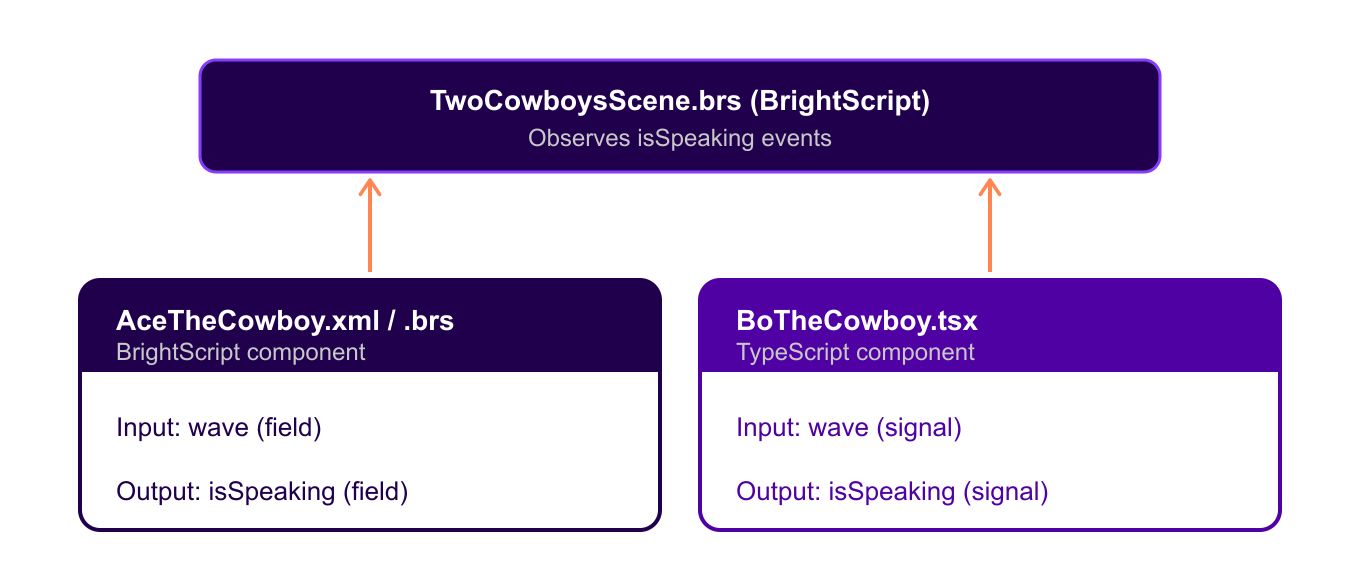
The cowboys communicate through input and output fields:
- Input events: Both cowboys have a
waveinput field that controls arm movement. - Output events: Both cowboys emit an
isSpeakingoutput field when displaying speech bubbles. - Cross-language communication: BrightScript and TypeScript components observe each other's events.
Visual behavior
Each cowboy has the following visual behavior:
- Arms: Both cowboys have left and right arms.
- Waving animation: The left arm moves up when the
waveinput istrueand returns to the resting position when the input isfalse. - Speech bubbles: Random "Howdy!" messages with a 2-second display duration.
- Responsive interaction: Cowboys wave back when the other cowboy speaks.
Architecture
The following diagram shows the hybrid architecture pattern with event-driven communication.
Key demonstration points
This app demonstrates the following points:
-
Same component, different implementations: Both cowboys are functionally identical but demonstrate different coding approaches.
- Ace (BrightScript): Uses XML layout, BrightScript logic, field observations, and node references.
- Bo (TypeScript): Uses TSX layout, TypeScript logic, reactive signals, and SolidJS primitives.
-
Input and output event systems:
- BrightScript: Events are mapped through XML
<field>definitions and.observeField(). - TypeScript: SolidJS signals and reactive primitives handle events.
- BrightScript: Events are mapped through XML
-
Cross-language interoperability:
- BrightScript scene logic coordinates both components.
- Components communicate regardless of implementation language.
- Field observations work across language boundaries.
-
Event-driven architecture: Cowboys respond to each other's state changes.
-
Gradual migration path: Existing BrightScript apps can gradually adopt TypeScript components.
Implementation details
This section shows the key code for each cowboy and for the scene.
BrightScript implementation (Ace)
The Ace component declares its fields in XML and handles waving in BrightScript.
<!-- AceTheCowboy.xml -->
<interface>
    <field id="wave" type="bool" value="false" />        <!-- Input -->
    <field id="isSpeaking" type="bool" value="false" />  <!-- Output -->
</interface>' AceTheCowboy.brs
function handleWave()
if m.top.wave
m.leftArm.translation = [17, 145] ' Wave position
else
m.leftArm.translation = [17, 180] ' Rest position
end if
end functionTypeScript implementation (Bo)
The Bo component defines its fields in a descriptor and moves its arm reactively.
// BoTheCowboy.tsx
const BoTheCowboyDescriptor = {
    componentName: "BoTheCowboy",
    extends: "Group" as const,
    inputFields: {
        wave: FieldType.Boolean()     // Input
    },
    outputFields: {
        isSpeaking: FieldType.Boolean()  // Output
    }
};

// Reactive arm movement
<rectangle
    translation={inputs.wave ? [17, 145] : [17, 180]}
/>

export default defineAnchorNode(BoTheCowboyDescriptor, BoTheCowboy);
Control logic (BrightScript scene)
The scene observes each cowboy and signals the other cowboy to wave.
' TwoCowboysScene.brs
m.aceTheCowboy.observeField("isSpeaking", "onAceSpeakingChanged")
m.boTheCowboy.observeField("isSpeaking", "onBoSpeakingChanged")

function onAceSpeakingChanged()
    m.boTheCowboy.wave = m.aceTheCowboy.isSpeaking  ' Bo waves when Ace speaks
end function

function onBoSpeakingChanged()
    m.aceTheCowboy.wave = m.boTheCowboy.isSpeaking  ' Ace waves when Bo speaks
end function
Building and running
You can install dependencies and side-load the app with these commands:
# Install dependencies
pnpm install

# Side-load the app to a development Roku device
npx rk dev
Files structure
This section lists the BrightScript and TypeScript files in the app.
BrightScript files (traditional)
The BrightScript side includes these files:
pkg/source/Main.brs: App entry pointpkg/components/TwoCowboysScene.xml/brs: Main scene with control logicpkg/components/AceTheCowboy.xml/brs: Ace cowboy component with arms and wavingpkg/manifest: Roku app manifest
TypeScript files (modern)
The TypeScript side includes these files:
src/index.ts: TypeScript entry point and component registrationsrc/components/bo-the-cowboy.tsx: Bo cowboy component with reactive arms
This app shows the following:
- How to implement the same functionality with different approaches
- Input and output event handling in both BrightScript and TypeScript
- Cross-language component communication
- Gradual migration strategies for existing BrightScript apps
Updated about 4 hours ago