
Effect
Applies shader effects such as rounded corners, borders, and gradients to Poster and Rectangle nodes
Extends Group
Available since Roku OS 16.0.
The Effect node applies predefined shader effects to existing SceneGraph nodes. The Poster and Rectangle nodes include an effect field that references an Effect node.
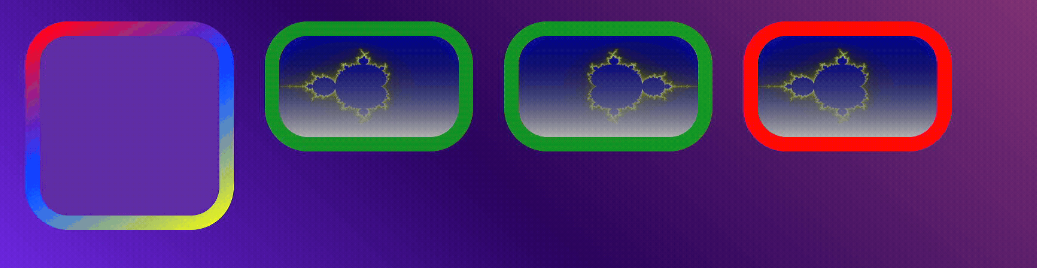
On platforms without a shader-capable GPU, or when disabled by configuration, the Effect node does nothing and the node to which it is applied renders as though the Effect were not present. Check the read-only supported field to determine availability.
To apply an effect to a Poster node, you must set the poster's shaderCompatible field to
truebefore you set its uri field. Setting shaderCompatible after the bitmap has loaded has no effect.
Fields
| Field | Type | Default | Access Permission | Description |
|---|---|---|---|---|
| supported | boolean | Platform-dependent | READ_ONLY | Indicates whether effects are supported on the device platform. |
| borderRadius | array of float | [] | READ_WRITE | 0, 1, or 4 floats specifying corner radii clockwise from the top right, in pixels. Other lengths are silently truncated to length 1 or 4. |
| borderWidth | float | 0.0 | READ_WRITE | The width in pixels of a border drawn around the edge. |
| borderPadding | float | 0.0 | READ_WRITE | Padding between the content rect and the border stroke, in pixels. |
| borderColor | color | 0xFFFFFFFF | READ_WRITE | The color of the border. |
| gradientColors | array of color | [] | READ_WRITE | At least 2 and at most 8 color values interpolated along a gradient. Indexes 8 or higher are ignored. |
| gradientStops | array of float | [] | READ_WRITE | The fractional distances along the gradient of each color. If not specified, even distribution is assumed. If specified, it should have the same length as gradientColors, and is truncated or ignored if it does not. |
| gradientAngle | float | 0.0 | READ_WRITE | The angle of a linear gradient, in degrees, clockwise from "up". |
| gradientCentre | vector2d | [0.5, 0.5] | READ_WRITE | The center point of a radial gradient, normalized between 0 and 1. Values outside that range work, but are outside the node. |
| gradientRadius | vector2d | 1.0 | READ_WRITE | The radius of a radial gradient in the x and y directions, proportional to the node size. |
| gradientStyle | string | "none" | READ_WRITE | Gradient fill style applied over the content area: "none", "linear", or "radial". |
| gradientFillContent | boolean | true | READ_WRITE | Applies the specified gradient to the content area. |
| gradientFillBorder | boolean | false | READ_WRITE | Applies the specified gradient to the border area. Both gradientFillContent and gradientFillBorder may be set to true. |
Example
rounded = CreateObject("roSGNode", "Effect")
rounded.borderRadius = [50]

square = CreateObject("roSGNode", "Poster")
square.shaderCompatible = true
square.uri = "pkg:/images/square.png"
square.effect = rounded
Updated 8 days ago