
Accessing SceneGraph nodes
How SceneGraph nodes, BrightScript, fields, copying, and threads affect the performance and memory use of your app
SceneGraph is built around a tree of nodes which are then rendered onto the display. BrightScript can manipulate these nodes. You can extend the built-in node classes by defining component classes.
This guide describes how these parts work and how they affect the performance and memory use of a BrightScript/SceneGraph app.
SceneGraph nodes
SceneGraph nodes are built upon a base C++ Node class (for example, Group or ContentNode). Nodes can have children and can also reference other nodes through fields. These nodes are reference-counted in C++ via std::shared_ptrand live independently of BrightScript. They are released when their reference count drops to zero.
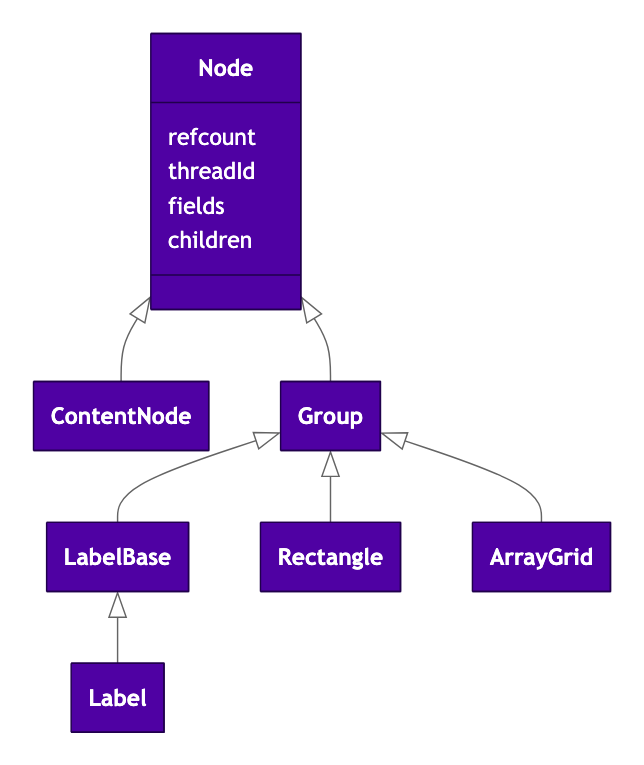
Thread ownership
The threadId is used to track "ownership"—which thread (task/SDK1 or render thread) "owns" this node. If a non-render thread accesses a node owned by the render thread, it will rendezvous the operation. It is never possible for the render thread to encounter a node it does not own—the APIs transfer the ownership recursively over to the render thread first.
This is the mechanism that ensures a task thread cannot access a node concurrently with the render thread—after a task thread passes a node over to the render thread its ownership changes and thereafter all operations by the task thread are rendezvoused over to the render thread—the task thread blocks while the render thread performs the operation on its behalf (get/set/callfunc, etc).
SceneGraph components
SceneGraph's base C++ components can be extended using SceneGraph's XML markup:
<component name="MyComponent" extends="ContentNode">This creates an internal CompiledComponent object which records:
- The parent compiled component (for example, when one compiled component extends another).
- The list of field definitions.
- The set of interface functions.
- The set of functions used by this component (for example,
init), used for the namespacing support.
When a component node is created (CreateObject("roSGNode", "MyContentNode")), this results in the creation of:
- The base C++ node object (for example,
ContentNode). - A
Componentinstance, which references theCompiledComponent. This is referenced by the node. - The individual fields, with values set to initial values defined in the
CompiledComponent. - The Component
marray (m.foo = some_value).
That is, a "component" is a SceneGraph Node with an associated Component data structure which extends the derived-Node's behavior (refcounting, ownership, etc). The words "component", "node", and "component node" are often used interchangeably but as far as programming from BrightScript is concerned, all classes of "component" are actually "nodes" with extended user-defined fields and functions and have all the properties of a node.
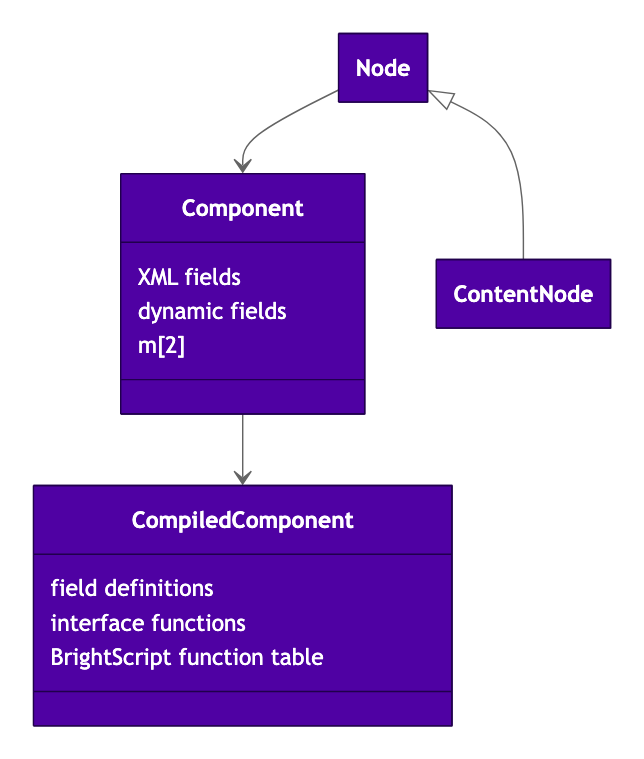
Each CompiledComponent keeps a lookup table (hashmap) of functions—this is used for the per-component function namespacing.
To minimize Component creation time, avoid deeply nested class hierarchies (
extends), keep the number of fields to a minimum, avoid using default values, and keep theinit()function(s) as short and fast as possible. This also reduces the memory overhead of theCompiledComponent(although this is not normally significant).
Defining fields in XML or with addField
Field creation is faster when defined in the XML compared to ad-hoc creation via node.addField(). When fields are added via addField, each node must build its own per-node name-to-field dictionary. When fields are defined via the XML, this dictionary is shared across all components of the same type and built only once.
Fields are looked-up in the name-to-field dictionary at each level in the component's class hierarchy, so deep class hierarchies will be slower than shallow ones.
BrightScript runtime
Each BrightScript thread owns a control structure that owns a BrightScript domain. When a BrightScript thread creates a BrightScript object (for example, via CreateObject() or box()) it is added to this list with a refcount of 1. When other references are created the refcount is incremented, and when the refcount drops to zero it is released.
foo = box("foo")    ' roString with refcount 1
myaa = {foo: foo}   ' refcount = 2
foo = invalid       ' refcount = 1
myaa.foo = invalid  ' refcount = 0, recycled
The terms "BrightScript component" and "BrightScript object" are used interchangeably.
An app starts with a single BrightScript thread which runs the main() subroutine. Creating a scene implicitly creates the render thread. Task threads create additional BrightScript threads.
Threads can communicate with the render thread using a Rendezvous, MessagePorts or the roRenderThreadQueue.
Bridging BrightScript to SceneGraph
See roSGNode
BrightScript's roSGNode class is used to manage SceneGraph Node instances. Each roSGNode instance has a std::shared_ptr which references that node. These roSGNode instances of course also have their own separate BrightScript refcount. Multiple roSGNode instances can reference the same Node instance.
For an XML file like this:
<component name="MyComponent" extends="ContentNode">Created like this:
n = CreateObject("roSGNode", "MyContentNode")The Node instance will have a refcount of 1, as will the BrightScript roSGNode instance.
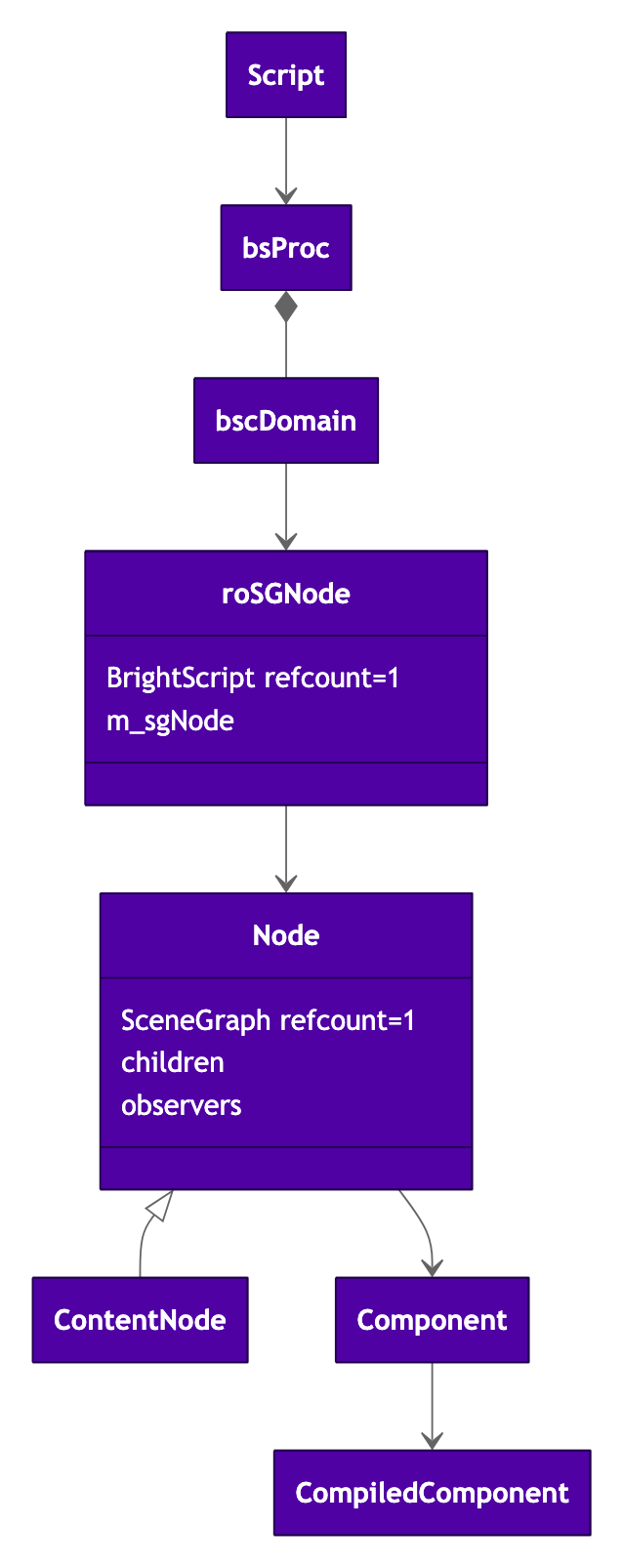
Two different refcounts
If that BrightScript variable is assigned to another variable, this increments the refcount on the BrightScript object, but not the underlying SceneGraph node:
m = n ' roSGNode BrightScript object's refcount is now 2The SceneGraph node's refcount will be incremented if some other SceneGraph object references it, or if the roSGNode is cloned, for example:
m.top.addChild(n) ' SceneGraph Node refcount is now 2When you use the /query/sgnodes External Control Protocol (ECP) command, the osref count that is reported is calculated as the underlying std::shared_ptr refcount with 1 subtracted for each referencing roSGNode instance.
Passing values between BrightScript and SceneGraph
When values are passed from a BrightScript object to a SceneGraph node (via an roSGNode object) using either "dot" notation or explicit set or get operations, the data is copied to or from the field.
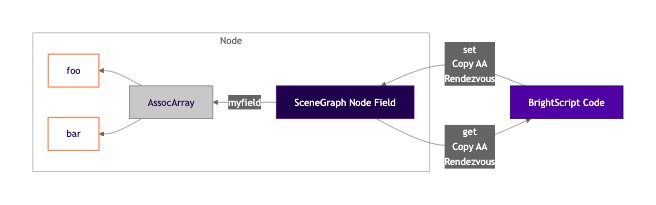
Just like set and get, callfunc also copies its arguments and result, and also does a rendezvous if ownership does not match.
Copying roSGNode
An roSGNode can be copied from a task thread to the render thread. When this happens the data is not copied—only the roSGNode "shell" object is copied—which is fast.
There is a small amount of overhead for setting the new owning thread-id, but this is tiny (sub-microsecond per node).
Component-scope "m" and threads
See:
The component owns a pair of BrightScript associative arrays which correspond to the m special variable in component code, the component-scope m.
sub init()
    m.foo = 42    ' stored in render-thread half of "m"
end sub
One side of this pair is used by the render thread, and the other side is used when the component's code executes on a task thread (and is empty otherwise).
When a task thread starts up, it will deep-clone the values in the render-thread's side across to the task thread's side during the first rendezvous.
This can have a performance impact for large amounts of data in
m.It is better to have a small number of long-lived task threads rather than spawning new ones per request—thread startup requires at least one rendezvous and so can easily take tens of milliseconds, and block the render thread.
Common performance problems when copying data in and out of node fields
The field copying that occurs when moving data from BrightScript into a SceneGraph field or out again can often cause both performance and memory problems.
The similarity in notation can easily trip up even the most experienced developers. This is especially easy to do when mixing accesses to m and m.top.
mis a normal BrightScript associative array, so accesses are fast. The data references do still need to be managed to ensure memory is recycled when no longer needed.m.topis a SceneGraph node. Accesses result in a copy of the field's data to construct a new BrightScript associative array. Releasing it (when its refcount drops to zero) will take time.m.globalis also a SceneGraph node, so the same performance penalties apply—accessing its fields will copy the data in or out.
Consider the following code:
- It parses a JSON string.
- A reference is added to
m. - The JSON data is copied into a SceneGraph node's field.
- The JSON data is read (copied) multiple times from the field.
- There is a write to a subfield (
m.top.data.state.some_value) but this merely mutates the copy—the mutation is immediately lost. - There is a write to the entire field—this updates it correctly but copies all of the data.
' This just pays the JSON parse cost
data = ParseJson(json)

' Cost is negligible but must now release *both* refs before data will be recycled.
' It is not uncommon for apps to forget to release one or other of these.
m.data = data

' Copies the data into the field - slow for large data
m.top.data = data

' Reads the whole of data *twice*, not just "state", and discards it *twice*
if m.top.data.state <> invalid and m.top.data.state.some_value = 42 then
   do_thing(m.top.data.state)    ' and reads + releases it again!

   ' Try to modify "some_value"
   m.top.data.state.some_value = 43   ' Oops, only updates copy - mutation lost!

   data.state.some_value = 44
   m.top.data = data   ' Success - updates entire field.
end if

data = invalid         ' Decrements refcount, still one more reference
m.data = invalid       ' Memory released (takes time)
m.top.data = invalid   ' Field data released (takes time)
Copying patterns to watch for
| Code | What actually happens | Time complexity |
|---|---|---|
m.data = data | Store ref in AA, increment refcount | O(1) |
m.top.data = data | Copy entire data into node field | O(N) |
m.top.data.state | Copy entire data OUT of node → temp AA, read .state | O(N) |
m.top.data.state.some_value=43 | Copy entire data OUT → temp AA, mutate temp. Node unchanged | O(N), wasted |
m.data = invalid | Decrement refcount, release if zero | O(N) |
m.top.data = invalid | Release field contents | O(N) |
Analyzing copying in Perfetto
The Perfetto trace of this code looks like the following. Some event names are truncated.

bscCopyToDomainExis the internal function which clones BrightScript objects.- The multiple
getFieldandbscCopyToDomainExblocks are the multiple field accesses in the code above. - The gaps in the trace are where a pre-existing BrightScript object is being replaced, resulting in object release, which takes time.
- The
bscDeleteStandaloneDomainentry is where the old field value is replaced with the new.
See also the discussion in Referencing subsections of m.global.
SceneGraph assocarray and array field performance
For historical reasons, fields of type assocarray have better performance than fields of type array.
For small fields this is not a consideration, but for large fields it can have an effect on performance:
- Fields of type
assocarrayare accessed with time complexityO(N)in the number of BrightScript objects in the field. - Fields of type
arrayare accessed with time complexityO(NlogN).
Passing data to and from CallFunc()
Data passed to CallFunc() is copied, as is the return value.
It uses the same algorithm used for array fields—even if an associative array is being passed.
Moving and referencing
It may be possible to reduce or eliminate the copies required when transferring data to/from a node by using moveIntoField(), moveFromField(), getRef() and setRef().
moveIntoField() can be used to avoid copying data. However, the moving algorithm will avoid moving data that is externally referenced. This means that if you know that your data is externally referenced it may well be faster to simply copy it, since this avoids the overhead of the external-referencing check.
The roRenderThreadQueue's PostMessage() API has the same performance limitation—if you know that the data is heavily externally referenced, then it will likely be faster to use CopyMessage().
moveFromField() is constant-time (O(1)) in all cases.
See Data Transfer APIs.
Cycles
Cycles can create a leak—each object keeps the other object alive even though they are no longer referenced from anywhere else in the system. Cycles can exist not only between objects of the same family (BrightScript or SceneGraph) but also across object families—SceneGraph to BrightScript cycles are a common source of problems.
Cycles in BrightScript
Creating an object cycle in BrightScript will keep the objects alive forever and cause a leak.
foo = {}
foo.bar = {}
foo.bar.cycle = foo    ' cyclic - each references the other - refcount never drops to zero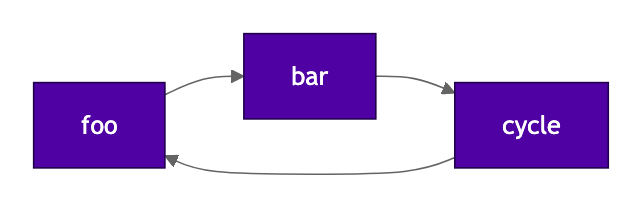
This can be detected at run time with RunGarbageCollector() which will walk the objects in the domain (thread) that it is invoked on and find those that have outstanding refcounts. Cycles can also be detected with Perfetto where they will be reported as unreachable objects.
RunGarbageCollector() should not normally be used in production—its execution time is linear (O(N)) in the number of objects in the domain, so can become slow for non-trivial applications.
See also Garbage Collector and Circular Dependencies in SceneGraph.
Cycles in SceneGraph trees: child-to-parent
When child nodes are added, SceneGraph checks that the child being added is not already a parent (recursively up the node tree). This means that building a tree of nodes is quadratic in the depth (O(N^2)). In practice this overhead is small—on a typical device constructing a tree of depth 10 is a few tens of microseconds per node. The cycle detection does not visit sibling nodes (it is done merely to ensure that the tree can always be traversed upwards without looping).
Cycles between nodes due to (for example) node field references are only broken when the app is closed. This can also defeat the reference counting and cause a memory leak.
Cycles between BrightScript and SceneGraph
It is possible to create a cycle between BrightScript objects and SceneGraph objects. This will prevent these objects from being cleaned up when expected.
For example a component could store a reference to a parent or related component in its component m. This will defeat the normal teardown and leave both parent and child "orphaned" when the parent is removed from the tree.
For example, in the child:
m.parent_cycle = m.top.getParent() ' BrightScript->SceneGraph cycle!Now trying to delete the topmost node from the tree will leave it orphaned as it is being kept alive by the reference in the component m. This can also happen with more complex cycles.
A Perfetto heapgraph can reveal these cycles—it records the edges between all nodes.
Cycles, array fields, and CallFunc()
A long-standing bug means that if an array field has a cycle then the memory will be leaked even if the field itself is destroyed. This is not true of assocarray fields—for these, a cyclic field structure is cleaned up when the field is reassigned or destroyed.
These array field leaks are not detectable with RunGarbageCollector(). The cycles can be viewed in Perfetto, but any already-leaked cycles from this effect are not visible.
The same problem also exists in CallFunc()—if the parameters or return value contain a cycle then this will be irrecoverably leaked on each invocation.
Node tree operations
findNode()
roSGNode.findNode() searches in two steps: first it looks up the id in a dictionary built from all of the nodes constructed in the XML. This search is O(logN) in the number of nodes. If the object is not found there, it then searches using a breadth-first search, which is O(N) in the number of nodes in that subtree.
This search can become slow if used repeatedly on large trees of nodes.
appendChild() and removeChild()
These operations are O(N) in the number of children, but still very fast (small tens of microseconds). However, for renderable nodes, adding or removing a node will dirty the parent node. Additionally, if there are observers on the parent node they will fire on every child addition or removal—for an empty observer this will be in the region of an additional 25–50 µs per addition or removal on typical hardware. A large complex observer function on the parent node could have quite a big impact.
Communication between threads
Rendezvous
A rendezvous is the mechanism used to synchronize between task threads (and the SDK1 main thread) and the render thread.
The task thread blocks waiting for the render thread to respond. Additionally, any SceneGraph objects that are involved in the rendezvous become "owned" by the render thread. Thereafter all accesses to that object and its child nodes by the task thread require a rendezvous.
' Task.brs

sub runTask()
    n = CreateObject("roSGNode", "MyContentNode")    ' owned by task here
    n.my_field = "hello"             ' still owned by task, no blocking
    m.top.some_field = n             ' rendezvous - m.top is already owned by render thread
                                     ' "n" is now owned by the render thread
    ? n.my_field                     ' rendezvous - "n" now owned by render thread
end sub
Where the rendezvous is imposed
The boundary where the rendezvous applies is the roSGNode. That is where the ownership test takes place, and where the blocking takes place.
An ordinary BrightScript array or AA does not rendezvous.
Because a rendezvous occurs on each access, and the accesses are not easily visible in the syntax of your code, it can be easy to introduce performance problems without realizing it.
Example: multiple blocking rendezvous
This shows an example where a single line of code blocks twice on two different roSGNode instances owned by the render thread. There is no rendezvous blocking on the intermediate AA.
sub init()
    '
    ' init runs on the render thread - no rendezvous here
    '
    my_node = CreateObject("roSGNode", "ContentNode")
    my_node.title = "Hello World"
    m.top.aafield = {my_node: my_node}

    ' No rendezvous - all in the render thread
    print m.top.aafield.my_node.title
end sub

sub runTask()
    ' Two rendezvous; m.top and my_node
    print m.top.aafield.my_node.title
end sub
Rendezvous after an ownership transfer
A rendezvous can also occur when your code accesses a node after a rendezvous has transferred its ownership to the render thread. This is an easy mistake to make because it is not obvious from the code syntax that there is a performance problem. Consider the following code—two identical statements that take very different amounts of time following a rendezvous:
' MyTask.brs
sub RunTask()
    data = get_my_content_node() ' Get a content node from somewhere
    do_thing(data.foo)           ' No problem, not a rendezvous, only cost is copying "foo"

    ' Rendezvous to render thread
    m.top.data = data            ' Rendezvous, data now owned by render thread

    do_thing(data.foo)           ' Oops, this will also rendezvous!

    data = get_some_data()       ' Get a new content node
    do_thing(data.foo)           ' No rendezvous, only a copy
end sub
The example above uses m.top which is always owned by the render thread, but it applies to any object owned by the render thread.
Rendezvous overhead
A single rendezvous costs on the order of 100–200 µs on typical hardware (ignoring the cost of copying any field data).
Diagnosing rendezvous problems
You can use these tools to diagnose rendezvous problems:
- Perfetto
- The
sgrendezvouscommands. - Roku Resource Monitor
Observers
Observer leaks
When observeField and observeFieldScopedEx are called, this adds a new observer even if an observer for the same field and callback already exists. It does not replace an existing observer watching on the same field name.
Example:
m.top.observeFieldScopedEx("myfield", target)
m.top.observeFieldScopedEx("myfield", target)
The target will now be notified twice—the second call adds a new observer, it does not replace the old one. This results in wasted CPU cycles due to duplicated observer notifications. There is also a small amount of leaked memory.
This can often happen with components that are repeatedly created and destroyed and observe a field in their setup.
Perfetto reports the number of observers in the system which can be used to diagnose this.
Fixing observer leaks
One way to fix this is to unobserve the field. Another way to fix such a leak is to choose observeField() or observeFieldScopedEx() depending on the lifetime of the observing and observed objects.
node.observeField()stores the observer in the observed object (node).node.observeFieldScopedEx()stores the observer in the observing object, or inm.globalif being called from the SDK1/mainthread.
If the observed object is being created and destroyed, then using observeField() will ensure that the observer is automatically cleaned up when that observed object is destroyed.
Similarly, if the observing object is being created and destroyed then observeFieldScopedEx() is a better choice—otherwise the observed object will have a dangling observer when the observer goes away, wasting memory and CPU cycles.
Do not use observeFieldScoped()—it is retained for backward compatibility but does not work properly, and stores the observer on the observed field, like observeField().
See ifSGNodeField.
roMessagePort
See roMessagePort
This will copy its data from the source field which could be a problem for large amounts of data. If the data contains any SceneGraph nodes then the receiving task thread could end up rendezvousing on every access to them since they will be owned by the render thread.
roRenderThreadQueue
This can be used by task threads and the SDK1/main thread to avoid blocking in a rendezvous. It is useful for long-lived tasks that must periodically signal the render thread and can do additional useful work if they are not blocked.
See roRenderThreadQueue and Data Transfer APIs.
BrightScript compilation
Channel Store compilation
BrightScript apps are compiled offline in the Channel Store before being delivered to devices. This cuts down on startup time (seconds for a large app), and also reduces memory requirements. DCLs stored in the app itself are also compiled in the same way.
This does not happen for DCLs loaded from an external URL since the Channel Store does not have access to the code.
Finding performance problems with Perfetto
One way to find performance problems is with Perfetto.
- Capture a Perfetto timechart to visually see where the time is going.
- Use the SQL query tool to find the longest operations.
- Check the observer metrics for observer leaks.
- Add custom tracepoints around particular parts of the code by injecting Perfetto events from BrightScript.
- Use the Perfetto heapgraph to find large allocations. Large amounts of data not only consume memory but also take time to construct and destruct.
- Use the heapgraph in conjunction with post-processing tools to visualize cycles.
This is described in more detail in Perfetto.
Performance tips
Less is more. Do not pass more data around than you need to; it will make your app slower and use more memory. If you can reduce the amount of JSON data sent by your server endpoints this can be an easy way to improve both performance and memory use.
- Try to read field values just once into a local variable rather than repeatedly copying from the same field.
- Try to avoid duplicating data in your fields inside long-lived members of
m—they will be fast to access but they still use memory. - Try to break up data structures—putting everything into a single field is convenient but can result in unavoidable copying costs.
- Watch out for accesses to a node in a task thread after it has been rendezvoused across to the render thread—each access to that node and its children will now require a rendezvous.
- Use Perfetto to find large or repeated copies, and repeated rendezvous operations.
- Watch out for cycles. Use Perfetto to find them.
Updated 18 days ago