
Dynamic Component Libraries (DCL)
A Dynamic Component Library (DCL) is a separately packaged Roku component library that a host app loads at runtime. A DCL can contain BrightScript/XML components, TypeScript components, or both.
To use a DCL, you build it and sideload it to the device, list its app ID in the host app manifest, and load it from the host app.
Host apps and DCLs are built and shipped independently. A TypeScript DCL does not bundle the SDK. It uses the SDK modules that the host app publishes at runtime.
A host app that loads a TypeScript DCL must import
@roku-sdk/rsg-ts/module-registryin its entry point. See Opting in to the module registry for more information.
Overview
A DCL setup has three roles: a BrightScript DCL, a TypeScript DCL, and the host app that loads them. The following table lists the library name and contents of each role.
| Role | Library name | Contents |
|---|---|---|
| BrightScript DCL | brsDCL | BrightScript/XML components in pkg/components/ |
| TypeScript DCL | tsDCL | TypeScript components registered via DCL_COMPONENTS |
| Host app | None | Loads and renders components from installed DCLs |
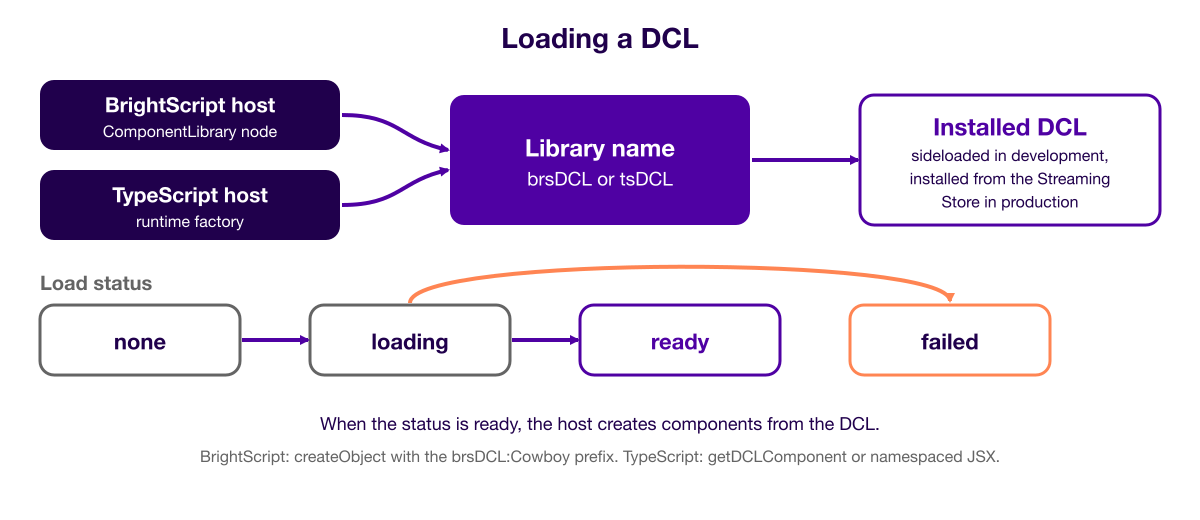
A host app that includes TypeScript can load DCLs from two sides:
- BrightScript host: uses the SceneGraph ComponentLibrary node
- TypeScript host: uses the ComponentLibrary runtime API
From either side, the host can load a BrightScript DCL or a TypeScript DCL.
Loading from the Streaming Store
The host app resolves DCLs from the Roku Streaming Store, or from sideloaded DCLs during development. You must set libraryName on the ComponentLibrary node, or pass the name to createLibrary(name), using the DCL's library name (for example, brsDCL or tsDCL).
A BrightScript host that loads a BrightScript DCL uses the same ComponentLibrary node and
libraryNamefield that existed before RSG 2.0 SDK TypeScript DCL support. That path is unchanged.
Developing with DCLs
During development, you sideload the DCLs and the host app to a device, and then check which DCLs the device has installed. Follow these steps:
- Build and sideload each DCL package to the device (
pnpm rk dev; use--no-write-ts-pathfor BrightScript-only DCLs). - Build and deploy the host app.
- Verify installed libraries with
rk dcl ls. Seerk dclfor more information.
Using the ComponentLibrary API
The ComponentLibrary API loads a DCL into a host app. The following sections show how to use it from a BrightScript host and from a TypeScript host.
The diagram below shows how a host loads a DCL and how the load status changes.
Using the ComponentLibrary node in BrightScript
Create a ComponentLibrary node and set libraryName to the installed DCL name:
componentLibrary = createObject("roSGNode", "ComponentLibrary")
componentLibrary.observeField("loadStatus", "onLoadStatusChanged")
componentLibrary.libraryName = "brsDCL"   ' or "tsDCL"
The loadStatus field has the following values:
| Value | Meaning |
|---|---|
none | Not started |
loading | In progress |
ready | Components available |
failed | Load failed |
When loadStatus is ready, create components with the libraryName:ComponentName prefix:
cowboy = createObject("roSGNode", "brsDCL:Cowboy")
m.top.appendChild(cowboy)
To unload, clear libraryName, remove child nodes, and release references:
componentLibrary.libraryName = ""Using the runtime factory in TypeScript
A TypeScript host gets a ComponentLibrary handle from a factory, sets a load status handler, and then calls load(). The host can use the DCL's components after the status is LoadStatus.READY:
import { ComponentLibrary, LoadStatus } from "@roku-sdk/interfaces";
import { getDCLComponent } from "@roku-sdk/rsg-ts";
import { getComponentLibraryFactory } from "@roku-sdk/runtime/component-library";

const factory = await getComponentLibraryFactory();
const library = factory.createLibrary("tsDCL"); // or "brsDCL"

library.setLoadStatusHandler((status: LoadStatus) => {
    if (status === LoadStatus.READY) {
        // TypeScript DCL: retrieve the component for JSX
        const Cowboy = getDCLComponent("tsDCL", "Cowboy");

        // BrightScript DCL: use namespaced JSX directly
        // <brsDCL:Cowboy />
    }
});

library.load();
The following table describes the APIs in this example:
| API | Package | Purpose |
|---|---|---|
getComponentLibraryFactory() | @roku-sdk/runtime/component-library | Returns the factory |
factory.createLibrary(name) | @roku-sdk/interfaces | Creates a ComponentLibrary handle |
library.load() | @roku-sdk/interfaces | Starts loading (call once) |
library.setLoadStatusHandler(fn) | @roku-sdk/interfaces | Receives LoadStatus changes |
getDCLComponent(lib, name) | @roku-sdk/rsg-ts | Returns a TypeScript DCL component for JSX |
To use a BrightScript DCL in a TypeScript host, use namespaced JSX after LoadStatus.READY, as in the following example:
<brsDCL:Cowboy translation={[0, 0]} />This requires a JSX declaration for the component. See Declaring DCL types for more information.
To use a TypeScript DCL in a TypeScript host, call getDCLComponent after LoadStatus.READY, then render the returned component.
How a TypeScript DCL registers its components
When a TypeScript DCL loads, its components are made available in two ways, whichever host loaded it:
- They are declared to SceneGraph, so BrightScript creates them with
createObject("roSGNode", "tsDCL:Cowboy"). - They are published in-process, so TypeScript renders them with
getDCLComponent("tsDCL", "Cowboy").
In TypeScript code, always use getDCLComponent, never a <tsDCL:Cowboy /> tag. The tag creates a SceneGraph anchor node from TypeScript. Its creation, every input change, and every output each make an extra trip through the render thread, and its Solid root keeps running after removal until the node is garbage-collected.
getDCLComponent calls the component with its inputs only. This has the following consequences:
- Base-node fields are not applied.
getDCLComponentdoes not create the descriptor'sextendsbase node, so fields of the base, such astranslation, have no effect. To position the component, wrap it in agroup. - A BrightScript/XML base is lost. If a component's
extendsis a BrightScript/XML component, that base is dropped entirely, so create the component from BrightScript instead. - Output fields do nothing. To get a value back to the host, pass a callback prop.
Listing DCLs in the host app manifest
During development, list the DCL app IDs that the host expects:
dcl_channel_ids=brsDCL:dev,tsDCL:devRoku resolves these IDs against DCL packages that you sideload to the device. In production, the device installs DCLs from the Streaming Store by their published app ID.
Opting in to the module registry
A TypeScript DCL does not bundle the SDK. Its build leaves out @roku-sdk/rsg-ts, @roku-sdk/rsg-ts/interfaces, @roku-sdk/rsg-ts/runtime, and @roku-sdk/solid. At load time, the DCL resolves them with require() from a module registry that the host publishes on globalThis.__ROKU_MODULES__.
The diagram below shows how a TypeScript DCL gets the SDK packages from the host app.
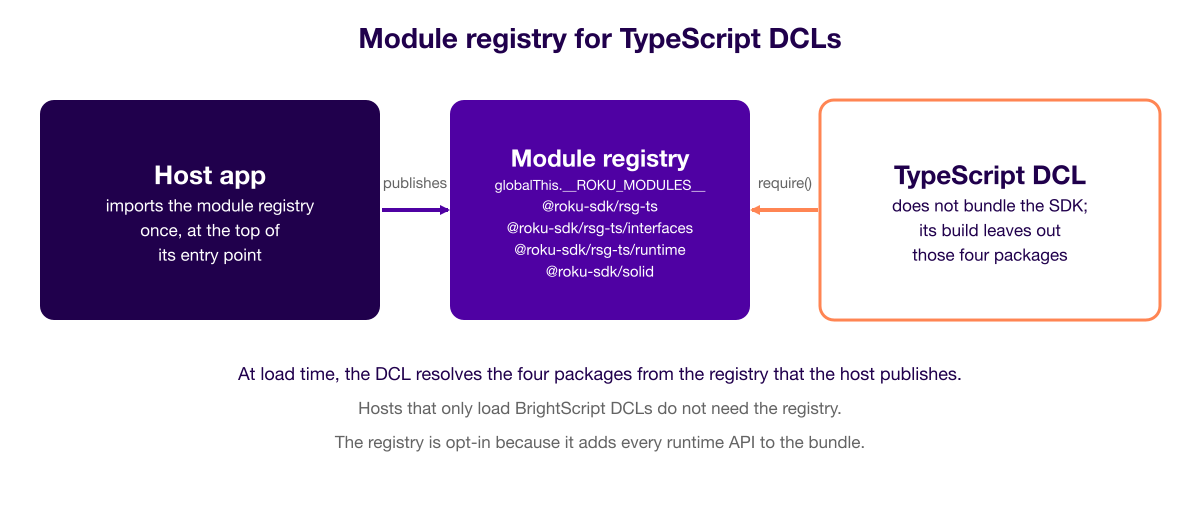
Any host that loads a TypeScript DCL, whether from its TypeScript side or its BrightScript side, must import the registry once, at the top of its entry point:
// src/index.ts of the host app
import "@roku-sdk/rsg-ts/module-registry";

import { main } from "@roku-sdk/rsg-ts";
The registry is opt-in because it registers all exports of those four packages. This prevents the build from removing unused code (tree shaking); therefore, the bundle includes every runtime API (crypto, CEC, HDMI, voice, file system) and solid-js/store. Apps that never load a TypeScript DCL leave out the registry and stay small. Previously, @roku-sdk/rsg-ts imported the registry for every app. A host that relied on that behavior and does not add the import fails when the DCL loads, with the error Module not found: @roku-sdk/solid (or another of the four package names).
Hosts that only load BrightScript DCLs do not need the registry.
Creating a DCL app
To create a DCL app, you set the app type in roku-config.ts, provide the DCL's components, and build the app.
roku-config.ts
roku-config.tsSet type: "dcl" so the build leaves out the SDK packages:
import { RokuConfig } from "@roku-sdk/rsg-ts/roku-config";

export default {
    app: {
        type: "dcl",
        entryPoint: "src/index.ts",
        manifestEntries: {
            title: "tsDCL"
        }
    }
} satisfies RokuConfig;
Exporting components from a TypeScript DCL
You must export components in DCL_COMPONENTS. The SDK registers them when the DCL loads, not at build time in the host:
import { Cowboy, CowboyDescription } from "./components/cowboy";

export const DCL_COMPONENTS = [{ description: CowboyDescription, component: Cowboy }];
Creating a BrightScript DCL
BrightScript/XML components live in pkg/components/. The DCL_COMPONENTS array can be empty because the build picks up BrightScript components from pkg/:
export const DCL_COMPONENTS = [];Building a DCL
Use pnpm rk dev to build and sideload a DCL. For a BrightScript-only DCL, add --no-write-ts-path:
# TypeScript DCL
pnpm rk dev

# BrightScript-only DCL
pnpm rk dev --no-write-ts-path
Declaring DCL types
Host apps and DCLs are built and shipped independently; therefore, a TypeScript host does not have any access to a DCL's source. To type-check namespaced JSX (for example, <brsDCL:Cowboy translation={[0, 0]} />), the host needs a declaration that adds a libName:ComponentName entry to JSX.IntrinsicElements.
No DCL type packages are published today. The
rk buildcommand still generates a ready-to-publishdist-types/package for every DCL, but the previously published@roku-sdk/brsDCL-typesand@roku-sdk/tsDCL-typespackages have been retired. They were published to one registry only, which broke installs of this workspace. Their version was derived from the DCL app's own1.0.0; therefore, it could never be corrected after a component changed. Until DCL types are published on a real version line, a host app either references the generated folder directly (see Linking local DCL types in a monorepo) or hand-writes the declaration. Thedcl-host-appexample now hand-writes it insrc/types/dcl-components.d.ts.
Generating the types
Every rk build of a type: "dcl" app automatically generates a dist-types/ folder (you do not need extra flags). The generator:
- Reads
sg_component_libs_providedfrom the built manifest to determine the DCL library name (the JSX namespace prefix, for example,brsDCL). - Emits one
.d.tsper component:- BrightScript/XML components in
pkg/components/*.xml. The generator reads the fields and theextendsbase type from the XML. - TypeScript components. The generator reads them from the
DCL_COMPONENTSdescriptions insrc/index.ts.
- BrightScript/XML components in
- Adds a
"libName:ComponentName"entry toJSX.IntrinsicElementsin each.d.ts. As a result,<brsDCL:Cowboy />becomes a fully typed element. - Writes
dist-types/index.d.ts(an index file that re-exports all component declarations) anddist-types/package.json(a package named@roku-sdk/<libName>-types, ready to publish should a version line ever be set up for it).
The following commands generate the dist-types/ folder:
# Generates dist-types/ as a side effect of the build
pnpm rk build                     # TypeScript DCL
pnpm rk build --no-write-ts-path  # BrightScript-only DCL
The generated folder has the following structure:
dist-types/
├── package.json          # @roku-sdk/<libName>-types
├── index.d.ts            # index file: imports every component .d.ts
└── components/
    ├── Cowboy.xml.d.ts   # BrightScript/XML component
    └── Cowboy.ts.d.ts    # TypeScript component
Consuming the types in the host
A TypeScript host can use the generated types in two ways: it can link to the generated dist-types/ folder, or it can use a hand-written declaration. The following sections describe each way.
Types are compile-time only; therefore, they do not affect the runtime bundle. The component still comes from the DCL that the host loads at runtime (BrightScript through the ComponentLibrary node, TypeScript through
getDCLComponent). A declaration for TypeScript DCL components is optional because you retrieve them withgetDCLComponent. The BrightScript namespaced-JSX path requires a declaration.
Linking local DCL types in a monorepo
You can point the host at the generated dist-types/ folders with a file: dependency (build the DCLs first so the folders exist):
"devDependencies": {
    "@roku-sdk/brsDCL-types": "file:../brs-dcl/dist-types",
    "@roku-sdk/tsDCL-types": "file:../ts-dcl/dist-types"
}
Because it is a file: link, you must build the DCL (rk build) before you run the host app's pnpm install or type-check. That build-ordering requirement is why the dcl-host-app example in this repository does not currently use the file: link. Continuous integration (CI) builds the example without a preceding DCL build.
Writing a declaration by hand
If the generated folder is not available at type-check time, declare the elements directly. The dcl-host-app example does this in src/types/dcl-components.d.ts:
import type { IGroupProps } from "@roku-sdk/components";

interface CowboyFields {
    isSpeaking: boolean;
    wave: boolean;
}

interface ICowboyProps extends IGroupProps, Partial<CowboyFields> {}

declare module "@roku-sdk/solid" {
    namespace JSX {
        interface IntrinsicElements {
            "brsDCL:Cowboy": ICowboyProps;
        }
    }
}

// Repeat for "@roku-sdk/solid/jsx-runtime". When `jsxImportSource`
// is set, TypeScript resolves intrinsics through the jsx-runtime entry.
The trade-off is that nothing keeps a hand-written declaration in sync with the DCL's <interface> block. You can use the generated dist-types/ where build ordering allows it.
Debugging DCLs
You can debug DCLs with rk commands and with breakpoints in the DCL's TypeScript source:
- Device management: The
rk dcl lscommand lists installed DCLs on a device. - Stack traces: When a crash spans host and DCL bundles, you can use
rk decode-stack --dcl-dir. - Breakpoints in a TypeScript DCL: Sideload the DCL, load it from the host, and set breakpoints in the DCL's TypeScript source.
Related documentation
- Manifest processing — Describes manifest configuration.
- App configuration — Describes the
roku-config.tsoptions. rk dcl— Describes how to list and delete installed DCLs on a device.- DCL examples overview: Gives an overview of the DCL examples.
brs-dcl— Includes an example BrightScript DCL.ts-dcl— Includes an example TypeScript DCL.dcl-host-app— Includes an example host app that loads BrightScript and TypeScript DCLs from the Streaming Store.dcl-host-appBrsHostApp — Shows how a BrightScript host uses the ComponentLibrary node.dcl-host-appTsHostApp — Shows how a TypeScript host uses the ComponentLibrary runtime API.
Updated about 4 hours ago