
RSG 2.0 SDK overview
The RSG 2.0 SDK brings TypeScript to Roku SceneGraph (RSG), the UI framework behind every Roku app, alongside BrightScript and XML components. This document explains what the SDK is, what is new, how it differs from BrightScript development, how the pieces fit together, and where to go next.
What the RSG 2.0 SDK is
The RSG 2.0 SDK lets you write SceneGraph components, or an entire app, in TypeScript instead of BrightScript and XML. TypeScript components render through the same SceneGraph renderer as BrightScript components and can interoperate with them. We've designed the SDK so that you can incrementally add TypeScript components to your existing BrightScript app.
The RSG 2.0 SDK does not replace BrightScript or require you to rewrite an existing app. BrightScript remains fully supported. The SDK is also not a web framework: TypeScript components render to SceneGraph nodes on the device, and the SDK has no HTML, CSS or browser environment.
Why TypeScript
Our developer community has a long history of trying to get the best performance on the Roku platform, and that has helped Roku win in the marketplace. Despite all our efforts though, we could not achieve 60 fps on grid animation on our lower end devices. With RSG 2.0, it is now possible to measure 60 fps on a grid on low end devices.
As Roku onboards more content partners in new regions, we've been challenged to find additional BrightScript developers. According to the GitHub Octoverse blog, TypeScript has now surpassed Python and JavaScript to become the #1 most-used programming language on GitHub. TypeScript also improves the developer experience in one fell swoop by including the most frequently requested BrightScript enhancements like modules, closures, generics, and about twenty other language features.
We believe apps will be more performant and robust when written in TypeScript. As your application migrates more of its code to TypeScript, the amount of code running on the render thread is reduced. BrightScript executes all its FieldObservers on the render thread and these go away as components are migrated to TypeScript. Eventually, the render thread will be dedicated to walking the scene graph to render each frame. Program logic would run in a different thread in the TypeScript engine. RSG 2.0 is also based on the SolidJS framework and this brings an asynchronous programming model to the components. As a BrightScript developer, you have become concerned with minimizing rendezvous hold times. In the SolidJS programming model, you need to adopt the async programming model of reactive components. You will still minimize the data passed to the render thread, but now it will be in the form of reusing renderable nodes and keeping animations out of program logic.
The static type checking that TypeScript affords will catch more errors at compile time rather than run time and we are adding real-time app exit telemetry. There is a robust set of tooling for TypeScript applications including Perfetto, Chrome DevTools, and VSCode. These tools will help track down memory leaks and performance bottlenecks in your application.
With all the great benefits of TypeScript, Roku still wins by producing the best applications for our economical platform. TypeScript is a new twist on the skills BrightScript engineers already have at producing high-performance applications using our RSG components.
What is new
The RSG 2.0 SDK adds the following to Roku development. Later sections describe each in more detail.
- TypeScript authoring. You write components in TypeScript and TSX, with types, autocomplete, and compile-time checking.
- A separate runtime for your app logic. TypeScript runs on the Hermes JavaScript engine in its own context, apart from the render thread.
- SolidJS components. SolidJS is a reactive UI framework that does not have a virtual DOM and updates only the nodes that depend on a changed value.
- Anchor nodes. A SceneGraph component whose contents you write in TypeScript attaches your TypeScript tree to SceneGraph and exposes fields that BrightScript can set and observe.
FocusBoundaryanduseFocusable. These components provide a focus system that runs in TypeScript.- FlexGrid. This component is a virtualized two-dimensional grid engine for content shelves and grids.
- The
rktool. One tool builds, sideloads, debugs, logs, and packages your app, with a typedroku-config.tsfor configuration. - AI tooling. Skills and a Model Context Protocol (MCP) server let AI assistants work with the SDK and a real device.
- Open source. The SDK, its documentation, and its samples accept contributions in the public repository. Note that reference documentation is generated from JSDoc comments in the source files themselves, so submit proposed changes to reference documentation in the source files. Other RSG 2.0 documentation updates should be submitted to RSG 2.0 SDK documentation folder.
The SDK ships as a set of @roku-sdk/* packages. The ones you install or import directly fall into four groups. Other packages, such as common, interfaces, ts-core, and native, are internal building blocks that the packages below depend on, and they are installed automatically.
- Building an app.
@roku-sdk/rsg-ts: the core TypeScript SceneGraph runtime for your components.@roku-sdk/solid: the SolidJS reactive primitives. Import them from here, not fromsolid-js.@roku-sdk/components: TypeScript wrappers for SceneGraph components, plus extra containers.@roku-sdk/navigation: focus primitives and a screen stack for moving between screens.@roku-sdk/runtime: Roku device APIs as typed functions and reactive hooks.
- Feature libraries.
@roku-sdk/flex-grid-3: FlexGrid, a virtualized 2D grid engine for content shelves and grids.@roku-sdk/slideshow: a horizontal slideshow engine.
@roku-sdk/ads: client-side ad insertion through the Roku Advertising Framework (RAF); its interface may still change between releases- Tooling.
@roku-sdk/tooling: therkcommand-line tool, MCP server, and HTTP API.@roku-sdk/sdk-config: the types behindroku-config.ts.@roku-sdk/dev-tools: shared TypeScript, lint, and build configuration for SDK projects.@roku-sdk/ai: the AI skills thatrk update-ai-contextinstalls.@roku-sdk/stack-decoder: decodes Hermes stack traces back to your original source.
- Testing.
@roku-sdk/testing-library: Jest unit and integration tests on your computer or in CI, against a mock render tree.@roku-sdk/device-test-client: integration tests that run against your app on a real device.
See Installing @roku-sdk/* packages for more information on adding them to your app.
What is different
The following table compares the two development models.
| Area | BrightScript and XML | RSG 2.0 SDK |
|---|---|---|
| Language | BrightScript and XML | TypeScript and TSX |
| Where your logic runs | On the render thread, with SceneGraph | In a separate Program Context on its own thread |
| Component definition | An XML file with <interface> fields, plus a BrightScript file | A TypeScript descriptor and a SolidJS component |
| Reacting to change | observeField with a handler for each field | Signals and memos; the framework updates the UI |
| Background work | Task nodes | async and await, with fetch; a Task node is not needed |
| Calling from TypeScript into a BrightScript or SceneGraph component | callFunc, which is synchronous | Write an input field and observe an output field. Calls across the seam are asynchronous; calls between TypeScript components are ordinary synchronous function calls |
| Focus | SceneGraph focus, with setFocus and key handlers in each component | Virtual focus in TypeScript with FocusBoundary and useFocusable |
| Grids and lists | Built-in grids such as RowList and MarkupGrid | FlexGrid, plus the built-in grids if you need them |
| Build and run | Zip and sideload through the device | rk builds, type checks, sideloads, and watches for changes |
| Configuration | A hand-edited manifest file | A typed roku-config.ts that can generate the manifest |
| Images | A path string such as pkg:/images/logo.png | An import that returns the URI and dimensions, with optional WebP conversion |
| Testing | On-device | Jest unit and integration tests on your computer or in CI with a mock render tree, plus on-device tests with @roku-sdk/device-test-client |
| Debugging | print statements, the BrightScript debug console, and the community VS Code extension | The Chrome DevTools Protocol, Perfetto traces, source-mapped stack traces, MCP tools, and the same community VS Code extension |
The next sections explain the differences that change how you structure your code.
How TypeScript components fit into SceneGraph
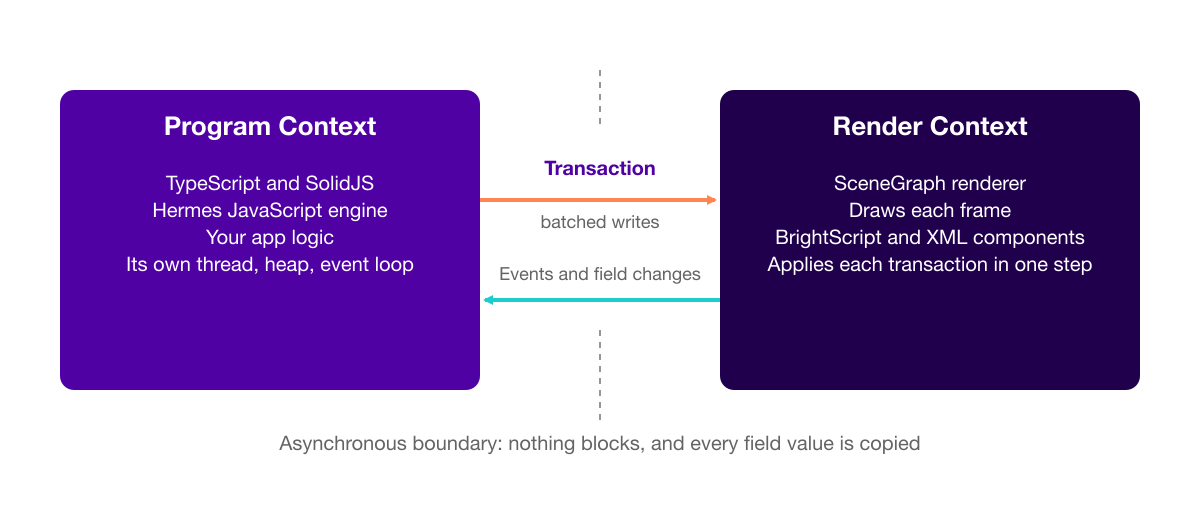
TypeScript runs in its own Program Context, with its own thread, heap, and event loop, separate from the Render Context, the thread that draws each frame and runs SceneGraph. Keeping TypeScript off the render thread is what avoids the jank.
All communication between the two contexts is asynchronous and does not block. When your components change the UI, the SDK collects the writes, such as creating a node, setting a property, and inserting or removing a node, into a single transaction. The SDK hands the transaction to the SceneGraph renderer, which applies it in one step on the render thread. Events and field changes travel back the same way.
Anchor nodes
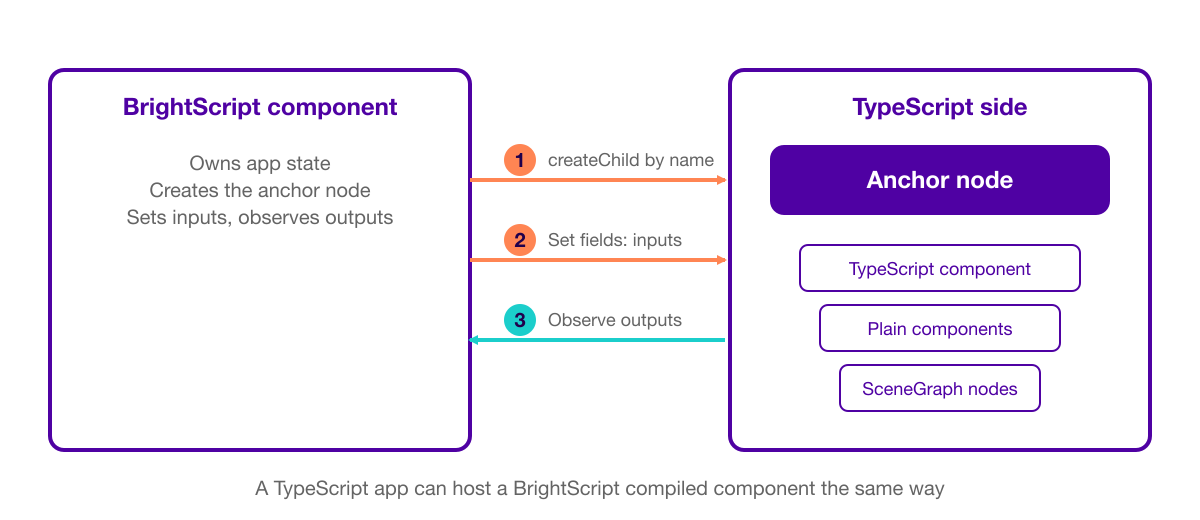
A TypeScript component mounts into the render tree through an anchor node. An anchor node is a wrapper that SceneGraph can hold a reference to and set fields on, similar in role to an XML <interface> block. The anchor node is the mechanism for crossing into SceneGraph, not a pattern to use everywhere. You should compose in plain TypeScript and anchor only where something outside TypeScript needs a handle on the result.
The seam between BrightScript and TypeScript
The seam between a BrightScript component and a TypeScript component is fields, in both directions:
- Setting a field on a TypeScript component's anchor node arrives on the TypeScript side as an input.
- Calling an output function from TypeScript arrives on the BrightScript side as a field you can observe with
observeField.
A BrightScript component can host a TypeScript component, and a TypeScript app can host a BrightScript compiled component. This symmetry lets you migrate an app piece by piece.
Technology choices
Two technology choices support the runtime:
- Hermes, a JavaScript engine that compiles ahead of time, runs the TypeScript side. The team chose it over a just-in-time (JIT) engine such as V8 because a JIT keeps a compiler in memory and needs time to warm up on first run, which costs memory and startup time on a TV-class device. Hermes differs from the JavaScript engines in browsers and Node.js. See RSG 2.0 SDK pitfalls for more information.
- SolidJS is the framework you author components against. It compiles your TSX at build time into code that creates each node once and updates only what depends on a changed signal. Because it does not have a virtual DOM, it costs less memory and less work per update than diffing a tree.
The cost of crossing
Crossing the Program and Render boundary is not free because every field value is copied. You should keep field payloads small and use primitives instead of large objects. The cost is in the crossing, not in the direction.
The mental model shift
Coming from BrightScript, you move from "when this changes, do that" field observers to a declarative model, where a component's UI is an expression of its current state. In BrightScript, you declare a field, observe it, and write a handler that updates the UI. In SolidJS, you keep the value in a signal and use it in an expression, and SolidJS wires the update. You do not attach or remove observers.
Components run once
A SolidJS component's function body runs once, like a constructor, not on every update. Components use the following building blocks:
createSignal: a value that can be read and writtencreateMemo: a derived value that is cached and recomputed only when its inputs changecreateEffect: a side effect, such as a log or a device call, that reruns when the signals it reads change- A plain function: derived state that is cheap enough to recompute on every read
Reactivity follows where a signal is read, not where it is assigned. If you move a signal read out of a TSX expression and into a separate variable, the subscription is lost, and the UI stops updating. The SDK does not report an error that points at the cause. A value you read outside a reactive expression, such as a TSX expression, a memo, or an effect, is read once and never updates.
Calls across the seam become messages
Within TypeScript, you call functions and pass props as usual, and those calls are synchronous. The change is at the seam with BrightScript and SceneGraph. SceneGraph callFunc is synchronous, and the boundary between the Program Context and the Render Context is asynchronous; therefore, callFunc does not cross it. You send a command by writing a value to a field, and you receive results by observing an output field. Only scalar values are stable across the boundary; a new array or object always counts as a change.
Work is asynchronous by default
A Task node exists to move work off the render thread. TypeScript already runs off the render thread; therefore, you write a plain async function and use fetch instead. These async functions do execute on the Program thread, so we are looking at Web Workers as a way to run long running async jobs on a separate thread than either the render thread or program thread. Code you produce today with async functions will be easily migrated to Web Workers in the future.
Coordinates use a 1920×1080 space
When your manifest sets ui_resolutions to fhd, which is what rk create generates for new apps, all coordinates use a 1920×1080 space regardless of the device resolution. See Flexible manifest processing for more information. Roku recommends setting ui_resolutions to only fhd so that you only need to support one design. When used in coordination with URL rewriting, properly sized assets (not scaled) can be delivered to a scaled UI layout based on the display size.
Focus management
SceneGraph still owns focus and delivers key events to the focused node. What changes is how a TypeScript subtree participates in navigation.
A component registers a FocusBoundary to tell SceneGraph that its subtree makes its own focus decisions. Boundaries nest: a boundary inside another boundary looks like an ordinary focusable item to its parent, and a key it does not handle bubbles up to the parent boundary. A boundary owns one region, not the whole app, and only the root boundary needs a key event handler.
Within a region, a component has two ways to participate:
- A component can use a per-item key handler, which consumes the key unless it returns the
bubblesentinel from@roku-sdk/navigation. A bubbled key continues through the boundary's navigation and fallback handlers before it reaches the parent boundary. - A component can use the boundary's own navigation map, which says where focus goes from each item (for example, which item is above or below another).
In most cases, isFocused() is the only piece of focus-related state a component needs to track about itself.
Tooling
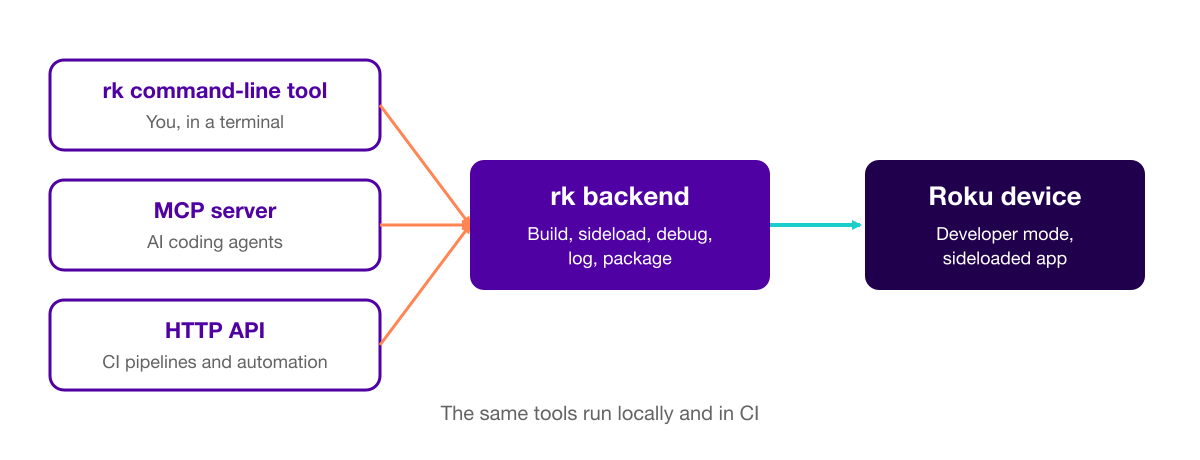
The RSG 2.0 SDK ships one developer-tools backend, exposed three ways:
- The
rkcommand-line tool, for use in a terminal - An MCP server that exposes the same tools to AI coding agents
- An HTTP API, for continuous integration (CI) pipelines and other automation
The rk dev command builds, sideloads, and launches your app, and it can watch for changes, open a console, or attach a debugger, all from one command. The rk build command produces a production artifact, bundled and minified. The same command runs in CI; therefore, you do not need a separate build system to keep in sync with local development.
A project's build and run configuration lives in roku-config.ts at the project root, typed by RokuConfig. The rk tool also handles the following for you:
- Image imports. The build measures each imported image; therefore, one import statement covers both high-definition (HD) and full-high-definition (FHD) variants, and
rkcan convert PNG or JPEG files to WebP. - Typed XML imports. Importing an existing BrightScript XML component generates a type-checked
.d.tsfile; therefore, TypeScript knows about the component's fields. The build generates types only for XML you import. - Typed manifest entries. You can generate your manifest from
roku-config.ts, and the compiler checks the keys and values.
For debugging, the rk server speaks the Chrome DevTools Protocol; therefore, an editor or a tool such as Perfetto can attach to the same device session over one port. For performance work, the SDK points to three tools: fps_display, an on-device frame-rate meter; Perfetto, a timeline trace across the render and TypeScript threads; and the Hermes CPU profiler, a built-in, sample-based profiler.
AI-assisted development
The RSG 2.0 SDK ships with AI context and tooling so coding assistants understand its APIs and patterns. Two pieces work together:
- Skills are markdown files that describe how to use a specific part of the SDK correctly. They ship in the
@roku-sdk/aipackage and are versioned with the SDK so they stay current. You can runrk update-ai-contextin your app to install them for your assistant. - The MCP server (
rk mcp) exposes the same tool set asrk; therefore, an assistant can act on a real device. It can discover available tools, hold a paused debug session across calls, and query specific captured data instead of putting an entire UI tree or screenshot into the assistant's context.
TypeScript and BrightScript can coexist in the same app; therefore, you can choose how much of your migration an assistant drives and how much you write by hand. See Debugging Roku apps with AI for more information.
FlexGrid: a TypeScript-native grid
@roku-sdk/flex-grid-3 is a 2D grid component built in TypeScript for content shelves and grids. SceneGraph's built-in grids (LabelList, MarkupGrid, PosterGrid, RowList, and ZoomRowList) are usable from TypeScript, but they carry costs: jank on smooth scrolling, memory duplication from ContentNode, and behavior that is fixed in firmware. FlexGrid addresses those costs directly:
- Data virtualization, so only on-screen cells are rendered.
- Cell pooling, including a pool shared across tabs or pages.
- Pluggable modules, so a feature you do not use is not in your bundle.
- A per-cell item component template, instead of one template per row.
- Pluggable focus styles (
fixedFocus,fixedFocusWrap,floatingFocus, or your own). - Progressive loading: an
onFocusChangedhook reports where focus is, your app prefetches the next window of rows, andupdateRowspatches them into the grid in place, without a full ContentNode copy.
A focus strategy is a small set of plain functions: computeFocusX and computeFocusY set where the highlight sits, and computeScrollX and computeScrollY set how the container moves. You can compose a new strategy instead of being limited to the ones that ship.
You can use FlexGrid for new TypeScript development. The built-in SceneGraph grids remain available while you migrate an existing app incrementally; however, they keep the memory and performance costs described earlier in this section. FlexGrid is under active development; therefore, its interfaces may change during the beta. See FlexGrid for more information.
Migrating an existing BrightScript app to TypeScript
When migrating an existing application to TypeScript, it's useful to look at the scene graph layout of your application. It's probably best to start with an isolated section of the graph, like a settings page. These isolated sections of the graph can be found at leaf nodes of the graph. You can work your way up from the leaf nodes and migrate more of the UI to TypeScript. When you start to encounter nodes that are populated with contentNodes, you might want to look at alternative implementations in the RSG 2.0 SDK. For example, the new FlexGrid component will support all the features of the previous grids and is extensible for more custom grid implementations. It is populated with native TypeScript types and supports renderable node pooling so that expensive node creation is minimized.
If you have custom components in your application that you'd like to migrate to TypeScript, please study techniques demonstrated in the pooled-item-row example. It's important to use node pooling and our Tween component as you will learn in that example to achieve 60fps animation performance.
Advantages
The advantages of the RSG 2.0 SDK fall into four groups.
Performance
- Your app logic runs off the render thread; therefore, it does not compete with frame drawing. A call into SceneGraph does not block your code while it waits.
- The SDK batches updates into one transaction instead of many separate calls.
- SolidJS updates only the nodes that depend on changed values, which reduces the memory and work per update compared with diffing a virtual tree.
- Hermes avoids the memory and startup cost of a resident JIT compiler.
- FlexGrid renders only the cells on screen and reuses cells, which addresses the scrolling and memory costs of the built-in grids.
Developer productivity
- You write in TypeScript and can use your existing editors and tools.
- The compiler catches type errors, including errors in your manifest entries and in the fields of imported BrightScript components, before you deploy.
- One tool,
rk, covers building, sideloading, debugging, logging, and packaging, and the same commands run locally and in CI. - You can test components with Jest on your computer or in CI, in addition to on a device.
- One
asyncfunction replaces the Task node, its XML declaration, and the callbacks that go with it.
Incremental adoption
- BrightScript and TypeScript can live in the same app, and each can host the other; therefore, you can migrate one component at a time.
- You can keep existing BrightScript components and use them from TypeScript with generated types.
AI-assisted development and debugging
- The MCP tools let an assistant act on a real device: capture the screen, query the UI tree, send keys, and read logs.
- Debugging uses standard tools. The
rkserver supports the Chrome DevTools Protocol; therefore, an editor or another tool can attach to the running app.
What stays the same
- SceneGraph is the renderer. TypeScript components create the same nodes that BrightScript components create, and the platform renders them in the same way.
- BrightScript is still supported. Your existing BrightScript apps keep working, and you can keep writing BrightScript in new apps. However, Roku is allocating more resources to our TypeScript future.
- Device support does not change. RSG 2.0 runs on all supported devices including the lowest-end Liberty and Littlefield devices.
- Certification requirements. RSG 2.0 doesn't change any certification requirements at this time. During the beta, apps built with the SDK can't be published to the Roku Streaming Store.
Considerations
Keep the following in mind as you plan your adoption:
- The model is new. Developers from BrightScript need to learn reactive programming, and developers from React need to learn that components run once.
- The seam between BrightScript and TypeScript is asynchronous. Inside TypeScript, SolidJS components are ordinary components and can call each other synchronously. Where your app crosses into BrightScript or SceneGraph, design the interface around commands and events, and keep payloads small.
- The SDK is in beta. APIs and documentation may change before general availability.
- You cannot publish SDK apps yet. During the beta, you install SDK apps by sideloading. Publishing to the Roku Streaming Store is not supported until Roku announces the end of the beta.
- TypeScript is recommended. Hermes also runs plain JavaScript, but Roku recommends developing exclusively in TypeScript. We may compile TypeScript to native machine code in the future.
- Migrate from the leaf nodes up. Start with an isolated part of the scene graph, such as a settings page, and work your way up. See Migrating an existing BrightScript app to TypeScript.
Availability
RSG 2.0 is currently in a beta period. This means you can install RSG 2.0 SDK apps only by sideloading. Publishing to the Roku Streaming Store is not supported yet. General availability is targeted for Fall 2027.
Next steps
- See Getting started with the RSG 2.0 SDK for more information on installing the SDK and running your first app.
- See Examples for more information on the sample apps that ship with the SDK.
- See Developer tools for more information on the existing BrightScript development tools.
- See the RSG 2.0 SDK section of the Roku developer forum for community support.
Updated about 3 hours ago