
Extends example (focus and key handling with anchor nodes)
This RSG 2.0 SDK example demonstrates how to implement focus and key handling on TypeScript Anchor nodes by extending BrightScript components.
Background
In Roku's SceneGraph, focus management and key event handling are native capabilities that you must implement on the render thread (the BrightScript domain). TypeScript components (anchor nodes) run asynchronously off the render thread; as a result, they cannot directly do the following:
- Receive focus state changes
- Handle key events (OK, Back, directional keys, and so on)
- Set themselves as focusable
- Participate in focus management
Solution
With the RSG 2.0 SDK, TypeScript components can extend any BrightScript component. This capability enables the following architectural pattern:
-
Create a BrightScript base component (for example,
ButtonBase) that handles render thread concerns:- Focus state management (
focusable,onFocusChanged) - Key event handling (
onKeyEvent) - Communication fields (input/output) for TypeScript integration
- Focus state management (
-
Extend the base component from TypeScript (for example,
TsCustomButton extends ButtonBase) to add:- Reactive UI using TypeScript and JSX
- Business logic and state management
- Component patterns (SolidJS reactivity)
-
Communicate between domains using SceneGraph fields:
- Input fields (BrightScript to TypeScript):
focused,keyarray - Output fields (TypeScript to BrightScript):
keysarray (allowed keys),onClickcounter
- Input fields (BrightScript to TypeScript):
Summary
This section describes the architecture, components, and communication flow of the example.
Architecture overview
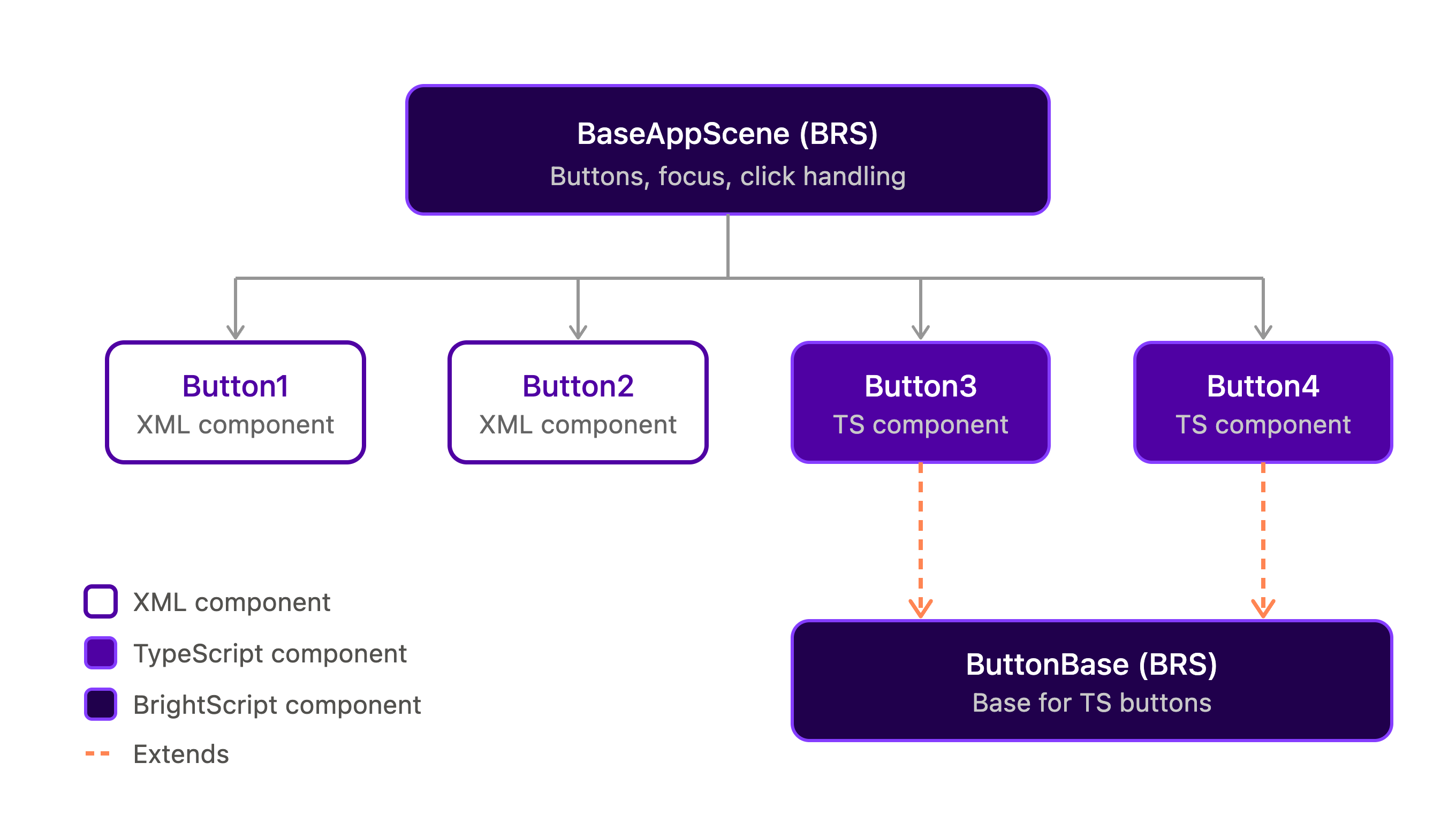
The following diagram shows how the scene, the buttons, and the base component relate.
Components
The example uses the following three components:
ButtonBase(BrightScript and XML)TsCustomButton(TypeScript and JSX)BaseAppScene(BrightScript and XML)
ButtonBase (BrightScript/XML)
Location: components/ButtonBase.xml and components/ButtonBase.brs
Purpose: The base component that provides focus and key handling infrastructure.
The following code shows the base component:
sub init()
    m.top.focusable = true
    m.top.observeField("focusedChild", "onFocusChanged")
end sub

sub onFocusChanged()
    m.top.focused = (m.top.hasFocus() or m.top.isInFocusChain())
end sub

function onKeyEvent(key as String, press as Boolean) as Boolean
    if press and m.top.keys.count() > 0
        ' Check if key is in allowed keys array
        for each allowedKey in m.top.keys
            if allowedKey = key
                m.top.key = [key, m.keyPressCount]
                m.keyPressCount++
                return true
            end if
        end for
    end if
    return false
end function
The base component has these interface fields:
focused(bool): Current focus statekey(array): Most recent key press as[keyName, index]keys(array): Allowed keys (set by TypeScript component)onClick(integer): Click counter (set by TypeScript component)
TsCustomButton (TypeScript/JSX)
Location: src/components/ts-custom-button.tsx
Purpose: The TypeScript component that extends ButtonBase and provides reactive UI.
The following code shows the component descriptor:
export const TsCustomButtonDescription = {
    componentName: "TsCustomButton",
    extends: "ButtonBase" as const, // ← Extends ButtonBase, not Group!
    inputFields: {
        text: FieldType.String(),
        width: FieldType.Number(),
        height: FieldType.Number(),
        focused: FieldType.Boolean(false), // From ButtonBase
        key: FieldType.Array() // From ButtonBase
    },
    outputFields: {
        keys: FieldType.Array(), // Tell ButtonBase which keys to handle
        onClick: FieldType.Number() // Notify scene of clicks
    }
};
The following code shows the reactive behavior:
export const TsCustomButton: TsComponent<typeof TsCustomButtonDescription> = (inputs, outputs) => {
    let clickCount = 0;

    // React to focus changes
    createEffect(() => {
        if (inputs.focused) {
            outputs.keys(["OK"]);  // Accept OK key when focused
        } else {
            outputs.keys([]);      // Accept no keys when unfocused
        }
    });

    // React to key presses
    createEffect(() => {
        if (inputs.key && inputs.key[0] === "OK") {
            clickCount++;
            outputs.onClick(clickCount);
        }
    });

    // Reactive UI
    return (
        <group>
            <rectangle
                color={inputs.focused ? "0x0080FFFF" : "0x404040FF"}
                width={inputs.width}
                height={inputs.height}
            />
            <label
                text={inputs.text}
                color="0xFFFFFFFF"
                width={inputs.width}
                height={inputs.height}
            />
        </group>
    );
};
BaseAppScene (BrightScript/XML)
Location: components/BaseAppScene.xml and components/BaseAppScene.brs
Purpose: The main scene that manages the button collection and routing.
The following code shows the scene:
sub init()
    m.buttons = [
        m.top.findNode("button1"),
        m.top.findNode("button2"),
        m.top.findNode("button3"),
        m.top.findNode("button4")
    ]

    ' Set up observers for all buttons
    for i = 0 to m.buttons.count() - 1
        m.buttons[i].observeField("onClick", "onButtonClicked")
    next i

    m.buttons[0].setFocus(true)
end sub

sub onButtonClicked(event as Object)
    buttonNode = event.getRoSGNode()
    ' Find which button was clicked
    for i = 0 to m.buttons.count() - 1
        if m.buttons[i].isSameNode(buttonNode)
            print "[Scene] Button " + Str(i + 1) + " clicked!"
            exit for
        end if
    next i
end sub
Communication flow
The following sequences show how a focus change and a key press move between BrightScript and TypeScript.
-
Focus change:
User navigates → ButtonBase.onFocusChanged() → Sets ButtonBase.focused field → TsCustomButton.inputs.focused updates → createEffect triggers → Background color changes (blue/gray) → outputs.keys() tells ButtonBase which keys to accept -
Key press:
User presses OK → ButtonBase.onKeyEvent()
→ Checks if "OK" in m.top.keys array
→ Sets ButtonBase.key = ["OK", count]
→ TsCustomButton.inputs.key updates
→ createEffect triggers
→ Increments clickCount
→ outputs.onClick() notifies scene
→ BaseAppScene.onButtonClicked() handles event
Key patterns
This example relies on three patterns:
- Field communication with
alwaysNotify - Allowed keys pattern
- Field naming that avoids type-mismatch collisions
Field communication with alwaysNotify
For edge detection (the same key pressed multiple times), use the alwaysNotify attribute:
<field id="key" type="array" alwaysNotify="true" />The array [keyName, index] makes each key press trigger observers, even when you press the same key repeatedly.
Allowed keys pattern
The TypeScript component controls which keys ButtonBase handles:
- Focused:
outputs.keys(["OK"])accepts the OK key - Unfocused:
outputs.keys([])accepts no keys
Field naming that avoids type-mismatch collisions
When an anchor node extends a custom base component, its inputFields and outputFields share one field namespace with the base's <interface> fields. This example reuses base field names (focused, key) with the same type, which is safe. A field with the same name and a different type is not safe:
- A field with the same name and the same type (as here) round-trips on both sides.
- You can use distinct names. If you need to reach a base field, you can bridge to it under a different name and forward it inside the base BrightScript.
- You must not declare a field whose name matches a base field but whose type differs (for example, a
stringinput over anarraybase field). This causes a failure on the device: the node is rejected at creation (Field <name> type mismatch during creation), and the app exits. The SDK does not have any build-time guard for this case.
See AnchorNode and base-component field-name collisions for more information about the full behavior matrix.
Running the example
To run the example, use these commands:
# Install dependencies
pnpm install

# Build and deploy the app
npx rk dev

# Run tests
npm test

# Run with coverage
npm run coverage
Updated about 4 hours ago