
StandardPinPadDialog
Dialog node for text and voice entry of numeric PIN codes
Extends StandardDialog
The StandardPinPadDialog node enables text and voice entry of numeric characters—typically, short numeric PIN codes. It is similar to the legacy PinDialog node, but includes additional voice entry of the numeric digits. This additional functionality is provided through the node's internal DynamicPinPad and VoiceTextEditBox nodes.
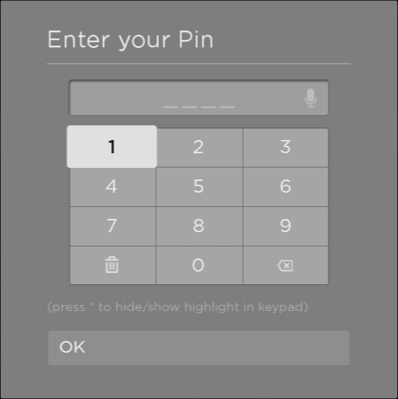
Structure
The StandardKeyboardDialog is comprised of the following areas and building block nodes:
- StdDlgTitleArea.
- StdDlgContentArea, which may contain the following items:
- Zero or more StdDlgTextItem nodes.
- One StdDlgKeyboardItem containing a DynamicPinPad node
- StdDlgButtonArea, which may contain zero or more StdDlgButton nodes.
Fields
| Field | Type | Default | Access Permission | Description |
|---|---|---|---|---|
| title | string | "" | READ_WRITE | The title to be displayed at the top of the dialog. |
| message | array of strings | [ ] | READ_WRITE | One or more blocks of text, which are typically used to describe information about the data to be entered. Each string in the array is displayed as a separate block of text with the standard amount of space left between the blocks.
|
| buttons | array of strings | [ ] | READ_WRITE | List of buttons to be displayed in the button area at the bottom of the dialog. Each string in the buttons array adds a new button to the button area.
|
| textEditBox | VoiceTextEditBox node | The keyboard item's VoiceTextEditBox node | READ | The internal VoiceTextEditBox node used by this dialog's internal keyboard. This field should be used only to access the fields of this internal node
|
| pin | string | "" | READ_WRITE | Displays the entered PIN number in the text edit box. As the user enters each numeric digit, this field is updated with the currently entered value. |
Sample app
You can download and install a sample app that demonstrates how to create a standard PINPad dialog.
Updated 5 months ago