
Dynamic voice keyboard nodes
SceneGraph nodes for text and voice entry: DynamicKeyboard, DynamicPinPad, DynamicMiniKeyboard, DynamicCustomKeyboard, and the components that back them
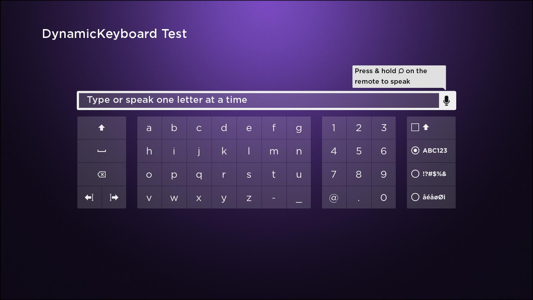
Dynamic voice keyboard nodes let you collect text from the user with both on-screen typing and voice entry. They support email addresses, PIN codes, passwords, and free-form text.
Apps must use these keyboards for email, PIN, and password entry to pass certification.
Choosing a node
| Node | Use case |
|---|---|
| DynamicKeyboard | A full alphanumeric keyboard for general text entry, email addresses, and passwords. |
| DynamicPinPad | A numeric pin pad for PIN codes, zip codes, and similar short numeric input. |
| DynamicMiniKeyboard | A compact keyboard variant for tighter UI surfaces. |
| DynamicCustomKeyboard | A keyboard whose key layout you define in a custom Key Definition File. |
The four keyboard nodes share these underlying components:
| Component | Role |
|---|---|
| DynamicKeyGrid | The grid of keys rendered inside each keyboard, laid out from a JSON Key Definition File. |
| VoiceTextEditBox | The text-display box that shows the entered or spoken text above the key grid. |
| Key Definition File | The JSON file format that describes the keyboard layout used by DynamicKeyGrid. |
Inheritance
DynamicKeyboard, DynamicPinPad, DynamicMiniKeyboard, and DynamicCustomKeyboard all extend DynamicKeyboardBase, an abstract base class that combines a DynamicKeyGrid and a VoiceTextEditBox into a single node. Most of the field reference for the four keyboard variants (text, textEditBox, keyGrid, domain, hideTextBox) is documented on the DynamicKeyboardBase page rather than repeated on each subclass.
Voice entry
Voice entry currently supports English and Spanish. The domain field on DynamicKeyboardBase (and therefore on every subclass) controls the speech-recognition mode: email, numeric, alphanumeric, generic, or password. See the DynamicKeyboardBase fields for details.
Looking for something else?
- Migrating from the legacy keyboards? Replace Keyboard, PinPad, and similar legacy nodes with their dynamic voice-enabled counterparts above to gain voice entry and broader language support.
- Building a dialog with an embedded keyboard or pin pad? The Standard dialog framework provides StandardKeyboardDialog and StandardPinPadDialog, pre-built modal dialogs that wrap these keyboards with a title, buttons, and consistent chrome.
Sample app
A voice-enabled keyboard sample app demonstrates how to create and configure each of the four keyboard variants, including a custom address keyboard built from a Key Definition File.
Updated 5 months ago