
SimpleLabel
Lightweight single-line text node with font and origin control
Extends Group
The SimpleLabel node class is used to display a single line of text. SimpleLabel is a lightweight complement to the Label node. It supports simplified font style specification and is more memory efficient than the Label node.
The SimpleLabel node class supports:
- Specifying either a built-in system font or a TrueType/OpenType font file
- Specifying the color of the font
- Customizable Horizontal and Vertical origin
The following shows a text layout derived from the SimpleLabel node:
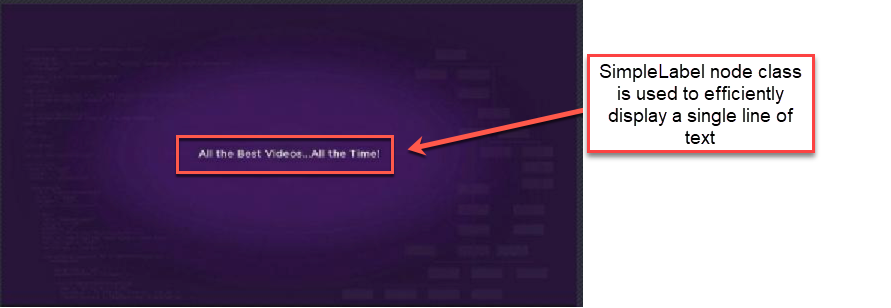
With ui_resolutions=hd specified in the manifest, the following displays the text string "Application Development Made Easy!" using the medium bold system font, centered horizontally on display, and with the baseline of the text at the vertical center of the display.
<?xml version="1.0" encoding="utf-8" ?>
<component name="simpleLabeltest" extends="Group">
  <script type="text/brightscript">
    <![CDATA[
      sub init()
        m.top.setFocus(true)
      end sub
    ]]>
  </script>

  <SimpleLabel
    id="testLabel"
    font="fontUri:MediumBoldSystemFont"
    text="Application Development Made Easy!"
    horizOrigin="left"
    vertOrigin="baseline"
    translation="[640,360]" />
</component>
Text Origin
The SimpleLabel node uses the horizOrigin and vertOrigin fields to control the origin of the coordinate system for the node.
Horizontal Origin
The horizOrigin field allows controlling the x=0 position of the SimpleLabel node's local coordinate system.
There are three possible values for the horizOrigin field:
-
left
The left edge of the text is located at the 0 x-coordinate position of the SimpleLabel node's local coordinate system -
center
The horizontal center of the text is positioned at the 0 x-coordinate position of the SimpleLabel node's local coordinate system -
right
The right edge of the text is positioned at the 0 x-coordinate position of the SimpleLabel node's local coordinate system
Vertical Origin
The vertOrigin field allows controlling the y=0 position of the SimpleLabel node's local coordinate system.
There are four possible values for the vertOrigin field:
-
top
The top edge of the text is located at the 0 y-coordinate position of the SimpleLabel node's local coordinate system -
center
The vertical center of the text is located at the 0 y-coordinate position of the SimpleLabel node's local coordinate system -
baseline
The baseline of the text is located at the 0 y-coordinate position of the SimpleLabel node's local coordinate system -
bottom
The bottom edge of the text is located at the 0 y-coordinate position of the SimpleLabel node's local coordinate system
SimpleLabel Origin Example
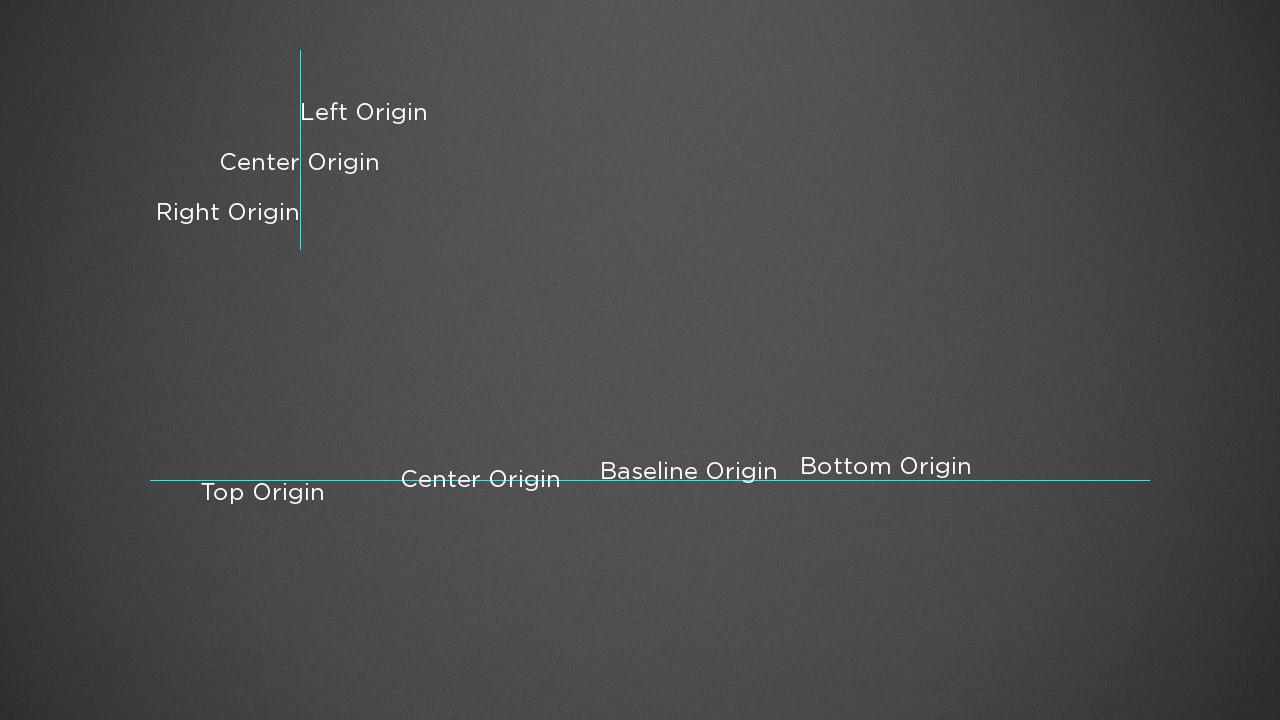
The following image illustrates the horizontal and vertical origin options supported by the SimpleLabel node. The manifest includes ui_resolutions=fhd, so all coordinate values are in the range 1920x1080.
- On the top left, in the image below, a Group node is displayed that has a 1-pixel wide Rectangle node and three SimpleLabel nodes as children. The Group node's x-translation is set to 200, and the x translation of the Rectangle and all three SimpleLabel nodes is set to 0.
- The Rectangle serves as a visual reference of where x=0 is located in its parent Group's local coordinate system.
- The three SimpleLabel nodes illustrate each option for the horizOrigin field (i.e., SimpleLabel horizontal origin at the left edge, center, and right edge of the text).
- In the bottom of the image, a Group node is displayed that has a 1-pixel tall Rectangle node and four SimpleLabel nodes as children.
- The Group node's y-translation is set to 480, and the y translation of the Rectangle and all four SimpleLabel nodes is set to 0.
- The Rectangle serves as a visual reference of where y=0 is located in its parent Group's local coordinate system.
- The four SimpleLabel nodes illustrate each option for the vertOrigin field (i.e., SimpleLabel vertical origin at the top edge, center, baseline, and bottom edge of the text).
Rotation
Rotation of SimpleLabel nodes is supported. The center of rotation is determined by the origin point as determined by the horizOrigin and vertOrigin fields. On platforms that do not support OpenGL, only rotations divisible by 90 are supported (e.g., 0, 90, 180, and 270 degrees). For those platforms, other values are rendered using the nearest 90-degree value (e.g., 103 degrees is rendered as a 90-degree rotation, -262 degrees is rendered as a -270 rotation).
Fields
| Field | Type | Default | Description | ||||||||||||||||||||||||
|---|---|---|---|---|---|---|---|---|---|---|---|---|---|---|---|---|---|---|---|---|---|---|---|---|---|---|---|
| text | string | "" | Specifies the text to be displayed | ||||||||||||||||||||||||
| color | color | 0xddddddff | Specifies the text color | ||||||||||||||||||||||||
| fontUri | string | system default | Specifies either a path to a TrueType or OpenType font file or a built-in system font name. For TrueType or OpenType font files, the file must be included with the application (e.g. pkg:/fonts/SomeFontFile.ttf). If no fontUri is specified, the System Default font is used.The table below shows the options for using built-in system fonts. The "Fixed Size?" column indicates whether the fontSize field of the SimpleLabel is respected or not. For those where the size is fixed, the font size cannot be modified.
|
||||||||||||||||||||||||
| fontSize | integer | system default | Specifies the size of the font in points. As noted in the description of the fontUri field, the use of fixed size system fonts ignores the value of the fontSize field. |
||||||||||||||||||||||||
| horizOrigin | string | left | See Horizontal Origin | ||||||||||||||||||||||||
| vertOrigin | string | top | See Vertical Origin |
The following Fields derived from the Group base class can also be used:
| Field | Type | Default | Access Permission | Description | ||||||||
|---|---|---|---|---|---|---|---|---|---|---|---|---|
| scaleRotateCenter | vector2d | [0.0,0.0] | READ_WRITE | Describes the location of a point in the node local coordinate that serves as the center of the scale and rotation operations | ||||||||
| visible | Boolean | true | READ_WRITE | If true, the node and its children are rendered. If false, the node and its children do not render | ||||||||
| inheritParentOpacity | Boolean | true | READ_WRITE | If true, the node opacity is determined by multiplying opacity attribute of the node by the opacity of the parent node, which may have been determined by multiplying the opacity of its ancestor nodes. If false, the node opacity is determined by the opacity attribute set for the node or the default opacity attribute value | ||||||||
| rotation | float | 0.0 | READ_WRITE | Defines the rotation angle about the scaleRotateCenter point (in radians) of the node local coordinate system. Positive values specify a counterclockwise rotation, negative values specify a clockwise rotation. For some Roku Player hardware, specifically Roku Players without OpenGL graphics support, only rotations of 0, 90, 180 and 270 degrees (in equivalent radians) are supported. (See Roku Models and Features for information on OpenGL support) | ||||||||
| scale | vector2d | [1.0,1.0] | READ_WRITE | Defines the scale factor to be applied to the node local coordinate | ||||||||
| renderTracking | option as string | disabled | READ_WRITE | renderTracking is set to "disabled" when enableRenderTracking is set to false. The following options are only available when enableRenderTracking is set to true:
|
||||||||
| inheritParentTransform | Boolean | true | READ_WRITE | If true, the node overall transformation is determined by combining the accumulated transformation matrix of all of its ancestors in the SceneGraph with the node local 2D transformation matrix described by its translation, rotation, scale and scaleRotateCenter fields. If false, the accumulated transformation of all of its ancestors in the SceneGraph is ignored and only the node local transformation matrix is used. This causes the node to be transformed relative to the root of the SceneGraph (that is, the Scene component) | ||||||||
| renderPass | integer | 0 | READ_WRITE | Used in combination with the numRenderPasses field of nodes extended from the ArrayGrid abstract node class, to optimize rendering of lists and grids. This should never be set to a non-zero value unless you are optimizing the performance of a list or grid rendering by specifying the sequence of rendering operations for sub-elements of the list or grid items, and have set the numRenderPasses field value for the list or grid to a value greater than 1. If the numRenderPasses field value for the list or grid is set to a value greater than 1, you must set this field to a value greater than 0 for all sub-elements of the list or grid items, and not greater than the numRenderPasses field value. If the numRenderPasses field is set to a value greater than 1, and you set this field for a list or grid item sub-element to 0 (the default), or a value greater than the numRenderPasses field value, the list or grid item sub-element will not render | ||||||||
| childRenderOrder | option as string | renderLast | READ_WRITE |
|
||||||||
| clippingRect | array of float | [ 0.0, 0.0, 0.0, 0.0 ] | READ_WRITE | Specifies a rectangle in the node local coordinate system that is used to limit the region where this node and its children can render. If a non-empty rectangle is specified, then all drawing by this node and its children will be limited to that rectangular area.
|
||||||||
| enableRenderTracking | Boolean | false | READ_WRITE | If true, renderTracking will be set to a string describing how much of the node is rendered on screen | ||||||||
| translation | vector2d | [0.0,0.0] | READ_WRITE | Defines the origin of the node local coordinate system relative to its parent node | ||||||||
| opacity | float | 1.0 | READ_WRITE | Sets the opacity of the node and its children. Opacity is the opposite of transparency. Opacity values range from 0.0 (fully transparent) to 1.0 (fully opaque). As the SceneGraph is traversed, the opacity values are combined by multiplying the current accumulated opacity with the node opacity, so that if the accumulated opacity of a node ancestors is 0.25 (75% transparent), the node will have opacity of 0.25 or less. This allows entire branches of the SceneGraph to fade in and out by animating the opacity of the node at the root of the branch | ||||||||
| muteAudioGuide | Boolean | false | READ_WRITE | Set to true to suppress the default CVAA text to speech. This allows apps to provide their own custom implementation |
Sample app
LabelExample is a sample app demonstrating Label in action.
Updated 17 days ago