
Roku Content Partner Portal
Overview
The Roku Content Partner Portal is a self-service platform designed to give you greater visibility, control, and efficiency in managing your content lifecycle on The Roku Channel. It serves as a centralized destination where you can track the status of titles, monitor key milestones, access analytics to understand performance and engagement, and manage storefront and creatives marketing for Premium Subscriptions—all without relying on manual support or back-and-forth communication.
AvailabilityThe Roku Content Partner Portal is currently in a limited alpha or beta phase and is available by invitation only. Access is being rolled out in stages to ensure a high-quality experience while incorporating your feedback into ongoing development.
If you’re interested in participating, reach out to your Roku partner manager to express interest in joining the program. Eligible participants will be onboarded as capacity allows.
What the portal enables
At its core, the Roku Content Partner Portal is built to simplify how you interact with Roku’s content operations, and marketing. Instead of operating through fragmented tools or delayed updates, you can:
- Track title status in real time across the full lifecycle, from ingestion through availability and expiration
- Understand processing outcomes with clear, actionable status indicators
- Identify issues early such as failed or unfulfilled deliveries
- Monitor rights windows and availability across territories
- Access a consolidated view of all titles in one place
- Manage storefront and creative marketing to control how content appears and is promoted for your Premium Subscriptions on The Roku Channel
- Access analytics to gain insights on content performance, viewership trends, and engagement
This transparency reduces uncertainty and empowers your teams to take action faster.
Why it matters
Historically, you have depended on manual workflows, support tickets, or internal contacts to understand what is happening with your content. This slows down decision-making and creates unnecessary operational overhead.
The Roku Content Partner Portal shifts that model by:
- Reducing dependency on support teams
- Improving turnaround time for issue resolution
- Providing consistent and reliable data
- Enabling you to self-serve critical insights
The result is a more scalable and efficient partnership model.
Who this is for
The portal is designed for business, operation, and marketing stakeholders within your organizations who need visibility into content performance, delivery, and marketing status. This includes teams responsible for:
- Content and operations teams
- Business and strategy teams
- Marketing and merchandising teams
- Partner account management
To get started, users must have the appropriate access role, typically business manager, operations manager, marketing manager, or analytics — assigned by one of your company’s account administrators.
Portal layout
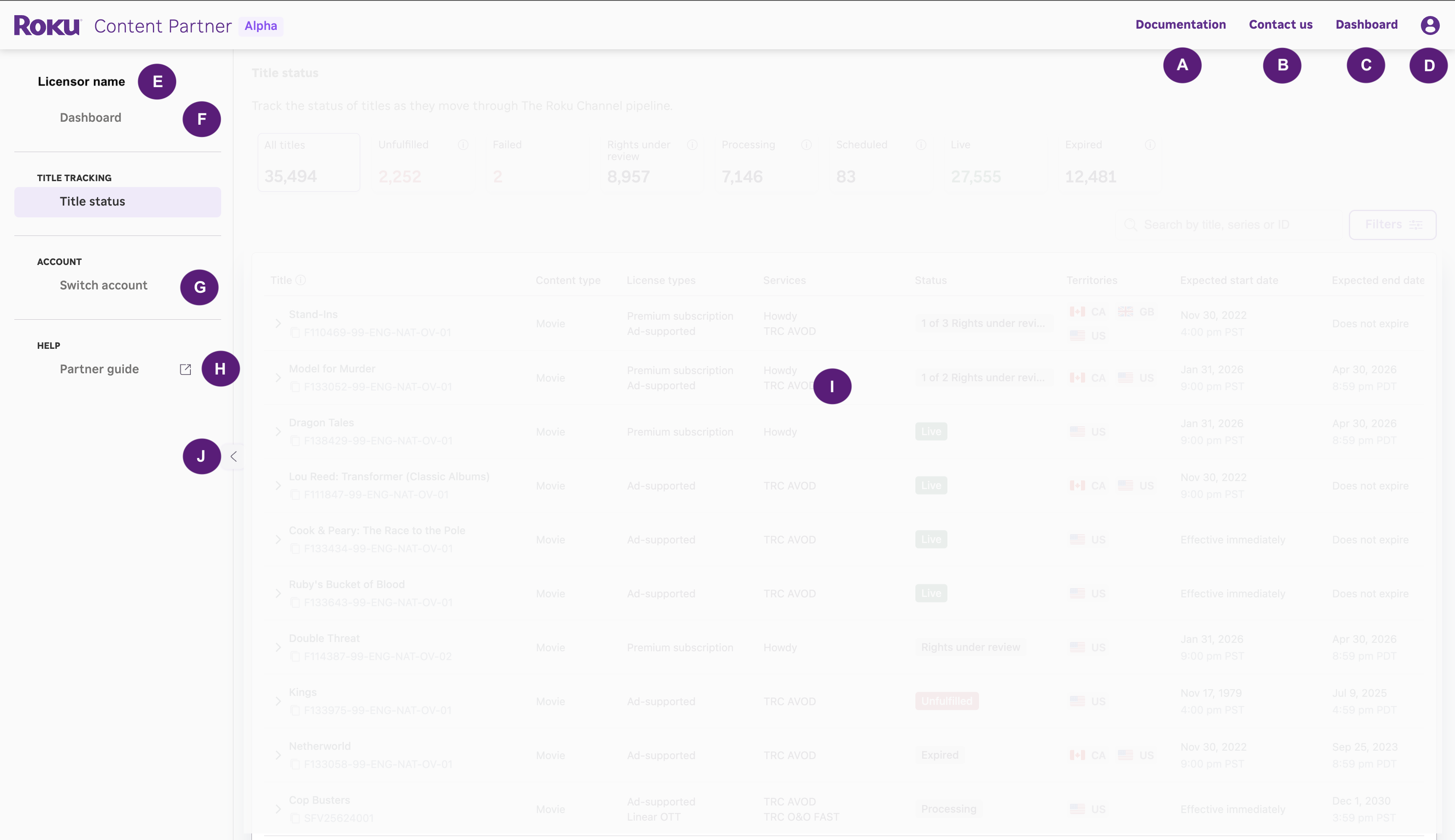
Each labeled element corresponds to the components described in the table below
| Key | Page component |
|---|---|
| A | Documentation and help guides: Access the Content Partner documentation space, including feature guides and help topics. |
| B | Contact us (partner support): Opens support options for reaching out to Roku for assistance. |
| C | Dashboard navigation (top nav): Navigates to the main Dashboard view from the top navigation bar. |
| D | Profile – Provides access to user profile settings and account-related options. |
| E | Licensor switcher (if applicable): Allows users to switch between licensors within the same organization to view associated titles. |
| F | Dashboard navigation (left nav): Navigates to the Dashboard using the left-hand navigation panel. |
| G | Switch accounts: Allows you to switch between different accounts you may have access to. |
| H | Partner guide: Access the Content Partner documentation space, including feature guides and help topics. |
| I | Feature pages: The main application workspace where selected features are displayed and interacted with. This area updates based on navigation and is where you view and manage feature-specific data, such as Title Status, Storefront, Creatives, and more. |
| J | Collapse left navigation Toggles the visibility of the left-hand navigation panel to expand workspace. |
Getting started
Access to the portal requires a Roku account. You can sign in or create an account at: https://my.roku.com/signin
If your company is new to Roku, see Set up your Roku account for how to create and enroll your company's account, give your team access, and enroll in payouts.
Once signed in, you can access the Roku Launchpad to explore available tools. Access to the portal itself must be granted before you see it in the Roku Launchpad.
- Ask your company's administrator to grant access based on your responsibilities.
Contact your internal team if you are not sure who your administrator is.
The Roku Content Partner Portal represents a shift toward greater transparency and operational independence, giving you the tools you need to manage your content with confidence and speed.
Updated 5 days ago