
Ads example
This RSG 2.0 SDK app demonstrates Client-Side Ad Stitching (CSAS), Client-Side Ad Insertion (CSAI), and Server-Side Ad Insertion (SSAI) using the @roku-sdk/ads package and Roku Advertising Framework (RAF).
Overview
On launch, the app shows a menu with CSAS, CSAI, and SSAI buttons. Each mode plays test content but uses a different RAF integration pattern.
All modes use the <Ads> SceneGraph Task component, which runs RAF in a background BrightScript task and is driven from TypeScript via field writes and event callbacks.
CSAS
Client-Side Ad Stitching pre-composes ad pods and content into a single RAF playlist for seamless playback. Unlike CSAI, the app does not stop and resume a content Video between breaks; RAF renders the stitched stream into adView.
- Waits for the Ads task to reach the
readystate - Sets content metadata (
contentMetadata) and audience measurement fields (enableAdMeasurements,contentGenre,contentId) - Fetches ad pods from a Roku sample Video Multiple Ad Playlist (VMAP) endpoint (
getAds) - Builds the stitched playlist (
constructStitchedStream) - Renders the stitched stream into
adView(renderStitchedStream)
CSAI
The CSAI flow inserts ad breaks around content playback:
- Waits for the Ads task to reach the
readystate - Fetches ad pods from a Google sample VMAP endpoint (
getAds) - Renders pre-roll and mid-roll ads into a dedicated view node (
showAds) - Starts or resumes main content playback when each ad break completes (or when no ads are returned)
The Ads task fetches mid-roll pods automatically when it observes the playback position on the content Video node. This differs from a traditional BrightScript app, where the app manually calls getAds at cue points. The TypeScript side cannot acquire the roSGNodeEvent argument that getAds expects.
SSAI
The SSAI flow stitches ads into the content stream:
- Waits for the Ads task to reach the
readystate - Fetches ad pods from a Google sample VMAP endpoint (
getAds) - Initializes stitched playback with
stitchedAdsInitand starts the content Video - Receives stitched ad lifecycle events via
onStitchedAdResultas ads play within the stream
CSAI and SSAI comparison
The following table compares how the CSAI and SSAI modes use RAF.
| Concept | CSAI | SSAI |
|---|---|---|
| RAF library loading | bs_libs_required=roku_ads_lib in roku-config.ts | Same as CSAI |
| Ad URL and VMAP fetch | Google pre/mid/post VMAP tag | Google mid-skip VMAP tag |
| Command-driven RAF task | getAds, showAds | getAds, stitchedAdsInit |
| Ad render target | Rectangle ref passed as adView | Not used; ads are in the stream |
| Content position | contentView ref for mid-roll cue detection | contentView ref for stitched ad events |
| Resume after ad break | ContentNode playStart + Video control="play" | continuous playback after stitchedAdsInit |
Architecture
The following diagram shows how the TypeScript components and the <Ads> task fit together.
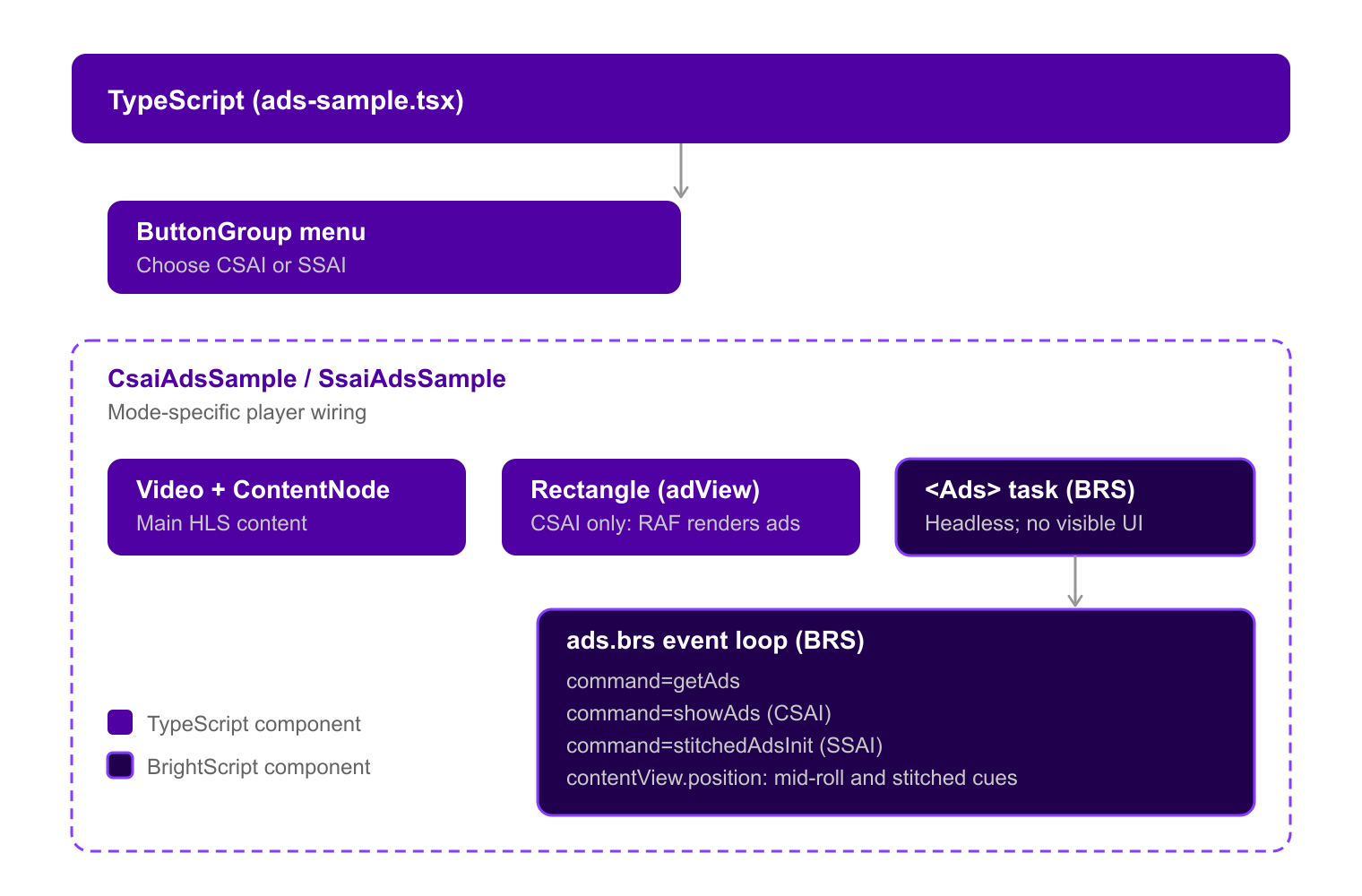
The <Ads> component wraps a SceneGraph Task node. TypeScript sets fields (command, adUrl, adView, contentView, and so on) and listens for callbacks (onAdsState, onGetAdsResult, onShowAdsResult, onStitchedAdResult).
Ad lifecycle
Each mode moves through a sequence of Ads task events and callbacks.
CSAS
The following sequence shows the CSAS callbacks.
onAdsState("ready")
  → set contentMetadata, enableAdMeasurements, contentGenre, contentId
  → set adUrl, enable debugOutput
  → command = "getAds"

onGetAdsResult(pods)
  → command = "constructStitchedStream"

onConstructStitchedStreamResult("completed")
  → command = "renderStitchedStream"

onRenderStitchedStreamResult(result)
  → "completed" or "user_exited": return to menu
While the stitched stream plays, the CSAS sample mounts a full-screen Rectangle as adView. RAF takes focus during playback.
CSAI
The following sequence shows the CSAI callbacks.
onAdsState("ready")
  → set adUrl, enable debugOutput
  → command = "getAds"

onGetAdsResult(pods)
  → pods.length > 0: stop content, command = "showAds"
  → pods empty (pre-roll only): command = "play" on content Video

onShowAdsResult(completed)
  → completed: start content playback from playStart (0 for pre-roll)
While ads play, the CSAI sample mounts a full-screen Rectangle as adView and keeps the content Video stopped. RAF takes focus during ad playback; the sample returns focus to the content Video when control becomes "play".
SSAI
The following sequence shows the SSAI callbacks.
onAdsState("ready")
  → set adUrl, enable debugOutput
  → command = "getAds"

onGetAdsResult(pods)
  → pods.length > 0: command = "stitchedAdsInit", start content Video
  → pods empty (pre-roll only): start content Video without ads

onStitchedAdResult(result)
  → ad lifecycle events as stitched ads play in the stream
Key files
The following table lists the files that matter most in this sample.
| File | Purpose |
|---|---|
src/index.ts | App entry; registers AdsSample anchor node |
src/components/ads-sample.tsx | Menu and routing between CSAS, CSAI, and SSAI samples |
src/components/csas.tsx | CSAS flow, audience measurement, <Ads> wiring |
src/components/csai.tsx | CSAI flow, UI status overlay, <Ads> wiring |
src/components/ssai.tsx | SSAI flow, UI status overlay, <Ads> wiring |
roku-config.ts | Manifest entries including bs_libs_required |
@roku-sdk/ads → ads.brs | Background RAF task and command dispatch |
Requirements
This sample requires the following:
- Node.js 24 or later and pnpm
- A registered Roku device (
npx rk device add <IP>) - Network access on the device because the sample ad URLs and the HLS stream are remote
The manifest must include bs_libs_required=roku_ads_lib. This example sets the entry in roku-config.ts:
manifestEntries: {
    bs_libs_required: "roku_ads_lib"
}
Running the app
You can run the sample on a registered Roku device from this directory:
npx rk devYou can also run the sample from the monorepo root after you run pnpm install:
cd examples/ads
npx rk dev
The npx rk dev command ships unminified JavaScript with a source map. You can use npx rk dev -d when you attach a debugger.
Development
You can use these commands to build, test, and lint the sample:
pnpm build        # Production build
pnpm test         # Unit tests
pnpm run lint     # ESLint
pnpm run type-check
Extending for production
This sample is minimal. A production integration also does the following:
- Sets content metadata before
getAds(setContentId,setContentGenre,setContentLength) for ad targeting and audience measurement - Enables
enableAdMeasurementsand provides accuratecontentIdandcontentGenrefor RAF certification - Handles mid-roll and post-roll by calling
showAds(CSAI) or responding to stitched ad events (SSAI). The task calls RAF'sgetAdsitself at each cue point it sees oncontentView; therefore, the app does not have any pods to filter - Pauses content, shows the ad view (CSAI), and resumes from the correct
playStartoffset after each break, including re-asserting focus, which an ad break does not hand back - Sets
command = "stop"when leaving the player screen. Doing it from a cleanup alone is best-effort because SolidJS may already have torn down the effect that writes the field - Uses your own VMAP or VAST ad server URL and content stream
Reference
You can use these resources for more information:
- Roku Advertising Framework documentation
@roku-sdk/adspackage (packages/ads)- CSAI sample ad URL: Google VMAP pre/mid/post test tag
- SSAI sample ad URL: Google VMAP mid-skip test tag
- CSAI and SSAI sample content:
https://test-streams.mux.dev/x36xhzz/x36xhzz.m3u8 - CSAS sample ad URL:
https://devtools.web.roku.com/samples/sample.xml
Updated about 5 hours ago