Roku's Robot Framework Library enables keyword-driven testing of apps. The library resides in a Python class that has methods that map directly to keyword names. The keywords take the same arguments as the methods implementing them. The keywords report failures with exceptions, create logs by writing to standard output, and return values using the return statement.
To create an instance of the Roku Framework Robot Library, provide the following four arguments:
| Argument | Description |
|---|
| ip | The IP address of the device to be used for testing. |
| path | The path to the Roku WebDriver. |
| timeout | The amount of time (in milliseconds) that commands are allowed to run. |
| pressDelay | The amount of time (in milliseconds) between keypress commands. This argument works with the Send keys command. |
The following example demonstrates how to instantiate the Roku Robot Framework Library:
*** Settings ***
Library ./../Library/RobotLibrary.py  ${ip_address}  ${timeout}  ${pressDelay}   ${server_path}

*** Variables ***
${ip_address} 127.0.0.1
${server_path} D:/path/to/webDriver/main.exe
${timeout} 20000
${pressDelay} 2000

.py file:
class RobotLibrary:

    def __init__(self, ip, timeout = 0, pressDelay = 0,  path = ""):
        <some code>
The Roku's Robot Framework Library includes the following keywords:
- Sideload (available since release 2.0)
- Launch the app
- Input deep linking data (available since release 2.0)
- Get apps
- Send key
- Send keys
- Send word
- Mark timer
- Get timer
- Verify is playback started (available since release 2.0)
- Verify is screen loaded (available since release 2.0)
- Get child nodes (available since release 2.1)
- Get element
- Get elements
- Get focused element
- Verify is app loaded
- Get current app info
- Get device info
- Get player info
- Verify app exists
- Set timeout
- Set press delay
- Get attribute
A keyword will fail if its respective WebDriver endpoint returns a 4xx or 500 error.
(available since release 2.0)
| Keyword | Argument | Description | Example |
|---|
| Sideload |
- channel: A zipped package file.
- username: Enter rokudev, which is the user name for the Development Application Installer.
- password: The password for accessing the Development Application Installer on your Roku device.
| Sideloads an app that has been packaged into a zip file.
If the Sideload command fails, sideload the app to be tested and use the Launch the app command. | Sideload myChannel.zip rokudev your_device_password |
| Keyword | Argument | Description | Example |
|---|
| Launch the app |
- channel_code: The ID of the app to be launched.
- contentId: The contentId of the content to be played. You can include this parameter and the contentType to execute deep linking tests.
- mediaType: The mediaType of the content to be played. You can include this parameter and the contentId to execute deep linking tests.
| Launches the app corresponding to the specified channel ID. | Launch the app dev myMovie123 movie |
(available since release 2.0)
| Keyword | Argument | Description | Example |
|---|
| Input deep linking data |
- channelId: The ID of the app to be launched.
- contentId: The contentId of the content to be played. You can include this parameter and the contentType to execute deep linking tests.
- mediaType: The mediaType of the content to be played. You can include this parameter and the contentId to execute deep linking tests.
| Launches the app corresponding to the specified app ID. | Input deep linking data dev myMovie123 movie |
| Keyword | Description | Example |
|---|
| Get apps | Returns a list of installed apps as an array of objects. Each app object contains the following fields:
- title
- id
- type
- version
- subtype
| @{apps}=Get Apps |
| Keyword | Arguments | Description | Example |
|---|
| Send key |
- key_press: The key to be pressed and released, which may be one of the following: "up", "down", "right", "left", "back, "select", "instantreplay", "play", "stop", "rev", "fwd", and "info".
- delay: The delay (in seconds) before the keypresses are executed. This argument is optional, and it defaults to 2 seconds if not specified.
| Simulates the press and release of the specified key. | Send key up 2 |
| Keyword | Arguments | Description | Example |
|---|
| Send keys |
- sequence: An array containing the sequence of keys to be pressed and released (for example, down, down, down, down, select).
- delay: The delay (in seconds) before the keypresses are executed. This argument is optional, and it defaults to 2 seconds if not specified.
| Simulates the sequence of keypresses and releases. | Variables*
|
| Keyword | Arguments | Description | Example |
|---|
| Send word |
- word: The specified word to be entered.
- delay: The delay (in seconds) before the entry of each letter in the specified word. This argument is optional, and it defaults to 2 seconds if not specified.
| Simulates the press and release of each letter in a word. | Send word Hello |
(available since release 2.0)
| Keyword | Description | Example |
|---|
| Mark timer | Starts the timer. | Mark timer |
(available since release 2.0)
| Keyword | Description | Example |
|---|
| Get timer | Returns the number of milliseconds elapsed since the timer was last started. | ${time} = Get timer |
| Keyword | Arguments | Description | Example |
|---|
| Verify is playback started |
- retries: The number of requests that can be made before returning false. This argument is optional, and it defaults to 10 if not specified.
- delay: The delay (in seconds) between retries. This argument is optional, and it defaults to 1 second if not specified.
| Verify playback has started on the Roku media player.
This keyword fails if player state is not "play". | Verify is playback started 10 1 |
| Keyword | Arguments | Description | Exa
mple |
|---|
| Verify is screen loaded |
- data: An object with locators for elementData and parentData (parentData is optional). See the WebDriver element command command for more information.
- retries: The number of requests that can be made before returning false. This argument is optional, and it defaults to 10 if not specified.
- delay: The delay (in seconds) between retries. This argument is optional, and it defaults to 1 second if not specified.
| Verify that the screen is loaded based on the provided element data. | Variables
&{ElementData}= using=text value=some text
@{ElementArray}= &{ElementData}
&{ElementParams} elementData=${ElementArray}
* Test Cases *
Verify is screen loaded ${ElementParams}
|
| Keyword | Arguments | Description | Example |
|---|
| Get child nodes | - parentNode: The parent node for which the child nodes are to be retrieved.
locator: An array containing search criteria for the child nodes to be retrieved. The locator has the following syntax:
using=attribute, tag, or text attribute=specific attribute value=tag or attribute value
| Retrieves the child component of the specified node. | Variables
&{LabelData}=
using=text value=Live Gaming
&{IndexData}= using=attr attribute=index value=1
@{LabelArray}= &{LabelData} &{IndexData}
@{ParamArray}= &{PosterData}
Test Cases
&{focusedEl}=
get focusedElement
@{Nodes}=
Get child nodes
${focusedEl}
${ParamArray}
|
| Keyword | Arguments | Description | Example |
|---|
| Get element |
- data: An object with locators for elementData and parentData (parentData is optional). See the WebDriver element command for more information.
- delay: The delay (in seconds) between retries. This argument is optional, and it defaults to 1 second if not specified.
| Searches for an element on the page based on the specified locator starting from the screen root. Returns information on the first matching element. | Variables
&{ElementData}= using=text value=some text
@{ElementArray}= &{ElementData}
&{ElementParams} elementData=${ElementArray}Test Cases
&{element}= Get element ${ElementParams}
|
| Keyword | Arguments | Description | Example |
|---|
| Get elements |
- data: An object with locators for elementData and parentData (parentData is optional). See the WebDriver element command for more information.
- delay: The delay (in seconds) between retries. This argument is optional, and it defaults to 1 second if not specified.
| Searches for elements on the page based on the specified locators starting from the screen root. Returns information on the matching elements. | Variables
&{ElementData}= using=text value=some text
@{ElementArray}= &{ElementData}
&{ElementParams} elementData=${ElementArray}Test Cases
@{elements}= Get elements ${locators}
|
| Keyword | Description | Example |
|---|
| Get focused element | Return the element on the screen that currently has focus. See the WebDriver active element command for more information. | &{element}= Get focused element |
| Keyword | Arguments | Description | Example |
|---|
| Verify is channel loaded |
- id: The ID of the app to be launched. Use
dev to verify a sideloaded app.
- retries: The number of requests that can be made before returning false. This argument is optional, and it defaults to 10 if not specified.
- delay: The delay (in seconds) between retries. This argument is optional, and it defaults to 1 second if not specified.
| Verify that the specified app has been launched.
This keyword fails if the provided app ID does not match a valid channel. | Verify is channel loaded dev |
| Keyword | Description | Example |
|---|
| Get current channel info | Returns an object containing information about the app currently loaded. This object has the following fields:
| Key |
Type |
Description | sessionId |
string |
The advertising ID of the device | status |
int |
A status code summarizing the result of the command. | value |
array | | value[i].Title |
string |
The title of the app. | value[i].ID |
string |
The ID of the app. | value[i].Version |
string |
The build version of the app. | value[i].Subtype |
string |
"ndka"/"rsga" | value[i].Type |
string |
"menu"/"appl" |
| Key |
| Key | Type | Description |
| sessionId | string | The advertising ID of the device |
| status | int | A status code summarizing the result of the command. |
| value | array | |
| value[i].Title | string | The title of the app. |
| value[i].ID | string | The ID of the app. |
| value[i].Version | string | The build version of the app. |
| value[i].Subtype | string | "ndka"/"rsga" |
| value[i].Type | string | "menu"/"appl" |
| Keyword | Description | Example |
|---|
| Get device info | Returns an object containing the information about the device. This object has the following fields: | &{info}=Get device info |
| Keyword | Description | Example |
|---|
| Get player info | Returns an object containing information about the Roku media player. This object has the following fields:
| Key |
Type |
Description | sessionId |
string |
The advertisement ID of the device. | status |
int |
A status code summarizing the result of the command. | value |
object | | value.vendorName |
string |
The vendor of the device. | value.modelName |
string |
The model of the device. | value.language |
string |
The language of the device. | value.country |
string |
The country of the device. | value.ip |
string |
The IP address of the device. | value.timeout |
int |
The specified timeout for WebDriver client requests. | value.pressDelay |
int |
The specified delay between key presses. |
| Key |
| Key | Type | Description |
| sessionId | string | The advertisement ID of the device. |
| status | int | A status code summarizing the result of the command. |
| value | object | |
| value.vendorName | string | The vendor of the device. |
| value.modelName | string | The model of the device. |
| value.language | string | The language of the device. |
| value.country | string | The country of the device. |
| value.ip | string | The IP address of the device. |
| value.timeout | int | The specified timeout for WebDriver client requests. |
| value.pressDelay | int | The specified delay between key presses. |
| Keyword | Arguments | Description | Example |
|---|
| Verify is channel exist |
- apps: An array containing currently installed on the device.
- id: The ID of the app to be verified. Use
dev to verify a sideloaded app.
| Verifies the specified app is installed on the device. This keyword fails if the apps array does not contain the app specified in the id argument. | @{apps}= Get apps
Verify is channel exist @{apps} dev
|
| Keyword | Arguments | Description | Example |
|---|
| Set timeout |
- timeout: The amount of time (in milliseconds) that Web driver client requests are allowed to run.
| Sets the timeout for Web driver client requests. | Set timeout 5000 |
| Keyword | Arguments | Description | Example |
|---|
| Set press delay |
- delay: The interval (in milliseconds) to be used between key presses.
| Sets the delay between key presses. This keyword works with the Send keys keyword. | Set press delay 2000 |
| Keyword | Arguments | Description | Example |
|---|
| Get attribute |
- element: An object that contains element information (attributes, child nodes).<br/>
- attr: The name of the attribute to be retrieved.
| Get attribute value. This keyword fails if an element does not contain the specified attribute. | Variables
&{ElementData}= using=text value=some text
@{ElementArray}= &{ElementData}
&{ElementParams} elementData=${ElementArray}Test Cases
&{element}= Get element ${ElementParams}
${attrValue}= Get attribute ${element} text
|
The Roku automated app testing repository includes a set of sample Robot Framework test cases that can be executed on their corresponding SceneGraph Developer Extensions (SGDEX) sample apps. For example, you can execute the SGDEX GridView test case (test_3_Grid.robot), which will sideload the corresponding sample app (3_Grid) on your device, and then view the test output. You can reference these samples when developing test scripts for the automated testing of your development apps.
Before running a sample test case, you need to update the sideload command in the test case with the Roku device password.
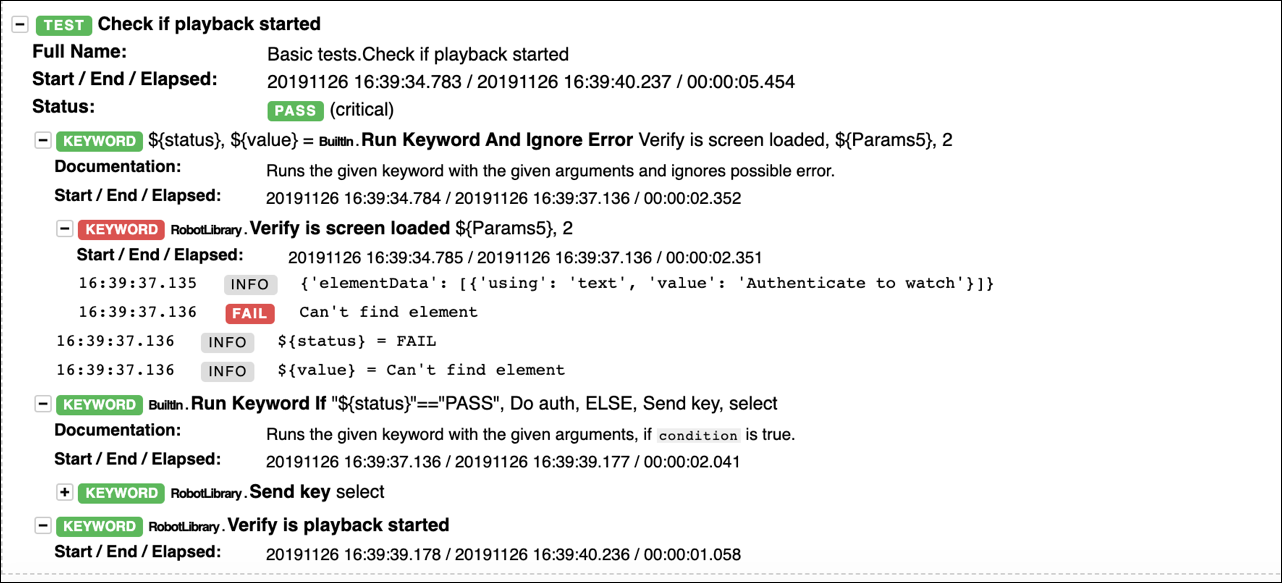
The Basic_tests.robot sample demonstrates how to create a simple test case that checks whether a user is authenticated before playing content using the Roku Robot Framework Library:
*** Settings ***
Documentation  Basic smoke tests
Variables  ./../Library/variables.py
Library  ./../Library/RobotLibrary.py  ${ip_address}  ${timeout}  ${pressDelay}  ${server_path}
Library  Collections

*** Variables ***
${channel_code}  dev
&{DATA2}=  using=text  value=Barack Gates, Bill Obama
@{DATA2Array}=  &{DATA2}
&{Params2}=  elementData=${DATA2Array}
&{DATA3}=  using=text  value=Please enter your username
@{DATA3Array}=  &{DATA3}
&{Params3}=  elementData=${DATA3Array}
&{DATA4}=  using=text  value=Please enter your password
@{DATA4Array}=  &{DATA4}
&{Params4}=  elementData=${DATA4Array}
@{KEYS}=   down  down  down  down  select
&{DATA5}=  using=text  value=Authenticate to watch
@{DATA5Array}=  &{DATA5}
&{Params5}=  elementData=${DATA5Array}

*** Test Cases ***
Channel should be launched
    Side load  ../sample/channel.zip   rokudev   aaaa
    Verify is channel loaded    ${channel_code}

Check if details screen showed
    Send key  select  4
    Verify is screen loaded    ${Params2}

Check if playback started
    ${status}  ${value}=  Run Keyword And Ignore Error  Verify is screen loaded  ${Params5}  2
    Run keyword if   "${status}"=="PASS"  Do auth
    ...  ELSE  Send key  select
    Verify is playback started  20  2

*** Keywords ***
Do auth
    Send key  select
    Verify is screen loaded   ${Params3}
    Send word  user
    Send keys  ${KEYS}
    Verify is screen loaded   ${Params4}
    Send word  pass
    Send keys  ${KEYS}
After you run a test case that uses the Roku Robot Framework Library, you can view the generated report and log files in the specified output directory. The report summarizes the test case and provides statistics on the percentage of individual tests that passed/failed. The log details the success/failure of the individual keywords used in each test case.