
Expressions, variables, and types
Covers identifiers, types, literals, operators, and type conversion rules
Identifiers
Identifiers (names of variables, functions, labels, or object member
functions or interfaces (appear after a ".")) have the following rules.
-
Must start with an alphabetic character (a – z) or the symbol "_"
(underscore) -
May consist of alphabetic characters, numbers, or the symbol "_"
(underscore) -
Are not case sensitive
-
May be of any length
-
May not use a "reserved word" as the name (see Reserved
Words for list of
reserved words). -
If a variable: may end with an optional type designator character ($
for string, % for integer, ! for float, # for double) (function
names do not support a type designator character).
For example:
a
boy5
super_man$
To mark a variable as unused, prepend an underscore to its name (for
example, sub myTask(__x_)). This avoids warnings and compilation errors
when an unused variable has a special behavior or another valid purpose.
Unused variables that are not marked this way generate warnings that are
output to the SceneGraph debug port (8085). The maximum number of warnings
that may be generated is 100.
Types
BrightScript uses dynamic typing. This means that every value also has a
type determined at run time. Unless otherwise specified, a variable is
dynamically typed: its type is determined by the value assigned to it at
assignment time, and it may change when the variable is assigned a new
value. For example, 1 is an integer, 2.3 is a float, and "hello" is a
string; a=4 creates "a" as an integer, and then a = "hello" changes the
variable "a" to a string. A variable is not dynamically typed if (a) the
variable ends in a type designator character, or (b) the "As" keyword is
used with the variable in a function declaration.
However, BrightScript also supports declared types. This means that a variable can be made to always contain
a value of a specific type. If a value is assigned to a variable which
has a specific type, the type of the value assigned will be converted to
the variables type, if possible. If not possible, a runtime error will
result.
The following types are supported in BrightScript:
- Boolean – Either true or false.
- Integer – A 32-bit signed integer number.
- LongInteger – A 64-bit signed integer number.
- Float – A 32-bit IEEE floating point number.
- Double – A 64-bit IEEE floating point number. (Although Double
is an intrinsically understood type, it is implemented internally
with the roIntrinsicDouble component. This is generally hidden from
the developer). - String – A sequence of Unicode characters. Internally there are
two intrinsic string states. The first is for constant strings. For
example, s="astring", will create an intrinsic constant string. But
once a string is used in an expression, it becomes an "roString".
For example: s=s+"more", results in s becoming an "roString". If
this is followed by an s2=s, s2 will be a reference to s, not a
copy. - Object – A reference to a BrightScript component. Note that if
you use the "type()" function, you will not get "Object", but
instead you will get the type of object. E.g. "roArray",
"roAssociativeArray", "roList", "roVideoPlayer", etc. Note that
intrinsic array and associative array values correspond to roArray
and roAssociativeArray components respectively. - Function – Functions (and Subs, which are functions with void
return types) are an intrinsic type. They can be stored in variables
and passed to functions. - Interface – An interface in a BrightScript component. If a "dot
operator" is used on an interface type, the member must be static
(since there is no object context). - Invalid – The type invalid has only one value: invalid. It is
returned in various cases, for example, when reading an array
element that has never been set.
To mark a variable as unused, see Identifiers.
Comments
In BrightScript
When the BrightScript interpreter encounters an apostrophe (') or the
statement REM, it ignores all following text till the end of the line.
This has multiple uses:
Adding brief explanatory notes for the benefit of those reading it
Used to assist in explaining code functionality, by preceding a block of
code or by following a statement on the same line, e.g.

When debugging
Used to disable a line. "Commenting out" code snippets is a common
developer practice, e.g. say to test what the outcome is without the
line:

To comment out multiple lines, precede each of them with REM or
apostrophe. To "block comment" big chunks of text, consider
using conditional
compilation.
In XML
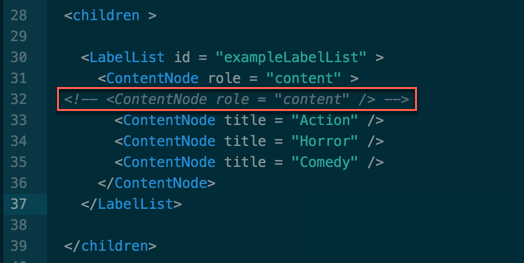
In the XML part of the code, in order to comment or temporarily disable
a line of code, you must use <!-- comment --> as in the
following example:
Note that the apostrophe DOES NOT work within the XML environment.
Literals (constants)
Type Boolean: true, false
Type Invalid: invalid
String literals
Type String: String in quotes, e.g. "this is a string".
The quotation mark character can be embedded in a string literal using two consecutive quotation marks.
Example: s ="""" : ? len(s), asc(s) outputs 1, 34.
Numeric literals
Type Integer: Hex integer, e.g. &HFF, or decimal integer, e.g. 255
Type Float: e.g. 2.01, 1.23456E+30, or 2!
Type Double: e.g. 1.23456789D-12 or 2.3#
Type LongInteger: Hex integer, e.g. &hFEDCBA9876543210&, or decimal integer, e.g. 9876543210&.
The following rules determine how integers, doubles, and floats are
determined:
-
If a constant contains 10 or more digits, or if D is used in the
exponent, that number is double precision. Adding a # declaration
character also forces a constant to be double precision. -
If the number is not double-precision, and if it contains a decimal
point, then the number is float. If the number is expressed in
exponential notation with E preceding the exponent, the number is
float. -
If neither of the above is true of the constant, then it is an
integer.
Source literals
Type Integer: LINE_NUM – the current source line number.
Function literals
Type Function: e.g. MyFunction
Array literals
The Array Operator [ ] can be used to declare an array. It may contain
literals (constants), or expressions.
Example
myarray = [] ' empty array

myarray = [ 1, 2, 3 ] ' array of three members

myarray = [ x+5, true, 1<>2, ["a","b"] ] ' array of four members
Arrays can be specified in multi-line form:
Example
a = [
    "able"
    "baker"
]
OR
a = [
    3.1415,
    2.71828
]
Associative array literals
The operator can be used to define an Associative Array. It can contain literals or expressions.
Example
aa = { }
aa = { key1: "value", key2: 55, key3: 5+3 }
Key names must be valid identifiers.
Key names can be specified as string literals.
Example
aa = { "Jane Doe": 1001, "John Doe": 1002 }Associative Arrays can be specified in multi-line form:
Example
aa = {
    Myfunc1: aFunction
    Myval1: "the value"
}
OR
aa = {
    alpha: 1,
    zulu: 26
}
Dynamic vs. object types
Certain functions that return objects can also return invalid (for
example, in the case when there is no object to return). In which case,
the variable accepting the result must be dynamic, since it may get
"invalid" or it may get an "object".
l=[]
a$=l.pop()
This example will return a type mismatch (a$ is a string, and can not
contain "invalid"). Many functions that return objects can return
invalid as well.
Type declaration characters
A type declaration character may be used at the end of either a variable
or a literal to fix its type. Variables with the same identifier but
separate types are separate variables. For example, a, a$, and a% are
all different variables.
| Character | Type | Examples | Notes |
|---|---|---|---|
| $ | String | A$, STR$ | |
| % | Integer | A%, SUM%, 125% | |
| ! | Float | A!, value!, 125! | Single-precision |
| # | Double | A#, distance#, 125# | Double-precision |
| & | LongInteger | A&, ID& |
Type conversion (promotion)
When operations are performed on one or two numbers, the result must be
typed as integer, double or single-precision (float). When a +, -, or *
operation is performed, the result will have the same degree of
precision as the most precise operand. For example, if one operand is
integer, and the other double-precision, the result will be double
precision. Only when both operands are integers will a result be
integer.
Division follows the same rules as +, * and -, except that it is never
done at the integer level: when both operators are integers, the
operation is done as float with a float result.
During a compare operation (<, >, =, etc.) the operands are converted
to the same type before they are compared. The less precise type will
always be converted to the more precise type.
Effects of type conversions on accuracy
When a number is converted to integer type, it is "rounded down"; i.e.,
the largest integer, which is not greater than the number is used (This
is the same thing that happens when the INT function is applied to the
number).
When a number is converted from double to single precision, it is "4/5
rounded" (the least significant digit is rounded up if the fractional
part >=5. Otherwise, it is left unchanged).
When a single precision number is converted to double precision, only
the seven most significant digits will be accurate.
Operators
Operations in the innermost level of parentheses are performed first,
and then evaluation proceeds according to the precedence in the
following table. Operations on the same precedence are left associative,
except for exponentiation, which is right associative.
| () | Function call, or parentheses |
|---|---|
| . | Dot operator |
| [ ] | Array operator |
| "?.", "?@", "?[", "?(" | Optional chaining operators |
| ^ | Exponentiation |
| – , + | Negation (unary) |
| Multiplicative operators |
| – , + | Additive operators |
| <<, >> | Integer bitshift operators |
| <, >, = , <>, <=, >= | Comparisons |
| NOT | Unary logical NOT or bitwise |
| AND | Logical or bitwise |
| OR | Logical or bitwise |
Function call operator
The function call operator "( )" can be used to call a function. When
used on a function name, function literal, or variable containing a
function reference, it calls the function.
function five() as Integer
    return 5
end function

print five()

fivevar = five
print fivevar()

array[1] = fivevar
print array[1]()
Dot operator
The dot operator can be used on any BrightScript Component. It also has
special meaning when used on any roAssociativeArray, roXMLElement or
roXMLList. When used on a BrightScript Component, it refers to an
interface or a member function.
Example
i = CreateObject("roInt")

i.ifInt.SetInt(5)

i.SetInt(5)
"ifInt" is the interface, and "SetInt" is the member function. Every
member function of a BrightScript Component is part of an interface.
However, specifying the interface with the dot operator is optional. If
it is left out, as in the last line of the example above, each interface
in the object is searched for the member function. If there is a
conflict (a member function with the same name appearing in two
interfaces), then the interface should be specified.
When the dot operator is used on an Associative Array, it is the same as
calling the Lookup() or AddReplace() member of the AssociativeArray
Object. However the dot operator's parameters are set at compile time –
they are not dynamic (unlike the Lookup() or AddReplace() functions).
Example
aa = CreateObject("roAssociativeArray")

aa.newkey = "the value" ' same as: aa.AddReplace("newkey", "the value")

print aa.newkey ' same as: print aa.Lookup("newkey")
When used for lookups, the dot operator is always case insensitive, even
if ifAssociativeArray.SetModeCaseSensitive() has been called. By
convention, a statement like:
aa.NewKey = 55will actually create the Associative Array entry in all lower case
("newkey"). Similarly, an AssociativeArray literal like this will also
create the entry in lower case:
aa = { NewKey: 55 }To create mixed case keys, use the array operator or the ifAssociativeArray.AddReplace method:
aa["NewKey"] = 55

aa.AddReplace("NewKey", 55)
See the section on XML support for details on using the dot operator on xml objects.
Array operator
The "[ ]" operator is used to access an Array (any BrightScript
Component that has an "ifArray" interface, such as roArray and roList).
It can also be used as a synonym for the dot operator to access an
AssociativeArray (except that the dot operator is case insensitive as
described above).
array = CreateObject("roArray", 10, true)
array[2] = "two"
print array[2]

aa = CreateObject("roAssociativeArray")
aa["newkey"] = "the value"
print aa["newkey"]
The "[ ]" operator takes expressions that are evaluated at runtime and
so is different than the dot operator in this way. Thus the "[ ]"
operator can be used in situations where dot cannot, such as when the
value of the index contains a character which is invalid in a variable
name.
aa = {}
aa.name = 1
aa["name"] = 1 ' same as previous line
aa["name with spaces"] = 2 ' cannot do this with dot operator
Arrays in BrightScript are one dimensional. Multi-dimensional arrays are
implemented as arrays of arrays. The "[ ]" operator will automatically
map a list of indexes separated by commas to the appropriate sequence of
indexing. For example, the following two expressions to fetch "item" are
the same:
Example
dim array[5,5,5]

item = array[1][2][3]

item = array[1,2,3]
If a multi-dimension array grows beyond its hint size the new entries
are not automatically set to roArray.
Optional chaining operators
Developers can use optional chaining operators, "?.", "?@", "?[", and "?(", in their BrightScript code to access possibly invalid values. This enables developers to execute more concise, higher-performing code. The optional chaining operators are used to read the value of a property nested within a chain of connected objects without having to first check whether each reference in the chain does not return the BrightScript value of "invalid". If the expression to the left of the chaining operator is invalid, the operator to the right of the chaining operator is skipped.
The optional chaining operators feature is not supported on devices running firmware earlier than Roku OS 11.0 (doing so generates syntax errors). If the app does use the optional chaining operators feature, specify Roku OS 11.0 (or later) as the minimum version when uploading your package file in order to publish to the Streaming Store.
Example
The following example demonstrates how the BrightScript optional chaining operators enable developers to write concise expressions when accessing chained properties that may contain a missing reference. The following example attempts to call the bar() method of the foo member nested at index 3. With the optional chaining operators, this validation can be done in a single line of code; otherwise, it requires many additional lines.
With optional chaining operators
x = array?[3]?.foo?.bar?()In this example, the ? variant checks whether the left-hand side of the expression is invalid. It returns invalid as the result instead of giving an error.
No optional chaining operators
if array <> invalid then
    el = array[3]
    if el <> invalid then
        foo = el.foo
        if foo <> invalid then
            if foo.bar <> invalid then
                x = foo.bar()
            else
                x = invalid
            end if
        else
            x = invalid
        end if
    else
        x = invalid
    end if
else
    x = invalid
end if
Notes
-
The new operators are indivisible "tokens". You must write
a = b ?. c. Do not writea = b ? . c. -
The
invalidvalue and its boxed version,CreateObject("roInvalid"), are both treated as invalid; however, no other values are. -
The new operators only check whether the left-hand of the expression is
invalid. It does not check for any other errors. For example, the following statements will still throw exceptions:s = "Hello"
a = [1,2,3]x = uninitialized ?. foo ' Accessing an uninitialized variable
x = s ?[ 5 ] ' Trying to index into a string
x = a ?[ s ] ' Trying to use a string to index an array -
The
?[and?(operators support short-circuiting. If the left-hand of the expression isinvalid, the terms on the right side are not evaluated.FUNCTION explode() : THROW "Kaboom!" : END FUNCTION
i = invalid
x = i?(1, "String", explode()) ' Does not explode becuaseiis invalid
x = i?[explode()] ' Does not explode becuaseiis invalid -
An
invalidvalue is not considered false. The following code fails:IF aa?.foo THEN ... ' Throws exception if aa is invalid
This code should be written as follows:
IF aa?.foo <> invalid THEN ... ' Test if aa.foo exists
IF aa?.foo = TRUE THEN ... ' Test if aa.foo is present and true
IF aa?.foo <> FALSE THEN ... ' Test if aa.foo is true, or missing
Support details
-
The optional chaining operators are only supported in the context of expressions. They cannot be used directly in a standalone function call or as the target of an assignment:
x = array?[12] ' Supported
array?[12] = x ' Not supported
x = f?() ' Supported
f?() ' Not supportedHowever, the optional chaining operators may be used in an expression that occurs within a standalone function call or assignment target:
f(array?[12]) ' Supported
f(foo?.bar).member = 5 ' Supported -
The
?.operator does not work with interface names:a = [1,2,3]
PRINT a.ifArray.count() ' Prints 3
PRINT a?.ifArray.count() ' Prints 3
PRINT a.ifArray.count?() ' Prints 3
PRINT a.ifArray?.count() ' Run-time error -
The
?(operator does not work on built-in or global functions:PRINT TYPE("Hello") ' Prints String
PRINT TYPE?("Hello") ' Compile-time error; misuse of the keyword TYPE
PRINT LEN("Hello") ' Prints 5
PRINT LEN?("Hello") ' Run-time error (LEN isn't a keyword, so not faulted at compile time) -
In BrightScript,
?is also an alias forPRINT. For backwards compatibility, the following statements are still supported:?("Hello") ' Prints Hello
?.1 ' Prints 0.1However, the following syntax is no longer supported:
' Previously:
x = TRUE
IF x?("Hello") ' Used to print Hello' But now:
FUNCTION x(_) : RETURN TRUE : END FUNCTION
IF x?("Hello") ' Now begins a multi-line IF
PRINT "Hi"
END IF
Exponentiation operator
If x and y are integer, float or double, x^y evaluates to x raised to
the power y. Unlike other operators, exponentiation is right
associative, so 2^3^2 = 2^(3^2) = 512, not (2^3)^2 = 64.
Negation operator
If x is integer, float or double, -x evaluates to the negation of x, and
+x is equal to x.
Multiplicative operators
If x and y are integer, float or double, x * y evaluates to their
product and x / y evaluates to their quotient.
x MOD y is the remainder when x is divided by y.
x \ y is the integer division result. For example 7 \ 2 = 3.
x / y, x MOD y, and x \ y will all generate a runtime error if y is
zero.
Additive operators
If x and y are integer, float or double, x+y evaluates to their
arithmetic sum and x-y evaluates to their difference. If x and y are
strings, x+y is the concatenation of x and y.
Increment and decrement operators
Increment (++) and decrement (–) operators are available to allow
integer increment and decrement to have effect on a variable. A few
examples:
x=1
x++
' x = 2
x--
' x = 1
Mathematical and bitshift assignment operators
The following assignment operators are available to support mathematical
and bitshift operations that take a numeric operand:
-
+=
-
-=
-
*=
-
/=
-
=
-
<<=
-
=
A few examples:
x=1
x+=1
' x = 2
x+=2
' x = 4
x-=1
' x = 3
x/=2
' x = 1.5

x=9
x\=2
' x = 4 (integer divide)
x*=3
' x = 12

x=1
x<<=8
' x = 256
x-=1
' x = 255
x>>=4
' x = 15
Integer bitshift operators
Given a number value, evaluated as an integer, and a shift value in the
integer range 0..32, returns the integer value bitshifted accordingly.
A runtime error is generated if the shift value is out of range.
Example:
print 2 << 10 '= 2048

print 7 >> 1 '= 3
Right shifting treats the value as an unsigned integer, e.g. &hFFFFFFFF >> 1 is equal to &h7FFFFFFF.
Comparison operators
This table describes the comparison operators. All operate on either numeric values (integer, float or double) or strings.
| Operator | Numeric | String |
|---|---|---|
| A = B | true if A equals B | true if strings A and B are identical |
| A <> B | true if A is not equal to B | true if strings A and B are different |
| A < B | true if A is less than B | true if string A is lexically less than string B |
| A <= B | true if (A < B) or (A = B) | true if (A < B) or (A = B) |
| A > B | true if A is greater than B | true if string A is lexically greater than string B |
| A >= B | true if (A > B) or (A = B) | true if (A > B) or (A = B) |
That string comparisons are case sensitive. For example, ("one" = "One") evaluates to false.
Logical and bitwise operators
AND, OR and NOT can be used both for constructing logical (Boolean)
expressions and for bit manipulation. If the arguments to these
operators are Boolean, then they perform a logical operation. If the
arguments are numeric, they perform bitwise operations.
x = 1 and 2 ' x is zero

y = true and false ' y is false

if a = c and not (b > 40) then print "success"
When AND and OR are used for logical operations, the clauses are
evaluated from left to right, and only the necessary amount of the
expression is executed (a feature sometimes called "minimal evaluation"
or "short-circuit evaluation"). For example:
if true or func()=0 then print "ok"The above statement will print "ok" but will not call func, since the
expression is true no matter what func returns. On the other hand
if false or func()=0 then print "ok"will call func and print ok only if func returns a value of zero.
This feature can be used to write statements such as
if count > 0 and (total / count) > 33 then ...Because of minimal evaluation, this will work correctly even when count
is zero, while the following similar expression would not:
if (total / count) > 33 and count > 0 then ... ' runtime error when count = 0= operator
"=" is used for both assignment and comparison.
a=5

if a=5 then print "a is 5"
BrightScript does not support the use of the "=" assignment operator
inside an expression (like C does). This is to eliminate the common
class of bugs where a programmer meant "comparison", not "assignment".
When an assignment occurs, intrinsic types (numbers, booleans, strings)
are copied, but BrightScript objects (native objects, arrays,
associative arrays) are reference counted.
Updated 9 days ago