
ifSGNodeBoundingRect
Queries the bounding rectangle of a subject node as an associative array
The ifSGNodeBoundingRect interface can be used to query the bounding rectangle of subject node. The ifSGNodeBoundingRect interface methods return a node bounding rectangle as an associative array with four elements:
| Name | Value |
|---|---|
| x | x-coordinate of the origin of the bounding rectangle |
| y | y-coordinate of the origin of the bounding rectangle |
| width | width of the bounding rectangle |
| height | height of the bounding rectangle |
These methods return the bounding rectangle dimensions and location of component objects at the time they are called. If they are called before an object is fully constructed, such as before all graphical images have been loaded, they will return the dimensions and location at the time of the call, which may not be the correct values for placing the component object properly. To ensure that your screen has the component objects located as you intended, make sure you call these methods after the component object is fully constructed. For example, if the component object relies on loading graphical images to construct its appearance, it is best to use these methods as part of an observer callback function triggered by the image loading field events, such as the loadStatus field of the Poster node.
Implemented by
| Name | Description |
|---|---|
| roSGNode | The roSGNode object is the BrightScript equivalent of SceneGraph XML file node creation |
Supported methods
boundingRect() as Dynamic
Description
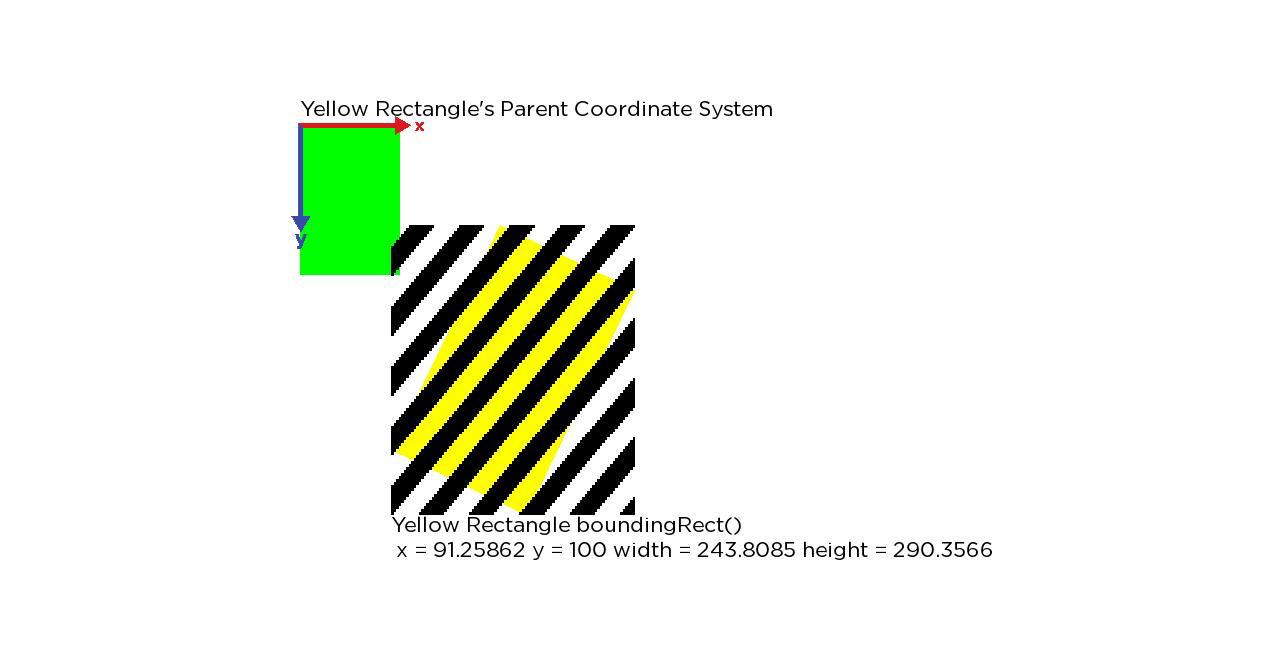
Returns the node bounding rectangle. The bounding rectangle of a node is the axis-aligned rectangle computed by transforming the local bounding rectangle of the node by the node transformation matrix. The resulting rectangle corresponds to the node local bounding rectangle transformed into its parent node local coordinate system.
Return Value
An associative array with the node bounding rectangle.
localBoundingRect() as Dynamic
Description
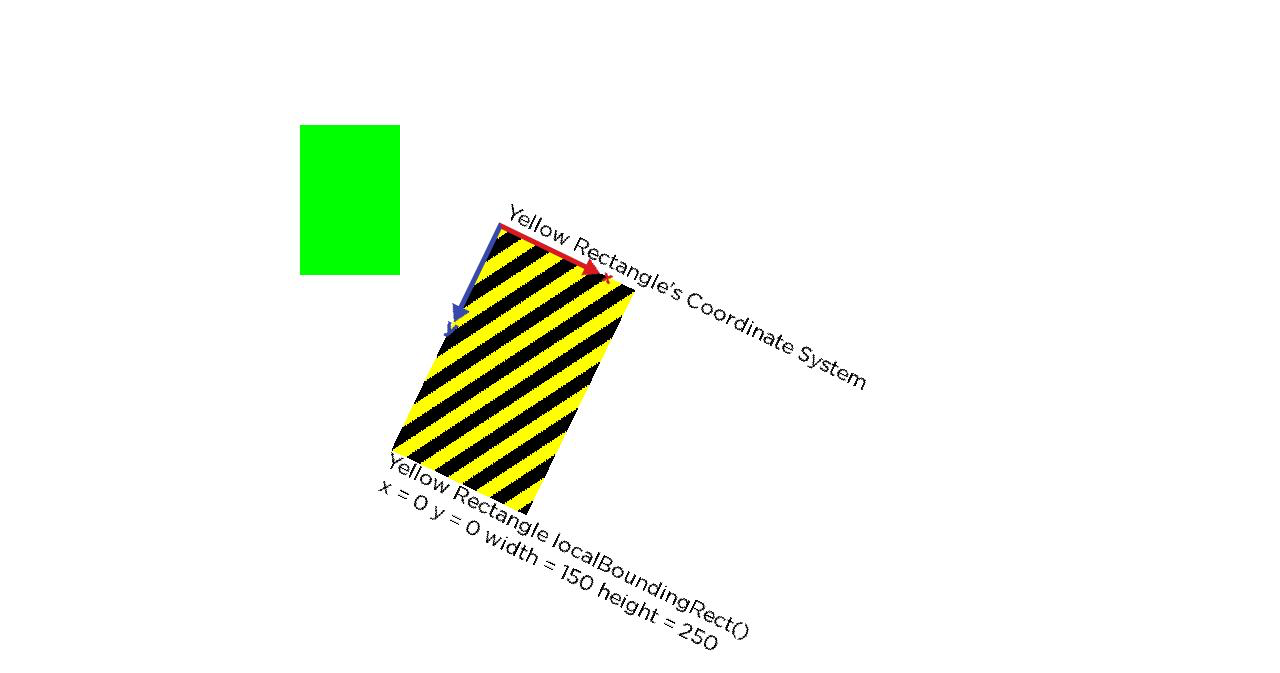
Returns the node local bounding rectangle. The local bounding rectangle of a node is the axis-aligned rectangle, that includes the union of the bounding rectangle of the geometry of the node, and the bounding rectangles of all of the node children, transformed into the local coordinate system of the node.
Return Value
An associative array with the node local bounding rectangle.
sceneBoundingRect() as Dynamic
Description
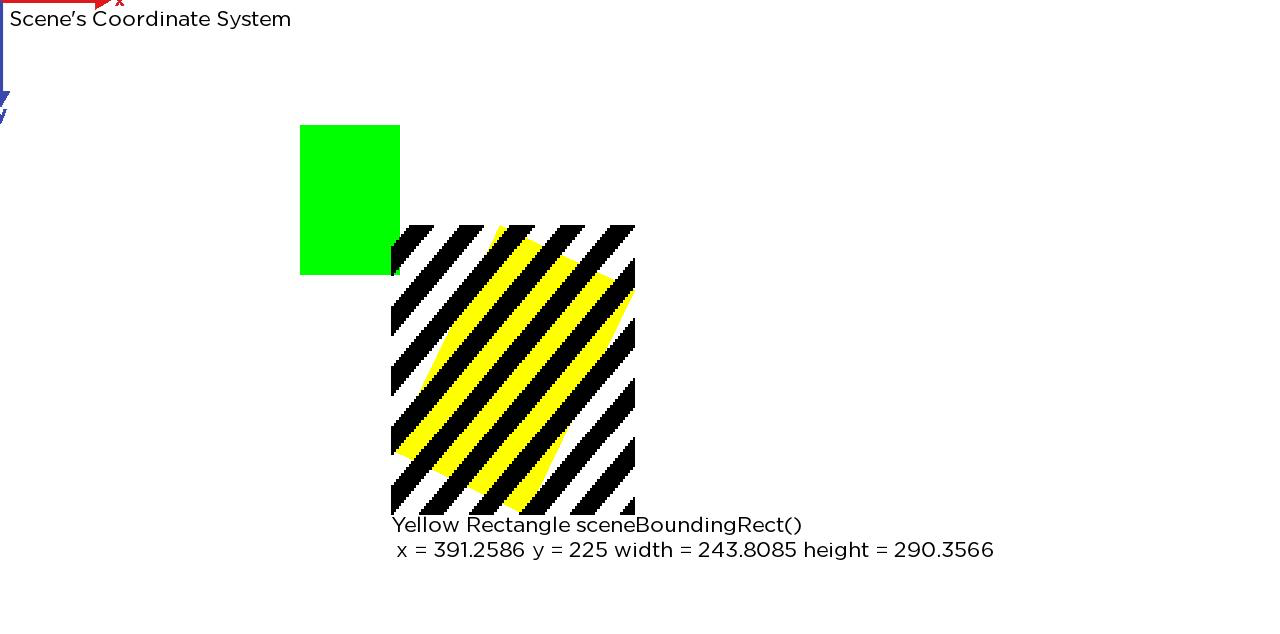
Returns the bounding rectangle for scene components (component nodes extended from a Scene or OverhangPanelSetScene node class).
If this method is called before any child components have been added to the Scene component, or the child components are smaller than the Scene component, this is the screen dimensions of the user interface, so can be used to automatically create a bounding rectangle for the specified display user interface dimensions (SD, HD, FHD), to locate and dimension child components within the screen.
If this method is called after child components have been added that are larger than the Scene component, the returned bounding rectangle will be larger than the user interface dimensions.
Return Value
An associative array with the bounding rectangle.
ancestorBoundingRect(ancestor as roSGNode) as Dynamic
Description
Returns the bounding rectangle of this node and all of its children in the Scene's root coordinate system, including any transformation specified in the Scene node.
In most cases, this will result in the bounding rectangle expressed in display coordinates.
If the node is not connected to a Scene node, this will return the same value as the boundingRect() method.
Parameters
| Name | Type | Description |
|---|---|---|
| ancestor | roSGNode | The ancestor of the subject node. |
Return Value
An associative array with the bounding rectangle and all of its children in the Scene's root coordinate system.
localSubBoundingRect(itemnumber as String) as Dynamic
Description
Returns the local bounding rectangle of this node's identified sub part in the node's local coordinate system. If the subpart does not exist, the node's local bounding rectangle is returned.
Parameters
| Name | Type | Description |
|---|---|---|
| itemnumber | String | The itemnumber parameter may contain one of the following strings:
|
Return Value
An associative array with the local bounding rectangle of the node's identified sub part.
subBoundingRect(itemnumber as String) as Dynamic
Description
Returns the bounding rectangle of this node's identified sub part, as transformed by this node's transformation matrix, in its parent node's coordinate system. If the subpart does not exist, the node's bounding rectangle is returned.
Parameters
| Name | Type | Description |
|---|---|---|
| itemnumber | String | The itemnumber parameter may contain one of the following strings:
|
Return Value
An associative array with the bounding rectangle.
sceneSubBoundingRect(itemnumber as String) as Dynamic
Description
Returns the bounding rectangle of this node's subpart in its Scene's coordinate system If the subpart does not exist or if the node is not an ancestor of a Scene node, this will return the node's bounding rectangle.
Parameters
| Name | Type | Description |
|---|---|---|
| itemnumber | String | The itemnumber parameter may contain one of the following strings:
|
Return Value
An associative array with the bounding rectangle.
| Name | Return Type | Parameters | Return Value | Description |
|---|---|---|---|---|
| sceneSubBoundingRect | Dynamic | ${sceneSubBoundingRect} | Bounding rectangle |
ancestorSubBoundingRect(itemnumber as String, ancestor as roSGNode) as Object
Description
Returns the bounding rectangle of this node's subpart into the specified ancestor' s coordinate system. If the subpart does not exist or if the node is not an ancestor of the specified node, this will return the node's bounding rectangle
Parameters
| Name | Type | Description |
|---|---|---|
| itemnumber | String | The itemnumber parameter may contain one of the following strings:
|
| ancestor | roSGNode | The ancestor of the subject node. |
Return Value
An associative array with the bounding rectangle.
Example: Illustrating Bounding Rectangles
We start with the following code example:
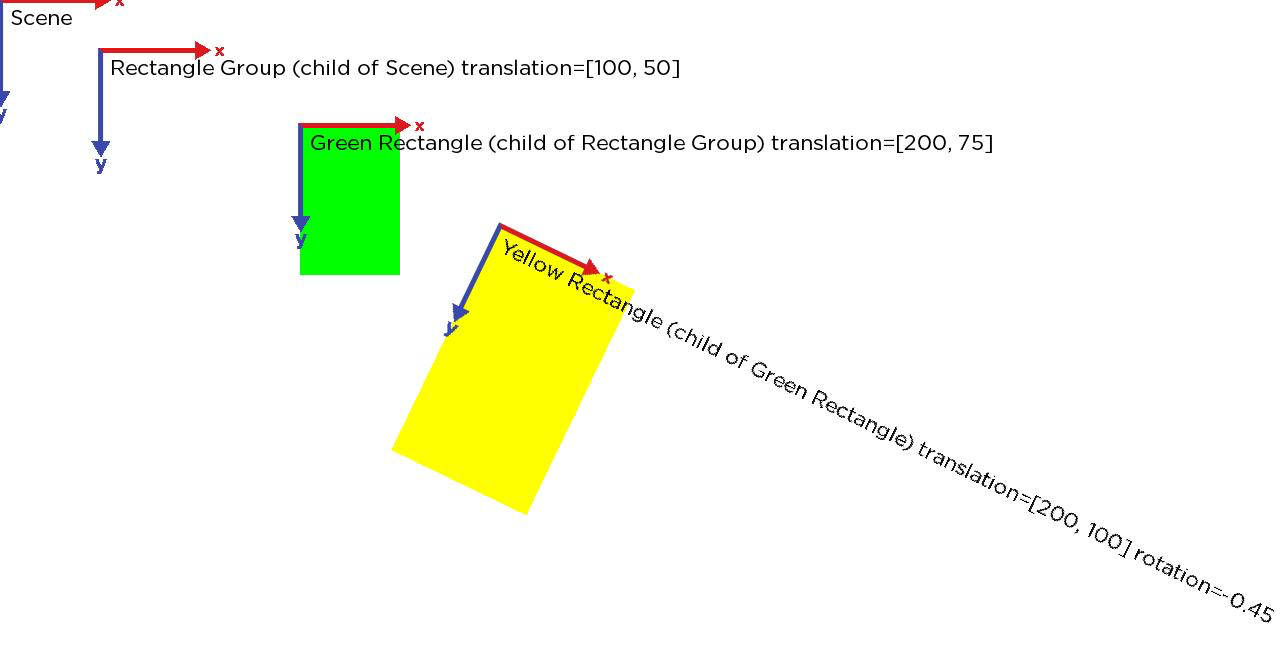
The scene has the following parenting structure:
Scene
RectangleGroup
Rectangle (Green)
Rectangle (Yellow)
<Scene>
  <Group id="RectGroup" translation="[100, 50]" >
        <Rectangle id="GreenRect" width="100" height="150" color="0x00FF00FF" translation="[200, 75]" >
            <Rectangle id="YellowRect" width="150" height="250" color="0xFFFF00FF" translation="[200,100]" rotation="-0.45"/>
        </Rectangle>
   </Group>
</Scene>
Initially, the illustration shows the local coordinates systems of each of these nodes.
The next illustration shows the Yellow rectangle's localBoundingRect().
The next illustration shows the Yellow rectangle's boundingRect(), which is relative to it's parent's coordinate system.
The next illustration shows the Yellow rectangle's sceneBoundingRect(), which is relative to the Scene's coordinate system.
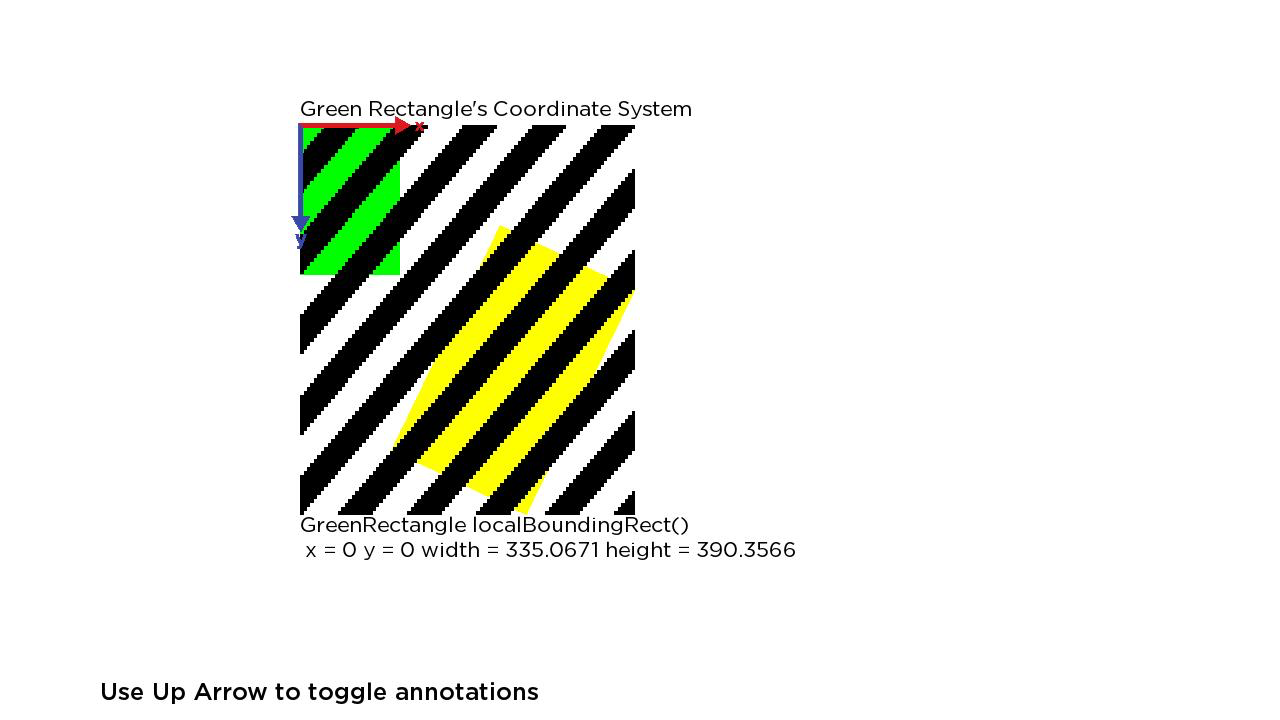
The next illustration shows the localBoundingRect() of the Green rectangle, that includes the union of the Green rectangle's local rectangle and the boundingRect() of it's child. This rectangle is relative to the Green rectangle's local coordinate system.
Note that this is the smallest, screen-aligned rectangle the encloses both the Green and Yellow rectangle.
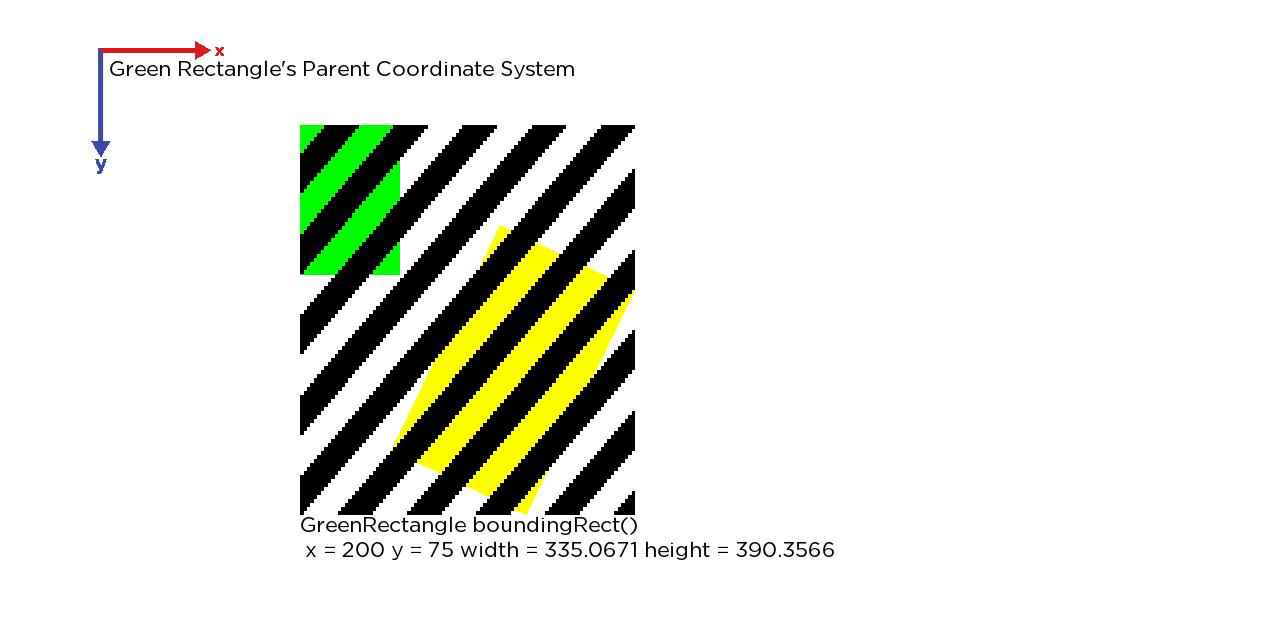
The next illustration shows the boundingRect() of the Green rectangle, which is relative to its parent Group's coordinate system.
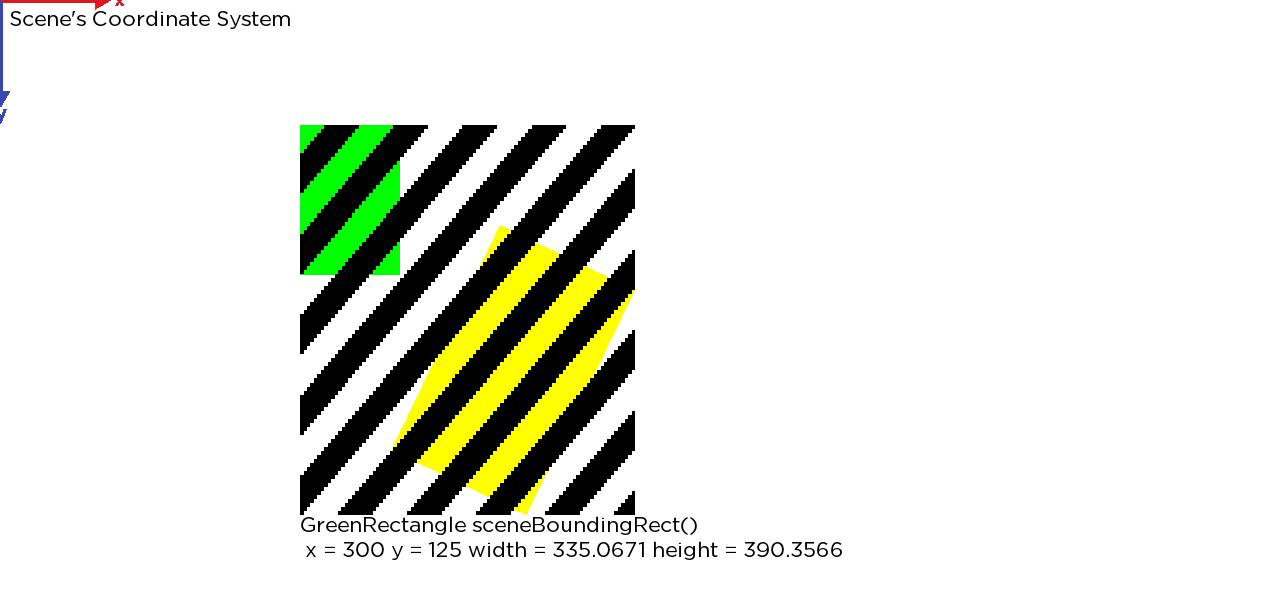
The last illustration shows the Green rectangle's sceneBoundingRect(), which is relative to the Scene's coordinate system.
Updated 16 days ago