
Forwarding exceptions to monitoring services
The setUncaughtExceptionHandler() function registers an async handler that runs when an uncaught exception occurs.
When an uncaught exception occurs, your app can forward the error to an external monitoring service before the process exits (or resumes, when you opt in with { resume: true }).
Understanding how exception forwarding works
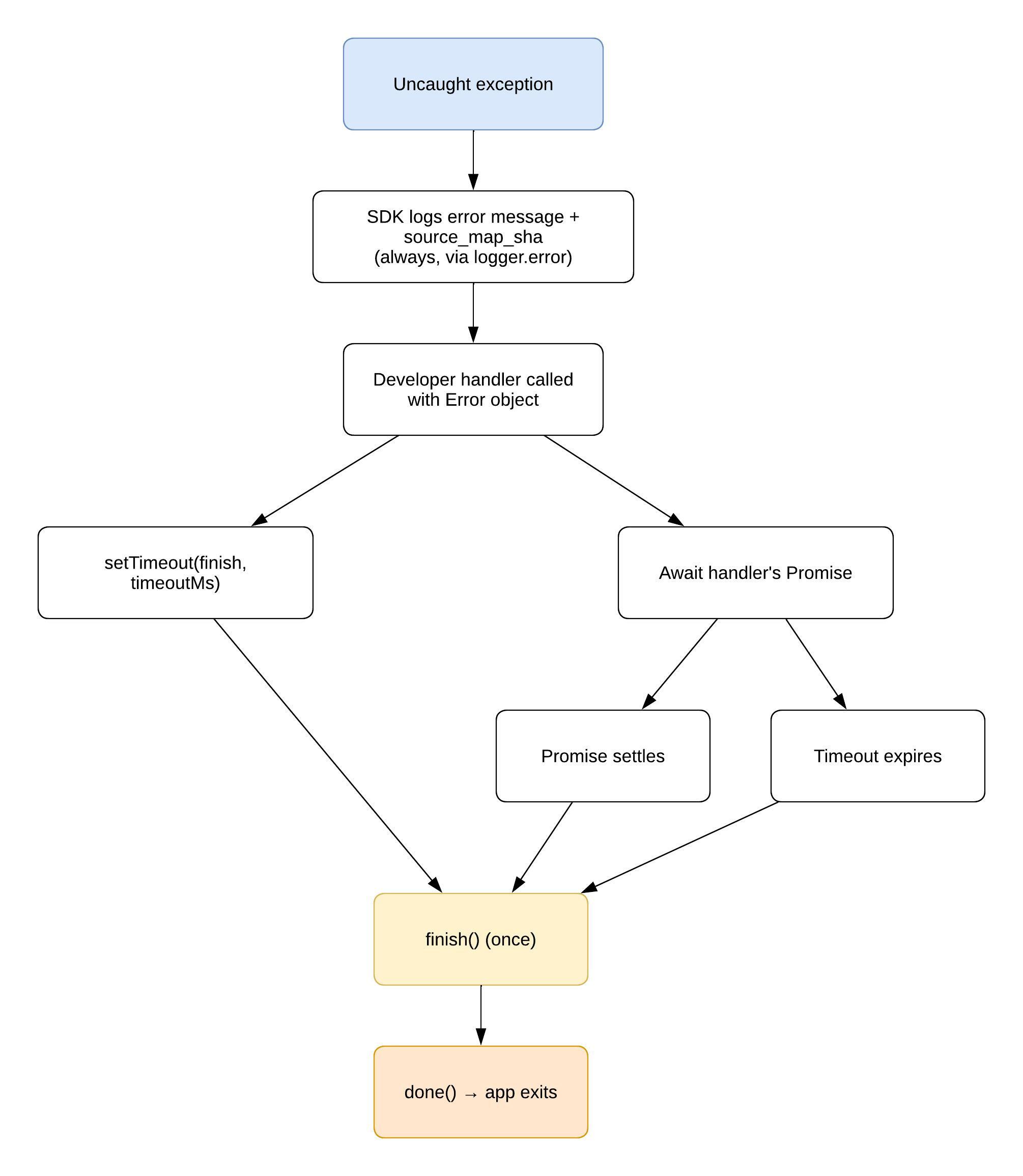
The RSG 2.0 SDK's built-in logging runs first, regardless of the custom handler. When the handler's Promise settles or the timeout expires (whichever comes first), the SDK calls the runtime done callback:
- By default (or with
{ resume: false }), the SDK callsdone(true), and the plugin exits. - With
{ resume: true }, the SDK callsdone(false), and the event loop resumes without exiting.
On the raw globalThis.Process.setUncaughtExceptionCaptureCallback API, the same rules apply: done(false) resumes; done(true) or done() exits.
The following flowchart shows how the SDK logs the error, calls the handler, and calls done() when the Promise settles or the timeout expires.
Understanding handler scope
The setUncaughtExceptionHandler() function covers uncaught synchronous exceptions only. The SDK's default handler logs unhandled Promise rejections but does not forward them to the custom handler. To handle unhandled rejections with custom logic, you can use globalThis.Process.setUnhandledRejectionCallback directly.
Handling exceptions during boot
The custom handler sees only exceptions thrown after setUncaughtExceptionHandler() has run. Until then, the SDK's default handler logs the error and source_map_sha, and the app exits.
Before the app calls main(), the runtime evaluates the whole bundle: the top-level code of every module, in import order, with a module's imports evaluated before its own body. All of this happens before Main.brs runs. By the time the app calls main(), every module that the entry file imports has already run its top-level code. A handler that you register inside main() therefore covers the main() callback and everything after it, but not a throw from module top-level code, such as a constant initialized from a configuration read that fails.
To cover module evaluation too, you should register the handler in a module of its own, and import that module first in the entry file, as a bare side-effect import. The following example shows the handler module and the entry file:
// src/install-exception-reporting.ts
import { enableExceptionTagging, setUncaughtExceptionHandler } from "@roku-sdk/rsg-ts";

enableExceptionTagging();
setUncaughtExceptionHandler(async (error: Error) => {
    // forward error.message and error.stack
});// src/index.ts
import "./install-exception-reporting";
import { main, registerAnchorNode } from "@roku-sdk/rsg-ts";
// ... other importsYou must use import "./…", not a named import. The import-sorting lint rule keeps side-effect imports first and in the order they were written, but sorts named imports alphabetically, which can move the handler below the module that throws.
A boot-time exception has these consequences:
- The SDK invokes the handler, and the runtime waits for its Promise to settle or time out before the app exits, as it does after boot. The viewer sees only the splash screen, followed by the Home screen.
- With
{ resume: true }, the app does not have anything to resume because the throwing module never finished, andmain()either never ran or stopped before it registered the app's components. - Exceptions thrown while a component renders do not reach the handler at any phase. Every anchor node renders inside an
ErrorBoundary, which logsError in TS component:and renders nothing.
The boot-exception-handler example demonstrates each case (a throw at module top level, a throw inside the main() callback, a handler registered too late, and a throw after boot) along with the device log that each case produces.
API reference
The setUncaughtExceptionHandler() function registers a custom async handler to process uncaught exceptions before the app exits (or resumes). The function has the following signature:
function setUncaughtExceptionHandler(
    handler: (error: Error) => Promise<void>,
    options?: { timeout?: number; resume?: boolean }
): void;
The following table describes the parameters:
| Parameter | Description |
|---|---|
handler | Async function that receives the Error object. If enableExceptionTagging() is active, the error.stack field includes a [SourceMap: <sha>] tag so that you can decode the stack to TypeScript source positions. If the runtime passes a null error, the handler receives a synthesized Error with message "Uncaught exception (no error object provided)". |
options.timeout | The maximum number of milliseconds to wait for the handler's Promise (the default timeout is 5000 ms). The minimum timeout is 100 ms (values below 100 are set to 100). |
options.resume | When true, the SDK calls done(false) after the handler settles or times out; therefore, the event loop keeps running. When omitted or false (the default), the SDK calls done(true) and the plugin exits. Handler errors and timeouts still honor this flag. With { resume: true }, a handler that throws still resumes; the SDK treats the resume decision as the app's policy and does not make it conditional on handler success. |
Examples
The following examples demonstrate different ways to implement exception forwarding in your app.
Forwarding an exception to a monitoring service
The following example registers a handler that sends the error message, name, stack, and a timestamp to a monitoring endpoint with fetch():
import { main, enableExceptionTagging, setUncaughtExceptionHandler } from "@roku-sdk/rsg-ts";

main(() => {
    enableExceptionTagging();
    setUncaughtExceptionHandler(async (error: Error) => {
        await fetch("https://monitoring.example.com/exceptions", {
            method: "POST",
            headers: { "Content-Type": "application/json" },
            body: JSON.stringify({
                message: error.message,
                name: error.name,
                stack: error.stack,
                timestamp: new Date().toISOString()
            })
        });
    });
    // ... registerAnchorNode(...)
});
Setting a custom timeout for a fast endpoint
The following example passes { timeout: 2000 } to limit the wait for the handler's Promise to 2000 ms:
main(() => {
    enableExceptionTagging();
    setUncaughtExceptionHandler(
        async (error: Error) => {
            await fetch("https://fast-logs.example.com", {
                method: "POST",
                body: JSON.stringify({ stack: error.stack })
            });
        },
        { timeout: 2000 }
    );
});
Resuming instead of exiting
You can use { resume: true } when you want to report the error and keep the channel running. The SDK calls done(false) after the handler settles. The following example reports the error and resumes:
main(() => {
    enableExceptionTagging();
    setUncaughtExceptionHandler(
        async (error: Error) => {
            await fetch("https://monitoring.example.com/exceptions", {
                method: "POST",
                headers: { "Content-Type": "application/json" },
                body: JSON.stringify({
                    message: error.message,
                    stack: error.stack
                })
            });
        },
        { resume: true }
    );
    // ... registerAnchorNode(...)
});
Retrying with backoff
The handler's timeout covers all retry delays and network round trips. With three attempts and a 500 ms wait between them, the waits alone take 1 s, and each of the three requests adds its own round trip. You can size the timeout to cover the full retry window. The following example retries the request up to three times and sets the timeout to 5000 ms:
main(() => {
    enableExceptionTagging();
    setUncaughtExceptionHandler(async (error: Error) => {
        const payload = {
            message: error.message,
            stack: error.stack,
            timestamp: new Date().toISOString()
        };

        for (let i = 0; i < 3; i++) {
            try {
                const response = await fetch("https://monitoring.example.com/exceptions", {
                    method: "POST",
                    headers: { "Content-Type": "application/json" },
                    body: JSON.stringify(payload)
                });
                // A 4xx or 5xx resolves rather than rejects.
                if (response.ok) return;
                console.error(`Attempt ${i + 1} returned ${response.status}`);
            } catch (err) {
                console.error(`Attempt ${i + 1} failed:`, err);
            }
            if (i < 2) {
                await new Promise(resolve => setTimeout(resolve, 500));
            }
        }
        console.error("Failed to log exception after 3 retries");
    }, { timeout: 5000 });
});
Using the default behavior without a custom handler
If you do not register a custom handler, the SDK's built-in uncaught exception handler runs automatically. It logs the error message and source_map_sha through the SDK logger and calls done(true) immediately, which allows the process to exit without delay. The following example does not call setUncaughtExceptionHandler():
import { main, enableExceptionTagging } from "@roku-sdk/rsg-ts";

main(() => {
    enableExceptionTagging();
    // No setUncaughtExceptionHandler() call.
    // Uncaught exceptions are logged to console with error + SHA, then app exits.
    registerAnchorNode(MyComponent);
});
Following best practices
You should follow these guidelines when you implement exception forwarding in your app.
- You must register the exception handler before anything can throw. Registering it at the start of the
main()callback, beforeregisterAnchorNodeordeclareTsComponent, covers component declaration and everything after it. If any imported module runs code at its top level that can throw, register the handler in a module that the entry file imports first instead. See Handling exceptions during boot for more information. - You should keep handlers fast. You should avoid complex processing inside the handler because network requests on constrained devices may be slow.
- You should size your timeout. The default timeout of 5000 ms is sufficient for a handler that sends a single request. If your handler retries or waits on multiple requests, you should increase the timeout to cover the total expected duration. The minimum accepted timeout is 100 ms.
- You should test your handler with failures. You should verify that your handler behaves correctly when the monitoring endpoint is down or slow. The SDK catches handler errors and still calls the
done()function with the chosen exit or resume flag. - You can combine the handler with
enableExceptionTagging(). When you callenableExceptionTagging(),error.stackautomatically includes the[SourceMap: <sha>]tag, which enables your monitoring backend to decode raw stack frames to TypeScript source positions. - You should design the handler as fire-and-forget. A fire-and-forget handler sends the error payload and then returns. The handler should not assume that it can interact with app state after the exception. If you use
{ resume: true }, the app may be in a partially corrupted state; therefore, you should limit post-resume UI updates. - Exit is the default; resume is opt-in. By default,
setUncaughtExceptionHandler()reports the error and then exits (done(true)). You should pass{ resume: true }only when you intentionally want the event loop to continue after the handler. - Unhandled rejections are separate. See Understanding handler scope for more information.
Using console methods
See Console API polyfill for more information about method behavior and production-build caveats.
Related documentation
- Console API polyfill: Describes console method behavior and production-build caveats.
- boot-exception-handler: Demonstrates a throw at module top level, a throw inside the
main()callback, a handler registered too late, and a throw after boot, along with the device log that each case produces.
Updated about 5 hours ago