
Threads
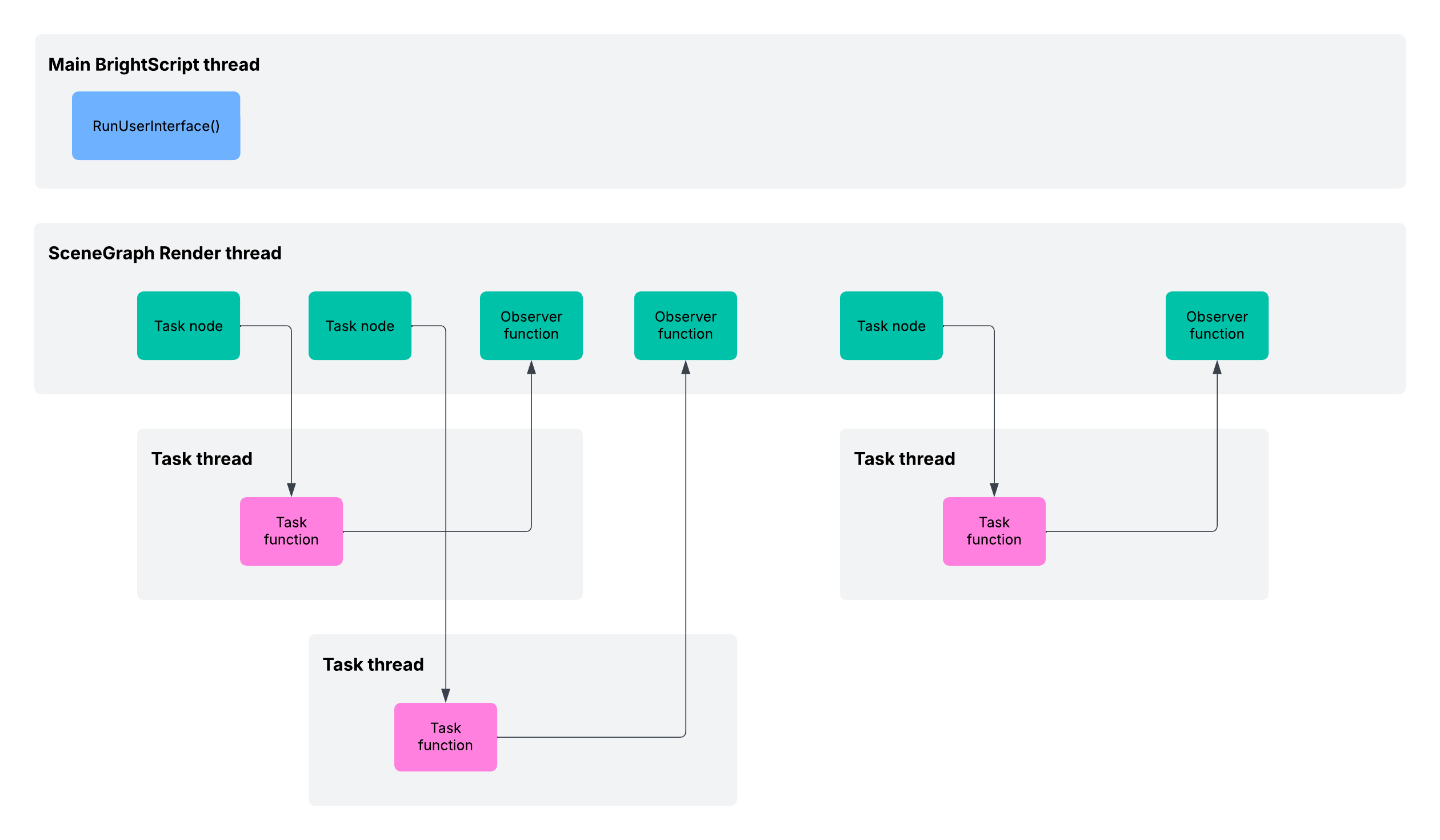
SceneGraph applications support these basic thread types:
-
Main BrightScript thread: This is the thread that is launched for all Roku applications from the
Main()orRunUserInterface()entry point. For SceneGraph applications, the thread is used primarily to create the scene component object, which starts the SceneGraph Render thread. For other applications, this is the only thread for the entire application. -
SceneGraph Render thread: The Render thread is the main SceneGraph thread that performs all rendering of the application visual elements. Certain BrightScript operations and components that might block or modify the SceneGraph in the Render thread cannot be used in this thread. Operations and components that might block the Render thread can be used in a Task node thread. The thread usage of these operations and components is listed in BrightScript support.
If the Render thread blocks execution, production apps will terminate after 10 seconds; sideloaded apps will timeout in 3 seconds.
-
Task threads: By creating and running a Task node, you can launch asynchronous Task threads. These threads can perform most typical BrightScript operations.
Thread limits
RokuOS imposes a limit of 100 concurrent threads per running instance of an app. When the instance exceeds 100 threads, a “too many threads” error exception (&h29) is raised; if the app does not catch this exception, app operation is terminated, along with a corresponding stack trace
In practice, developers should minimize the number of concurrent threads for better app performance.
Thread ownership
All SceneGraph nodes have a thread owner. In general, nodes will be owned by the Render thread.
Task threads can create Node and ContentNode objects that are owned by the Task thread. Entire trees of nodes owned by a Task thread may be created.
Thread ownership of a node can change during app execution.
- When a node is assigned to a field, the ownership of the node is changed to the thread that owns the node that contains the field.
- When a node is added as a child of another node, the ownership is changed to the thread that owns the parent node.
Thread rendezvous
Operations on nodes are executed on the thread that owns the node. If an operation is invoked on a node by a thread other than the Render thread, the invoking thread must rendezvous with the Render thread to execute the operation. In a thread rendezvous, the invoking thread makes a request of the Render thread, and then waits for a response. The Render thread receives the request, processes it, and then responds. The invoking thread then continues with the response as if it had made the call itself. The response appears synchronous to the invoking thread.
A distinct rendezvous is used on each separate operation invoked by a Task thread on a Render-thread-owned node. In particular, consider an expression like x.y.z, where x is a node and y and z, are fields on that node. This is evaluated as a succession of getField() calls. If x is owned by the Render thread and this expression is evaluated in a Task thread, each dot represents a distinct rendezvous. Simply counting dots in naively organized Task thread scripts can indicate the number of rendezvous and the performance penalties incurred. In well designed Task thread scripts, most dots avoid as many rendezvous as it can.
The entire interface to a node, including field creation, setting, and getting, uses this rendezvous mechanism to ensure thread safety, without having to use explicit locks in the application, and without the possibility of deadlock. The rendezvous mechanism does add more overhead than simple field getting and setting, so SceneGraph application programmers should use it carefully, taking into account the following:
- Only the Render thread may serve a rendezvous.
- Since Task threads do not have an implicit event loop, they cannot serve a rendezvous.
- Nodes owned by a Task thread are not accessible outside that thread.
- Task nodes are owned by the Render thread, so Task nodes and their fields can only be accessed by rendezvous from threads other than the Render thread. This includes threads launched by the Task node itself.
Use the logrendezvous command in the SceneGraph debug console to identify performance issues in the Task thread caused by a rendezvous. This command indicates whether a rendezvous is occurring and its duration (in milliseconds).
BrightScript operations without SceneGraph node objects
If a BrightScript operation does not involve a SceneGraph node object, such as reading a URL, or parsing XML, the rendezvous mechanism is not used. These types of operations can be used in a Task node thread without the overhead of the rendezvous mechanism.
Renderable node (Group) objects
Do not create renderable node objects in a Task node thread. The rendezvous mechanism will be required to create and operate on those node objects. Every field set or get operation on such nodes will require a full rendezvous, and this could impact the performance of your application.
Excessive rendezvous operations
Avoid excessive rendezvous to improve app performance. It is better to build an entire tree of nodes or ContentNodes, then pass the tree to the Render thread using one rendezvous, than to repeatedly pass each node in the tree as it is created. For field setting and getting, ifSGNodeField methods such as getFields() and setFields(), which set and get multiple fields at once, should be used rather than several get and set operations.
Task node objects ownership
Since Task nodes are owned by the Render thread, setting Task node fields from a Task thread happens via rendezvous, and all observer callbacks on the fields are executed in the Render thread. The only case where observer callbacks are executed in a Task thread is if the observed field is in a node object owned by the Task thread.
Render Thread
my_task = CreateObject("roSGNode", "MyTask")
' setting fields from the Render thread WILL NOT rendezvous
my_task.my_field = "some value"
' observer will run on the Render thread
my_task.ObserveField("my_field", "OnMyFieldChanged")
Task Thread
' setting fields from the Task thread WILL rendezvous
m.top.my_field = "some value"
cn = CreateObject("roSGNode", "ContentNode")
' observer will run on the Task thread
cn.ObserveField("title", "OnTitleChaned")
Re-running a task
A Task node can contain multiple Task functions and spawn multiple Task threads during its lifetime. A Task node can only have one active Task thread at a time. This is managed by setting the functionName and control fields on the Task node.
If a Task node is already in a given state as indicated by its state field, including RUN, setting its control field to that same state value has no effect. To run additional Task threads from a Task node, it must be in the STOP state, either by returning from its function or being commanded to STOP via its control field.
At the time a Task node’s state transitions to RUN, it will look at its functionName field to determine what function to execute. It will transition to the STOP state automatically when that function returns.
To run multiple independent threads from the same Task component, create multiple Task instances. There can be several simultaneously executing objects of the same Task component, and each can be running different functions in their Task threads.
Component global associative array
All SceneGraph nodes have a component-global associative array designated as m, including Task nodes. This associative array is local to the component but global within it. For Task nodes, this associative array is not shared between threads. The Task node m is initially owned by the Render thread. The Task node init() function then populates the Task node with references in the associative array.
On every setting of the Task node control field to RUN, a new thread is launched, and the Task node associative array is cloned, with the launched thread receiving the original object associative array, and the Render thread receiving the clone. Only basic object types are cloned: integers, Booleans, strings, floats, nodes, and recursively, arrays and associative arrays. These are generally the same object types that are copied through the fields, plus functions and timespans. Because of this cloning mechanism, some object references, such as a message port created in init(), are only passed to the first thread launched from a Task node, and not to subsequent threads launched by the same Task node.
Updated 13 days ago