
Roku Pay push notifications reference
Reference for Roku Pay push notification transaction types and JSON payload examples
Roku Pay push notifications send billing data to a publisher's web server listener when transactions occur. Transactions include purchases, cancellations, refunds, credits, and renewed cancellations. Receiving push notifications enables publishers to update their backend system in real-time as subscriptions are purchased, canceled, and refunded.
See Setting up Roku Pay web services for how to add production endpoints and enable them to receive Roku Pay push notifications.
Security
This section describes how to receive and respond to Roku Pay push notifications, which are sent without any authentication.
Requests (sent by Roku)
Roku Pay push notifications can not be redirected in any way. Requests time out after 10 seconds. If a redirect attempt is made, the request fails.
Push notifications include transaction data and a responseKey.
{
... transaction data fields
"responseKey":"abcdabcd6b1649f681a408f1beebabcd"
}
https://pushNotificationEndpoint
Text body
Include the value of the responseKey sent by Roku Pay (the responseKey does not have cryptographic signatures in both the request and response). Roku Pay compares the size of the responseKey in the response to ensure it matches the one it sent before downloading the content. This helps maintain the security of the Roku Pay web services.
abcdabcd6b1649f681a408f1beebabcdNotifications
Roku Pay sends push notifications for the following transactions:
| Transaction Type | Description | Action Required by Publisher |
|---|---|---|
| Sale | A purchase or renewal occurs, or a free trial starts. Renewals are denoted with the comment field set to"Recurring subscription processed". |
|
| GraceInitiated | The payment for a subscription auto-renewal fails and the subscription was placed in a grace period. |
|
| GraceRecovered | A payment is received for a subscription that was in a grace period. |
|
| OnHoldInitiated | The grace period elapsed (renewal payment was still not received) and the subscription was placed on hold. This notification is only sent to publishers using Enhanced Subscription Recovery. |
|
| OnHoldRecovered | A payment is received for a subscription that was placed on-hold. This notification is only sent to |
|
| CancellationOfferIntiated | The customer accepts a cancellation offer and its specified pricing and billing terms for the subscription go into effect. |
|
| CancellationOfferEnded | The pricing and billing terms specified in the cancellation offer elapse. |
|
| Cancellation | A subscription is canceled by the customer, deactivated becuase the customer opted out of automatic renewal, or is passively canceled because payment could not be recovered. Active cancellations: The expirationDate field is set to the current or future date Deactivations: The expirationDate field is set to the deactivation date Passive cancellations: The expirationDate field is set to a past date. |
|
| Refund | A refund was initiated by the publisher or Roku Pay. | If the refund was a result of an unauthorized purchase, Roku cancels the subscription. Remove the entitlement upon receiving the cancellation notification from Roku. |
| Credit | A service credit was issued to a Roku customer by the publisher or Roku Pay. | No action required. |
| Resubscribe | A subscription previously canceled by the customer is reinstated during the current billing period. | Revert any action taken based on the cancellation. |
| UpgradeSale | An upgraded subscription is purchased. | Add entitlement for upgraded product. |
| UpgradeCancellation | An original subscription is canceled as a result of being upgraded. | Remove entitlement for original product. |
| DowngradeSale | A downgraded subscription is purchased. | On the expiration date of the current subscription, move entitlement to the downgrade subscription. |
| DowngradeCancellation | An original subscription is canceled as a result of being downgraded. | Remove entitlement for original subscription on the expiration date. |
| Chargeback | The customer has initiated a transaction dispute. The transaction will be deducted from the partner's payout. | No action required. |
| ChargebackReversed | Roku successfully reversed the chargeback claim. The revenue share will be returned to the partner payout. | No action required. |
| SecondChargeback | The customer's bank has disputed the chargeback reversal on the transaction (this may occur if the customer provided new information, the chargeback reason changed, or the bank determined that the information provided by Roku was not sufficient to refute the chargeback). The transaction will be deducted from the partner's payout. | No action required |
transactionId format: The transactionIds returned by the Roku Pay push notifications are ASCII strings of variable length that may be up to 1024 bytes.
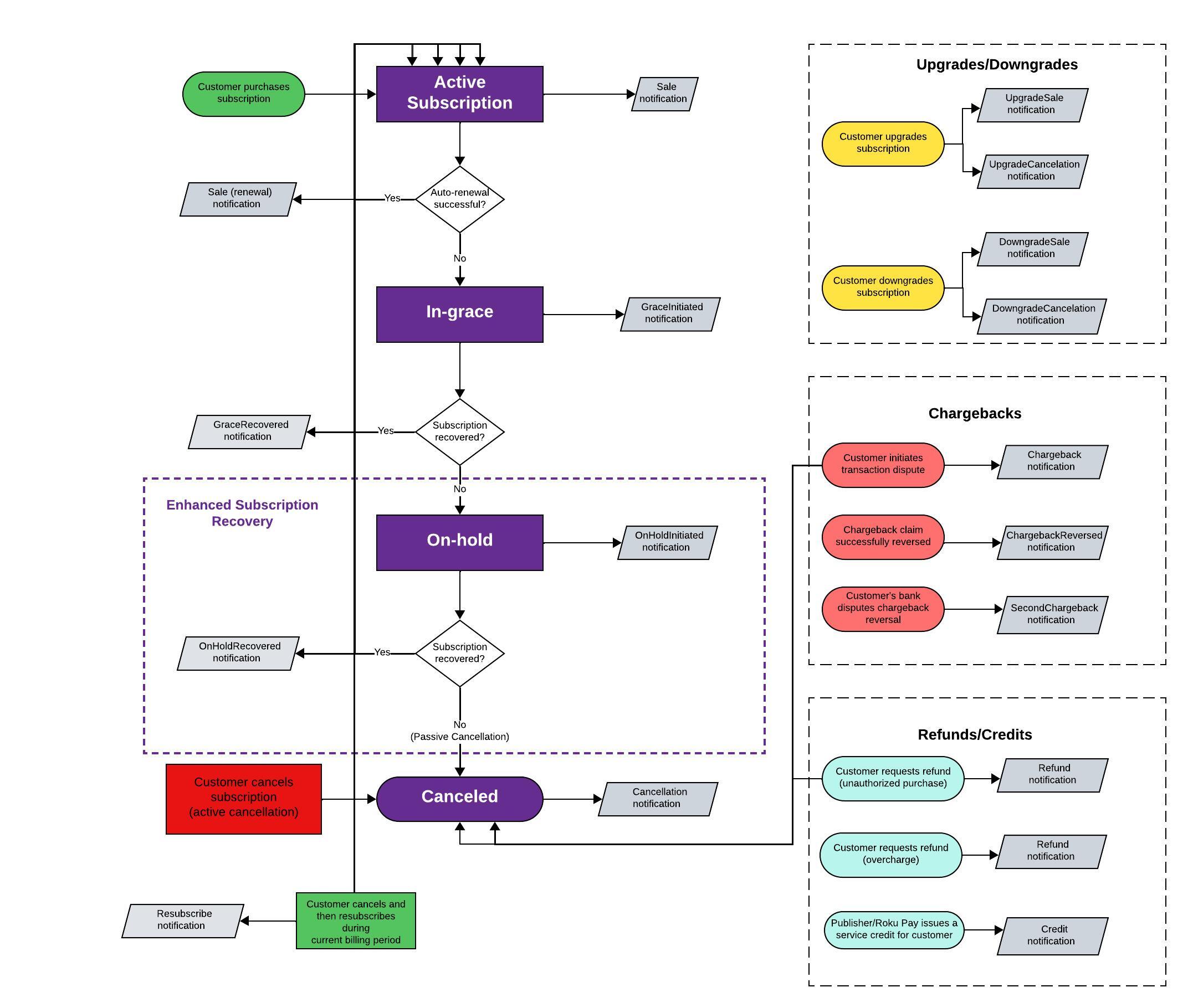
Push notifications workflow
The following diagram illustrates the Roku Pay push notifications workflow:
Sale
A Sale push notification is sent when a purchase, renewal (including renewal of a free trial), on-device free trial start, or a free trial start via Instant Signup occurs (in the case of Instant Signup, the push notification includes additional information to be used for creating a customer account).
For a new purchase, publishers should create a user account and add the entitlement to their system. For renewals, publishers should check the entitlement and verify subscription is not marked for cancellation.
When a renewal occurs, the comments field in the notification is set to "Recurring subscription processed".
As of Roku OS 10.0, the Sale push notification includes purchaseChannel and purchaseContext fields that identify whether a Roku Pay subscription purchase originated from Instant Signup. For purchases made via Instant Signup, the purchaseChannel field is set to "web" and purchaseContext field is set to "isu". For on-device purchases, these fields are set to "device" and "iap", respectively.
Purchase example
{
    "customerId": "2df58f54b4f7540ca3aa31ce8bec1fe7",
    "transactionType": "Sale",
    "transactionId": "abcb0b53015211edb4490a58a9feac0c",
    "channelId": "1143791",
    "channelName": "1p6d9g0o7k7w9a1m",
    "productCode": "UQcEYh2fVuKqS6cTuR3X_MonthlySub",
    "productName": "UQcEYh2fVuKqS6cTuR3X_MonthlySub_name",
    "price": 0.99,
    "total": 0.99,
    "tax": 0.0,
    "currency": "usd",
    "originalTransactionId": "abcb0b53015211edb4490a58a9feac0c",
    "eventDate": "2022-07-11T19:50:18Z",
    "expirationDate": "2022-08-11T19:50:16Z",
    "comments": "New order processed.",
    "responseKey": "abcb0b53015211edb4490a58a9feac0c",
    "purchaseChannel": "DEVICE",
    "purchaseContext": "IAP",
    "isFreeTrial": false
}
Renewal example
{
    "customerId": "2df58f54b4f7540ca3aa31ce8bec1fe7",
    "transactionType": "Sale",
    "transactionId": "037w1nn4nyzum28gkyj0poqqv7n4cb5q",
    "channelId": "1143791",
    "channelName": "1p6d9g0o7k7w9a1m",
    "productCode": "UQcEYh2fVuKqS6cTuR3X_MonthlySub",
    "productName": "UQcEYh2fVuKqS6cTuR3X_MonthlySub_name",
    "price": 0.99,
    "total": 0.99,
    "tax": 0.0,
    "currency": "usd",
    "originalTransactionId": "447a43489c354b129dbe64e5ed79cd9e",
    "originalPurchaseDate": "2022-03-03T02:51:33Z",
    "eventDate": "2024-02-03T11:27:16Z",
    "expirationDate": "2024-03-03T02:51:33Z",
    "comments": "Recurring subscription processed",
    "responseKey": "abcb0b53015211edb4490a58a9feac0c",
    "purchaseChannel": "DEVICE",
    "purchaseContext": "IAP",
    "isFreeTrial": false
}
Since March 23, 2020, the creditsApplied field is included only if a service credit was applied to the transaction. This field helps verify that a specific service credit issued by the app was applied by Roku Pay.
In grace period
If the auto-renewal of a customer's subscription fails, Roku Pay automatically places the subscription in a 3-day grace period. When a subscription is in a grace period, the publisher should allow the customer to continue accessing content on the app, while Roku Pay automatically notifies them daily via email to update their method of payment (MOP) and attempts to charge their current MOP on file.
If Roku receives a payment during the 3-day grace period, it is processed and entitlement is maintained (the billing period also remains the same). If no payment is received by the end of the 3-day grace period, the subscription is canceled.
-
A GraceInitiated push notification is sent when payment for a subscription auto-renewal fails. When this occurs, the customer may still access content while Roku attempts to charge the MOP. The developer should use the DoRecovery API to display an in-app notice prompting customers to update their method of payment. When the customer selects content in the app, the publisher should still grant access to it.
-
A GraceRecovered push notification is sent when payment is received for a subscription that was in a grace period. When this occurs, the customer maintains access to content and the billing period remains the same. The developer should stop prompting the customer to update their method of payment.
See Basic Subscription Recovery for more information.
GraceInitiated example
{
    "customerId": "9aa37bd6f970578294cea4783af08560",
    "transactionType": "GraceInitiated",
    "transactionId": "024d4e1fc7b611eeafbe0a58a9feaca8",
    "channelId": "3605562",
    "productCode": "0fCsu09EGS5C6OHlEUnz_MonthlySub",
    "productName": "0fCsu09EGS5C6OHlEUnz_MonthlySub",
    "originalTransactionId": "024d4e1fc7b611eeafbe0a58a9feaca8",
    "originalPurchaseDate": "2024-01-12T01:45:36Z",
    "eventDate": "2024-02-10T01:45:39Z",
    "expirationDate": "2024-02-10T01:45:36Z",
    "comments": "Subscription is in dunning state",
    "responseKey": "163792dbc7b611eeafbe0a58a9feaca8",
    "isFreeTrial": false
}
GraceRecovered example
{
    "customerId": "9d425957549250dcba71e03dacf426b5",
    "transactionType": "GraceRecovered",
    "transactionId": "f0864331c7b611eea3c40a58a9fead9c",
    "channelId": "3193830",
    "productCode": "PPfCfuZMf3TOXBBl3Ttu_MonthlySub",
    "productName": "PPfCfuZMf3TOXBBl3Ttu_MonthlySub",
    "originalTransactionId": "d4c4da85c7b611eea3c40a58a9fead9c",
    "originalPurchaseDate": "2024-01-12T01:51:39Z",
    "eventDate": "2024-02-10T01:51:46Z",
    "expirationDate": "2024-03-10T01:51:39Z",
    "comments": "Subscription recovered from dunning state.",
    "responseKey": "d915ab762a3752e7bf112e7903958f52",
    "isFreeTrial": false
}
On hold
For publishers using Enhanced Subscription Recovery, if the auto-renewal of a customer's subscription continues to fail and the grace period elapses, Roku Pay automatically places the subscription on hold. When a subscription is on hold, the publisher blocks the customer from accessing content on the app, while Roku Pay automatically notifies them daily on-device and via email for 60 days to update their method of payment (MOP) and attempts to charge their current MOP on file.
If Roku receives a payment, it is processed and entitlement is automatically granted again, and the billing period adjusts to the time that the payment was collected. If no payment is received by the end of the 60-day notification cycle, the subscription is canceled.
-
An OnHoldInitiated push notification is sent when payment for a subscription auto-renewal fails. When this occurs, the customer should no longer have access to content. The developer should use the DoRecovery API to display an in-app notice prompting customers to update their method of payment. When the customer selects content in the app, the publisher should block access to it. The developer should update their entitlement system to denote that access to content should be denied.
-
An OnHoldRecovered push notification is sent when payment is received for a subscription that was on-hold. When this occurs, the customer should once again have access to content and the billing period should adjusted to the time that the payment was collected. The developer should stop prompting the customer to update their method of payment, update their system with the new billing period, and update their entitlement system to denote that access to content should be granted.
See Enhanced Subscription Recovery for more information.
OnHoldInitiated example
{
    "customerId": "8446ceff30e952349bcd9d3b78bc94a0",
    "transactionType": "OnHoldInitiated",
    "transactionId": "ed0ca6b7348411ed84a30a58a9feaec5",
    "channelId": "1688604",
    "productCode": "VR8IqPLBJ7VeWD7bvIHH_MonthlySub",
    "productName": "VR8IqPLBJ7VeWD7bvIHH_MonthlySub",
    "originalTransactionId": "df10f029348411edb4bf0a58a9feacbc",
    "originalPurchaseDate": "2022-08-14T23:28:23Z",
    "eventDate": "2022-09-14T23:28:24Z",
    "expirationDate": "2022-09-13T23:28:23Z",
    "comments": "Subscription is in Passive OnHold state",
    "responseKey": "ed0ca6b7348411ed84a30a58a9feaec5",
    "isFreeTrial": false
}
OnHoldRecovered example
{
    "customerId": "8446ceff30e952349bcd9d3b78bc94a0",
    "transactionType": "OnHoldRecovered",
    "transactionId": "b466213697aa59a4ac53804daa1272bc",
    "channelId": "1688604",
    "productCode": "VR8IqPLBJ7VeWD7bvIHH_MonthlySub",
    "productName": "VR8IqPLBJ7VeWD7bvIHH_MonthlySub",
    "originalTransactionId": "df10f029348411edb4bf0a58a9feacbc",
    "originalPurchaseDate": "2022-08-14T23:28:23Z",
    "eventDate": "2022-09-14T23:28:29Z",
    "expirationDate": "2022-10-14T23:28:09Z",
    "comments": "Subscription recovered from Passive OnHold state.",
    "responseKey": "b466213697aa59a4ac53804daa1272bc",
    "isFreeTrial": false
}
CancellationOffers
A CancellationOfferInitated event is fired when the customer accepts a cancellation offer and its specified pricing and billing terms for the subscription go into effect. A CancellationOfferEnded event is sent when the pricing and billing terms specified in the cancellation offer elapse.
CancellationOfferInitated
{
  "customerId": "a659926a3769514ab2292fc8d7c2da5b",
  "transactionType": "CancellationOfferInitiated",
  "transactionId": "13f2b572-ceb2-5708-a8c8-dee8d546767e",
  "channelId": "1688604",
  "productCode": "VR8IqPLBJ7VeWD7bvIHH_MonthlySub",
  "productName": "DefaultText",
  "isFreeTrial": false,
  "originalTransactionId": "0ea63a4b-7236-11ef-93cb-0a58a9feae68",
  "originalPurchaseDate": "2024-09-14T01:09:58Z",
  "eventDate": "2024-09-14T01:10:37Z",
  "expirationDate": "2024-12-14T01:09:58Z",
  "comments": "Initiated cancellation offer for the subscription.",
  "responseKey": "13f2b572-ceb2-5708-a8c8-dee8d546767e"
}
CancellationOfferEnded
{
  "customerId": "a659926a3769514ab2292fc8d7c2da5b",
  "transactionType": "CancellationOfferEnded",
  "transactionId": "76a6a1ae-c4fa-50e0-8cea-28647bfccbf1",
  "channelId": "1688604",
  "productCode": "VR8IqPLBJ7VeWD7bvIHH_MonthlySub",
  "productName": "DefaultText",
  "isFreeTrial": false,
  "originalTransactionId": "0ea63a4b-7236-11ef-93cb-0a58a9feae68",
  "originalPurchaseDate": "2024-09-14T01:09:58Z",
  "eventDate": "2024-09-14T01:26:36Z",
  "expirationDate": "2025-02-14T01:09:58Z",
  "comments": "Cancellation offer for the subscription ended.",
  "responseKey": "76a6a1ae-c4fa-50e0-8cea-28647bfccbf1"
}
Cancellation
A Cancellation push notification is sent when a user actively cancels their subscription or opts out of automatic renewal, or a subscription is passively canceled because the customer fails to provide a valid method of payment to keep their subscription. An expirationDate in the future indicates an active cancellation; a past date indicates a passive cancellation.
The publisher action required (if any) depends on the expirationDate field:
- Future date: No action is required until the expiration date.
- Today's date: Remove the entitlement (the customer actively canceled the subscription and today is the last day of the billing cycle).
- Past date: Remove entitlement (passive cancellation; the subscription could not be recovered).
Active cancelation/deactivation example
{
    "customerId": "493d0c919a9d547086baaccd2a80daf0",
    "transactionType": "Cancellation",
    "transactionId": "f4abd057015211edb4490a58a9feac0c",
    "channelId": "1143791",
    "productCode": "UQcEYh2fVuKqS6cTuR3X_MonthlySub",
    "productName": "UQcEYh2fVuKqS6cTuR3X_MonthlySub_name",
    "originalTransactionId": "e875704d015211edb4490a58a9feac0c",
    "originalPurchaseDate": "2022-07-11T19:51:57Z",
    "eventDate": "2022-07-11T19:52:12Z",
    "expirationDate": "2022-08-11T19:51:57Z",
    "comments": "Cancellation for UQcEYh2fVuKqS6cTuR3X_MonthlySub_name",
    "responseKey": "f4abd057015211edb4490a58a9feac0c",
    "isFreeTrial": false
}
Passive cancelation example
{
    "customerId": "493d0c919a9d547086baaccd2a80daf0",
    "transactionType": "Cancellation",
    "transactionId": "f4abd057015211edb4490a58a9feac0c",
    "channelId": "1143791",
    "productCode": "UQcEYh2fVuKqS6cTuR3X_MonthlySub",
    "productName": "UQcEYh2fVuKqS6cTuR3X_MonthlySub_name",
    "originalTransactionId": "e875704d015211edb4490a58a9feac0c",
    "originalPurchaseDate": "2023-10-09T00:47:11Z",
    "eventDate": "2024-02-02T08:04:30Z",
    "expirationDate": "2023-11-09T00:47:11Z",
    "comments": "Cancellation for UQcEYh2fVuKqS6cTuR3X_MonthlySub_name",
    "responseKey": "f4abd057015211edb4490a58a9feac0c",
    "isFreeTrial": false
}
Refund
A Refund push notification is sent when the publisher or Roku Pay initiates a refund. If the refund was a result of an unauthorized purchase, Roku cancels the subscription. In this case, the publisher should remove the entitlement upon receipt of a subsequent Cancellation notification.
Example
{
    "customerId": "cb570816d25c547ca881cfae77dc4068",
    "transactionType": "Refund",
    "transactionId": "a062b93cdecf5a35bff9b2425ccaff7c",
    "channelId": "1143791",
    "productCode": "UQcEYh2fVuKqS6cTuR3X_MonthlySub",
    "productName": "UQcEYh2fVuKqS6cTuR3X_MonthlySub_name",
    "price": -0.99,
    "total": -1.06,
    "tax": -0.07,
    "currency": "usd",
    "partnerReferenceId": "1657569338",
    "originalTransactionId": "675cc6c9015311edb4490a58a9feac0c",
    "originalPurchaseDate": "2022-07-11T19:55:32Z",
    "eventDate": "2022-07-11T19:55:34Z",
    "comments": "Refund for UQcEYh2fVuKqS6cTuR3X_MonthlySub_name",
    "responseKey": "a062b93cdecf5a35bff9b2425ccaff7c",
    "isFreeTrial": false
}
Credit
A Credit push notification is sent when the publisher or Roku Pay issues a service credit for a Roku customer. No publisher action is required upon receiving this event.
Example
{
    "customerId": "e54246dd10405b159f4799ef60d791ce",
    "transactionType": "Credit",
    "transactionId": "579743",
    "channelId": "1143791",
    "channelName": "1p6d9g0o7k7w9a1m",
    "productCode": "UQcEYh2fVuKqS6cTuR3X_MonthlySub",
    "productName": "UQcEYh2fVuKqS6cTuR3X_MonthlySub_name",
    "price": 1.0,
    "total": 1.0,
    "currency": "usd",
    "partnerReferenceId": "2d6ab759de4743b4939a15fd491a6698",
    "eventDate": "2022-07-11T20:00:45.458297119Z",
    "comments": "Admin credit push notifications",
    "responseKey": "029282d0015411eda89b0a58a9feac07",
    "isFreeTrial": false
}
Resubscribe
A Resubscribe push notification is sent when a customer opts to keep a subscription they previously canceled within the current billing period. For example, during a 30-day billing period, a customer cancels a subscription on day 10, but on day 20 decides to keep it. If the customer repurchases the subscription after the billing period ends, a Sale notification is sent. When a customer resubscribes, service will continue for them as though they never canceled the subscription at all.
Example
{
    "customerId": "12d3ddf4509c5bc5bbcfee76bd97f58e",
    "transactionType": "Resubscribe",
    "transactionId": "3baba090015311edb4490a58a9feac0c",
    "channelId": "1143791",
    "productCode": "UQcEYh2fVuKqS6cTuR3X_MonthlySub",
    "productName": "UQcEYh2fVuKqS6cTuR3X_MonthlySub_name",
    "price": 0.0,
    "total": 0.0,
    "tax": 0.0,
    "currency": "usd",
    "originalTransactionId": "325f8f87015311edb4490a58a9feac0c",
    "originalPurchaseDate": "2022-07-11T19:54:02Z",
    "eventDate": "2022-07-11T19:54:11Z",
    "comments": "Resubscription processed.",
    "responseKey": "3baba090015311edb4490a58a9feac0c",
    "isFreeTrial": false
}
Similar to the Sale notification, a creditsApplied field is included only if a service credit was applied to the transaction.
Upgrades/downgrades
When a customer upgrades or downgrades a subscription, a new purchase is made and the original one is canceled. As a result, a pair of notifications are sent: a sale for the new transaction (UpgradeSale or DowngradeSale), and a cancellation for the original transaction (UpgradeCancellation or DowngradeCancellation ). The transactionType field in the push notification indicates the upgrade/downgrade event associated with the notification. This makes it easy to identify the reason for purchases and cancellations related to upgrades/downgrades.
For example, if a customer upgrades from a monthly to an annual subscription, the following two notifications are sent: (1) an UpgradeSale notification for the purchase of the annual subscription, and (2) an UpgradeCancellation notification for the cancellation of the monthly subscription. The following table summarizes the transaction types for the notifications sent for upgrades and downgrades.
+---------------+---------------+-----------------------+
| Action | Transaction Type |
- +---------------+-----------------------+
| | Sale | Cancellation |
+===============+===============+=======================+
| Upgrade | UpgradeSale | UpgradeCancellation |
+---------------+---------------+-----------------------+
| Downgrade | DowngradeSale | DowngradeCancellation |
+---------------+---------------+-----------------------+
The following samples demonstrate the UpgradeSale and UpgradeCancellation notifications sent when a customer upgrades from a monthly to an annual subscription. Samples of the DowngradeSale and DowngradeCancellation notifications are included as well.
UpgradeSale example
{
    "customerId": "8c805ea26be25915a6c15e4545f592a4",
    "transactionType": "UpgradeSale",
    "transactionId": "884b1a6c015311edb4490a58a9feac0c",
    "channelId": "627917",
    "channelName": "disneychannelteststg",
    "productCode": "QynVhYtdThAg7wcfTkgi_MonthlySubFreeTrial",
    "productName": "QynVhYtdThAg7wcfTkgi_MonthlySubFreeTrial",
    "currency": "usd",
    "originalTransactionId": "884b1a6c015311edb4490a58a9feac0c",
    "eventDate": "2022-07-11T19:56:29Z",
    "expirationDate": "2022-07-18T19:56:29Z",
    "comments": "New order processed.",
    "responseKey": "884b1a6c015311edb4490a58a9feac0c",
    "purchaseChannel": "DEVICE",
    "purchaseContext": "IAP",
    "isFreeTrial": true
}
UpgradeCancellation example
{
    "customerId": "8c805ea26be25915a6c15e4545f592a4",
    "transactionType": "UpgradeCancellation",
    "transactionId": "8e7f6459015311edb4490a58a9feac0c",
    "channelId": "627917",
    "productCode": "ZTtL0DvuGNX1sO4tJGNp_MonthlySubFreeTrial",
    "productName": "ZTtL0DvuGNX1sO4tJGNp_MonthlySubFreeTrial",
    "originalTransactionId": "7c8e097a015311edb4490a58a9feac0c",
    "originalPurchaseDate": "2022-07-11T19:56:06Z",
    "eventDate": "2022-07-11T19:56:30Z",
    "expirationDate": "2022-07-18T19:56:06Z",
    "comments": "Cancellation for ZTtL0DvuGNX1sO4tJGNp_MonthlySubFreeTrial",
    "responseKey": "8e7f6459015311edb4490a58a9feac0c",
    "isFreeTrial": false
}
DowngradeSale example
{
    "customerId": "7993a78f2922550589654e4dbe21404a",
    "transactionType": "DowngradeSale",
    "transactionId": "a52ff4b7015311edb4490a58a9feac0c",
    "channelId": "627917",
    "channelName": "rokudeveloperteststg",
    "productCode": "ZTtL0DvuGNX1sO4tJGNp_MonthlySubFreeTrial",
    "productName": "ZTtL0DvuGNX1sO4tJGNp_MonthlySubFreeTrial",
    "currency": "usd",
    "originalTransactionId": "a52ff4b7015311edb4490a58a9feac0c",
    "eventDate": "2022-07-11T19:57:14Z",
    "expirationDate": "2022-07-18T19:56:54Z",
    "comments": "New order processed.",
    "responseKey": "a52ff4b7015311edb4490a58a9feac0c",
    "purchaseChannel": "DEVICE",
    "purchaseContext": "IAP",
    "isFreeTrial": true
}
DowngradeCancellation example
{
    "customerId": "7993a78f2922550589654e4dbe21404a",
    "transactionType": "DowngradeCancellation",
    "transactionId": "a98173fc015311ed810f0a58a9feac11",
    "channelId": "627917",
    "productCode": "QynVhYtdThAg7wcfTkgi_MonthlySubFreeTrial",
    "productName": "QynVhYtdThAg7wcfTkgi_MonthlySubFreeTrial",
    "originalTransactionId": "996acd4c015311edb4490a58a9feac0c",
    "originalPurchaseDate": "2022-07-11T19:56:54Z",
    "eventDate": "2022-07-11T19:57:15Z",
    "expirationDate": "2022-07-18T19:56:54Z",
    "comments": "Cancellation for QynVhYtdThAg7wcfTkgi_MonthlySubFreeTrial",
    "responseKey": "a98173fc015311ed810f0a58a9feac11",
    "isFreeTrial": false
}
Chargeback
Chargebacks: When a customer disputes a transaction made through Roku Pay that results in a chargeback, the transactionType field in the refund notification is set to "Chargeback", "ChargebackReversed", or "SecondChargeback" (this is the sequence in which these events may occur). Each of these events is described in the following sections.
SEPA chargebacks (for apps in the Germany Streaming Store): When a customer in Germany disputes a transaction made through Roku Pay that results in a chargeback or their bank account has insufficient funds, the transactionType field in the refund notification is set to "Chargeback".
A Chargeback push notification is sent when a customer initiates a transaction dispute. The transaction is deducted from the partner's payout.
Example
{
    "customerId": "cb570816d25c547ca881cfae77dc4068",
    "transactionType": "Chargeback",
    "transactionId": "wci8ef2snsq0z6micdcye2an6m6k5wq2",
    "channelId": "581251",
    "productCode": "VR8IqPLBJ7VeWD7bvIHH_MonthlySub",
    "productName": "VR8IqPLBJ7VeWD7bvIHH_MonthlySub",
    "price": -2.99,
    "total": -2.99,
    "tax": -0.00,
    "currency": "usd",
    "partnerReferenceId": "",
    "originalTransactionId": "856b408a65e54c439d3720fd7b33e650",
    "originalPurchaseDate": "2024-01-13T18:52:48Z",
    "eventDate": "2024-01-25T17:38:14Z",
    "responseKey": "a062b93cdecf5a35bff9b2425ccaff7c",
    "isFreeTrial": false
}
ChargebackReversed
A Chargeback push notification is sent when Roku has successfully reversed a chargeback claim. The revenue share is returned to the partner payout.
No publisher action is required when this event occurs.
Example
{
    "customerId": "cb570816d25c547ca881cfae77dc4068",
    "transactionType": "ChargebackReversed",
    "transactionId": "1ok27ojghw015hfyulu6uuc3ovh4x2ca",
    "channelId": "581251",
    "productCode": "VR8IqPLBJ7VeWD7bvIHH_MonthlySub",
    "price": 2.99,
    "total": 2.99,
    "tax": 0.00,
    "currency": "usd",
    "partnerReferenceId": "",
    "originalTransactionId": "5b9272e393c0438aa5edb8da5df17b5f",
    "originalPurchaseDate": "2021-12-02T03:21:36Z",
    "eventDate": "2024-02-07T17:41:51Z",
    "responseKey": "a062b93cdecf5a35bff9b2425ccaff7c",
    "isFreeTrial": false
}
SecondChargeback
A SecondChargeback push notification is sent when the customer's bank has disputed the chargeback reversal on a transaction (this may occur if the customer provided new information, the chargeback reason changed, or the bank determined that the information provided by Roku was not sufficient to refute the chargeback). The transaction is deducted from the partner's payout.
No publisher action is required when this event occurs.
Example
{
    "customerId": "cb570816d25c547ca881cfae77dc4068",
    "transactionType": "SecondChargeback",
    "transactionId": "17ehfl6ia1ho3dfinurlgkom3b6ek36n",
    "channelId": "581251",
    "productCode": "VR8IqPLBJ7VeWD7bvIHH_MonthlySub",
    "price": -2.99,
    "total": -2.99,
    "tax": 0.00,
    "currency": "usd",
    "partnerReferenceId": "",
    "originalTransactionId": "6ee32cd3-fd68-4997-b279-1438ea4d8177",
    "originalPurchaseDate": "2023-09-09T01:00:52Z",
    "eventDate": "2024-02-20T19:58:53Z",
    "responseKey": "a062b93cdecf5a35bff9b2425ccaff7c",
    "isFreeTrial": false
}
Updated 2 days ago