
Delivery methods
Supported transfer methods: Aspera (Shares/P2P) and direct S3 connection.
Overview
Roku supports two primary content delivery methods:
- Aspera: via Aspera Shares (desktop app) or Aspera Enterprise/P2P (SSH-key authenticated)
- Direct S3 connection: cross-account S3-to-S3 transfer
Roku will confirm your delivery method during onboarding. Other transfer methods, including physical media, may be considered case by case and must be approved in advance. If physical delivery is approved, any media or hard drives supplied to Roku will not be returned.
Aspera
Roku accepts content via Aspera, configured as either:
- Aspera Shares (using the IBM Aspera for Desktop application), or
- Aspera Enterprise/P2P (using Aspera Client or Console)
Aspera Shares suits occasional or smaller transfers. Aspera Enterprise/P2P uses SSH keys and is typically used for larger or more frequent automated transfers. Roku will confirm which option applies during onboarding.
Aspera Shares Delivery
Provide the names and email addresses of the people who will deliver content to Roku Channel.
- Roku's Aspera Shares URL: https://aspera.sr.roku.com
- Required application: IBM Aspera for Desktop. Installation is required to upload content via Aspera Shares.
Invitation emails: Aspera Shares invitations come from Roku's server. If yours has not arrived, check your spam or junk folder and move the message to your inbox before opening the link. Your organization's email filter or firewall may also block the invitation.
Aspera Enterprise/P2P/HSTS Delivery
Roku authenticates via RSA public/private key exchange. To complete configuration, provide a public RSA-SSH key.
- Steps to create SSH keys: Aspera's official documentation
- Roku will provide host and username information during onboarding.
- Required application: Aspera Client
Transfer Bandwidth
Roku applies a global bandwidth cap of 300 Mbps. Roku recommends verifying or updating your Aspera Client's global and user preferences to align with your preferred upload bandwidth.
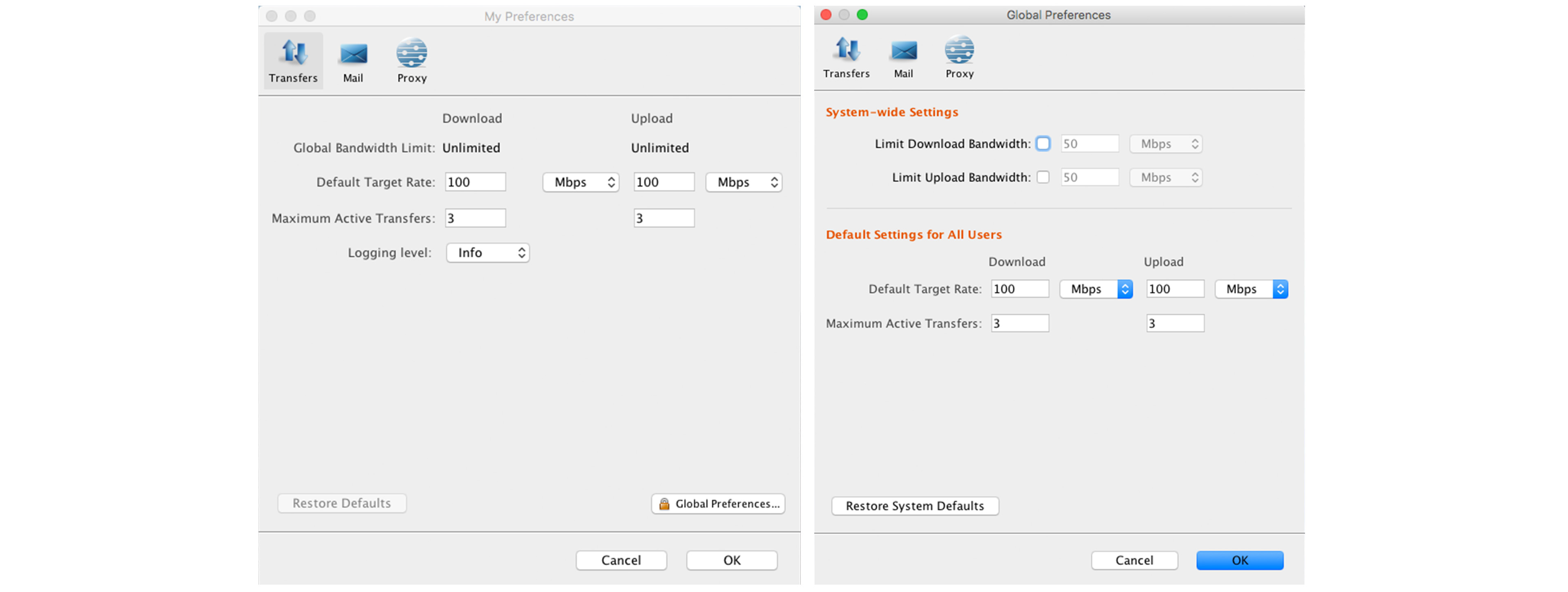
Where you configure transfer speed depends on which client/connection type you're using:
| Connection Type | Where to Configure | Reference |
|---|---|---|
| Desktop Client GUI (global settings) | Global bandwidth preferences | IBM docs: global bandwidth settings |
| Desktop Client GUI (per-connection) | "Speed" setting when adding/editing a connection | IBM docs: adding/editing connections |
| Command line | -l switch on the transfer command, e.g. ascp -l 100m ... sets a 100 Mbps transfer rate | Not applicable |
| Aspera Shares (web interface) | System-wide or per-user target rate | Configuring transfer settings / Configure user settings |
Use the configuration option for your connection type.
Direct S3 Connection
Roku supports direct S3-to-S3 transfer for content delivery. The Roku delivery bucket for S3 direct connect uses a customer-managed KMS key. Because this is a cross-account transfer, a KMS key and policy granting the partner's account permission is required.
What Roku Needs From Partners
Provide the IAM role ARN that your transfer system assumes for multipart uploads or S3 copies. Roku adds that role to the KMS policy allow list.
Typical ARN format:
arn:aws:iam::<AWS_ACCOUNT>:role/<ROLE_NAME>Required IAM policy for the partner's assumed role:
{
"Version": "2012-10-17",
"Statement": [
  {
    "Effect": "Allow",
    "Action": [
      "kms:\*",
      "s3:\*"
    ],
    "Resource": "\*"
  }
]
}
What Partners Need From Roku
-
Roku's production environment bucket name for direct ingest:
ingest-direct1-886239521314 -
Partner-specific prefix within the bucket, supplied by Roku during onboarding, following this convention:
Convention:
ingest/<partner_name>/prod/Full bucket path example:
ingest-direct1-886239521314/ingest/<partner_name>/prod/
Best Practices / Optimization
Roku's S3 bucket is located in the us-east-1 region. Cross-region transfers are expected to be slower. Transfers can be optimized via multipart upload/copy settings:
aws configure set default.s3.multipart_chunksize 128MB
aws configure set default.s3.max_concurrent_requests 30
Testing
To validate configuration, perform the following:
- Test uploading a file to the Roku S3 bucket, into the designated partner prefix.
- Test copying a file from the partner's S3 bucket to the Roku S3 bucket, into the designated partner prefix.
Glossary
| Term | Definition |
|---|---|
| Aspera Shares | A browser/desktop-app-based Aspera delivery method using user invitations rather than SSH-key authentication. |
| Aspera Enterprise/P2P/HSTS | An SSH-key-authenticated Aspera delivery method, typically used for larger or automated transfers. (HSTS here refers to Aspera's "High-Speed Transfer Server") |
| KMS key | AWS Key Management Service key used here to encrypt/decrypt content in Roku's S3 delivery bucket. |
| IAM role ARN | Amazon Resource Name identifying an AWS IAM role. This is the identity a partner's system assumes to perform the transfer. |
| Multipart upload | An S3 upload method that splits a large file into parts uploaded in parallel, improving transfer speed and reliability. |
| Cross-account transfer | A transfer between two separate AWS accounts (the partner's and Roku's), requiring explicit permission grants on both sides. |
Updated about 5 hours ago